
spring02-组件注册-@ComponentScan-自动扫描组件&指定扫描规则
上一篇我们讲到,讲@Bean注解标在某个方法上,那么ioc容器启动的时候就会将方法返回值放到ioc容器中
在开发中,实际上包扫描用的比较多,接下来我们会介绍两种方式一种是基于xml,一种是基于注解。
咱们先来xml的形式进行包扫描
这里我用的是spring suit tool 版本的eclipse,专门开发spring项目的
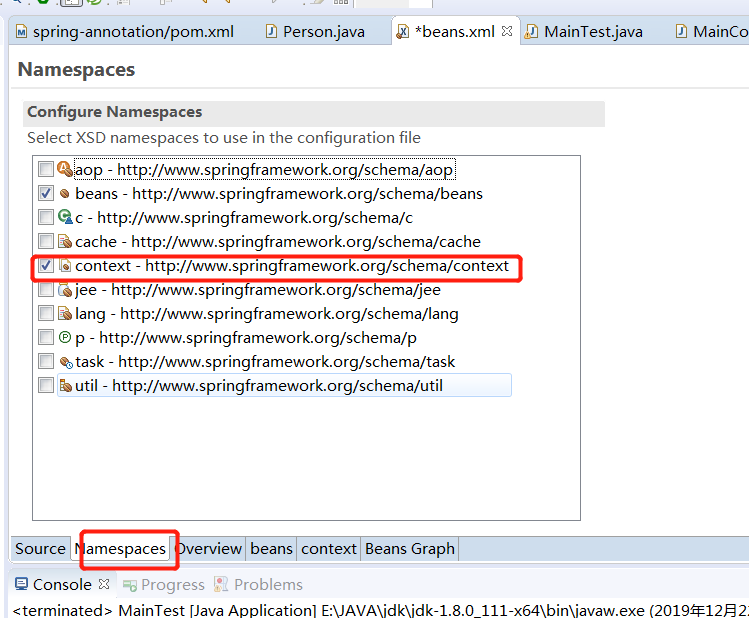
勾选上后会有自动提示的,包括创建的时候
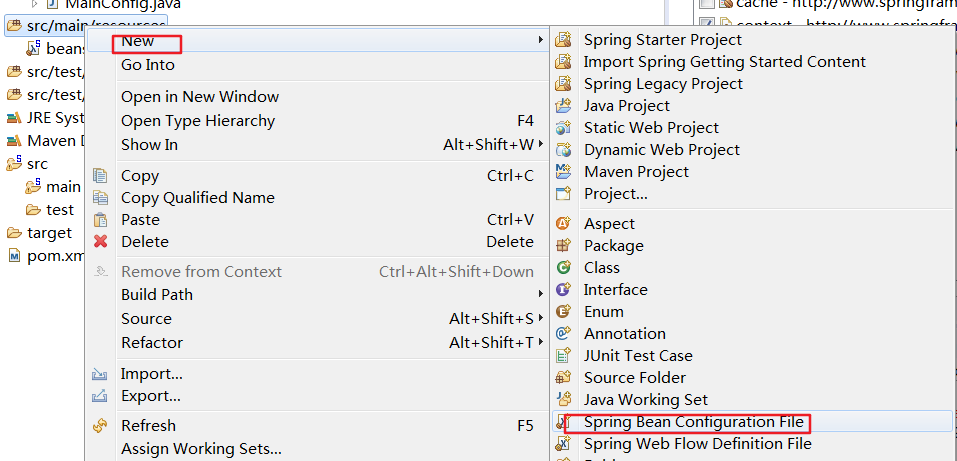
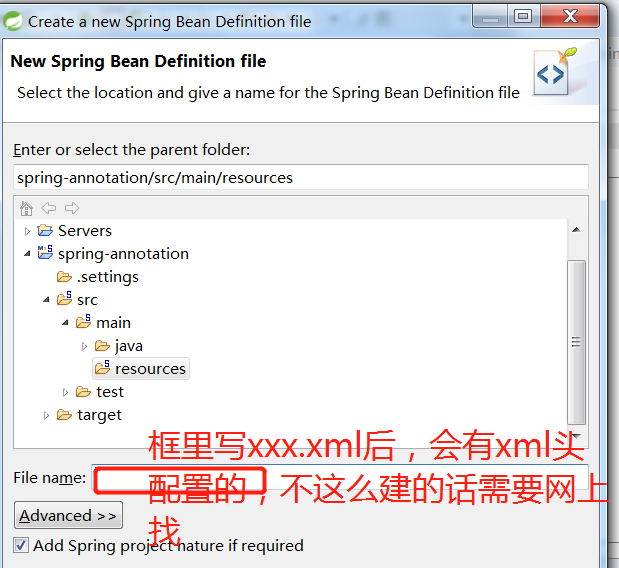
这次就有提示了
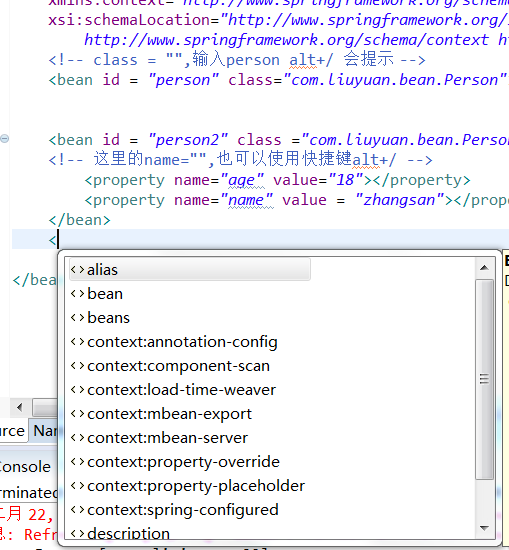
<?xml version="1.0" encoding="UTF-8"?>

<beans xmlns="http://www.springframework.org/schema/beans"

	xmlns:xsi="http://www.w3.org/2001/XMLSchema-instance"

	xmlns:context="http://www.springframework.org/schema/context"

	xsi:schemaLocation="http://www.springframework.org/schema/beans http://www.springframework.org/schema/beans/spring-beans.xsd

		http://www.springframework.org/schema/context http://www.springframework.org/schema/context/spring-context-4.3.xsd">

	<!-- class = "",输入person alt+/ 会提示 -->

	<bean id = "person" class="com.liuyuan.bean.Person"></bean>

	<bean id = "person2" class ="com.liuyuan.bean.Person">

	<!-- 这里的name="",也可以使用快捷键alt+/ -->

		<property name="age" value="18"></property>

		<property name="name" value = "zhangsan"></property>

	</bean>

	<!-- 包扫描,只要标注了@Controller,@Service,@Component,@Repository就会被扫描,加进ioc容器 -->

	<context:component-scan base-package="com.liuyuan"></context:component-scan>

</beans>
对于注解形式
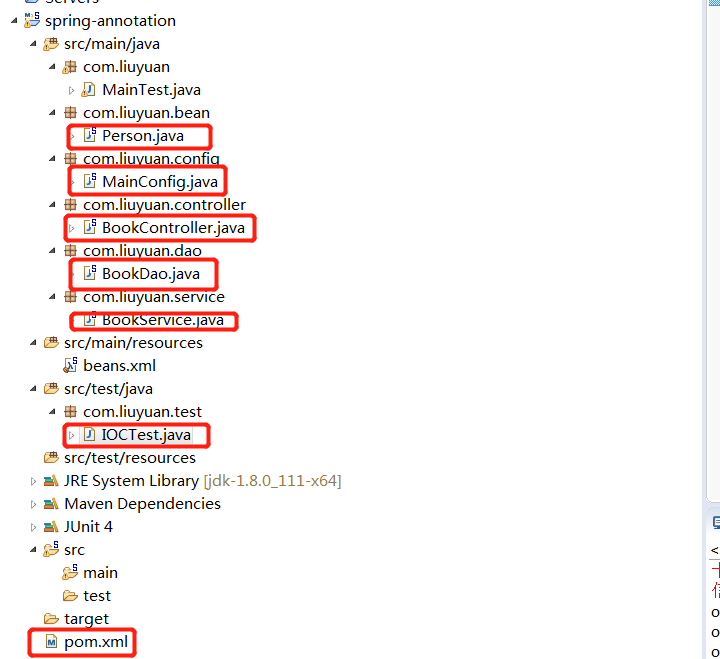
加了@ComponentScan(value= "com.liuyuan")
package com.liuyuan.config;

import org.springframework.context.annotation.Bean;

import org.springframework.context.annotation.ComponentScan;

import org.springframework.context.annotation.Configuration;

import com.liuyuan.bean.Person;

//配置类等同于之前的配置文件

@Configuration  //告诉spring这是一个配置类

@ComponentScan(value= "com.liuyuan")

public class MainConfig {

	//给容器注册一个Bean,类型为返回值得类型,

	///id默认是以方法名作为id

	@Bean("AAA")

	public Person person() {

		return new Person("lisi",20);

	}

}
建了com.liuyuan.dao,com.liuyuan.service,com.liuyuan.controller 这些包,里面对应的建了BookDao,BookService,BookControler,在这三个类上面加了注解,@Repository,@Service,@Controller
注解,完了建立一个测试类
package com.liuyuan.test;

import org.junit.Test;

import org.springframework.context.annotation.AnnotationConfigApplicationContext;

import com.liuyuan.config.MainConfig;

public class IOCTest {

	@SuppressWarnings("resource")

	@Test

	public void test01() {

		AnnotationConfigApplicationContext applicationContext = new AnnotationConfigApplicationContext(MainConfig.class);

		String [] definitionNames = applicationContext.getBeanDefinitionNames();

		for (String name : definitionNames) {

			System.out.println(name);

		}

	}

}
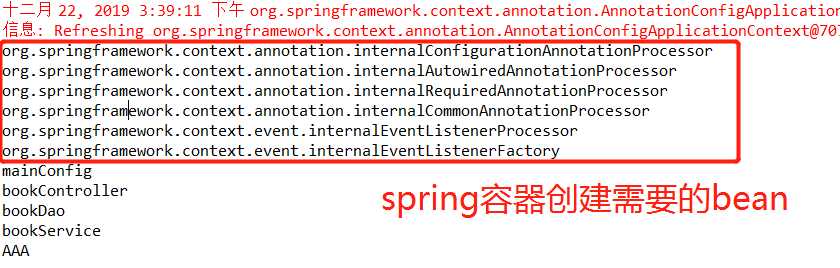
这些Bean都是类名第一位小写
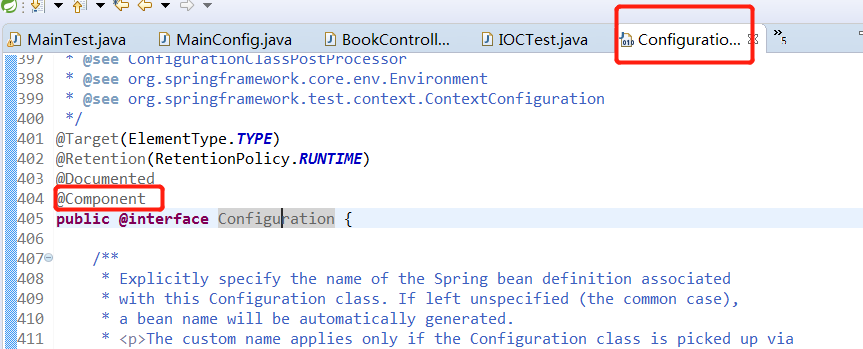
那个mainConfig为什么有呢?因为@Configration注解,可以点进去看一下
接下来我们定一些包扫描规则
比如排除一部分Bean
@ComponentScan(value= "com.liuyuan",excludeFilters = {
@Filter(type=FilterType.ANNOTATION,classes={Controller.class}),
})
这个 filter实际上是一个数组,可以写多个,并且可以指定过滤的形式
package com.liuyuan.config;

import org.springframework.context.annotation.Bean;

import org.springframework.context.annotation.ComponentScan;

import org.springframework.context.annotation.ComponentScan.Filter;

import org.springframework.context.annotation.Configuration;

import org.springframework.context.annotation.FilterType;

import org.springframework.stereotype.Controller;

import com.liuyuan.bean.Person;

import com.liuyuan.service.BookService;

//配置类等同于之前的配置文件

@Configuration  //告诉spring这是一个配置类

@ComponentScan(value= "com.liuyuan",excludeFilters = {

								@Filter(type=FilterType.ANNOTATION,classes={Controller.class}),

})

public class MainConfig {

	//给容器注册一个Bean,类型为返回值得类型,

	///id默认是以方法名作为id

	@Bean("AAA")

	public Person person() {

		return new Person("lisi",20);

	}

}
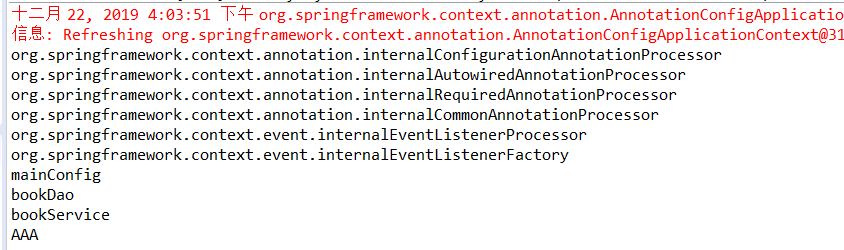
再次启动测试类,发现bookController真的被排除了
接下来再来一个包含某些进行扫描的定义规则
还记得在xml里面配置的时候需要禁用掉默认的过滤规则
加个use-default-filters="true"
如下
<?xml version="1.0" encoding="UTF-8"?>

<beans xmlns="http://www.springframework.org/schema/beans"

	xmlns:xsi="http://www.w3.org/2001/XMLSchema-instance"

	xmlns:context="http://www.springframework.org/schema/context"

	xsi:schemaLocation="http://www.springframework.org/schema/beans http://www.springframework.org/schema/beans/spring-beans.xsd

		http://www.springframework.org/schema/context http://www.springframework.org/schema/context/spring-context-4.3.xsd">

	<!-- class = "",输入person alt+/ 会提示 -->

	<bean id = "person" class="com.liuyuan.bean.Person"></bean>

	<bean id = "person2" class ="com.liuyuan.bean.Person">

	<!-- 这里的name="",也可以使用快捷键alt+/ -->

		<property name="age" value="18"></property>

		<property name="name" value = "zhangsan"></property>

	</bean>

	<!-- 包扫描,只要标注了@Controller,@Service,@Component,@Repository就会被扫描,加进ioc容器use-default-filters="false"

	只包含某些需要禁用掉默认的过滤规则,只包含啊才能生效-->

	<context:component-scan base-package="com.liuyuan" use-default-filters="false"></context:component-scan>

</beans>
对于注解形式的
package com.liuyuan.config;

import org.springframework.context.annotation.Bean;

import org.springframework.context.annotation.ComponentScan;

import org.springframework.context.annotation.ComponentScan.Filter;

import org.springframework.context.annotation.Configuration;

import org.springframework.context.annotation.FilterType;

import org.springframework.stereotype.Controller;

import com.liuyuan.bean.Person;

import com.liuyuan.service.BookService;

//配置类等同于之前的配置文件

@Configuration  //告诉spring这是一个配置类

@ComponentScan(value= "com.liuyuan",/*excludeFilters = {

								@Filter(type=FilterType.ANNOTATION,classes={Controller.class})*/

includeFilters= {@Filter(type=FilterType.ANNOTATION,classes= {Controller.class})

},useDefaultFilters=false)

public class MainConfig {

	//给容器注册一个Bean,类型为返回值得类型,

	///id默认是以方法名作为id

	@Bean("AAA")

	public Person person() {

		return new Person("lisi",20);

	}

}
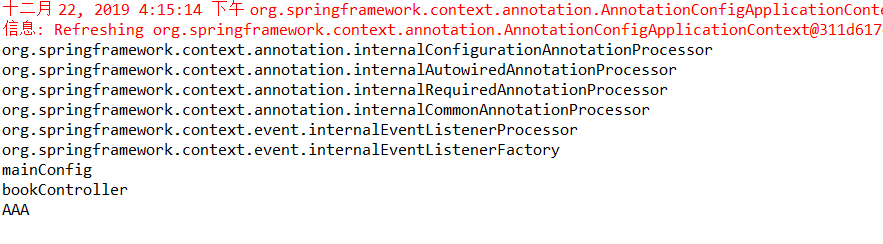
对于mainCofig已经看到@Component注解,Bean也看下吧
查看确实是没有,为什么会被spring 的ioc管理呢?
留个疑问吧
来源:淮安网站优化
spring02-组件注册-@ComponentScan-自动扫描组件&指定扫描规则的更多相关文章
- 3、组件注册-@ComponentScan-自动扫描组件&指定扫描规则
3.组件注册-@ComponentScan-自动扫描组件&指定扫描规则 3.1 xml方式 benas.xml 导入context命名空间 <?xml version="1.0 ...
- 【Spring注解驱动开发】组件注册-@ComponentScan-自动扫描组件&指定扫描规则
写在前面 在实际项目中,我们更多的是使用Spring的包扫描功能对项目中的包进行扫描,凡是在指定的包或子包中的类上标注了@Repository.@Service.@Controller.@Compon ...
- 5、组件注册-@Scope-设置组件作用域
5.组件注册-@Scope-设置组件作用域 IOC容器默认都是单实例的 /** * * {@link ConfigurableBeanFactory#SCOPE_SINGLETON SCOPE_SIN ...
- 二、Spring中的@ComponentScan自动扫描组件
在以往采用xml配置的方式中,我们通常需要配置<context:component-scan>标签 比如这样: <!-- 包扫描.只要标注了@Controller.@Service. ...
- spring注解扫描组件注册
最近对单点系统进行微服务拆分,被各个springboot的组件注册搞得云里雾里的.(有的是通过springboot的自动配置进IOC容器的,有的是自己添加构造方法添加进IOC容器.)决定抽时间将spr ...
- Spring注解开发系列Ⅰ--- 组件注册(上)
传统的Spring做法是使用.xml文件来对bean进行注入或者是配置aop.事物,这么做有两个缺点:1.如果所有的内容都配置在.xml文件中,那么.xml文件将会十分庞大:如果按需求分开.xml文件 ...
- Spring Boot 自动扫描组件
使用@ComponentScan自动扫描组件 案例准备 1.创建一个配置类,在配置类上添加 @ComponentScan 注解.该注解默认会扫描该类所在的包下所有的配置类,相当于之前的 <con ...
- Spring注解驱动——组件注册系列
1.@Configuration 从Spring3.0,@Configuration用于定义配置类,可替换xml配置文件,被注解的类内部包含有一个或多个被@Bean注解的方法,这些方法将会被Annot ...
- 【spring 注解驱动开发】spring组件注册
尚学堂spring 注解驱动开发学习笔记之 - 组件注册 组件注册 1.@Configuration&@Bean给容器中注册组件 2.@ComponentScan-自动扫描组件&指定扫 ...
随机推荐
- Standard Aras Dialogs
In a another blog post, we covered how to open dialogs within Aras Innovator using custom forms and ...
- Vue编程式路由跳转传递参数
Vue 有时在路由跳转时需要用到一些原页面里的数据,用以下方法: 1.在跳转页的方法里写下query参数 TableChange(scope){ this.$router.push({ path:'d ...
- php 常用编译参数
安装依赖 yum install -y gcc gcc-c++ make zlib zlib-devel pcre pcre-devel libjpeg libjpeg-devel libpng li ...
- js数组,字符转换;key_value获取
js 数组转字符串js 字符串转数组arr.join(",");String.split(","); 对象的所有keys Object.keys(val)对象的 ...
- C语言I作业博客07
这个作业属于那个课程 C语言程序设计II 这个作业要求在哪里 https://edu.cnblogs.com/campus/zswxy/CST2019-1/homework/9935 我在这个课程的目 ...
- HTML5 Canvas——折线图
<script type="text/javascript"> /*1.绘制网格 网格大小 10px 网格的颜色 #ddd */ /*2.绘制坐标 轴的离边距离 20p ...
- scrapy 在pycharm中调试 不用到命令行中启动爬虫方法
(目录结构如上图) 在主目录中加入main.py,在其中加入代码,运行此文件就可以运行整个爬虫: # -*- coding: utf-8 -*- __author__='pasaulis' #在程序中 ...
- Pmw大控件(二)
Pmw大控件英文名Pmw Python megawidgets 官方参考文档:Pmw 1.3 Python megawidgets 一,如何使用Pmw大控件 下面以创建一个计数器(Counter)为例 ...
- Redhat7 开机启动服务
#!/bin/sh ### BEGIN INIT INFO # Provides: jboss # Required-Start: $local_fs $remote_fs $network $sys ...
- while read line do done < file
zzx@zzx120:~/test1$ cat file.txt 1122zzx@zzx120:~/test1$ cat ./read.sh #!/bin/bashwhile read line ...