
十、Vue:Vuex实现data(){}内数据多个组件间共享
一、概述
官方文档:https://vuex.vuejs.org/zh/installation.html
1.1vuex有什么用
Vuex:实现data(){}内数据多个组件间共享一种解决方案(类似react的redux)
1.2什么情况下使用vuex
	虽然 Vuex 可以帮助我们管理共享状态,但也附带了更多的概念和框架。这需要对短期和长期效益进行权衡。

	如果您不打算开发大型单页应用,使用 Vuex 可能是繁琐冗余的。确实是如此——如果您的应用够简单,您最好不要使用 Vuex。一个简单的 global event bus 就足够您所需了。但是,如果您需要构建是一个中大型单页应用,您很可能会考虑如何更好地在组件外部管理状态,Vuex 将会成为自然而然的选择。
1.3Vuex状态管理
	view ->(dispatch) Action ->(Commit) Mutations ->(Mutate) State -> View

	注意:Action不是必需品,如果有异步操作才可能用到Action,否则可以不使用
1.4Actions:
	Action 提交的是 mutation,而不是直接变更状态。

	Action 可以包含任意异步操作。
二、安装及使用
官方文档:https://vuex.vuejs.org/zh/installation.html
安装方法1,npm
cnpm install vuex --save

或

npm install vuex --save
安装方法2,cdn
<script src="/path/to/vue.js"></script>

<script src="/path/to/vuex.js"></script>
其它略过,见文档。
【使用】
在一个模块化的打包系统中,您必须显式地通过 Vue.use() 来安装 Vuex:
import Vue from 'vue'

import Vuex from 'vuex'

Vue.use(Vuex)
当使用全局 script 标签引用 Vuex 时,不需要以上安装过程。
2.1 vuex定义共享数据和引用 state:{}
应用场景: 例如在购物车中,你在商品详情页进行加减库存操作,而到购物车详情中时,用之前学得的data(){}内数据用法,你是得不到商品详情里的商品数量这个数据的,此时就引入了state:{}做为所有页面的共享数据,加减商品都可使用此处的数据,从而实现数据的共享。
代码实例
(多余代码为父子组件互传值复习)
第1步,引入vuex并创建store实例 src/main.js
[1]引入vuex
[2]使用vuex
[3]创建一个store实例(主要)
[4]所有组件共用数据存放处
[5]注入store(重要)
import Vue from 'vue'

import App from './App.vue'

import Vuex from 'vuex' //[1]引入vuex

Vue.use(Vuex)//[2]使用vuex

//[3]创建一个store实例

const store=new Vuex.Store({

  state:{//[4]所有组件共用数据存放处

    count:10

  }

})

new Vue({

  el: '#app',

  store,//[5]注入store

  render: h => h(App)

})
第2步,引用1步所创建的共享数据count(src/components/home.vue)
【1】获取store里的共享数据方法1直接调用(this.$store.state.count)
<template>

  <div>

    <Hello :title='msg' @msg='getmsg'/><br/>

    {{msg2}}<br/>

    <!-- 【1】获取store里的共享数据方法1 -->

    home:获取vuex的store共用数据:{{this.$store.state.count}}

  </div>

</template>

<script>

import Hello from './hello.vue';

  export default{

    name:'home',

    data(){

      return{

        msg:'Home向Hello传的消息',

        msg2:''

      }

    },

    components:{Hello},

    methods:{

      getmsg(data){

        this.msg2=data;

      }

    }

  }

</script>

<style>

</style>
第2.2步,其它组件都可以引用共享数据
src/components/hello.vue
【1】写一个函数获取vuex并返回store共享数据
【2】获取vuex的store共享数据方法2(在computed内写一个获取函数,再调用)
<template>

  <div>

    <!--【2】获取vuex的store共享数据方法2 -->

    hello子组件:{{getCount}}----{{title}}<br/>

    <button @click="sendMsg">给父组件传消息</button>

  </div>

</template>

<script>

export default{

  name:'hello',

  data(){

    return{

      msg:'Hello子组件向父组件传数据'

    }

  },

  props:{

    title:{

      type:String,

      default:''

    }

  },

  computed:{

    //【1】写一个函数获取vuex并返回store共享数据

    getCount(){

      return this.$store.state.count

    }

  },

  methods:{

    sendMsg(){

      this.$emit('msg',this.msg)

    }

  }

}

</script>

<style>

</style>
效果:成功获取到在mian.js内定义的count数据值
10
2.2 修改共享数据实例 mutaitions:{}
第1步,定义修改共享数据的函数 main.js
[6]更改state里的数据在mutations里写函数操作
[6.1.0]自加函数,用于其它组件操作数据通过 this.\(store.commit('increment')
[6.1.1]自减函数,用于其它组件操作数据通过 this.\)store.commit('decrement')
import Vue from 'vue'

import App from './App.vue'

import Vuex from 'vuex' //[1]引入vuex

Vue.use(Vuex)//[2]使用vuex

//[3]创建一个store实例

const store=new Vuex.Store({

  state:{//[4]所有组件共用数据存放处

    count:10

  },//[6]更改state里的数据在mutations里写函数操作

  mutations: {

    increment (state) {//[6.1.0]自加函数,用于其它组件操作数据通过 this.$store.commit('increment')

      state.count++

    },

    decrement(state){//[6.1.1]自减函数,用于其它组件操作数据通过 this.$store.commit('decrement')

      state.count--

    }

  }

})

new Vue({

  el: '#app',

  store,//[5]注入store

  render: h => h(App)

})
第2步,在组件中使用1步定义的修改共享数据函数 home.vue
【1】使用mutations里定义好的函数进行共享数据自加操作
【1.1】使用mutations里定义好的函数进行共享数据自减操作
【2】修改共享数据自加
【2.1】修改共享数据自减
<template>

  <div>

    <Hello :title='msg' @msg='getmsg'/><br/>

    {{msg2}}<br/>

    <!-- 获取store里的共享数据方法1 -->

    home:获取vuex的store共用数据:{{this.$store.state.count}}<br/><br/>

    <button @click='add'>加store.state里数据</button> <!-- 【2】修改共享数据自加 -->

    <button @click="sub">减</button> <!-- 【2.1】修改共享数据自减 -->

  </div>

</template>

<script>

import Hello from './hello.vue';

  export default{

    name:'home',

    data(){

      return{

        msg:'Home向Hello传的消息',

        msg2:''

      }

    },

    components:{Hello},

    methods:{

      add(){//【1】使用mutations里定义好的函数进行共享数据自加操作

        this.$store.commit('increment')

      },

      sub(){//【1.1】使用mutations里定义好的函数进行共享数据自减操作

        this.$store.commit('decrement')

      },

      getmsg(data){

        this.msg2=data;

      }

    }

  }

</script>

<style>

</style>
hello.vue 不重要
<template>

  <div>

    <!--获取vuex的store共享数据方法2 -->

    hello子组件:{{getCount}}----{{title}}<br/>

    <button @click="sendMsg">给父组件传消息</button>

  </div>

</template>

<script>

export default{

  name:'hello',

  data(){

    return{

      msg:'Hello子组件向父组件传数据'

    }

  },

  props:{

    title:{

      type:String,

      default:''

    }

  },

  computed:{

    //写一个函数获取vuex并返回store共享数据

    getCount(){

      return this.$store.state.count

    }

  },

  methods:{

    sendMsg(){

      this.$emit('msg',this.msg)

    }

  }

}

</script>

<style>

</style>
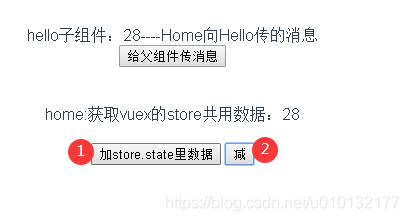
效果:点加按钮会进行共享数据自加操作,减则自减
注意:数据变更后,所有地方数据都会自动进行变更

2.3 actions的使用
Actions:
Action 提交的是 mutation,而不是直接变更状态。
Action 可以包含任意异步操作。
mutaitions内只能执行同步操作。
src/main.js 定义actions:{}内函数
【1】用动作操作mutations里函数
import Vue from 'vue'

import App from './App.vue'

import Vuex from 'vuex' //[1]引入vuex

Vue.use(Vuex)//[2]使用vuex

//[3]创建一个store实例

const store=new Vuex.Store({

  state:{//[4]所有组件共用数据存放处

    count:10

  },//[6]更改state里的数据在mutations里写函数操作

  mutations: {

    increment (state) {//[6.1.0]自加函数,用于其它组件操作数据通过 this.$store.commit('increment')

      state.count++

    },

    decrement(state){//[6.1.1]自减函数,用于其它组件操作数据通过 this.$store.commit('decrement')

      state.count--

    }

  },

  actions:{//【1】用动作操作mutations里函数

    increment(context){//context承上启下

      context.commit('increment');

    },

    decrement(context){

      context.commit('decrement');

    }

  }

})

new Vue({

  el: '#app',

  store,//[5]注入store

  render: h => h(App)

})
src/components/home.vue 调用actions内的函数
【1】使用main.js里actions里定义好的函数进行共享数据自加操作
【1.1】使用main.js里action里定义好的函数进行共享数据自减操作
this.$store.dispatch('decrement')
<template>

  <div>

    <Hello :title='msg' @msg='getmsg'/><br/>

    {{msg2}}<br/>

    <!-- 获取store里的共享数据方法1 -->

    home:获取vuex的store共用数据:{{this.$store.state.count}}<br/><br/>

    <button @click='add'>加store.state里数据</button> <!-- 【2】修改共享数据自加 -->

    <button @click="sub">减</button> <!-- 【2.1】修改共享数据自减 -->

  </div>

</template>

<script>

import Hello from './hello.vue';

  export default{

    name:'home',

    data(){

      return{

        msg:'Home向Hello传的消息',

        msg2:''

      }

    },

    components:{Hello},

    methods:{

      add(){//【1】使用main.js里actions里定义好的函数进行共享数据自加操作

        // this.$store.commit('increment')

        this.$store.dispatch('increment')

      },

      sub(){//【1.1】使用main.js里action里定义好的函数进行共享数据自减操作

        // this.$store.commit('decrement')

        this.$store.dispatch('decrement')

      },

      getmsg(data){

        this.msg2=data;

      }

    }

  }

</script>

<style>

</style>
效果:同上,操作共享数据,1加,2减
2.3.1 actions内执行异步操作
src/main.js actions:{}内进行异步模拟
【异步】异步操作模拟,利用setTimeout函数延迟1秒执行自加操作
import Vue from 'vue'

import App from './App.vue'

import Vuex from 'vuex' //[1]引入vuex

Vue.use(Vuex)//[2]使用vuex

//[3]创建一个store实例

const store=new Vuex.Store({

  state:{//[4]所有组件共用数据存放处

    count:10

  },//[6]更改state里的数据在mutations里写函数操作

  mutations: {

    increment (state) {//[6.1.0]自加函数,用于其它组件操作数据通过 this.$store.commit('increment')

      state.count++

    },

    decrement(state){//[6.1.1]自减函数,用于其它组件操作数据通过 this.$store.commit('decrement')

      state.count--

    }

  },

  actions:{

    increment(context){

      // context.commit('increment');

      setTimeout(function(){ //【异步】异步操作模拟,利用setTimeout函数延迟1秒执行自加操作

        context.commit('increment');

      },1000)

    },

    decrement(context){

      context.commit('decrement');

    }

  }

})

new Vue({

  el: '#app',

  store,//[5]注入store

  render: h => h(App)

})
src/components/home.vue
代码同上例,略过
效果同上例略过
2.4 getter:{}的使用
应用场景:例如在购物车中,利用2.3例的自减减少库存,当减少到0时还可以继续减为负数,此时商家将要向用户倒找钱,这样显然不合理。因此引入getter函数;
src/main.js 写 getters用于控制共享数据
【getter】用于控制共享数据的使用
如果count数据大于0则返回count,否则只返回0(小于0时只返回0)
import Vue from 'vue'

import App from './App.vue'

import Vuex from 'vuex' //[1]引入vuex

Vue.use(Vuex)//[2]使用vuex

//[3]创建一个store实例

const store=new Vuex.Store({

  state:{//[4]所有组件共用数据存放处

    count:10

  },

  getters:{//【getter】用于控制共享数据的使用

    controlState(state){ //如果count数据大于0则返回count,否则只返回0(小于0时只返回0)

      return state.count > 0 ? state.count : 0

    }

  },

  //[6]更改state里的数据在mutations里写函数操作

  mutations: {

    increment (state) {//[6.1.0]自加函数,用于其它组件操作数据通过 this.$store.commit('increment')

      state.count++

    },

    decrement(state){//[6.1.1]自减函数,用于其它组件操作数据通过 this.$store.commit('decrement')

      state.count--

    }

  },

  actions:{

    increment(context){

      // context.commit('increment');

      setTimeout(function(){ //异步操作模拟,利用setTimeout函数延迟1秒执行自加操作

        context.commit('increment');

      },1000)

    },

    decrement(context){

      context.commit('decrement');

    }

  }

})

new Vue({

  el: '#app',

  store,//[5]注入store

  render: h => h(App)

})
src/components/home.vue
【getters-1】通过computed写函数来获取store里的共享数据方法
【getters-2】通过computed写函数来显示store里的共享数据
<template>

  <div>

    <Hello :title='msg' @msg='getmsg'/><br/>

    {{msg2}}<br/>

    <!-- 【getters-2】通过computed写函数来显示store里的共享数据 -->

    home:获取vuex的store共用数据:{{getState}}<br/><br/>

    <button @click='add'>加store.state里数据</button> <!--修改共享数据自加 -->

    <button @click="sub">减</button> <!--修改共享数据自减 -->

  </div>

</template>

<script>

import Hello from './hello.vue';

  export default{

    name:'home',

    data(){

      return{

        msg:'Home向Hello传的消息',

        msg2:''

      }

    },

    components:{Hello},

    computed:{//【getters-1】通过computed写函数来获取store里的共享数据方法

      getState(){

        return this.$store.getters.controlState;

      }

    },

    methods:{

      add(){//使用mutations里定义好的函数进行共享数据自加操作

        // this.$store.commit('increment')

        this.$store.dispatch('increment')

      },

      sub(){//使用mutations里定义好的函数进行共享数据自减操作

        // this.$store.commit('decrement')

        this.$store.dispatch('decrement')

      },

      getmsg(data){

        this.msg2=data;

      }

    }

  }

</script>

<style>

</style>
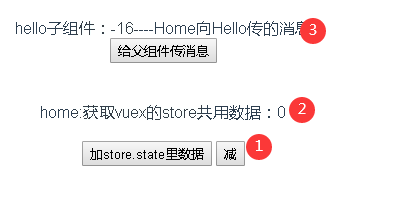
效果:加了用getter获取数据2处最多只能减到0,没加的,3还是会返回负数
2.5 moudel模块操作
官方文档:https://vuex.vuejs.org/zh/guide/modules.html
由于使用单一状态树,应用的所有状态会集中到一个比较大的对象。当应用变得非常复杂时,store 对象就有可能变得相当臃肿。
为了解决以上问题,Vuex 允许我们将 store 分割成模块(module)。每个模块拥有自己的 state、mutation、action、getter、甚至是嵌套子模块——从上至下进行同样方式的分割:
const moduleA = {

  state: { ... },

  mutations: { ... },

  actions: { ... },

  getters: { ... }

}

const moduleB = {

  state: { ... },

  mutations: { ... },

  actions: { ... }

}

const store = new Vuex.Store({

  modules: {

    a: moduleA,

    b: moduleB

  }

})

store.state.a // -> moduleA 的状态

store.state.b // -> moduleB 的状态
2.6 store提取为单独文件
也可参考 router
具体步骤:
- 新建一个src/store文件夹
- 在建立一个文件/src/store/index.js
- 把store提取到2步建好的文件
- 在main.js里引入store文件
/src/store/index.js
【1】注意导出:创建一个store仓库
import Vue from "vue"

import Vuex from 'vuex'

Vue.use(Vuex)

// 【1】注意导出:创建一个store仓库

export default new Vuex.Store({

	state: {

		count: 10

	},

	mutations: {

		increment(state) {

			state.count++;

		},

		decrement(state) {

			state.count--;

		}

	},

	actions: {

		// context:承上启下

		increment(context) {

			setTimeout(function() {

				context.commit("increment");

			})

		},

		decrement(context) {

			setTimeout(function() {

				context.commit("decrement");

			})

		}

	},

	getters: {

		controlState(state) {

			return state.count > 0 ? state.count : 0

		}

	}

});
main.js
【1】全局引入store文件
import Vue from 'vue'

import App from './App.vue'

import store from './store/index.js' //【1】全局引入store文件

new Vue({

  el: '#app',

  store,//[5]注入store

  render: h => h(App)

})
效果:同上例
十、Vue:Vuex实现data(){}内数据多个组件间共享的更多相关文章
- 还原Vue.js的data内的数组和对象
最近学习Vue.js发现其为了实现对data内的数组和对象进行双向绑定,将数组和对象进行了封装. 如下的对象 todos: [ { id: 1, title: ...
- 【C++】DLL内共享数据区在进程间共享数据(重要)
因项目需要,需要在DLL中共享数据,即DLL中某一变量只执行一次,在运行DLL中其他函数时该变量值不改变:刚开始想法理解错误,搜到了DLL进程间共享数据段,后面发现直接在DLL中定义全局变量就行,当时 ...
- android组件间共享数据的常用方法
使用Intent在激活组件的时候携带数据,以进行数据的传递 使用广播进行组件间数据的伟递 使用外部存储(sharedPreference,文件,数据库,网络)进行组件间数据共享 使用Static静态成 ...
- 深入浅出的webpack4构建工具--webpack4+vue+vuex+mock模拟后台数据(十九)
mock的官网文档 mock官网 关于mockjs的优点,官网这样描述它:1)可以前后端分离.2)增加单元测试的真实性(通过随机数据,模拟各种场景).3)开发无侵入(不需要修改既有代码,就可以拦截 A ...
- 解决vue中模态框内数据和外面的数据绑定的问题
1.做表格的修改,把整条数据传到模态框做修改,但是出现模态框改变数据没有保存时,表格的数据也会跟着改变,我想实现保存以后表格数据才会改变的功能. html:使用item整条数据都上传过去了,在upda ...
- 对vue中的data进行数据初始化
this.$data:是表示当前的改变后的this中的数据 this.$options.data():是表示没有赋值前的this中的数据,表示 初始化的data 一般可以使用Object.assign ...
- Vue+element UI实现表格数据导出Excel组件
介绍 这是一个可以将页面中的表格数据导出为Excel文件的功能组件,该组件一般与表格一起使用,将表格数据传给组件,然后通过点击组件按钮可将表格中的数据导出成Excel文件. 使用方法 由于封装该组件内 ...
- vue使用技巧:Promise + async + await 解决组件间串行编程问题
业务场景描述 大家都通过互联网投递过简历,比如在智联.58.猎聘等平台.投递心仪的职位前一般都需要前提创建一份简历,简历编辑界面常规的布局最上面是用户的个人基本信息,如姓名.性别.年龄.名族等,接着是 ...
- 浅谈Vue不同场景下组件间的数据交流
浅谈Vue不同场景下组件间的数据“交流” Vue的官方文档可以说是很详细了.在我看来,它和react等其他框架文档一样,讲述的方式的更多的是“方法论”,而不是“场景论”,这也就导致了:我们在阅读完 ...
随机推荐
- SPI接口的FLASH
SPI flash W25Qxx: W25Q系列的spiflash.每页(Page)256B,每16个page为一个sector(扇区=4KB),每16个扇区为一个block(块=64KB) W25Q ...
- iOS 开发之 开发一款自己的美颜相机
以前在公司做项目时很少遇到对相机.图片进行处理的(非公司业务),只是偶尔上传,裁剪,预览下.近期自己准备写个相机应用,把图片处理的这些技术细节整理下.包含美颜相机,图片美化,简单拼图,艺术拼图等主要模 ...
- Day11-G - Calendar Game HDU - 1079
Adam and Eve enter this year’s ACM International Collegiate Programming Contest. Last night, they pl ...
- UniGui安装(01)
UniGui安装.Delphi10和uniGUI1.90.0.1509 1]下载 2]安装 3]目录说明 1]下载 在我百度网盘里 uniGUI1-90-0-1509.zip https://pan ...
- Flask - 数据库相关
1. Flask-SQLAlchemy 1.1 参考: http://flask-sqlalchemy.pocoo.org/2.3/ https://github.com/janetat/flasky ...
- Node.js 阻塞 回调函数
回调例程 N所有API都支持回调函数,可以处理大量并发请求.回调函数一般作为最后一个参数出现: function foo1(name, age, callback){ } function foo2( ...
- 特约稿件 Java并发教程(Oracle官方资料)
本文是Oracle官方的Java并发相关的教程,感谢并发编程网的翻译和投递. (关注ITeye官微,随时随地查看最新开发资讯.技术文章.) 计算机的使用者一直以为他们的计算机可以同时做很多事情.他 ...
- KALI 2017 X64安装到U盘
KALI 2017 X64安装到U盘启动(作者:黑冰) 此方法为虚拟机方法,自认为成功率很高,已经成功安装过16,32G U盘,但也不排除有些人用拷碟方法安装这里我仅介绍虚拟机安装方法. 1.准备 ...
- Burp Suite Pro1.7.36破解版
百度网盘下载(H大会一直更新):链接: https://pan.baidu.com/s/1brjPKM7 密码: 9v4r 爱盘下载:https://down.52pojie.cn/Tools/Net ...
- phpQuery的使用
前言 为什么使用phpQuery phpQuery是基于php5新添加的DOMDocument.而DOMDocument则是专门用来处理html/xml.它提供了强大的xpath选择器及其他很多htm ...