
jquery如何实现动态增加选择框
jquery如何实现动态增加选择框
一、总结
一句话总结:用jquery的clone(true)方法。
1、如何在页面中复制amazeui加了特效的标签?
amazeui中的控件带js方法,不知道那部分js的情况下,只有不用功能才能方便用clone(true)复制
2、选兄弟选不到的时候怎么选元素?
通过父亲选儿子,照样可以达到相同的功能
3、表单中的控件如何让它不能提交过去?
控件设置为disabled
二、jquery如何实现动态增加选择框
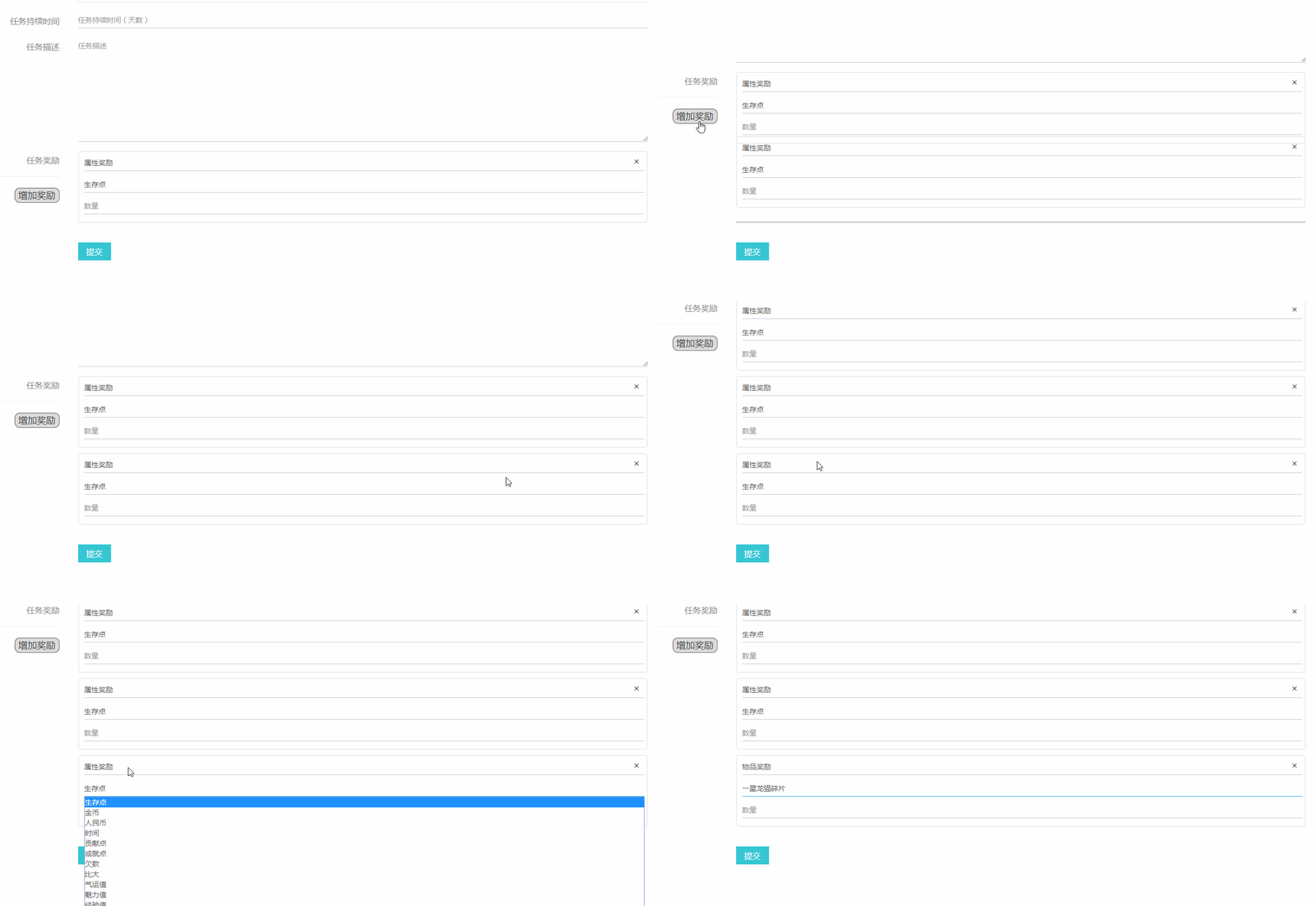
 <script>

     function taskRewardHidden(){

         $('div.goods').hide();

         $('div.goods').find($('select')).attr({'disabled':'disabled'});

         $('div.attribute').hide();

         $('div.attribute').find($('select')).attr({'disabled':'disabled'});

     }

     taskRewardHidden();

     $('div.attribute').show();

     $('div.attribute').find($('select')).removeAttr('disabled');

     //把作为复制之用的那个item的所有东西都设置为disabled,避免提交

     //$('.task_reward_list_item:first').find($('select,input[type=number]')).attr({'disabled':'disabled'});

     $('div.reward_type').children("select").change(function () {

         //$(this)就有选出来的就有问题

         var type=$(this).val();

         //alert($(this).html());

         //alert($(this).parent().parent().children('.goods').html());

         $(this).parent().parent().children('.goods').hide();

         $(this).parent().parent().children('.goods').find($('select')).attr({'disabled':'disabled'});

         $(this).parent().parent().children('.attribute').hide();

         $(this).parent().parent().children('.attribute').find($('select')).attr({'disabled':'disabled'});

         $(this).parent().parent().children('.'+type).show();

         $(this).parent().parent().children('.'+type).find($('select')).removeAttr('disabled');

         //taskRewardHidden();

         //$('div.'+type).show();

     });

     //增加一个隐藏的task_reward_list_item做复制之用

     $('.task_btn_addReward').click(function () {

         //把作为复制之用的那个item的所有东西都设置的disabled移去,方便复制

         $('.task_reward_list_item:first').find($('select,input[type=number]')).removeAttr('disabled');

         //复制过来的东西因为只显示了属性,所以还要把物品设置成disabled

         $('.task_reward_list_item:first').find($('div.goods').find($('select'))).attr({'disabled':'disabled'});

         //复制

         var new_task_reward_list_item=$('.task_reward_list_item:first').clone(true);

         //var new_task_reward_list_item=$('.task_reward_list_item:first').find($('select,input[type=number]')).removeAttr('disabled').end().clone(true);

         //显示

         new_task_reward_list_item.show().animate({

             'top': '-500px', opacity: '0.5'

         }, 1);

         $('div.task_reward_list_group').animate({

             borderWidth: 15

         },10);

         new_task_reward_list_item.animate({

             'top': '0', opacity: '1'

         }, 500,'swing');

         //alert($('div.task_reward_list_group').length);

         $('div.task_reward_list_group').css({

             'border-bottom': '5px groove'

         });

         $('div.task_reward_list_group').animate({

             borderWidth: 15

         },499);

         $('div.task_reward_list_group').animate({

             borderWidth: 7

         },1);

         new_task_reward_list_item.animate({

             'top': '-130px', opacity: '1'

         }, 200,'linear');

         new_task_reward_list_item.animate({

             'top': '0', opacity: '1'

         }, 200,'linear');

         $('div.task_reward_list_group').animate({

             borderWidth: 7

         },399);

         $('div.task_reward_list_group').animate({

             borderWidth: 3

         },1);

         new_task_reward_list_item.animate({

             'top': '-65px', opacity: '1'

         }, 200,'linear');

         new_task_reward_list_item.animate({

             'top': '0', opacity: '1'

         }, 200,'linear');

         $('div.task_reward_list_group').animate({

             borderWidth: 3

         },399);

         $('div.task_reward_list_group').animate({

             borderWidth: 1.5

         },1);

         new_task_reward_list_item.animate({

             'top': '-30px', opacity: '1'

         }, 200,'linear');

         new_task_reward_list_item.animate({

             'top': '0', opacity: '1'

         }, 200,'linear');

         $('div.task_reward_list_group').animate({

             borderWidth: 1.5

         },399);

         $('div.task_reward_list_group').animate({

             borderWidth: 0

         },1);

         //alert($('.task_reward_list_item:first').find($('select,input[type=number]')).length);

         //alert(new_task_reward_list_item.html());

         //alert(new_task_reward_list_item.html());

         $('.task_reward_list_group').append(new_task_reward_list_item);

         //把作为复制之用的那个item的所有东西都设置为disabled,避免提交

         $('.task_reward_list_item:first').find($('select,input[type=number]')).attr({'disabled':'disabled'});

         //把第一个奖励列表数据拿来用用

     });

     //关闭方法

     $('.task_reward_list_item_close').click(function () {

         //alert($('.task_reward_list_item_close').length);

         //alert($('.task_reward_list_item_close').eq(0));

         //alert($(this).parent().index());

         //找出它的索引号,判断索引号是不是0来解决

         //比较用数字来比较比较好

         if($(this).parent().index()==1) alert('第一个不能删!');

         else{

             $(this).parent().hide();

             //alert($(this).parent().find($('select,input[type=number]')).length);

             $(this).parent().find($('select,input[type=number]')).attr({'disabled':'disabled'});

         }

         //隐藏的元素不让传参数

     });

     //执行js的时候,php早走完了,所以选项只有一份,当时可以通过dom把数据弄过来

     //以为这里涉及到amaze ui里面的js,所以会出错

     //不用amaze ui的这个选择框特效就特别好做了

 </script>
jquery如何实现动态增加选择框的更多相关文章
- 基于jQuery美化联动下拉选择框
今天给大家介绍一款基于jQuery美化联动下拉选择框.这款下下拉选择框js里自带了全国所有城市的数数库.下拉选择框适用浏览器:IE8.360.FireFox.Chrome.Safari.Opera.傲 ...
- jquery.chosen.js下拉选择框美化插件项目实例
由于之前使用的bootstrap-select插件是建立在bootstrap基础上的,实际使用到项目中的时候,与我们使用的ace-admin(基于bootstrap)存在样式冲突,导致下拉框的样式发生 ...
- jquery中为动态增加的元素添加事件
// html代码 <ul id="main"> </ul> // js代码 $(function(){ // 动态添加html代码 $("#ma ...
- [jQuery编程挑战]004 针对选择框词典式排序
<!DOCTYPE html> <html lang="zh"> <head> <meta charset="utf-8&quo ...
- EasyUI combobox动态增加选择项
有需求需要动态的为combobox增加可选项,后来解决方案如下 html如下 <select id="workerList"></select> js 如下 ...
- jQuery立体式数字动态增加(animate方法)
1.HTML结构 <div class="integral">已有<span class="ii"></span>积分< ...
- 用jquery来实现正反选选择框checkbox的小示例
<!DOCTYPE html> <html lang="en"> <head> <meta charset="UTF-8&quo ...
- 转:zTree树控件入门之checkbox:如何动态设置节点的checkbox选择框启用与禁用状态(chkDisabled)
当一棵树的部分节点根据登入用户角色不同而决定是否启用节点前的checkbox选择框的时候,我们应该如何做呢?也或者如何在页面加载的时候动态根据当前登入用户角色动态切换节点前的checkbox的禁用状态 ...
- jquery动态增加或删除tr和td【实际项目】
难点: (1)动态增加.删除tr和td (2)每天tr和td都有下标,且下标要动态变化, (3)tr和td为什么下标不能随便写,原因是此处需要把所有tr中的数据以list的形式发送到后台对象中,所有每 ...
随机推荐
- CMDB学习之三数据采集
判断系统因为是公用的方法,所有要写基类方法使用,首先在插件中创建一个基类 将插件文件继承基类 思路是创建基类使用handler.cmd ,命令去获取系统信息,然后进行判断,然后去执行 磁盘 ,cpu, ...
- 小米开源文件管理器MiCodeFileExplorer-源码研究(3)-使用最多的工具类Util
Util.java,使用最广泛~代码中很多地方,都写了注释说明~基本不需要怎么解释了~ package net.micode.fileexplorer.util; import java.io.Fil ...
- 洛谷 P2360 地下城主
P2360 地下城主 题目描述 你参加了一项秘密任务,在任务过程中你被困在了一个3D的地下监狱里面,任务是计时的,你现在需要在最短的时间里面从地牢里面逃出来继续你的任务.地牢由若干层组成,每一层的形状 ...
- 深入具体解释SQL中的Null
NULL 在计算机和编程世界中表示的是未知,不确定.尽管中文翻译为 "空", 但此空(null)非彼空(empty). Null表示的是一种未知状态.未来状态,比方小明兜里有多少钱 ...
- cocos2d-x cocoStudioUI编辑器导出文件的使用
代码演示样例: UILayer* layer = UILayer::create(); layer ->addWidget(CCUIHELPER->createWidgetFromJson ...
- samba-设定文件共享
家里有两台电脑,一台装的是window,一台装的是ubuntu.一直想要实现两台电脑资源共享,今天终于成功实现了. smaba 具体简介就不说了,反正就知道,它可以创建一个服务器,然后让其他的电脑共享 ...
- java中异常的限制
子类在覆盖父类方法时,父类的方法如果抛出了异常,那么子类的方法只能抛出父类的异常或者该异常的子类.如果父类抛出多个异常,那么子类只能抛出父类异常的子集.简单说:子类覆盖父类只能抛出父 ...
- vuex-store模块化配置
一.目录结构: src -> js -> modules 1. 在modules下新建文件夹,文件夹名称按模块功能命名 如: modules ---- home -> homeMod ...
- 记2018/4/29 qbxt 测试
记 2018/4/29 qbxt 测试(提高基础班) 简单的 NOIP 模拟赛 竞赛时间: 2018 年 4 月 29 日 13:30-17:00 题目名称 乘法 求和 计数 输入文件名 mul.i ...
- amazeui学习笔记一(开始使用5)--藏品collections
amazeui学习笔记一(开始使用5)--藏品collections 一.总结 1.藏品collections:一些 Amaze UI 中没有的功能.amazeui认为好的解决方案.像图表绘制里面的百 ...