
MyBatis+mysql查询和添加数据
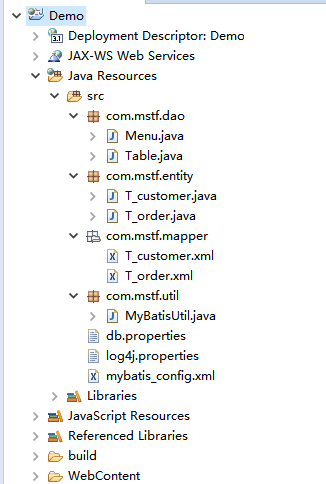
项目结构:
Menu
package com.mstf.dao;

import java.util.Scanner;

import org.apache.ibatis.session.SqlSession;

import com.mstf.util.MyBatisUtil;

public class Menu {

	private static Scanner sc = new Scanner(System.in);

	public static void main(String[] args) {

		SqlSession session=MyBatisUtil.getSession();

		System.out.println("请输入菜单选项:");

		System.err.println("1.根据订单ID查询信息");

		System.err.println("2.添加客户订单信息");

		String id = sc.next();

		if ("1".equals(id)) {

			Table.table1();

		} else if ("2".equals(id)) {

			Table.table2();

		} else {

			System.err.println("非法操作:没有此选项!");

			session.close();

		}

	}

}
Table
package com.mstf.dao;

import java.util.List;

import java.util.Scanner;

import org.apache.ibatis.session.SqlSession;

import com.mstf.entity.T_customer;

import com.mstf.entity.T_order;

import com.mstf.util.MyBatisUtil;

public class Table {

	private static Scanner sc = new Scanner(System.in);

	static SqlSession session=MyBatisUtil.getSession();

	/**

	 * 根据订单 ID 查询

	 * @author wangzheng

	 */

	public static void table1(){

		System.err.println("请输入订单ID:");

		String bug=sc.next();

		try {

			List<T_order> list = session.selectList("getT_customerT_order",bug);

			for (T_order t_order : list) {

				System.out.println(t_order);

			}

		} finally {

			session.commit();

			session.close();

			System.out.println("查询一条数据成功!如果没有数据显示,则为无此订单ID!");

		}

	}

	/**

	 * 添加一条新数据

	 * @author wangzheng

	 */

	public static void table2(){

		int customer_id=0;

		System.out.println("请输入客户姓名:");

		String name=sc.next();

		System.out.println("请输入客户年龄:");

		String age=sc.next();

		System.out.println("请输入客户电话:");

		String tel=sc.next();

		System.out.println("请输入订单编号:");

		String order_number=sc.next();

		System.out.println("请输入订单价格:");

		String order_price=sc.next();

		try {

			T_customer t_customer = new T_customer(0,name,age,tel);

			T_order t_order = new T_order(0,order_number,order_price,customer_id);

			session.insert("insert_T_customer",t_customer);

			session.insert("insert_T_order",t_order);

		} finally {

			session.commit();

			session.close();

			System.out.println("添加数据成功!");

		}

	}

}
T_customer
package com.mstf.entity;

public class T_customer {

	private int id;

	private String name;

	private String age;

	private String tel;

	public int getId() {

		return id;

	}

	public void setId(int id) {

		this.id = id;

	}

	public String getName() {

		return name;

	}

	public void setName(String name) {

		this.name = name;

	}

	public String getAge() {

		return age;

	}

	public void setAge(String age) {

		this.age = age;

	}

	public String getTel() {

		return tel;

	}

	public void setTel(String tel) {

		this.tel = tel;

	}

	public T_customer(int id, String name, String age, String tel) {

		super();

		this.id = id;

		this.name = name;

		this.age = age;

		this.tel = tel;

	}

	public T_customer() {

		super();

	}

	@Override

	public String toString() {

		return "订单客户:[客户ID:" + id + ", 姓名:" + name + ", 年龄:" + age + ", 电话:" + tel + "]";

	}

}
T_order
package com.mstf.entity;

public class T_order {

	private int id;

	private String order_number;

	private String order_price;

	private T_customer t_customer;

	private int customer_id;

	public int getCustomer_id() {

		return customer_id;

	}

	public void setCustomer_id(int customer_id) {

		this.customer_id = customer_id;

	}

	public T_customer getT_customer() {

		return t_customer;

	}

	public void setT_customer(T_customer t_customer) {

		this.t_customer = t_customer;

	}

	public int getId() {

		return id;

	}

	public void setId(int id) {

		this.id = id;

	}

	public String getOrder_number() {

		return order_number;

	}

	public void setOrder_number(String order_number) {

		this.order_number = order_number;

	}

	public String getOrder_price() {

		return order_price;

	}

	public void setOrder_price(String order_price) {

		this.order_price = order_price;

	}

	public T_order(int id, String order_number, String order_price, int customer_id) {

		super();

		this.id = id;

		this.order_number = order_number;

		this.order_price = order_price;

		this.customer_id = customer_id;

	}

	public T_order() {

		super();

	}

	@Override

	public String toString() {

		return "系统订单:[订单ID:" + id + ", 订单号:" + order_number + ", 总价:" + order_price

				+ "];\n" + t_customer + "\n";

	}

}
T_customer.xml
<?xml version="1.0" encoding="UTF-8"?>

<!DOCTYPE mapper

  PUBLIC "-//mybatis.org//DTD Mapper 3.0//EN"

  "http://mybatis.org/dtd/mybatis-3-mapper.dtd">

<mapper namespace="com.mstf.mapper">

	<select id="getT_customerT_order" resultMap="T_customerT_order" parameterType="String">

		SELECT * FROM t_customer tc,t_order t WHERE tc.id=t.customer_id and t.customer_id =#{t.customer_id}

	</select>

	<resultMap type="T_order" id="T_customerT_order">

		<id column="id" property="id"/>

		<result column="order_number" property="order_number"/>

		<result column="order_price" property="order_price"/>

		<association property="t_customer" javaType="T_customer">

			<id column="id" property="id"/>

			<result column="name" property="name"/>

			<result column="age" property="age"/>

			<result column="tel" property="tel"/>

		</association>

	</resultMap>

</mapper>
T_order.xml
<?xml version="1.0" encoding="UTF-8"?>

<!DOCTYPE mapper

  PUBLIC "-//mybatis.org//DTD Mapper 3.0//EN"

  "http://mybatis.org/dtd/mybatis-3-mapper.dtd">

<mapper namespace="com.mstf.mapper">

	<insert id="insert_T_customer">

		insert into t_customer (name, age, tel) values (#{name}, #{age}, #{tel})

	</insert>

	<insert id="insert_T_order">

		insert into t_order (order_number, order_price, customer_id) VALUES (#{order_number},#{order_price},(SELECT MAX(`id`) FROM `t_customer`))

	</insert>

</mapper>
MyBatisUtil
package com.mstf.util;

import java.io.Reader;

import org.apache.ibatis.io.Resources;

import org.apache.ibatis.session.SqlSession;

import org.apache.ibatis.session.SqlSessionFactory;

import org.apache.ibatis.session.SqlSessionFactoryBuilder;

public class MyBatisUtil {

	// 去读取编写的 mybatis_config.xml 文件加载文件中的映射

	public static SqlSession getSession() {

		SqlSessionFactory ssf=null;

		String url="mybatis_config.xml";

		Reader reader=null;

		try {

			reader=Resources.getResourceAsReader(url);

		} catch (Exception e) {

			e.printStackTrace();

		}

		ssf=new SqlSessionFactoryBuilder().build(reader);

		return ssf.openSession();

	}

}
db.properties
driver=com.mysql.jdbc.Driver

url=jdbc:mysql://127.0.0.1/demo

username=root

password=root
log4j.properties
# 全局的日志配置

log4j.rootLogger = ERROR,stdout

# MyBatis 的日志配置

log4j.logger.org.fkit.mapper.UserMapper=DEBUG

# 控制台输出

log4j.appender.stdout = org.apache.log4j.ConsoleAppender

log4j.appender.stdout.layout = org.apache.log4j.PatternLayout

log4j.appender.stdout.layout.ConversionPattern=%5p [%t] - %m%n
mybatis_config.xml
<?xml version="1.0" encoding="UTF-8"?>

<!DOCTYPE configuration

  PUBLIC "-//mybatis.org//DTD Config 3.0//EN"

  "http://mybatis.org/dtd/mybatis-3-config.dtd">

  <!-- XML 配置文件包含对 MyBatis 系统的核心配置 -->

<configuration>

	<!-- 加载数据库配置文件 -->

	<properties resource="db.properties"/>

	<!-- 指定 MyBatis 所用日志的具体实现 -->

	<settings>

		<setting name="logImpl" value="LOG4J"/>

	</settings>

	<!-- 给实体类类取别名 -->

	<typeAliases>

		<typeAlias type="com.mstf.entity.T_customer" alias="T_customer"/>

		<typeAlias type="com.mstf.entity.T_order" alias="T_order"/>

	</typeAliases>

	<!-- 环境配置,即连接数据库 -->

	<environments default="mysql">

		<environment id="mysql">

			<!-- 指定事务管理类型, type="JDBC" 指直接简单使用了 JDBC 的提交和回滚设置 -->

			<transactionManager type="JDBC"/>

				<!-- dataScurce 指数据源配置, POOLED 是 JDBC 连接对象的数据源连接池的实现 -->

				<dataSource type="POOLED">

					<property name="driver" value="${driver}"/>

					<property name="url" value="${url}"/>

					<property name="username" value="${username}"/>

					<property name="password" value="${password}"/>

				</dataSource>

		</environment>

	</environments>

	<!-- mappers 告诉了 MyBatis 去哪里找持久化类的映射文件 -->

	<mappers>

		<mapper resource="com/mstf/mapper/T_customer.xml"/>

		<mapper resource="com/mstf/mapper/T_order.xml"/>

	</mappers>

</configuration>
MyBatis+mysql查询和添加数据的更多相关文章
- mysql查询当天的数据
mysql查询当天的数据 贴代码: #两个时间都使用to_days()函数 select * from reple where to_days(create_time) = to_days(NOW() ...
- mysql查询当天所有数据sql语句
mysql查询当天的所有信息: select * from test where year(regdate)=year(now()) and month(regdate)=month(now()) a ...
- 【转】mysql查询当天所有数据sql语句
mysql查询当天的所有信息: select * from test where year(regdate)=year(now()) and month(regdate)=month(now()) a ...
- php----处理从mysql查询返回的数据
使用php的mysql,向mysql查询,返回的是一个资源,有4个函数可以进行处理. 1.mysql_fetch_row() 2.mysql_fetch_assoc() 3.mysql_fetch_a ...
- (转载)MySQl数据库-批量添加数据的两种方法
方法一:使用excel表格 方法二:使用insert语句(FileWriter批量写入) 使用excel表格 1.打开数据表,按照表的字段在excel中添加数据.注意:表中字段名必须和excel中的名 ...
- MySQL - 查询今天的数据(以及昨天、本月、上个月、今年...) 查询Datetime 时间的数据
1,查询当天(今天)的数据 1 SELECT * FROM `order` WHERE TO_DAYS(order_time) = TO_DAYS(NOW()) 2,查询昨天的数据 1 SELECT ...
- mysql 查询常见时间段数据
1.今天 select * from 表名 where to_days(时间字段名) = to_days(now()); 2.昨天 SELECT * FROM 表名 WHERE TO_DAYS( NO ...
- java连接elasticsearch:查询、添加数据
导入jar包 <!-- https://mvnrepository.com/artifact/org.elasticsearch.client/transport --> <depe ...
- mysql 向字段添加数据或者删除数据
UPDATE table SET cids = CONCAT(cids , ',12') where id=id //向字段添加数据 //因为要用逗号分隔 所以在在前面加了一个逗号 UPDATE ta ...
随机推荐
- 用了一天的时间,linux下expect实现ssh自己主动登录server记,歧视下网上各种抄来抄去残段子
由于要对客户方的快30个项目进行特别有顺序的重新启动,所以不得不想办法写个脚本,网上看了不少段子.真是残缺的能够. 没有一段是能够正常运行的.我来按顺序记录一下 脚本的本身 使用expect实现自己主 ...
- MainWndProc运行观察(有待研究)
MainWndProc运行观察 把MainWndProc改写成如下代码,便于观察:procedure TWinControl.MainWndProc(var Message: TMessage);be ...
- bzoj1305: [CQOI2009]dance跳舞(二分答案+网络流)
1305: [CQOI2009]dance跳舞 题目:传送门 题解: 一眼网络流基础建模...然后就GG了 二分答案+拆点建边+最大流判断: 把男女生拆为男1,男2,女1,女2 1.男1和男2还有女1 ...
- iOS-MBProgressHUD使用
在码代码过程中,我们经常用到MBProgressHUD,但我很少实例化使用,一般都是偷个懒直接显示隐藏,这里贴上详解,以便日后有样式要求时使用. 1,MBProgressHUD常用属性和用法Demo ...
- ES不设置副本是非常脆弱的,整个文章告诉了你为什么
Delaying Shard Allocation As discussed way back in Scale Horizontally, Elasticsearch will automatica ...
- nyoj--814--又见拦截导弹(动态规划+贪心)
又见拦截导弹 时间限制:3000 ms | 内存限制:65535 KB 难度:3 描述 大家对拦截导弹那个题目应该比较熟悉了,我再叙述一下题意:某国为了防御敌国的导弹袭击,新研制出来一种导弹拦截系 ...
- xBIM 基础08 WeXplorer 简介
系列目录 [已更新最新开发文章,点击查看详细] 一.WeXplorer 简介 WeXplorer 是 XBIM 工具包的可视化部分,它使用预处理的 WexBIM 文件在 Web 上处理 IFC ...
- POJ 3657 并查集
题意: 思路: 1.二分+线段树(但是会TLE 本地测没有任何问题,但是POJ上就是会挂--) 2.二分+并查集 我搞了一下午+一晚上才搞出来----..(多半时间是在查错) 首先 如果我们想知道这头 ...
- 页面的URL分析----window.location.href
window.location是页面的位置对象window.location.href是 location的一个属性值,并且它是location的默认属性. window.location直接赋值一个 ...
- Swift学习笔记(7):函数
目录: 函数参数与返回值 参数标签和参数名称 可变参数 传入传出参数 函数类型 嵌套函数 函数是一段完成特定任务的独立代码片段,使用func标示函数名,使用->标示返回类型. ・可以为函数参数设 ...