
[转]ASP.NET Core Exception Filters and Resource Filters
本文转自:https://damienbod.com/2015/09/30/asp-net-5-exception-filters-and-resource-filters/
This article shows how an exception filter and a resource filter can be used in ASP.NET Core
Code: https://github.com/damienbod/AspNet5Filters
2017.07.01: Updated to VS2017 and csproj 2016.07.01: Updated to ASP.NET Core 1.0 RTM 2016.05.17: Updated to ASP.NET Core 1.0 RC2 dotnet 2015.11.18: Updated to ASP.NET Core 1.0 RC1 2015.10.16: Updated to ASP.NET Core 1.0 beta8
An exception filter can be implemented using the IExceptionFilterinterface or by implementing the abstract class ExceptionFilter. The ExceptionFilter class implements the IAsyncExceptionFilter, IExceptionFilter and the IOrderedFilter interfaces. In a MVC 6 controller, the ExceptionFilter can be used directly, as a ServiceFilter or as a TypeFilter, on the class itself or applied to single methods. The ExceptionFilter can also be added globally in the Startup class.
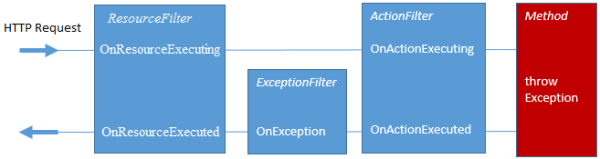
A custom resource filter is implemented by using the IResourceFilterinterface. The resource filter method OnResourceExecuting is called before all action filters and exception filters and the resource filter OnResourceExecuted method is called after all action filter and exception filters.
Custom Exception Filter
The following code is an example of a custom filter implemented using the abstract class ExceptionFilterAttribute. The filter does not require a default constructor and can be used to add dependencies which will be added using the MVC 6 IoC.
using Microsoft.AspNetCore.Mvc.Filters;

using Microsoft.Extensions.Logging;

namespace AspNet5.Filters.ExceptionFilters

{

    public class CustomOneLoggingExceptionFilter : ExceptionFilterAttribute

    {

        private readonly ILogger _logger;

        public CustomOneLoggingExceptionFilter(ILoggerFactory loggerFactory)

        {

            _logger = loggerFactory.CreateLogger("CustomOneLoggingExceptionFilter");

        }

        public override void OnException(ExceptionContext context)

        {

            _logger.LogInformation("OnException");

            base.OnException(context);

        }

        //public override Task OnExceptionAsync(ExceptionContext context)

        //{

        //    _logger.LogInformation("OnActionExecuting async");

        //    return base.OnExceptionAsync(context);

        //}

    }

}
Custom Resource Filter
A custom filter can also be implemented using the IResourceFilter interface.
using Microsoft.AspNetCore.Mvc.Filters;

using Microsoft.Extensions.Logging;

namespace AspNet5.Filters.ResourceFilters

{

    public class CustomOneResourceFilter : IResourceFilter

    {

        private readonly ILogger _logger;

        public CustomOneResourceFilter(ILoggerFactory loggerFactory)

        {

            _logger = loggerFactory.CreateLogger("CustomOneResourceFilter");

        }

        public void OnResourceExecuted(ResourceExecutedContext context)

        {

            _logger.LogInformation("OnResourceExecuted");

        }

        public void OnResourceExecuting(ResourceExecutingContext context)

        {

            _logger.LogInformation("OnResourceExecuting");

        }

    }

}
Startup class code configuration
Global filters can be added using the ConfigureServices method in the Startup class. If the custom filters are used as ServiceType filters in the controller classes, the custom filters need to be added to the MVC 6 IoC.
public void ConfigureServices(IServiceCollection services)

{

	var loggerFactory = new LoggerFactory();

	loggerFactory.AddConsole();

	loggerFactory.AddDebug();

	services.AddMvc(

		config =>

			{

				config.Filters.Add(new GlobalFilter(loggerFactory));

				config.Filters.Add(new GlobalLoggingExceptionFilter(loggerFactory));

			});

	services.AddScoped<ConsoleLogActionOneFilter>();

	services.AddScoped<ConsoleLogActionTwoFilter>();

	services.AddScoped<ClassConsoleLogActionBaseFilter>();

	services.AddScoped<ClassConsoleLogActionOneFilter>();

	services.AddScoped<CustomOneLoggingExceptionFilter>();

	services.AddScoped<CustomTwoLoggingExceptionFilter>();

	services.AddScoped<CustomOneResourceFilter>();

}
Request with Exception with default filters
The TestExceptionController implements the default exception example.
using System;

using System.Collections.Generic;

using AspNet5.Filters.ActionFilters;

using AspNet5.Filters.ExceptionFilters;

using AspNet5.Filters.ResourceFilters;

using Microsoft.AspNetCore.Mvc;

using Microsoft.Extensions.Logging;

namespace AspNet5.Controllers

{

    [Route("api/[controller]")]

    [ServiceFilter(typeof(CustomTwoLoggingExceptionFilter))]

    public class TestExceptionController : Controller

    {

        private readonly ILogger _logger;

        public TestExceptionController(ILoggerFactory loggerFactory)

        {

            _logger = loggerFactory.CreateLogger("TestExceptionController");

        }

        [HttpGet]

        [ServiceFilter(typeof(CustomOneLoggingExceptionFilter))]

        [ServiceFilter(typeof(CustomOneResourceFilter))]

        [ServiceFilter(typeof(ConsoleLogActionTwoFilter))]

        public IEnumerable<string> Get()

        {

            _logger.LogInformation("Executing Http Get before exception");

            throw new Exception("Yes a great exception");

        }

        [HttpGet("getwithorder")]

        [ServiceFilter(typeof(CustomOneLoggingExceptionFilter), Order = -1)]

        [ServiceFilter(typeof(CustomOneResourceFilter))]

        public IEnumerable<string> GetWithOrderedFiltered()

        {

            _logger.LogInformation("Executing Http Get before exception");

            throw new Exception("Yes a great exception");

        }

        [HttpGet("getcustomexception")]

        [ServiceFilter(typeof(CustomOneLoggingExceptionFilter))]

        [ServiceFilter(typeof(CustomOneResourceFilter))]

        public IEnumerable<string> GetWithCustomException()

        {

            _logger.LogInformation("Executing Http Get before exception");

            throw new CustomException("Yes a great exception");

        }

        [HttpGet("getnoexception")]

        [ServiceFilter(typeof(CustomOneLoggingExceptionFilter))]

        [ServiceFilter(typeof(CustomOneResourceFilter))]

        public IEnumerable<string> GetNoException()

        {

            _logger.LogInformation("Executing Http GetNoException");

            return new string[] { "test data one", "test data two" };

        }

    }

}
When the HTTP Request is executed in the MVC 6 pipeline, the Resource filters OnResourceExecuting is executed first. Then all the action filter OnResourceExecuting are executed. The method itself is then executed. After this, all the action filter OnResourceExecuted are executed. Then the Exception filters are called. (OnException ). The Resource filter OnResourceExecuted is called at the end.
The result can also be viewed in in the console (start the application in the console with dnx web):
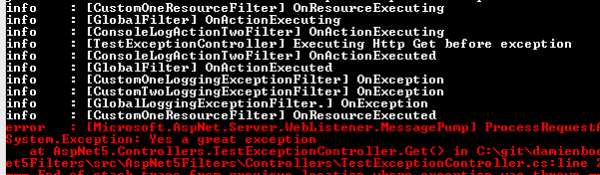
The exception filter closest the the action method is executed first, then the controller class filter, and then the global exception filter. The resource filter is executed at the end.
Request with Exception with handled exception
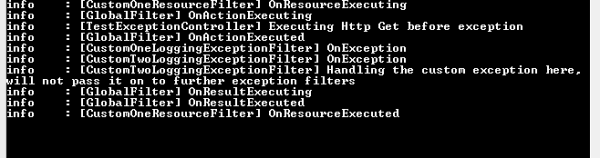
This example stops executing ExceptionFilters if a CustomException is throw. This is done by setting the Exception property of the ExceptionContext to null. The following OnException methods exception filters are not executed.
public override void OnException(ExceptionContext context)

{

	_logger.LogInformation("OnActionExecuting");

	handleCustomException(context);

	base.OnException(context);

}

private void handleCustomException(ExceptionContext context)

{

	if (context.Exception.GetType() == typeof(CustomException))

	{

		_logger.LogInformation("Handling the custom exception here, will not pass  it on to further exception filters");

		context.Exception = null;

	}

}
The example is implemented in the controller as follows:
[HttpGet("getcustomexception")]

[ServiceFilter(typeof(CustomOneLoggingExceptionFilter))]

[ServiceFilter(typeof(CustomOneResourceFilter))]

public IEnumerable<string> GetWithCustomException()

{

	_logger.LogInformation("Executing Http Get before exception");

	throw new CustomException("Yes a great exception");

}
This can be called in a browser with the URL: http://localhost:5000/api/testexception/getcustomexception
The global exception filter is never called.
Request with Exception with handled exception ordered
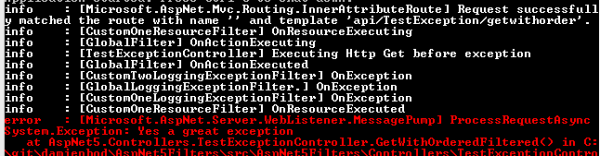
The Exception filter with the highest Order property value is executed first. We can force that the CustomOneLoggingExceptionFilter is executed last by setting the Order property to -1, less than the default Order value.
[HttpGet("getwithorder")]

[ServiceFilter(typeof(CustomOneLoggingExceptionFilter), Order = -1)]

[ServiceFilter(typeof(CustomOneResourceFilter))]

public IEnumerable<string> GetWithOrderedFiltered()

{

	_logger.LogInformation("Executing Http Get before exception");

	throw new Exception("Yes a great exception");

}
This can be tested in the browser with the URL: http://localhost:5000/api/testexception/getwithorder
The executed order has been changed:
Links:
div{float:left;margin-right:10px;}
div.wpmrec2x div.u > div:nth-child(3n){margin-right:0px;}
-->
[转]ASP.NET Core Exception Filters and Resource Filters的更多相关文章
- Filters in ASP.NET Core
Filters in ASP.NET Core allow code to be run before or after specific stages in the request processi ...
- ASP.NET Core 2.2 十八.各种Filter的内部处理机制及执行顺序
ASP.NET core 的Filter是系统中经常用到的,本文详细分享一下各种Filter定义.执行的内部机制以及执行顺序.(ASP.NET Core 系列目录) 一. 概述 ASP.NET Cor ...
- ASP.NET Core 2.1 Web API + Identity Server 4 + Angular 6 + Angular Material 实战小项目视频
视频简介 ASP.NET Core Web API + Angular 6的教学视频 我是后端开发人员, 前端的Angular部分讲的比较差一些, 可以直接看代码!!!! 这是一个小项目的实战视频, ...
- 给你的 ASP.NET Core 程序插上 Feature Flag 的翅膀
前言 我们知道,目前大多数应用程序在正式发布到生产环境之前都会经历多个不同的测试环境,通过让应用程序在多个不同的环境中运行来及时发现并解决问题,避免在线上发生不必要的损失.这是对于整个软件的发布流程来 ...
- ASP.NET Core 2 学习笔记(十四)Filters
Filter是延续ASP.NET MVC的产物,同样保留了五种的Filter,分别是Authorization Filter.Resource Filter.Action Filter.Excepti ...
- Filters in ASP.NET Core (转自MSDN)
Filters in ASP.NET Core MVC allow you to run code before or after specific stages in the request pro ...
- Asp.Net Core 进阶(四)—— 过滤器 Filters
一.介绍 Asp.Net Core Filter 使得可以在请求处理管道的特定阶段的前后执行代码,我们可以创建自定义的 filter 用于处理横切关注点. 横切关注点的示例包括错误处理.缓存.配置.授 ...
- 理解ASP.NET Core - 过滤器(Filters)
注:本文隶属于<理解ASP.NET Core>系列文章,请查看置顶博客或点击此处查看全文目录 Filter概览 如果你是从ASP.NET一路走过来的,那么你一定对过滤器(Filter)不陌 ...
- [转]Create Custom Exception Filter in ASP.NET Core
本文转自:http://www.binaryintellect.net/articles/5df6e275-1148-45a1-a8b3-0ba2c7c9cea1.aspx In my previou ...
随机推荐
- Socket 简易静态服务器 WPF MVVM模式(二)
command类 标准来说,command会有三种模式,委托命令 准备命令 附加命令 1.DelegateCommand 2.RelayCommand 3.AttachbehaviorCommand ...
- Kotlin 区间和循环 Loop和Range
在kotln中有一种很简单的方式来表达某一个区间的数字. 比如我想存储1~100. 我在其他的语言中可以用数组,步骤大概有三个把. 但是在kotlin中就只需要一步. 代码如下: fun main(a ...
- R:魔兽世界终极版
描述 魔兽世界的西面是红魔军的司令部,东面是蓝魔军的司令部.两个司令部之间是依次排列的若干城市,城市从西向东依次编号为1,2,3 .... N ( N <= 20 ).红魔军的司令部算作编号为0 ...
- Google的C++代码规范
英文版:http://google-styleguide.googlecode.com/svn/trunk/cppguide.xml 中文版:http://zh-google-styleguide ...
- 【转】VS2010中无System.Data.OracleClient引用的问题
源地址:http://blog.csdn.net/pinchw/article/details/30465749
- sass的基本语法与使用
一.简介 SASS是一种CSS的开发工具,提供了许多便利的写法,大大节省了设计者的时间,使得CSS的开发,变得简单和可维护.以上都是百度的,哈哈: 其实个人认为sass就是一套提高编写css效率的规则 ...
- 14、OpenCV Python 直线检测
__author__ = "WSX" import cv2 as cv import numpy as np #-----------------霍夫变换------------- ...
- 微信发送模版消息,PHP代码简单案例
function http_request($url,$data=array()){ $ch = curl_init(); curl_setopt($ch, CURLOPT_URL, $url); c ...
- 【转】idea project中导入其他文件夹下的模块,可能出现java.io.FileNotFoundException: XXX.xml
在一个project 中导入一个java 模块, 我要执行该模块的main函数 ,在main函数中有一个 FileReader(“generatorConfig.xml”) 而generatorCon ...
- 一个数字从后向前输入每一位数字,Camel和Pascal命名规范,IsValid()
int num = int.Parse(Console.ReadLine()); ; ) { n = num % ; num /= ; Console.WriteLine(n); } Camel和Pa ...