
solr6.6 导入 文本(txt/json/xml/csv)文件
重点就是三个配置文件
1、建立的data-config.xml
内容如下:
<dataConfig>

  <dataSource name="fileDataSource" type="FileDataSource" />

    <!--<document>

        <entity name="tika-test" processor="TikaEntityProcessor"

                url="C:/docs/solr-word.pdf" format="text">

                <field column="Author" name="author" meta="true"/>

                <field column="title" name="title" meta="true"/>

                <field column="text" name="text"/>

        </entity>

    </document>-->

  <dataSource name="urlDataSource" type="BinURLDataSource" />

  <!--baseDir="D:/work/Solr/solr-6.6.0/ImportDoc" fileName=".*\.(doc)|(pdf)|(docx)|(txt)"-->

  <document>

    <entity name="files" dataSource="null" rootEntity="false"

    processor="FileListEntityProcessor"

    baseDir="D:/work/Solr/solr-6.6.0/ImportDoc" fileName=".*\.(json)|(txt)|(csv)|(xml)"

    onError="skip"

    recursive="true">

      <field column="file" name="id"/>

      <field column="fileAbsolutePath" name="filePath" />

      <field column="fileSize" name="size" />

      <field column="fileLastModified" name="lastModified" />

      <entity processor="PlainTextEntityProcessor" name="txtfile" url="${files.fileAbsolutePath}" dataSource="fileDataSource">

        <field column="plainText" name="text"/>

      </entity>

    </entity>

  </document>

</dataConfig>
2、修改managed-schema文件
增加如下内容:
 <!-- mmseg4j fieldType-->

  <fieldType name="text_mmseg4j_complex" class="solr.TextField" positionIncrementGap="100" >

    <analyzer>

      <tokenizer class="com.chenlb.mmseg4j.solr.MMSegTokenizerFactory" mode="complex" />

    </analyzer>

  </fieldType>

  <fieldType name="text_mmseg4j_maxword" class="solr.TextField" positionIncrementGap="100" >

    <analyzer>

      <tokenizer class="com.chenlb.mmseg4j.solr.MMSegTokenizerFactory" mode="max-word" />

    </analyzer>

  </fieldType>

  <fieldType name="text_mmseg4j_simple" class="solr.TextField" positionIncrementGap="100" >

    <analyzer>

      <tokenizer class="com.chenlb.mmseg4j.solr.MMSegTokenizerFactory" mode="simple" />

    </analyzer>

  </fieldType>

  <field name="text" type="text_mmseg4j_complex" indexed="true" stored="true" omitNorms="true" multiValued="false"/>

  <field name="fileName" type="string" indexed="true" stored="true" />

  <field name="filePath" type="string" indexed="true" stored="true" required="true" multiValued="false" />

  <field name="size" type="long" indexed="true" stored="true" />

  <field name="lastModified" type="date" indexed="true" stored="true" />
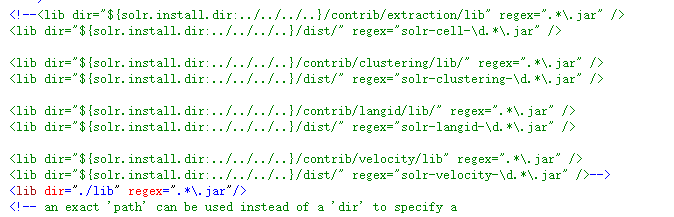
3、修改solrconfig.xml文件
<lib dir="./lib" regex=".*\.jar"/>
4、导入文件
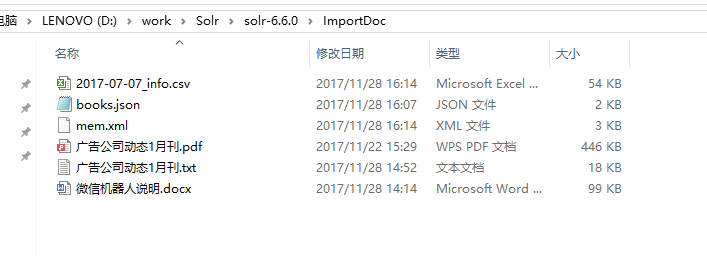
注意,txt文件编码请保证是UTF-8编码,默认txt文件的编码是GBK
5、查询
导入成功后,查询
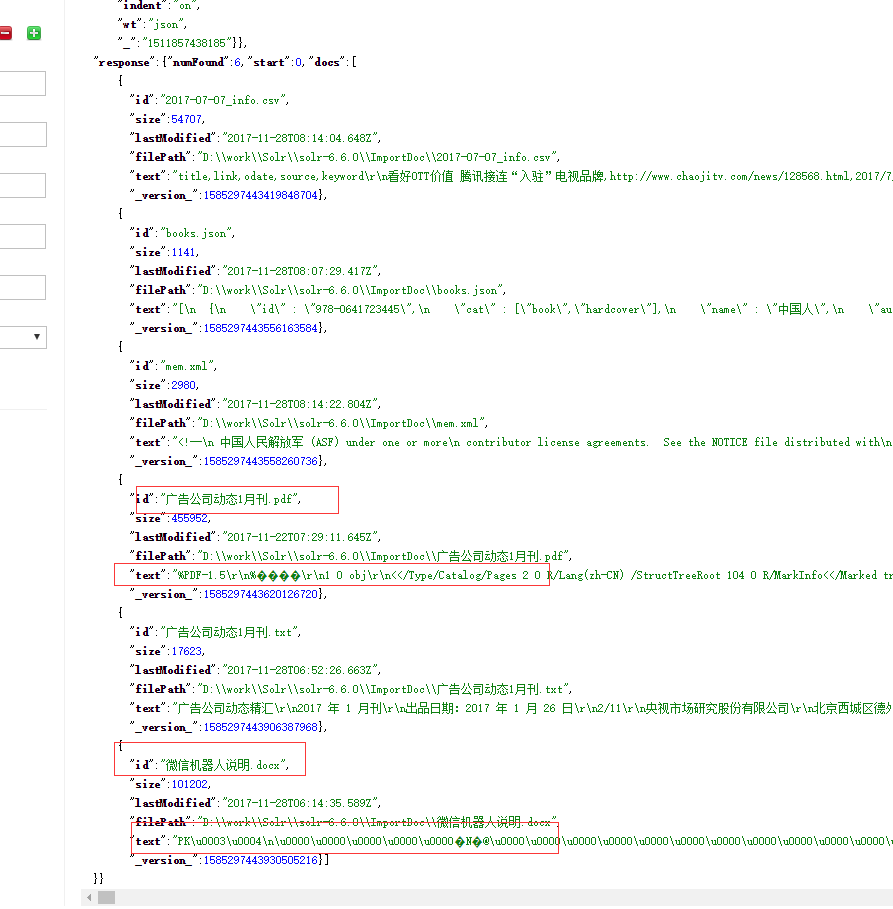
从上面可以看到,pdf和word文件是乱码,必须用其它Processor进行处理
solr6.6 导入 文本(txt/json/xml/csv)文件的更多相关文章
- 导出Excel/Pdf/txt/json/XML/PNG/CSV/SQL/MS-Word/ Ms-Powerpoint/等通过tableExport.js插件来实现
首先去我的云盘下载需要的js: 链接:https://pan.baidu.com/s/13vC-u92ulpx3RbljsuadWw 提取码:mo8m 页面代码: <!DOCTYPE html& ...
- Java 对不同类型的数据文件的读写操作整合器[JSON,XML,CSV]-[经过设计模式改造](2020年寒假小目标03)
日期:2020.01.16 博客期:125 星期四 我想说想要构造这样一个通用文件读写器确实不容易,嗯~以后会添加更多的文件类型,先来熟悉一下文件内容样式: <?xml version=&quo ...
- json和csv文件存储
一. json 1:基本概念 1.1 Json和Javascript JSON, 全称JavaScript Object Notation,它通过对象和数组的组合来表示数据.在JavaScript中一 ...
- MySQL导入含有中文字段(内容)CSV文件乱码解决方法
特别的注意:一般的CSV文件并不是UTF-8编码,而是10008(MAC-Simplified Chinese GB 2312),所以再通过Navicat导入数据的时候需要指定的编码格式是10008( ...
- Solr json,xml等文件数据导入(添加索引)linux下操作
使用solr-5.3.1\example\exampledocs下的post.jar来完成数据导入 1.将想要导入的文件放在solr-5.3.1\example\exampledocs中,如aaa.x ...
- CSV文件导入导mysql数据库
1.导入 基本语法: load data [low_priority] [local] infile 'file_name txt' [replace | ignore] into table tbl ...
- Oracle数据库导入csv文件(sqlldr命令行)
1.说明 Oracle数据库导入csv文件, 当csv文件较小时, 可以使用数据库管理工具, 比如DBevaer导入到数据库, 当csv文件很大时, 可以使用Oracle提供的sqlldr命令行工具, ...
- mysql SQLyog导入导出csv文件
1.选择数据库表 --> 右击属性 --> 备份/导出 --> 导出表数据作为 --> 选择cvs --> 选择下面的“更改” --> 字段 --> 变量长度 ...
- MongoDB:数据导入CSV文件之错误记录
测试主机1:Windows 10,MongoDB 3.6.3,WPS 10.1,Notepad++ 7.5.3, 测试主机2:Ubuntu 16.04,MongoDB 4, 今天测试了将数据从文件—— ...
随机推荐
- 【C语言】一次内存泄露的分析的记录
今天运行一个程序,程序刚启动时占用内存很小,在运行过程中发现占用的内存会一直增大. 用cat /proc/pid/statm的方式查看发现也确实在一直增大. 而且这个程序移植到另外一个平台后,会直接无 ...
- 在另一个文本框显示input file选择的文件名字
javascript 获取文件域 (type=file) 的完整路径一直是很麻烦的问题,问题主要出在一些浏览器基于安全性考虑而不能正常获取到文件域中选中图片的决对路径,尤其一些基于webkit的浏览器 ...
- HUST-1350 Trie
1350 - Trie 时间限制:1秒 内存限制:128兆 104 次提交 35 次通过 题目描述 In computer science, a trie, is an ordered tree da ...
- python 判断平年还是闰年
while 1: s = input('请填入一个年份:') s = int(s) year = False if s % 100 == 0 and s % 400 == 0: year = True ...
- Selenium2+python自动化20-Excel数据参数化【转载】
前言 问: Python 获取到Excel一列值后怎么用selenium录制的脚本中参数化,比如对登录用户名和密码如何做参数化? 答:可以使用xlrd读取Excel的内容进行参数化.当然为了便于各位小 ...
- JS监听页面滚动到底部事件
废话不说,直接上代码,放心我这个是最好的,直接放到js脚本里,直接生效: $(window).scroll(function(){ var scrollTop = $(this).scrollTop( ...
- 【互动问答分享】第11期决胜云计算大数据时代Spark亚太研究院公益大讲堂
Q1:docker成熟度如何? Docker是2013年和2014年最火爆的云计算开源项目: Baidu公司是中国使用Docker最为深入和最大规模的公司,线上稳定运行数十万个Docker容器,目前已 ...
- 【cocos2d-js官方文档】十二、对象缓冲池
cc.pool的使用场景 经常创建和销毁的元素,例如打飞机游戏里面的子弹等. 不适用的场景:不是很经常创建的物体,比如背景,建筑等. 如何使用cc.pool 让你的类支持cc.pool 首先,你需在需 ...
- 谜题15:令人晕头转向的Hello
下面的程序是对一个老生常谈的例子做出了稍许的变化之后的版本.那么,它会打印出什么呢? /** * Generated by the IBM IDL-to-Java compiler, version ...
- hadoop InputSplit
/** * <code>InputSplit</code> represents the data to be processed by an * individual {@l ...