
【JS 逆向百例】网洛者反爬练习平台第七题:JSVMPZL 初体验

关注微信公众号:K哥爬虫,持续分享爬虫进阶、JS/安卓逆向等技术干货!
声明
本文章中所有内容仅供学习交流,抓包内容、敏感网址、数据接口均已做脱敏处理,严禁用于商业用途和非法用途,否则由此产生的一切后果均与作者无关,若有侵权,请在公众号联系我立即删除!
逆向目标
- 目标:网洛者反反爬虫练习平台第七题:JSVMPZL 初体验
- 链接:http://spider.wangluozhe.com/challenge/7
- 简介:平台注册需要邀请码,站长在群里,可后台回复交流群加群获取,或者直接加网站底部站长QQ获取。要求采集100页的全部数字,并计算所有数据加和。主要难点在于 vvv 大佬开发的 JS 混淆框架:jsvmpzl
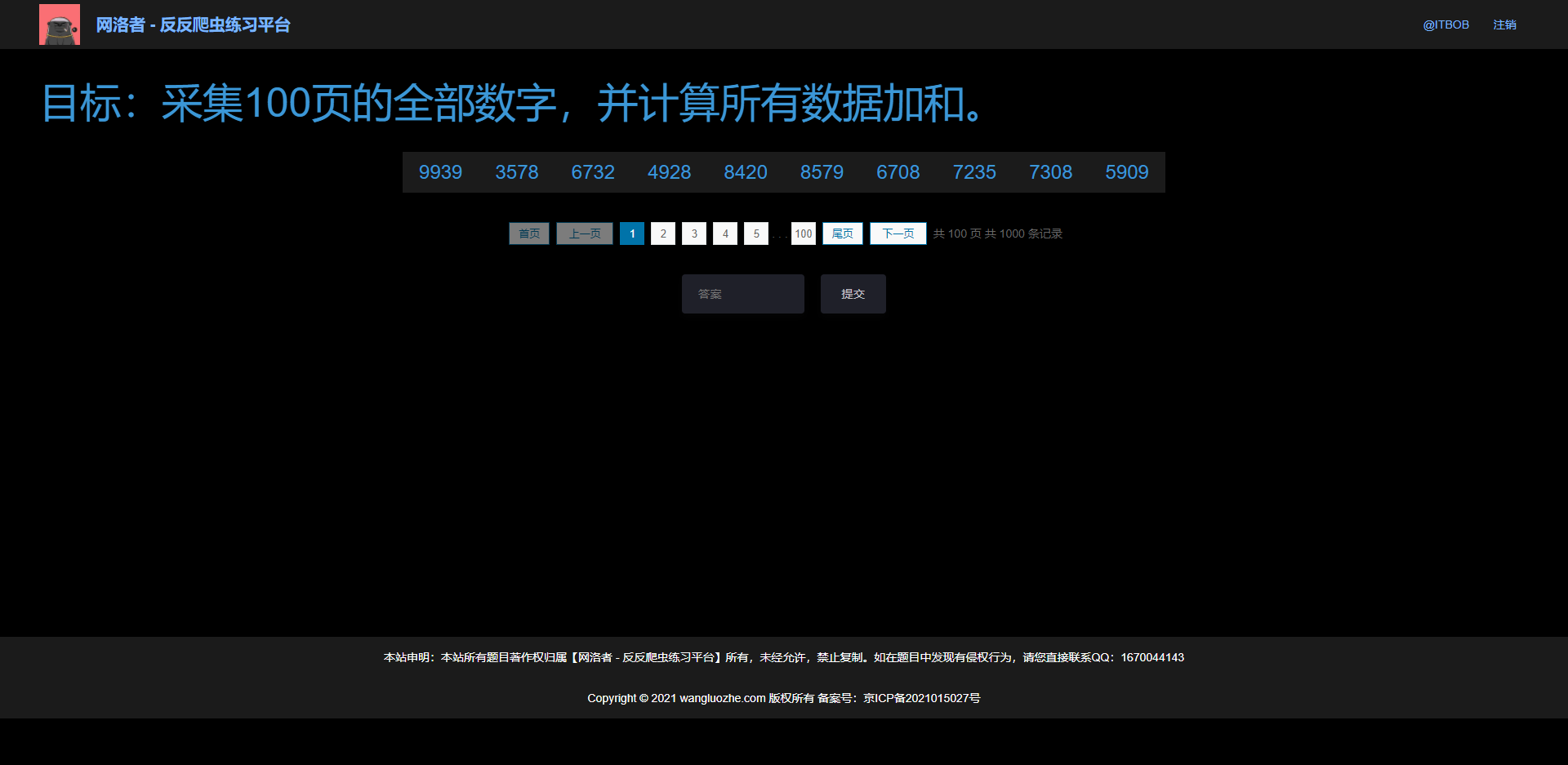
逆向过程
直接搜索,或者跟栈,可以轻松找到加密入口,打开 F12 有两个反调试,一是无限 debugger,右键 Never pause here 即可,二是定时器,控制台输入 for (let i = 1; i < 99999; i++) window.clearInterval(i); 过掉即可。
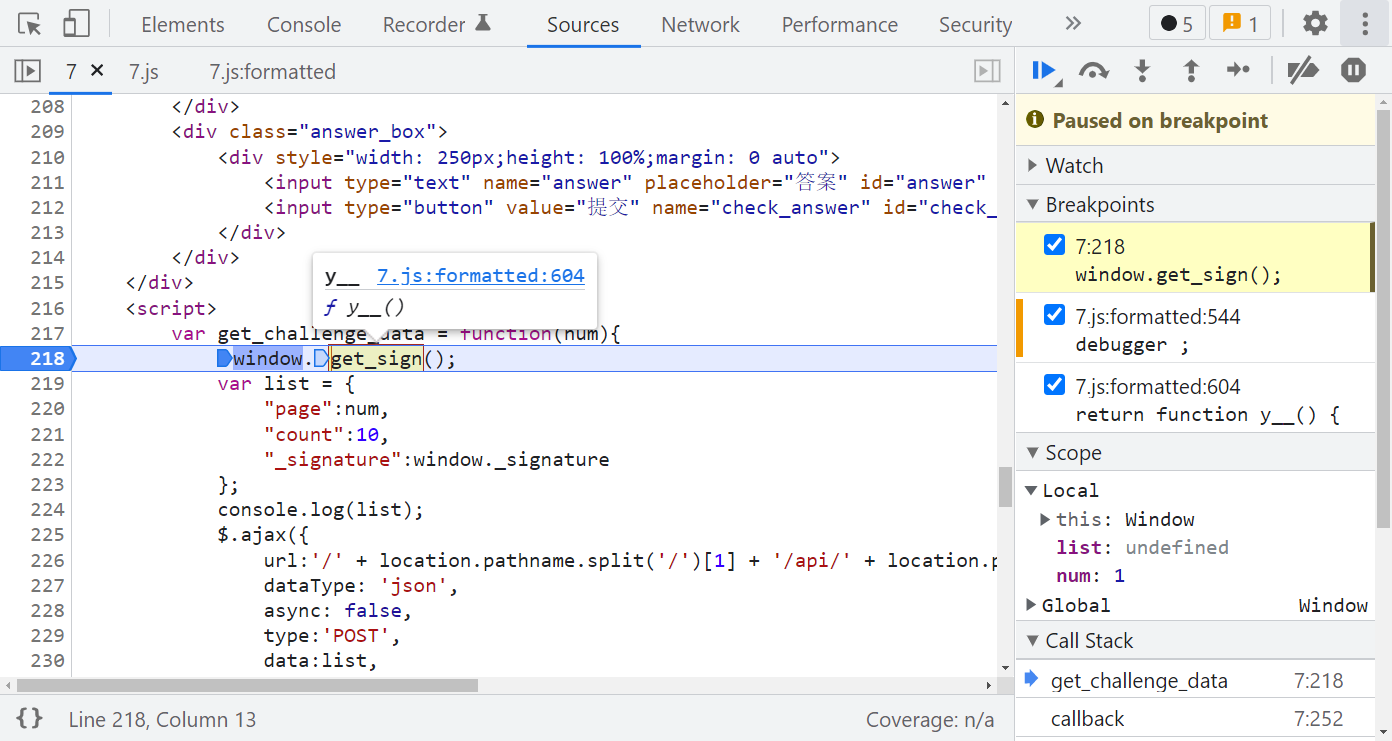
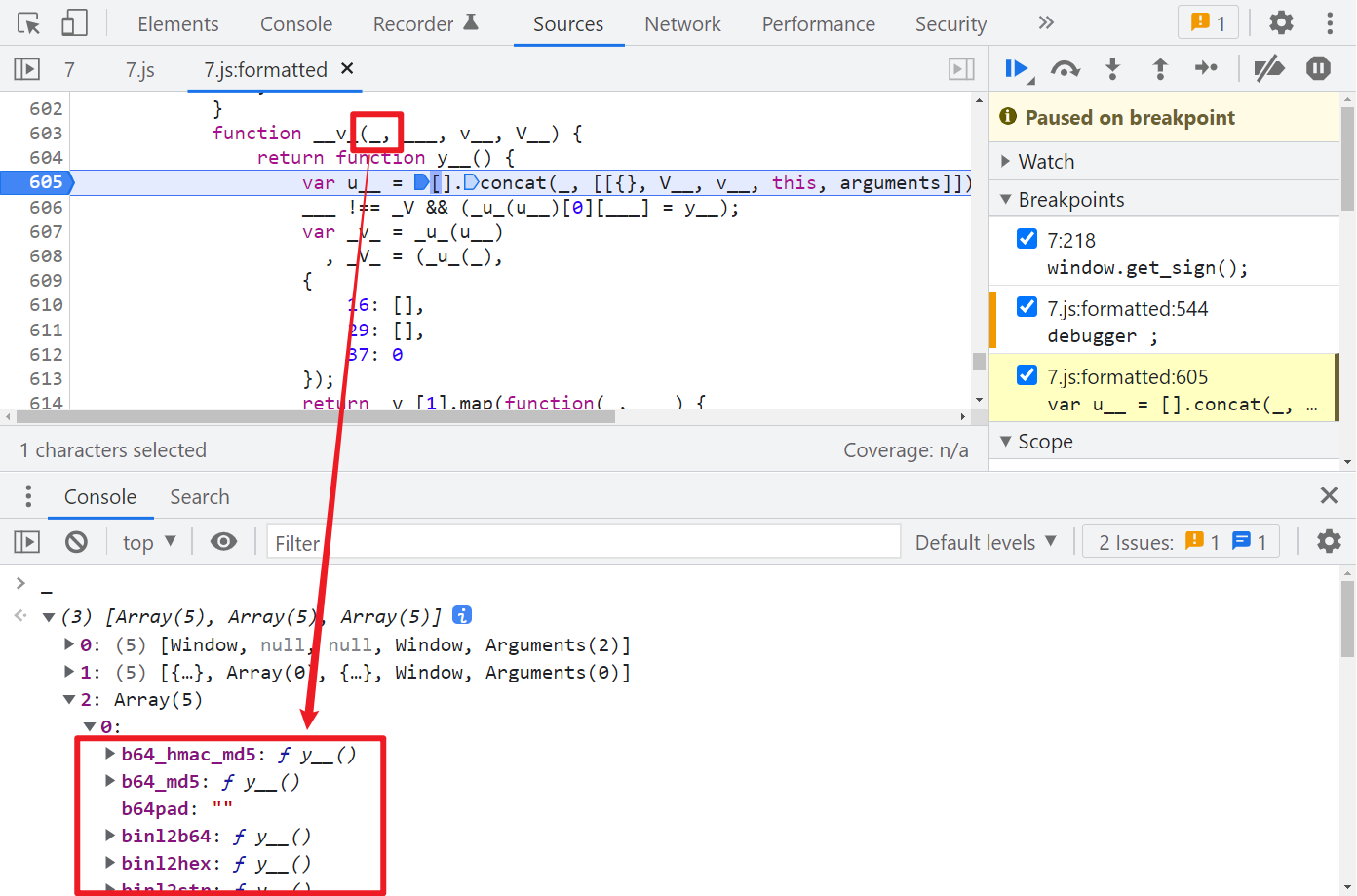
跟进 y__(),就可以看到 jsvmpzl 混淆的代码了,如果有做过猿人学平台的题,会发现此混淆和猿人学第 18 题(https://match.yuanrenxue.com/match/18)是一样的,在 y__() 第一行下个断点,观察 __v_() 第一个参数 _,_[2][0] 你会发现有关 MD5 算法的一些特征,如下图所示:
那么我们直接大胆猜测一下,是不是就是某个数据经过 MD5 之后就是 _signature 了呢?再继续调试一下,注意 arguments 的变化:
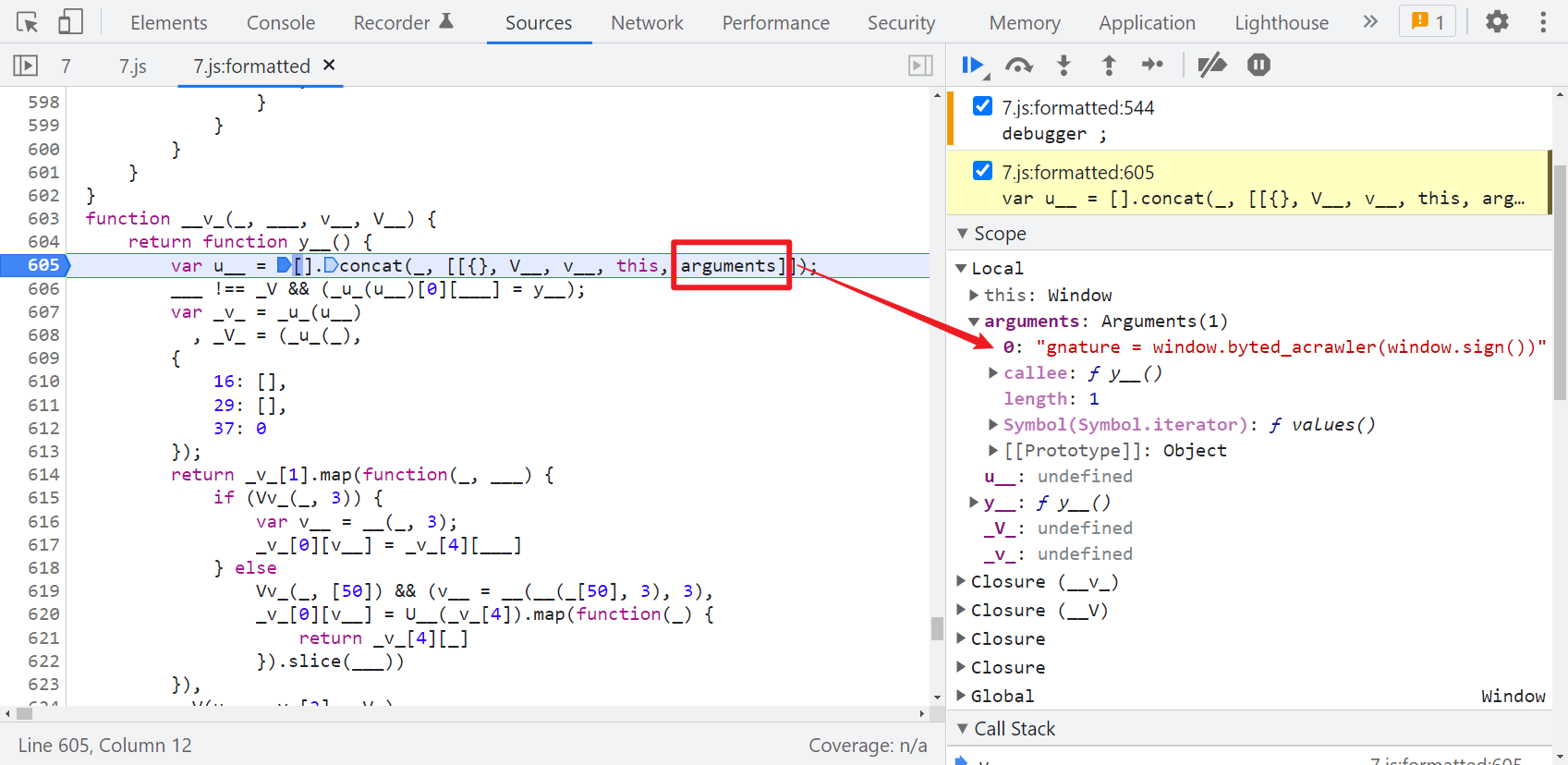
很明显这个 window.byted_acrawler(window.sign()) 应该就是生成 _signature 的语句,这个方法和某字节系的 _signature 生成的方法名称是一样的,直接在控制台输出一下可以拿到值,其中 window.sign() 是取的时间戳:
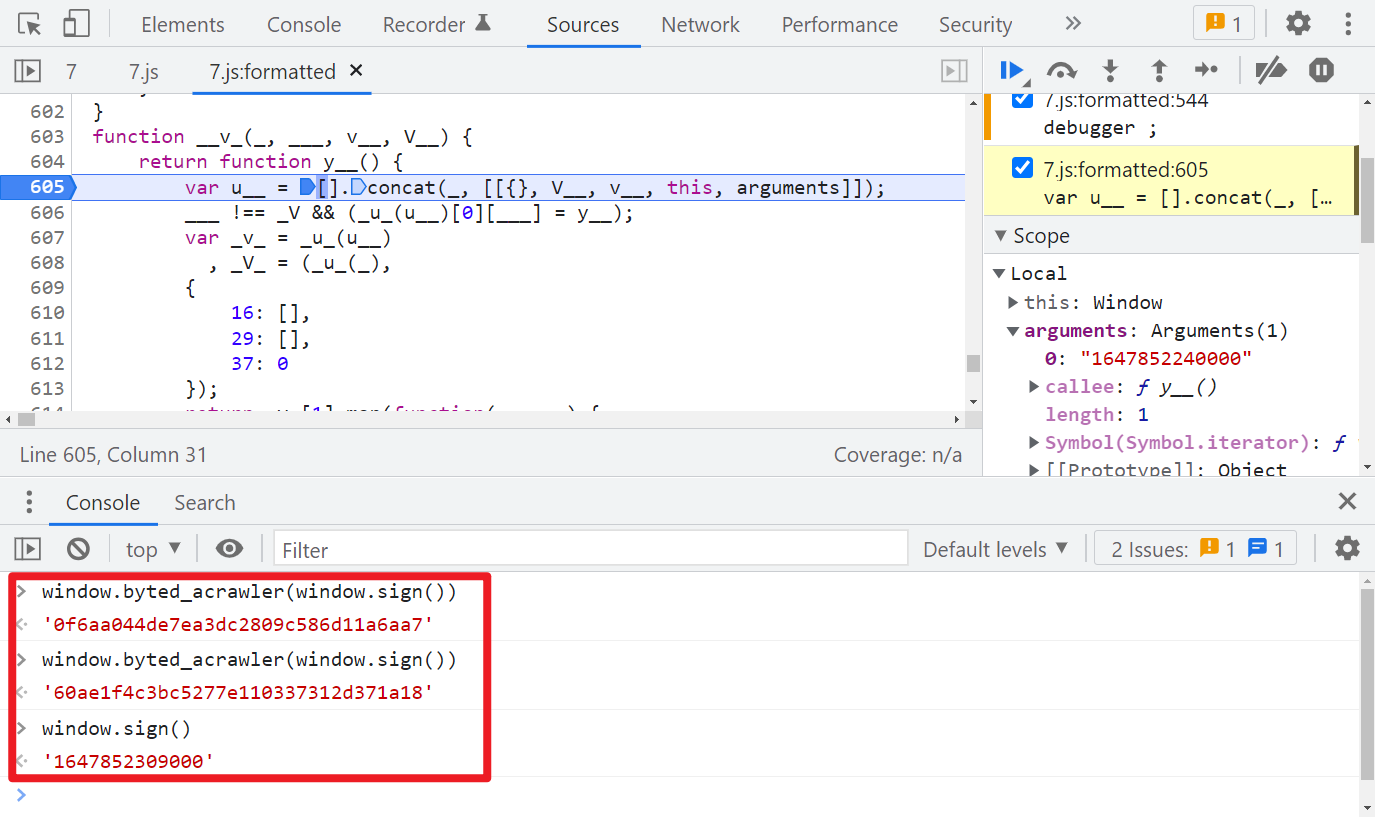
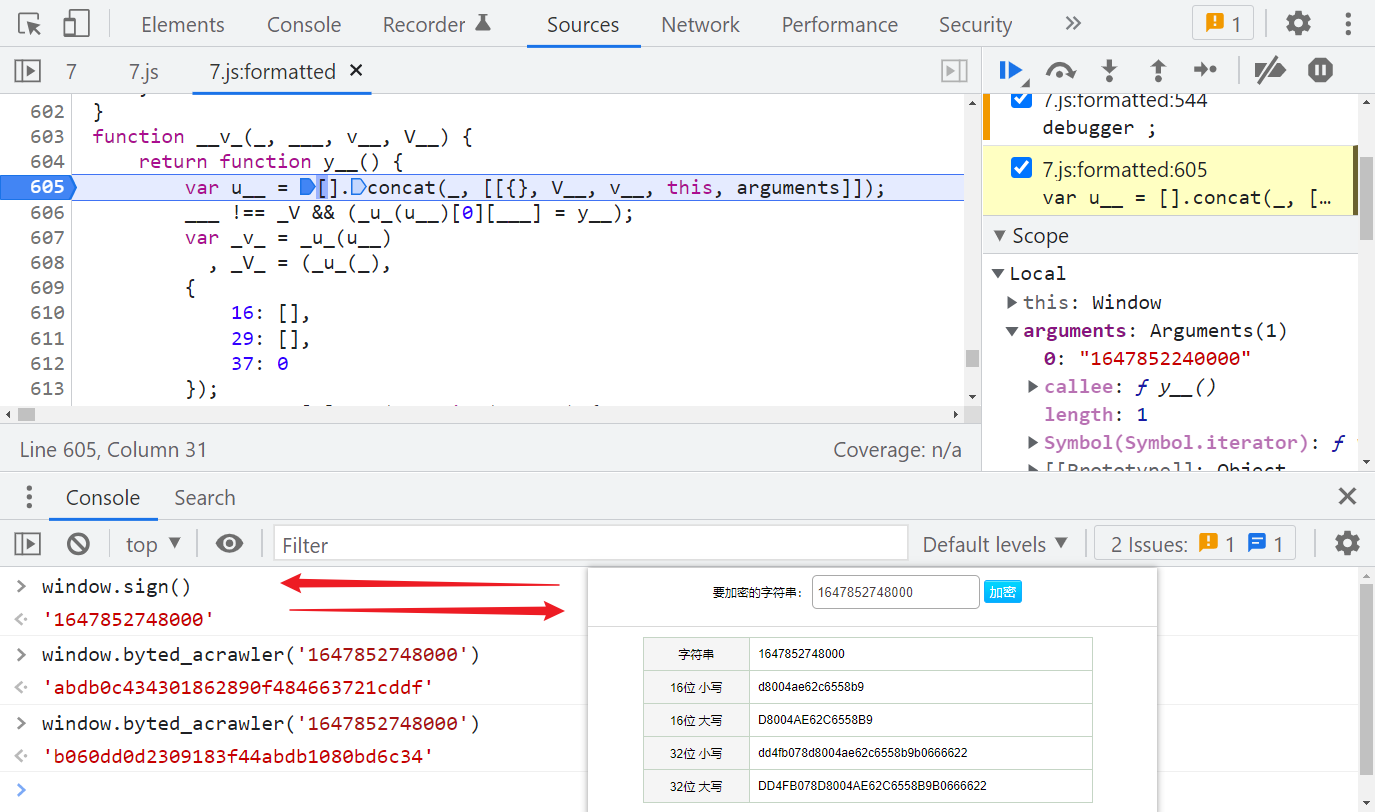
我们前面猜测是 MD5,直接验证一下,发现并不是的,即便是同一个时间戳,经过 window.byted_acrawler() 后得到的值每次也都不一样:
Hook 关键方法
经过前面的分析,既然标准的 MD5 不行,那有没有可能是魔改的 MD5 呢?首先找个 JavaScript 标准的 MD5 代码看一下,比如:http://pajhome.org.uk/crypt/md5/md5.html
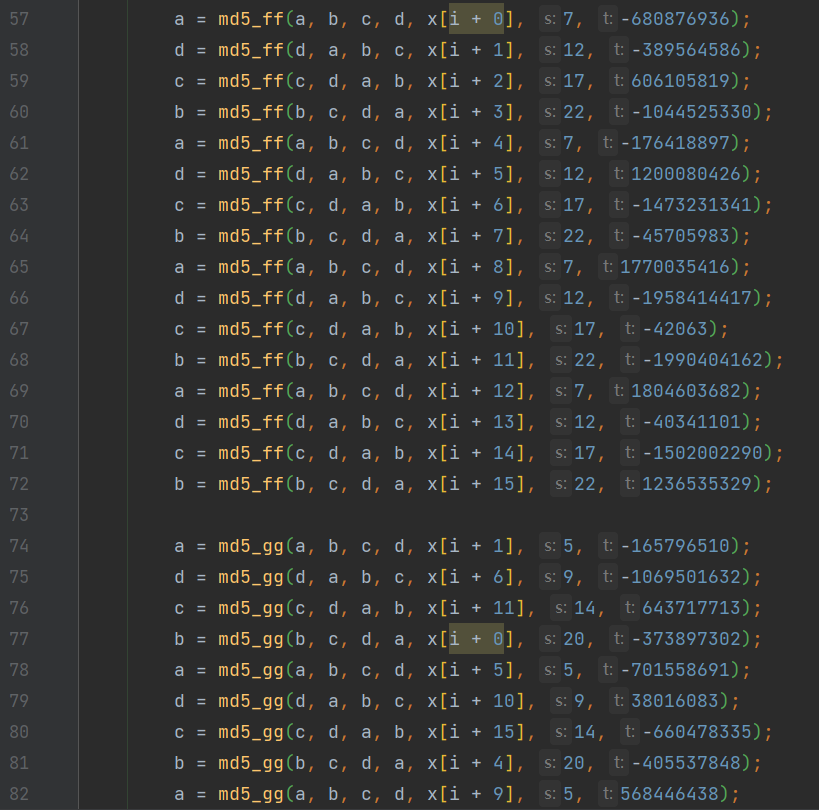
可以注意到,源码里面有很多 md5_ff、md5_gg、md5_hh、md5_ii 的方法,最后一个值都是固定的,那么有没有可能此题就是在标准 MD5 的基础上修改了一些默认值呢?所以我们可以直接 Hook 这些关键方法,在控制台输出传入的值,来一一对比一下,看看默认值是否是一样的,为了方便观察,我们还可以为输出语句加上颜色,Hook 代码如下:
let oldFF = _[2][0]['md5_ff'];

let oldGG = _[2][0]['md5_gg'];

let oldHH = _[2][0]['md5_hh'];

let oldII = _[2][0]['md5_ii'];

let color_white_red = "color: white; background: red;"

let color_white_grey = "color: white; background: grey;"

let color_white_darkcyan = "color: white; background: darkcyan;"

let color_white_green = "color: white; background: green;"

let color_white_orange = "color: white; background: orange;"

_[2][0]['md5_ff'] = function (a, b, c, d, e, f, g) {

    debugger;

    let result = oldFF(a, b, c, d, e, f, g);

    console.log("%c Function: %c md5_ff %c Result: %c %s %c Params: %c %s, %s, %s, %s, %s, %s, %s ", color_white_red, color_white_grey, color_white_red, color_white_grey, result, color_white_red, color_white_grey, a, b, c, d, e, f, g)

    return result;

};

_[2][0]['md5_gg'] = function (a, b, c, d, e, f, g) {

    debugger;

    let result = oldGG(a, b, c, d, e, f, g);

    console.log("%c Function: %c md5_gg %c Result: %c %s %c Params: %c %s, %s, %s, %s, %s, %s, %s ", color_white_red, color_white_darkcyan, color_white_red, color_white_darkcyan, result, color_white_red, color_white_darkcyan, a, b, c, d, e, f, g)

    return result;

};

_[2][0]['md5_hh'] = function (a, b, c, d, e, f, g) {

    debugger;

    let result = oldHH(a, b, c, d, e, f, g);

    console.log("%c Function: %c md5_hh %c Result: %c %s %c Params: %c %s, %s, %s, %s, %s, %s, %s ", color_white_red, color_white_green, color_white_red, color_white_green, result, color_white_red, color_white_green, a, b, c, d, e, f, g)

    return result;

};

_[2][0]['md5_ii'] = function (a, b, c, d, e, f, g) {

    debugger;

    let result = oldII(a, b, c, d, e, f, g);

    console.log("%c Function: %c md5_ii %c Result: %c %s %c Params: %c %s, %s, %s, %s, %s, %s, %s ", color_white_red, color_white_orange, color_white_red, color_white_orange, result, color_white_red, color_white_orange, a, b, c, d, e, f, g)

    return result;

};
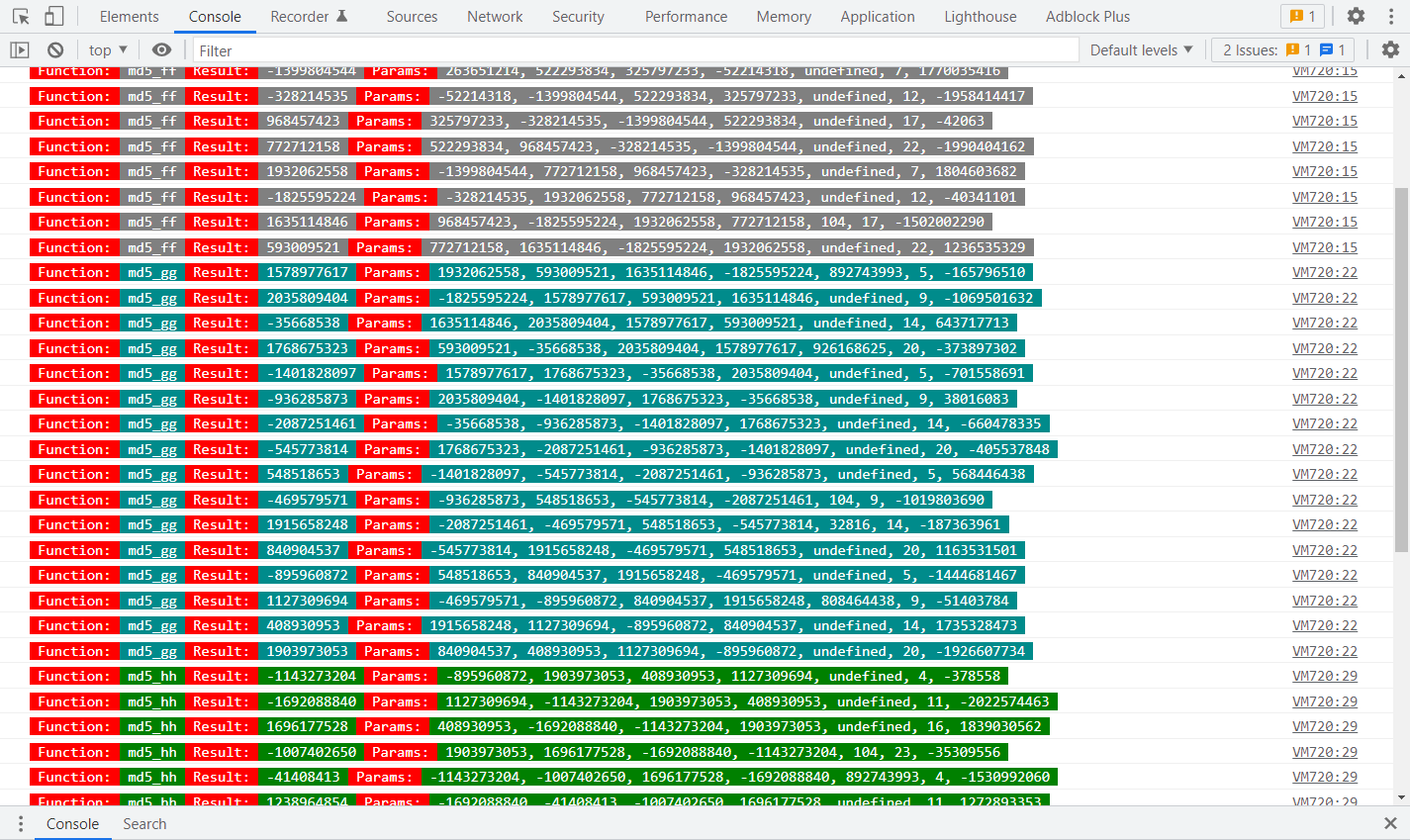
Hook 代码写得比较死板,熟悉 JS 的大佬可自己优化一下,注意注入代码的时机,清除定时器后,断点运行到 y__() 方法后再注入,然后取消断点,一直下一步,就可以在控制台看到输出的参数了,如下图所示:
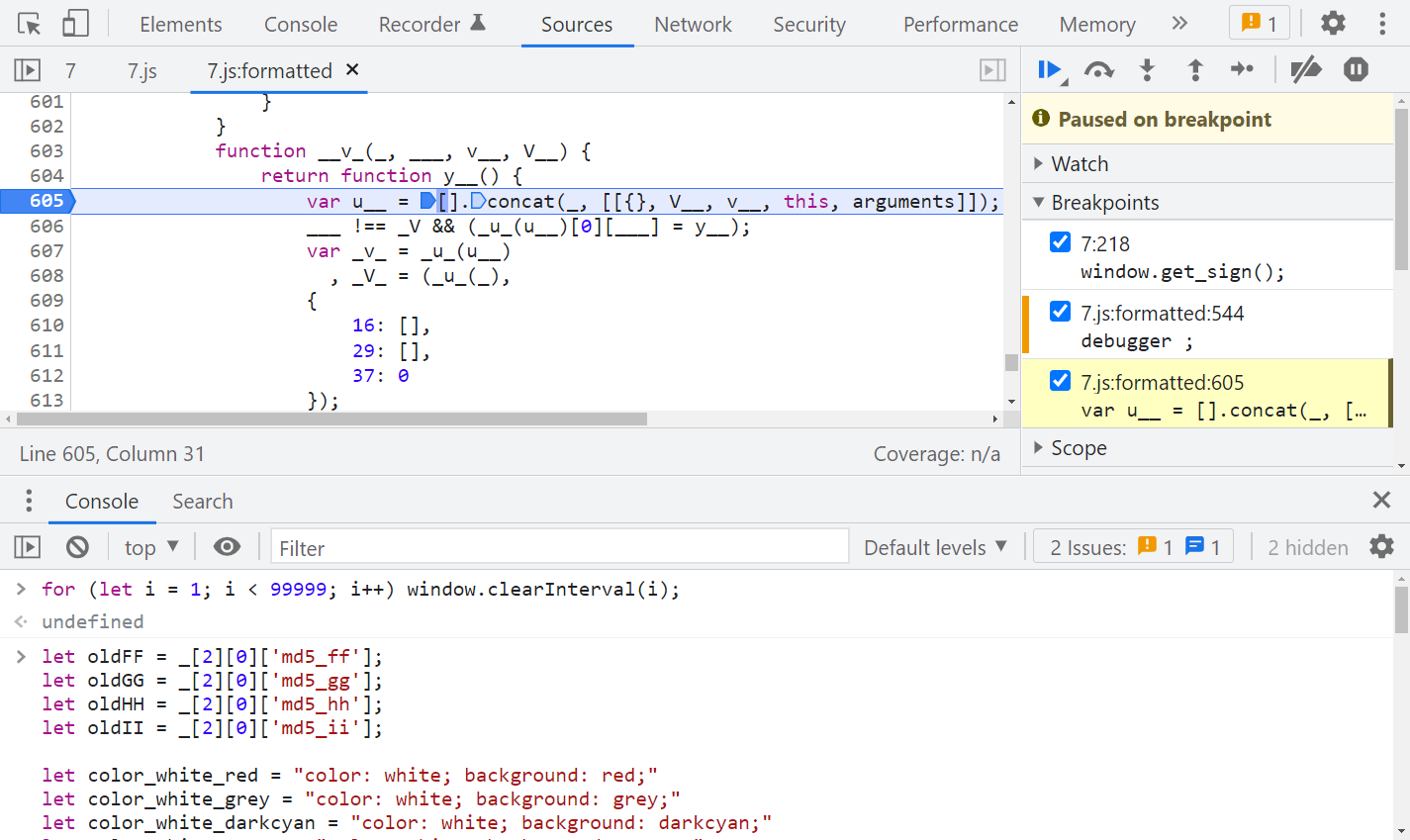
与默认参数进行对比,可以发现 md5_hh() 里有两个默认参数被修改了:
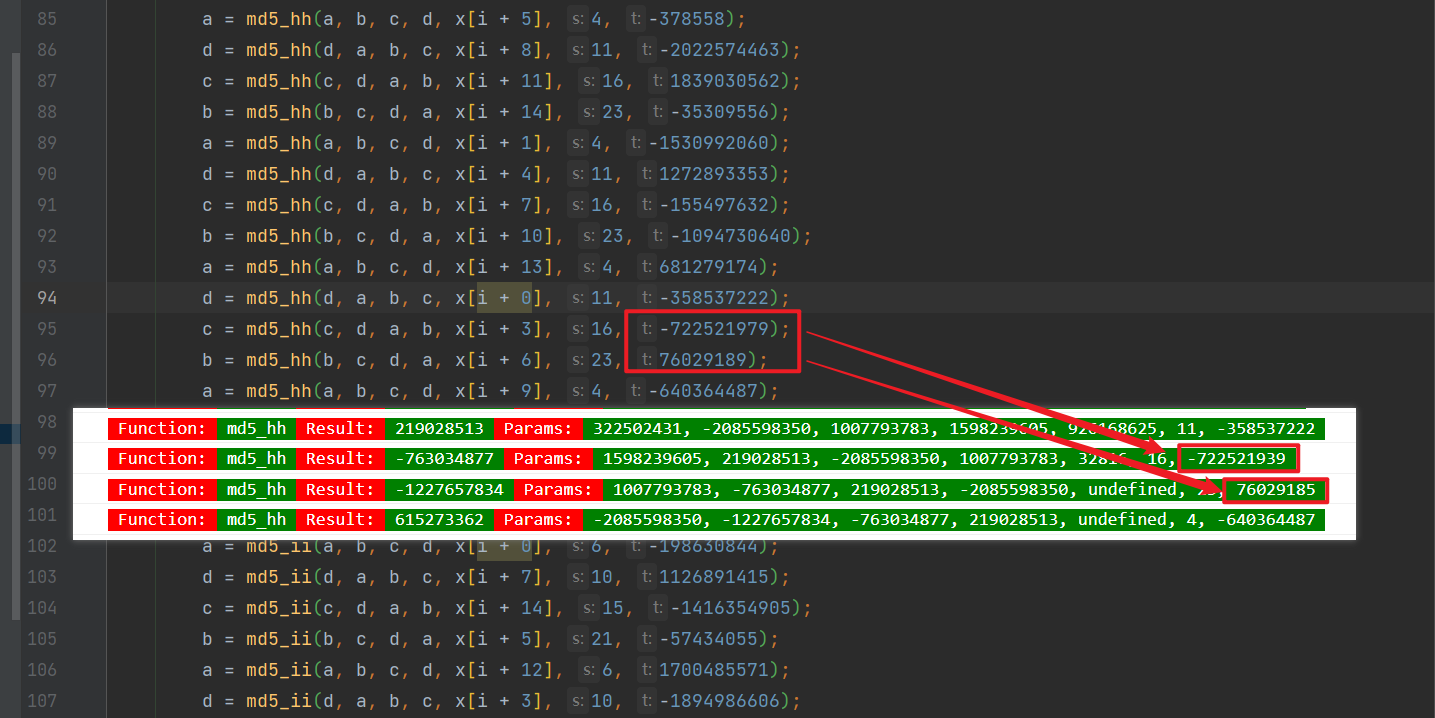
默认的 -722521979 改成了 -722521939、76029189 改成了 76029185,本地代码修改一下即可:
/* ==================================

# @Time    : 2021-12-23

# @Author  : 微信公众号:K哥爬虫

# @FileName: challenge_7.js

# @Software: PyCharm

# ================================== */

/*

 * A JavaScript implementation of the RSA Data Security, Inc. MD5 Message

 * Digest Algorithm, as defined in RFC 1321.

 * Version 2.2 Copyright (C) Paul Johnston 1999 - 2009

 * Other contributors: Greg Holt, Andrew Kepert, Ydnar, Lostinet

 * Distributed under the BSD License

 * See http://pajhome.org.uk/crypt/md5 for more info.

 */

/*

 * Configurable variables. You may need to tweak these to be compatible with

 * the server-side, but the defaults work in most cases.

 */

var hexcase = 0;   /* hex output format. 0 - lowercase; 1 - uppercase        */

var b64pad  = "";  /* base-64 pad character. "=" for strict RFC compliance   */

/*

 * These are the functions you'll usually want to call

 * They take string arguments and return either hex or base-64 encoded strings

 */

function hex_md5(s)    { return rstr2hex(rstr_md5(str2rstr_utf8(s))); }

function b64_md5(s)    { return rstr2b64(rstr_md5(str2rstr_utf8(s))); }

function any_md5(s, e) { return rstr2any(rstr_md5(str2rstr_utf8(s)), e); }

function hex_hmac_md5(k, d)

  { return rstr2hex(rstr_hmac_md5(str2rstr_utf8(k), str2rstr_utf8(d))); }

function b64_hmac_md5(k, d)

  { return rstr2b64(rstr_hmac_md5(str2rstr_utf8(k), str2rstr_utf8(d))); }

function any_hmac_md5(k, d, e)

  { return rstr2any(rstr_hmac_md5(str2rstr_utf8(k), str2rstr_utf8(d)), e); }

/*

 * Perform a simple self-test to see if the VM is working

 */

function md5_vm_test()

{

  return hex_md5("abc").toLowerCase() == "900150983cd24fb0d6963f7d28e17f72";

}

/*

 * Calculate the MD5 of a raw string

 */

function rstr_md5(s)

{

  return binl2rstr(binl_md5(rstr2binl(s), s.length * 8));

}

/*

 * Calculate the HMAC-MD5, of a key and some data (raw strings)

 */

function rstr_hmac_md5(key, data)

{

  var bkey = rstr2binl(key);

  if(bkey.length > 16) bkey = binl_md5(bkey, key.length * 8);

  var ipad = Array(16), opad = Array(16);

  for(var i = 0; i < 16; i++)

  {

    ipad[i] = bkey[i] ^ 0x36363636;

    opad[i] = bkey[i] ^ 0x5C5C5C5C;

  }

  var hash = binl_md5(ipad.concat(rstr2binl(data)), 512 + data.length * 8);

  return binl2rstr(binl_md5(opad.concat(hash), 512 + 128));

}

/*

 * Convert a raw string to a hex string

 */

function rstr2hex(input)

{

  try { hexcase } catch(e) { hexcase=0; }

  var hex_tab = hexcase ? "0123456789ABCDEF" : "0123456789abcdef";

  var output = "";

  var x;

  for(var i = 0; i < input.length; i++)

  {

    x = input.charCodeAt(i);

    output += hex_tab.charAt((x >>> 4) & 0x0F)

           +  hex_tab.charAt( x        & 0x0F);

  }

  return output;

}

/*

 * Convert a raw string to a base-64 string

 */

function rstr2b64(input)

{

  try { b64pad } catch(e) { b64pad=''; }

  var tab = "ABCDEFGHIJKLMNOPQRSTUVWXYZabcdefghijklmnopqrstuvwxyz0123456789+/";

  var output = "";

  var len = input.length;

  for(var i = 0; i < len; i += 3)

  {

    var triplet = (input.charCodeAt(i) << 16)

                | (i + 1 < len ? input.charCodeAt(i+1) << 8 : 0)

                | (i + 2 < len ? input.charCodeAt(i+2)      : 0);

    for(var j = 0; j < 4; j++)

    {

      if(i * 8 + j * 6 > input.length * 8) output += b64pad;

      else output += tab.charAt((triplet >>> 6*(3-j)) & 0x3F);

    }

  }

  return output;

}

/*

 * Convert a raw string to an arbitrary string encoding

 */

function rstr2any(input, encoding)

{

  var divisor = encoding.length;

  var i, j, q, x, quotient;

  /* Convert to an array of 16-bit big-endian values, forming the dividend */

  var dividend = Array(Math.ceil(input.length / 2));

  for(i = 0; i < dividend.length; i++)

  {

    dividend[i] = (input.charCodeAt(i * 2) << 8) | input.charCodeAt(i * 2 + 1);

  }

  /*

   * Repeatedly perform a long division. The binary array forms the dividend,

   * the length of the encoding is the divisor. Once computed, the quotient

   * forms the dividend for the next step. All remainders are stored for later

   * use.

   */

  var full_length = Math.ceil(input.length * 8 /

                                    (Math.log(encoding.length) / Math.log(2)));

  var remainders = Array(full_length);

  for(j = 0; j < full_length; j++)

  {

    quotient = Array();

    x = 0;

    for(i = 0; i < dividend.length; i++)

    {

      x = (x << 16) + dividend[i];

      q = Math.floor(x / divisor);

      x -= q * divisor;

      if(quotient.length > 0 || q > 0)

        quotient[quotient.length] = q;

    }

    remainders[j] = x;

    dividend = quotient;

  }

  /* Convert the remainders to the output string */

  var output = "";

  for(i = remainders.length - 1; i >= 0; i--)

    output += encoding.charAt(remainders[i]);

  return output;

}

/*

 * Encode a string as utf-8.

 * For efficiency, this assumes the input is valid utf-16.

 */

function str2rstr_utf8(input)

{

  var output = "";

  var i = -1;

  var x, y;

  while(++i < input.length)

  {

    /* Decode utf-16 surrogate pairs */

    x = input.charCodeAt(i);

    y = i + 1 < input.length ? input.charCodeAt(i + 1) : 0;

    if(0xD800 <= x && x <= 0xDBFF && 0xDC00 <= y && y <= 0xDFFF)

    {

      x = 0x10000 + ((x & 0x03FF) << 10) + (y & 0x03FF);

      i++;

    }

    /* Encode output as utf-8 */

    if(x <= 0x7F)

      output += String.fromCharCode(x);

    else if(x <= 0x7FF)

      output += String.fromCharCode(0xC0 | ((x >>> 6 ) & 0x1F),

                                    0x80 | ( x         & 0x3F));

    else if(x <= 0xFFFF)

      output += String.fromCharCode(0xE0 | ((x >>> 12) & 0x0F),

                                    0x80 | ((x >>> 6 ) & 0x3F),

                                    0x80 | ( x         & 0x3F));

    else if(x <= 0x1FFFFF)

      output += String.fromCharCode(0xF0 | ((x >>> 18) & 0x07),

                                    0x80 | ((x >>> 12) & 0x3F),

                                    0x80 | ((x >>> 6 ) & 0x3F),

                                    0x80 | ( x         & 0x3F));

  }

  return output;

}

/*

 * Encode a string as utf-16

 */

function str2rstr_utf16le(input)

{

  var output = "";

  for(var i = 0; i < input.length; i++)

    output += String.fromCharCode( input.charCodeAt(i)        & 0xFF,

                                  (input.charCodeAt(i) >>> 8) & 0xFF);

  return output;

}

function str2rstr_utf16be(input)

{

  var output = "";

  for(var i = 0; i < input.length; i++)

    output += String.fromCharCode((input.charCodeAt(i) >>> 8) & 0xFF,

                                   input.charCodeAt(i)        & 0xFF);

  return output;

}

/*

 * Convert a raw string to an array of little-endian words

 * Characters >255 have their high-byte silently ignored.

 */

function rstr2binl(input)

{

  var output = Array(input.length >> 2);

  for(var i = 0; i < output.length; i++)

    output[i] = 0;

  for(var i = 0; i < input.length * 8; i += 8)

    output[i>>5] |= (input.charCodeAt(i / 8) & 0xFF) << (i%32);

  return output;

}

/*

 * Convert an array of little-endian words to a string

 */

function binl2rstr(input)

{

  var output = "";

  for(var i = 0; i < input.length * 32; i += 8)

    output += String.fromCharCode((input[i>>5] >>> (i % 32)) & 0xFF);

  return output;

}

/*

 * Calculate the MD5 of an array of little-endian words, and a bit length.

 */

function binl_md5(x, len)

{

  /* append padding */

  x[len >> 5] |= 0x80 << ((len) % 32);

  x[(((len + 64) >>> 9) << 4) + 14] = len;

  var a =  1732584193;

  var b = -271733879;

  var c = -1732584194;

  var d =  271733878;

  for(var i = 0; i < x.length; i += 16)

  {

    var olda = a;

    var oldb = b;

    var oldc = c;

    var oldd = d;

    a = md5_ff(a, b, c, d, x[i+ 0], 7 , -680876936);

    d = md5_ff(d, a, b, c, x[i+ 1], 12, -389564586);

    c = md5_ff(c, d, a, b, x[i+ 2], 17,  606105819);

    b = md5_ff(b, c, d, a, x[i+ 3], 22, -1044525330);

    a = md5_ff(a, b, c, d, x[i+ 4], 7 , -176418897);

    d = md5_ff(d, a, b, c, x[i+ 5], 12,  1200080426);

    c = md5_ff(c, d, a, b, x[i+ 6], 17, -1473231341);

    b = md5_ff(b, c, d, a, x[i+ 7], 22, -45705983);

    a = md5_ff(a, b, c, d, x[i+ 8], 7 ,  1770035416);

    d = md5_ff(d, a, b, c, x[i+ 9], 12, -1958414417);

    c = md5_ff(c, d, a, b, x[i+10], 17, -42063);

    b = md5_ff(b, c, d, a, x[i+11], 22, -1990404162);

    a = md5_ff(a, b, c, d, x[i+12], 7 ,  1804603682);

    d = md5_ff(d, a, b, c, x[i+13], 12, -40341101);

    c = md5_ff(c, d, a, b, x[i+14], 17, -1502002290);

    b = md5_ff(b, c, d, a, x[i+15], 22,  1236535329);

    a = md5_gg(a, b, c, d, x[i+ 1], 5 , -165796510);

    d = md5_gg(d, a, b, c, x[i+ 6], 9 , -1069501632);

    c = md5_gg(c, d, a, b, x[i+11], 14,  643717713);

    b = md5_gg(b, c, d, a, x[i+ 0], 20, -373897302);

    a = md5_gg(a, b, c, d, x[i+ 5], 5 , -701558691);

    d = md5_gg(d, a, b, c, x[i+10], 9 ,  38016083);

    c = md5_gg(c, d, a, b, x[i+15], 14, -660478335);

    b = md5_gg(b, c, d, a, x[i+ 4], 20, -405537848);

    a = md5_gg(a, b, c, d, x[i+ 9], 5 ,  568446438);

    d = md5_gg(d, a, b, c, x[i+14], 9 , -1019803690);

    c = md5_gg(c, d, a, b, x[i+ 3], 14, -187363961);

    b = md5_gg(b, c, d, a, x[i+ 8], 20,  1163531501);

    a = md5_gg(a, b, c, d, x[i+13], 5 , -1444681467);

    d = md5_gg(d, a, b, c, x[i+ 2], 9 , -51403784);

    c = md5_gg(c, d, a, b, x[i+ 7], 14,  1735328473);

    b = md5_gg(b, c, d, a, x[i+12], 20, -1926607734);

    a = md5_hh(a, b, c, d, x[i+ 5], 4 , -378558);

    d = md5_hh(d, a, b, c, x[i+ 8], 11, -2022574463);

    c = md5_hh(c, d, a, b, x[i+11], 16,  1839030562);

    b = md5_hh(b, c, d, a, x[i+14], 23, -35309556);

    a = md5_hh(a, b, c, d, x[i+ 1], 4 , -1530992060);

    d = md5_hh(d, a, b, c, x[i+ 4], 11,  1272893353);

    c = md5_hh(c, d, a, b, x[i+ 7], 16, -155497632);

    b = md5_hh(b, c, d, a, x[i+10], 23, -1094730640);

    a = md5_hh(a, b, c, d, x[i+13], 4 ,  681279174);

    d = md5_hh(d, a, b, c, x[i+ 0], 11, -358537222);

    // 注释掉的是默认值

    // c = md5_hh(c, d, a, b, x[i+ 3], 16, -722521979);

    c = md5_hh(c, d, a, b, x[i+ 3], 16, -722521939);

    // b = md5_hh(b, c, d, a, x[i+ 6], 23,  76029189);

    b = md5_hh(b, c, d, a, x[i+ 6], 23,  76029185);

    a = md5_hh(a, b, c, d, x[i+ 9], 4 , -640364487);

    d = md5_hh(d, a, b, c, x[i+12], 11, -421815835);

    c = md5_hh(c, d, a, b, x[i+15], 16,  530742520);

    b = md5_hh(b, c, d, a, x[i+ 2], 23, -995338651);

    a = md5_ii(a, b, c, d, x[i+ 0], 6 , -198630844);

    d = md5_ii(d, a, b, c, x[i+ 7], 10,  1126891415);

    c = md5_ii(c, d, a, b, x[i+14], 15, -1416354905);

    b = md5_ii(b, c, d, a, x[i+ 5], 21, -57434055);

    a = md5_ii(a, b, c, d, x[i+12], 6 ,  1700485571);

    d = md5_ii(d, a, b, c, x[i+ 3], 10, -1894986606);

    c = md5_ii(c, d, a, b, x[i+10], 15, -1051523);

    b = md5_ii(b, c, d, a, x[i+ 1], 21, -2054922799);

    a = md5_ii(a, b, c, d, x[i+ 8], 6 ,  1873313359);

    d = md5_ii(d, a, b, c, x[i+15], 10, -30611744);

    c = md5_ii(c, d, a, b, x[i+ 6], 15, -1560198380);

    b = md5_ii(b, c, d, a, x[i+13], 21,  1309151649);

    a = md5_ii(a, b, c, d, x[i+ 4], 6 , -145523070);

    d = md5_ii(d, a, b, c, x[i+11], 10, -1120210379);

    c = md5_ii(c, d, a, b, x[i+ 2], 15,  718787259);

    b = md5_ii(b, c, d, a, x[i+ 9], 21, -343485551);

    a = safe_add(a, olda);

    b = safe_add(b, oldb);

    c = safe_add(c, oldc);

    d = safe_add(d, oldd);

  }

  return Array(a, b, c, d);

}

/*

 * These functions implement the four basic operations the algorithm uses.

 */

function md5_cmn(q, a, b, x, s, t)

{

  return safe_add(bit_rol(safe_add(safe_add(a, q), safe_add(x, t)), s),b);

}

function md5_ff(a, b, c, d, x, s, t)

{

  return md5_cmn((b & c) | ((~b) & d), a, b, x, s, t);

}

function md5_gg(a, b, c, d, x, s, t)

{

  return md5_cmn((b & d) | (c & (~d)), a, b, x, s, t);

}

function md5_hh(a, b, c, d, x, s, t)

{

  return md5_cmn(b ^ c ^ d, a, b, x, s, t);

}

function md5_ii(a, b, c, d, x, s, t)

{

  return md5_cmn(c ^ (b | (~d)), a, b, x, s, t);

}

/*

 * Add integers, wrapping at 2^32. This uses 16-bit operations internally

 * to work around bugs in some JS interpreters.

 */

function safe_add(x, y)

{

  var lsw = (x & 0xFFFF) + (y & 0xFFFF);

  var msw = (x >> 16) + (y >> 16) + (lsw >> 16);

  return (msw << 16) | (lsw & 0xFFFF);

}

/*

 * Bitwise rotate a 32-bit number to the left.

 */

function bit_rol(num, cnt)

{

  return (num << cnt) | (num >>> (32 - cnt));

}

function getSignature() {

    return hex_md5(Date.parse(Date()).toString())

}

console.log(getSignature())
Python 调用代码:
# ==================================

# --*-- coding: utf-8 --*--

# @Time    : 2021-12-23

# @Author  : 微信公众号:K哥爬虫

# @FileName: challenge_7.py

# @Software: PyCharm

# ==================================

import time

import execjs

import requests

challenge_api = "http://spider.wangluozhe.com/challenge/api/7"

headers = {

    "Cookie": "Cookie 替换成你的",

    "Host": "spider.wangluozhe.com",

    "Origin": "http://spider.wangluozhe.com",

    "Referer": "http://spider.wangluozhe.com/challenge/7",

    "User-Agent": "Mozilla/5.0 (Windows NT 10.0; Win64; x64) AppleWebKit/537.36 (KHTML, like Gecko) Chrome/96.0.4664.45 Safari/537.36",

    "X-Requested-With": "XMLHttpRequest"

}

def get_signature():

    now = str(int(time.time())) + "000"

    with open('challenge_7.js', 'r', encoding='utf-8') as f:

        wlz_js = execjs.compile(f.read())

    # signature = wlz_js.call("getSignature")

    signature = wlz_js.call("hex_md5", now)

    print("signature: ", signature)

    return signature

def main():

    result = 0

    for page in range(1, 101):

        data = {

            "page": page,

            "count": 10,

            "_signature": get_signature()

        }

        response = requests.post(url=challenge_api, headers=headers, data=data).json()

        print(response)

        for d in response["data"]:

            result += d["value"]

    print("结果为: ", result)

if __name__ == '__main__':

    main()
这里还有一点小细节,如果是 Python 生成时间戳传入 JS 的 hex_md5 方法的话,要保证时间戳的最后三位为0,不然校验通不过,通常的写法是 str(int(time.time() * 1000)),这里要改一下:str(int(time.time())) + "000",不用 Python 的话,也可以在 JS 里写个方法直接返回 hex_md5(Date.parse(Date()).toString()) 也行。
还有一个问题就是如果你找的 MD5 代码不规范,准确来说是和题目使用的 MD5 代码不太一样的话,有可能本地要改的地方就不止这两处了,所以尽量找一个方法名都一样的JS,能省不少事儿。
日志断点 / 插桩调试
除了 Hook 以外,我们还可以通过插桩调试的方式,将整个生成 _signature 的流程、涉及到的参数、生成的值,都通过日志的形式打印出来,逆向分析其逻辑。PS:插桩,即日志断点,鼠标右键选择 Add logpoint 即可添加一个日志断点,相当于 console.log(),此功能是 Chrome 73 版本新增的。
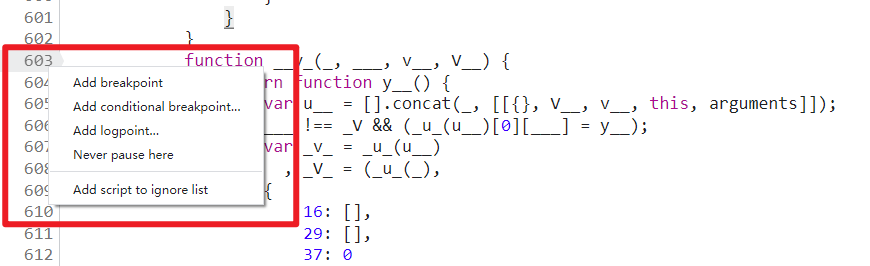
- Add breakpoint:添加普通断点;
- Add conditional breakpoint:添加条件断点,满足条件才断下;
- Add logpoint:添加日志断点;
- Never pause here:永不在此处断下;
- Add script to ignore list:网站的部分 JS,比如
jquery.min.js之类的库文件,我们单步调试的时候并不想进入到该文件中,那么可以将此类文件右键添加忽略掉。
关键的日志断点有以下三处:
- 第 605 行,
arguments为当前传入函数的参数值; - 第 141 行,
___.join(vV_)为当前调用的方法名称,也会输出方法中的参数名称; - 第 591 行,
__V(_, ___(u_), 0, 0, _U__).apply(void 0, y__(v___))为当前方法执行完毕的结果。
肯定有人会疑惑,如何知道应该在这三个地方下日志断点呢?答案是只能自己单步、多步调试,找规律、仔细观察,就像交流群里的小小白大佬说的一样,屁股坐烂就行了。当然也不是只有这三个地方能输出对应的信息,有可能其他地方也可以,这就要看你自己调试了。
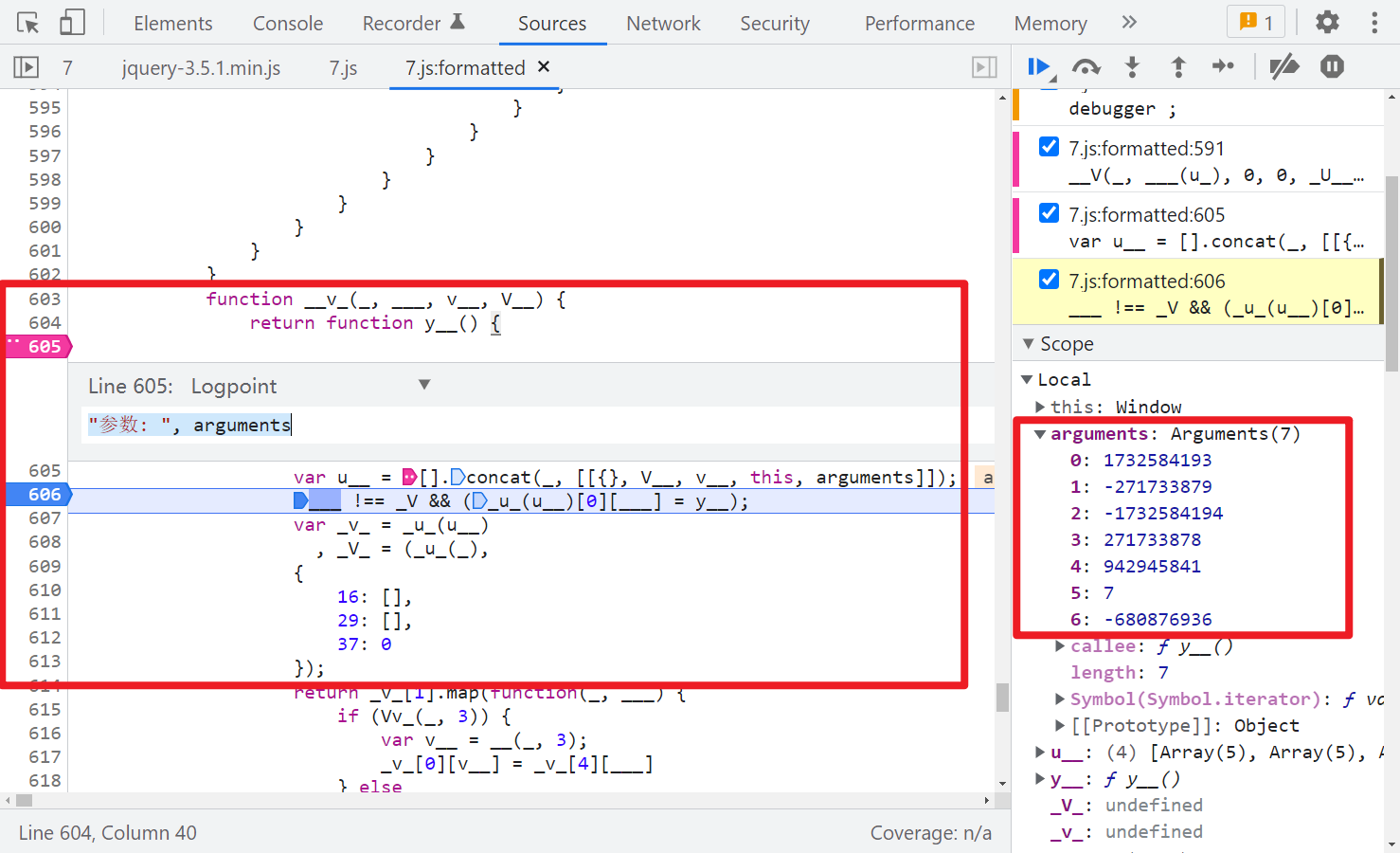
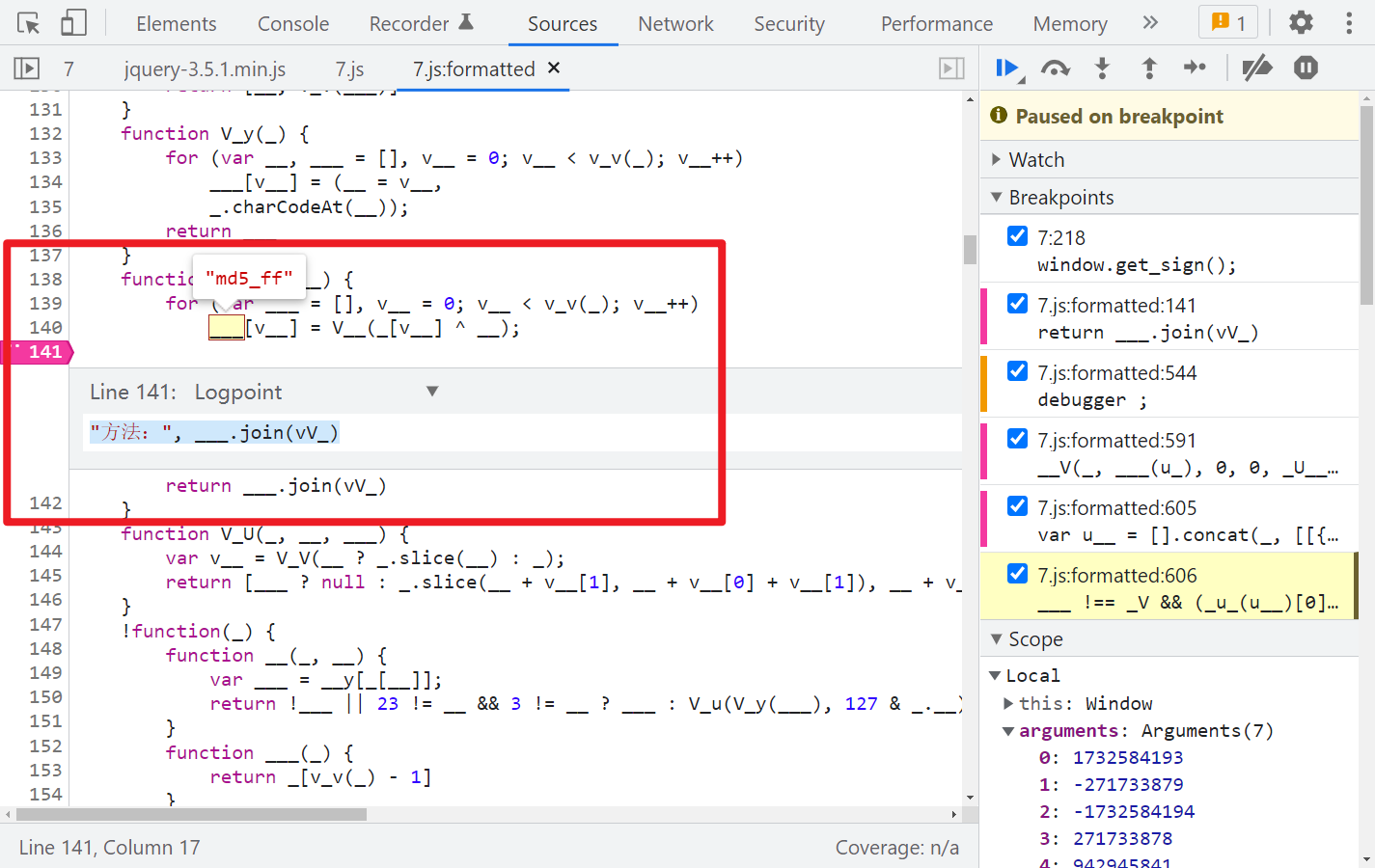
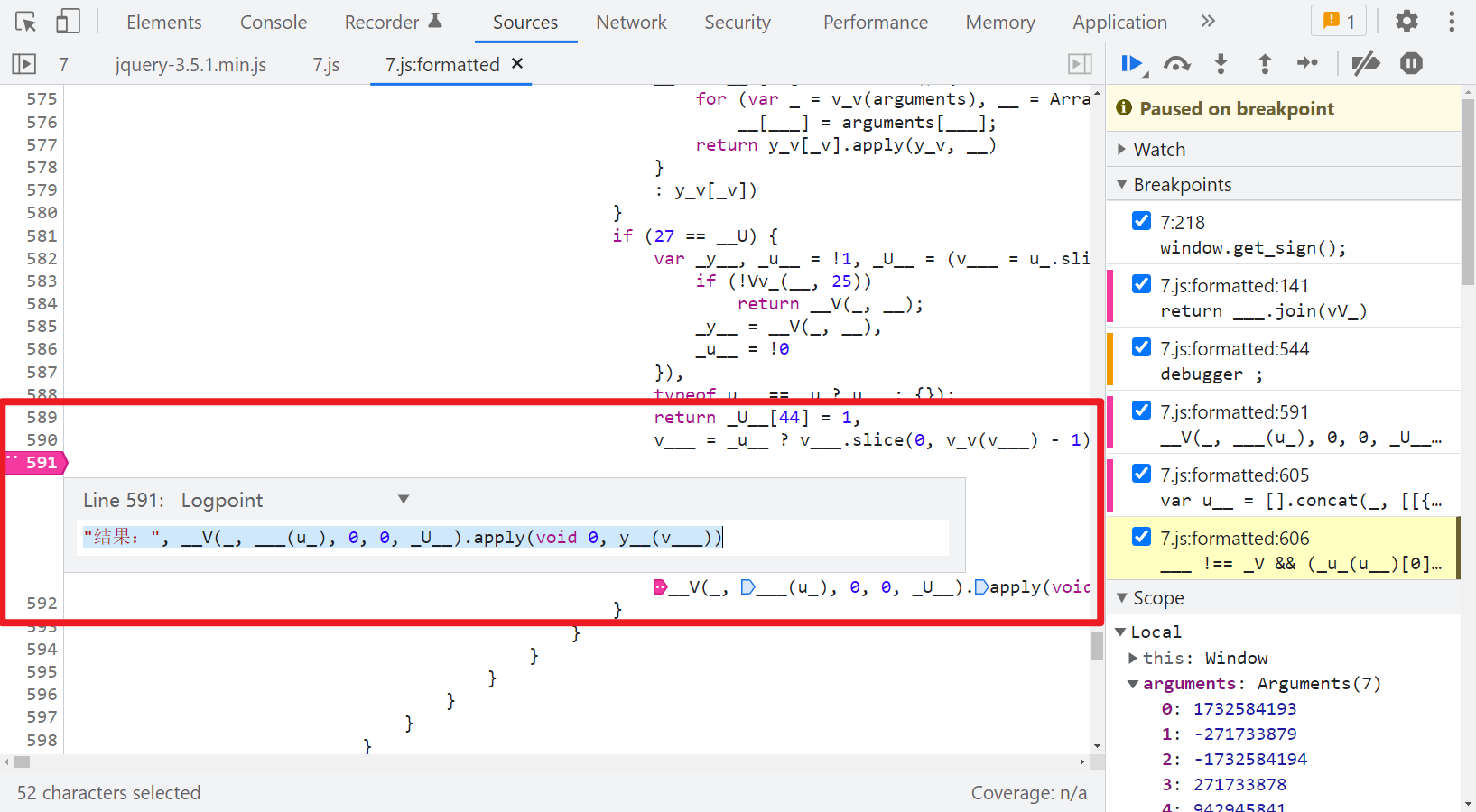
除了这三个地方的日志断点以外,建议还可以在第 606 行打个断点,这样每次执行一个方法就断下,本地就可以跟着同步调试,挨个对比传入的参数和得到的结果,不至于一下子输出的东西太多,不方便查找。
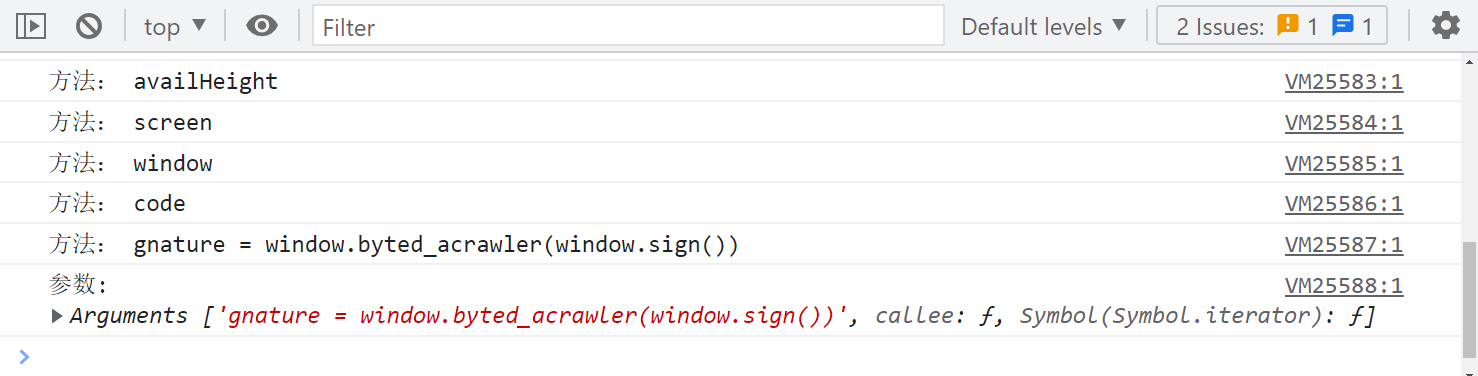
第一步,gnature = window.byted_acrawler(window.sign()):
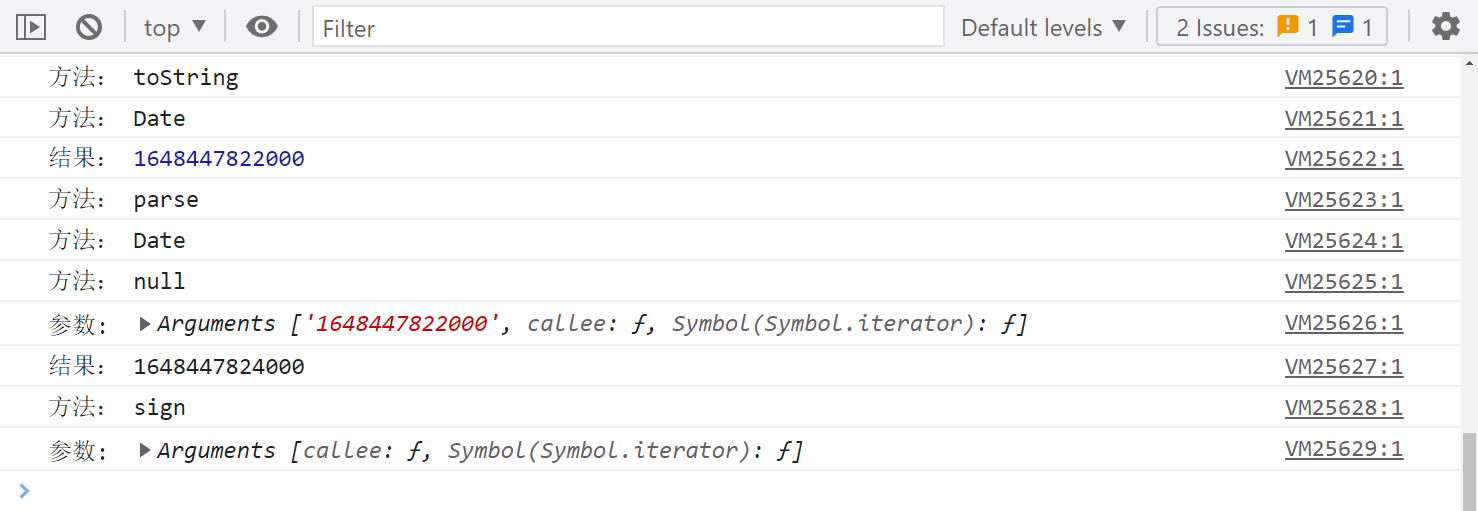
下一步,sign 方法,取时间戳:
下一步,调用 hex_md5() 方法:
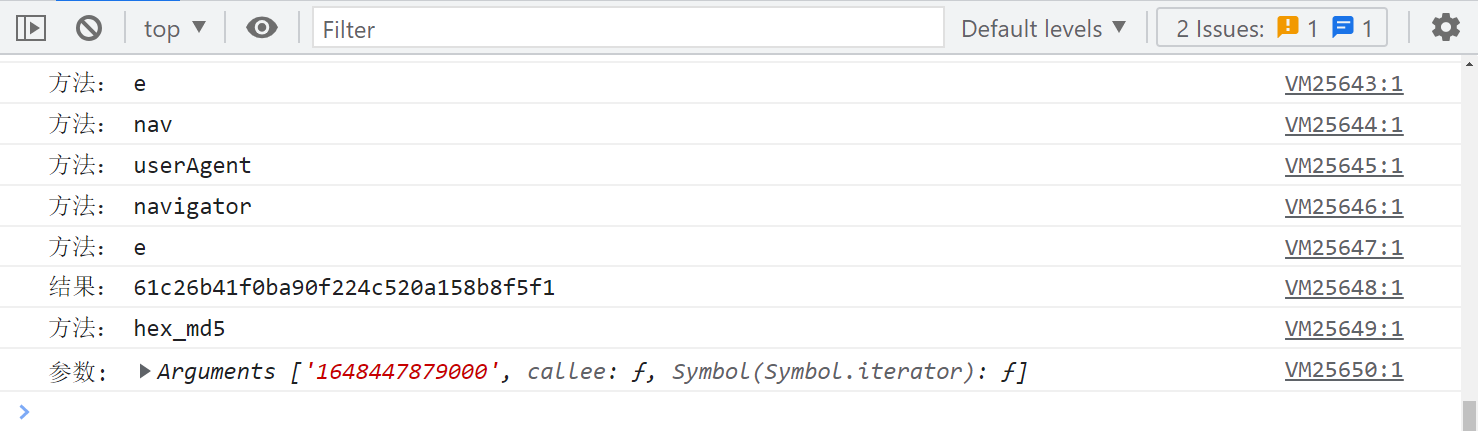
从这里就可以开始本地同步调试了,本地 MD5 下断点调试,可以看到得到的值不一样:
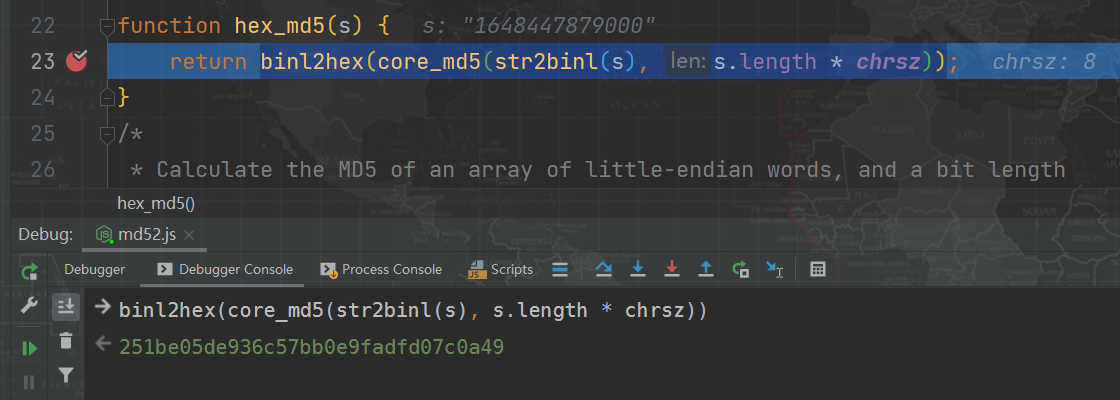
下一步,调用 str2binl() 方法,和本地得到的值是一样的:

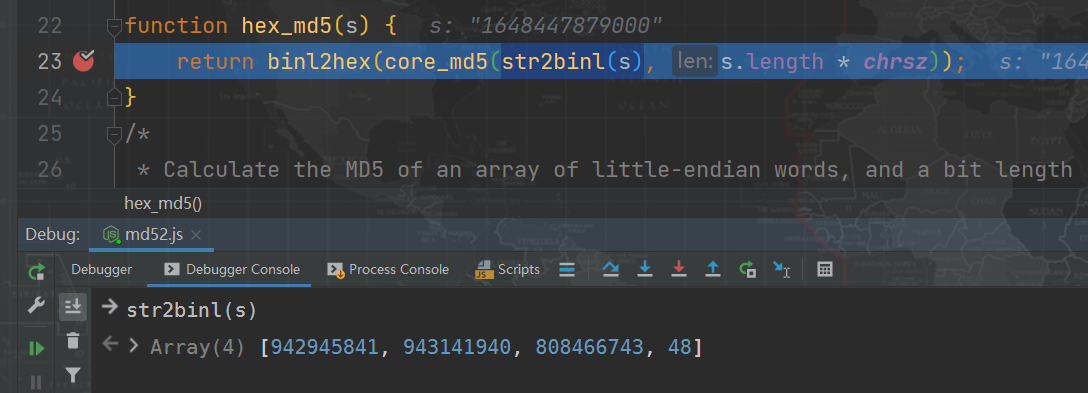
下一步,调用 core_md5() 方法,得到的值和本地就不一样了,这里大致可以确定此方法内部与标准算法有差别了:

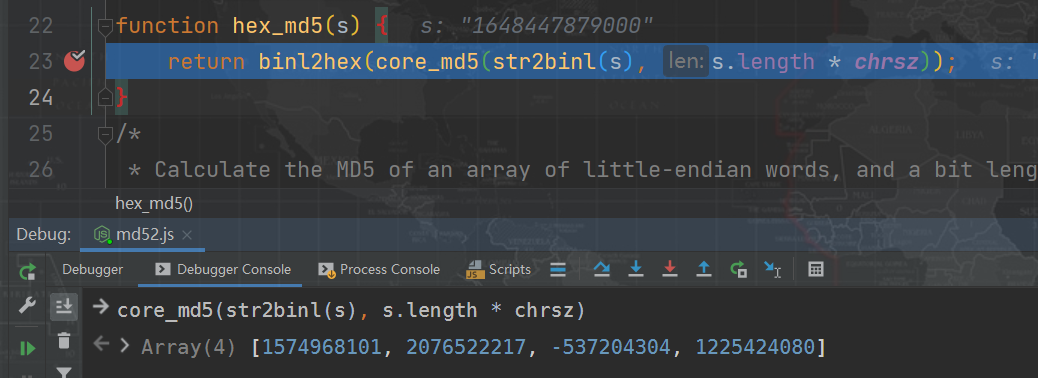
下一步,调用 md5_ff() 方法,得到的值是一样的:

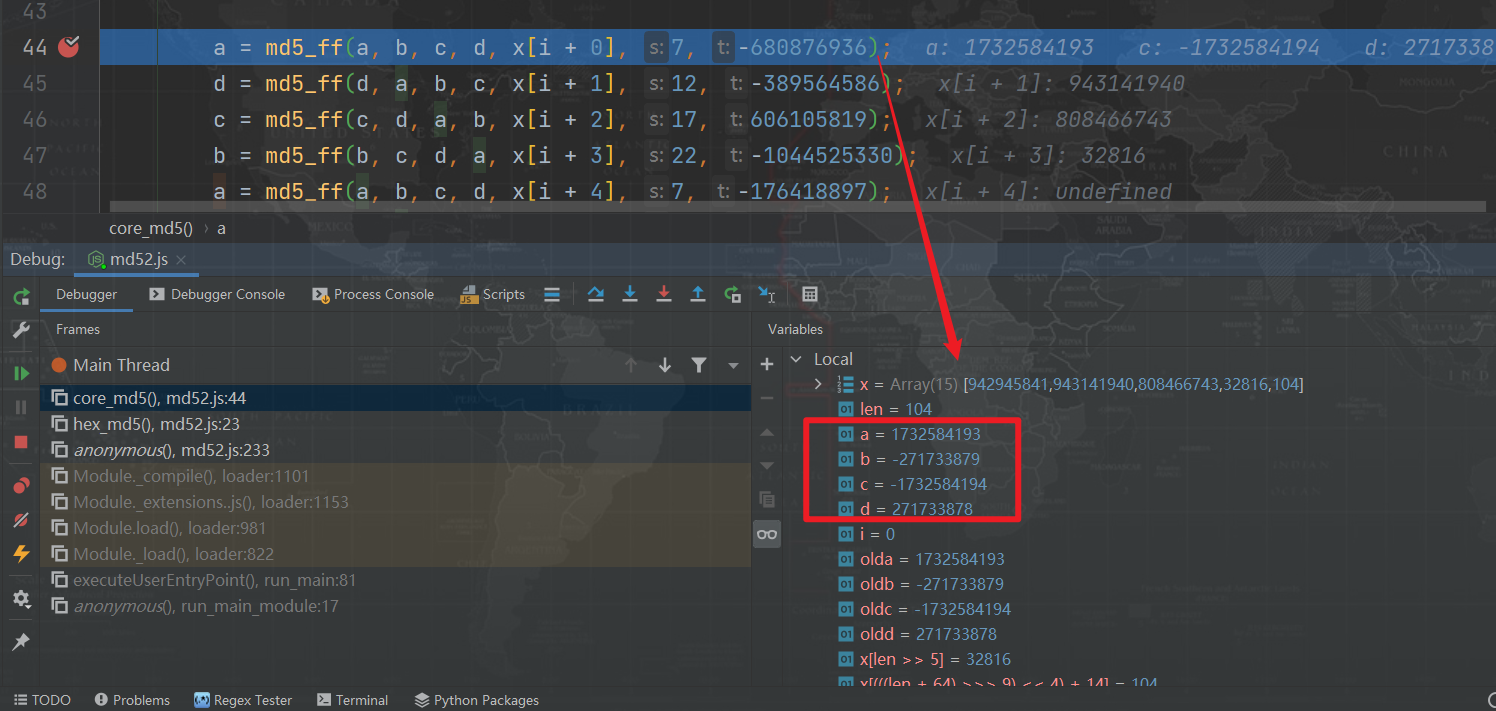
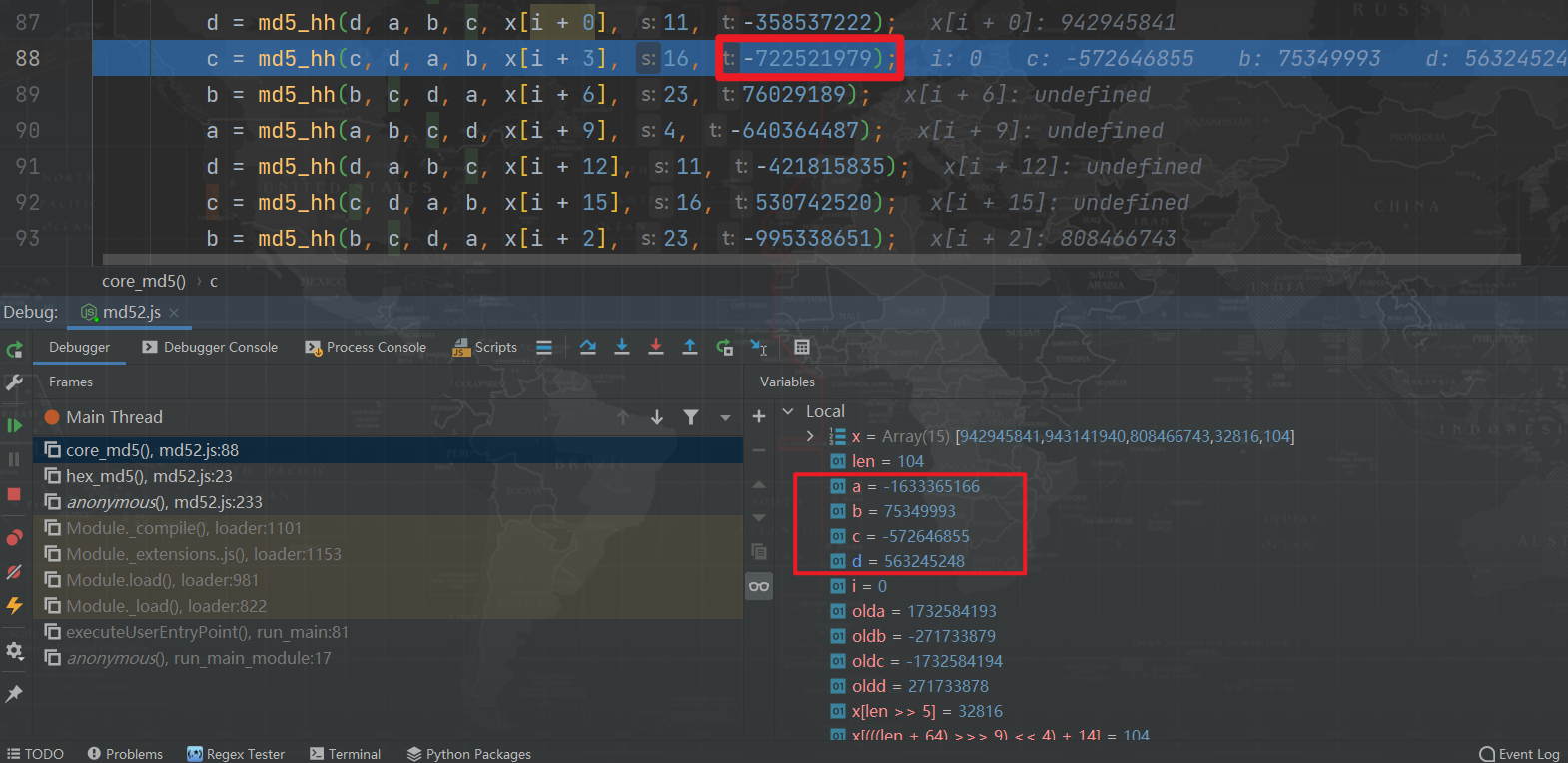
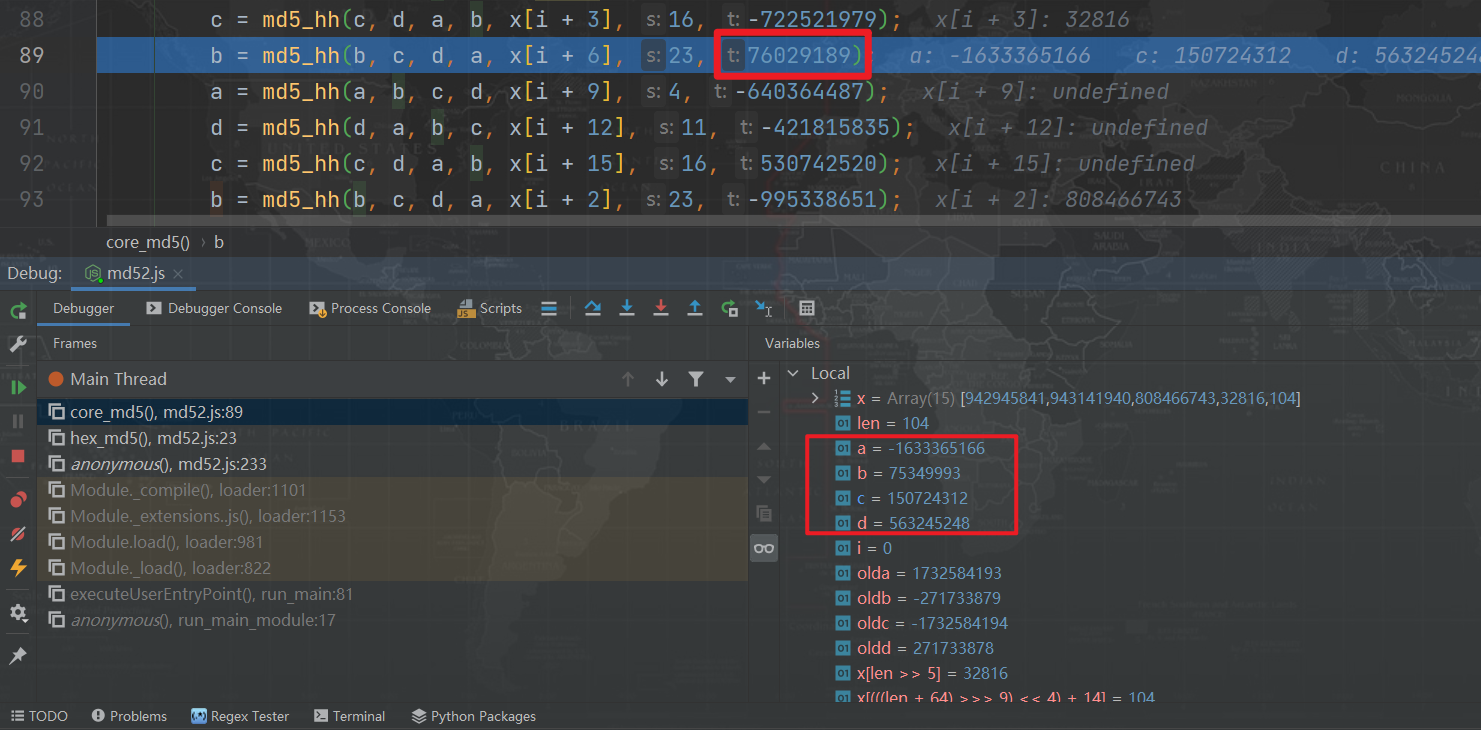
以此类推,最终会找到两个不一样的地方,即 md5_hh() 两个默认参数被修改了。
-722521979 被改成了 -722521939:

76029189 被改成了 76029185:

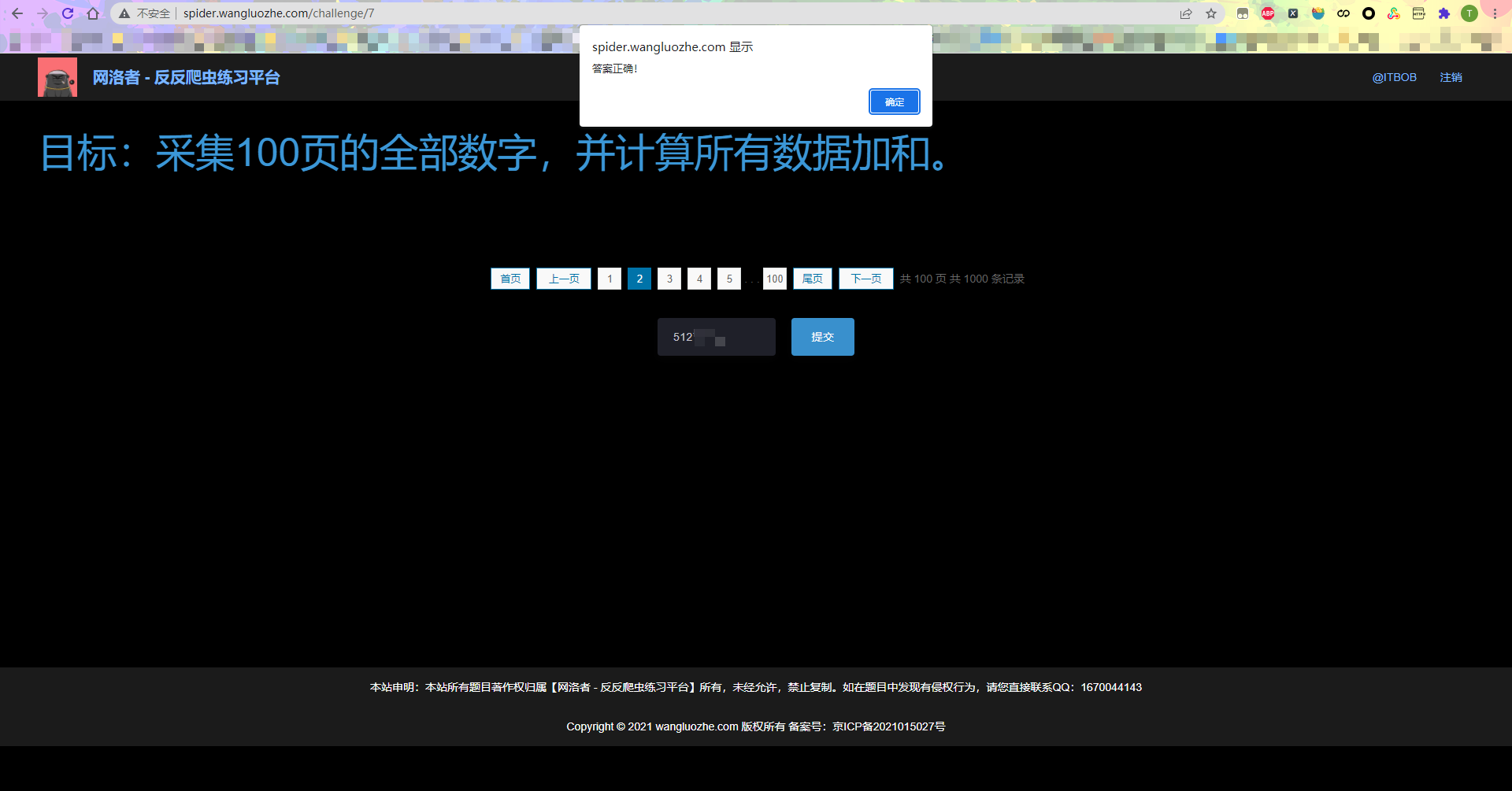
最终提交结果,验证成功:
【JS 逆向百例】网洛者反爬练习平台第七题:JSVMPZL 初体验的更多相关文章
- 通过JS逆向ProtoBuf 反反爬思路分享
前言 本文意在记录,在爬虫过程中,我首次遇到Protobuf时的一系列问题和解决问题的思路. 文章编写遵循当时工作的思路,优点:非常详细,缺点:文字冗长,描述不准确 protobuf用在前后端传输,在 ...
- 我去!爬虫遇到JS逆向AES加密反爬,哭了
今天准备爬取网页时,遇到『JS逆向AES加密』反爬.比如这样的: 在发送请求获取数据时,需要用到参数params和encSecKey,但是这两个参数经过JS逆向AES加密而来. 既然遇到了这个情况,那 ...
- Python之手把手教你用JS逆向爬取网易云40万+评论并用stylecloud炫酷词云进行情感分析
本文借鉴了@平胸小仙女的知乎回复 https://www.zhihu.com/question/36081767 写在前面: 文章有点长,操作有点复杂,需要代码的直接去文末即可.想要学习的需要有点耐心 ...
- Python反爬:利用js逆向和woff文件爬取猫眼电影评分信息
首先:看看运行结果效果如何! 1. 实现思路 小编基本实现思路如下: 利用js逆向模拟请求得到电影评分的页面(就是猫眼电影的评分信息并不是我们上述看到的那个页面上,应该它的实现是在一个页面上插入另外一 ...
- 【算法】C语言趣味程序设计编程百例精解
C语言趣味程序设计编程百例精解 C/C++语言经典.实用.趣味程序设计编程百例精解(1) https://wenku.baidu.com/view/b9f683c08bd63186bcebbc3c. ...
- 上百例Silverlight网站及演示汇总,供友参考
毁灭2012 博客园 首页 新闻 新随笔 联系 管理 订阅 随笔- 125 文章- 0 评论- 446 上百例Silverlight网站及演示汇总,供友参考 今天我将发现的Silverlig ...
- Java使用正则表达式取网页中的一段内容(以取Js方法为例)
关于正则表达式: 表1.常用的元字符 代码 说明 . 匹配除换行符以外的任意字符 \w 匹配字母或数字或下划线或汉字 \s 匹配任意的空白符 \d 匹配数字 \b 匹配单词的开始或结束 ^ 匹配字符串 ...
- 网络爬虫之记一次js逆向解密经历
1 引言 数月前写过某网站(请原谅我的掩耳盗铃)的爬虫,这两天需要重新采集一次,用的是scrapy-redis框架,本以为二次爬取可以轻松完成的,可没想到爬虫启动没几秒,出现了大堆的重试提示,心里顿时 ...
- 爬虫05 /js加密/js逆向、常用抓包工具、移动端数据爬取
爬虫05 /js加密/js逆向.常用抓包工具.移动端数据爬取 目录 爬虫05 /js加密/js逆向.常用抓包工具.移动端数据爬取 1. js加密.js逆向:案例1 2. js加密.js逆向:案例2 3 ...
- 兄弟,你爬虫基础这么好,需要研究js逆向了,一起吧(有完整JS代码)
这几天的确有空了,看更新多快,专门研究了一下几个网站登录中密码加密方法,比起滑块验证码来说都相对简单,适合新手js逆向入门,大家可以自己试一下,试不出来了再参考我的js代码.篇幅有限,完整的js代码在 ...
随机推荐
- 常用的echo和cat,这次让我折在了特殊字符丢失问题上
摘要:用过linux的都知道,echo和cat是我们常用的展示内容和写入内容的方式. 本文分享自华为云社区<echo和cat,重定向到文件时,解决特殊字符丢失问题>,作者: 大金(内蒙的) ...
- 如何精准预测天气?火山引擎ByteHouse与大地量子这么做
更多技术交流.求职机会,欢迎关注字节跳动数据平台微信公众号,回复[1]进入官方交流群 伴随着气象技术的发展以及城市气象设施的完善,气象监测服务能力在不断提高,实现短期甚至中长期的气象预测成为可能. ...
- Nginx在windows下常用命令
cmd 进入Nginx解压目录 执行以下命令 start nginx : 启动nginx服务 nginx -s reload :修改配置后重新加载生效 nginx -s reopen :重新打开日志文 ...
- Jenkins 多分支流水线(SVN)
实际应用过程中,一般多分支流水线的方式用得比较多一些, master 对应 生成环境 develop 对应 测试环境, 将不同分支的代码构建到不同的环境中 添加 Jenkinsfile 文件 Jenk ...
- Python 批量制作缩略图
本来想网上下个软件处理下的,给我加了水印,不然就让我升会员,程序员都是薅人家羊毛,哪能被人家薅羊毛 1. 安装组件 (指定国内源,速度快些),带上版本号,最新版本会卡在 XXX(PEP 517) 上. ...
- go对mongodb的聚合查询
mongodb的环境搭建参考前面一篇通过mongo-driver使用说明 GO 包管理机制 BSON 介绍 在Go中使用BSON对象构建操作命令 在我们发送查询给数据库之前, 很重要的一点是,理解Go ...
- Go--命名规则
在Go语言中,项目名和文件名的命名规则有一些建议和惯例.以下是一些常见的规则和最佳实践: 项目名: 项目名应该简短.有意义,并能够清晰地表达项目的目的或功能. 项目名通常使用小写字母,使用连字符或下划 ...
- JSP开发模式(四种模式)
原作者为 RioTian@cnblogs, 本作品采用 CC 4.0 BY 进行许可,转载请注明出处. 学习编程开发少不了学习开发模式, JSP在创立至今有 \(4\) 种流行的开发模式: 包括 JS ...
- AtCoder Beginner Contest 218 A~D
比赛链接:Here A - Weather Forecas 水题,判断 \(s[n - 1] = o\) 的话输出 YES B - qwerty 题意:给出 \((1,2,...,26)\) 的某个全 ...
- AtCoder Beginner Contest 177 (个人题解,C后缀和,D并查集,E质因数分解)
补题链接:Here A - Don't be late 题意:高桥(Takahashi )现在要去距离家 \(D\) 米的地方面基,请问如果以最高速度 \(S\) 能否再 \(T\) 时刻准时到达? ...