
python基础_mysql建表、编辑、删除、查询、更新
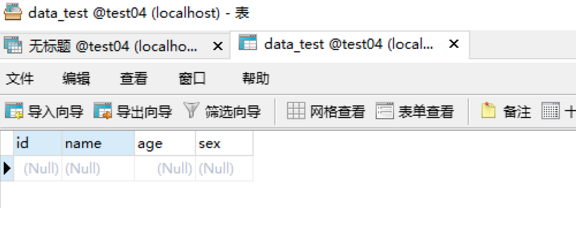
1.建一张学生表 包含(id,name,age,sex)
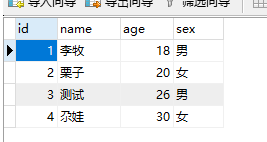
2.增加四条数据
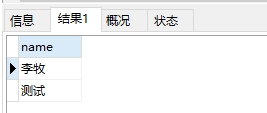
3.查询表中sex为男的数据
4.删除id =3的数据,
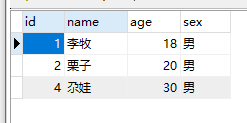
5.将sex为女的,修改为男

create:
CREATE TABLE data_test(

                        id INT unique,

                        name VARCHAR(50),

                        age INT,

                        sex enum('男','女')

                        )

insert:
insert into data_test(id, name, age, sex)

VALUES(1, '李牧', 18, '男'),

     (2, '栗子', 20, '女'),

     (3, '测试', 26, '男'),

     (4, '尕娃', 30, '女')
select:
select name from data_test where sex='男'
delete:
delete from data_test where id=3

updata:
update data_test set sex='男' where sex='女'
完整代码如下:
import pymysql

class Mysql():

    def create(self):

        try:

            sql_creat = """CREATE TABLE data_test(

                        id INT unique,

                        name VARCHAR(50),

                        age INT,

                        sex enum('男','女')

                        )"""

            cursor.execute(sql_creat)

            print("建表成功")

        except UserWarning:

            print("建表失败")

    def insert(self):

        try:

            sql_insert = """insert into data_test(id, name, age, sex) VALUES(1, '李牧', 18, '男'),(2, '栗子', 20, '女'),(3, '测试', 26, '男'),(4, '尕娃', 30, '女')"""

            cursor.execute(sql_insert)

            print("插入数据成功")

        except UserWarning:

            print("插入数据失败")

    def select(self):

        try:

            sql_select = """select name from data_test where sex='男'"""

            cursor.execute(sql_select)

            print("查询数据成功")

        except UserWarning:

            print("插入数据失败")

    def delete(self):

        try:

            sql_delete = """delete from data_test where id=3"""

            cursor.execute(sql_delete)

            print("数据删除成功")

        except UserWarning:

            print("数据删除失败")

    def updata(self):

        try:

            sql_update = """update data_test set sex='男' where sex='女'"""

            cursor.execute(sql_update)

            print("数据更新成功")

        except UserWarning:

            print("数据更新失败")

    def delete_table(self):

        sql_delete_table = """drop table data_test"""

        cursor.execute(sql_delete_table)

        print("清洗数据:删除数据表")

if __name__ == '__main__':

    con = pymysql.connect("localhost", "root", "", "test04", charset='utf8')

    cursor = con.cursor()

    # 实例化

    test = Mysql()

    # 建一张学生表 包含(id,name,age,sex)

    test.create()

    # 增加四条数据

    test.insert()

    con.commit() # 提交

    # 查询表中sex为男的数据

    test.select()

    print(cursor.fetchall())

    # 删除id =3的数据

    test.delete()

    con.commit() # 提交

    # 将sex为女的,修改为男

    test.updata()

    con.commit() # 提交

    test.delete_table()

    cursor.close()
作者:含笑半步颠√
博客链接:https://www.cnblogs.com/lixy-88428977
声明:本文为博主学习感悟总结,水平有限,如果不当,欢迎指正。如果您认为还不错,欢迎转载。转载与引用请注明作者及出处。
python基础_mysql建表、编辑、删除、查询、更新的更多相关文章
- [SQL基础教程] 1-5 表的删除和更新
[SQL基础教程] 1-5 表的删除和更新 表的删除 语法 DROP TABLE <表名>; 法则 1-12 删除的表无法恢复 表定义的更新 语法 ALTER TABLE<表名> ...
- 通过python给mysql建表
一.python连接mysql from sqlalchemy import create_engine # 数据库数据 HOSTNAME = '127.0.0.1' # linux本地 PORT = ...
- mysql 个人博客应用的建表和相关查询
一.建表 用户表tb_user create table if not exists tb_user( user_id int auto_increment, ) not null, user_pas ...
- SqlServer 循环建表、删除表、更新表
常用于分库分表 1.批量删除 declare @outter int declare @inner int ) ) ) begin set @tablePrefix='BankPayOrder_'+c ...
- MySQL基础2-创建表和主键约束
1.创建表 在操作数据表之前,应该使用"USE 数据库名"指定操作是在哪个数据库中进行 主键约束(唯一标识) ****非空*** ****唯一*** ****被引用****(学习外 ...
- 小贝_mysql建表以及列属性
mysql建表以及列属性 简要: 一.建表原则 二.具体的列属性说明 一.建表原则 建表: 事实上就是声明列的过程,数据终于是以文件的形式放在硬盘(内存) 列: 不同的列类型占的空间不一样. 选列的原 ...
- hibernate的基础学习--多表关联数据查询
Hibernate共提供4种多表关联数据查询方式 OID数据查询+OGN数据查询方式 HQL数据查询方式 QBC数据查询方式 本地SQL查询方式(hibernate很少用) 1.OID数据查询+OGN ...
- python基础学习1-列表使用
python 列表相关操作方法 namelist = ['a','b','c','d','1','2','3','4'] namelist1 = ['a','b','c','d','1','2','3 ...
- python 基础知识3-列表元祖
1.列表增. # append 追加,给列表的最后面追加一个元素 li = ['alex','wufa','太白','大白'] li.append('教师') li.append(1) print(l ...
随机推荐
- zookeeper、hbase集成kerberos
1.KDC创建principal 1.1.创建认证用户 登陆到kdc服务器,使用root或者可以使用root权限的普通用户操作: # kadmin.local -q “addprinc -randke ...
- 【洛谷】P4198 楼房重建(线段树)
传送门 分析 被线段树按在地上摩擦 先把左边转化成斜率,那么这个题就转化成每次修改一个点的值,输出前缀最大值的个数 看到标签是线段树,所以还是想想线段树的做法吧 既然是线段树,那么就要将区间分成两半 ...
- 【Excel】多条件查找
例如下图:要求在单元格从C10中根据分类与名称找出相应的数量 1.VLOOKUP函数(数组公式) {=VLOOKUP(A10&B10,IF({1,0},A2:A6&B2:B6,C2:C ...
- 【大数据作业十】分布式文件系统HDFS 练习
作业要求来自: https://edu.cnblogs.com/campus/gzcc/GZCC-16SE2/homework/3292 利用Shell命令与HDFS进行交互 以”./bin/dfs ...
- 升级ruby的版本 https://gems.ruby-china.com/
升级ruby版本,有时候安装ruby的版本过低,需要进行升级,例如安装在centos6.7安装fpm需要ruby版本在1.9以上. 1.主机环境如下: 1 [root@test ~]# cat /et ...
- Netty执行流程分析与重要组件介绍
一.环境搭建 创建工程,引入Netty依赖 二.基于Netty的请求响应Demo 1.TestHttpServerHandle 处理器.读取客户端发送过来的请求,并且向客户端返回hello worl ...
- free中buffer 与 cache 的区别
通常人们所说的Cache就是指缓存SRAM. SRAM叫静态内存,“静态”指的是当我们将一笔数据写入SRAM后,除非重新写入新数据或关闭电源,否则写入的数据保持不变. 由于CPU的速度比内存和硬盘的速 ...
- mysql查询列定义,是否自增等
SELECT ORDINAL_POSITION AS Colorder, Column_Name AS ColumnName, data_type AS TypeName, COLUMN_COMMEN ...
- Linux下打开超大文件的方法
Linux下打开超大文件方法 在Linux下用VIM打开大小几个G.甚至几十个G的文件时,是非常慢的. 这时,我们可以利用下面的方法分割文件,然后再打开. 1 查看文件的前多少行 head -1000 ...
- 如何开发一个npm包并发布到npm中央仓库
转自: https://liaolongdong.com/2019/01/24/publish-public-npm.html 如何开发一个npm包并发布到npm中央仓库需求背景:平时在项目工作中可能 ...