
android AlertDialog控件使用
1、先创建activity_alert_dialog.xml
<?xml version="1.0" encoding="utf-8"?>

<androidx.constraintlayout.widget.ConstraintLayout xmlns:android="http://schemas.android.com/apk/res/android"

    xmlns:app="http://schemas.android.com/apk/res-auto"

    xmlns:tools="http://schemas.android.com/tools"

    android:layout_width="match_parent"

    android:layout_height="match_parent"

    tools:context=".AlertDialogActivity">

    <androidx.constraintlayout.widget.Guideline

        android:id="@+id/guideline6"

        android:layout_width="wrap_content"

        android:layout_height="wrap_content"

        android:orientation="horizontal"

        app:layout_constraintGuide_percent="0.08" />

    <Button

        android:id="@+id/button7"

        android:layout_width="wrap_content"

        android:layout_height="wrap_content"

        android:text="@string/btn5"

        app:layout_constraintBottom_toTopOf="@+id/guideline6"

        app:layout_constraintEnd_toEndOf="parent"

        app:layout_constraintStart_toStartOf="parent"

        app:layout_constraintTop_toTopOf="@+id/guideline6" />

    <androidx.constraintlayout.widget.Guideline

        android:id="@+id/guideline7"

        android:layout_width="wrap_content"

        android:layout_height="wrap_content"

        android:orientation="horizontal"

        app:layout_constraintGuide_percent="0.17920657" />

    <Button

        android:id="@+id/button9"

        android:layout_width="wrap_content"

        android:layout_height="wrap_content"

        android:text="@string/btn6"

        app:layout_constraintBottom_toTopOf="@+id/guideline7"

        app:layout_constraintEnd_toEndOf="parent"

        app:layout_constraintStart_toStartOf="parent"

        app:layout_constraintTop_toTopOf="@+id/guideline7" />

    <androidx.constraintlayout.widget.Guideline

        android:id="@+id/guideline8"

        android:layout_width="wrap_content"

        android:layout_height="wrap_content"

        android:orientation="horizontal"

        app:layout_constraintGuide_percent="0.30779755" />

    <Button

        android:id="@+id/button10"

        android:layout_width="wrap_content"

        android:layout_height="wrap_content"

        android:text="@string/btn7"

        app:layout_constraintBottom_toTopOf="@+id/guideline8"

        app:layout_constraintEnd_toEndOf="parent"

        app:layout_constraintHorizontal_bias="0.498"

        app:layout_constraintStart_toStartOf="parent"

        app:layout_constraintTop_toTopOf="@+id/guideline8" />

    <androidx.constraintlayout.widget.Guideline

        android:id="@+id/guideline9"

        android:layout_width="wrap_content"

        android:layout_height="wrap_content"

        android:orientation="horizontal"

        app:layout_constraintGuide_percent="0.44" />

    <Button

        android:id="@+id/button11"

        android:layout_width="wrap_content"

        android:layout_height="wrap_content"

        android:text="@string/btn8"

        app:layout_constraintBottom_toTopOf="@+id/guideline9"

        app:layout_constraintEnd_toEndOf="parent"

        app:layout_constraintHorizontal_bias="0.498"

        app:layout_constraintStart_toStartOf="parent"

        app:layout_constraintTop_toTopOf="@+id/guideline9" />

</androidx.constraintlayout.widget.ConstraintLayout>
2、AlertDialogActivity.java
package com.example.myapplication;

import androidx.appcompat.app.AlertDialog;

import androidx.appcompat.app.AppCompatActivity;

import android.app.DatePickerDialog;

import android.content.DialogInterface;

import android.os.Bundle;

import android.view.View;

import android.widget.Button;

import android.widget.Toast;

public class AlertDialogActivity extends AppCompatActivity {

    private Button btn7,btn9,btn10,btn11;

    @Override

    protected void onCreate(Bundle savedInstanceState) {

        super.onCreate(savedInstanceState);

        setContentView(R.layout.activity_alert_dialog);

        btn7 = findViewById(R.id.button7);

        btn9 = findViewById(R.id.button9);

        btn10 = findViewById(R.id.button10);

        btn11 = findViewById(R.id.button11);

        btn7.setOnClickListener(new View.OnClickListener() {

            @Override

            public void onClick(View view) {

                AlertDialog.Builder bulder = new AlertDialog.Builder(AlertDialogActivity.this);

                bulder.setTitle("问卷调查").setIcon(R.drawable.p2).setMessage("感觉地球气温有上升吗?")

                        .setPositiveButton("没有", new DialogInterface.OnClickListener() {

                            @Override

                            public void onClick(DialogInterface dialogInterface, int i) {

                                Toast.makeText(AlertDialogActivity.this, "气温没有上升", Toast.LENGTH_SHORT).show();

                            }

                        }).setNeutralButton("不知道", new DialogInterface.OnClickListener() {

                    @Override

                    public void onClick(DialogInterface dialogInterface, int i) {

                        Toast.makeText(AlertDialogActivity.this, "不知道", Toast.LENGTH_SHORT).show();

                    }

                }).setNegativeButton("上升好多", new DialogInterface.OnClickListener() {

                    @Override

                    public void onClick(DialogInterface dialogInterface, int i) {

                        Toast.makeText(AlertDialogActivity.this, "上升好多", Toast.LENGTH_SHORT).show();

                    }

                }).show();

            }

        });

        btn9.setOnClickListener(new View.OnClickListener() {

            @Override

            public void onClick(View view) {

                AlertDialog.Builder bulder = new AlertDialog.Builder(AlertDialogActivity.this);

                final String[] array = {"男","女"};

                bulder.setTitle("请选择性别").setItems(array, new DialogInterface.OnClickListener() {

                    @Override

                    public void onClick(DialogInterface dialogInterface, int i) {

                        Toast.makeText(AlertDialogActivity.this, array[i], Toast.LENGTH_SHORT).show();

                    }

                }).show();

            }

        });

        btn10.setOnClickListener(new View.OnClickListener() {

            @Override

            public void onClick(View view) {

                AlertDialog.Builder bulder = new AlertDialog.Builder(AlertDialogActivity.this);

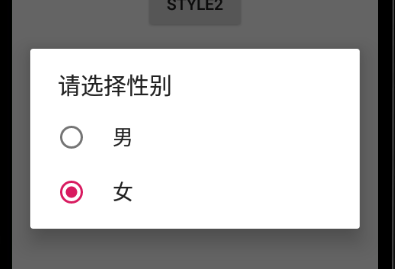
                final String[] array = {"男","女"};

                bulder.setTitle("请选择性别").setSingleChoiceItems(array, 1, new DialogInterface.OnClickListener(){

                    @Override

                    public void onClick(DialogInterface dialogInterface, int i) {

                        Toast.makeText(AlertDialogActivity.this, array[i], Toast.LENGTH_SHORT).show();

                    }

                }).show();

            }

        });

        btn11.setOnClickListener(new View.OnClickListener() {

            @Override

            public void onClick(View view) {

                AlertDialog.Builder bulder = new AlertDialog.Builder(AlertDialogActivity.this);

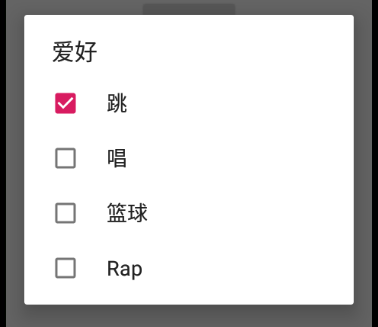
                final String[] array = {"跳","唱","篮球","Rap"};

                final boolean[] isSelected = { true,false,false,false};

                bulder.setTitle("爱好").setMultiChoiceItems(array, isSelected, new DialogInterface.OnMultiChoiceClickListener() {

                    @Override

                    public void onClick(DialogInterface dialogInterface, int i, boolean b) {

                        Toast.makeText(AlertDialogActivity.this, array[i]+b, Toast.LENGTH_SHORT).show();

                    }

                }).show();

            }

        });

    }

}
3、效果:

android AlertDialog控件使用的更多相关文章
- android:AlertDialog控件
AlertDialog 可以在当前的界面弹出一个对话框,这个对话框是置顶于所有界面元素之上 的,能够屏蔽掉其他控件的交互能力,因此一般 AlertDialog 都是用于提示一些非常重要的 内容或者警告 ...
- 【Android开发日记】之入门篇(十三)——Android的控件解析
Android的控件都派生自android.view.View类,在android.widget包中定义了大量的系统控件供开发者使用,开发者也可以从View类及其子类中,派生出自定义的控件. 一.An ...
- 一个Demo让你掌握Android所有控件
原文:一个Demo让你掌握Android所有控件 本文是转载收藏,侵删,出处:"安卓巴士" 下面给出实现各个组件的源代码: 1.下拉框实现--Spinner packag ...
- android 基础控件(EditView、SeekBar等)的属性及使用方法
android提供了大量的UI控件,本文将介绍TextView.ImageView.Button.EditView.ProgressBar.SeekBar.ScrollView.WebView ...
- Android基本控件之Menus
在我们的手机中有很多样式的菜单,比如:我们的短信界面,每条短信,我们长按都会出现一个菜单,还有很多的种类.那么现在,我们就来详细的讨论一下安卓中的菜单 Android的控件中就有这么一个,叫做Menu ...
- Android:控件布局(相对布局)RelativeLayout
RelativeLayout是相对布局控件:以控件之间相对位置或相对父容器位置进行排列. 相对布局常用属性: 子类控件相对子类控件:值是另外一个控件的id android:layout_above-- ...
- Android:控件布局(线性布局)LinearLayout
LinearLayout是线性布局控件:要么横向排布,要么竖向排布 决定性属性:必须有的! android:orientation:vertical (垂直方向) .horizontal(水平方向) ...
- 矩阵, 矩阵 , Android基础控件之ImageView
天下文章大家抄,以下所有内容,有来自copy,有来自查询,亦有自己的总结(目的是总结出自己的东西),所以说原创,不合适,说是转载也不恰当,所以我称之为笔记,可惜没有此分类选项,姑且不要脸一点,选择为原 ...
- Android给控件添加触摸回调
Android给控件添加触摸回调 脑补一个场景,一个页面点击某个按钮会弹出PopupWindow,然后点击PopupWindow以外的任意位置关闭 效果图 实现方法 可以在布局的最外层容器监听触摸事件 ...
随机推荐
- mysql skip-grant-tables 后要多次重启 和验证登录检查确认密码生效
mysql skip-grant-tables 后要多次重启 和验证登录检查确认密码生效
- 更新Alpine Linux源 sed -i 's/dl-cdn.alpinelinux.org/mirrors.ustc.edu.cn/g' /etc/apk/repositories apk add xxx
更新Alpine Linux源 国内镜像源 清华TUNA镜像源:https://mirror.tuna.tsinghua.edu.cn/alpine/中科大镜像源:http://mirrors.ust ...
- Qt QSplitter任意拆分窗口
Qt拆分窗口可以使用QSplitter,也可以使用比较容易使用布局控件来完成,本文章给出使用QSplitter分割窗口的例子. QSplitter 继承自QFrame,而QFrame又继承自QWidg ...
- vue---自定义指令的使用
在vue开发项目中,指令的使用场景也是比较多的,那么该如何定义使用呢? 找到 src / directive 下新建 gender 目录,下面新建 index.js 和 gender.js index ...
- centos6.10中部署percona-mysql双实例的方法
centos6.10中部署percona-mysql双实例的方法 数据库的同步关系:192.168.11.53(master) --> slave(192.168.10.189) --> ...
- 【翻译】Flink Table Api & SQL — SQL
本文翻译自官网:SQL https://ci.apache.org/projects/flink/flink-docs-release-1.9/dev/table/sql.html Flink Tab ...
- [LeetCode] 68. Text Justification 文本对齐
Given an array of words and a length L, format the text such that each line has exactly L characters ...
- Git安装和使用(Windows)
Git介绍 分布式:Git版本控制系统是一个分布式的系统,是用来保存工程源代码历史状态的命令行工具. 保存点:Git的保存点可以追踪源码中的文件, 并能得到某一个时间点上的整个工程项目的状态:可以在该 ...
- Indy10 Tcp接收数据问题
在做Delphi开发时,使用Indy组件来做网络通讯是一种比较快捷的方式.今天要说一下indy10中tcp接收数据的问题. 我们在测试时经常使用Wrinteln来发送数据,用Readln来接收数据.用 ...
- 常用的python的内置库或者第三方库
内置库:re,json,time,random,sys,os, 第三方库:转载: https://www.cnblogs.com/jiangchunsheng/p/9275881.htmlReques ...