
在CNN中使用Tensorflow进行数据增强
开始之前,需要思考一些基本问题
1、为什么需要大量数据
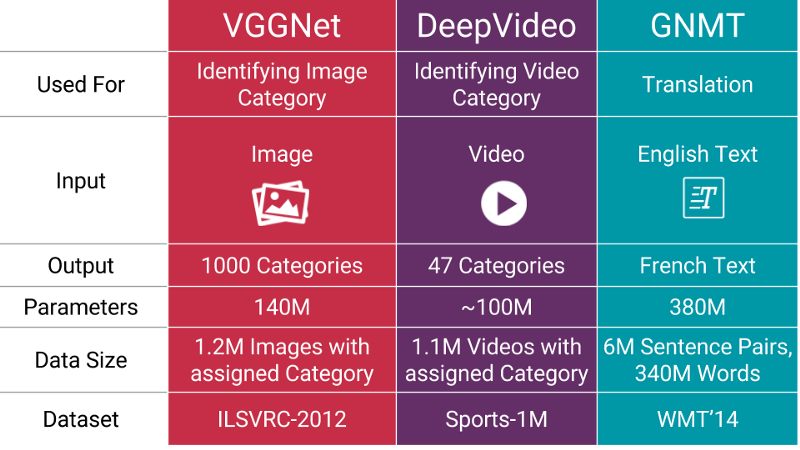
当您训练机器学习模型时,您真正在做的是调整其参数,以便它可以将特定输入(例如,图像)映射到某个输出(标签)。我们的优化目标是追逐我们模型损失较低的最佳位置,这种情况发生在您的参数以正确的方式调整时。
现在的神经网络通常具有数百万的参数,因此,你需要向您的机器学习模型喂入一定比例的示例,以获得良好的性能。此外,您需要的参数数量与模型送执行的任务的复杂程度成正比。
2、如果我没有“更多数据”,如何获得更多数据?
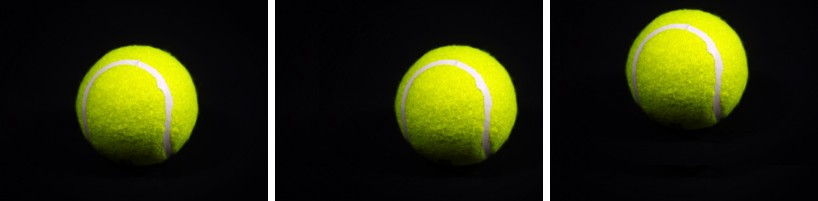
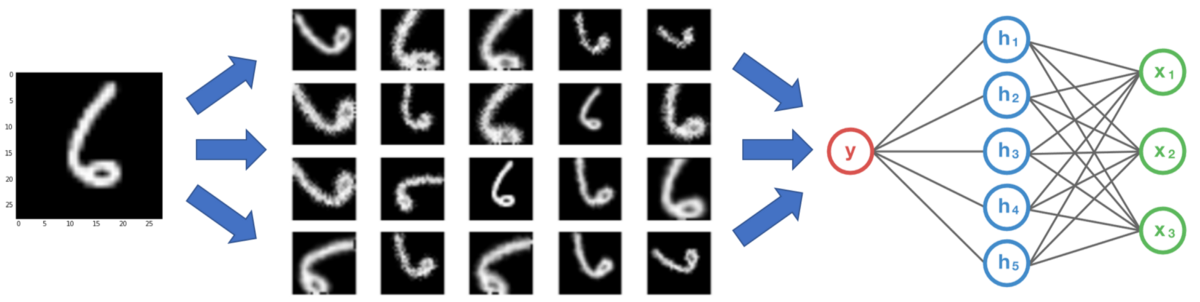
3、即使有我有大量的数据,扩充也可以提供帮助吗

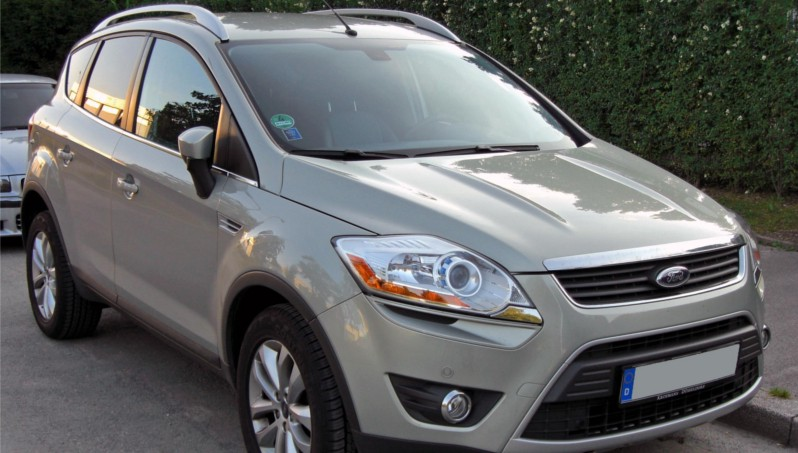
 福特汽车(品牌A),但面对正确。
流行的增强技术
让我们探讨几种最常用的图像增强技术,包括代码示例和增强后的图像可视化。从这里开始,数据将被称为图像。我们将在所有示例中使用用Python编写的Tensorflow或OpenCV。以下是我们将在文章中使用的技术索引:
在任何技术之前:图像大小调整
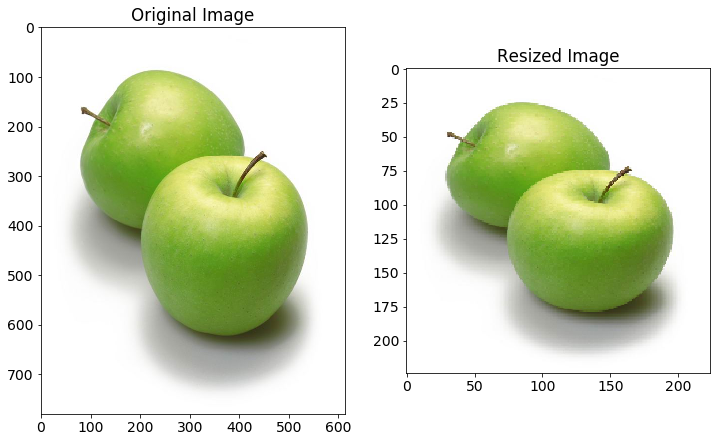
从互联网收集的图像将具有不同的大小。由于在大多数神经网络中存在完全连接的层,所以馈送到网络的图像将需要固定大小(除非您在传递到密集层之前使用空间金字塔池)。因此,在图像增强发生之前,让我们将图像预处理到我们网络所需的大小。使用固定大小的图像,我们可以获得批量处理它们的好处。
 import tensorflow as tf

 import matplotlib.image as mpimg

 import numpy as np

 IMAGE_SIZE = 224

 def tf_resize_images(X_img_file_paths):

     X_data = []

     tf.reset_default_graph()

     X = tf.placeholder(tf.float32, (None, None, 3))

     tf_img = tf.image.resize_images(X, (IMAGE_SIZE, IMAGE_SIZE),

                                     tf.image.ResizeMethod.NEAREST_NEIGHBOR)

     with tf.Session() as sess:

         sess.run(tf.global_variables_initializer())

         # Each image is resized individually as different image may be of different size.

         for index, file_path in enumerate(X_img_file_paths):

             img = mpimg.imread(file_path)[:, :, :3] # Do not read alpha channel.

             resized_img = sess.run(tf_img, feed_dict = {X: img})

             X_data.append(resized_img)

     X_data = np.array(X_data, dtype = np.float32) # Convert to numpy

     return X_data
Image Reszing
缩放
在图像中具有不同缩放的感兴趣对象是图像多样性的最重要方面。当您的网络掌握在真实用户手中时,图像中的对象可能很小或很大。此外,有时,物体可以覆盖整个图像,但不会完全存在于图像中(即在物体的边缘处被裁剪)。
def central_scale_images(X_imgs, scales):

    # Various settings needed for Tensorflow operation

    boxes = np.zeros((len(scales), 4), dtype = np.float32)

    for index, scale in enumerate(scales):

        x1 = y1 = 0.5 - 0.5 * scale # To scale centrally

        x2 = y2 = 0.5 + 0.5 * scale

        boxes[index] = np.array([y1, x1, y2, x2], dtype = np.float32)

    box_ind = np.zeros((len(scales)), dtype = np.int32)

    crop_size = np.array([IMAGE_SIZE, IMAGE_SIZE], dtype = np.int32)

    X_scale_data = []

    tf.reset_default_graph()

    X = tf.placeholder(tf.float32, shape = (1, IMAGE_SIZE, IMAGE_SIZE, 3))

    # Define Tensorflow operation for all scales but only one base image at a time

    tf_img = tf.image.crop_and_resize(X, boxes, box_ind, crop_size)

    with tf.Session() as sess:

        sess.run(tf.global_variables_initializer())

        for img_data in X_imgs:

            batch_img = np.expand_dims(img_data, axis = 0)

            scaled_imgs = sess.run(tf_img, feed_dict = {X: batch_img})

            X_scale_data.extend(scaled_imgs)

    X_scale_data = np.array(X_scale_data, dtype = np.float32)

    return X_scale_data

# Produce each image at scaling of 90%, 75% and 60% of original image.

scaled_imgs = central_scale_images(X_imgs, [0.90, 0.75, 0.60])
Scaling

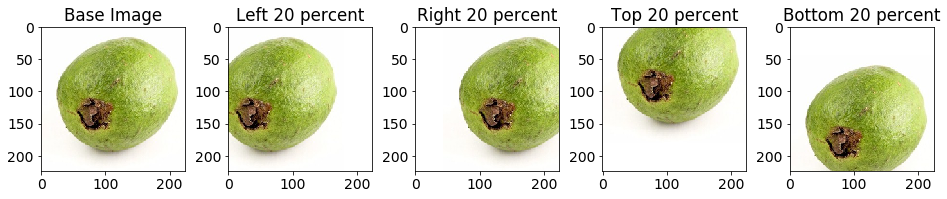
翻译
from math import ceil, floor

def get_translate_parameters(index):

    if index == 0: # Translate left 20 percent

        offset = np.array([0.0, 0.2], dtype = np.float32)

        size = np.array([IMAGE_SIZE, ceil(0.8 * IMAGE_SIZE)], dtype = np.int32)

        w_start = 0

        w_end = int(ceil(0.8 * IMAGE_SIZE))

        h_start = 0

        h_end = IMAGE_SIZE

    elif index == 1: # Translate right 20 percent

        offset = np.array([0.0, -0.2], dtype = np.float32)

        size = np.array([IMAGE_SIZE, ceil(0.8 * IMAGE_SIZE)], dtype = np.int32)

        w_start = int(floor((1 - 0.8) * IMAGE_SIZE))

        w_end = IMAGE_SIZE

        h_start = 0

        h_end = IMAGE_SIZE

    elif index == 2: # Translate top 20 percent

        offset = np.array([0.2, 0.0], dtype = np.float32)

        size = np.array([ceil(0.8 * IMAGE_SIZE), IMAGE_SIZE], dtype = np.int32)

        w_start = 0

        w_end = IMAGE_SIZE

        h_start = 0

        h_end = int(ceil(0.8 * IMAGE_SIZE))

    else: # Translate bottom 20 percent

        offset = np.array([-0.2, 0.0], dtype = np.float32)

        size = np.array([ceil(0.8 * IMAGE_SIZE), IMAGE_SIZE], dtype = np.int32)

        w_start = 0

        w_end = IMAGE_SIZE

        h_start = int(floor((1 - 0.8) * IMAGE_SIZE))

        h_end = IMAGE_SIZE

    return offset, size, w_start, w_end, h_start, h_end

def translate_images(X_imgs):

    offsets = np.zeros((len(X_imgs), 2), dtype = np.float32)

    n_translations = 4

    X_translated_arr = []

    tf.reset_default_graph()

    with tf.Session() as sess:

        sess.run(tf.global_variables_initializer())

        for i in range(n_translations):

            X_translated = np.zeros((len(X_imgs), IMAGE_SIZE, IMAGE_SIZE, 3),

                    dtype = np.float32)

            X_translated.fill(1.0) # Filling background color

            base_offset, size, w_start, w_end, h_start, h_end = get_translate_parameters(i)

            offsets[:, :] = base_offset

            glimpses = tf.image.extract_glimpse(X_imgs, size, offsets)

            glimpses = sess.run(glimpses)

            X_translated[:, h_start: h_start + size[0], \

             w_start: w_start + size[1], :] = glimpses

            X_translated_arr.extend(X_translated)

    X_translated_arr = np.array(X_translated_arr, dtype = np.float32)

    return X_translated_arr

translated_imgs = translate_images(X_imgs)
Translation
旋转(90度)
def rotate_images(X_imgs):

    X_rotate = []

    tf.reset_default_graph()

    X = tf.placeholder(tf.float32, shape = (IMAGE_SIZE, IMAGE_SIZE, 3))

    k = tf.placeholder(tf.int32)

    tf_img = tf.image.rot90(X, k = k)

    with tf.Session() as sess:

        sess.run(tf.global_variables_initializer())

        for img in X_imgs:

            for i in range(3):  # Rotation at 90, 180 and 270 degrees

                rotated_img = sess.run(tf_img, feed_dict = {X: img, k: i + 1})

                X_rotate.append(rotated_img)

    X_rotate = np.array(X_rotate, dtype = np.float32)

    return X_rotate

rotated_imgs = rotate_images(X_imgs)
Rotate90

旋转(更精细的角度)
根据上面的需求,它可能是必要的对于各种角度。如果这图片的背景是一种固定的颜色,新加的颜色需要与背景融合,否则,神经网络不会将它作为一种特征来学习,而这种特征是不必要的。
from math import pi

def rotate_images(X_imgs, start_angle, end_angle, n_images):

    X_rotate = []

    iterate_at = (end_angle - start_angle) / (n_images - 1)

    tf.reset_default_graph()

    X = tf.placeholder(tf.float32, shape = (None, IMAGE_SIZE, IMAGE_SIZE, 3))

    radian = tf.placeholder(tf.float32, shape = (len(X_imgs)))

    tf_img = tf.contrib.image.rotate(X, radian)

    with tf.Session() as sess:

        sess.run(tf.global_variables_initializer())

        for index in range(n_images):

            degrees_angle = start_angle + index * iterate_at

            radian_value = degrees_angle * pi / 180  # Convert to radian

            radian_arr = [radian_value] * len(X_imgs)

            rotated_imgs = sess.run(tf_img, feed_dict = {X: X_imgs, radian: radian_arr})

            X_rotate.extend(rotated_imgs)

    X_rotate = np.array(X_rotate, dtype = np.float32)

    return X_rotate

# Start rotation at -90 degrees, end at 90 degrees and produce totally 14 images

rotated_imgs = rotate_images(X_imgs, -90, 90, 14)
rotate

翻转
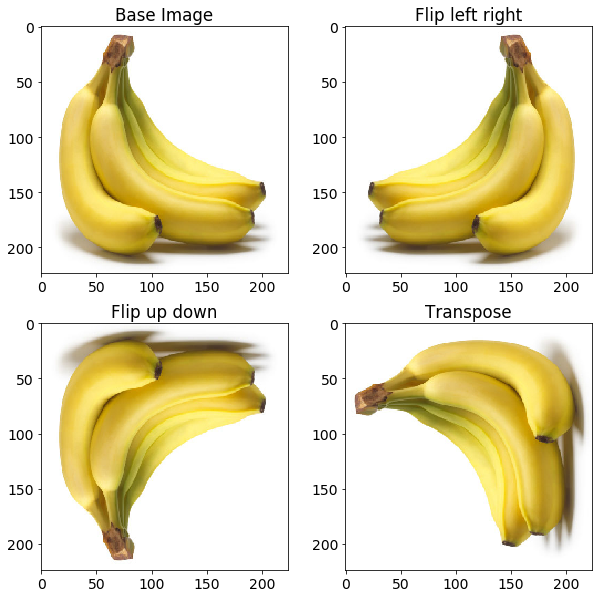
这种情况对于网络来说更重要的是消除假设对象的某些特征仅在特定方面可用的偏差。考虑图像示例中显示的情况。您不希望网络知道香蕉的倾斜仅发生在基本图像中观察到的右侧。
def flip_images(X_imgs):

    X_flip = []

    tf.reset_default_graph()

    X = tf.placeholder(tf.float32, shape = (IMAGE_SIZE, IMAGE_SIZE, 3))

    tf_img1 = tf.image.flip_left_right(X)

    tf_img2 = tf.image.flip_up_down(X)

    tf_img3 = tf.image.transpose_image(X)

    with tf.Session() as sess:

        sess.run(tf.global_variables_initializer())

        for img in X_imgs:

            flipped_imgs = sess.run([tf_img1, tf_img2, tf_img3], feed_dict = {X: img})

            X_flip.extend(flipped_imgs)

    X_flip = np.array(X_flip, dtype = np.float32)

    return X_flip

flipped_images = flip_images(X_imgs)
flip image
添加椒盐噪声
def add_salt_pepper_noise(X_imgs):

    # Need to produce a copy as to not modify the original image

    X_imgs_copy = X_imgs.copy()

    row, col, _ = X_imgs_copy[0].shape

    salt_vs_pepper = 0.2

    amount = 0.004

    num_salt = np.ceil(amount * X_imgs_copy[0].size * salt_vs_pepper)

    num_pepper = np.ceil(amount * X_imgs_copy[0].size * (1.0 - salt_vs_pepper))

    for X_img in X_imgs_copy:

        # Add Salt noise

        coords = [np.random.randint(0, i - 1, int(num_salt)) for i in X_img.shape]

        X_img[coords[0], coords[1], :] = 1

        # Add Pepper noise

        coords = [np.random.randint(0, i - 1, int(num_pepper)) for i in X_img.shape]

        X_img[coords[0], coords[1], :] = 0

    return X_imgs_copy

salt_pepper_noise_imgs = add_salt_pepper_noise(X_imgs)
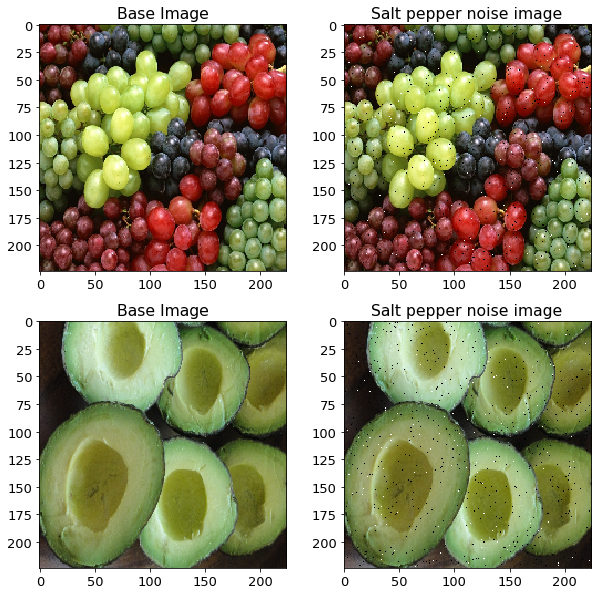
salt_pepper_noise
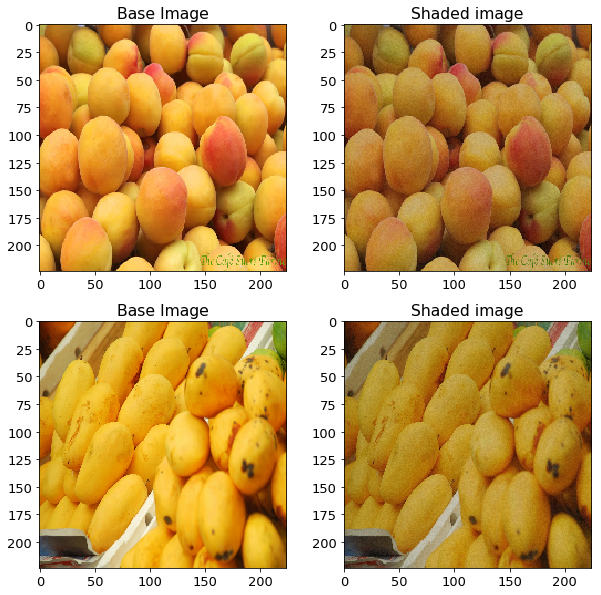
光照条件
import cv2

def add_gaussian_noise(X_imgs):

    gaussian_noise_imgs = []

    row, col, _ = X_imgs[0].shape

    # Gaussian distribution parameters

    mean = 0

    var = 0.1

    sigma = var ** 0.5

    for X_img in X_imgs:

        gaussian = np.random.random((row, col, 1)).astype(np.float32)

        gaussian = np.concatenate((gaussian, gaussian, gaussian), axis = 2)

        gaussian_img = cv2.addWeighted(X_img, 0.75, 0.25 * gaussian, 0.25, 0)

        gaussian_noise_imgs.append(gaussian_img)

    gaussian_noise_imgs = np.array(gaussian_noise_imgs, dtype = np.float32)

    return gaussian_noise_imgs

gaussian_noise_imgs = add_gaussian_noise(X_imgs)
gaussian_noise
 透视变换
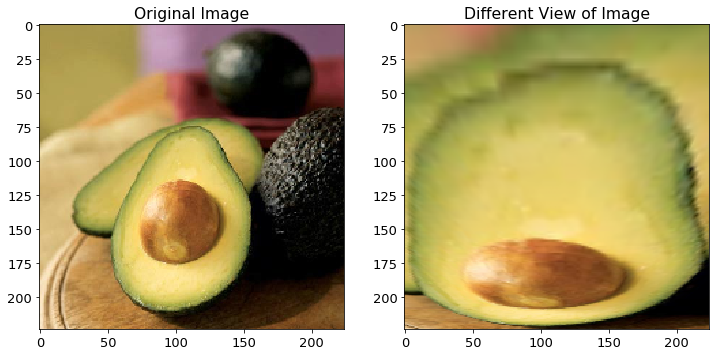
透视变换
def get_mask_coord(imshape):

    vertices = np.array([[(0.09 * imshape[1], 0.99 * imshape[0]),

                          (0.43 * imshape[1], 0.32 * imshape[0]),

                          (0.56 * imshape[1], 0.32 * imshape[0]),

                          (0.85 * imshape[1], 0.99 * imshape[0])]], dtype = np.int32)

    return vertices

def get_perspective_matrices(X_img):

    offset = 15

    img_size = (X_img.shape[1], X_img.shape[0])

    # Estimate the coordinates of object of interest inside the image.

    src = np.float32(get_mask_coord(X_img.shape))

    dst = np.float32([[offset, img_size[1]], [offset, 0], [img_size[0] - offset, 0],

                      [img_size[0] - offset, img_size[1]]])

    perspective_matrix = cv2.getPerspectiveTransform(src, dst)

    return perspective_matrix

def perspective_transform(X_img):

    # Doing only for one type of example

    perspective_matrix = get_perspective_matrices(X_img)

    warped_img = cv2.warpPerspective(X_img, perspective_matrix,

                                     (X_img.shape[1], X_img.shape[0]),

                                     flags = cv2.INTER_LINEAR)

    return warped_img

perspective_img = perspective_transform(X_img)
perspective_transform
总结
尽管上面的图像增强方法列表并非详尽无遗,但是包含了许多广泛使用的方法,您可以组合的使用这些扩充来生成更多的图像。您可以在Github中查看本文使用的代码。
在CNN中使用Tensorflow进行数据增强的更多相关文章
- 图像数据增强 (Data Augmentation in Computer Vision)
1.1 简介 深层神经网络一般都需要大量的训练数据才能获得比较理想的结果.在数据量有限的情况下,可以通过数据增强(Data Augmentation)来增加训练样本的多样性, 提高模型鲁棒性,避免过拟 ...
- CNN中的卷积核及TensorFlow中卷积的各种实现
声明: 1. 我和每一个应该看这篇博文的人一样,都是初学者,都是小菜鸟,我发布博文只是希望加深学习印象并与大家讨论. 2. 我不确定的地方用了"应该"二字 首先,通俗说一下,CNN ...
- TensorFlow之DNN(三):神经网络的正则化方法(Dropout、L2正则化、早停和数据增强)
这一篇博客整理用TensorFlow实现神经网络正则化的内容. 深层神经网络往往具有数十万乃至数百万的参数,可以进行非常复杂的特征变换,具有强大的学习能力,因此容易在训练集上过拟合.缓解神经网络的过拟 ...
- [开发技巧]·TensorFlow中numpy与tensor数据相互转化
[开发技巧]·TensorFlow中numpy与tensor数据相互转化 个人主页–> https://xiaosongshine.github.io/ - 问题描述 在我们使用TensorFl ...
- 大规模的I/O流中有效识别大数据并增强时间局部性
一篇热数据识别存储外文翻译,本文主要在讲思想 原文题目: HDCat: Effectively Identifying Hot Data in Large-scale I/O Streams ...
- NLP中的数据增强
相关方法合集见:https://github.com/quincyliang/nlp-data-augmentation 较为简单的数据增强的方法见论文:https://arxiv.org/pdf/1 ...
- ubuntu之路——day19.2 开源框架与迁移、CNN中的数据扩充
开源框架与迁移 上面介绍了一些已经取得很好成绩的CNN框架,我们可以直接从GitHub上下载这些神经网络的结构和已经在ImageNet等数据集上训练好的权重超参数. 在应用于我们自己的数据时. 1.如 ...
- 转《在浏览器中使用tensorflow.js进行人脸识别的JavaScript API》
作者 | Vincent Mühle 编译 | 姗姗 出品 | 人工智能头条(公众号ID:AI_Thinker) [导读]随着深度学习方法的应用,浏览器调用人脸识别技术已经得到了更广泛的应用与提升.在 ...
- (转)如何用TensorLayer做目标检测的数据增强
数据增强在机器学习中的作用不言而喻.和图片分类的数据增强不同,训练目标检测模型的数据增强在对图像做处理时,还需要对图片中每个目标的坐标做相应的处理.此外,位移.裁剪等操作还有可能使得一些目标在处理后只 ...
随机推荐
- C#——委托(1)
什么是委托?还记得C/C++语言里的函数指针吗?委托就是他的”升级版“.先看一个简单的小程序: # include<stdio.h> typedef int(*Calc)(int a, i ...
- 数据库路由中间件MyCat - 源代码篇(11)
此文已由作者张镐薪授权网易云社区发布. 欢迎访问网易云社区,了解更多网易技术产品运营经验. 4.配置模块 每个MyCatServer初始化时,会初始化: MyCatServer.java: publi ...
- 重启centOS丢失nginx.pid导致无法启动nginx的解决方法
目录 找到nginx 找到nginx的配置文件 拼接命令,启动nginx Nginx指令拓展知识(中英对照): tags: centOS linux nginx categories: 服务器 找到n ...
- Corn Fields(模板)
题目链接 #include <stdio.h> #include <algorithm> #include <string.h> #include <iost ...
- HTML+CSS注意点
1. 对于中文网页,需要在header中使用<meta charset="utf-8">声明编码,否则会出现乱码. 2. 属性 属性 描述 class 为html元素定 ...
- [题解](折半搜索)luogu_P4799_BZOJ_4800世界冰球锦标赛
抄的题解 以及参考:https://www.cnblogs.com/ZAGER/p/9827160.html 2^40爆搜过不了,考虑折半搜索,难点在于合并左右的答案,因为有可能答案同时载左右两边,我 ...
- [软件工程基础]2017.11.06 第十次 Scrum 会议
具体事项 项目交接燃尽图 每人工作内容 成员 已完成的工作 计划完成的工作 工作中遇到的困难 游心 #62 调试生成报告代码:#60 整理物理网站上的实验流程:#71 撰写报告生成搭建文档: 李煦通 ...
- @Column 注解详情
@Column标记表示所持久化属性所映射表中的字段,该注释的属性定义如下: @Target({METHOD, FIELD}) @Retention(RUNTIME) public @interface ...
- NET Core中使用Redis和Memcached
.NET Core中使用Redis和Memcached的序列化问题 前言 在使用分布式缓存的时候,都不可避免的要做这样一步操作,将数据序列化后再存储到缓存中去. 序列化这一操作,或许是显式的,或许 ...
- SpringBoot---Web开发
一.概述 1.SpringBoot提供了spring-boot-starter-web为 web开发 予以支持: 2.spring-boot-starter-web提供了 内嵌的Tomcat 以及 S ...