
借助Code Splitting 提升单页面应用性能
近日的工作集中于一个单页面应用(Single-page application),在项目中尝试了闻名已久的Code splitting,收获极大,特此分享。
Why we need code splitting
SPA的客户端路由极大的减少了Server 与 Client端之间的Round trip,在此基础上,我们还可以借助Server Side Rendering 砍掉客户端的初次页面渲染时间(这里是SSR实现的参考链接:React,Angular2).
仍然有一个问题普遍存在着:随着应用复杂度/规模的增加,应用初始所加载的文件大小也随之增加。我们可以通过将文件分割成按需加载的chunks来解决这一问题,对于初始页面,只请求他所用到的模块的相关文件,等我们进入新的路由,或者使用到一些复杂的功能模块时,才加载与之相关的chunk。
借助于webpack与react-router(目前我的应用是基于React开发的),我们可以快速实现这些按需加载的chunks。
webpack
Webpack是非常火的一个module bundler,这里是一个很好的入门参考链接。
我们可以借助代码中定义split point以创建按需加载的chunk。
使用require.ensure(dependencies, callback)可以加载 CommonJs modules, 使用require(dependencies, callback)加载 AMD modules。webpack会在build过程中检测到这些split points,创建chunks。
React router
React router 是一个基于React且非常流行的客户端路由库。
我们能以plain JavaScript object或者declaratively的形式定义客户端路由。
Plain JavaScript way:
let myRoute = {

  path: `${some path}`,

  childRoutes: [

    RouteA,

    RouteB,

    RouteC,

  ]

}
declaratively way:
const routes = (

  <Route component={Component}>

    <Route path="pathA" component={ComponentA}/>

    <Route path="pathB" component={ComponentB}/>

  </Route>

)
React router 可以实现代码的lazy load, 而我们正好可以把split points 定义在这些lazy load code中(参考链接)。
Code Splitting implement
below is a demo of create two on demand loaded chunks, chunk A will load once when enter rootUrl/A, chunk B will load once when enter rootUrl/B.
接下来的代码就是创建按需加载的chunks的例子,chunk A 只有当进入rootUrl/A才会加载,chunk B 只有当进入rootUrl/B才会加载。
routes
/* ---            RootRoute            --- */

...

import RouteA from './RouteA'

import RouteB from './RouteB'

export default {

  path: '/',

  component: App,

  childRoutes: [

    RouteA,

    RouteB,

  ],

  indexRoute: {

    component: Index

  }

}

/* ---              RouteA              --- */

...

export default {

  path: 'A',

  getComponent(location, cb) {

    require.ensure([], (require) => {

      cb(null, require(`${PathOfRelatedComponent}`))

    }, 'chunkA')

  }

}

/* ---              RouteB              --- */

...

export default {

  path: 'B',

  getComponent(location, cb) {

    require.ensure([], (require) => {

      cb(null, require(`${PathOfRelatedComponent}`))

    }, 'chunkB')

  }

}
client side code for client side render
...

import { match, Router } from 'react-router'

const { pathname, search, hash } = window.location

const location = `${pathname}${search}${hash}`

//use match to trigger the split code to load before rendering.

match({ routes, location }, () => {

  render(

    <Router routes={routes} history={createHistory()} />,

      document.getElementById('app')

  )

})
server code for server side rendering
...

app.createServer((req, res) => {

  match({ routes, location: req.url }, (error, redirectLocation, renderProps) => {

    if (error)

      writeError('ERROR!', res)

    else if (redirectLocation)

      redirect(redirectLocation, res)

    else if (renderProps)

      renderApp(renderProps, res)

    else

      writeNotFound(res)

}).listen(PORT)

function renderApp(props, res) {

  const markup = renderToString(<RoutingContext {...props}/>)

  const html = createPage(markup)

  write(html, 'text/html', res)

}

export function createPage(html) {

  return `

  <!doctype html>

  <html>

    <head>

      <meta charset="utf-8"/>

      <title>My Universal App</title>

    </head>

    <body>

      <div id="app">${html}</div>

      <script src="/__build__/main.js"></script>

    </body>

  </html>

  `

}
实现中可能会遇到的坑
取决于你是如何写自己的模块的,你可能会遇到这个错误:React.createElement: type should not be null, undefined, boolean, or number. It should be a string (for DOM elements) or a ReactClass (for composite components). Check the render method of RoutingContext.在require()之后加一个.default即可。
如果你收到了这样的错误提示:require.ensure is not function, 增加一个polyfill即可: if (typeof require.ensure !== 'function') require.ensure = (d, c) => c(require),在Server端使用require来代替require.ensure.
谢谢,希望能指正我的错误!
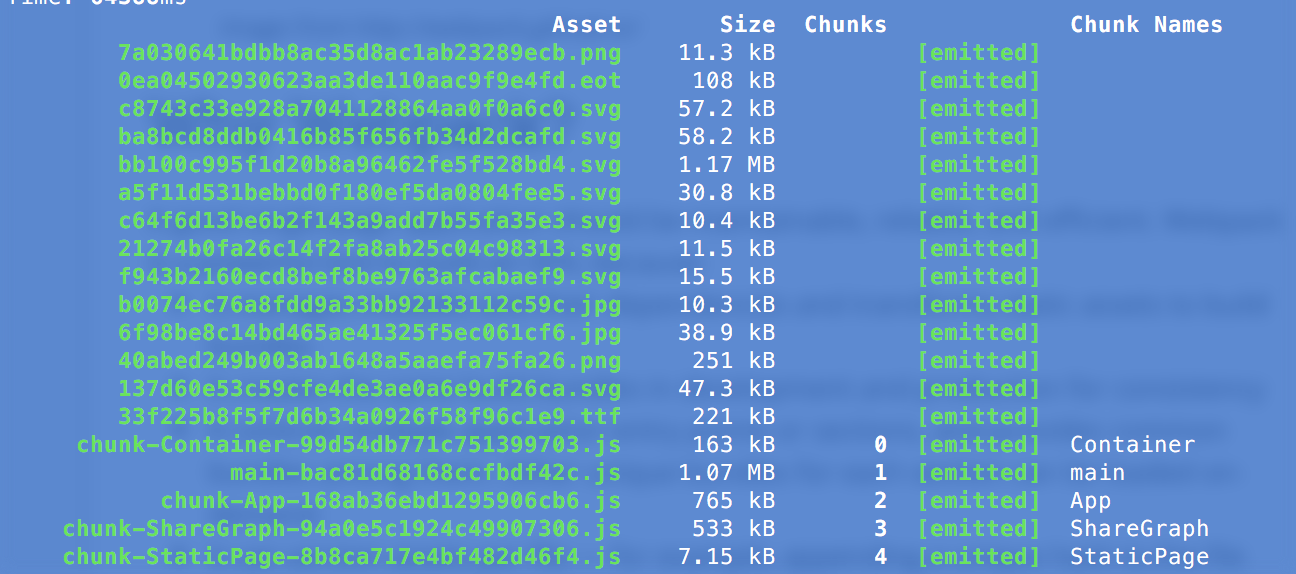
最后附一张目前项目的chunks图:
借助Code Splitting 提升单页面应用性能的更多相关文章
- 借助 Vue 来构建单页面应用
原文: https://github.com/MeCKodo/vue-tutorial 主题 Vue.js (1/2)Vue构建单页应用最佳实战 前言 我们将会选择使用一些vue周边的库 1.使用no ...
- webpack优化之code splitting
作为当前风头正盛的打包工具,webpack风靡前端界.确实作为引领了一个时代的打包工具,很多方面都带来了颠覆性的改进,让我们更加的感受到自动化的快感.不过最为大家诟病的一点就是用起来太难了. 要想愉快 ...
- webpack 和 code splitting
Code Splitting指的是代码分割,那么什么是代码分割,webpack和code splitting又有什么样的联系呢? 使用npm run dev:"webpack-dev-ser ...
- Ember.js实现单页面应用程序
1.1.1 摘要 单页应用程序 (SPA) 是加载单个HTML 页面并在用户与应用程序交互时动态更新该页面的Web应用程序. SPA使用AJAX和HTML5创建流畅且响应迅速的Web应用程序,不会经常 ...
- Cloud Test 单页面即时监测功能上线!
什么是即时监测? 即时监测,顾名思义是指输入 URL 后能够立即进行监测并展示结果,无需注册. 如下图,在输入框内输入需要监测的 URL,点击免费监测,即可展示网页监测结果: 图中我们可以看到页面各个 ...
- 由单页面web应用引发的企业应用问题
由于单页面web应用的流行,client与server端之间都对应的产生了一些微妙的变化,比方,client原来仅仅是用来展示页面和理清逻辑,而现在逐渐转变成了一个可以进入驱动状态的应用程序. 未来的 ...
- 详细解剖大型H5单页面应用的核心技术点
项目 Xut.js 阐述下开发中一个比较核心的优化技术点,这是一套平台代码,并非某一个插件功能或者框架可以直接拿来使用,核心代码大概是6万行左右(不包含任何插件) .这也并非一个开源项目,不能商业使用 ...
- webpack Code Splitting浅析
Code Splitting是webpack的一个重要特性,他允许你将代码打包生成多个bundle.对多页应用来说,它是必须的,因为必须要配置多个入口生成多个bundle:对于单页应用来说,如果只打包 ...
- [转] react-router4 + webpack Code Splitting
项目升级为react-router4后,就尝试着根据官方文档进行代码分割.https://reacttraining.com/react-router/web/guides/code-splittin ...
随机推荐
- bzoj 2155 Xor
题目大意: 求一条从$1 \rightarrow n$的路径是异或和最大 思路: 先随便求一棵生成树,然后求出所有环,对于所有环都可以去转一圈只取到这个环的贡献 那么就是线性基裸题了 #include ...
- 【整理】XOR:从陌生到头晕
一:解决XOR常用的方法: 在vjudge上面输入关键词xor,然后按照顺序刷了一些题. 然后大概悟出了一些的的套路: 常用的有贪心,主要是利用二进制的一些性质,即贪心最大值的尽量高位取1. 然后有前 ...
- 多线程之:synchonized锁实现的原理<一>
一:java同步的锁类型? --->目前在Java中存在两种锁机制:synchonized和Lock--->Lock接口及其实现类是JDK5增加的内容,其作者是大名鼎鼎的并发专家Doug ...
- Java笔记(五)
泛型:JDK1.5版本后出现的新特性.用于解决安全问题,是一个类型安全机制. 好处:将运行期间出现问题ClassCastException,转移到了编译时期.方便程序员解决问题,让运行时问题减少. 避 ...
- c++之函数值传递和引用传递解析----关键在于理解函数return的实现机制(内存分配)
函数调用过程解析 func里的a存储在调用fun函数时开辟的栈空间里,这块栈只在调用func时对func可用,调用结束后返回的a,其实是暂存在寄存器里的(一般情况下是eax),而返回到main里时,m ...
- bzoj2730矿场搭建——点双连通分量
题目:https://www.lydsy.com/JudgeOnline/problem.php?id=2730 首先一遍tarjan找出割点,将图缩点,这些大点中如果有只包含一个割点的,那么如果这个 ...
- android实例3:拖动条
个人网站http://www.ravedonut.com/ 拖动条改变图片的透明度 xml <LinearLayout xmlns:android="http://schemas.an ...
- CCF 201512-3 画图 (DFS搜索+模拟)
问题描述 用 ASCII 字符来画图是一件有趣的事情,并形成了一门被称为 ASCII Art 的艺术.例如,下图是用 ASCII 字符画出来的 CSPRO 字样. ..____.____..____. ...
- SqlServer2012——表
1.数据类型 数字类型:int,smallint, 高精度:decimal,numeric 日期和时间:datetime,smalldatetime 二进制:binary,varbinary,imag ...
- Linux网络命令必知必会之瑞士军刀 nc(netcat)
本文首发于我的公众号 Linux云计算网络(id: cloud_dev),专注于干货分享,号内有 10T 书籍和视频资源,后台回复「1024」即可领取,欢迎大家关注,二维码文末可以扫. nc,全名叫 ...