
Selenium2+python自动化57-捕获异常(NoSuchElementException)
前言
在定位元素的时候,经常会遇到各种异常,为什么会发生这些异常,遇到异常又该如何处理呢?
本篇通过学习selenium的exceptions模块,了解异常发生的原因。
selenium+python高级教程》已出书:selenium webdriver基于Python源码案例
(购买此书送对应PDF版本)

一、发生异常
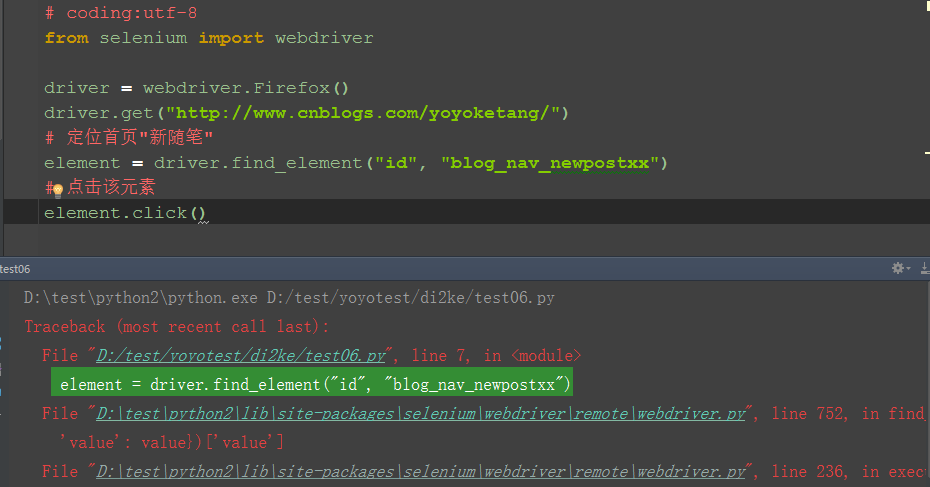
1.打开博客首页,定位“新随笔”元素,此元素id="blog_nav_newpost"
2.为了故意让它定位失败,我在元素属性后面加上xx
3.运行失败后如下图所示,程序在查找元素的这一行发生了中断,不会继续执行click事件了
二、捕获异常
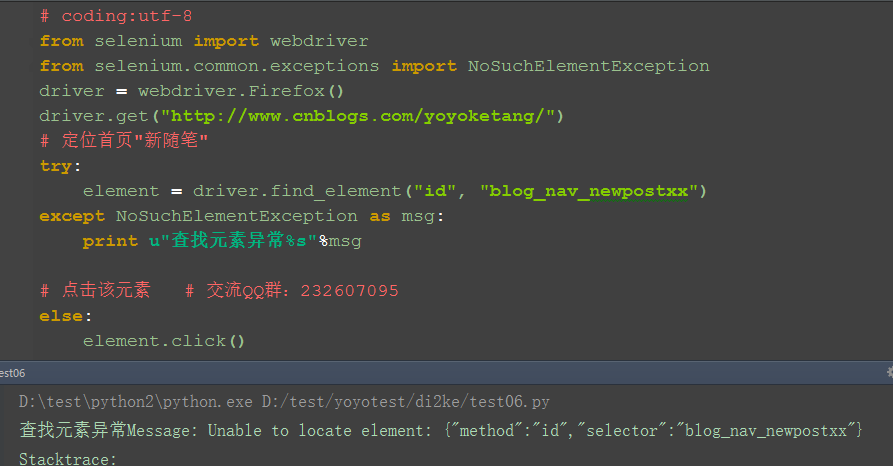
1.为了让程序继续执行,我们可以用try...except...捕获异常。捕获异常后可以打印出异常原因,这样以便于分析异常原因
2.从如下异常内容可以看出,发生异常原因是:NoSuchElementException
selenium.common.exceptions.NoSuchElementException: Message: Unable to locate element: {"method":"id","selector":"blog_nav_newpostxx"}
3.从selenium.common.exceptions 导入 NoSuchElementException类
三、参考代码:
# coding:utf-8
from selenium import webdriver
from selenium.common.exceptions import NoSuchElementException
driver = webdriver.Firefox()
driver.get("http://www.cnblogs.com/yoyoketang/")
# 定位首页"新随笔"
try:
element = driver.find_element("id", "blog_nav_newpostxx")
except NoSuchElementException as msg:
print u"查找元素异常%s"%msg
# 点击该元素 # 交流QQ群:232607095
else:
element.click()
四、selenium常见异常
1.NoSuchElementException:没有找到元素
2.NoSuchFrameException:没有找到iframe
3.NoSuchWindowException:没找到窗口句柄handle
4.NoSuchAttributeException:属性错误
5.NoAlertPresentException:没找到alert弹出框
6.lementNotVisibleException:元素不可见
7.ElementNotSelectableException:元素没有被选中
8.TimeoutException:查找元素超时
五、其它异常与源码
1.在Lib目录下:\Lib\site-packages\selenium\common有兴趣的可以看看
# Licensed to the Software Freedom Conservancy (SFC) under one
# or more contributor license agreements. See the NOTICE file
# distributed with this work for additional information
# regarding copyright ownership. The SFC licenses this file
# to you under the Apache License, Version 2.0 (the
# "License"); you may not use this file except in compliance
# with the License. You may obtain a copy of the License at
#
# http://www.apache.org/licenses/LICENSE-2.0
#
# Unless required by applicable law or agreed to in writing,
# software distributed under the License is distributed on an
# "AS IS" BASIS, WITHOUT WARRANTIES OR CONDITIONS OF ANY
# KIND, either express or implied. See the License for the
# specific language governing permissions and limitations
# under the License.
"""
Exceptions that may happen in all the webdriver code.
"""
class WebDriverException(Exception):
"""
Base webdriver exception.
"""
def __init__(self, msg=None, screen=None, stacktrace=None):
self.msg = msg
self.screen = screen
self.stacktrace = stacktrace
def __str__(self):
exception_msg = "Message: %s\n" % self.msg
if self.screen is not None:
exception_msg += "Screenshot: available via screen\n"
if self.stacktrace is not None:
stacktrace = "\n".join(self.stacktrace)
exception_msg += "Stacktrace:\n%s" % stacktrace
return exception_msg
class ErrorInResponseException(WebDriverException):
"""
Thrown when an error has occurred on the server side.
This may happen when communicating with the firefox extension
or the remote driver server.
"""
def __init__(self, response, msg):
WebDriverException.__init__(self, msg)
self.response = response
class InvalidSwitchToTargetException(WebDriverException):
"""
Thrown when frame or window target to be switched doesn't exist.
"""
pass
class NoSuchFrameException(InvalidSwitchToTargetException):
"""
Thrown when frame target to be switched doesn't exist.
"""
pass
class NoSuchWindowException(InvalidSwitchToTargetException):
"""
Thrown when window target to be switched doesn't exist.
To find the current set of active window handles, you can get a list
of the active window handles in the following way::
print driver.window_handles
"""
pass
class NoSuchElementException(WebDriverException):
"""
Thrown when element could not be found.
If you encounter this exception, you may want to check the following:
* Check your selector used in your find_by...
* Element may not yet be on the screen at the time of the find operation,
(webpage is still loading) see selenium.webdriver.support.wait.WebDriverWait()
for how to write a wait wrapper to wait for an element to appear.
"""
pass
class NoSuchAttributeException(WebDriverException):
"""
Thrown when the attribute of element could not be found.
You may want to check if the attribute exists in the particular browser you are
testing against. Some browsers may have different property names for the same
property. (IE8's .innerText vs. Firefox .textContent)
"""
pass
class StaleElementReferenceException(WebDriverException):
"""
Thrown when a reference to an element is now "stale".
Stale means the element no longer appears on the DOM of the page.
Possible causes of StaleElementReferenceException include, but not limited to:
* You are no longer on the same page, or the page may have refreshed since the element
was located.
* The element may have been removed and re-added to the screen, since it was located.
Such as an element being relocated.
This can happen typically with a javascript framework when values are updated and the
node is rebuilt.
* Element may have been inside an iframe or another context which was refreshed.
"""
pass
class InvalidElementStateException(WebDriverException):
"""
"""
pass
class UnexpectedAlertPresentException(WebDriverException):
"""
Thrown when an unexpected alert is appeared.
Usually raised when when an expected modal is blocking webdriver form executing any
more commands.
"""
def __init__(self, msg=None, screen=None, stacktrace=None, alert_text=None):
super(UnexpectedAlertPresentException, self).__init__(msg, screen, stacktrace)
self.alert_text = alert_text
def __str__(self):
return "Alert Text: %s\n%s" % (self.alert_text, super(UnexpectedAlertPresentException, self).__str__())
class NoAlertPresentException(WebDriverException):
"""
Thrown when switching to no presented alert.
This can be caused by calling an operation on the Alert() class when an alert is
not yet on the screen.
"""
pass
class ElementNotVisibleException(InvalidElementStateException):
"""
Thrown when an element is present on the DOM, but
it is not visible, and so is not able to be interacted with.
Most commonly encountered when trying to click or read text
of an element that is hidden from view.
"""
pass
class ElementNotSelectableException(InvalidElementStateException):
"""
Thrown when trying to select an unselectable element.
For example, selecting a 'script' element.
"""
pass
class InvalidCookieDomainException(WebDriverException):
"""
Thrown when attempting to add a cookie under a different domain
than the current URL.
"""
pass
class UnableToSetCookieException(WebDriverException):
"""
Thrown when a driver fails to set a cookie.
"""
pass
class RemoteDriverServerException(WebDriverException):
"""
"""
pass
class TimeoutException(WebDriverException):
"""
Thrown when a command does not complete in enough time.
"""
pass
class MoveTargetOutOfBoundsException(WebDriverException):
"""
Thrown when the target provided to the `ActionsChains` move()
method is invalid, i.e. out of document.
"""
pass
class UnexpectedTagNameException(WebDriverException):
"""
Thrown when a support class did not get an expected web element.
"""
pass
class InvalidSelectorException(NoSuchElementException):
"""
Thrown when the selector which is used to find an element does not return
a WebElement. Currently this only happens when the selector is an xpath
expression and it is either syntactically invalid (i.e. it is not a
xpath expression) or the expression does not select WebElements
(e.g. "count(//input)").
"""
pass
class ImeNotAvailableException(WebDriverException):
"""
Thrown when IME support is not available. This exception is thrown for every IME-related
method call if IME support is not available on the machine.
"""
pass
class ImeActivationFailedException(WebDriverException):
"""
Thrown when activating an IME engine has failed.
"""
pass
学习过程中有遇到疑问的,可以加selenium(python+java) QQ群交流:646645429
觉得对你有帮助,就在右下角点个赞吧,感谢支持!
Selenium2+python自动化57-捕获异常(NoSuchElementException)的更多相关文章
- Selenium2+python自动化61-Chrome您使用的是不受支持的命令行标记:--ignore-certificate-errors
前言 您使用的是不受支持的命令行标记:--ignore-certificate-errors.稳定性和安全性会有所下降 selenium2启动Chrome浏览器是需要安装驱动包的,但是不同的Chrom ...
- Selenium2+python自动化61-Chrome浏览器(chromedriver)【转载】
前言 selenium2启动Chrome浏览器是需要安装驱动包的,但是不同的Chrome浏览器版本号,对应的驱动文件版本号又不一样,如果版本号不匹配,是没法启动起来的. 一.Chrome遇到问题 1. ...
- Selenium2+python自动化20-Excel数据参数化【转载】
前言 问: Python 获取到Excel一列值后怎么用selenium录制的脚本中参数化,比如对登录用户名和密码如何做参数化? 答:可以使用xlrd读取Excel的内容进行参数化.当然为了便于各位小 ...
- Selenium2+python自动化23-富文本(自动发帖)
前言 富文本编辑框是做web自动化最常见的场景,有很多小伙伴遇到了不知道无从下手,本篇以博客园的编辑器为例,解决如何定位富文本,输入文本内容 一.加载配置 1.打开博客园写随笔,首先需要登录,这里为了 ...
- Selenium2+python自动化24-js处理富文本(带iframe)
前言 上一篇Selenium2+python自动化23-富文本(自动发帖)解决了富文本上iframe问题,其实没什么特别之处,主要是iframe的切换,本篇讲解通过js的方法处理富文本上iframe的 ...
- Selenium2+python自动化7-xpath定位
前言 在上一篇简单的介绍了用工具查看目标元素的xpath地址,工具查看比较死板,不够灵活,有时候直接复制粘贴会定位不到.这个时候就需要自己手动的去写xpath了,这一篇详细讲解xpath的一些语法. ...
- Selenium2+python自动化13-Alert
不是所有的弹出框都叫alert,在使用alert方法前,先要识别出它到底是不是alert.先认清楚alert长什么样子,下次碰到了,就可以用对应方法解决.alert\confirm\prompt弹出框 ...
- Selenium2+python自动化28-table定位
前言 在web页面中经常会遇到table表格,特别是后台操作页面比较常见.本篇详细讲解table表格如何定位. 一.认识table 1.首先看下table长什么样,如下图,这种网状表格的都是table ...
- Selenium2+python自动化43-判断title(title_is)
From: https://www.cnblogs.com/yoyoketang/p/6539117.html 前言 获取页面title的方法可以直接用driver.title获取到,然后也可以把获取 ...
- Selenium2+python自动化54-unittest生成测试报告(HTMLTestRunner)
前言 批量执行完用例后,生成的测试报告是文本形式的,不够直观,为了更好的展示测试报告,最好是生成HTML格式的. unittest里面是不能生成html格式报告的,需要导入一个第三方的模块:HTMLT ...
随机推荐
- C#socket编程序(二)
在上一篇中,我列了一些常用的方法,可以说这些方法是一些辅助性的方法,对于分析网络中的主机属性非常有用.在这篇中,我将会介绍一下面向连接(TCP)socket编程,其中辅以实例,代码可供下载. 对于TC ...
- Django和Mysql合用时,显示时间问题
这个以前没系统处理过,感觉前端页面显示正常,就OK. 但有的不重要的地方,显示有8小时错乱,也没有列入优先级处理. 昨天下细看了一些网上文档,找取了解决思路. 大致想法是:数据库里存+00:00时区的 ...
- Adapter.notifyDataSetChanged()源码分析以及与ListView.setAdapter的区别
一直很好奇,notifyDataSetChanged究竟是重绘了整个ListView还是只重绘了被修改的那些Item,它与重新设置适配器即调用setAdapter的区别在哪里?所以特地追踪了一下源码, ...
- 【LOJ】#2062. 「HAOI2016」地图
题解 我对莫队真是一无所知 这个东西显然可以用圆方树转成一个dfs序列 然后呢,用莫队计算每个询问区间的每个数出现的次数,从而顺带计算每个数字的奇偶性 但是我们要查的数字也用一个范围,可以直接用分块维 ...
- nginx一些细节知识点补充
1.upstream 配置代理 upstream local_tomcat { server localhost:8080; } server{ location / { proxy_pass htt ...
- Session机制一(基础知识点)
一: 1.介绍 对于会话与状态管理,有两种方式,cookie与session. 其中,cookie机制采用客户端保持cookie的方案. 而,session机制采用的是服务器保持Http状态信息的方案 ...
- Python学习笔记之爬虫
爬虫调度端:启动爬虫,停止爬虫,监视爬虫运行情况 URL管理器:对将要爬取的和已经爬取过的URL进行管理:可取出带爬取的URL,将其传送给“网页下载器”网页下载器:将URL指定的网页下载,存储成一个字 ...
- R语言实战(十)处理缺失数据的高级方法
本文对应<R语言实战>第15章:处理缺失数据的高级方法 本文仅在书的基础上进行简单阐述,更加详细的缺失数据问题研究将会单独写一篇文章. 处理缺失值的一般步骤: 识别缺失数据: 检查导致数据 ...
- IIS Server Farms入门
概念了解 IIS Server Farms,实际上应该叫“Microsoft Web Farm Framework (WFF)”,依赖于“Web Platform Installer”才能安装,依赖于 ...
- C++使用new和不使用new创建对象区别
前言 在使用面向对象的时候,发现使用new和不使用new创建的对象区别还是蛮大的,做个总结: 总结 new创建的是一个指向类对象的指针,需要指针进行接收,一处初始化,多处使用,但是不用new创建的话不 ...