
[svc]logstash和filebeat之间ssl加密
cfssl生成证书
wget https://pkg.cfssl.org/R1.2/cfssl_linux-amd64 -O     /usr/local/bin/cfssl

wget https://pkg.cfssl.org/R1.2/cfssljson_linux-amd64 -O      /usr/local/bin/cfssljson

wget https://pkg.cfssl.org/R1.2/cfssl-certinfo_linux-amd64 -O /usr/local/bin/cfssl-certinfo

chmod +x /usr/local/bin/cfssl*

cd;mkdir keys;cd keys

cat > ca-config.json <<EOF

{

  "signing": {

    "default": {

      "expiry": "8760h"

    },

    "profiles": {

      "app": {

        "usages": [

            "signing",

            "key encipherment",

            "server auth",

            "client auth"

        ],

        "expiry": "8760h"

      }

    }

  }

}

EOF

cat > ca-csr.json <<EOF

{

  "CN": "k8s",

  "key": {

    "algo": "rsa",

    "size": 2048

  },

  "names": [

    {

      "C": "CN",

      "ST": "BeiJing",

      "L": "BeiJing",

      "O": "k8s",

      "OU": "System"

    }

  ]

}

EOF

cfssl gencert -initca ca-csr.json | cfssljson -bare ca

cd /root/keys

cat > app-csr.json <<EOF

{

  "CN": "app",

  "hosts": [

    "127.0.0.1",

    "192.168.1.11",

    "192.168.1.12"

  ],

  "key": {

    "algo": "rsa",

    "size": 2048

  },

  "names": [

    {

      "C": "CN",

      "ST": "BeiJing",

      "L": "BeiJing",

      "O": "k8s",

      "OU": "System"

    }

  ]

}

EOF

cfssl gencert -ca=/root/keys/ca.pem \

  -ca-key=/root/keys/ca-key.pem \

  -config=/root/keys/ca-config.json \

  -profile=app app-csr.json | cfssljson -bare app

openssl x509  -noout -text -in  app.pem
可以看到san里包含了n1 和 n2的ip. 这里计划logstash(的ip)和filebeat(的ip)使用同一套证书
实验环境
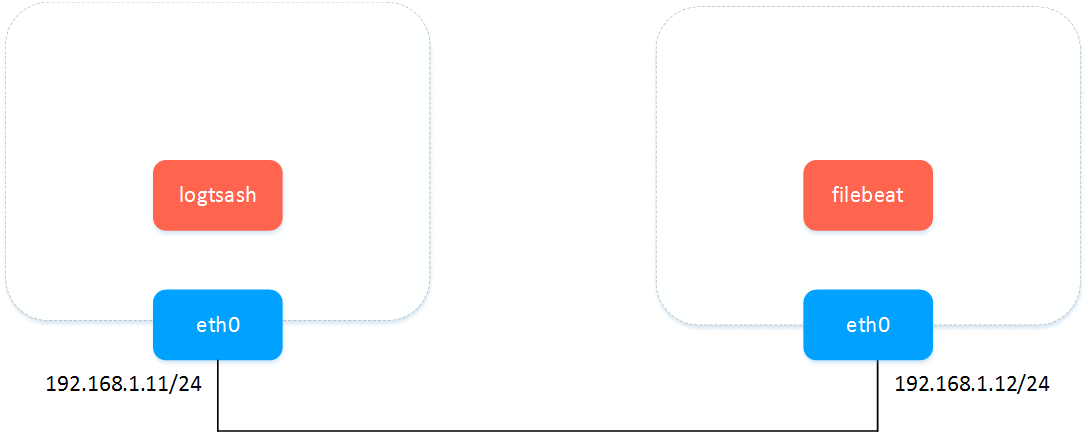
logstash&filebeat之间传数据-明文
logstash配置
cat > pipeline.conf <<EOF

input {

  beats {

    port => 5044

  }

  stdin {

    codec => "json"

  }

}

output {

  stdout { codec => rubydebug }

}

EOF

bin/logstash -f pipeline.conf --config.reload.automatic
filebeat多输入(不能多输出)参考: https://www.elastic.co/guide/en/beats/filebeat/current/migration-configuration.html
cat > filebeat.yml <<EOF

filebeat.prospectors:

- type: log

  enabled: true

  paths:

    - /tmp/ma.txt

- type: stdin

output.logstash:

  hosts: ["192.168.1.11:5044"]

# output.console:

#  pretty: true

EOF

./filebeat -e -c filebeat.yml -d "publish"
测试文字
helloworld helloworld helloworld helloworld helloworld helloworld helloworld helloworld helloworld helloworld helloworld helloworld helloworld helloworld helloworld helloworld helloworld helloworld helloworld helloworld helloworld helloworld helloworld helloworld helloworld helloworld helloworld helloworld helloworld helloworld helloworld helloworld helloworld helloworld helloworld helloworld helloworld helloworld helloworld helloworld helloworld helloworld helloworld helloworld helloworld helloworld helloworld helloworld helloworld helloworld helloworld helloworld helloworld helloworld helloworld helloworld helloworld helloworld helloworld helloworld helloworld helloworld helloworld helloworld helloworld helloworld helloworld helloworld helloworld helloworld helloworld helloworld helloworld helloworld helloworld helloworld helloworld helloworld helloworld helloworld helloworld helloworld helloworld helloworld helloworld helloworld helloworld
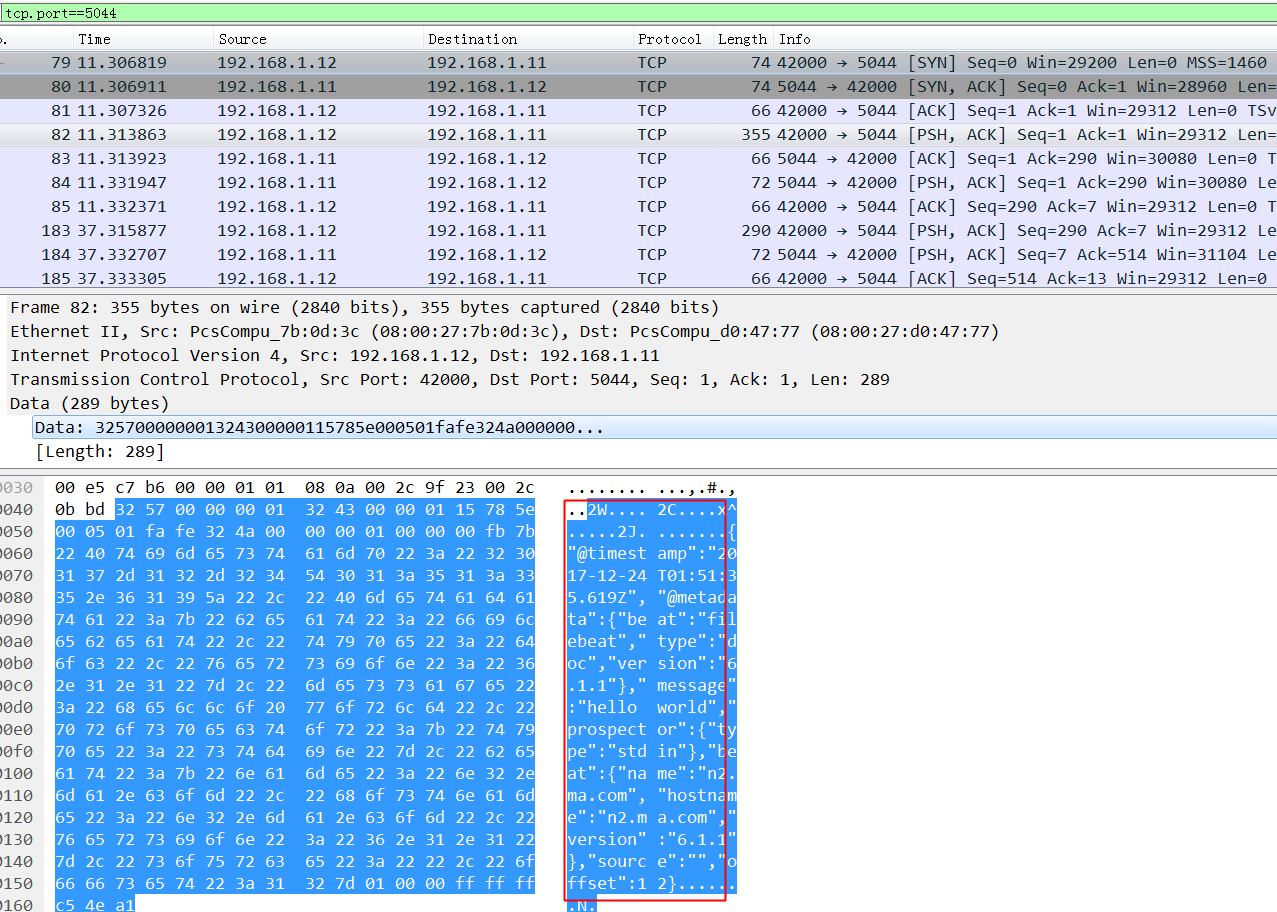
wireshark抓包: 不加密的时候,可以看到这玩意依稀可以看到依稀传输内容,如果互联网传输的话会有隐患.
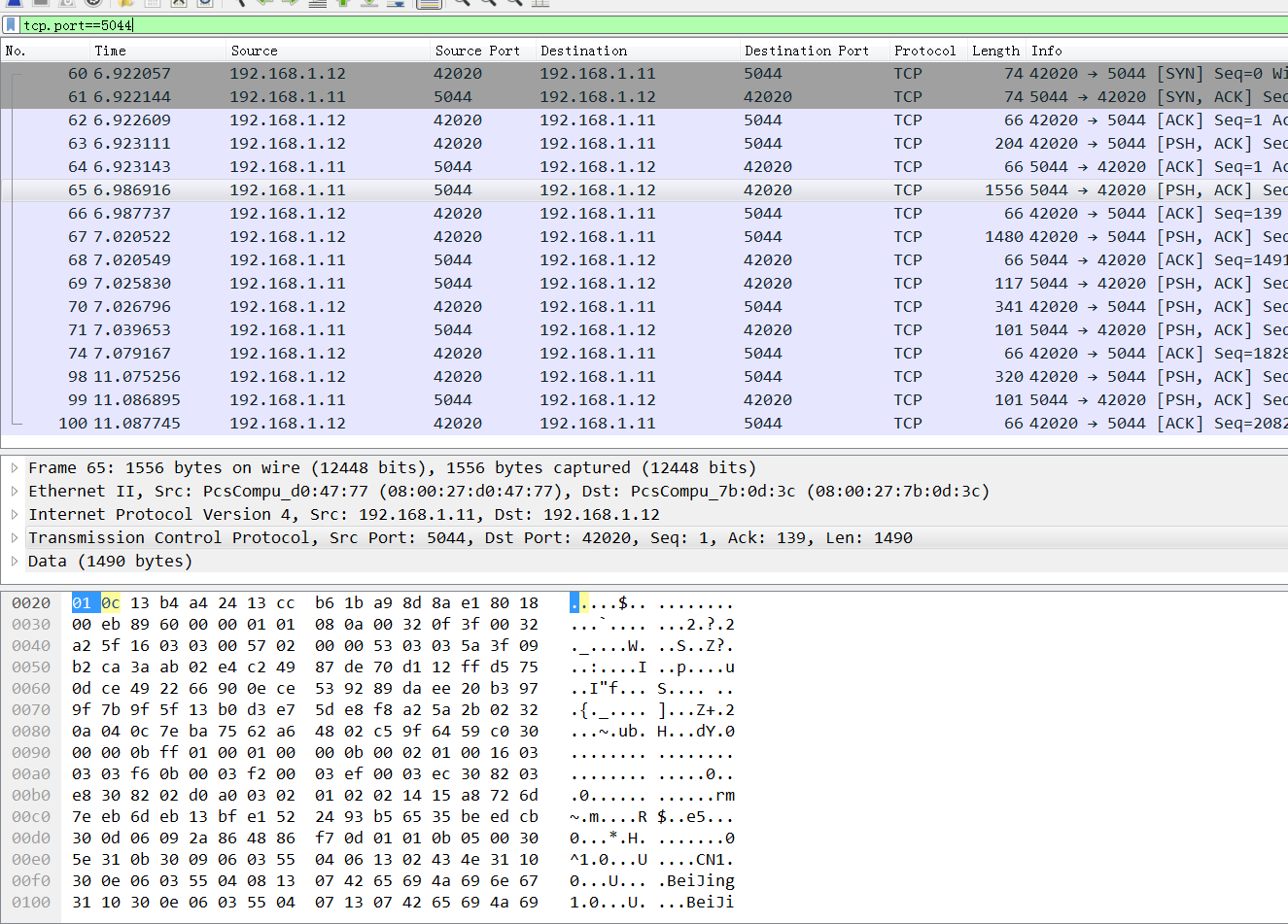
logstash&filebeat之间传数据-ssl加密
- logstash配置ssl
参考: https://www.elastic.co/guide/en/beats/filebeat/current/configuring-ssl-logstash.html
cat > pipeline.conf <<EOF

input {

  beats {

    port => 5044

    ssl => true

    ssl_certificate_authorities => ["/root/keys/ca.pem"]

    ssl_certificate => "/root/keys/app.pem"

    ssl_key => "/root/keys/app-key.pem"

    ssl_verify_mode => "force_peer"

  }

  stdin {

    codec => "json"

  }

}

output {

  stdout { codec => rubydebug }

}

EOF

bin/logstash -f pipeline.conf --config.reload.automatic
- filebeat配置ssl
filebeat.prospectors:

- type: log

  enabled: true

  paths:

    - /tmp/ma.txt

output.logstash:

  hosts: ["192.168.1.12:5043"]

output.logstash.ssl.certificate_authorities: ["/root/keys/ca.pem"]

output.logstash.ssl.certificate: "/root/keys/app.pem"

output.logstash.ssl.key: "/root/keys/app-key.pem"

output.console:

  pretty: true

./filebeat -e -c filebeat.yml -d "publish"
wireshark抓包: 看不到任何传输内容,依稀看到证书的subject(公开的).
报错doesn't contain any IP SANs
2017/12/24 02:33:59.242540 output.go:74: ERR Failed to connect: x509: cannot validate certificate for 192.168.1.11 because it doesn't contain any IP SANs

2017/12/24 02:34:15.289558 output.go:74: ERR Failed to connect: x509: cannot validate certificate for 192.168.1.11 because it doesn't contain any IP SANs
ssl验证流程:
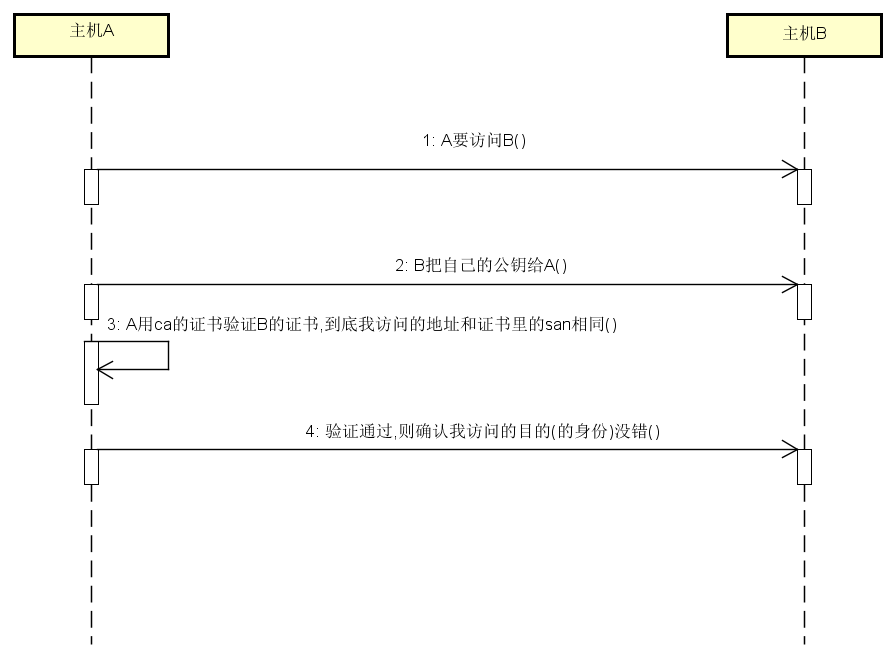
报错原因: 我生成证书请求的时候 hosts字段(即san)为空.
cd /root/keys

cat > app-csr.json <<EOF

{

  "CN": "192.168.1.12",

  "hosts": [],

  "key": {

    "algo": "rsa",

    "size": 2048

  },

  "names": [

    {

      "C": "CN",

      "ST": "BeiJing",

      "L": "BeiJing",

      "O": "k8s",

      "OU": "System"

    }

  ]

}

EOF

cfssl gencert -ca=/root/keys/ca.pem \

  -ca-key=/root/keys/ca-key.pem \

  -config=/root/keys/ca-config.json \

  -profile=app app-csr.json | cfssljson -bare app

openssl x509  -noout -text -in  app.pem
[svc]logstash和filebeat之间ssl加密的更多相关文章
- Filebeat与Logstash配置SSL加密通信
为了保证应用日志数据的传输安全,我们可以使用SSL相互身份验证来保护Filebeat和Logstash之间的连接. 这可以确保Filebeat仅将加密数据发送到受信任的Logstash服务器,并确保L ...
- Chapter 1 Securing Your Server and Network(5):使用SSL加密会话
原文:Chapter 1 Securing Your Server and Network(5):使用SSL加密会话 原文出处:http://blog.csdn.net/dba_huangzj/art ...
- ELK 架构之 Logstash 和 Filebeat 配置使用(采集过滤)
相关文章: ELK 架构之 Elasticsearch 和 Kibana 安装配置 ELK 架构之 Logstash 和 Filebeat 安装配置 ELK 使用步骤:Spring Boot 日志输出 ...
- 利用Fiddler和Wireshark解密SSL加密流量
原文地址:http://kelvinh.github.io/blog/2014/01/12/decrypt-ssl-using-fiddler-and-wireshark/ Fiddler是一个著名的 ...
- Vsftpd支持SSL加密传输
ftp传输数据是明文,弄个抓包软件就可以通过数据包来分析到账号和密码,为了搭建一个安全性比较高ftp,可以结合SSL来解决问题 SSL(Secure Socket Layer)工作于传输层和应用程 ...
- .net mvc 站点自带简易SSL加密传输 Word报告自动生成(例如 导出数据库结构) 微信小程序:动画(Animation) SignalR 设计理念(一) ASP.NET -- WebForm -- ViewState ASP.NET -- 一般处理程序ashx 常用到的一些js方法,记录一下 CryptoJS与C#AES加解密互转
.net mvc 站点自带简易SSL加密传输 因项目需要,传输数据需要加密,因此有了一些经验,现简易抽出来分享! 请求:前端cryptojs用rsa/aes 或 rsa/des加密,后端.net ...
- 170228、Linux操作系统安装ELK stack日志管理系统--(1)Logstash和Filebeat的安装与使用
安装测试环境:Ubuntu 16.04.2 LTS 前言 (1)ELK是Elasticsearch,Logstash,Kibana 开源软件的集合,对外是作为一个日志管理系统的开源方案.它可以从任何来 ...
- YS端对端之间SSL通信安全问题
1.简介: 传统的互联网,SSL通信主要基于客户端和服务器之间,在物联网时代,端和端之间的加密通信将变得很普遍,在YS业务中主要的端和端通信为: (1).客户端(移动APP,YS工作 ...
- spice在桌面虚拟化中的应用系列之三(USB映射实现,SSL加密,密码认证,多客户端支持)
本系列其它文章 spice在桌面虚拟化中的应用系列之一(spice简介,性能优化等) spice在桌面虚拟化中的应用系列之二(Linux平台spice客户端的编译安装,支持USB映射) 1.spice ...
随机推荐
- CheeseZH: Stanford University: Machine Learning Ex3: Multiclass Logistic Regression and Neural Network Prediction
Handwritten digits recognition (0-9) Multi-class Logistic Regression 1. Vectorizing Logistic Regress ...
- ORACLE常用监控语句(未完待续)
--查询日志的切换频率 select t1.RECID as srecid ,t2.RECID as erecid ,t1.FIRST_TIME as stime ...
- 美国程序猿(软件project师)平均年薪状况调查
来源站点:Indeed.com&computerengineeringsalarydata.com Average Software Engineer Salary by 50 States ...
- 深入理解Object提供的阻塞和唤醒API
深入理解Object提供的阻塞和唤醒API 前提 前段时间花了大量时间去研读JUC中同步器AbstractQueuedSynchronizer的源码实现,再结合很久之前看过的一篇关于Object提供的 ...
- How to Analyze Java Thread Dumps
When there is an obstacle, or when a Java based Web application is running much slower than expected ...
- xcode8 的坑 Info.plist 配置app权限
好多更新完Xcode8 的小盆友们(我也是小盆友啦),会发现当我们调用系统功能,相册,相机,麦克风等会出现崩溃,而控制台打印出一堆乱七八糟的看不懂的东西,但是最后一句话是有用的,给出了崩溃的原因 啦, ...
- Autocomplete in ASP.NET MVC3自动检索并填充输入框
1.单一产品情况下使用: public ActionResult GetStockList() { var item = _db.Stocks.ToList().Select(s =>s.Pro ...
- Unix 网络编程 读书笔记1
第一章: C/C++语言提供两种不同的编程模式:IPL32和PL64.► IPL32 ● 表示integer/pointer/long三种数据类型是32位(4个字节),在这种模式下,提供32位的地址空 ...
- 快速搭建Seeddms文档管理系统
Seddms文档管理系统是开源的 环境: Redhat6.5 lamp 01.LAMP的安装 安装请看:http://www.cnblogs.com/xiaochina/p/6442337.html ...
- 修改Cygwin的默认启动路径
原先启动Cygwin后,pwd显示: C:\Documents and Settings\Administrator@IBM-EBDC0EAC4B7 ~$ pwdC:\Documents and Se ...