
CSS3D动画制作一个3d旋转的筛子
希望这个demo能让大家理解CSS3的3d空间动画(其实是个假3D)
首先给一个3d的解剖图,x/y/z轴线轴线已经标出
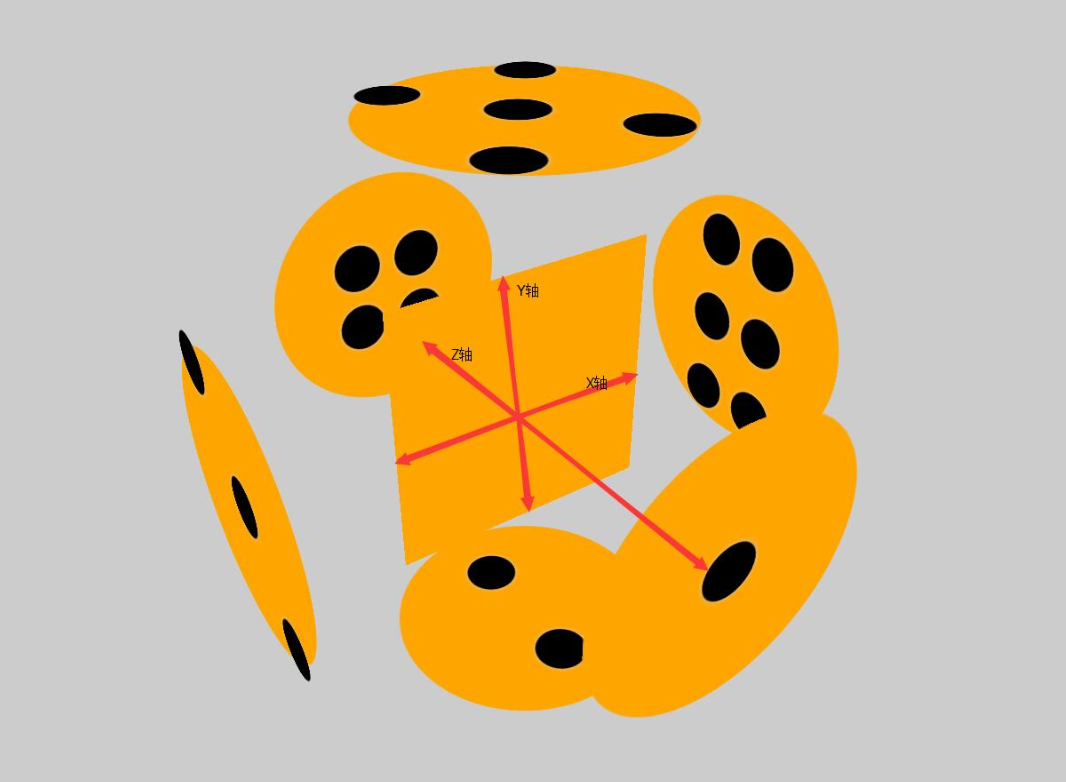
下面附上添加特效的动画旋转
可以根据demo并参考上面解剖图进行理解
<!DOCTYPE html>

<html lang="en">

<head>

    <meta charset="UTF-8">

    <title>Document</title>

    <style>

        html{

            height: 100%;

        }

        body{

            height: 100%;

            display: flex;

            justify-content: center;

            align-items: center;

            background-color: black;

            perspective: 1000px;

            transform-style: preserve-3d;

        }

        section{

            width: 300px;

            height: 300px;

            transform-style: preserve-3d;

            animation: zhuan 16s infinite linear;

        }

        div{

            width: 300px;

            height: 300px;

            background-color: orange;

            display: flex;

            flex-wrap: wrap;

            align-items: center;

            justify-content: center;

            position: absolute;

            box-shadow: 0 0 300px green;

            opacity: 0.8;

        }

        div:nth-child(1){

            transform: translateZ(300px);

            border-radius: 50%;

            box-shadow: 0 0 500px orange;

            opacity: 0.4;

        }

        div:nth-child(2){

            transform: rotateX(90deg) translateZ(300px);

            align-items: center;

            justify-content: space-around;

            flex-direction: column;

            border-radius: 50%;

            box-shadow: 0 0 500px orange;

            opacity: 0.4;

        }

        div:nth-child(3){

            transform: rotateY(90deg) translateZ(300px);

            flex-wrap: wrap;

            align-items: flex-start;

            justify-content: center;

            border-radius: 50%;

            box-shadow: 0 0 500px orange;

            opacity: 0.4;

        }

        div:nth-child(3) p:nth-child(2){

            align-self: center;

        }

        div:nth-child(3) p:nth-child(3){

            align-self: flex-end;

        }

        div:nth-child(4){

            transform: translateZ(-300px);

            flex-wrap: wrap;

            border-radius: 50%;

            box-shadow: 0 0 500px orange;

            opacity: 0.4;

        }

        div:nth-child(5){

            transform: rotateX(90deg) translateZ(-300px);

            border-radius: 50%;

            box-shadow: 0 0 500px orange;

            opacity: 0.4;

        }

        div:nth-child(6){

            transform: rotateY(90deg) translateZ(-300px);

            border-radius: 50%;

            box-shadow: 0 0 500px orange;

            opacity: 0.4;

        }

        .low{

            width: 300px;

            height: 150px;

            display: flex;

        }

        .low:nth-child(1){

            align-items: flex-end;

            justify-content: center;

        }

        .low:nth-child(2){

            align-items: flex-start;

            justify-content: center;

        }

        .stree{

            width: 300px;

            height: 33.33%;

            display: flex;

        }

        .stree:nth-child(1){

            justify-content: space-around;

        }

        .stree:nth-child(2){

            justify-content: center;

        }

        .stree:nth-child(3){

            justify-content: space-around;

        }

        .fore{

            width: 300px;

            height: 33.33%;

            display: flex;

        }

        .fore:nth-child(1){

            justify-content: center;

        }

        .fore:nth-child(3){

            justify-content: center;

        }

        p{

            width: 60px;

            height: 60px;

            background-color: white;

            border-radius: 50%;

            box-shadow: 200 60 400px #ccc;

            opacity: 0.7;

            margin: 10px;

        }

        @keyframes zhuan{

            0%{

                transform: rotateX(0deg) rotateY(0deg);

            }

            100%{

                transform: rotateX(360deg) rotateY(360deg) ;

            }

        }

    </style>

</head>

<body>

    <section>

        <div>

            <p></p>

        </div>

        <div>

            <p></p>

            <p></p>

        </div>

        <div>

            <p></p>

            <p></p>

            <p></p>

        </div>

        <div>

        <main class="low">

            <p></p>

            <p></p>

        </main>

        <main class="low">

            <p></p>

            <p></p>

        </main>

        </div>

        <div>

        <main class="stree">

            <p></p>

            <p></p>

        </main>

        <main class="stree">

            <p></p>

        </main>

        <main class="stree">

            <p></p>

            <p></p>

        </main>

        </div>

        <div>

            <main class="fore">

            <p></p>

                <p></p>

            </main>

            <main class="stree">

                <p></p>

                <p></p>

            </main>

            <main class="fore">

                <p></p>

                <p></p>

            </main>

        </div>

    </section>

</body>

</html>
CSS3D动画制作一个3d旋转的筛子的更多相关文章
- Coco2dx制作一个3D旋转的效果
建了工程之后修改HelloWorldScene.cpp文件,修改部分为 // on "init" you need to initialize your instance bool ...
- 用CSS伪类制作一个不断旋转的八卦图?
前言 介绍一下如何制作一个不断旋转的八卦图.快速预览代码及效果,点击:八卦图 代码如下: HTML部分 <!DOCTYPE html> <html> <head> ...
- transform动画的一个3D的正方体盒子
<!DOCTYPE html> <html lang="en"> <head> <meta charset="UTF-8&quo ...
- 使用纯CSS3实现一个3D旋转的书本
有一些前沿的电商站点已经開始使用3D模型来展示商品并支持在线定制,而当中图书的展示是最为简单的一种, 无需复杂的建模过程,使用图片和CSS3的一些变换就可以实现更好的展示效果,简洁而有用. 书本的3D ...
- CSS动画实例:3D立方体
CSS3支持3D转换,与3D转换有关的属性有: transform:向元素应用 2D或3D 转换. transform-origin:改变被转换元素的位置. transform-style:规定被嵌套 ...
- 纯CSS做3D旋转魔方
昨天偶然看见网友(简单说 用CSS做一个魔方旋转的效果)做的一个3D旋转魔方 效果就是本博客右侧公告栏所示 在这里把做法展现出来 感兴趣的可以试试 做成自己特有的魔方 <!DOCTYPE h ...
- iOS 帧动画之翻转和旋转动画
记录两个比较简单的动画,一个是翻转的动画,一个是旋转的动画. 旋转动画: 1 [UIView animateWithDuration:3 animations:^{ if (formView) { f ...
- WPF 3D:简单的Point3D和Vector3D动画创造一个旋转的正方体
原文:WPF 3D:简单的Point3D和Vector3D动画创造一个旋转的正方体 运行结果: 事实上很简单,定义好一个正方体,处理好纹理.关于MeshGeometry3D的正确定义和纹理这里就不多讲 ...
- 【巩固】CSS3的3D动画 ——3D旋转(1)
最近学了妙味的css3的动画,2D,3D的都有,先写一个最简单的3d翻转效果,鼠标移入div,正反面翻转效果. 注意点有: 要给正反面外面加个父级: transform-style: preserve ...
随机推荐
- jQuery.cookie的使用指南
一个轻量级的cookie 插件,可以读取.写入.删除 cookie. 配置 首先包含jQuery的库文件,在后面包含 jquery.cookie.js 的库文件. <script type=&q ...
- Jmeter分布式测试的各种坑之jmeter-server修改ip
第一坑:启动压力机的时候,直接./jmeter-server,会报如下错误 错误原因:127.0.0.1是本机, 一个回路地址, 没有指定地址 正确的启动方式:启动命令加一个参数, IP地址写压力机对 ...
- 转的很好的前端html 内容
HTML 初识 web服务本质 import socket def main(): sock = socket.socket(socket.AF_INET, socket.SOCK_STREAM) s ...
- 数据结构---散列表查找(哈希表)概述和简单实现(Java)
散列表查找定义 散列技术是在记录的存储位置和它的关键字之间建立一个确定的对应关系f,是的每个关键字key对应一个存储位置f(key).查找时,根据这个确定的对应关系找到给定值的key的对应f(key) ...
- Mac下的paths.d目录神奇用法
首先,这个方法是通过PG的做法学到的,且这个方法只能在Mac下用,在Linux下还真没有这个方法. 这个paths.d的作用很简单,就是在里面创建一个文件,然后写上需要在全局命令行下用到的命令,直接配 ...
- (转)Linux中的位图
原文:https://www.jianshu.com/p/74626c2d2916 什么是位图 位图(bitmap)的定义 维基百科中关于位图的介绍: 一种数据结构,代表了有限域中的稠集(dense ...
- How React Works (一)首次渲染
How React Works (一)首次渲染 一.前言 本文将会通过一个简单的例子,结合React源码(v 16.4.2)来说明 React 是如何工作的,并且帮助读者理解 ReactElement ...
- 解析ASP.NET WebForm和Mvc开发的区别 分类: ASP.NET 2013-12-29 01:59 11738人阅读 评论(5) 收藏
因为以前主要是做WebFrom开发,对MVC开发并没有太深入的了解.自从来到创新工场的新团队后,用的技术都是自己以前没有接触过的,比如:MVC 和EF还有就是WCF,压力一直很大.在很多问题都是不清楚 ...
- Asp.Net Core 连接Mysql
上一篇文章里最后在VS里测试是没有问题的,但是在Windows命令行模式下会报错. 首先用dotnet restore命令的时候会出现error: 然后用dotnet run会出现警告,但是依旧会成功 ...
- Android 开发服务类 04_ServletForPOSTMethod
ServletForPOSTMethod 业务类 package com.wangjialin.internet.servlet; import java.io.IOException; import ...