
PHP+Gtk实例(求24点)
- 作者: Laruence(


 )
) - 本文地址: http://www.laruence.com/2009/05/26/871.html
- 转载请注明出处
最近要安排我为BIT提供的《PHP高级应用–关于PHP你不知道的》一门课的讲课素材, 其中有部分涉及到PHP和Gtk2开发桌面应用的部分, 于是抽空就想写一了一个demo出来.
这是一个经典的求24的算法的PHP实现, 加上了Gtk2的界面, 其实也没什么复杂的, 和MFC开发没什么太大的区别, 唯一的不爽, 就是要自己用代码来写布局。。。
有兴趣的同学可以看看.
后记: 这里有一个网页版的, 可以用来玩玩: http://www.laruence.com/stashes/compute.php
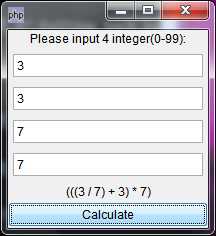
运行截图
完整源代码(PHP-Gtk example):
- <?php
- /**
- * A 24 maker
- * @version 1.0.0
- * @author laruence<laruence at yahoo.com.cn>
- * @copyright (c) 2009 http://www.laruence.com
- */
- class TwentyFourCal extends GtkWindow {
- private $chalkboard;
- private $inputs;
- public $needle = 24;
- public $precision = '1e-6';
- function TwentyFourCal() {
- parent::__construct();
- $this->draw();
- $this->show();
- }
- /**
- * 画窗体方法
- */
- public function draw() {
- $this->set_default_size(200, 200);
- $this->set_title("24计算器");
- $mesg = new GtkLabel('Please input 4 integer(0-99):');
- $this->chalkboard = new GtkLabel();
- $this->inputs = $inputs = array(
- new GtkEntry(),
- new GtkEntry(),
- new GtkEntry(),
- new GtkEntry()
- );
- /**
- * container
- */
- $table = new GtkTable(4, 1, 0);
- $layout = array(
- 'left' => 0,
- 'right' => 1,
- 'top' => 0,
- 'bottom' => 1,
- );
- $vBox = new GtkVBox(false, true);
- $vBox->pack_start($mesg);
- foreach ( $inputs as $input ) {
- $input->set_max_length(2);
- $table->attach($input, $layout['left'], $layout['right'],
- $layout['top']++, $layout['bottom']++);
- }
- $vBox->pack_start($table);
- $button = new GtkButton("Calculate");
- $button->connect("clicked", array($this, "calculate"));
- $vBox->pack_start($this->chalkboard);
- $vBox->pack_start($button, true, false);
- $this->add($vBox);
- }
- public function show() {
- $this->show_all(); // 显示窗体
- }
- private function notice($mesg) {
- $this->chalkboard->set_text($mesg);
- }
- /**
- * 取得用户输入方法
- */
- public function calculate() {
- $operants = array();
- $inputs = $this->inputs;
- foreach ($inputs as $input) {
- $number = $input->get_text();
- if (!preg_match('/^\s*\d+\s*$/', $number)) {
- $this->notice('pleas input for integer(0-99)');
- return ;
- }
- array_push($operants, $number);
- }
- $length = count($operants);
- try {
- $this->search($operants, 4);
- } catch (Exception $e) {
- $this->notice($e->getMessage());
- return;
- }
- $this->notice('can\'t compute!');
- return;
- }
- /**
- * 求24点算法PHP实现
- */
- private function search($expressions, $level) {
- if ($level == 1) {
- $result = 'return ' . $expressions[0] . ';';
- if ( abs(eval($result) - $this->needle) <= $this->precision) {
- throw new Exception($expressions[0]);
- }
- }
- for ($i=0;$i<$level;$i++) {
- for ($j=$i+1;$j<$level;$j++) {
- $expLeft = $expressions[$i];
- $expRight = $expressions[$j];
- $expressions[$j] = $expressions[$level - 1];
- $expressions[$i] = '(' . $expLeft . ' + ' . $expRight . ')';
- $this->search($expressions, $level - 1);
- $expressions[$i] = '(' . $expLeft . ' * ' . $expRight . ')';
- $this->search($expressions, $level - 1);
- $expressions[$i] = '(' . $expLeft . ' - ' . $expRight . ')';
- $this->search($expressions, $level - 1);
- $expressions[$i] = '(' . $expRight . ' - ' . $expLeft . ')';
- $this->search($expressions, $level - 1);
- if ($expLeft != 0) {
- $expressions[$i] = '(' . $expRight . ' / ' . $expLeft . ')';
- $this->search($expressions, $level - 1);
- }
- if ($expRight != 0) {
- $expressions[$i] = '(' . $expLeft . ' / ' . $expRight . ')';
- $this->search($expressions, $level - 1);
- }
- $expressions[$i] = $expLeft;
- $expressions[$j] = $expRight;
- }
- }
- return false;
- }
- function __destruct() {
- Gtk::main_quit();
- }
- }
- new TwentyFourCal();
- Gtk::main(); //进入GTK主循环
- ?>
GTK1的API Reference : http://gtk.php.net/manual/en/gtk.gtkentry.php
GTK2的API Reference: 很不完整
PHP+Gtk实例(求24点)的更多相关文章
- C 语言实例 - 求两数最小公倍数
C 语言实例 - 求两数最小公倍数 用户输入两个数,其这两个数的最小公倍数. 实例 - 使用 while 和 if #include <stdio.h> int main() { int ...
- C 语言实例 - 求两数的最大公约数
C 语言实例 - 求两数的最大公约数 用户输入两个数,求这两个数的最大公约数. 实例 - 使用 for 和 if #include <stdio.h> int main() { int n ...
- JAVA 数组实例-求学生成绩的最大成绩,获取数组中的最大值、最小值
实例: import java.util.*; //求学生最大成绩 public class Test{ public static void main(String[] args){ System. ...
- Mapreduce实例--求平均值
求平均数是MapReduce比较常见的算法,求平均数的算法也比较简单,一种思路是Map端读取数据,在数据输入到Reduce之前先经过shuffle,将map函数输出的key值相同的所有的value值形 ...
- Java文件写入与读取实例求最大子数组
出现bug的点:输入数组无限大: 输入的整数,量大: 解决方案:向文件中输入随机数组,大小范围与量都可以控制. 源代码: import java.io.BufferedReader; import j ...
- ASP.NET Core 6框架揭秘实例演示[24]:中间件的多种定义方式
ASP.NET Core的请求处理管道由一个服务器和一组中间件组成,位于 "龙头" 的服务器负责请求的监听.接收.分发和最终的响应,针对请求的处理由后续的中间件来完成.中间件最终体 ...
- C#中按指定质量保存图片的实例代码 24位深度
/// <summary> /// 按指定的压缩质量及格式保存图片(微软的Image.Save方法保存到图片压缩质量为75) /// </summary ...
- MapReduce实例——求平均值,所得结果无法写出到文件的错误原因及解决方案
1.错误原因 mapreduce按行读取文本,map需要在原有基础上增加一个控制语句,使得读到空行时不执行write操作,否则reduce不接受,也无法输出到新路径. 2.解决方案 原错误代码 pub ...
- C 语言实例 -求分数数列1/2+2/3+3/5+5/8+...的前n项和
程序分析:抓住分子与分母的变化规律:分子a:1,2,3,5,8,13,21,34,55,89,144...分母b:2,3,5,8,13,21,34,55,89,144,233...分母b把数赋给了分子 ...
随机推荐
- express基础
express框架 const express = require("express"); 引入express框架 var app= express(); 实例化 相当于构造函 ...
- concurrent.futures模块
1.concurrent.futures模块介绍 2.ThreadPoolExecutor线程池使用 3.ProcessPoolExecutor进程池使用 4.其他方法使用 1.concurrent. ...
- html文字在django模板中取消转译
django {{ news.content | safe }} 还有escape=fales,具体咋用,有点蒙蔽
- c++官方文档-按值传递和按引用传递
#include<stdio.h> #include<iostream> #include<queue> #include<map> #include& ...
- python学习中的第一个例子
搭建python 先学习下当小白鼠 1 看下自己的python版本 python -v 2 然后,用pip安装开发Web App需要的第三方库: 异步框架aiohttp: pip3 install a ...
- OpenCL 归约 1
▶ 照着书上的代码,写了几个一步归约的计算,只计算一步,将原数组归约到不超过 1024 个工作项 ● 代码 // kernel.cl __kernel void reduce01(__global u ...
- python正则表达式re库(自用)
经典例子: 1.由26个字母组成的字符串 ^[A-Za-z]+$ 2. 中国境内邮政编码 [1-9]\d{5} 3.IP地址 0-99:[1-9]?\d 100-199:1\d{2} 200-249: ...
- tp5 redis 单例模式 转载
单例模式(Singleton Pattern 单件模式或单元素模式) 单例模式确保某个类只有一个实例,而且自行实例化并向整个系统提供这个实例. 单例模式有以下3个特点: 1 . 它必须有一个构造函数, ...
- SourceTree使用方法
一 .SourceTree简介 SourceTree 是 Windows 和Mac OS X 下免费的 Git 和 Hg 客户端,拥有可视化界面,容易上手操作.同时它也是Mercurial和Subve ...
- discuz 标签详解
Discuz 模板标签说明 Discuz! 的模板采用近似 PHP 表达式的语法,基本都是可识别的HTML,但涉及到变量和动态内容时,基本形式下: <!-{ 代码内容 }-> 逻辑元素包围 ...