
python json格式化打印
编写python脚本,调试的时候需要打印json格式报文,直接打印看不出层次,可以使用json.dumps格式化打印
import json

import requests

def test_json():

    r=requests.get('https://home.testing-studio.com/categories.json')

    print(r.json())

    print(json.dumps(r.json(), indent=2,ensure_ascii=False))  # r.json()是json对象,indent表示缩进,ensure_ascii设置编码
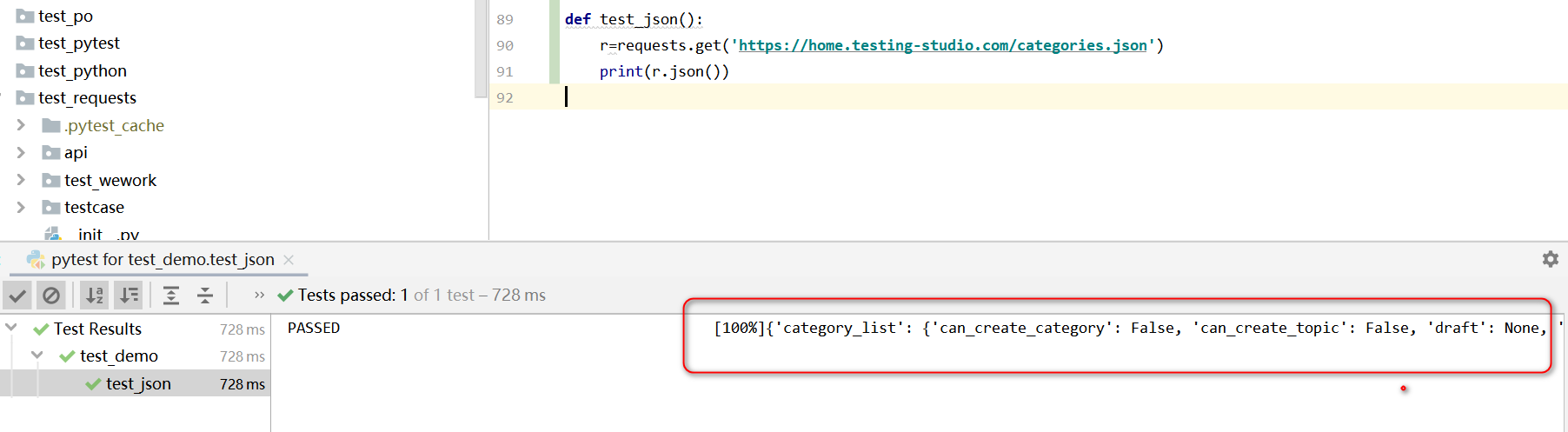
格式化打印前:
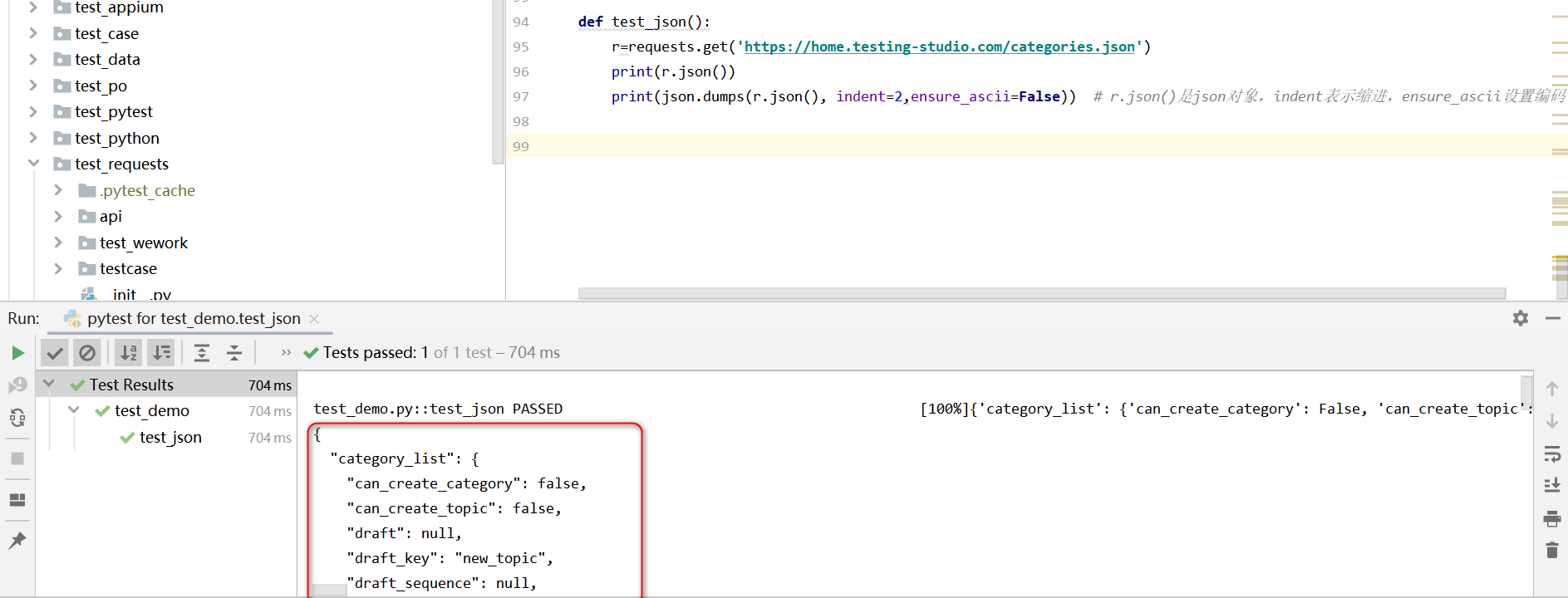
格式化打印后:
json.dumps方法源码:
def dumps(obj, *, skipkeys=False, ensure_ascii=True, check_circular=True,

        allow_nan=True, cls=None, indent=None, separators=None,

        default=None, sort_keys=False, **kw):

    """Serialize ``obj`` to a JSON formatted ``str``.

    If ``skipkeys`` is true then ``dict`` keys that are not basic types

    (``str``, ``int``, ``float``, ``bool``, ``None``) will be skipped

    instead of raising a ``TypeError``.

    If ``ensure_ascii`` is false, then the return value can contain non-ASCII

    characters if they appear in strings contained in ``obj``. Otherwise, all

    such characters are escaped in JSON strings.

    If ``check_circular`` is false, then the circular reference check

    for container types will be skipped and a circular reference will

    result in an ``OverflowError`` (or worse).

    If ``allow_nan`` is false, then it will be a ``ValueError`` to

    serialize out of range ``float`` values (``nan``, ``inf``, ``-inf``) in

    strict compliance of the JSON specification, instead of using the

    JavaScript equivalents (``NaN``, ``Infinity``, ``-Infinity``).

    If ``indent`` is a non-negative integer, then JSON array elements and

    object members will be pretty-printed with that indent level. An indent

    level of 0 will only insert newlines. ``None`` is the most compact

    representation.

    If specified, ``separators`` should be an ``(item_separator, key_separator)``

    tuple.  The default is ``(', ', ': ')`` if *indent* is ``None`` and

    ``(',', ': ')`` otherwise.  To get the most compact JSON representation,

    you should specify ``(',', ':')`` to eliminate whitespace.

    ``default(obj)`` is a function that should return a serializable version

    of obj or raise TypeError. The default simply raises TypeError.

    If *sort_keys* is true (default: ``False``), then the output of

    dictionaries will be sorted by key.

    To use a custom ``JSONEncoder`` subclass (e.g. one that overrides the

    ``.default()`` method to serialize additional types), specify it with

    the ``cls`` kwarg; otherwise ``JSONEncoder`` is used.

    """

    # cached encoder

    if (not skipkeys and ensure_ascii and

        check_circular and allow_nan and

        cls is None and indent is None and separators is None and

        default is None and not sort_keys and not kw):

        return _default_encoder.encode(obj)

    if cls is None:

        cls = JSONEncoder

    return cls(

        skipkeys=skipkeys, ensure_ascii=ensure_ascii,

        check_circular=check_circular, allow_nan=allow_nan, indent=indent,

        separators=separators, default=default, sort_keys=sort_keys,

        **kw).encode(obj)
python json格式化打印的更多相关文章
- (Python )格式化输出、文件操作、json
本节学习Python的格式化输出,文件操作以及json的简单用法 1.格式化输出 将非字符串类型转换成字符串,可以使用函数:str() 或者repr() ,(这两个函数的区别目前我还没搞懂,求解答) ...
- Python进行JSON格式化输出,以及汉字显示问题
格式化输出 转载地址 https://blog.csdn.net/real_tino/article/details/76422634 问题分析: Python下json手法的json在打印查看时, ...
- Python之读取用户指令和格式化打印
Python之读取用户指令和格式化打印 一.读取用户指令 当你的程序要接收用户输入的指令时,可以用input函数: name = input("请输入你的名字:") print(& ...
- 【Python】格式化输出json
参考文档: Python JSON JSON 函数 使用 JSON 函数需要导入 json 库:import json. 函数 描述 json.dumps 将 Python 对象编码成 JSON 字 ...
- Python JSON的简单使用
1 json简介 1.1 json是什么? JSON(JavaScript Object Notation)是一种轻量级的数据交换格式. “在JSON出现之前,大家一 ...
- yformater - chrome谷歌浏览器json格式化json高亮json解析插件
yformater是一款chrome浏览器插件,用来格式化(高亮)服务端接口返回的json数据. 实际上小菜并不是第一个写这种插件的,但是现有的chrome json格式化插件实在是不太好用,索性小菜 ...
- python json基础学习01
# -*- coding: utf-8 -*- # python:2.x __author__ = 'Administrator' import json #全称(javascript object ...
- ABP入门系列(8)——Json格式化
ABP入门系列目录--学习Abp框架之实操演练 讲完了分页功能,这一节我们先不急着实现新的功能.来简要介绍下Abp中Json的用法.为什么要在这一节讲呢?当然是做铺垫啊,后面的系列文章会经常和Json ...
- python json数据的转换
1 Python数据转json字符串 import json json_str = json.dumps(py_data) 参数解析: json_str = json.dumps(py_data,s ...
随机推荐
- idea 生成 javaDoc
idea 生成 javaDoc 使用命令 Generate javaDoc - 直接输入javadoc就可以了 Generate JavaDoc scope 3个区域,一般选择第三项自定义,选择模块, ...
- zookeeper同一台服务器创建伪集群
下载zk wget https://mirrors.tuna.tsinghua.edu.cn/apache/zookeeper/zookeeper-3.7.0/apache-zookeeper-3.7 ...
- 常用css样式(文字超出部分用省略号显示、鼠标经过图片放大、出现阴影)
文字超出部分用省略号显示: white-space: nowrap; /* 不换行 */ overflow: hidden; /* 超出部分不显示 */ text-overflow: ellipsis ...
- 终于讲清楚了:深入理解Java 应用程序中 final 关键字的各种使用场景
在 Java 语言众多的关键字中,final 关键字无疑是被提到最多的,也是在面试过程中经常被问到的知识点.今天,老王查找了很多材料,最后终于收集了关于 final 关键字比较全的知识点.首先,fin ...
- 5、二进制安装K8s 之 部署kube-scheduler
二进制安装K8s之部署kube-scheduler 1.创建配置文件 cat > /data/k8s/config/kube-scheduler.conf << EOF KUBE_S ...
- 六:使用Cookie进行会话管理
1.存储客户端的状态 因为Http协议是无状态的,也就是说每个客户访问服务器端资源时,服务器并不知道该客户端是谁,所以需要会话技术识别客户端的状态.会话技术是帮助服务器 记住客户端状态 2.会话技术 ...
- 【REST】使用RestSharp 库消费Restful Service
使用RestSharp 库消费Restful Service 现在互联网上的服务接口都是Restful的,SOAP的Service已经不是主流..NET/Mono下如何消费Restful Serv ...
- 统计MySQL数据库硬盘占用量大小
select TABLE_NAME, concat(truncate(data_length/1024/1024,2),' MB') as data_size, concat(truncate(ind ...
- session.flush与transaction.commit
以session的save方法为例来看一个简单.完整的事务流程,如下是代码片段: ---------------------------- Session session = sessionFacto ...
- Jetpack Compose之隐藏Scaffold的BottomNavigation
做主页导航时会用到底部导航栏,Jetpack Compose提供了基础槽位的布局Scaffold,使用Scaffold可以构建底部导航栏,例如: @Composable fun Greeting(vm ...