
利用Spring AOP切面对用户访问进行监控
开发系统时往往需要考虑记录用户访问系统查询了那些数据、进行了什么操作,尤其是访问重要的数据和执行重要的操作的时候将数记录下来尤显的有意义。有了这些用户行为数据,事后可以以用户为条件对用户在系统的访问和操作进行统计。
同时因为系统对登录用户在系统的行为有较为详细的记录,客观上也增加了系统的安全性。
记录那些数据
根据多年的经验,系统一般自动记录用户以下内容基本可以满足需要:
谁,在什么时候,在哪里,做了什么,结果如何。
使用什么方式
使用Spring AOP切面记录用户在系统中行为再合适不过了。使用Spring AOP切面横切需要需要记录的用户访问的方法,在切面中记录:谁,在什么时候,在哪里,做了什么,结果如何。 如下图所示

使用Spring AOP实现记录用户行为的切面
首先回顾下AOP的术语
Advice(通知):
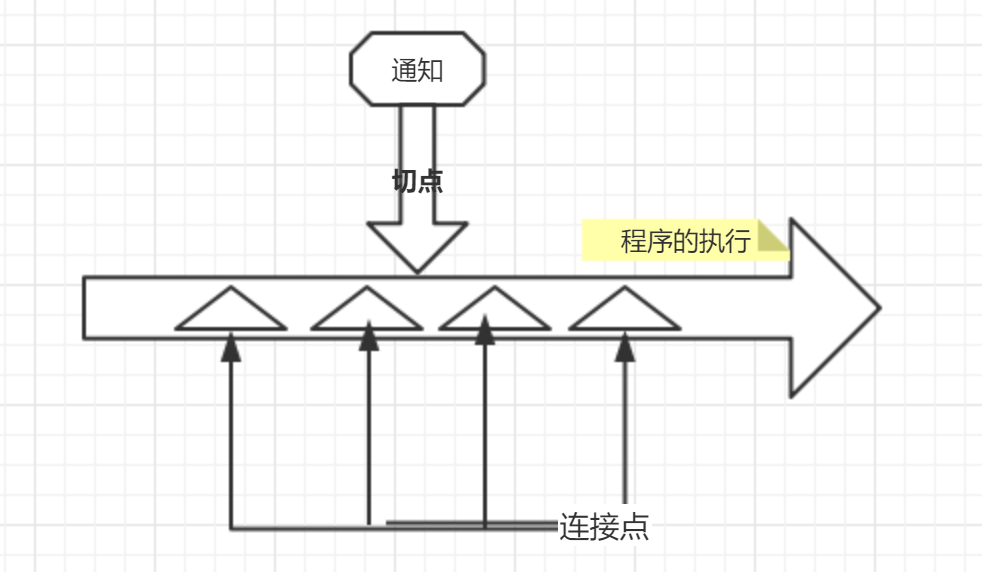
定义了切面完成的工作以及何时执行这个工作。
Spring切面定义了5种类型的通知:
前置通知(Before):在目标方法调用之前调用。
后置通知(After):在目标方法完成之后调用。
返回通知(After-returning) :在目标方法成功执行之后调用。
异常通知(After-throwing):在目标方法抛出异常之后条用。
环绕通知(Around):包裹了目标方法,在目标方法调用之前和之后执行自定义的行为。
Pointcut(切点): Advice(通知)定义了 何时、做什么的问题,那么切点定义了哪里做的问题。切点Pointcut的定义会匹配通知所要织入的一个或多个连接点JoinPoint。稍后我们用注解的方式描述切点Pointcut。
Join Point(连接点):应用通知的时机,在SpringAOP中指的的就是方法。
切面(Aspect) :就是通知和切点的结合。它们共同定义了在何时何处做点什么。
示意图:
编码实现
标注了AuditAction注解的方法都将被AuditAspectAuditAspect拦截,并在通知中将用户的行为记录下来。
用注解的方式定义切点
被此注解标注的方法都将被拦截织入通知。
package com.sdsxblp.common.log.aspect;
import java.lang.annotation.Documented;
import java.lang.annotation.Retention;
import java.lang.annotation.Target;
import static java.lang.annotation.ElementType.METHOD;
import static java.lang.annotation.RetentionPolicy.RUNTIME;
@Documented
@Retention(RUNTIME)
@Target(METHOD)
/**
* @Description: 标记需要记录操作日志的方法
* @author Bruce Zou(jblzdg@163.com)
*/
public @interface AuditAction {
/**
* 对资源(比如用户管理功能等)进行操作
*
* @return
*/
String resource() default "";
/**
* 资源的描述
*
* @return
*/
String resourceDes() default "";
/**
* 操作的类型
*
* @return
*/
String actionType() default "";
}
定义切面
package com.sdsxblp.common.log.aspect;
import com.sdsxblp.common.log.entity.ActionLog;
import com.sdsxblp.common.log.util.AuditLogHolder;
import com.sdsxblp.common.log.service.ActionLogService;
import com.sdsxblp.common.log.api.IAuditActionDataService;
import lombok.extern.slf4j.Slf4j;
import org.apache.commons.lang3.StringUtils;
import org.aspectj.lang.ProceedingJoinPoint;
import org.aspectj.lang.annotation.Around;
import org.aspectj.lang.annotation.Aspect;
import org.aspectj.lang.reflect.MethodSignature;
import org.springframework.beans.factory.annotation.Autowired;
import org.springframework.stereotype.Component;
import java.lang.reflect.Method;
import java.util.Date;
/**
* @author Bruce Zou(jblzdg@163.com)
* @Description:记录操作日志的切面
*/
@Aspect
@Component
@Slf4j
public class AuditAspect {
@Autowired
//将用户行为数据保存到db中
private ActionLogService actionLogService;
//使用环绕通知。
//被com.sdsxblp.common.log.aspect.AuditAction标注的方法都将被拦截
@Around(value = "@annotation(com.sdsxblp.common.log.aspect.AuditAction)")
public Object executeAudit(ProceedingJoinPoint joinPoint) throws Throwable {
log.info("**开始记录操作日志:");
//执行目标方法
Object returnValue = joinPoint.proceed();
ActionLog actionLog = new ActionLog();
actionLog.setActionDate(new Date());
setValueFromAnnotation(joinPoint, actionLog);
//为了提高性能使用异步方法保存行为数据
actionLogService.asynSaveLog(actionLog);
log.info("**操作日志记录结束。");
// 返回目标方法的结果
return returnValue;
}
/**
* 从代理的Target方法中获取资源、资源描述和操作类型。
*
* @param joinPoint
* @param actionLog
* @throws NoSuchMethodException
*/
private void setValueFromAnnotation(ProceedingJoinPoint joinPoint, ActionLog actionLog) throws NoSuchMethodException {
//获取接口方法签名
MethodSignature methodSignature = (MethodSignature) joinPoint.getSignature();
String methodName = methodSignature.getName();
//获取实现类方法
Method method = joinPoint.getTarget().getClass().getMethod(methodName, methodSignature.getParameterTypes());
//获取实现类注解
AuditAction auditAction = method.getAnnotation(AuditAction.class);
if (auditAction != null) {
String resource = auditAction.resource();
if (StringUtils.isNotBlank(resource)) {
actionLog.setResource(resource);
}
String resourceDes = auditAction.resourceDes();
if (StringUtils.isNotBlank(resourceDes)) {
actionLog.setResourceDes(resourceDes);
}
String actionType = auditAction.actionType();
if (StringUtils.isNotBlank(actionType)) {
actionLog.setActionType(actionType);
}
}
}
}
备注 ActionLog主要代码如下
public class ActionLog {
private String userName;
private Date actionDate;
private String fomIp;
private String macAddress;
private String resource;
private String resourceDes;
private String actionType;
private String beforeValue;
private String afterValue;
...
}
利用Spring AOP切面对用户访问进行监控的更多相关文章
- Spring AOP 切面编程记录日志和接口执行时间
最近客户现在提出系统访问非常慢,需要优化提升访问速度,在排查了nginx.tomcat内存和服务器负载之后,判断是数据库查询速度慢,进一步排查发现是因为部分视图和表查询特别慢导致了整个系统的响应时间特 ...
- 使用Spring AOP切面解决数据库读写分离
http://blog.jobbole.com/103496/ 为了减轻数据库的压力,一般会使用数据库主从(master/slave)的方式,但是这种方式会给应用程序带来一定的麻烦,比如说,应用程序如 ...
- 化繁就简,如何利用Spring AOP快速实现系统日志
1.引言 有关Spring AOP的概念就不细讲了,网上这样的文章一大堆,要讲我也不会比别人讲得更好,所以就不啰嗦了. 为什么要用Spring AOP呢?少写代码.专注自身业务逻辑实现(关注本身的业务 ...
- 我使用Spring AOP实现了用户操作日志功能
我使用Spring AOP实现了用户操作日志功能 今天答辩完了,复盘了一下系统,发现还是有一些东西值得拿出来和大家分享一下. 需求分析 系统需要对用户的操作进行记录,方便未来溯源 首先想到的就是在每个 ...
- Spring AOP切面的时候参数的传递
Spring AOP切面的时候参数的传递 Xml: <?xml version="1.0" encoding="UTF-8"?> <beans ...
- spring AOP(切面) 表达式介绍
在 spring AOP(切面) 例子基础上对表达式进行介绍 1.添加接口删除方法 2.接口实现类 UserDaoServer 添加实现接口删除方法 3.测试类调用delUser方法 4. 输出结果截 ...
- 利用spring AOP 和注解实现方法中查cache-我们到底能走多远系列(46)
主题:这份代码是开发中常见的代码,查询数据库某个主表的数据,为了提高性能,做一次缓存,每次调用时先拿缓存数据,有则直接返回,没有才向数据库查数据,降低数据库压力. public Merchant lo ...
- 利用Spring AOP自定义注解解决日志和签名校验
转载:http://www.cnblogs.com/shipengzhi/articles/2716004.html 一.需解决的问题 部分API有签名参数(signature),Passport首先 ...
- 利用Spring AOP和自定义注解实现日志功能
Spring AOP的主要功能相信大家都知道,日志记录.权限校验等等. 用法就是定义一个切入点(Pointcut),定义一个通知(Advice),然后设置通知在该切入点上执行的方式(前置.后置.环绕等 ...
随机推荐
- 转:addChildViewController实现网易新闻首页切换
本来只是打算介绍一下addChildViewController这个方法的,正好今天朋友去换工作面试问到网易新闻标签栏效果的实现,就结合它,用个小Demo实例介绍一下:(具体解释都写在了Demo里面的 ...
- glViewport()函数和glOrtho()函数的理解
glViewport()函数和glOrtho()函数的理解 OpenGL中有两个比较重要的投影变换函数,glViewport和glOrtho. glOrtho是创建一个正交平行的视景体. 一般 ...
- mysql的MVCC多版本并发控制机制
MVCC多版本并发控制机制 全英文名:Multi-Version Concurrency Control MVCC不会通过加锁互斥来保证隔离性,避免频繁的加锁互斥. 而在串行化隔离级别为了保证较高的隔 ...
- CF1569A Balanced Substring 题解
Content 给定一个长度为 \(n\) 且仅包含字符 a.b 的字符串 \(s\).请找出任意一个使得 a.b 数量相等的 \(s\) 的子串并输出其起始位置和终止位置.如果不存在请输出 -1 - ...
- LuoguB2106 矩阵转置 题解
Content 给定一个 \(n\times m\) 的矩阵 \(A\),求其转置 \(A^\text T\). 数据范围:\(1\leqslant n,m\leqslant 100\). Solut ...
- 账号不允许远程访问服务器上的mysql数据库的解决办法host is not allowed to connect to this mysql
改表法.可能是你的帐号不允许从远程登陆,只能在localhost.这个时候只要在localhost的那台电脑,登入mysql后,更改 "mysql" 数据库里的 "use ...
- 使用react搭建组件库:react+typescript+storybook
前期准备 1. 初始化项目 npx create-react-app react-components --template typescript 2. 安装依赖 使用哪种打包方案:webpack/r ...
- 【LeetCode】667. Beautiful Arrangement II 解题报告(Python & C++)
作者: 负雪明烛 id: fuxuemingzhu 个人博客: http://fuxuemingzhu.cn/ 目录 题目描述 题目大意 解题方法 日期 题目地址:https://leetcode.c ...
- (数据科学学习手札133)利用geopandas绘制拓扑着色地图
本文示例代码及文件已上传至我的Github仓库https://github.com/CNFeffery/DataScienceStudyNotes 1 简介 我们在绘制某些地图时,为了凸显出每个独立的 ...
- uniapp以及微信小程序中scroll-view隐藏滚动条 自定义滚动条
隐藏滚动条 1.全局隐藏滚动条,在app.vue中 ::-webkit-scrollbar{ display: none; } 2.局部隐藏藏滚动条 样式没有使用scoped属性时, 否则无效. .u ...