
WPF-控件-编辑圆角TextBox
使用模板

代码如下:
<Window

        xmlns="http://schemas.microsoft.com/winfx/2006/xaml/presentation"

        xmlns:x="http://schemas.microsoft.com/winfx/2006/xaml"

        xmlns:Themes="clr-namespace:Microsoft.Windows.Themes;assembly=PresentationFramework.Aero" x:Class="模板.MainWindow"

        Title="MainWindow" Height="350" Width="525">

    <Window.Resources>

        <LinearGradientBrush x:Key="TextBoxBorder" EndPoint="0,20" MappingMode="Absolute" StartPoint="0,0">

            <GradientStop Color="#ABADB3" Offset="0.05"/>

            <GradientStop Color="#E2E3EA" Offset="0.07"/>

            <GradientStop Color="#E3E9EF" Offset="1"/>

        </LinearGradientBrush>

        <Style x:Key="RoutedCornerTextBoxStyle" BasedOn="{x:Null}" TargetType="{x:Type TextBox}">

            <Setter Property="Foreground" Value="{DynamicResource {x:Static SystemColors.ControlTextBrushKey}}"/>

            <Setter Property="Background" Value="{DynamicResource {x:Static SystemColors.WindowBrushKey}}"/>

            <Setter Property="BorderBrush" Value="{StaticResource TextBoxBorder}"/>

            <Setter Property="BorderThickness" Value="1"/>

            <Setter Property="Padding" Value="1"/>

            <Setter Property="AllowDrop" Value="true"/>

            <Setter Property="FocusVisualStyle" Value="{x:Null}"/>

            <Setter Property="Template">

                <Setter.Value>

                    <ControlTemplate TargetType="{x:Type TextBox}">

                        <!--<Themes:ListBoxChrome x:Name="Bd" BorderBrush="{TemplateBinding BorderBrush}" BorderThickness="{TemplateBinding BorderThickness}" Background="{TemplateBinding Background}" RenderMouseOver="{TemplateBinding IsMouseOver}" RenderFocused="{TemplateBinding IsKeyboardFocusWithin}" SnapsToDevicePixels="true">

                            <ScrollViewer x:Name="PART_ContentHost" SnapsToDevicePixels="{TemplateBinding SnapsToDevicePixels}"/>

                        </Themes:ListBoxChrome>

                        <ControlTemplate.Triggers>

                            <Trigger Property="IsEnabled" Value="false">

                                <Setter Property="Background" TargetName="Bd" Value="{DynamicResource {x:Static SystemColors.ControlBrushKey}}"/>

                                <Setter Property="Foreground" Value="{DynamicResource {x:Static SystemColors.GrayTextBrushKey}}"/>

                            </Trigger>

                        </ControlTemplate.Triggers>-->

                        <Border x:Name="Bd" SnapsToDevicePixels="True"

                                Background="{TemplateBinding Background}"

                                BorderBrush="{TemplateBinding BorderBrush}"

                                BorderThickness="{TemplateBinding BorderThickness}"

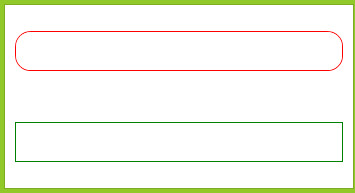
                                CornerRadius="15"

                                >

                            <ScrollViewer x:Name="PART_ContentHost" SnapsToDevicePixels="{TemplateBinding SnapsToDevicePixels}"></ScrollViewer>

                        </Border>

                    </ControlTemplate>

                </Setter.Value>

            </Setter>

        </Style>

    </Window.Resources>

    <Grid>

        <Grid.RowDefinitions>

            <RowDefinition/>

            <RowDefinition/>

        </Grid.RowDefinitions>

        <TextBox x:Name="textBox1" BorderBrush="Red" Margin="10" Height="40" Grid.Row="0" Style="{DynamicResource RoutedCornerTextBoxStyle}"/>

        <TextBox x:Name="textBox2" BorderBrush="Green" Margin="10" Height="40" Grid.Row="1"/>

    </Grid>

</Window>
效果如下:
另一种方式
<Window x:Class="圆角TextBox.MainWindow"

        xmlns="http://schemas.microsoft.com/winfx/2006/xaml/presentation"

        xmlns:x="http://schemas.microsoft.com/winfx/2006/xaml"

        Title="MainWindow" Height="350" Width="525">

    <Window.Resources>

        <Style TargetType="{x:Type TextBox}">

            <Setter Property="Template">

                <Setter.Value>

                    <ControlTemplate TargetType="{x:Type TextBox}">

                        <Border x:Name="Bd" SnapsToDevicePixels="True"

                                Background="{TemplateBinding Background}"

                                BorderBrush="{TemplateBinding BorderBrush}"

                                BorderThickness="{TemplateBinding BorderThickness}"

                                CornerRadius="5">

                            <ScrollViewer x:Name="da" SnapsToDevicePixels="{TemplateBinding SnapsToDevicePixels}"></ScrollViewer>

                        </Border>

                    </ControlTemplate>

                </Setter.Value>

            </Setter>

            <Setter Property="Margin" Value="5"/>

            <Setter Property="BorderBrush" Value="Green"/>

            <Setter Property="Height" Value="25"/>

            <Setter Property="Width" Value="200"/>

        </Style>

    </Window.Resources>

    <StackPanel>

        <TextBox/>

        <TextBox/>

        <TextBox Style="{x:Null}" Height="20" Width="100" Margin="10"></TextBox>

    </StackPanel>

</Window>

因为Style没有x:Key标记,默认为应用到所有由x:Type指定的控件上,如果不想应用则需要把空间的Style标记为{x:Null}就行。
WPF-控件-编辑圆角TextBox的更多相关文章
- (转)WPF控件开源资源
(转)WPF控件开源资源 Textbox Drag/Drop in WPFhttp://www.codeproject.com/Articles/42696/Textbox-Drag-Drop-in- ...
- WPF控件开源资源
(转)WPF控件开源资源 Textbox Drag/Drop in WPFhttp://www.codeproject.com/Articles/42696/Textbox-Drag-Drop-in- ...
- 6 WPF控件
WPF控件分类: 内容控件 标题内容控件 文本控件 列表控件 基于范围的控件 日期控件 控件类 控件是与用户交互的元素.控件可以获得焦点,能接受键盘或鼠标的输入. 所有控件的基类是System.Win ...
- 《Dotnet9》系列-开源C# WPF控件库3《HandyControl》强力推荐
大家好,我是Dotnet9小编,一个从事dotnet开发8年+的程序员.我最近开始写dotnet分享文章,希望能让更多人看到dotnet的发展,了解更多dotnet技术,帮助dotnet程序员应用do ...
- 浅尝辄止——使用ActiveX装载WPF控件
1 引言 使用VC编写的容器类编辑器,很多都可以挂接ActiveX控件,因为基于COM的ActiveX控件不仅封装性不错,还可以显示一些不错的界面图元. 但是随着技术不断的进步,已被抛弃的Active ...
- XMAL语法系列之-(2)---WPF控件继承图
WPF控件继承图 1 FrameworkElement 1.1 Panel(面板类元素) 1.1.1 Canvas 1.1.2 DockPanel 1.1.3 Grid 1.1.4 TabPanel ...
- WPF控件模板
引言:在进行WPF项目开发过程中,由于项目的需要,经常要对某个控件进行特殊的设定,其中就牵涉到模板的相关方面的内容.本文也是在自己进行项目开发过程中遇到控件模板设定时集中搜集资料后整理出来的,以供在以 ...
- 关于WinForm引用WPF窗体---在Winform窗体中使用WPF控件
项目中有个界面展示用WPF实现起来比较简单,并且能提供更酷炫的效果,但是在WinForm中使用WPF窗体出现了问题,在网上找了一下有些人说Winform不能引用WPF的窗体,我就很纳闷,Win32都能 ...
- 我的WPF控件库——KAN.WPF.XCtrl(141105)
自己开发的WPF控件库,只是初版,有扩展的Button,TextBox,Window.详细参见前几篇博文. WPF自定义控件(一)——Button:http://www.cnblogs.com/Qin ...
随机推荐
- 解决ThinkPHP开启APP_DEBUG=>false时报错的问题
最近用ThinkPHP开发一个项目,本地开发测试完成上传到服务器后,第一次打开正常,再刷新页面时就出现 “页面调试错误,无法找开页面,请重试”的错误,我就郁闷啦,明明本地设置define('APP_D ...
- 连续区间覆盖染色问题 ------ SHUOJ 1716
题目链接:http://202.121.199.212/JudgeOnline/problem.php?id=1716 [题意] 1到N的区间,一种操作让编号从a到b的数变为z,但不会低于2,问多次操 ...
- HDU 1003 Max Sum && HDU 1231 最大连续子序列 (DP)
Max Sum Time Limit: 2000/1000 MS (Java/Others) Memory Limit: 65536/32768 K (Java/Others)Total Sub ...
- 关于MSSQL导入导出时主键与约束丢失的问题解决
导入数据时,使用默认选项,会丢失主键.约束.默认值等属性,按如下步骤操作: -->导出向导 -->选择数据源 -->选择目的 -->指定表复制或查询:不要使用默认选项,选择“在 ...
- MVC中的Routing
Routing ASP.NET Routing模块的责任是将传入的浏览器请求映射为特有的MVC controller actions. public static void RegisterRoute ...
- web.config配置aspx页面默认引用的namespace
如果我们在aspx页面上使用<%%>的方式使用某些类的时候很多都没办法直接使用,我们必须要在页面上引用命名空间, 如:如果我们要使用DataTable类的时候,我们必须先使用<%@ ...
- 浅谈sql 、linq、lambda 查询语句的区别
浅谈sql .linq.lambda 查询语句的区别 LINQ的书写格式如下: from 临时变量 in 集合对象或数据库对象 where 条件表达式 [order by条件] select 临时变量 ...
- in/exists not in/not exists null
in/not in exists/not exists null的理解 两个测试表 create table tmp01 as with tmp as ( select '1' as id from ...
- iOS 自定义view里实现控制器的跳转
1.view里实现控制器的modal 拿到主窗口的根控制器,用根控制器进行modal需要的modal的控制器 场景:点击自定义view里的按钮实现控制器的modal UIViewController ...
- iOS 之单例,代理,通知,KVO,Block全能解析
//单例 //.h + (Instannce *)shareInstance; //.m static Instannce *instance = nil; @implementation Insta ...