
Spring Boot 文件上传原理
首先我们要知道什么是Spring Boot,这里简单说一下,Spring Boot可以看作是一个框架中的框架--->集成了各种框架,像security、jpa、data、cloud等等,它无须关心配置可以快速启动开发,有兴趣可以了解下自动化配置实现原理,本质上是 spring 4.0的条件化配置实现,深抛下注解,就会看到了。
说Spring Boot 文件上传原理 其实就是Spring MVC,因为这部分工作是Spring MVC做的而不是Spring Boot,那么,SpringMVC又是怎么处理文件上传这个过程的呢?
图:
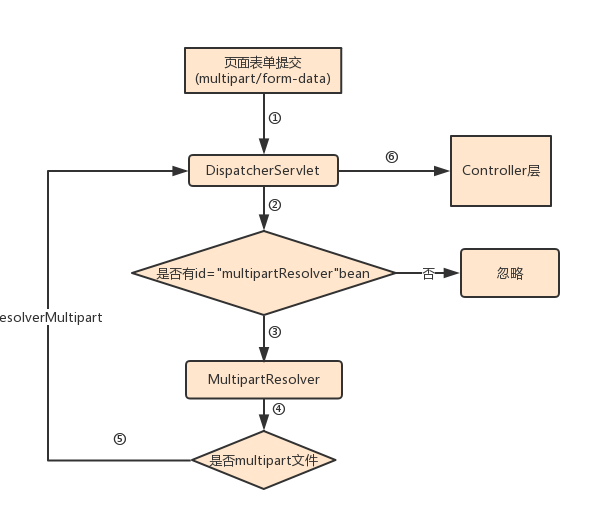
首先项目启动相关配置,再执行上述第二步的时候 DispatcherServlet会去查找id为multipartResolver的Bean,在配置中看到Bean指向的是CommonsMultipartResolve,其中实现了MultipartResolver接口。
第四步骤这里会判断是否multipart文件即isMultipart方法,返回true:就会调用 multipartResolver 方法,传递HttpServletRequest会返回一个MultipartHttpServletRequest对象,再有DispatcherServlet进行处理到Controller层;返回false:会忽略掉,继续传递HttpServletRequest。
在MVC中需要在配置文件webApplicationContext.xml中配置 如下:
    <bean id="multipartResolver" class="org.springframework.web.multipart.commons.CommonsMultipartResolver">
            <property name="defaultEncoding" value="UTF-8"/>
            <property name="maxUploadSize" value="100000000"/>
            <property name="uploadTempDir" value="fileUpload/temp"/>
    </bean>
而Spring Boot已经自动配置好,直接用就行,做个test没什么问题。有默认的上传限制大小,不过在实际开发中我们还是做一些配置的,
如下在application.properties中:
# multipart config
#默认支持文件上传
spring.http.multipart.enabled=true
#文件上传目录
spring.http.multipart.location=/tmp/xunwu/images/
#最大支持文件大小
spring.http.multipart.max-file-size=4Mb
#最大支持请求大小
spring.http.multipart.max-request-size=20MB
当然也可以写配置类来实现,具体的就不做展示了。
看完上述你肯定有个大概的了解了,这里再啰嗦下,Spring提供Multipart的解析器:MultipartResolver,上述说的是CommonsMultipartResolver,它是基于Commons File Upload第三方来实现,这也是在Servlet3.0之前的东西,3.0+之后也可以不需要依赖第三方库,可以用StandardServletMultipartResolver,同样也是实现了MultipartResolver接口,我们可以看下它的实现:
 * Copyright 2002-2017 the original author or authors.

package org.springframework.web.multipart.support;

import javax.servlet.http.HttpServletRequest;
import javax.servlet.http.Part;

import org.apache.commons.logging.LogFactory;

import org.springframework.web.multipart.MultipartException;
import org.springframework.web.multipart.MultipartHttpServletRequest;
import org.springframework.web.multipart.MultipartResolver;

/**
 * Standard implementation of the {@link MultipartResolver} interface,
 * based on the Servlet 3.0 {@link javax.servlet.http.Part} API.
 * To be added as "multipartResolver" bean to a Spring DispatcherServlet context,
 * without any extra configuration at the bean level (see below).
 *
 * <p><b>Note:</b> In order to use Servlet 3.0 based multipart parsing,
 * you need to mark the affected servlet with a "multipart-config" section in
 * {@code web.xml}, or with a {@link javax.servlet.MultipartConfigElement}
 * in programmatic servlet registration, or (in case of a custom servlet class)
 * possibly with a {@link javax.servlet.annotation.MultipartConfig} annotation
 * on your servlet class. Configuration settings such as maximum sizes or
 * storage locations need to be applied at that servlet registration level;
 * Servlet 3.0 does not allow for them to be set at the MultipartResolver level.
 *
 * @author Juergen Hoeller
 * @since 3.1
 * @see #setResolveLazily
 * @see HttpServletRequest#getParts()
 * @see org.springframework.web.multipart.commons.CommonsMultipartResolver
 */
public class StandardServletMultipartResolver implements MultipartResolver {

    private boolean resolveLazily = false;

    /**
     * Set whether to resolve the multipart request lazily at the time of
     * file or parameter access.
     * <p>Default is "false", resolving the multipart elements immediately, throwing
     * corresponding exceptions at the time of the {@link #resolveMultipart} call.
     * Switch this to "true" for lazy multipart parsing, throwing parse exceptions
     * once the application attempts to obtain multipart files or parameters.
     */
    public void setResolveLazily(boolean resolveLazily) {
        this.resolveLazily = resolveLazily;
    }

    @Override
    public boolean isMultipart(HttpServletRequest request) {
        // Same check as in Commons FileUpload...
        if (!"post".equals(request.getMethod().toLowerCase())) {
            return false;
        }
        String contentType = request.getContentType();
        return (contentType != null && contentType.toLowerCase().startsWith("multipart/"));
    }

    @Override
    public MultipartHttpServletRequest resolveMultipart(HttpServletRequest request) throws MultipartException {
        return new StandardMultipartHttpServletRequest(request, this.resolveLazily);
    }

    @Override
    public void cleanupMultipart(MultipartHttpServletRequest request) {
        // To be on the safe side: explicitly delete the parts,
        // but only actual file parts (for Resin compatibility)
        try {
            for (Part part : request.getParts()) {
                if (request.getFile(part.getName()) != null) {
                    part.delete();
                }
            }
        }
        catch (Throwable ex) {
            LogFactory.getLog(getClass()).warn("Failed to perform cleanup of multipart items", ex);
        }
    }

}
这里是之前写的test的后者实现配置类,可以简单看下,作为了解:
package com.bj.config;

import org.springframework.boot.autoconfigure.condition.ConditionalOnMissingBean;
import org.springframework.boot.autoconfigure.web.MultipartProperties;
import org.springframework.boot.context.properties.EnableConfigurationProperties;
import org.springframework.context.annotation.Bean;
import org.springframework.context.annotation.Configuration;
import org.springframework.web.multipart.MultipartResolver;
import org.springframework.web.multipart.support.StandardServletMultipartResolver;
import org.springframework.web.servlet.DispatcherServlet;

import javax.servlet.MultipartConfigElement;

@Configuration
@EnableConfigurationProperties(MultipartProperties.class)
public class FileUploadConfig {

    private final MultipartProperties multipartProperties;

    public FileUploadConfig(MultipartProperties multipartProperties){
        this.multipartProperties=multipartProperties;
    }

    /**
     * 注册解析器
     * @return
     */
    @Bean(name= DispatcherServlet.MULTIPART_RESOLVER_BEAN_NAME)
    @ConditionalOnMissingBean(MultipartResolver.class)
    public StandardServletMultipartResolver multipartResolver(){
        StandardServletMultipartResolver multipartResolver = new StandardServletMultipartResolver();
        multipartResolver.setResolveLazily(multipartProperties.isResolveLazily());
        return multipartResolver;
    }

    /**
     * 上传配置
     * @return
     */
    @Bean
    @ConditionalOnMissingBean
    public MultipartConfigElement multipartConfigElement(){
        return this.multipartProperties.createMultipartConfig();
    }

}
Spring Boot 文件上传原理的更多相关文章
- spring boot文件上传、下载
主题:Spring boot 文件上传(多文件上传)[从零开始学Spring Boot]http://www.iteye.com/topic/1143595 Spring MVC实现文件下载http: ...
- Spring Boot 文件上传
其实网上已经有很多这样的文章了.为什么我还要记录一下呢?原因是在工作中对接外系统时,碰到了他们调取我们文件上传接口确存在着http请求头部规范的情况,从而导致用传统方法获取不到参数.今天就来整理下Sp ...
- spring boot 文件上传大小限制
错误信息 : Spring Boot:The field file exceeds its maximum permitted size of 1048576 bytes. 解决方法一:在启动类添加如 ...
- 从.Net到Java学习第十篇——Spring Boot文件上传和下载
从.Net到Java学习系列目录 图片上传 Spring Boot中的文件上传就是Spring MVC中的文件上传,将其集成进来了. 在模板目录创建一个新的页面 profile/uploadPage. ...
- Spring Boot 文件上传与下载
原文地址: https://www.cnblogs.com/studyDetail/p/7003253.html 1.在pom.xml文件中添加依赖 <project xmlns="h ...
- (29)Spring boot 文件上传(多文件上传)【从零开始学Spring Boot】
文件上传主要分以下几个步骤: (1)新建maven java project: (2)在pom.xml加入相应依赖: (3)新建一个表单页面(这里使用thymleaf); (4)编写controlle ...
- spring boot 文件上传工具类(bug 已修改)
以前的文件上传都是之前前辈写的,现在自己来写一个,大家可以看看,有什么问题可以在评论中提出来. 写的这个文件上传是在spring boot 2.0中测试的,测试了,可以正常上传,下面贴代码 第一步:引 ...
- Spring Boot 文件上传简易教程
上传文件是我们日常使用最为广泛的功能之一,比如App端上传头像.本章演示如何从客户端上传到 Spring Boot 开发的 Api中. 本项目源码 github 下载 1 新建 Spring Boot ...
- Spring Boot文件上传
一.创建一个简单的包含WEB依赖的SpringBoot项目 二.配置文件上传的文件大小限制 # 上传文件总的最大值spring.servlet.multipart.max-request-size=1 ...
随机推荐
- dedecms在任意页面调用任意栏目文章
dedecms在任意页面调用任意栏目文章,我们用arclist标签即可实现.如果是调用多个栏目文章可以给typeid多个值. 我们以调用ID为1和ID为30的两个栏目下5篇文章为例: {dede:ar ...
- redux middleware 源码分析
原文链接 middleware 的由来 在业务中需要打印每一个 action 信息来调试,又或者希望 dispatch 或 reducer 拥有异步请求的功能.面对这些场景时,一个个修改 dispat ...
- 聚类-K均值
数据来源:http://archive.ics.uci.edu/ml/datasets/seeds 15.26 14.84 0.871 5.763 3.312 2.221 5.22 Kama 14.8 ...
- BroadcastReceiver工作过程
动态注册过程: ContextWrapper.registerReceiver--> ContextImpl.registerReceiver--> ContextImpl.registe ...
- POJ - 1182 食物链 并查集经典
思路:设r(x)表示节点x与根结点的关系,px表示x的根结点.记录每个节点与其父节点的关系,就能很方便知道每个节点以及和它的父节点的关系. struct node{ int par; //父亲节点 i ...
- MyEclipse中如何去掉JS/JSP语法错误提示
一 优化一下MyEclipse 1 .关闭MyEclipse的自动validation windows > perferences > myeclipse > val ...
- probabilistic robotics_bayes filter
贝叶斯滤波 执行测量后的后验概率: 执行测量前的先验概率: 执行测量后的后验概率推导 根据式2.23的推导方式 可推出 假定xt是complete,即xt可以完全决定测量结果,那么则有2.56式: 带 ...
- 针对特定XML的解析器XMLParser
一.建立网页库和偏移文件 为文本搜索引擎建立网页库,首先要把所有的网页(这里是文章)格式化,并保存到指定的格式中.如以下格式: | ...
- 对HI3531的GPIO使用的再分析
在一个嵌入式系统中使用最多的莫过于 通用输入输出 GPIO口.看到论坛中经常有朋友问海思为什么没有提供GPIO驱动.其实不然. 在海思SDK xxx/osdrv/tools/board_tools/ ...
- R语言︱噪声数据处理、数据分组——分箱法(离散化、等级化)
每每以为攀得众山小,可.每每又切实来到起点,大牛们,缓缓脚步来俺笔记葩分享一下吧,please~ --------------------------- 分箱法在实际案例操作过程中较为常见,能够将一些 ...