
Android Studio教程06-布局,监听器以及基本控件
2. 监听器
- 一个控件可以设置多个监听器
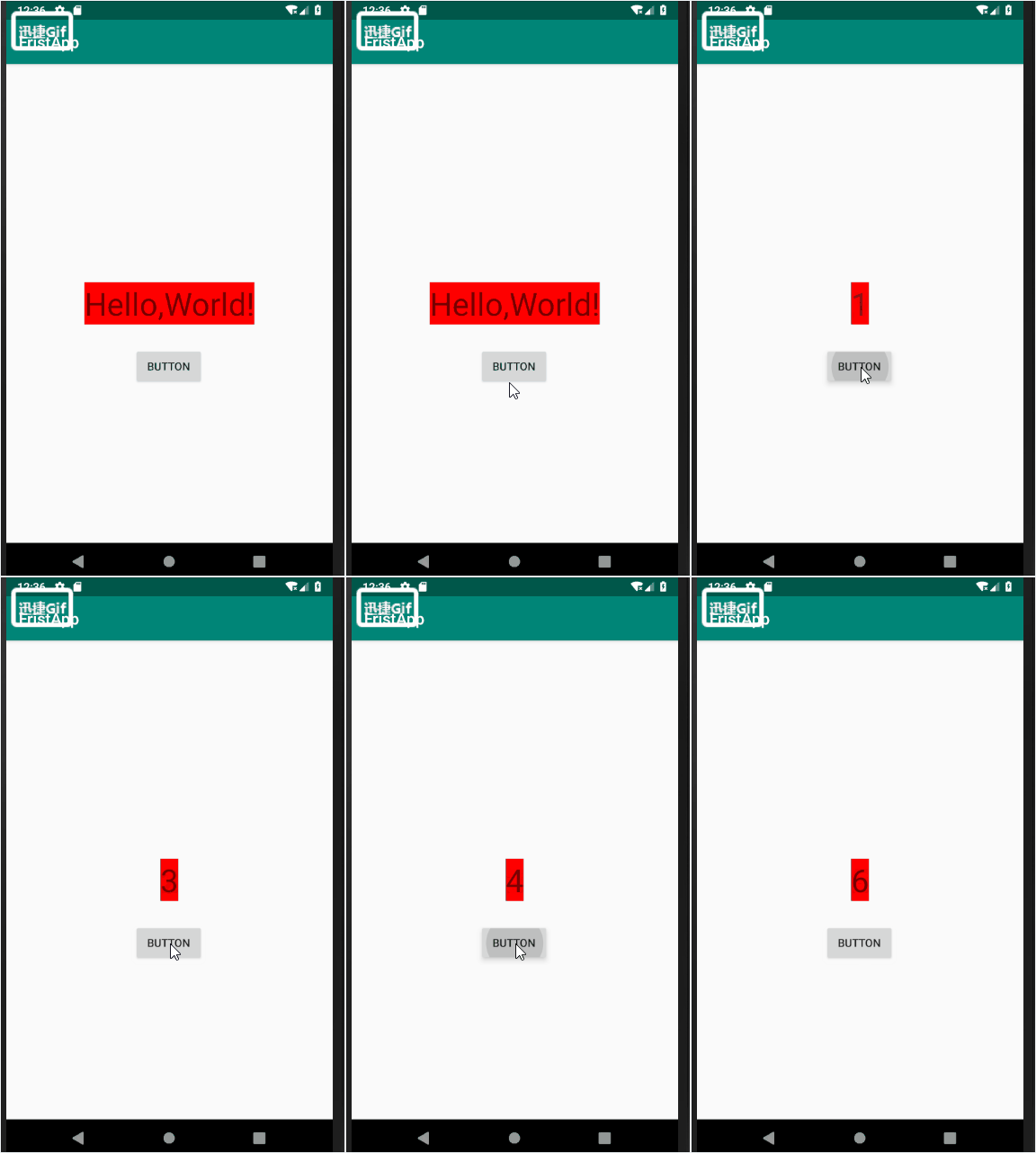
- 绑定监听器的步骤
- 获取代表控件的对象
- 定义一个类,实现监听器接口
- 生成监听器对象
- 为控件绑定监听器对象
public class MainActivity extends AppCompatActivity {

    private Button bt;

    private TextView tv;

    int count=0;

    @Override

    protected void onCreate(Bundle savedInstanceState) {

        super.onCreate(savedInstanceState);

        setContentView(R.layout.activity_main);

        bt = (Button)findViewById(R.id.bt1);

        tv = (TextView)findViewById(R.id.hello);

        //生成监听器对象 new ButtonListener()

        //为控件绑定监听器对象 bt.setOnClickListener

        bt.setOnClickListener(new ButtonListener());

        System.out.println("--MainActivity: OnCreate--");

    }

    // 定义一个类,实现监听器接口

    class ButtonListener implements View.OnClickListener{

        @Override

        public void onClick(View v) {

            count++;

            tv.setText(count+"");

        }

    }

  }
3. 布局
- 控件布局方法:就是控制控件在Activity中的位置,大小,颜色以及其他控件样式属性的方法
- 如何设置布局
- 在布局文件完成控件布局
- 在Java代码中完成控件布局
3.1. 布局分类
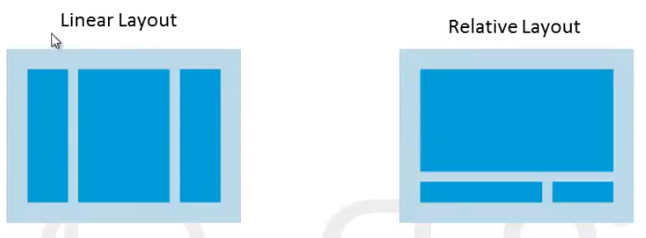
(1). Linear Layout
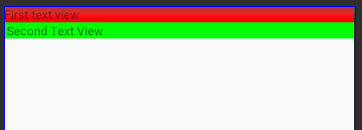
<?xml version="1.0" encoding="utf-8"?>

<LinearLayout xmlns:android="http://schemas.android.com/apk/res/android"

    android:layout_width="match_parent"

    android:orientation="vertical"

    android:layout_height="match_parent">

    <TextView

        android:layout_width="match_parent"

        android:layout_height="wrap_content"

        android:background="#FF0000"

        android:text="First text view"/>

    <TextView

        android:layout_width="match_parent"

        android:layout_height="wrap_content"

        android:background="#00FF00"

        android:text=" Second Text View"/>

</LinearLayout>
(2). Relative Layout
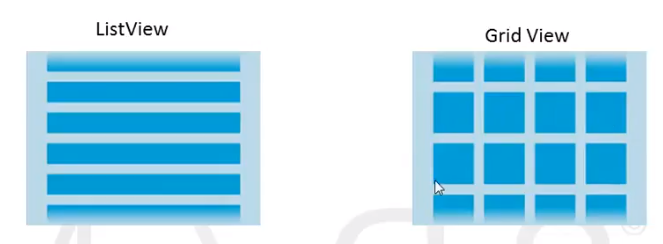
(3). ListView
(4). Grid View
4. 其他比较杂的内容
4.1. 距离单位的区别px,dp,sp
px: 像素分辨率,屏幕是480*800个像素,每个像素可以显示一个RGB颜色
dpi:屏幕细腻程度

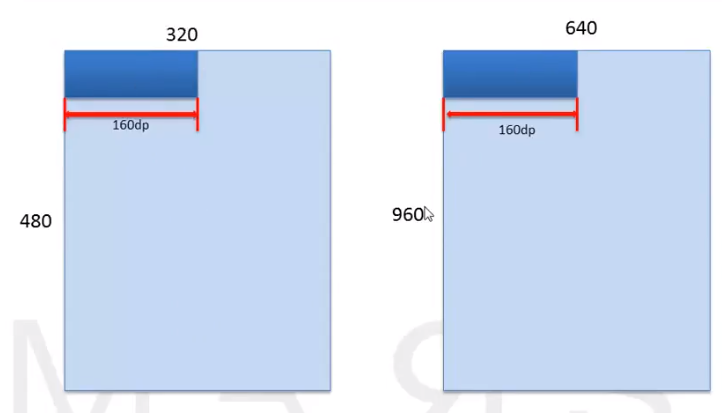
dp:设备无关像素(最主要)
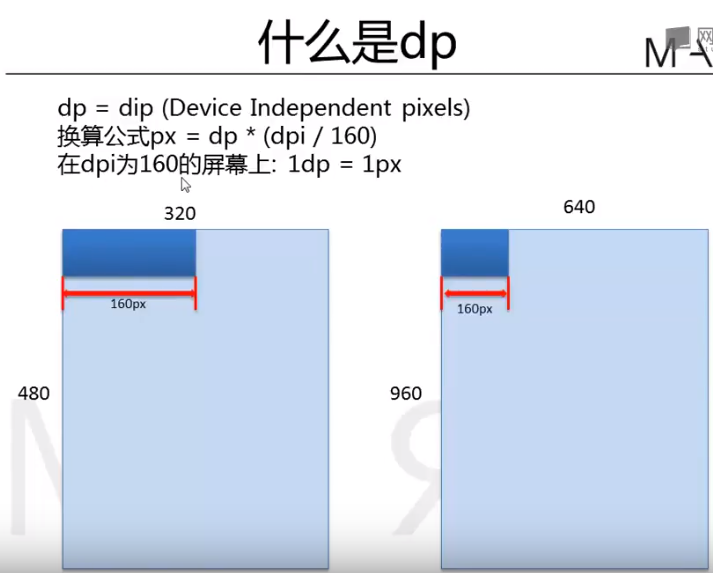
为什么使用dp?
- sp: 可以缩放的像素:用于指定字体大小
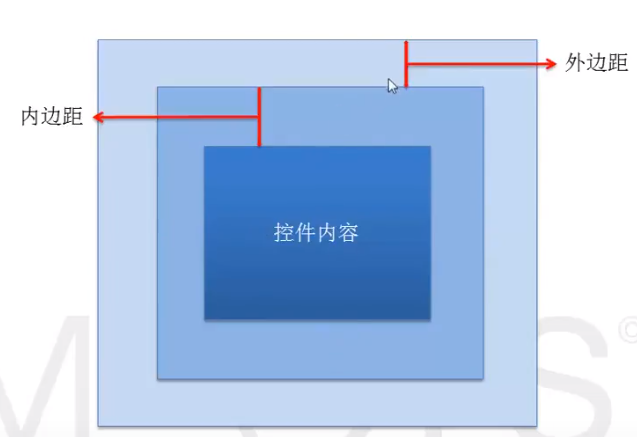
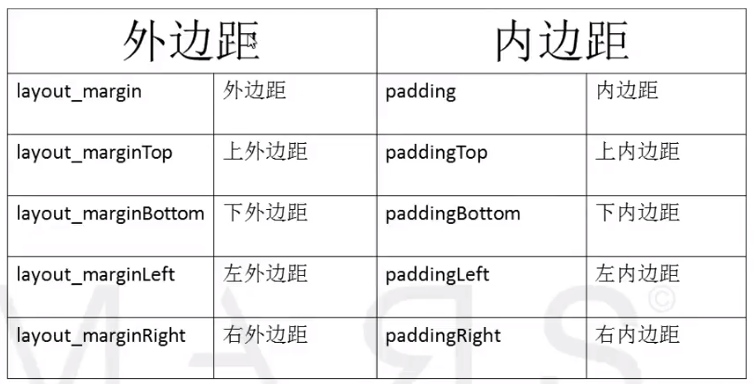
4.2. 控件的外边距和内边距
1. 什么是内外边距
2. 如何设置内外边距
5. Android控件
5.1.多选按钮CheckBox
1. 如何使用CheckBox
private CheckBox eatbox, sleppbox, dotabox;

@Override

protected void onCreate(Bundle savedInstanceState) {

    super.onCreate(savedInstanceState);

    setContentView(R.layout.frist_layout);

    eatbox = (CheckBox)findViewById(R.id.eatId);

    sleppbox = (CheckBox)findViewById(R.id.sleppId);

    dotabox = (CheckBox)findViewById(R.id.dotaId);

    onBoxClickListener listener = new onBoxClickListener();

    eatbox.setOnClickListener(listener);

    sleppbox.setOnClickListener(listener);

    dotabox.setOnClickListener(listener);

}
配置文件如下
<?xml version="1.0" encoding="utf-8"?>

<LinearLayout xmlns:android="http://schemas.android.com/apk/res/android"

    android:layout_width="match_parent"

    android:orientation="vertical"

    android:layout_height="match_parent">

    <CheckBox

        android:id="@+id/eatId"

        android:layout_width="wrap_content"

        android:layout_height="wrap_content"

        android:text="吃饭"/>

    <CheckBox

        android:id="@+id/sleppId"

        android:layout_width="wrap_content"

        android:layout_height="wrap_content"

        android:text="睡觉"/>

    <CheckBox

        android:id="@+id/dotaId"

        android:layout_width="wrap_content"

        android:layout_height="wrap_content"

        android:text="data"/>

</LinearLayout>
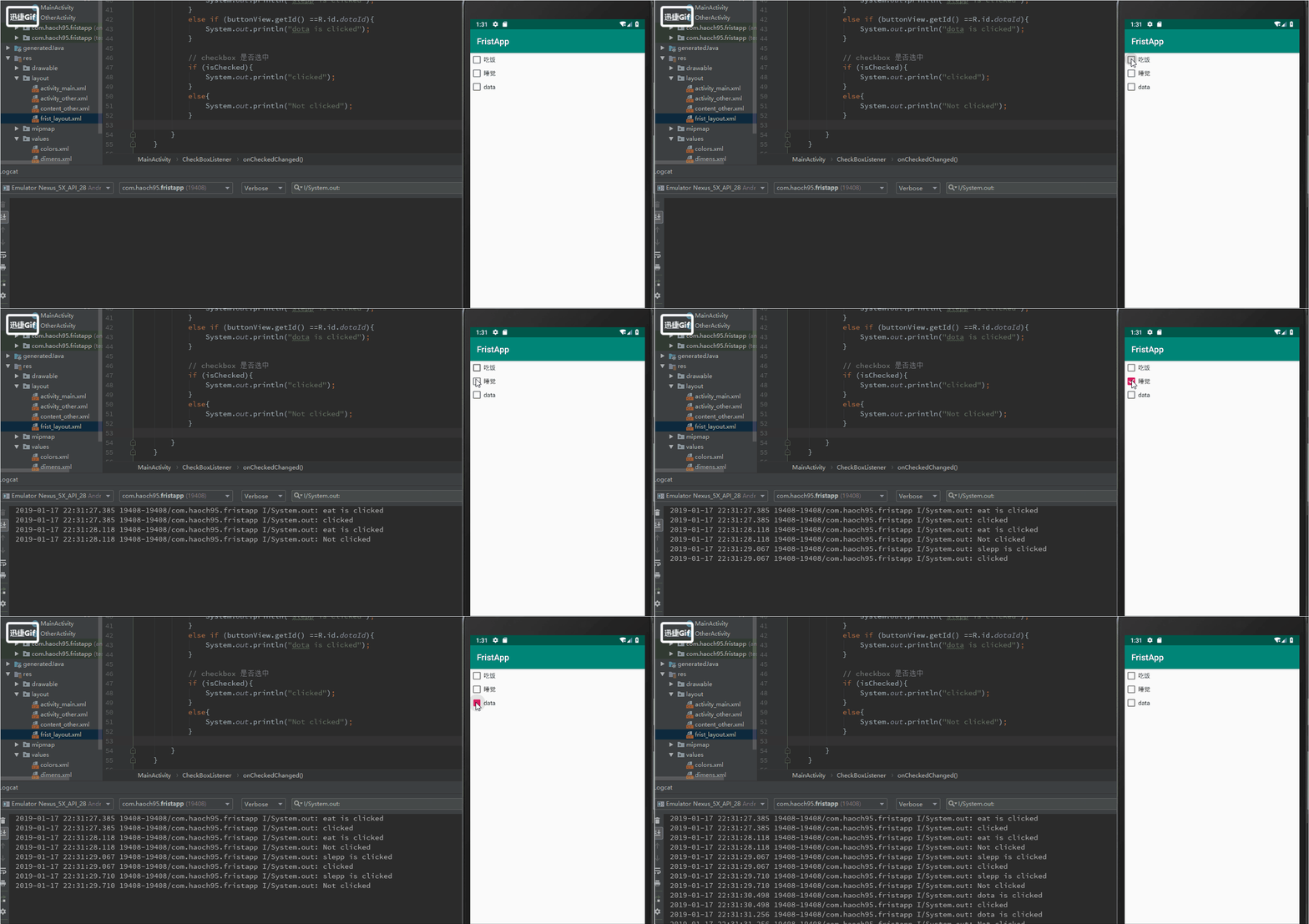
2. 常用onClickListener和onCheckedChangeListener监听器
2.1. onClickListener监听器
class onBoxClickListener implements View.OnClickListener{

    // view参数是调用setOnClickListener的对象

    // view是checkbox的父类

    // view.getId--查看是哪个对象调用的这个方法

    @Override

    public void onClick(View v) {

        // 向下转型

        CheckBox box = (CheckBox)v;

        if (v.getId() == R.id.eatId){

            System.out.println("eat is clicked");

        }

        else if (v.getId() == R.id.sleppId){

            System.out.println("slepp is clicked");

        }

        else if (v.getId() ==R.id.dotaId){

            System.out.println("dota is clicked");

        }

        // checkbox 是否选中

        if (box.isChecked()){

            System.out.println("clicked");

        }

        else{

            System.out.println("Not clicked");

        }

    }

}
2.2. onCheckedChangeListener监听器
CompoundButton
// 选中的时候就会调用这个状态

class CheckBoxListener implements CompoundButton.OnCheckedChangeListener{

    @Override

    public void onCheckedChanged(CompoundButton buttonView, boolean isChecked) {

        if (buttonView.getId() == R.id.eatId){

            System.out.println("eat is clicked");

        }

        else if (buttonView.getId() == R.id.sleppId){

            System.out.println("slepp is clicked");

        }

        else if (buttonView.getId() ==R.id.dotaId){

            System.out.println("dota is clicked");

        }

        // checkbox 是否选中

        if (isChecked){

            System.out.println("clicked");

        }

        else{

            System.out.println("Not clicked");

        }

    }

}
Android Studio教程06-布局,监听器以及基本控件的更多相关文章
- Android开发:在布局里移动ImageView控件
在做一个app时碰到需要移动一个图案的位置,查了一上午资料都没找到demo,自己写一个吧 RelativeLayout.LayoutParams lp = new RelativeLayout.Lay ...
- Android studio教程
Android studio教程: http://jingyan.baidu.com/season/44062
- Android开发自学笔记(Android Studio)—4.1布局组件
一.引言 Android的界面是有布局和组件协同完成的,布局好比是建筑里的框架,而组件则相当于建筑里的砖瓦.组件按照布局的要求依次排列,就组成了用户所看见的界面.在Android4.0之前,我们通常说 ...
- (转载) Android RecyclerView 使用完全解析 体验艺术般的控件
Android RecyclerView 使用完全解析 体验艺术般的控件 标签: Recyclerviewpager瀑布流 2015-04-16 09:07 721474人阅读 评论(458) 收藏 ...
- javascript 框架、根基技巧、布局、CSS、控件 JavaScript 类库
预筹备之 JavaScript 今朝支流的 JavaScript 框架排名中,jQuery 和 Ext 可算是佼佼者,得到了用户的普遍好评.海内的一些框架许多也是模仿 jQuery 对 JavaScr ...
- ANDROID L——Material Design详解(UI控件)
转载请注明本文出自大苞米的博客(http://blog.csdn.net/a396901990),谢谢支持! Android L: Google已经确认Android L就是Android Lolli ...
- android 开发进阶 自定义控件-仿ios自动清除控件
先上图: 开发中经常需要自定义view控件或者组合控件,某些控件可能需要一些额外的配置.比如自定义一个标题栏,你可能需要根据不同尺寸的手机定制不同长度的标题栏,或者更常见的你需要配置标题栏的背景,这时 ...
- 怎样在Android实现桌面清理内存简单Widget小控件
怎样在Android实现桌面清理内存简单Widget小控件 我们常常会看到类似于360.金山手机卫士一类的软件会带一个widget小控件,显示在桌面上,上面会显示现有内存大小,然后会带一个按键功能来一 ...
- Android 自定义支持快速搜索筛选的选择控件(一)
Android 自定义支持快速搜索筛选的选择控件 项目中遇到选择控件选项过多,需要快速查找匹配的情况. 做了简单的Demo,效果图如下: 源码地址:https://github.com/whieenz ...
随机推荐
- Android Gradle defaultConfig详解及实用技巧
实际项目中,都会应用Android Gradle Plugin,根据实际中的项目模块的职责,可以具体应用如下四种插件类型. 1,apply plugin: 'com.android.applicati ...
- WPF获取原始控件样式。
要获取WPF控件的原始样式,需要我们安装Blend for Visual Studio. 然后,我们打开Blend for Visual Studio,创建一个WPF项目. 然后,我们向页面拖动一个B ...
- ubuntu中使用docker部署.netcore2.1
概述 .netcore发布这么久,到现在才在项目中实际运用,之前算是了解一点,一般找工作都会问是否运用过.netcore,软件研发来说,如果这个技术没用过,觉得挺难,其实不难..netcore ...
- 设计模式系列19:策略模式(Stragety Pattern)
定义 定义一系列算法,将它们一个个封装起来,并且使它们可以互相替换,该模式使得算法可独立于使用它的客户而变化. --<设计模式>GoF UML类图 使用场景 一个系统有许多类,而区分 ...
- Odoo : 门店订货及在线签名免费开源方案
引言 Odoo是欧洲开发的,世界排名第一的开源免费ERP系统.该系统从2002开始研发,经过十几年的发展,去年下半年发布了12.0版.该软件因为免费下载,源代码开放,吸引了世界范围很多人参与使用及开发 ...
- mssql sqlserver isnull coalesce函数用法区别说明
摘要: 下文讲述isnull及coalesce空值替换函数的区别 isnull.coalesce函数区别:1.isnull 只能接受两个参数,而coalesce函数可以接受大于等于两个以上参数2.is ...
- 在keil中添加stc系列单片机型号(模型)方法
1.下载安装stc-isp烧录软件: 官网:http://www.gxwmcu.com/ 2.打开使用stc-isp软件,并导入stc官方器件库: 注意:一定要找到包含有C51和UV4的文件夹 3.显 ...
- windows凭据管理
解决windows凭据无法保存的问题1: 运行-gpedit.msc(组策略)-计算机配置-管理模板-系统-凭据分配 双击右侧”允许分配保存的凭据用于仅NTLM服务器身份验证“ 在弹出的窗口中选中“已 ...
- 微信小程序客服消息实时通知之最佳实践
我们做微信小程序开发的都知道,只要在小程序页面中添加如下代码即可进入小程序的客服会话界面: <button open-type="contact" >联系我们</ ...
- Pytorch中torch.autograd ---backward函数的使用方法详细解析,具体例子分析
backward函数 官方定义: torch.autograd.backward(tensors, grad_tensors=None, retain_graph=None, create_graph ...