
SpringMVC 框架系列之初识与入门实例
微信公众号:compassblog
欢迎关注、转发,互相学习,共同进步!
有任何问题,请后台留言联系!
1、SpringMVC 概述
(1)、 MVC:Model-View-Control
Control 层属于框架性质,完成的主要工作是:封装 web 请求为一个数据对象、调用业务逻辑层来处理数据对象、返回处理数据结果及相应的视图给客户端。
(2)、什么是 SpringMVC
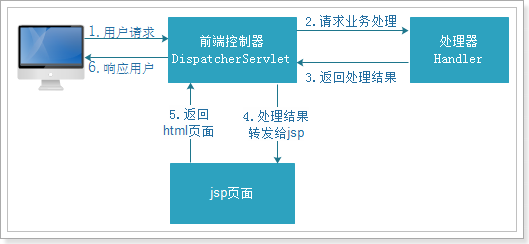
Spring mvc 和 Struts2 都属于表现层的框架,是 Spring 框架的一部分,Spring 框架的 Control 层的核心是 DispatcherServlet,它的作用是将请求分发给不同的后端处理器。
Spring 的 Control 层框架使用了后端控制器来映射处理器和视图解析器来共同完成 Control 层框架的主要工作。并且 spring 的 Control 层框架还真正地把业务层处理的数据结果和相应的视图拼成一个对象,即 ModelAndView 对象。
SpringMVC 本身就是 Spring 的子项目,对 Spring 兼容性很好,因此也不需要做过多的配置。
(3)SpringMVC 框架处理流程
2、SpringMVC 入门实例
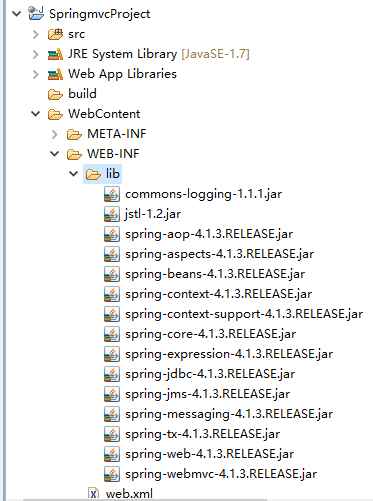
(1)、创建 web 项目,导入所需要的 jar 包,如图下图所示:
(2)、创建 SpringMVC 的核心配置文件,具体配置如下:
springmvc.xml
<?xml version="1.0" encoding="UTF-8"?>
<beans xmlns="http://www.springframework.org/schema/beans"
    xmlns:xsi="http://www.w3.org/2001/XMLSchema-instance" xmlns:p="http://www.springframework.org/schema/p"
    xmlns:context="http://www.springframework.org/schema/context"
    xmlns:mvc="http://www.springframework.org/schema/mvc"
    xsi:schemaLocation="http://www.springframework.org/schema/beans http://www.springframework.org/schema/beans/spring-beans-4.0.xsd
        http://www.springframework.org/schema/mvc http://www.springframework.org/schema/mvc/spring-mvc-4.0.xsd
        http://www.springframework.org/schema/context http://www.springframework.org/schema/context/spring-context-4.0.xsd">

        <!-- 扫描@Controler  @Service   -->
        <context:component-scan base-package="com.springmvc"/>

        <!-- 处理器映射器 -->
<!--         <bean class="org.springframework.web.servlet.mvc.method.annotation.RequestMappingHandlerMapping"/> -->
        <!-- 处理器适配器 -->
<!--         <bean class="org.springframework.web.servlet.mvc.method.annotation.RequestMappingHandlerAdapter"/> -->
        <!-- 注解驱动 -->
        <mvc:annotation-driven/>

        <!-- 视图解释器 -->
        <bean class="org.springframework.web.servlet.view.InternalResourceViewResolver">
            <property name="prefix" value="/WEB-INF/jsp/"/>
            <property name="suffix" value=".jsp"/>
        </bean>

   </beans>
(3)、配置 SpringMVC 的前端控制器 DispatcherServlet,具体配置如下:
web.xml
<?xml version="1.0" encoding="UTF-8"?>
<web-app xmlns:xsi="http://www.w3.org/2001/XMLSchema-instance" xmlns="http://java.sun.com/xml/ns/javaee" xmlns:web="http://java.sun.com/xml/ns/javaee/web-app_2_5.xsd" xsi:schemaLocation="http://java.sun.com/xml/ns/javaee http://java.sun.com/xml/ns/javaee/web-app_2_5.xsd" id="WebApp_ID" version="2.5">
  <display-name>SpringmvcProject</display-name>
  <welcome-file-list>
    <welcome-file>index.html</welcome-file>
    <welcome-file>index.htm</welcome-file>
    <welcome-file>index.jsp</welcome-file>
    <welcome-file>default.html</welcome-file>
    <welcome-file>default.htm</welcome-file>
    <welcome-file>default.jsp</welcome-file>
  </welcome-file-list>
  <servlet>
    <servlet-name>springmvc</servlet-name>
    <servlet-class>org.springframework.web.servlet.DispatcherServlet</servlet-class>
    <init-param>
      <param-name>contextConfigLocation</param-name>
      <param-value>classpath:springmvc.xml</param-value>
    </init-param>
  </servlet>
  <servlet-mapping>
    <servlet-name>springmvc</servlet-name>
    <url-pattern>*.action</url-pattern>
  </servlet-mapping>
</web-app>
(4)、在 /WEB-INF/ 目录下新建 jsp 目录,新建 jsp 文件,具体代码如下:
itemList.jsp
<%@ page language="java" contentType="text/html; charset=UTF-8"
    pageEncoding="UTF-8"%>
<%@ taglib uri="http://java.sun.com/jsp/jstl/core" prefix="c" %>
<%@ taglib uri="http://java.sun.com/jsp/jstl/fmt"  prefix="fmt"%>
<!DOCTYPE html PUBLIC "-//W3C//DTD HTML 4.01 Transitional//EN" "http://www.w3.org/TR/html4/loose.dtd">
<html>
<head>
<meta http-equiv="Content-Type" content="text/html; charset=UTF-8">
<title>查询商品列表</title>
</head>
<body>
<form action="${pageContext.request.contextPath }/item/queryitem.action" method="post">
<p></p>
商品列表:
<p></p>
<table width="100%" border=1>
<tr>
    <td>商品名称</td>
    <td>商品价格</td>
    <td>生产日期</td>
    <td>商品描述</td>
</tr>
<c:forEach items="${itemList }" var="item">
<tr>
    <td>${item.name }</td>
    <td>${item.price }</td>
    <td><fmt:formatDate value="${item.createtime}" pattern="yyyy-MM-dd HH:mm:ss"/></td>
    <td>${item.detail }</td>
</tr>
</c:forEach>
</table>
</form>
</body>
</html>
(5)、创建 POJO 类,具体代码如下:
Items.java
package com.springmvc.pojo;

import java.util.Date;

public class Items {

    public Items(Integer id, String name, Float price, Date createtime, String detail) {
        super();
        this.id = id;
        this.name = name;
        this.price = price;
        this.createtime = createtime;
        this.detail = detail;
    }

    private Integer id;

    private String name;

    private Float price;

    private String pic;

    private Date createtime;

    private String detail;

    public Integer getId() {
        return id;
    }

    public void setId(Integer id) {
        this.id = id;
    }

    public String getName() {
        return name;
    }

    public void setName(String name) {
        this.name = name == null ? null : name.trim();
    }

    public Float getPrice() {
        return price;
    }

    public void setPrice(Float price) {
        this.price = price;
    }

    public String getPic() {
        return pic;
    }

    public void setPic(String pic) {
        this.pic = pic == null ? null : pic.trim();
    }

    public Date getCreatetime() {
        return createtime;
    }

    public void setCreatetime(Date createtime) {
        this.createtime = createtime;
    }

    public String getDetail() {
        return detail;
    }

    public void setDetail(String detail) {
        this.detail = detail == null ? null : detail.trim();
    }
}
(6)、创建 Controller 类,具体代码如下:
ItemController.java
package com.springmvc.controller;

import java.util.ArrayList;
import java.util.Date;
import java.util.List;

import org.springframework.stereotype.Controller;
import org.springframework.web.bind.annotation.RequestMapping;
import org.springframework.web.servlet.ModelAndView;

import com.springmvc.pojo.Items;

/**
 * 商品管理
 *
 * @author lx
 *
 */
@Controller
public class ItemController {

    @RequestMapping(value = "/itemlist.action")
    public ModelAndView itemList(){

        // 创建页面需要显示的商品数据
        List<Items> list = new ArrayList<Items>();
        list.add(new Items(1, "1华为 荣耀8", 2399f, new Date(), "质量好!1"));
        list.add(new Items(2, "2华为 荣耀8", 2399f, new Date(), "质量好!2"));
        list.add(new Items(3, "3华为 荣耀8", 2399f, new Date(), "质量好!3"));
        list.add(new Items(4, "4华为 荣耀8", 2399f, new Date(), "质量好!4"));
        list.add(new Items(5, "5华为 荣耀8", 2399f, new Date(), "质量好!5"));
        list.add(new Items(6, "6华为 荣耀8", 2399f, new Date(), "质量好!6"));

        ModelAndView mav = new ModelAndView();
        //数据
        mav.addObject("itemList", list);
        mav.setViewName("itemList");
        return mav;
    }

}
(7)、启动 Tomcat,并到浏览器地址栏测试,结果如下:
3、SpringMVC 框架访问流程图
注:部分知识源于网络,侵权联删。
关注微信公众号compassblog,后台回复 “SpringMVC系列一” 获取本项目源码
推荐阅读:
本系列后期仍会持续更新,欢迎关注!
如果你认为这篇文章有用,欢迎转发分享给你的好友!
本号文章可以任意转载,转载请注明出处!
扫描关注微信公众号,了解更多

SpringMVC 框架系列之初识与入门实例的更多相关文章
- SpringMVC 框架系列之组件概述与配置详解
在上一篇文章 SpringMVC 框架系列之初识与入门实例 的实例中,我们已经知道,SpringMVC 框架是一个 web 层的框架,本篇文章就详细解释一下 SpringMVC 框架具体文件的配置以及 ...
- SpringMVC详解(一)------入门实例
本系列教程我们将详细的对SpringMVC进行介绍,相信你在学完本系列教程后,一定能在实际开发中运用自如. 1.什么是 SpringMVC ? 在介绍什么是 SpringMVC 之前,我们先看看 Sp ...
- 转载 SpringMVC详解(一)------入门实例
目录 1.什么是 SpringMVC ? 2.创建 web 工程,并导入相应的 jar 包. 3.新建 SpringMVC 全局配置文件 4.在 web.xml 文件中配置前端过滤器 5.编写处理器 ...
- 【SSH系列】初识spring+入门demo
学习过了hibernate,也就是冬天,经过一个冬天的冬眠,当春风吹绿大地,万物复苏,我们迎来了spring,在前面的一系列博文中,小编介绍hibernate的相关知识,接下来的博文中,小编将继续介绍 ...
- JQuery实战---初识JQuery+入门实例
JQuery在小编的世界中,也就是JavaScript和查询(Query),即是辅助JavaScript开发的库,百度百科对JQuery的介绍比较详细,小伙伴可以东东自己可耐的小爪子,上网进行搜索,说 ...
- scrapy框架系列 (1) 初识scrapy
Scrapy 框架 Scrapy是用纯Python实现一个为了爬取网站数据.提取结构性数据而编写的应用框架,用途非常广泛. 框架的力量,用户只需要定制开发几个模块就可以轻松的实现一个爬虫,用来抓取网页 ...
- SpringMVC系列之(一) 入门实例
Spring MVC是非常优秀的MVC框架,由其是在3.0版本发布后,现在有越来越多的团队选择了Spring3 MVC了.Spring MVC结构简单,应了那句话简单就是美,而且他强大不失灵活,性能也 ...
- MyBatis 框架系列之基础初识
MyBatis 框架系列之基础初识 1.什么是 MyBatis MyBatis 本是 apache 的一个开源项目 iBatis,后改名为 MyBatis,它 是一个优秀的持久层框架,对 jdbc 的 ...
- 项目搭建系列之二:SpringMVC框架下配置MyBatis
1.什么是MyBatis? MyBatis是一个支持普通SQL查询,存储过程和高级映射的优秀持久层框架.MyBatis消除了几乎所有的JDBC代码和参数的手工设置以及对结果集的检索封装.MyBatis ...
随机推荐
- POJ 1755 Triathlon [半平面交 线性规划]
Triathlon Time Limit: 1000MS Memory Limit: 10000K Total Submissions: 6912 Accepted: 1790 Descrip ...
- JS 特殊字符的验证的问题
个人的JS 的收集方便下次的使用做百度查询: 1. 特殊字符的验证: var pattern = new RegExp("[`~!@#$^&*()=|{}':;',\\[\\].&l ...
- redis requires ruby version 2.2.2的解决方案
在执行gem install redis时 提示: gem install redis ERROR: Error installing redis: redis requires Ruby versi ...
- 📟 Character Liquid Crystal Display Control (English)
A replica CLCD module control. Initiated on May 5, 2012 Updated on Feb 21, 2017 Copyright 2012-2017 ...
- servlet上传与下载
上传页面 上传学生信息 学号 姓名 密码 性别 男 女 年龄 身高 学院 计算机学院 软件学院 照片 简历 <!DOCTYPE html> <html lang=&qu ...
- ES6 学习笔记之二 块作用域与闭包
"闭包是函数和声明该函数的词法环境的组合." 这是MDN上对闭包的定义. <JavaScript高级程序设计>中则是这样定义的:闭包是指有权访问另一个函数作用域中的变量 ...
- Ubuntu下利用Apache转发模块实现反向代理
Apache的反向代理主要利用转发模块,proxy和proxy_http 先配置 Apache 支持proxy 和 proxy_http 在Ubuntu系统下,Apache的配置文件在目录/etc/a ...
- linux 下安装php curl扩展
方法一 安装cURL wget https://curl.haxx.se/download/curl-7.53.1.tar.gz tar -zxf curl-7.17.1.tar.gz ./confi ...
- CSS布局(五) 网页布局方式
网页实质是块与块之间的位置,块挨着块,块嵌套块,块叠着块. 三种关系:相邻,嵌套,重叠. 下面介绍网页布局的常用几种方式 1.一列布局: 一般都是固定的宽高,设置margin : 0 auto来水平居 ...
- 分布式高性能消息处理中心HPMessageCenter
# HPMessageCenter 高性能消息分发中心.用户只需写好restful接口,在portal里面配置消息的处理地址,消息消费者就会自动访问相关接口,完成消息任务. ### 部署说明 **创建 ...