
Android 仿QQ消息界面
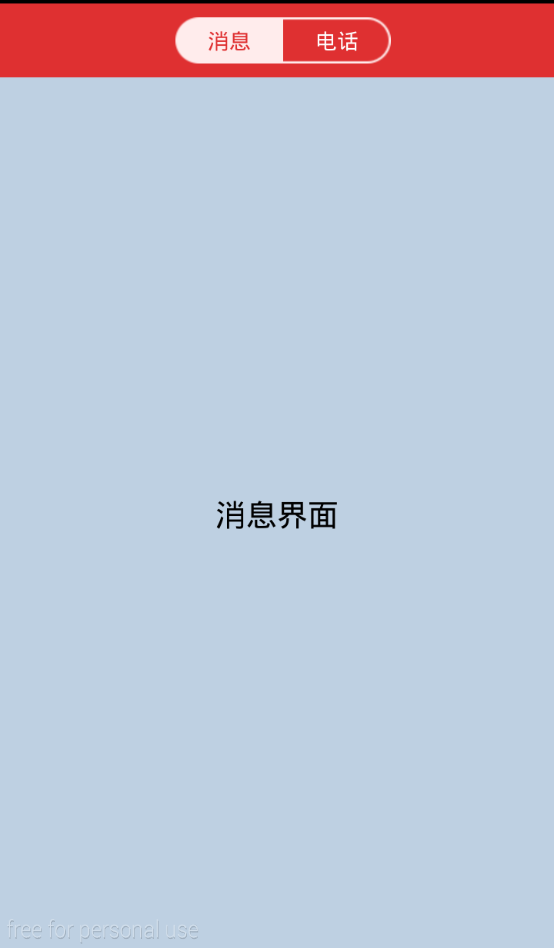

values 下面
dimens.xml

<resources>

    <!-- Default screen margins, per the Android Design guidelines. -->

    <dimen name="activity_horizontal_margin">16dp</dimen>

    <dimen name="activity_vertical_margin">16dp</dimen>

</resources>
主布局
activity_switch.xml
<?xml version="1.0" encoding="utf-8"?>

<LinearLayout xmlns:android="http://schemas.android.com/apk/res/android"

    android:layout_width="fill_parent"

    android:layout_height="fill_parent"

    android:orientation="vertical" >

    <RelativeLayout

        android:id="@+id/rl_header"

        android:layout_width="fill_parent"

        android:layout_height="48dp"

        android:background="#df3031" >

        <LinearLayout

            android:layout_width="wrap_content"

            android:layout_height="wrap_content"

            android:layout_centerInParent="true"

            android:layout_centerVertical="true"

            android:paddingLeft="8.0dp" >

            <Button

                android:id="@+id/btn_message"

                android:layout_width="70dip"

                android:layout_height="30dip"

                android:background="@drawable/baike_btn_pink_left_f_96"

                android:gravity="center"

                android:text="消息"

                android:textColor="#df3031"

                android:textSize="14sp" />

            <Button

                android:id="@+id/btn_call"

                android:layout_width="70dip"

                android:layout_height="30dip"

                android:background="@drawable/baike_btn_trans_right_f_96"

                android:gravity="center"

                android:text="电话"

                android:textColor="#ffffff"

                android:textSize="14sp" />

        </LinearLayout>

    </RelativeLayout>

    <FrameLayout

        android:id="@+id/fl_content"

        android:layout_width="fill_parent"

        android:layout_height="fill_parent" />

</LinearLayout>
两个fragment
fragment_message.xml
<?xml version="1.0" encoding="utf-8"?>

<LinearLayout xmlns:android="http://schemas.android.com/apk/res/android"

    android:layout_width="match_parent"

    android:layout_height="match_parent"

    android:orientation="vertical"

    android:gravity="center"

    android:background="#BED0E2">

    <TextView

        android:layout_width="wrap_content"

        android:layout_height="wrap_content"

        android:textSize="20sp"

        android:text="消息界面"

        android:textColor="#000000"/>

</LinearLayout>
fragment_call.xml
<?xml version="1.0" encoding="utf-8"?>

<LinearLayout xmlns:android="http://schemas.android.com/apk/res/android"

    android:layout_width="match_parent"

    android:layout_height="match_parent"

    android:orientation="vertical"

    android:gravity="center"

    android:background="#BED0E2">

    <TextView

        android:layout_width="wrap_content"

        android:layout_height="wrap_content"

        android:textSize="20sp"

        android:text="电话界面"

        android:textColor="#000000"/>

</LinearLayout>
主页面
SwitchActivity.java
package com.example.switchutils;

import android.graphics.Color;

import android.os.Bundle;

import android.support.v4.app.Fragment;

import android.support.v4.app.FragmentActivity;

import android.support.v4.app.FragmentManager;

import android.support.v4.app.FragmentTransaction;

import android.view.View;

import android.view.View.OnClickListener;

import android.view.Window;

import android.widget.Button;

public class SwitchActivity extends FragmentActivity {

    private Button btn_message,btn_call;

    private CallFragment callFragment;

    private MessageFragment messageFragment;

    public static final int MESSAGE_FRAGMENT_TYPE = 1;

    public static final int CALL_FRAGMENT_TYPE = 2;

    public int currentFragmentType = -1;

    @Override

    protected void onCreate(Bundle savedInstanceState) {

        super.onCreate(savedInstanceState);

        this.requestWindowFeature(Window.FEATURE_NO_TITLE);

        setContentView(R.layout.activity_switch);

        btn_message = (Button)findViewById(R.id.btn_message);

        btn_call = (Button)findViewById(R.id.btn_call);

        btn_message.setOnClickListener(onClicker);

        btn_call.setOnClickListener(onClicker);

        FragmentManager fragmentManager = getSupportFragmentManager();

        if (savedInstanceState != null) {

            int type = savedInstanceState.getInt("currentFragmentType");

            messageFragment = (MessageFragment)fragmentManager.findFragmentByTag("message");

            callFragment = (CallFragment)fragmentManager.findFragmentByTag("call");

            if(type > 0)

                loadFragment(type);

        } else {

            FragmentTransaction transaction = fragmentManager

                    .beginTransaction();

            Fragment mainFragment = fragmentManager.findFragmentByTag("message");

            if (mainFragment != null) {

                transaction.replace(R.id.fl_content, mainFragment);

                transaction.commit();

            } else {

                loadFragment(MESSAGE_FRAGMENT_TYPE);

            }

        }

    }

    @Override

    protected void onSaveInstanceState(Bundle outState) {

        super.onSaveInstanceState(outState);

        outState.putInt("lastFragmentTag", currentFragmentType);

    }

    private void switchFragment(int type) {

        switch (type) {

        case MESSAGE_FRAGMENT_TYPE:

            loadFragment(MESSAGE_FRAGMENT_TYPE);

            break;

        case CALL_FRAGMENT_TYPE:

            loadFragment(CALL_FRAGMENT_TYPE);

            break;

        }

    }

    private void loadFragment(int type) {

        FragmentManager fragmentManager = getSupportFragmentManager();

        FragmentTransaction transaction = fragmentManager.beginTransaction();

        if (type == CALL_FRAGMENT_TYPE) {

            if (callFragment == null) {

                callFragment = new CallFragment();

                transaction.add(R.id.fl_content, callFragment, "zhishi");

            } else {

                transaction.show(callFragment);

            }

            if (messageFragment != null) {

                transaction.hide(messageFragment);

            }

            currentFragmentType = MESSAGE_FRAGMENT_TYPE;

        } else {

            if (messageFragment == null) {

                messageFragment = new MessageFragment();

                transaction.add(R.id.fl_content, messageFragment, "wenda");

            } else {

                transaction.show(messageFragment);

            }

            if (callFragment != null) {

                transaction.hide(callFragment);

            }

            currentFragmentType = CALL_FRAGMENT_TYPE;

        }

        transaction.commitAllowingStateLoss();

    }

    private OnClickListener onClicker = new OnClickListener() {

        @Override

        public void onClick(View v) {

            switch (v.getId()) {

            case R.id.btn_message:

                btn_message.setTextColor(Color.parseColor("#df3031"));

                btn_call.setTextColor(Color.WHITE);

                btn_message

                        .setBackgroundResource(R.drawable.baike_btn_pink_left_f_96);

                btn_call

                        .setBackgroundResource(R.drawable.baike_btn_trans_right_f_96);

                switchFragment(MESSAGE_FRAGMENT_TYPE);

                break;

            case R.id.btn_call:

                btn_message.setTextColor(Color.WHITE);

                btn_call.setTextColor(Color.parseColor("#df3031"));

                btn_message

                        .setBackgroundResource(R.drawable.baike_btn_trans_left_f_96);

                btn_call

                        .setBackgroundResource(R.drawable.baike_btn_pink_right_f_96);

                switchFragment(CALL_FRAGMENT_TYPE);

                break;

            }

        }

    };

}
两个fragment
MessageFragment.java
package com.example.switchutils;

import android.os.Bundle;

import android.support.v4.app.Fragment;

import android.view.LayoutInflater;

import android.view.View;

import android.view.ViewGroup;

public class MessageFragment extends Fragment {

    @Override

    public View onCreateView(LayoutInflater inflater,

             ViewGroup container, Bundle savedInstanceState) {

        return inflater.inflate(R.layout.fragment_message, null);

    }

}
CallFragment.java
package com.example.switchutils;

import android.os.Bundle;

import android.support.v4.app.Fragment;

import android.view.LayoutInflater;

import android.view.View;

import android.view.ViewGroup;

public class CallFragment extends Fragment {

    @Override

    public View onCreateView(LayoutInflater inflater,

             ViewGroup container, Bundle savedInstanceState) {

        return inflater.inflate(R.layout.fragment_call, null);

    }

}
Android 仿QQ消息界面的更多相关文章
- Android 仿QQ首页的消息和电话的切换,首页的头部(完全用布局控制)
Android 仿QQ首页的消息和电话的切换,首页的头部(完全用布局控制) 首先贴上七个控制布局代码 1.title_text_sel.xml 字体颜色的切换 放到color文件夹下面 <?xm ...
- 高仿qq聊天界面
高仿qq聊天界面,给有需要的人,界面效果如下: 真心觉得做界面非常痛苦,给有需要的朋友. chat.xml <?xml version="1.0" encoding=&quo ...
- WPF开发实例——仿QQ登录界面
原文:WPF开发实例--仿QQ登录界面 版权声明:本文为博主原创文章,如需转载请标明转载地址 http://blog.csdn.net/u013981858 https://blog.csdn.net ...
- Android仿QQ ios dialog,仿QQ退出向上菜单
Android仿QQ ios dialog,仿QQ退出向上菜单 EasyDialog两种模式 仿QQ退出向上菜单,自己定义向上菜单 github地址:https://gith ...
- wpf实现仿qq消息提示框
原文:wpf实现仿qq消息提示框 版权声明:本文为博主原创文章,未经博主允许不得转载. https://blog.csdn.net/huangli321456/article/details/5052 ...
- 编写Java程序,使用Swing布局管理器和常用控件,实现仿QQ登录界面
返回本章节 返回作业目录 需求说明: 使用Swing布局管理器和常用控件,实现仿QQ登录界面 实现思路: 创建登录界面的类QQLogin,该类继承父类JFrame,在该类中创建无参数的构造方法,在构造 ...
- Android仿QQ界面
最近这几天,一直跟着朋友们聚会什么的,没怎么做项目,今天总算是有时间开电脑继续做我的项目了.下面我就把我做的效果展示一下. 这是模仿了qq的界面效果.因为代码比较长就不粘贴代码了.需要的小伙伴可以跟我 ...
- android 仿QQ手机版
千人2群开启,欢迎大家围观打酱油,群号145667827 您当前位置 : JavaApk-安卓应用游戏源码服务专家 » QQ » Android项目源码界面超级华丽的仿QQ最新版本 Andro ...
- 仿QQ大战—界面篇
之前在<仿QQ大战-服务器的搭建(ServerSocket)>中实现了服务器的搭建,以及一个简单地传递数据的实现,现在就是来实现类似与QQ聊天通信的功能.首先是界面的实现: 首先:服务器和 ...
随机推荐
- sql例子
select * from plat_material_resource where stl_url LIKE '/data1/upload%' --截取字符串 UPDATE plat_materia ...
- 使用 PHP 内置函数 get_browser() 判断是否是移动浏览器
get_browser — 获取浏览器具有的功能.该函数通过查找 browscap.ini 文件中的浏览器信息,尝试检测用户的浏览器所具有的功能. 由于许可证的问题,PHP 未提供浏览器功能文件,可以 ...
- .net core 1.0 中的asp.net identity 的基本使用 序言
2016年6月底,微软发不了vs2015 up3,在这个版本中,微软做了一些改变,本人目前也尚在学习使用之中,现把学习和使用的心得写出来,错误之处请大家指正. 开发环境:vs2015 UP3 项目 ...
- google protobuf初体验
最近在读别人代码的时候发现一个的东西,名字叫protobuf, 感觉挺好用的,写在这里,留个记录.那么什么是protobuf 呢?假如您在网上搜索,应该会得到类似这样的文字介绍: Google Pro ...
- source insight 编程风格(持续更新)
1.字体Source Code Pro 出身于豪门Adobe,从名字上来看就知道是转为编码而生的.基本上也是拥有前面所提的编程字体的所有要素的.这个字体基本上具有编程字体所需的所有要素:等宽.支持Cl ...
- wget
Linux wget是一个下载文件的工具,它用在命令行下.对于Linux用户是必不可少的工具,尤其对于网络管理员,经常要下载一些软件或从远程服务器恢复备份到 本地服务器.如果我们使用虚拟主机,处理这样 ...
- C++ 环形缓冲区的实现
参考文章:http://blog.csdn.net/linyt/article/details/53355355 本文参考linux系统中 kfifo缓冲区实现.由于没有涉及到锁,在多线程环境下,只适 ...
- Go语言的GOPATH与工作目录详解
这篇文章主要介绍了Go语言的GOPATH与工作目录详解,本文详细讲解了GOPATH设置.应用目录结构.编译应用等内容,需要的朋友可以参考下 GOPATH设置 go 命令依赖一个重要的环境变量:$GOP ...
- python 的var_dump
from __future__ import print_function from types import NoneType __author__ = "Shamim Hasnath&q ...
- mongodb入门学习小记
Mongodb 简单入门(个人学习小记) 1.安装并注册成服务:(示例) E:\DevTools\mongodb3.2.6\bin>mongod.exe --bind_ip 127.0.0.1 ...