
How to configure a static IP address on CentOS 7(CentOS7静态IP地址设置)
Question: On CentOS 7, I want to switch from DHCP to static IP address configuration with one of my network interfaces. What is a proper way to assign a static IP address to a network interface permanently on CentOS or RHEL 7?
If you want to set up a static IP address on a network interface in CentOS 7, there are several different ways to do it, varying depending on whether or not you want to use Network Manager for that.
Network Manager is a dynamic network control and configuration system that attempts to keep network devices and connections up and active when they are available). CentOS/RHEL 7 comes with Network Manager service installed and enabled by default.
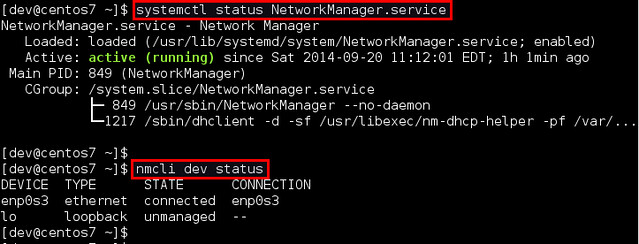
To verify the status of Network Manager service:
To check which network interface is managed by Network Manager, run:
<img src="https://farm4.staticflickr.com/3861/15295802711_a102a3574d_z.jpg">
If the output of nmcli shows "connected" for a particular interface (e.g., enp0s3 in the example), it means that the interface is managed by Network Manager. You can easily disable Network Manager for a particular interface, so that you can configure it on your own for a static IP address.
Here are two different ways to assign a static IP address to a network interface on CentOS 7. We will be configuring a network interface named enp0s3.
Configure a Static IP Address without Network Manager
Go to the /etc/sysconfig/network-scripts directory, and locate its configuration file (ifcfg-enp0s3). Create it if not found.

<img src="https://farm4.staticflickr.com/3911/15112399977_d3df8e15f5_z.jpg">
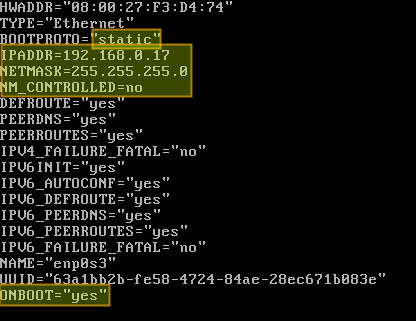
Open the configuration file and edit the following variables:
<img src="https://farm4.staticflickr.com/3880/15112184199_f4cbf269a6.jpg">
In the above, "NM_CONTROLLED=no" indicates that this interface will be set up using this configuration file, instead of being managed by Network Manager service. "ONBOOT=yes" tells the system to bring up the interface during boot.
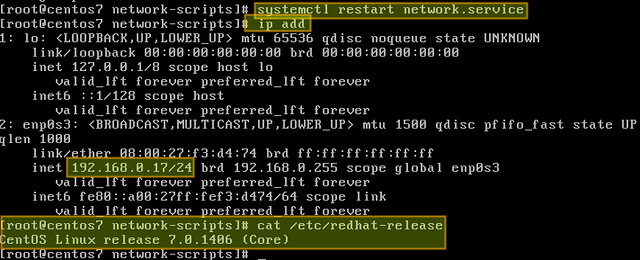
Save changes and restart the network service using the following command:
Now verify that the interface has been properly configured:
<img src="https://farm6.staticflickr.com/5593/15112397947_ac69a33fb4_z.jpg">
Configure a Static IP Address with Network Manager
If you want to use Network Manager to manage the interface, you can use nmtui (Network Manager Text User Interface) which provides a way to configure Network Manager in a terminal environment.
Before using nmtui, first set "NM_CONTROLLED=yes" in /etc/sysconfig/network-scripts/ifcfg-enp0s3.
Now let's install nmtui as follows.
Then go ahead and edit the Network Manager configuration of enp0s3 interface:
The following screen will allow us to manually enter the same information that is contained in /etc/sysconfig/network-scripts/ifcfg-enp0s3.
Use the arrow keys to navigate this screen, press Enter to select from a list of values (or fill in the desired values), and finally click OK at the bottom right:

<img src="https://farm4.staticflickr.com/3878/15295804521_4165c97828_z.jpg">
Finally, restart the network service.
and you're ready to go.
How to configure a static IP address on CentOS 7(CentOS7静态IP地址设置)的更多相关文章
- CentOS 6.5静态IP的设置(NAT和桥接都适用)
CentOS 6.5静态IP的设置(NAT和桥接都适用) 为了方便,用Xshell来.并将IP设置为静态的.因为,在CentOS里,若不对其IP进行静态设置的话,则每次开机,其IP都是动态变化的,这样 ...
- CentOS 7 配置静态IP后不生效 & Job for network.service failed
参考:http://tieba.baidu.com/p/3233996339#57290767555l 在CentOS中配置静态IP后不生效. 解决办法:将/etc/sysconfig/network ...
- 为CentOS 7配置静态IP地址及遇到的问题解决策略
为CentOS 7配置静态IP地址及遇到的问题解决策略 1. 为CentOS 7配置静态IP地址的两种方法 (原文地址:http://www.linuxidc.com/Linux/2014-10/10 ...
- centos系统设置局域网静态IP
---恢复内容开始--- centos系统设置局域网静态IP 很多时候,我们并不希望漏油器重启之后,自己的服务器动态的获取IP,这样很不利,因为你可能装了mysql,redis,等软件,然后需要远程去 ...
- centos 7配置静态IP,并配置DNS
注意:四 个文件 cat /etc/sysconfig/network-scripts/ifcfg-eth0 cat /etc/sysconfig/network cat /etc/resolv.co ...
- 33. CentOS7 静态ip设置
1.网络连接选择NAT模式: 2.关闭vmware的dhcp:选择编辑-->虚拟网络编辑器,选择VMnet8,去掉使用本地DHCP服务将ip地址分配给虚拟机(D). 3. 点击NAT设置(S)查 ...
- 如何为CentOS 7配置静态IP地址
问题:在CentOS 7上,我想要将我其中一个网络接口从DHCP改为静态IP地址配置,如何才能永久为CentOS或RHEL 7上的网络接口分配静态IP地址? 如果你想要为CentOS 7中的某个网络接 ...
- CentOS 7配置静态IP地址的两种方法 来自:互联网
CentOS 7配置静态IP地址的两种方法 来自:互联网 时间:2021-01-12 阅读:4 如果你想要为CentOS 7中的某个网络接口设置静态IP地址,有几种不同的方法,这取决于你是否想要使用网 ...
- Mac VMware Fusion Centos7 静态ip配置
一直没用mac装过虚拟机,最近因为一些原因不得不装一个,但是被这个静态ip配置把头都搞痛了(这里吐槽一下百度,我前几页都看了几遍,搜索关键字就是我现在的标题,结果都是一些抄抄抄并且不管用的攻略,最后使 ...
随机推荐
- Android签名机制
Android APK 签名比对 发布过Android应用的朋友们应该都知道,Android APK的发布是需要签名的.签名机制在Android应用和框架中有着十分重要的作用. 例如,Android系 ...
- 三剑客之SED
Sed功能说明 Sed是Strem Editor(流编辑器)缩写,是操作.过滤和转换文本内容的强大工具.常用功能有增删改查,过滤,取行. [root@old ~]# sed --versio ...
- Android IOS WebRTC 音视频开发总结(八十三)-- 使用WebRTC广播网络摄像头视频(上)
本文主要介绍WebRTC (我们翻译和整理的,译者:weizhenwei,校验:blacker),最早发表在[编风网] 支持原创,转载必须注明出处,欢迎关注我的微信公众号blacker(微信ID:bl ...
- Maximo-删除应用程序
执行如下SQL: delete from maxapps where app='<APPLICATION NAME>';delete from maxpresentation where ...
- django修改admin密码
python manage.py shell 然后获取你的用户名,并且重设密码:from django.contrib.auth.models import User user = User.obje ...
- 使用JQuery Ajax请求,在Controller里获取Session
昨天在做项目的时候,两个平台之间的切换,虽然两个网站的Session都指向了同一台机子,但是通过Ajax方式来请求时,就是不能获取到Session的值. 在调试的过程中发现,原来是Session的Is ...
- CSS3知识点总结----属性选择器
1.E[attr]只使用属性名,但没有确定任何属性值 2.E[attr="value"]指定属性名,并指定了该属性的属性值 3.E[attr~="value"] ...
- 【原】git如何删除本地和远程的仓库
今天操作git时遇到一个小问题:如何删除本地和远程的仓库,在网上巴拉一番解决了这个问题. 方法1: $rm testfile$git add -u $git commit -m "delet ...
- 犀利点评:csdn某文<第一次创业还是失败了---分享失败的经验>
今天上午在csdn看了一篇创业文,突然想无节操的做一下点评. 原文详细地址如下:http://blog.csdn.net/android_tutor/article/details/9815801 以 ...
- 《IT蓝豹》完整阅读软件客户端app
完整阅读软件客户端app,本项目里面还有扫描功能,搜索本地书籍,不过扫码功能通过c++层实现的. 本项目来自:https://github.com/JayFang1993/ScanBook Captu ...