
使用ActivityManager实现进程管理
Android中使用ActivityManager可以获得进程信息,并对进程进行管理,如结束进程等。本文使用ActivityManager获得进程列表,并结束选中的进程。
首先,看看布局文件。
<?xml version="1.0" encoding="utf-8"?>

<LinearLayout xmlns:android="http://schemas.android.com/apk/res/android"

    android:layout_width="match_parent"

    android:layout_height="match_parent"

    android:orientation="vertical" >

    <LinearLayout

        android:layout_width="fill_parent"

        android:layout_height="match_parent"

        android:layout_weight="5" >

        <TextView

            android:id="@+id/textView1"

            style="@style/my_style"

            android:layout_width="match_parent"

            android:layout_height="fill_parent"

            android:layout_weight="3" />

        <TextView

            android:id="@+id/textView2"

            style="@style/my_style"

            android:layout_width="match_parent"

            android:layout_height="fill_parent"

            android:layout_gravity="center_vertical|center_horizontal"

            android:layout_weight="3"

            android:gravity="center_vertical|center_horizontal"

            android:text="进程号" />

        <TextView

            android:id="@+id/textView3"

            style="@style/my_style"

            android:layout_width="match_parent"

            android:layout_height="fill_parent"

            android:layout_weight="2"

            android:gravity="center_vertical|center_horizontal"

            android:text="进程名" />

		<TextView

            android:id="@+id/textView4"

            style="@style/my_style"

            android:layout_width="match_parent"

            android:layout_height="fill_parent"

            android:layout_weight="3"

            android:gravity="center_vertical|center_horizontal"

            android:text="内存" />

    </LinearLayout>

    <ListView

        android:id="@id/android:list"

        android:layout_width="fill_parent"

        android:layout_height="match_parent"

        android:layout_weight="1" >

    </ListView>

    <Button

        android:id="@+id/btn_pro"

        style="@style/my_style"

        android:layout_width="fill_parent"

        android:layout_height="match_parent"

        android:layout_weight="5"

        android:text="结束" />

</LinearLayout>
然后是Java文件。
package com.hzhi.sysinfor;

import java.util.ArrayList;

import java.util.HashMap;

import java.util.List;

import java.util.Map;

import android.app.ActivityManager;

import android.app.AlertDialog;

import android.app.ListActivity;

import android.app.ProgressDialog;

import android.content.Context;

import android.content.DialogInterface;

import android.content.Intent;

import android.content.pm.PackageInfo;

import android.content.pm.PackageManager;

import android.graphics.drawable.Drawable;

import android.net.Uri;

import android.os.Bundle;

import android.os.Debug;

import android.util.Log;

import android.view.Menu;

import android.view.View;

import android.view.View.OnClickListener;

import android.view.ViewGroup;

import android.widget.BaseAdapter;

import android.widget.Button;

import android.widget.CheckBox;

import android.widget.CompoundButton;

import android.widget.CompoundButton.OnCheckedChangeListener;

import android.widget.ImageView;

import android.widget.LinearLayout;

import android.widget.TextView;

import android.widget.Toast;

public class process extends ListActivity{

	Button btn_stop;

	PackageManager pkg_man;

	list_pro list_ada;

	ActivityManager am;

	// 获得所有的进程列表

	public void get_pro(){

		list_ada = new list_pro(this);

		// 包管理器

		am = (ActivityManager) getSystemService(Context.ACTIVITY_SERVICE);

		// 获取手机内所有应用

		List<ActivityManager.RunningAppProcessInfo> pi = am.getRunningAppProcesses();

		for (int i=0; i<pi.size(); i++){

			ActivityManager.RunningAppProcessInfo pii =

					(ActivityManager.RunningAppProcessInfo) pi.get(i);

			int[] mem = new int[] {pii.pid};

			Debug.MemoryInfo[] mi = am.getProcessMemoryInfo(mem);

			list_ada.addItem(String.valueOf(pii.pid),

					pii.processName,

					String.valueOf(mi[0].dalvikPrivateDirty) + "KB",

					false);

		}

        setListAdapter(list_ada);

	}

	@Override

	protected void onCreate(Bundle savedInstanceState) {

		super.onCreate(savedInstanceState);

		setContentView(R.layout.activity_list_process);

		get_pro();

        btn_stop = (Button) findViewById(R.id.btn_pro);

        btn_stop.setOnClickListener(new View.OnClickListener() {

			@Override

			public void onClick(View v) {

				for (int j=0; j<list_ada.list_data.size(); j++){

					// 该应用需要删除

					if (list_ada.list_data.get(j).is_chk){

						String name = (String)

								list_ada.list_data.get(j).txt_name.getText();

						final String pro = (String)

								list_ada.list_data.get(j).txt_name.getText();

						new AlertDialog.Builder(process.this)

						.setTitle("结束进程")

						.setMessage("确定结束" + name + "吗?")

						.setPositiveButton("是", new DialogInterface.OnClickListener() {

							@Override

							public void onClick(DialogInterface arg0, int arg1) {

								unload(pro);

								get_pro();

							}

						})

						.setNegativeButton("否", null)

						.show();

					}

				}

			}

		});

	}

	@Override

	public boolean onCreateOptionsMenu(Menu menu) {

		getMenuInflater().inflate(R.menu.main, menu);

		return true;

	}

	public boolean unload (String n){

		boolean res = true;

		am.killBackgroundProcesses(n);

		Toast.makeText(process.this, "进程" + n + "已经结束!", Toast.LENGTH_LONG)

		.show();

		return res;

	}

}

// pro列表

class list_pro extends BaseAdapter implements OnClickListener{

	public Context ctx;

	public List<item_pro> list_data;

	public list_pro(Context context){

		ctx = context;

		list_data = new ArrayList<item_pro>();

	}

	@Override

	public int getCount() {

		// TODO Auto-generated method stub

		return list_data.size();

	}

	@Override

	public Object getItem(int arg0) {

     // TODO Auto-generated method stub

     return list_data.get(arg0);

	}

	@Override

	public long getItemId(int arg0) {

     // TODO Auto-generated method stub

     return list_data.indexOf(arg0);

	}

	@Override

	public View getView(int position, View convertView, ViewGroup parent) {

		item_pro my_item;

		Integer i = 0;

		if (convertView == null)

		{

			my_item = new item_pro(ctx,

                 (String)list_data.get(position).txt_no.getText(),

                 (String)list_data.get(position).txt_name.getText(),

                 (String)list_data.get(position).txt_size.getText(),

                 list_data.get(position).is_chk);

		}

		else

		{

			my_item = (item_pro)convertView;

			my_item.txt_no.setText(list_data.get(position).txt_no.getText());

			my_item.txt_name.setText(list_data.get(position).txt_name.getText());

			my_item.txt_size.setText(list_data.get(position).txt_size.getText());

		}

		CheckBox chk_item = (CheckBox) my_item.chk_pro;

		chk_item.setOnClickListener(this);

		chk_item.setChecked(list_data.get(position).is_chk);

		chk_item.setTag(position);

		return my_item;

	}

	public void addItem(String txt_no, String txt_name,

			String str_size, Boolean bol_chk)

	{

		list_data.add(new item_pro(ctx,txt_no,txt_name,str_size,bol_chk));

	}

	@Override

	public void onClick(View v) {

		// TODO Auto-generated method stub

		CheckBox c = (CheckBox) v;

		int pos = Integer.parseInt(v.getTag().toString());

		list_data.get(pos).is_chk = c.isChecked();

	}

}

// pro列表的一行

class item_pro extends LinearLayout{

	public CheckBox chk_pro;

	// 进程号

	public TextView txt_no;

	// 进程名

	public TextView txt_name;

	// 占用内存大小

	public TextView txt_size;

	// 是否选中

	public boolean is_chk;

	public item_pro(Context ctx, String str_no, String str_name,

			String str_size, Boolean bol_chk)

	{

		super(ctx);

		this.setOrientation(HORIZONTAL);

		int hei = 80;

		chk_pro = new CheckBox(ctx);

		addView(chk_pro,

				new LinearLayout.LayoutParams((int)(MainActivity.wid_scr*0.2),hei));

		txt_no = new TextView(ctx);

		txt_no.setText(str_no);

		addView(txt_no,

				new LinearLayout.LayoutParams((int)(MainActivity.wid_scr*0.2),hei));

		txt_name = new TextView(ctx);

		txt_name.setText(str_name);

		addView(txt_name,

				new LinearLayout.LayoutParams((int)(MainActivity.wid_scr*0.4),hei));

		txt_size = new TextView(ctx);

		txt_size.setText(str_size);

		addView(txt_size,

				new LinearLayout.LayoutParams((int)(MainActivity.wid_scr*0.2),hei));

		is_chk = bol_chk;

	 }

}
Java文件实现了三个类。process类是整个Activity的类,list_pro是适配器类,item_pro是列表里面的一行。
在process类的get_pro()方法里面,语句am = (ActivityManager) getSystemService(Context.ACTIVITY_SERVICE)获得了一个ActivityManager,List<ActivityManager.RunningAppProcessInfo> pi = am.getRunningAppProcesses()获得了系统的所有进程,并存储在列表pi里面。语句ActivityManager.RunningAppProcessInfo pii = (ActivityManager.RunningAppProcessInfo) pi.get(i)获得了每一个进程信息,pii.processName是该进程的进程名(通常是该进程对应的包名),mi[0].dalvikPrivateDirty是该进程占用的内存大小(通常以KB为单位)。在unload (String n)方法里面,am.killBackgroundProcesses(n)结束了进程名为n的进程,不过要在AndroidManifest.xml中加入android.permission.KILL_BACKGROUND_PROCESSES权限,否则会出现权限错误。
运行效果如下。
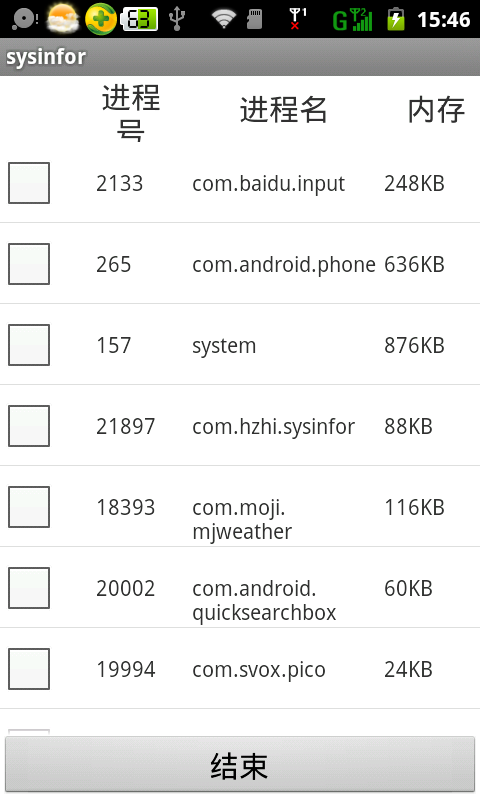
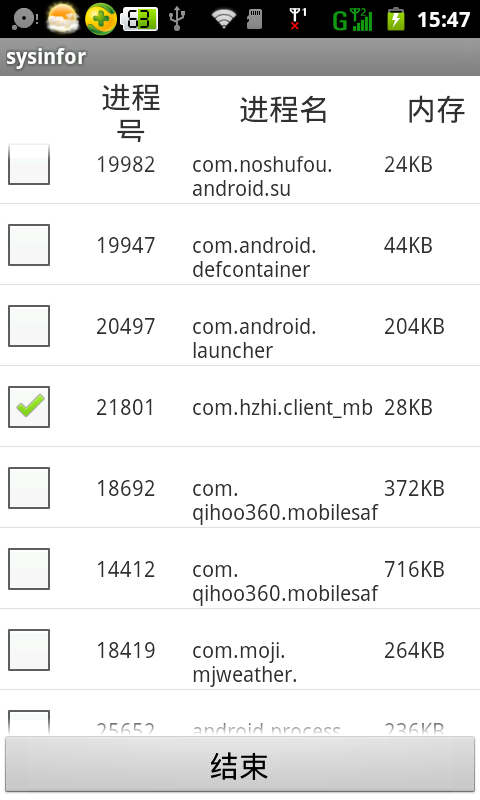
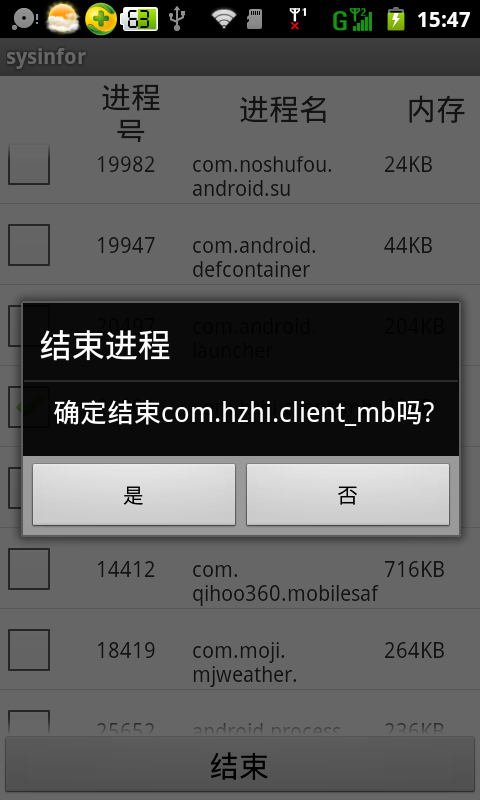
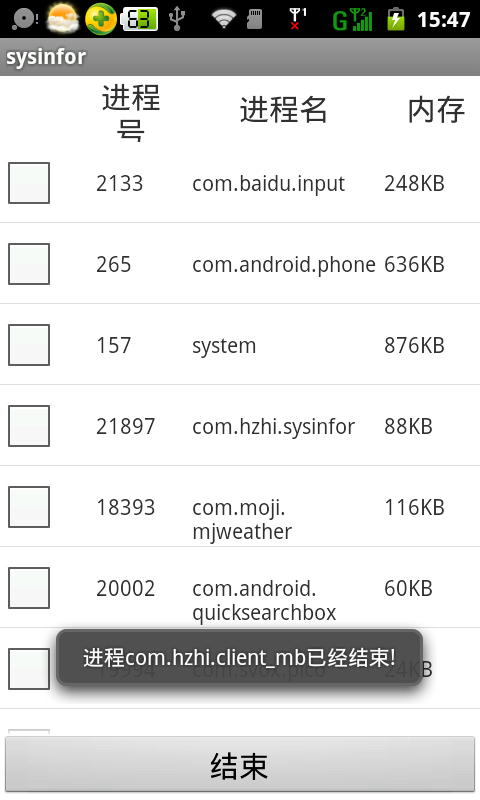
需要注意的是,系统进程是不能结束的。
使用ActivityManager实现进程管理的更多相关文章
- android145 360 进程管理
package com.itheima.mobileguard.activities; import java.util.ArrayList; import java.util.List; impor ...
- Android学习笔记_63_手机安全卫士知识点归纳(3)分享 程序锁 服务 进程管理 widget
1.分享: Intent shareIntent = new Intent(); shareIntent.setAction(Intent.ACTION_SEND); shareIntent.setT ...
- Android项目实战_手机安全卫士进程管理
###1.设备进程信息获取获取设备运行进程 ActivityManager am = (ActivityManager) context.getSystemService(Context.ACTIVI ...
- 《Linux内核设计与实现》读书笔记 第三章 进程管理
第三章进程管理 进程是Unix操作系统抽象概念中最基本的一种.我们拥有操作系统就是为了运行用户程序,因此,进程管理就是所有操作系统的心脏所在. 3.1进程 概念: 进程:处于执行期的程序.但不仅局限于 ...
- 进程管理三大扩展工具htop
三大进程管理监控工具 HTOP 介绍: Htop是一款运行于Linux系统监控与进程管理软件,htop提供所有进程的列表,并且使用彩色标识出处理器.swap和内存状态.用户一般可以在top无法提供详尽 ...
- Linux进程管理子系统分析【转】
本文转载自:http://blog.csdn.net/coding__madman/article/details/51298732 Linux进程管理: 进程与程序: 程序:存放在磁盘上的一系列代码 ...
- Linux下取代top的进程管理工具 htop
一.htop 简介 This is htop, an interactive process viewer for Linux. It is a text-mode application (for ...
- Linux进程管理
一.进程管理简介 进程是正在执行的程序或命令,每一个进程都是一个运行实体,都有自己的地址空间,并占用一定的系统资源. 进程管理的作用: 1.判断服务器的健康状态 2.查看系统中的所有进程 3.杀死进程 ...
- C++ Windows进程管理
功能: 1.各个进程启动.挂起.恢复.停止等 2.监听进程的运行状态,进程退出(正常.非正常)时,通知用户 3.异步队列 4.线程安全 进程管理器类: #ifndef __ProcessManager ...
随机推荐
- python Web开发框架-Django (2)
接上篇文章,介绍一些实用的技巧和注意点.首次用MarkDown编辑,感觉行空隙太大,不是那么好看. GET/POST 前后端会有数据交互,使用JQuery来实现get/post请求 GET 方法1:通 ...
- IOS 公共类-MyMBProgressUtil Progress显示
IOS 公共类-MyMBProgressUtil Progress显示 此公共类用于显示提示框,对MBProgress的进一步封装.可以看下面的代码 接口: @interface MyMBProgre ...
- java arraylist的问题
不得不说,我犯了错,很基础的.. 遍历list的时候可以删除数组元素吗? 答案是:简单/增强for循环不可以,list.iterator()这样的方式就可以. 我之前做过类似面试题的,不过忘记了, 不 ...
- 第2讲 Redis常用命令与高级应用
目录 一.redis数据类型 5. sorted sets类型和操作 二.Redis常用命令 1.键值相关命令 2.服务器相关命令 三. redis高级应用 1. 给redis服务器设置密码 2.持久 ...
- 题目一:打印出所有的 "水仙花数 ",所谓 "水仙花数 "是指一个三位数,其各位数字立方和等于该数本身。例如:153是一个 "水仙花数 ",因为153=1的三次方+5的三次方+3的三次方。
- [Linux]Linux下安装和配置solr/tomcat/IK分词器 详细实例二.
为了更好的排版, 所以将IK分词器的安装重启了一篇博文, 大家可以接上solr的安装一同查看.[Linux]Linux下安装和配置solr/tomcat/IK分词器 详细实例一: http://ww ...
- Atitit 语音识别的技术原理
Atitit 语音识别的技术原理 1.1. 语音识别技术,也被称为自动语音识别Automatic Speech Recognition,(ASR),2 1.2. 模型目前,主流的大词汇量语音识别系统多 ...
- C#并行编程-Task
菜鸟学习并行编程,参考<C#并行编程高级教程.PDF>,如有错误,欢迎指正. 目录 C#并行编程-相关概念 C#并行编程-Parallel C#并行编程-Task C#并行编程-并发集合 ...
- PHP面向对象 三大特性
1.封装 目的:就是为了让类更加安全 做法: 1 要将成员做成私有的 2 在类里面做方法来间接访问成员变量 3 在方法里面加控制 简单的: 第一个魔术方法:给变量赋值的 __set fu ...
- 每天一个linux命令(8):cp 命令
cp命令用来复制文件或者目录,是Linux系统中最常用的命令之一.一般情况下,shell会设置一个别名,在命令行下复制文件时,如果目标文件已经存在,就会询问是否覆盖,不管你是否使用-i参数.但是如果是 ...