
[C#]System.Timers.Timer(2)
摘要
之前学习过c#中定时器Timer的基本用法,在使用过程中,有一个问题,一直困扰着自己,就是在初始化定时器的时候,如果设置的interval过小,或者每次执行的业务非常耗时的时候,这时候该怎么处理?第一次还没执行结束,下一次已经触发了。
基础
之前学习时的一个例子:http://www.cnblogs.com/wolf-sun/p/5849229.html
一个例子
如果设置的interval比较大,而业务执行过程耗时很小,如下所示:
using System;

using System.Collections.Generic;

using System.Linq;

using System.Text;

using System.Timers;

namespace TimerTest

{

    class Program

    {

        static Timer timer = new Timer();

        static void Main(string[] args)

        {

            timer.Interval = ;

            timer.AutoReset = true;

            timer.Enabled = true;

            timer.Elapsed += timer_Elapsed;

            Console.Read();

        }

        static int count = ;

        static void timer_Elapsed(object sender, ElapsedEventArgs e)

        {

            Console.WriteLine("第{0}次触发", count.ToString());

            if (count == )

            {

                timer.Enabled = false;

            }

            Console.WriteLine("当前线程:" + System.Threading.Thread.CurrentThread.ManagedThreadId);

            System.Threading.Thread.Sleep();

            Console.WriteLine("第{0}次处理完成", count.ToString());

            count++;

        }

    }

}
执行过程
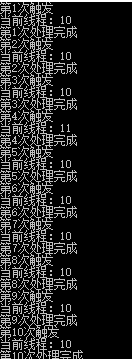
但实际中由于业务非常复杂,执行很耗时
System.Threading.Thread.Sleep();
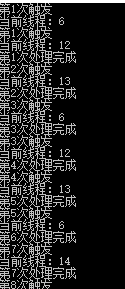
可以看到这是,已经开始乱了,线程id已经变了,如果在里面涉及到引用的类型,必然引起多个线程修改同一个变量的问题,造成并不是我们想要的结果。
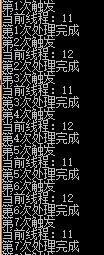
当然,这个时候有很多处理方法,加锁,或者设置标致量,等本次运行结束时,再运行下一次的。但这种方式,会造成timer的空转。
加锁
using System;

using System.Collections.Generic;

using System.Linq;

using System.Text;

using System.Timers;

namespace TimerTest

{

    class Program

    {

        static readonly object obj = new object();

        static Timer timer = new Timer();

        static void Main(string[] args)

        {

            timer.Interval = ;

            timer.AutoReset = true;

            timer.Enabled = true;

            timer.Elapsed += timer_Elapsed;

            Console.Read();

        }

        static int count = ;

        static void timer_Elapsed(object sender, ElapsedEventArgs e)

        {

            lock (obj)

            {

                Console.WriteLine("第{0}次触发", count.ToString());

                if (count == )

                {

                    timer.Enabled = false;

                }

                Console.WriteLine("当前线程:" + System.Threading.Thread.CurrentThread.ManagedThreadId);

                System.Threading.Thread.Sleep();

                Console.WriteLine("第{0}次处理完成", count.ToString());

                count++;

            }

        }

    }

}
执行
标志量
        static void timer_Elapsed(object sender, ElapsedEventArgs e)

        {

            if (isRunning)

            {

                isRunning = false;

                Console.WriteLine("第{0}次触发", count.ToString());

                if (count == )

                {

                    timer.Enabled = false;

                }

                Console.WriteLine("当前线程:" + System.Threading.Thread.CurrentThread.ManagedThreadId);

                System.Threading.Thread.Sleep();

                Console.WriteLine("第{0}次处理完成", count.ToString());

                count++;

                isRunning = true;

            }

        }
运行结果
但仍有另外一种方式,可以在当前处理业务的时候,将当前的timer先停止,执行完毕之后开启。
        static void timer_Elapsed(object sender, ElapsedEventArgs e)

        {

            timer.Enabled = false;

            if (count == )

            {

                timer.Enabled = false;

                return;

            }

            Console.WriteLine("第{0}次触发", count.ToString());

            Console.WriteLine("当前线程:" + System.Threading.Thread.CurrentThread.ManagedThreadId);

            System.Threading.Thread.Sleep();

            Console.WriteLine("第{0}次处理完成", count.ToString());

            timer.Enabled = true;

            count++;

        }
执行结果
总结
可以尝试测试开启100个定时器甚至更多的进行测试比较,推荐使用处理业务之前关闭,处理结束之后开启的方式。
[C#]System.Timers.Timer(2)的更多相关文章
- C# System.Timers.Timer的一些小问题?
比如设置间隔时间是 1000msSystem.Timers.Timer mytimer = new System.Timers.Timer(1000);问题若响应函数执行的时间超过了 1000 ms, ...
- [C#]System.Timers.Timer
摘要 在.Net中有几种定时器,最喜欢用的是System.Timers命名空间下的定时器,使用起来比较简单,作为定时任务,有Quartz.net,但有时候,一个非常简单的任务,不想引入这个定时任务框架 ...
- C# --System.Timers.Timer 定时方法
注意Start() 注意要等Interval 时间间隔 static void Main(string[] args) { System.Timers.Timer t = new System.Tim ...
- System.Windows.Forms.Timer与System.Timers.Timer的区别(zz)
.NET Framework里面提供了三种Timer: System.Windows.Forms.Timer System.Timers.Timer System.Threading.Timer VS ...
- 使用System.Timers.Timer类实现程序定时执行
使用System.Timers.Timer类实现程序定时执行 在C#里关于定时器类有3个:System.Windows.Forms.Timer类.System.Threading.Timer类和Sys ...
- .NET System.Timers.Timer的原理和使用(开发定时执行程序)
概述(来自MSDN) Timer 组件是基于服务器的计时器,它使您能够指定在应用程序中引发Elapsed 事件的周期性间隔.然后可以操控此事件以提供定期处理.例如,假设您有一台关键性服务器,必须每周7 ...
- C# 定时器-System.Timers.Timer
using Newtonsoft.Json; using Rafy; using Rafy.Domain; using System; using System.Collections.Generic ...
- .Net Windows Service(服务) 调试安装及System.Timers.Timer 使用
Windows Service(服务) 是运行在后台的进程 1.VS建立 Windows 服务(.NET Framework) 2.添加Timer 双击Service1.cs可以拖控件(System ...
- System.Windows.Forms.Timer、System.Timers.Timer、System.Threading.Timer的 区别和用法
System.Windows.Forms.Timer执行的时候,如果你在过程中间加一个sleep整个的界面就死掉了,但是另外两个没有这个情况,System.Timers.Timer.System.Th ...
- C# 定时执行方法: System.Timers.Timer用法示例
System.Timers.Timer t = new System.Timers.Timer(5000); //设置时间间隔为5秒 private void Form1_Load(ob ...
随机推荐
- 机器学习实战-ch2-有标签的聚类算法
本书中的这个聚类算法多少有些让人意外.通常的聚类算法是这样的: 给定一堆点: 给定一个距离计算的算法: 给定一个cluster之间的距离d,或者最小的cluster数目k: 初始化,每个点作为初始集群 ...
- ElectronNetTest
系统环境:Ubuntu 18.04.2 Desktop 软件环境:asp.net core 2.2,Node.js(version>8.6) Github上有人说不支持 asp.net core ...
- 在Asp.Net MVC中利用快递100接口实现订阅物流轨迹功能
前言 分享一篇关于在电商系统中同步物流轨迹到本地服务器的文章,当前方案使用了快递100做为数据来源接口,这个接口是收费的,不过提供的功能还是非常强大的,有专门的售后维护团队.也有免费的方案,类似于快递 ...
- DOM扩展:DOM API的进一步增强[总结篇-下]
本文承接<DOM扩展:DOM API的进一步增强[总结篇-上]>,继续总结DOM扩展相关的功能和API. 3.6 插入标记 DOM1级中的接口已经提供了向文档中插入内容的接口,但是在给文档 ...
- .NET Core中使用EF Core连接MySQL
最近一直在捣鼓.NET Core方面的东西,顺便写下点东西记录下 1.打开vs2017,新建一个项目 2.vs会自动生成一个项目,然后打开NuGet搜索MySql.Data.EntityFramewo ...
- PICE(1):Programming In Clustered Environment - 集群环境内编程模式
首先声明:标题上的所谓编程模式是我个人考虑在集群环境下跨节点(jvm)的流程控制编程模式,纯粹按实际需要构想,没什么理论支持.在5月份的深圳scala meetup上我分享了有关集群环境下的编程模式思 ...
- Java - 集成开发环境Eclipse的使用方法和技巧
00 - Eclipse教程 Eclipse 教程 01 - Eclipse设置编译和运行的环境 建议编译和运行的版本保持一致,否则请特别注意: 低编译,高运行 ---> 可行. 高编译,低运行 ...
- javascript 计算文件MD5 浏览器 javascript读取文件内容
原则上说,浏览器是一个不安全的环境.早期浏览器的内容是静态的,用户上网冲浪,一般就是拉取网页查看.后来,随着互联网的发展,浏览器提供了非常丰富的用户交互功能.从早期的表单交互,到现在的websocke ...
- const和define的差别
1.const有什么用途?(1)可以定义const常量(2)const可以修饰函数的参数和返回值,甚至函数的定义体.被const修饰的东西都受到强制保护,可以预防以外的变动,能提高程序的健壮性. in ...
- Flexbox指南
Flexbox布局(Flexible Box)模块旨在提供一个更加有效的方式制定.调整和分布一个容器里的项目布局,即使他们的大小是未知或者是动态的.(这里我们称为Flex). Flex布局主要思想是让 ...