
.Net Windows Service(服务) 调试安装及System.Timers.Timer 使用
Windows Service(服务) 是运行在后台的进程
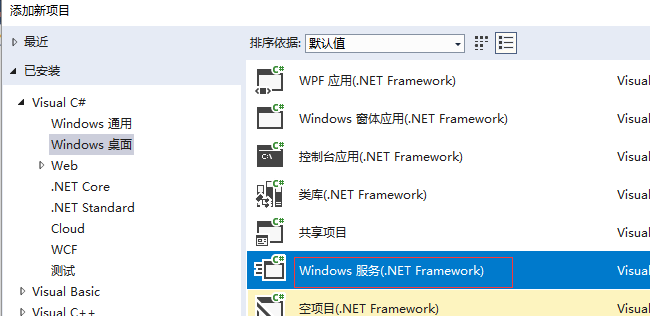
1、VS建立 Windows 服务(.NET Framework)
2、添加Timer
双击Service1.cs可以拖控件(System.Windows.Forms.Timer)这儿注意命名空间哦,
双击 trmer1 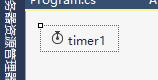 生成事件,修改事件方法如下:
App.config:
<appSettings>

    <add key="TimerExecTime" value="0001-01-01 10:07:00"/>

  </appSettings>
Service1.cs
private void timer1_Tick(object sender, EventArgs e)

        {

            _logger.Info("timer1_Tick");

            DateTime execTime = DateTime.Parse(ConfigurationManager.AppSettings["TimerExecTime"]);

            _logger.Info("timer1_Tick" + execTime.Year);

            if (execTime.Year == )

            {

                _logger.Info("yea"+ execTime.Hour + "Minute"+ execTime.Minute);

                DateTime curTime = DateTime.Now;

                if (execTime.Hour == curTime.Hour && execTime.Minute == curTime.Minute)

                {

                    //每天几小时几分执行代码

                }

            }

        }
进入Service1.Designer.cs 修改如下:
        #region 组件设计器生成的代码

        /// <summary>

        /// 设计器支持所需的方法 - 不要修改

        /// 使用代码编辑器修改此方法的内容。

        /// </summary>

        private void InitializeComponent()

        {

            this.components = new System.ComponentModel.Container();

            //this.timer1 = new System.Timers.Timer(this.components);

            this.timer1 = new System.Timers.Timer();

            //

            // timer1

            //

            this.timer1.Interval = ;

            //this.timer1.Tick += new System.EventHandler(this.timer1_Tick);

            this.timer1.Elapsed += new System.Timers.ElapsedEventHandler(timer1_Tick);

            this.timer1.AutoReset = true;//设置是执行一次(false)还是一直执行(true);

            this.timer1.Enabled = true;//是否执行System.Timers.Timer.Elapsed事件;

            //

            // Service1

            //

            this.ServiceName = "Service1";

        }

        #endregion

        public System.Timers.Timer timer1;
3、调试方法引用:
https://www.cnblogs.com/xiebin1986/archive/2011/12/15/2288893.html
4、安装与卸载
在Service1.cs 右键=》添加安装程序 ,生成 ProjectInstaller.cs
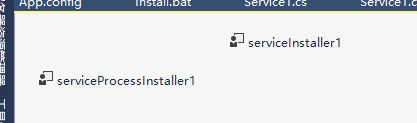
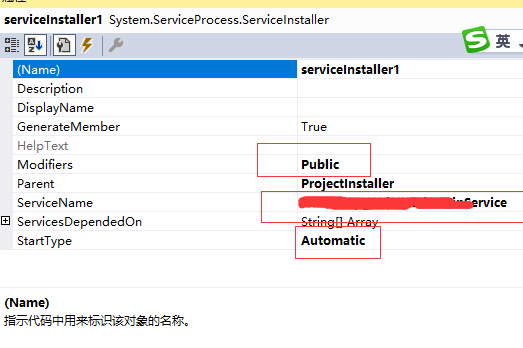
serviceInstaller1 设置如下图:
serviceProcessInstaller1设置如下图:
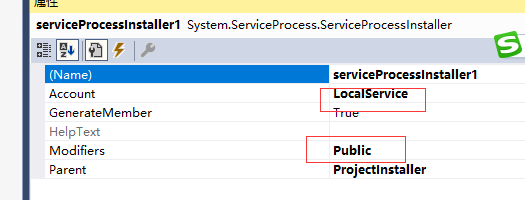
生成时
Install.bat
%SystemRoot%\Microsoft.NET\Framework\v2.0.50727\installutil.exe 路径Release  Service.exe

Net Start 服务名

sc config 服务名 start= auto
Uninstall.bat
%SystemRoot%\Microsoft.NET\Framework\v2.0.50727\installutil.exe /u 路径Release Service.exe
.Net Windows Service(服务) 调试安装及System.Timers.Timer 使用的更多相关文章
- C# Windows Service服务的创建和调试
前言 关于Windows服务创建和调试的文章在网络上的很多文章里面都有,直接拿过来贴在这里也不过仅仅是个记录,不会让人加深印象.所以本着能够更深刻了解服务项目的创建和调试过程及方法的目的,有了这篇记录 ...
- windows Service 之调试过程(附加到进程里调试,而且启动时间不能超过30秒)
最近第一次用C#写了一个windows service ,其实实现的内容比较简单.就是启动remoting 连接,但是调试相对初次写windws service 的我来说,比较烦.没有经验,而且没办法 ...
- C#Windows Service服务程序的安装/卸载、启动/停止 桌面客户端管理程序设计
C#Windows Service服务程序的安装/卸载.启动/停止 桌面客户端管理程序设计 关于Windows Service程序的安装与卸载如果每次使用命令行操作,那简直要奔溃了,太麻烦而且还容易出 ...
- 震惊!Windows Service服务和定时任务框架quartz之间原来是这种关系……
过场CG: 接到公司领导的文件指示,“小熊”需要在6月底去海外执行一个行动代号为[定时任务]的营救计划,这个计划关系到公司某个项目的生死(数据安全漏洞),作战部拟定两个作战方案: 方案一:使用务定 ...
- quartz.net结合Topshelf实现windows service服务托管的作业调度框架
topshelf可以很简单方便的实现windows service服务,详见我的一篇博客的介绍 http://www.cnblogs.com/xiaopotian/articles/5428361.h ...
- Windows Service 服务搭配FluentScheduler实现定时任务调度
Windows Service 服务 创建Windows Service 项目 创建一个Windows Service项目,并将项目名称改为 TaskWindowService 在解决方案资源管理器内 ...
- windows service 2008 R2 安装net4.6环境失败,windows service 2008 R2 升级sp1问题
一.错误 1.因为我的程序是以vs2017开发的,在windows service 2008 R2 IIS部署项目文件报出错误,因此要安装net4.6的环境. 2.windows service 2 ...
- System.Windows.Forms.Timer、System.Timers.Timer、System.Threading.Timer的 区别和用法
System.Windows.Forms.Timer执行的时候,如果你在过程中间加一个sleep整个的界面就死掉了,但是另外两个没有这个情况,System.Timers.Timer.System.Th ...
- 简述System.Windows.Forms.Timer 与System.Timers.Timer用法区别
System.Windows.Forms.Timer 基于窗体应用程序 阻塞同步 单线程 timer中处理时间较长则导致定时误差极大. System.Timers.Timer 基于服务 非阻塞异步 多 ...
随机推荐
- JAVA在Windows使用apache commons-csv导出CSV解决方案
一.添加依赖到pom.xml <!-- https://mvnrepository.com/artifact/commons-io/commons-io --> <dependenc ...
- 求标准分sql
if object_id('tempdb..#tempTable') is not null Begin drop table #tempTable End [校区],[学年],[考试年级],[考试类 ...
- springboot集成swagger2,构建优雅的Restful API
swagger,中文“拽”的意思.它是一个功能强大的api框架,它的集成非常简单,不仅提供了在线文档的查阅,而且还提供了在线文档的测试.另外swagger很容易构建restful风格的api,简单优雅 ...
- vue中Axios请求豆瓣API数据并展示到Swipe中
vue中Axios请求豆瓣API数据并展示到Swipe中 1.首先是安装Axios: 安装方法cnpm install axios --save 等待npm安装完毕: 2.在main.js中引入axi ...
- RDLC 图形报表预览时 “本地报表处理期间错误”
在RDLC报表中有图形报表的导出和打印都正常,但预览时"本地报表处理期间错误",这是因为你设置的图形太宽已经超过默认的A4 纸的宽度,解决办法:报表页面的报表--->报表属性 ...
- 使用ExpandableListView以及如何优化view的显示减少内存占用
上篇博客讲到如何获取手机中所有歌曲的信息.本文就把上篇获取到的歌曲按照歌手名字分类.用一个ExpandableListView显示出来. MainActivity .java public cla ...
- [转]Java NIO 系列教程
Java NIO提供了与标准IO不同的IO工作方式: Channels and Buffers(通道和缓冲区):标准的IO基于字节流和字符流进行操作的,而NIO是基于通道(Channel)和缓冲区(B ...
- PySpark 的背后原理
文章正文 Spark主要是由Scala语言开发,为了方便和其他系统集成而不引入scala相关依赖,部分实现使用Java语言开发,例如External Shuffle Service等.总体来说,Spa ...
- java转换日期格式为 RFC1123
import java.text.SimpleDateFormat; import java.util.Date; import java.util.Locale; import java.util. ...
- 假设分配给命令的连接位于本地挂起事务中,ExecuteReader 要求命令拥有事务。命令的 Transaction 属性尚未初始化
{System.InvalidOperationException: 假设分配给命令的连接位于本地挂起事务中.ExecuteReader 要求命令拥有事务.命令的 Transaction 属性尚未初始 ...