
[C#]System.Timers.Timer(2)
摘要
之前学习过c#中定时器Timer的基本用法,在使用过程中,有一个问题,一直困扰着自己,就是在初始化定时器的时候,如果设置的interval过小,或者每次执行的业务非常耗时的时候,这时候该怎么处理?第一次还没执行结束,下一次已经触发了。
基础
之前学习时的一个例子:http://www.cnblogs.com/wolf-sun/p/5849229.html
一个例子
如果设置的interval比较大,而业务执行过程耗时很小,如下所示:
using System;

using System.Collections.Generic;

using System.Linq;

using System.Text;

using System.Timers;

namespace TimerTest

{

    class Program

    {

        static Timer timer = new Timer();

        static void Main(string[] args)

        {

            timer.Interval = ;

            timer.AutoReset = true;

            timer.Enabled = true;

            timer.Elapsed += timer_Elapsed;

            Console.Read();

        }

        static int count = ;

        static void timer_Elapsed(object sender, ElapsedEventArgs e)

        {

            Console.WriteLine("第{0}次触发", count.ToString());

            if (count == )

            {

                timer.Enabled = false;

            }

            Console.WriteLine("当前线程:" + System.Threading.Thread.CurrentThread.ManagedThreadId);

            System.Threading.Thread.Sleep();

            Console.WriteLine("第{0}次处理完成", count.ToString());

            count++;

        }

    }

}
执行过程
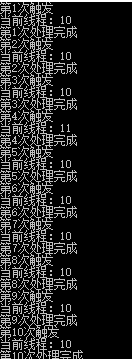
但实际中由于业务非常复杂,执行很耗时
System.Threading.Thread.Sleep();
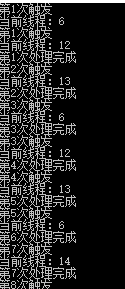
可以看到这是,已经开始乱了,线程id已经变了,如果在里面涉及到引用的类型,必然引起多个线程修改同一个变量的问题,造成并不是我们想要的结果。
当然,这个时候有很多处理方法,加锁,或者设置标致量,等本次运行结束时,再运行下一次的。但这种方式,会造成timer的空转。
加锁
using System;

using System.Collections.Generic;

using System.Linq;

using System.Text;

using System.Timers;

namespace TimerTest

{

    class Program

    {

        static readonly object obj = new object();

        static Timer timer = new Timer();

        static void Main(string[] args)

        {

            timer.Interval = ;

            timer.AutoReset = true;

            timer.Enabled = true;

            timer.Elapsed += timer_Elapsed;

            Console.Read();

        }

        static int count = ;

        static void timer_Elapsed(object sender, ElapsedEventArgs e)

        {

            lock (obj)

            {

                Console.WriteLine("第{0}次触发", count.ToString());

                if (count == )

                {

                    timer.Enabled = false;

                }

                Console.WriteLine("当前线程:" + System.Threading.Thread.CurrentThread.ManagedThreadId);

                System.Threading.Thread.Sleep();

                Console.WriteLine("第{0}次处理完成", count.ToString());

                count++;

            }

        }

    }

}
执行
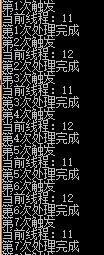
标志量
        static void timer_Elapsed(object sender, ElapsedEventArgs e)

        {

            if (isRunning)

            {

                isRunning = false;

                Console.WriteLine("第{0}次触发", count.ToString());

                if (count == )

                {

                    timer.Enabled = false;

                }

                Console.WriteLine("当前线程:" + System.Threading.Thread.CurrentThread.ManagedThreadId);

                System.Threading.Thread.Sleep();

                Console.WriteLine("第{0}次处理完成", count.ToString());

                count++;

                isRunning = true;

            }

        }
运行结果
但仍有另外一种方式,可以在当前处理业务的时候,将当前的timer先停止,执行完毕之后开启。
        static void timer_Elapsed(object sender, ElapsedEventArgs e)

        {

            timer.Enabled = false;

            if (count == )

            {

                timer.Enabled = false;

                return;

            }

            Console.WriteLine("第{0}次触发", count.ToString());

            Console.WriteLine("当前线程:" + System.Threading.Thread.CurrentThread.ManagedThreadId);

            System.Threading.Thread.Sleep();

            Console.WriteLine("第{0}次处理完成", count.ToString());

            timer.Enabled = true;

            count++;

        }
执行结果
总结
可以尝试测试开启100个定时器甚至更多的进行测试比较,推荐使用处理业务之前关闭,处理结束之后开启的方式。
[C#]System.Timers.Timer(2)的更多相关文章
- C# System.Timers.Timer的一些小问题?
比如设置间隔时间是 1000msSystem.Timers.Timer mytimer = new System.Timers.Timer(1000);问题若响应函数执行的时间超过了 1000 ms, ...
- [C#]System.Timers.Timer
摘要 在.Net中有几种定时器,最喜欢用的是System.Timers命名空间下的定时器,使用起来比较简单,作为定时任务,有Quartz.net,但有时候,一个非常简单的任务,不想引入这个定时任务框架 ...
- C# --System.Timers.Timer 定时方法
注意Start() 注意要等Interval 时间间隔 static void Main(string[] args) { System.Timers.Timer t = new System.Tim ...
- System.Windows.Forms.Timer与System.Timers.Timer的区别(zz)
.NET Framework里面提供了三种Timer: System.Windows.Forms.Timer System.Timers.Timer System.Threading.Timer VS ...
- 使用System.Timers.Timer类实现程序定时执行
使用System.Timers.Timer类实现程序定时执行 在C#里关于定时器类有3个:System.Windows.Forms.Timer类.System.Threading.Timer类和Sys ...
- .NET System.Timers.Timer的原理和使用(开发定时执行程序)
概述(来自MSDN) Timer 组件是基于服务器的计时器,它使您能够指定在应用程序中引发Elapsed 事件的周期性间隔.然后可以操控此事件以提供定期处理.例如,假设您有一台关键性服务器,必须每周7 ...
- C# 定时器-System.Timers.Timer
using Newtonsoft.Json; using Rafy; using Rafy.Domain; using System; using System.Collections.Generic ...
- .Net Windows Service(服务) 调试安装及System.Timers.Timer 使用
Windows Service(服务) 是运行在后台的进程 1.VS建立 Windows 服务(.NET Framework) 2.添加Timer 双击Service1.cs可以拖控件(System ...
- System.Windows.Forms.Timer、System.Timers.Timer、System.Threading.Timer的 区别和用法
System.Windows.Forms.Timer执行的时候,如果你在过程中间加一个sleep整个的界面就死掉了,但是另外两个没有这个情况,System.Timers.Timer.System.Th ...
- C# 定时执行方法: System.Timers.Timer用法示例
System.Timers.Timer t = new System.Timers.Timer(5000); //设置时间间隔为5秒 private void Form1_Load(ob ...
随机推荐
- Docker实践(二):容器的管理(创建、查看、启动、终止、删除)
docker官方文档地址如下:[https://docs.docker.com/engine/reference/](https://docs.docker.com/engine/reference/ ...
- .net4.0 请求HTTPS出错:未能创建 SSL/TLS 安全通道
两种方法: 1.在代码中修改 ServicePointManager.SecurityProtocol = (SecurityProtocolType)3072;// SecurityProtocol ...
- 【友情链接】各位dalao的博客
同省神犇 HA队长 __stdcall HA chty_syq为文文讲过字符串 HA cdcq为文文讲过后缀数组① ② Bluesky007超强的 外省神犇 知名OIer黄学长 一个可爱的蓝孩子qwq ...
- Linux系统磁盘与分区管理(7)
Linux最传统的磁盘文件系统(filesystem)使用的是EXT4格式,所以要了解文件系统就得要由认识EXT4开始,而文件系统是创建在硬盘上面的,因此我们得了解硬盘的物理组成才行,下面我们回来详细 ...
- web开发常用网络优化
优化方法: 1.合并资源文件,减少HTTP请求 2.压缩资源文件减少请求大小 3.利用缓存机制,尽可能使用缓存减少请求 如何做前端路由 html5 api中的history能够让我们控制url跳转之后 ...
- 试着用java实现DNS(一)——DatagramSocket, DatagramPacket, Message
一般来说,自己编写DNS是没有必要的,目前开源的dns服务软件很多,功能也很强大.但是,有时候又是很有必要的,有着诸多好处.比如说,用于企业内网,简化DNS配置,可以根据企业需求添加新的功能,非常灵活 ...
- springboot常用注解
@SpringBootApplication:包含了@ComponentScan.@Configuration和@EnableAutoConfiguration注解.其中@ComponentScan让 ...
- maven项目无法新增java test目录的问题
有时候当我们构建好maven项目时,再导入eclipse中会缺少src/main/java 和src/test/java,这是需要我们手动创建: 但是有时候在 项目视图下或者 enterprise ...
- mongodb初始化并使用node.js实现mongodb操作封装
mongodb的下载只要在https://www.mongodb.com/网站就能够下载 下载后安装只用一直点next就可以,注意最好使用默认路径安装到C盘,然后在任意位置建立一个文件夹用于储存你的数 ...
- Ubutntu安装docker启动报Removed /etc/systemd/system/docker.service.
Ubutntu安装docker启动报Removed /etc/systemd/system/docker.service.的错误,只需要执行以下三条命令. systemctl unmask docke ...