
VC设置代理方法
参考文章:
- VC 设置代理
- Setting and Retrieving Internet Options
- Change Internet Proxy settings
- http://support.microsoft.com/kb/226473
- http://bbs.csdn.net/topics/310192443
Setting Connection Options
In Internet Explorer 5 and later, Internet options can be set for on a specific connection. Previously, all connections shared the same Internet option settings. To set options for a particular connection:
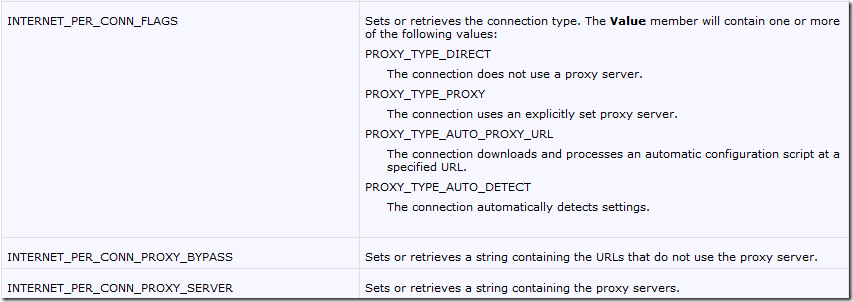
- Create an INTERNET_PER_CONN_OPTION_LIST structure.
- Allocate the memory for the individual Internet options that you want to set for the connection.
- Set the options in INTERNET_PER_CONN_OPTION structures.
- Set the options using InternetSetOption.
BOOL SetConnectionOptions()

{

    INTERNET_PER_CONN_OPTION_LIST list;

    BOOL    bReturn;

    DWORD   dwBufSize = sizeof(list);

    // Fill the list structure.

    list.dwSize = sizeof(list);

    // NULL == LAN, otherwise connectoid name.

    list.pszConnection = NULL;

    // Set three options.

    list.dwOptionCount = 3;

    list.pOptions = new INTERNET_PER_CONN_OPTION[3];

    // Ensure that the memory was allocated.

    if(NULL == list.pOptions)

    {

        // Return FALSE if the memory wasn't allocated.

        return FALSE;

    }

    // Set flags.

    list.pOptions[0].dwOption = INTERNET_PER_CONN_FLAGS;

    list.pOptions[0].Value.dwValue = PROXY_TYPE_DIRECT |

        PROXY_TYPE_PROXY;

    // Set proxy name.

    list.pOptions[1].dwOption = INTERNET_PER_CONN_PROXY_SERVER;

    list.pOptions[1].Value.pszValue = TEXT("http://proxy:80");

    // Set proxy override.

    list.pOptions[2].dwOption = INTERNET_PER_CONN_PROXY_BYPASS;

    list.pOptions[2].Value.pszValue = TEXT("local");

    // Set the options on the connection.

    bReturn = InternetSetOption(NULL,

        INTERNET_OPTION_PER_CONNECTION_OPTION, &list, dwBufSize);

    // Free the allocated memory.

    delete [] list.pOptions;

    return bReturn;

}
VC设置代理方法的更多相关文章
- webservice axis2客户端设置代理方法(公司网络通过代理访问时)
webservice axis2客户端设置代理方法(公司网络通过代理访问时) UploadProcessInServiceStub stub = new UploadProcessInServic ...
- github for window 中 git shell 设置代理方法和解决ssl证书错误的问题
体验了一下传说中的 github for windows(操作git有很多的方法,我还没有学会,所以找了个简单的方法),听说用起来还不错,毕竟也开始接触了github.下载地址是 http://win ...
- urllib,request 设置代理
通常防止爬虫被反主要有以下几个策略: 1.动态设置User-Agent(随机切换User-Agent,模拟不同用户的浏览器信息) 2.使用IP地址池:VPN和代理IP,现在大部分网站都是根据IP来b ...
- ios开发网络学八:NSURLSession相关代理方法
#import "ViewController.h" @interface ViewController ()<NSURLSessionDataDelegate> /* ...
- scrapy设置代理的方法
方法一: 直接在spider文件下设置代理,通过传参的方式设置在Request中 import scrapy class MimvpSpider(scrapy.spiders.Spider): nam ...
- collectionView代理方法快速设置cell大小上下左右间隔
#define JianGe 25 #define GeShu 4 #define ScreenWidth ([UIScreen mainScreen].bounds.size.width) #def ...
- 如何在android studio 1.0 启动时设置代理【解决WARN - ateSettings.impl.UpdateChecker - Connection failed.】
今天第一次用android studio,下了个比较新的1.0.1 linux版本,结果启动时老是出现以下错误: [ 6987] WARN - ateSettings.impl.UpdateCheck ...
- 通读AFN②--AFN的上传和下载功能分析、SessionTask及相应的session代理方法的使用细节
这一部分主要研究AFN的上传和下载功能,中间涉及到各种NSURLSessionTask的一些创建的解析和HTTPSessionManager对RESTful风格的web应用的支持,同时会穿插一点NSU ...
- UITextField的代理方法:textField:shouldChangeCharactersInRange:replacementString
原文链接:http://www.cnblogs.com/zhanggui/p/6101813.html 这个我在开发的过程中用到的次数最多,因此这里就简单对其进行分析.先看看Command+点击 弹出 ...
随机推荐
- 洛谷 P1603 斯诺登的密码
我一开始还没看懂非正规数字的意义,以为那里写的单词不算,蒙了好久,而且这题非常考验仔细程度,一不小心就RE,WA. 嗯,好像讲了些废话,那我们看看思路,我的做法和前面的大佬们有些不同,因为这题只有六个 ...
- Spark笔记之数据本地性(data locality)
一.什么是数据本地性(data locality) 大数据中有一个很有名的概念就是"移动数据不如移动计算",之所以有数据本地性就是因为数据在网络中传输会有不小的I/O消耗,如果能够 ...
- hibernate的多对多关联映射
在我们实际项目中,多对多的情况也时长存在,比如最常见的就是系统管理的五张表,如下面的一个结构: 在本文学习hibernate多对多关联映射的实验中我简单的写几个字段,达到学习目的即可. 1.多对多的关 ...
- Maven部署dao工程到私服上——(十三)
1.修改settings.xml 需要在客户端即(部署dao工程)的电脑上配置 maven环境,并修改 settings.xml 文件,配置连接私服的用户和密码 . 此用户名和密码用于私服校验,因为私 ...
- C#并行计算 Parallel.Foreach&Parallel.For
Parallel.For(int fromInclude, int toExclude, Action<int> body) 栗子: Parallel.For(0, 10, (i) =&g ...
- c# XML读取
System.Xml 命名空间 https://msdn.microsoft.com/zh-cn/library/gg145036(v=vs.110).aspx 一.读取 1.通过 XmlDocume ...
- jquery.validate动态更改校验规则
有时候表单中有多个字段是相互关联的,以下遇到的就是证件类型和证件号码的关联,在下拉框中选择不同的证件类型,证件号码的值的格式都是不同的,这就需要动态的改变校验规则. 点击(此处)折叠或打开 <! ...
- 网络图片转换到本地并转换成base64位
/** * 网络图片转换到本地并转换成base64位 * @param $url * @return string */ public function imgzhuanhuan($url) { // ...
- laravel中redis队列的使用
一.配置文件 首先我们需要在配置文件中配置默认队列驱动为Redis,队列配置文件是config/queue.php: return [ 'default' => env('QUEUE_DRIVE ...
- pyqt5-基础
PyQt5是一套来自Digia的Qt5应用框架和Python的粘合剂.支持Python2.x和Python3.x版本. PyQt5以一套Python模块的形式来实现功能.它包含了超过620个类,600 ...