
USBDM RS08/HCS08/HCS12/Coldfire V1,2,3,4/DSC/Kinetis Debugger and Programmer -- BDM Construction and Firmware
Construction.
- Build the hardware using the information provided in the PCB download.
- The following are provided:
- PDFs including the circuit diagrams with parts lists and example PCB layouts.
- PCB layouts in Altium designer format (a trial version of the software may be down loaded from http://altium.com/evaluate/).
- PCB layouts exported from Altium designer as Gerber files and NC drill files.
Initial programming of USBDM bootloader into BDM Flash.
- If you purchased a commercial version of the BDM with Version 4.0 or later software then the correct USBDM bootloader should have already been installed and you may go to Update of BDM firmware and changing serial number to update the BDM firmware. If the software is Ver 3 then you are advised to update all the flash including the bootloader.
- Please complete the following before the next step:
- Install the USBDM software Software Installation
- Install the USBDM drivers USB Driver Installation
- Note - Two bootloaders are used in programming the JS16 BDM
- The JS16 has an inbuilt USB bootloader. This is used with the provided JS16 First Stage Bootloader to initially program the JS16.
- The USBDM has its own bootloader. This is necessary for the JMxx versions and for consistency is also used with the JS16 versions. This bootloader has to be programmed into the BDM once (using the built-in bootloader from above!)
- If the BDM is completely unprogrammed you can simply plug it in, otherwise tie the BLMS pin low before doing so.
- The same driver is used by the JS16 Bootloader as used by the USBDM software so should install automatically.
- If you are having problems detecting the device or are not prompted for the driver you can confirm that the BDM is in Freescale bootloader mode by checking the device PID/VID in the device manager. It should be VID=15A2 & PID=0038 and the device should appears as JS16 Bootloader in the device manager when the driver is correctly installed.
- If you have previously used the Freescale JS16 GUI Bootloader then it may be necessary to uninstall the device first using the Device Manager.
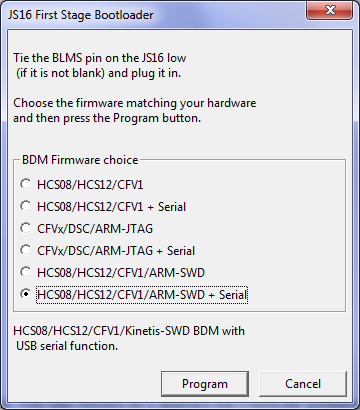
- Start the JS16 Bootloader.
- Select the appropriate firmware to load to the device.
- Press Program to program the device. There is no progress dialogue but after a short wait a confirmation should appear.
- You should then use the USBDM Firmware updater to install the current firmware version as described below.
Update of BDM firmware and changing serial number
This is the usual process for updating the BDM between different levels of the Version 4 firmware.
- Please complete the following before the next step (if not already done):
- Install the USBDM software Software Installation
- Install the USBDM drivers USB Driver Installation
- The provided USBDM Firmware Updater (FirmwareChanger.exe - not the JS16 First stage one!) may be used to change the BDM firmware. Its use is pretty obvious.
These required flash images are installed with the USBDM software and the correct one will be automatically loaded if the Auto update BDM firmware checkbox is selected.
It also allows the serial number of the BDM to be changed as part of the programming process. This is desirable as the serial number is used to identify a particular BDM if several are plugged in at the same time.Notes:
- The bootloader re-boots the BDM into USBDM in-circuit-programming (USBDM-ICP) mode to change the main firmware. The device will be re-enumerate and appears as a new device. You may be prompted to allow driver installation.
- The Bootloader will not allow the programming of a Flash image that doesn't match the existing BDM type i.e. whatever was originally programmed into the BDM. This is to prevent accidental upgrade with an incompatible Flash image.
- The Bootloader requires the BDM to have already been programmed at least once so that the Bootloader firmware is present in the BDM.
- If the BDM contains an old version of the Bootloader firmware (USBDM < V4.0) then it is necessary to take special steps to install the USB drivers to support both old and new VID/PIDs. Please see the driver installation instructions.

USBDM RS08/HCS08/HCS12/Coldfire V1,2,3,4/DSC/Kinetis Debugger and Programmer -- BDM Construction and Firmware的更多相关文章
- USBDM RS08/HCS08/HCS12/Coldfire V1,2,3,4/DSC/Kinetis Debugger and Programmer -- MC9S08JS16
Introduction The attached files provide a port of a combined TBDML/OSBDM code to a MC9S08JS16 proces ...
- USBDM RS08/HCS08/HCS12/Coldfire V1,2,3,4/DSC/Kinetis Debugger and Programmer -- Software Install
Installation of USBDM for Windows Under Windows, installation is done with a standard Windows MSI fi ...
- USBDM RS08/HCS08/HCS12/Coldfire V1,2,3,4/DSC/Kinetis Debugger and Programmer -- MC9S08JM16/32/60
Introduction The attached files provide a port of a combined TBDML/OSBDM/TBLCF code to a MC9S08JM16/ ...
- USBDM RS08/HCS08/HCS12/Coldfire V1,2,3,4/DSC/Kinetis Debugger and Programmer -- Driver Install
Installation of USBDM USB drivers for Windows There are four installers provided: USBDM_Drivers_x_x_ ...
- USBDM Debugger interface for Freescale RS08,HCS08,HCS12,Coldfire and ARM-Kinetis Devices.
Introduction USBDM is a debugger hardware interface for a range of Freescale microcontrollers. It is ...
- USBDM Coldfire V2,3,4/DSC/Kinetis Debugger and Programmer -- MC9S08JS16
Introduction The attached files provide a port of a combined TBLCF/DSC code to a MC9S08JS16 processo ...
- USBDM Kinetis Debugger and Programmer
Introduction The FRM-xxxx boards from Freescale includes a minimal SWD based debugging interface for ...
- Freescale OSBDM JM60仿真器
OSBDM-JM60 - 9S08JM60 Based OSBDM — It includes interfaces and firmware applied to all the targets s ...
- Freescale OSBDM JM60仿真器 BGND Interface
The BGND interface provides the standard 6 pin connection for the single wire BGND signal type devel ...
随机推荐
- lrc歌词文件格式
一.lrc文件有什么作用 lrc文件就是一个文本文件,用来记录歌曲的歌词信息,使得播放歌曲时能够让歌词与声音同步显示,类似于电影字幕那种效果. 心情很丧时我们会听首歌陶冶一下情操,不知你是否注意过音乐 ...
- jdk1.8源码Synchronized及其实现原理
一.Synchronized的基本使用 关于Synchronized在JVM的原理(偏向锁,轻量级锁,重量级锁)可以参考 : http://www.cnblogs.com/dennyzhangdd/ ...
- python版本管理工具pyenv和包管理工具pipenv
一.pyenv版本管理工具 pyenv是一个python版本管理工具,可以实现轻松切换多个python版本 它可根据每个用户更改全局python版本,也可以为每个项目指定python版本,还可以管理v ...
- 安装asp.net mvc4后mvc3项目编译报错
安装asp.net mvc4之后,之前的mvc3项目编译时报这个错“The type System.Web.Mvc.ModelClientValidationRule exists in both c ...
- 浅谈js设计模式之代理模式
代理模式是一种非常有意义的模式,在生活中可以找到很多代理模式的场景.比如,明星都有经纪人作为代理.如果想请明星来办一场商业演出,只能联系他的经纪人.经纪人会把商业演出的细节和报酬都谈好之后,再把合同交 ...
- cat集成项目所遇到的一些坑
第一个问题:(jar包依赖冲突) 启动报错,直接贴log zhengxin-third-shanghai-cis [2017-08-21 14:17:49] 56231 WARN [main] - A ...
- AngularJs(SPA)单页面SEO以及百度统计应用(下)
苍苍之天不得久视,堂堂之地不得久履 当你小心翼翼的开启服务端渲染的同时,一个问题不得不注意,使用内存模式去保存渲染过的页面,这样服务断掉重启后,缓存也没有了,所以这里我们使用mongdodb进行本地化 ...
- ***文件上传控件bootstrap-fileinput的使用和参数配置说明
特别注意: 引入所需文件后页面刷新查看样式奇怪,浏览器提示错误等,可能是因为js.css文件的引用顺序问题,zh.js需要在fileinput.js后面引入.bootstrap最好在filein ...
- Windows下RabbitMQ安装及配置
下载rabbitmq_server以及Erlang OTP平台 安装好了启动服务就行了 也可用命令 net start RabbitMQ 或 net stop RabbitMQ 配置用户添加环境变 ...
- spring-cloud-sleuth+zipkin追踪服务实现(四)
1.前言 在上一篇spring-cloud-sleuth+zipkin追踪服务实现(三)的处理实现后,很多朋友告诉我,在zipkin server的管理页面无法看到项目依赖关系. 当时也没有多想,以为 ...