
初始化Weex项目遇到的问题记录
Weex 提供了一个命令行工具 weex-toolkit 来帮助开发者使用 Weex。它可以用来快速创建一个空项目、初始化 iOS 和 Android 开发环境、调试、安装插件等操作。
目前 weex-toolkit 只支持创建 Vue.js 的项目。创建 Rax 的项目可以使用 rax-cli,参考 Rax 的官方网站 了解其用法。
一:初始化 (全局安装 weex-toolkit)
请确保你已经安装了 Node.js (可以参考React Native (0.57)开发环境搭建(过程记录)中Node.js的安装过程)
然后全局安装 weex-toolkit。
命令如下:
npm install -g weex-toolkit
但是事与愿违,报错,并且很恶心,怎么搞都没有办法。
解决过程重点记录:
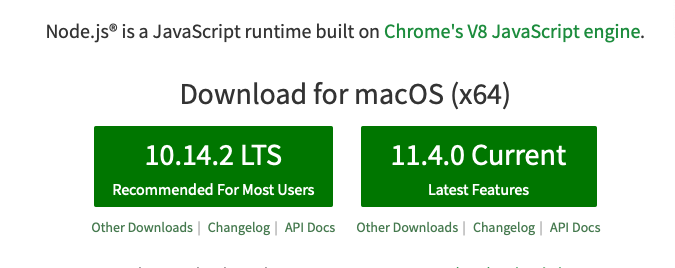
可能是我使用了左边的推荐的10.14.2版本(记不清了),导致“水土不服”。出现下面的问题:
1、警告
WARN optional SKIPPING OPTIONAL DEPENDENCY: fsevents@1.1.3 (node_modules/weex-toolkit/node_modules/weex-builder/node_modules/fsevents):
WARN optional SKIPPING OPTIONAL DEPENDENCY: fsevents@1.1.3 install: `node install`
WARN optional SKIPPING OPTIONAL DEPENDENCY: Exit status 1
WARN optional SKIPPING OPTIONAL DEPENDENCY: fsevents@1.1.2 (node_modules/weex-toolkit/node_modules/weex-previewer/node_modules/fsevents):
2、直接错误:
Tried to download(undefined): https://fsevents-binaries.s3-us-west-2.amazonaws.com/v1.1.3/fse-v1.1.3-node-v64-darwin-x64.tar.gz
Pre-built binaries not found for fsevents@1.1.3 and node@10.14.2 (node-v64 ABI, unknown) (falling back to source compile with node-gyp)
ERR! node -v v10.14.2
node-gyp -v v3.8.0
not ok
build error
node -v v10.14.2
node-pre-gyp -v v0.6.39
not ok
。。。。
就是以上类似问题。
解决方案:
1、降低node的版本号:
npm install -g n
sudo n v8.11.3
install : node-v8.11.3
mkdir : /usr/local/n/versions/node/8.11.3
fetch : https://nodejs.org/dist/v8.11.3/node-v8.11.3-darwin-x64.tar.gz
######################################################################## 100.0%
installed : v8.11.3
$ node -v
v8.11.3
$ npm -v
5.6.0
安装了node:v8.11.3 版本后,尝试初始化,执行如下命令,并记录过程:
$ npm install weex-toolkit -g
/usr/local/bin/weex -> /usr/local/lib/node_modules/weex-toolkit/bin/weex.js
> fsevents@1.1.3 install /usr/local/lib/node_modules/weex-toolkit/node_modules/weex-builder/node_modules/fsevents
> node install
[fsevents] Success: "/usr/local/lib/node_modules/weex-toolkit/node_modules/weex-builder/node_modules/fsevents/lib/binding/Release/node-v57-darwin-x64/fse.node" already installed
Pass --update-binary to reinstall or --build-from-source to recompile
> fsevents@1.1.2 install /usr/local/lib/node_modules/weex-toolkit/node_modules/weex-previewer/node_modules/fsevents
> node install
[fsevents] Success: "/usr/local/lib/node_modules/weex-toolkit/node_modules/weex-previewer/node_modules/fsevents/lib/binding/Release/node-v57-darwin-x64/fse.node" already installed
Pass --update-binary to reinstall or --build-from-source to recompile
> fsevents@1.1.3 install /usr/local/lib/node_modules/weex-toolkit/node_modules/weex-previewer/node_modules/weex-builder/node_modules/fsevents
> node install
[fsevents] Success: "/usr/local/lib/node_modules/weex-toolkit/node_modules/weex-previewer/node_modules/weex-builder/node_modules/fsevents/lib/binding/Release/node-v57-darwin-x64/fse.node" already installed
Pass --update-binary to reinstall or --build-from-source to recompile
> fsevents@1.1.3 install /usr/local/lib/node_modules/weex-toolkit/node_modules/xtoolkit/node_modules/fsevents
> node install
[fsevents] Success: "/usr/local/lib/node_modules/weex-toolkit/node_modules/xtoolkit/node_modules/fsevents/lib/binding/Release/node-v57-darwin-x64/fse.node" already installed
Pass --update-binary to reinstall or --build-from-source to recompile
+ weex-toolkit@1.3.11
added 463 packages and updated 1 package in 22.24s
整个过程没有出现问题
2、升级到最新版本的node.js
接着刚才的去安装最新的node.js
$ brew install node
Warning: node 11.4.0 is already installed, it's just not linked
You can use `brew link node` to link this version.
$ brew link node
Linking /usr/local/Cellar/node/11.4.0...
Error: Could not symlink bin/node
Target /usr/local/bin/node
already exists. You may want to remove it:
rm '/usr/local/bin/node'
To force the link and overwrite all conflicting files:
brew link --overwrite node
To list all files that would be deleted:
brew link --overwrite --dry-run node
果然node版本如下,没有改变:
$ node -v
v8.11.3
$ npm -v
5.6.0
尝试用下面的命令
$ sudo n v11.4.0
$ node -v
v11.4.0
$ npm -v
6.4.1
更新到最新的版本了。
$ npm install weex-toolkit -g
WARN read-shrinkwrap This version of npm is compatible with lockfileVersion@1, but npm-shrinkwrap.json was generated for lockfileVersion@0. I'll try to do my best with it!
WARN read-shrinkwrap This version of npm is compatible with lockfileVersion@1, but npm-shrinkwrap.json was generated for lockfileVersion@0. I'll try to do my best with it!
WARN read-shrinkwrap This version of npm is compatible with lockfileVersion@1, but npm-shrinkwrap.json was generated for lockfileVersion@0. I'll try to do my best with it!
/usr/local/bin/weex -> /usr/local/lib/node_modules/weex-toolkit/bin/weex.js
+ weex-toolkit@1.3.11
updated 229 packages in 20.484s
在最新的版本下面的时候,只剩余警告了。综上所述,我觉的还是使用v8.11.3靠谱点。
二:初始化 (weex create awesome-app )
npm install weex-toolkit -g
这条命令会向你命令行环境中注册一个 weex 命令。你可以用 weex create 命令来创建一个空的模板项目:
$ weex create awesome-app
【我觉得上面的命令 awesome-app 可以随便写,例如 $ weex create yooweiweex 然后在确定Project name的时候,有一次机会:? Project name yooweiweex】
如下;
$ weex create awesome-app
? Project name yooweiweex 【可以自己指定,也可直接回车,按照括号中默认名字(注意这里的名字不能有大写字母,如果有会报错Sorry, name can no longer contain capital letters)】
? Project description test weex
? Author yoowei <wyhist2012@126.com>
? Select weex web render latest
? Babel compiler (https://babeljs.io/docs/plugins/#stage-x-experimental-presets) stage-0
? Use vue-router to manage your view router? (not recommended) Yes
? Use ESLint to lint your code? Yes
? Pick an ESLint preset Standard
? Set up unit tests Yes
? Should we run `npm install` for you after the project has been created? (recommended) npm
16:31:26 : Generated awesome-app
# Installing project dependencies ...
# ========================
但是可能是使用了node的最高版本,中间还是出现了很多错误和警告。我觉得有必要将node降到v8.11.3 使用
注意为了避免出现一些其他的乱七八糟的问题,我们还是按照下面的两个注意事项去处理
1、前往/usr/local/lib/node_modules 目录现将weex-toolkit 删掉
2、回到根路径/Users/galahad 然后再去执行:$ npm install weex-toolkit -g
$ cd /Users/galahad/Desktop/ziliao/weex
$ weex create yooweiweex
? Project name yooweiweex
? Project description A weex project
? Author yoowei <wyhist2012@126.com>
? Select weex web render latest
? Babel compiler (https://babeljs.io/docs/plugins/#stage-x-experimental-presets) stage-0
? Use vue-router to manage your view router? (not recommended) No
? Use ESLint to lint your code? Yes
? Pick an ESLint preset Standard
? Set up unit tests Yes
? Should we run `npm install` for you after the project has been created? (recommended) npm
16:51:33 : Generated yooweiweex
# Installing project dependencies ...
# ========================
WARN deprecated babel-preset-es2015@6.24.1: ???? Thanks for using Babel: we recommend using babel-preset-env now: please read babeljs.io/env to update!
WARN deprecated text-encoding@0.6.4: no longer maintained
WARN deprecated browserslist@2.11.3: Browserslist 2 could fail on reading Browserslist >3.0 config used in other tools.
WARN deprecated browserslist@1.7.7: Browserslist 2 could fail on reading Browserslist >3.0 config used in other tools.
WARN deprecated circular-json@0.3.3: CircularJSON is in maintenance only, flatted is its successor.
> fsevents@1.2.4 install /Users/galahad/Desktop/ziliao/weex/yooweiweex/node_modules/fsevents
> node install
[fsevents] Success: "/Users/galahad/Desktop/ziliao/weex/yooweiweex/node_modules/fsevents/lib/binding/Release/node-v57-darwin-x64/fse.node" already installed
Pass --update-binary to reinstall or --build-from-source to recompile
> phantomjs-prebuilt@2.1.16 install /Users/galahad/Desktop/ziliao/weex/yooweiweex/node_modules/phantomjs-prebuilt
> node install.js
PhantomJS not found on PATH
Download already available at /var/folders/rg/gmjp61bx0x95t4tjx2hh_3sr0000gn/T/phantomjs/phantomjs-2.1.1-macosx.zip
Verified checksum of previously downloaded file
Extracting zip contents
Removing /Users/galahad/Desktop/ziliao/weex/yooweiweex/node_modules/phantomjs-prebuilt/lib/phantom
Copying extracted folder /var/folders/rg/gmjp61bx0x95t4tjx2hh_3sr0000gn/T/phantomjs/phantomjs-2.1.1-macosx.zip-extract-1545123137579/phantomjs-2.1.1-macosx -> /Users/galahad/Desktop/ziliao/weex/yooweiweex/node_modules/phantomjs-prebuilt/lib/phantom
Writing location.js file
Done. Phantomjs binary available at /Users/galahad/Desktop/ziliao/weex/yooweiweex/node_modules/phantomjs-prebuilt/lib/phantom/bin/phantomjs
> uglifyjs-webpack-plugin@0.4.6 postinstall /Users/galahad/Desktop/ziliao/weex/yooweiweex/node_modules/uglifyjs-webpack-plugin
> node lib/post_install.js
> sinon@4.5.0 postinstall /Users/galahad/Desktop/ziliao/weex/yooweiweex/node_modules/sinon
> node scripts/support-sinon.js
Have some ❤️ for Sinon? You can support the project via Open Collective:
> https://opencollective.com/sinon/donate
notice created a lockfile as package-lock.json. You should commit this file.
WARN babel-loader@6.4.1 requires a peer of webpack@1 || 2 || ^2.1.0-beta || ^2.2.0-rc but none is installed. You must install peer dependencies yourself.
WARN babel-loader@6.4.1 requires a peer of webpack@1 || 2 || ^2.1.0-beta || ^2.2.0-rc but none is installed. You must install peer dependencies yourself.
added 1692 packages in 44.856s
Running eslint --fix to comply with chosen preset rules...
# ========================
> yooweiweex@1.0.0 lint /Users/galahad/Desktop/ziliao/weex/yooweiweex
> eslint --ext .js,.vue src test/unit --fix
Success! Created yooweiweex at /Users/galahad/Desktop/ziliao/weex/yooweiweex
Inside that directory, you can run several commands:
npm start
Starts the development server for you to preview your weex page on browser
You can also scan the QR code using weex playground to preview weex page on native
npm run dev
Open the code compilation task in watch mode
npm run ios
(Mac only, requires Xcode)
Starts the development server and loads your app in an iOS simulator
npm run android
(Requires Android build tools)
Starts the development server and loads your app on a connected Android device or emulator
npm run pack:ios
(Mac only, requires Xcode)
Packaging ios project into ipa package
npm run pack:android
(Requires Android build tools)
Packaging android project into apk package
npm run pack:web
Packaging html5 project into `web/build` folder
npm run test
Starts the test runner
To get started:
cd yooweiweex
npm start
Enjoy your hacking time!
命令执行完以后,在当前目录的 awesome-app 文件夹里就有了一个空的 Weex + Vue.js 项目。
三:开发
下一步就是进入刚刚创建的文件夹,并且安装依赖,然后执行 npm start:
cd yooweiweex
npm install
npm start
然后工具会启动一个本地的 web 服务,监听 8081 端口。你可以打开 http://localhost:8081 查看页面在 Web 下的渲染效果。 源代码在 src/ 目录中,你可以像一个普通的 Vue.js 项目一样来开发.
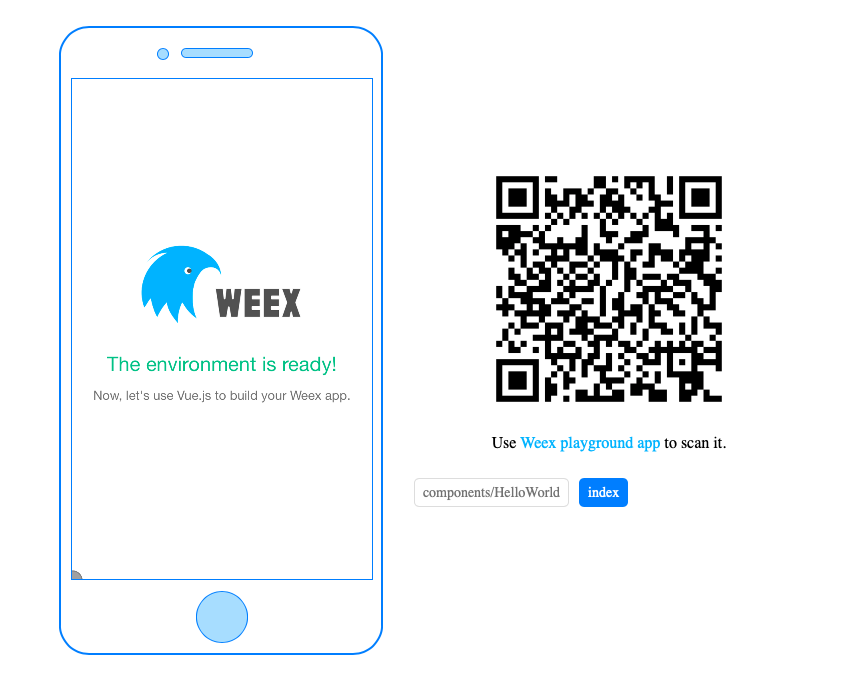
除此之外,你还可以打开 http://localhost:8081/preview.html 开启一个预览页面,它会把 web 端的页面放在一个 iframe 中渲染,而且在右侧生成一个二维码。用 Weex playground app 扫描这个二维码可以看到页面在手机上渲染的真实效果。
四:编译和运行
默认情况下 weex create 命令并不初始化 iOS 和 Android 项目,你可以通过执行 weex platform add 来添加特定平台的项目。
weex platform add ios
weex platform add android
由于网络环境的不同,安装过程可能需要一些时间,请耐心等待。如果安装失败,请确保自己的网络环境畅通。
$ cd /Users/galahad/Desktop/ziliao/weex/yooweiweex
$ weex platform add ios
17:13:20 : Adding ios weexpack-ios@4.1.6 ...
17:13:20 : Success!
$ weex platform add android
17:16:23 : Adding android weexpack-android@6.3.17 ...
17:16:23 : Success!
为了能在本地机器上打开 Android 和 iOS 项目,你应该配置好客户端的开发环境。对于 iOS,你应该安装并且配置好 Xcode。对于 Android,你应该安装并且配置好 Android Studio。当开发环境准备就绪后,运行下面的命令,可以在模拟器或真实设备上启动应用:
当然还是在$ cd /Users/galahad/Desktop/ziliao/weex/yooweiweex这个目录下面:
weex run ios
weex run android
weex run web
五:调试
weex-toolkit 还提供了强大的调试功能,只需要执行:
weex debug
这条命令会启动一个调试服务,并且在 Chrome (目前只支持基于 V8 引擎的桌面浏览器) 中打开调试页面。详细用法请参考 weex-toolkit 的文档。
初始化Weex项目遇到的问题记录的更多相关文章
- Weex项目快速打包
安装最新稳定版的Node.js 运行 cnpm install -g weex-toolkit 安装Weex 官方提供的 weex-toolkit 脚手架工具到全局环境中 运行 weex create ...
- weexpack打包weex项目运行/打包记录
构建weex项目 安装weex-toolkit cnpm install -g weex-toolkit 初始化一个项目只需新建文件夹并在目录下执行 weex init 即可 安装依赖:cnpm in ...
- 初始化本地项目到远程仓库【git】
大部分情况,都是从远程仓库clone项目,步骤很简单. 今天要把本地项目初始化到远程仓库的步骤记录下来,其实也很简单,几步就好: #初始化本地仓库 git init #将本地内容添加至git索引中 g ...
- 基于stm32的水质监测系统项目基础部分详细记录
基于stm32的水质监测系统项目基础部分详细记录 软件环境:MDK5 硬件环境:STM32F103ZET6 开发板.颜色传感器.串口屏.串口打印机 搭建工程模板 在进行项目软件的撰写时,首先新建一个基 ...
- weex 项目开发(二) weex 与 weexpack 的区别
1.weex 与 weexpack 即 weex-toolkit 与 weexpack 的区别 weex-toolkit 初始化的项目是针对开发单个 Weex 页面而设计的,也就是说这样的项目只包括 ...
- vs2005中删除最近打开的项目和文件的记录
vs2005中总是保留最近打开的项目和文件的记录,甚至是以删除的它也不删,-_-!下面介绍几种删除的方法: 第一种:建立一个bat文件,以后双击即可清除,内置代码如下: @echo off@REG D ...
- ASP.NET中如何删除最近打开的项目和文件的记录
ASP.NTET中总是保留最近打开的项目和文件的记录,甚至是已删除的它也不删.下面介绍几种删除的方法: 第一种:建立一个bat文件,以后双击即可清除,内置代码如下: @echo off@REG Del ...
- 项目中oracle存储过程记录——经常使用语法备忘
项目中oracle存储过程记录--经常使用语法备忘 项目中须要写一个oracle存储过程,需求是收集一个复杂查询的内容(涉及到多张表),然后把符合条件的记录插入到目标表中.当中原表之中的一个的日期字段 ...
- SQLServer 复制中移除和加入公布而不初始化全部项目
-- 若提前"禁止架构更改".新增的列不会自己主动加入大公布.此时应使用 sp_articlecolumn 加入列 EXEC sp_changepublication @publi ...
随机推荐
- October 13th 2017 Week 41st Friday
The shortest distance between two people is a smile. 人与人之间最短的距离是微笑. I find a smiling face can bring ...
- skimage 安装和子模块
平台:Windows 10 1.安装anaconda anaconda是python环境的集成安装软件,建议安装2.7版本的python 2.安装skimage 打开windows的命令提示符: 输 ...
- Django商城项目笔记No.8用户部分-注册接口实现
Django商城项目笔记No.8用户部分-注册接口实现 users的view.py中增加如下代码 class RegisterUserView(CreateAPIView): "" ...
- console.time方法与console.timeEnd方法
在Node.js中,当需要统计一段代码的执行时间时,可以使用console.time方法与console.timeEnd方法,其中console.time方法用于标记开始时间,console.time ...
- 日常使用Shell积累
HDFS统计文件行数: hdfs dfs -cat hdfs://ns3/wordcount/* |wc -l
- php header函数导出excel表格
推荐一个除了用PHPExcel导出表格之外的另外一种比较简单不需要引入类文件的表格导入方法——header()导出excel表格. 导出表格的步骤封装成了方法,以便于重复使用,代码如下: /** * ...
- Java之Https请求
import java.io.BufferedReader; import java.io.InputStream; import java.io.InputStreamReader; import ...
- [转]VS2015+OpenCV3.3 GPU模块和opencv_contrib模块的编译以及采用CMake编译opencv_contrib时提示“No extra modules found in folder”问题的解决方案
据官方说法,目前还不是太稳定的算法模块都在opencv_contrib里边,由于不稳定,所以不能在release版本里发行,只有在稳定以后才会放进release里边.但是这里边有很多我们经常要用的算法 ...
- WorldWind源码剖析系列:可渲染对象列表类RenderableObjectList
可渲染对象列表类RenderableObjectList用来存储与一个星球体相关联的全部的可渲染对象,继承自可渲染对象类RenderableObject.RenderableObjectList的类图 ...
- JS实现拖动div层移动
JS实现拖动div层移动 在谈到拖动div层之前,我们有必要来了解下 下面JS几个属性的区别---- pageX,pageY,layerX,layerY,clientX,clientY,screen ...