
Python图像识别(聚类)
 # -*- coding: utf-8 -*-

 """

 Created on Fri Sep 21 15:37:26 2018

 @author: zhen

 """

 from PIL import Image

 import numpy as np

 from sklearn.cluster import KMeans

 import matplotlib

 import matplotlib.pyplot as plt

 def restore_image(cb, cluster, shape):

     row, col, dummy = shape

     image = np.empty((row, col, dummy))

     for r in range(row):

         for c in range(col):

             image[r, c] = cb[cluster[r * col + c]]

     return image

 def show_scatter(a):

     N = 10

     density, edges = np.histogramdd(a, bins=[N, N, N], range=[(0, 1), (0, 1), (0, 1)])

     density /= density.max()

     x = y = z = np.arange(N)

     d = np.meshgrid(x, y, z)

     fig = plt.figure(1, facecolor='w')

     ax = fig.add_subplot(111, projection='3d')

     cm = matplotlib.colors.ListedColormap(list('rgbm'))

     ax.scatter(d[0], d[1], d[2], s=100 * density, cmap=cm, marker='o', depthshade=True)

     ax.set_xlabel(u'红')

     ax.set_ylabel(u'绿')

     ax.set_zlabel(u'蓝')

     plt.title(u'图像颜色三维频数分布', fontsize=20)

     plt.figure(2, facecolor='w')

     den = density[density > 0]

     den = np.sort(den)[::-1]

     t = np.arange(len(den))

     plt.plot(t, den, 'r-', t, den, 'go', lw=2)

     plt.title(u'图像颜色频数分布', fontsize=18)

     plt.grid(True)

     plt.show()

 if __name__ == '__main__':

     matplotlib.rcParams['font.sans-serif'] = [u'SimHei']

     matplotlib.rcParams['axes.unicode_minus'] = False

     # 聚类数2,6,30

     num_vq = 2

     im = Image.open('C:/Users/zhen/.spyder-py3/images/Lena.png')

     image = np.array(im).astype(np.float) / 255

     image = image[:, :, :3]

     image_v = image.reshape((-1, 3))

     kmeans = KMeans(n_clusters=num_vq, init='k-means++')

     show_scatter(image_v)

     N = image_v.shape[0]  # 图像像素总数

     # 选择样本,计算聚类中心

     idx = np.random.randint(0, N, size=int(N * 0.7))

     image_sample = image_v[idx]

     kmeans.fit(image_sample)

     result = kmeans.predict(image_v)  # 聚类结果

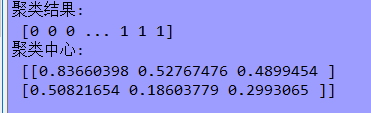
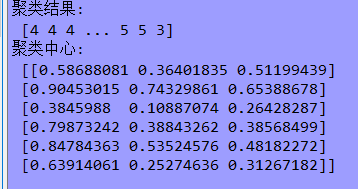
     print('聚类结果:\n', result)

     print('聚类中心:\n', kmeans.cluster_centers_)

     plt.figure(figsize=(15, 8), facecolor='w')

     plt.subplot(211)

     plt.axis('off')

     plt.title(u'原始图片', fontsize=18)

     plt.imshow(image)

     # plt.savefig('原始图片.png')

     plt.subplot(212)

     vq_image = restore_image(kmeans.cluster_centers_, result, image.shape)

     plt.axis('off')

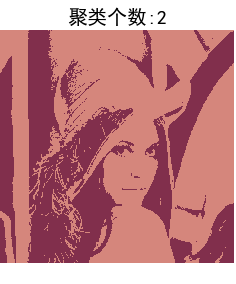
     plt.title(u'聚类个数:%d' % num_vq, fontsize=20)

     plt.imshow(vq_image)

     # plt.savefig('矢量化图片.png')

     plt.tight_layout(1.2)

     plt.show()
结果:

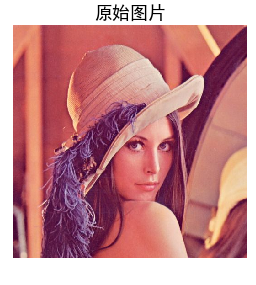
1.当k=2时:
2.当k=6时:
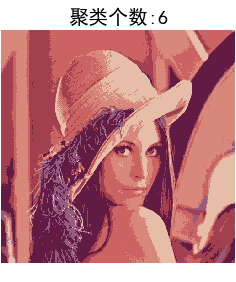
3.当k=30时:

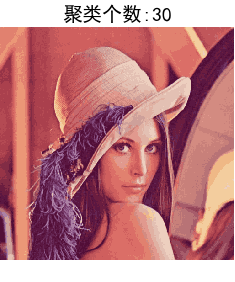
总结:当聚类个数较少时,算法运算速度快但效果较差,当聚类个数较多时,运算速度慢效果好但容易过拟合,所以恰当的k值对于聚类来说影响极其明显!!
Python图像识别(聚类)的更多相关文章
- 机器学习:Python实现聚类算法(三)之总结
考虑到学习知识的顺序及效率问题,所以后续的几种聚类方法不再详细讲解原理,也不再写python实现的源代码,只介绍下算法的基本思路,使大家对每种算法有个直观的印象,从而可以更好的理解函数中参数的意义及作 ...
- 听说图像识别很难,大神十行代码进行Python图像识别
随着深度学习算法的兴起和普及,人工智能领域取得了令人瞩目的进步,特别是在计算机视觉领域.21世纪的第二个十年迅速采用卷积神经网络,发明了最先进的算法,大量训练数据的可用性以及高性能和高性价比计算的 ...
- python 图像识别
这是一个最简单的图像识别,将图片加载后直接利用Python的一个识别引擎进行识别 将图片中的数字通过 pytesseract.image_to_string(image)识别后将结果存入到本地的txt ...
- Python机器学习--聚类
K-means聚类算法 测试: # -*- coding: utf-8 -*- """ Created on Thu Aug 31 10:59:20 2017 @auth ...
- python图像识别--验证码
1.pip3 install pyocr 2.pip3 install pillow or easy_install Pillow 3.安装tesseract-ocr:http://jaist.dl. ...
- 机器学习:Python实现聚类算法(一)之K-Means
1.简介 K-means算法是最为经典的基于划分的聚类方法,是十大经典数据挖掘算法之一.K-means算法的基本思想是:以空间中k个点为中心进行聚类,对最靠近他们的对象归类.通过迭代的方法,逐次更新各 ...
- 机器学习:Python实现聚类算法(一)之AP算法
1.算法简介 AP(Affinity Propagation)通常被翻译为近邻传播算法或者亲和力传播算法,是在2007年的Science杂志上提出的一种新的聚类算法.AP算法的基本思想是将全部数据点都 ...
- Python实现聚类算法AP
1.算法简介 AP(Affinity Propagation)通常被翻译为近邻传播算法或者亲和力传播算法,是在2007年的Science杂志上提出的一种新的聚类算法.AP算法的基本思想是将全部数据点都 ...
- 机器学习:Python实现聚类算法(二)之AP算法
1.算法简介 AP(Affinity Propagation)通常被翻译为近邻传播算法或者亲和力传播算法,是在2007年的Science杂志上提出的一种新的聚类算法.AP算法的基本思想是将全部数据点都 ...
随机推荐
- Is it possible to display icons in a PopupMenu?
I really like the new PopupMenu we got in 3.0, but I just can't display any icons next to the menu i ...
- 复刻smartbits的国产网络测试工具minismb功能特点-如何加载、发送PCAP数据包
复刻smartbits的网络性能测试工具minismb,是一款专门用于测试智能路由器,网络交换机的性能和稳定性的软硬件相结合的工具.可以通过此以太网测试工具测试任何ip网络设备的端口吞吐率,带宽,并发 ...
- 深度学习在CTR预估中的应用
欢迎大家前往腾讯云+社区,获取更多腾讯海量技术实践干货哦~ 本文由鹅厂优文发表于云+社区专栏 一.前言 二.深度学习模型 1. Factorization-machine(FM) FM = LR+ e ...
- es6学习笔记10--箭头函数
基本用法 ES6允许使用“箭头”(=>)定义函数. var f = v => v; 上面的箭头函数等同于: var f = function(v) { return v; }; 如果箭头函 ...
- Spring基础(5): 构造函数注入无法处理循环依赖
public class Person{ public Leader leader; public Person(Leader l){ this.leader= l; } } public class ...
- EPPlus批量插入图片到Excel
#region 测试EPPlus插入图片 public static void Createsheel2() { WebClien ...
- easyui datagrid 动态改变行背景色
/*根据查询条件查询调度单列表*/ function InitGrid(queryData) { $("#dg").datagrid({ loadMsg: "数据加载中, ...
- extJs常用的四种Ajax异步提交
/** * 第一种Ajax提交方式 * 这种方式需要直接使用ext Ajax方法进行提交 * 使用这种方式,需要将待传递的参数进行封装 * @return */function saveUser_aj ...
- 乐字节-Java8新特性之Optional
上一篇小乐带大家了解了Java新特性之Stream,接下来将会继续述说Java新特性之Optional Optional<T>类(java.util.Optional)是一个容器类,代表一 ...
- 方格填数-2015决赛C语言A组第一题
在2行5列的格子中填入1到10的数字. 要求: 相邻的格子中的数,右边的大于左边的,下边的大于上边的. 如[图1.png]所示的2种,就是合格的填法.请你计算一共有多少种可能的方案.请提交该整数,不要 ...