
CentOS配置防火墙操作实例
CentOS 配置防火墙操作实例(启、停、开、闭端口):
注:防火墙的基本操作命令:
查询防火墙状态:
[root@localhost ~]# service iptables status<回车>
停止防火墙:
[root@localhost ~]# service iptables stop <回车>
启动防火墙:
[root@localhost ~]# service iptables start <回车>
重启防火墙:
[root@localhost ~]# service iptables restart <回车>
永久关闭防火墙:
[root@localhost ~]# chkconfig iptables off<回车>
永久关闭后启用:
[root@localhost ~]# chkconfig iptables on<回车>
1、查看防火墙状态
[root@localhost ~]# service iptables status<回车>
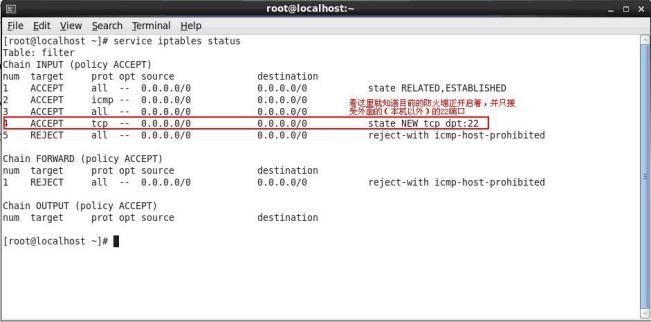
2、编辑/etc/sysconfig/iptables文件。我们实例中要打开8080端口和9990端口
用编辑器打开/etc/sysconfig/iptables
3、依葫芦画瓢,我们添加8080端口和9990端口
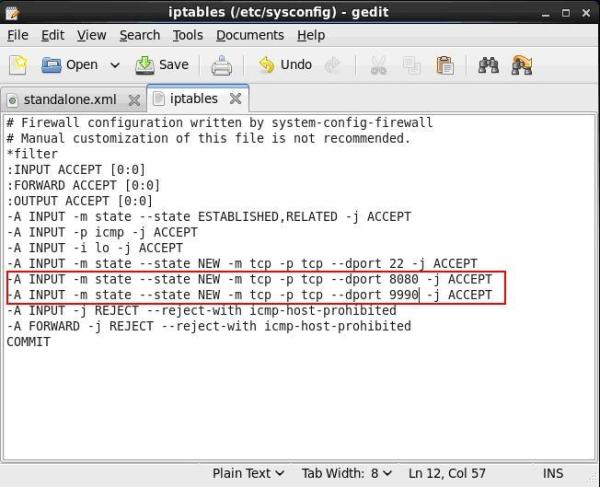
4、保存/etc/sysconfig/iptables文件,并在终端执行
[root@localhost ~]# service iptables restart <回车>
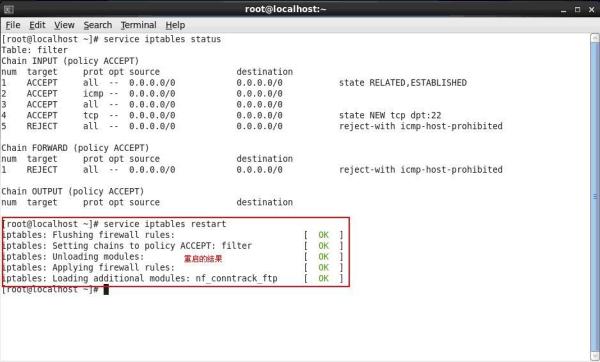
5、从新查看防火墙状态
[root@localhost ~]# service iptables status<回车>
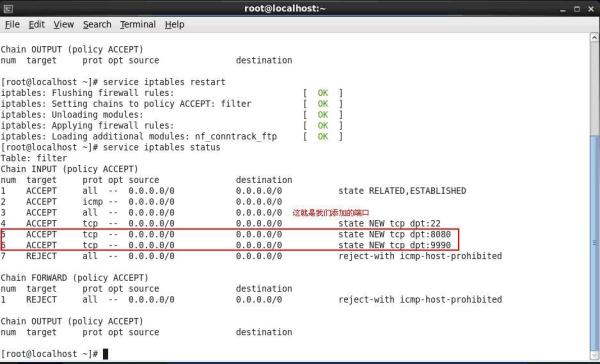
6、这时候,服务器的8080和9990端口就可以对外提供服务了。
7、其他端口的开放模式就是类似如此开放模式。
原文链接:http://my.oschina.net/u/593517/blog/297941
CentOS配置防火墙操作实例的更多相关文章
- CentOS 配置防火墙操作实例(启、停、开、闭端口):
CentOS 配置防火墙操作实例(启.停.开.闭端口): 注:防火墙的基本操作命令: 查询防火墙状态: [root@localhost ~]# service iptables status< ...
- CentOS 配置防火墙操作实例(启、停、开、闭端口)CentOS Linux-FTP/对外开放端口(接口)TomCat相关
链接地址:http://blog.csdn.net/jemlee2002/article/details/7042991 CentOS 配置防火墙操作实例(启.停.开.闭端口): 注:防火墙的基本操作 ...
- CentOS 配置防火墙操作实例(启、停、开、闭port)
CentOS 配置防火墙操作实例(启.停.开.闭port): 注:防火墙的基本操作命令: 查询防火墙状态: [root@localhost ~]# service iptables status& ...
- CentOS 配置防火墙操作实例(启、停、开、闭端口)
防火墙的基本操作命令 查询防火墙状态:[root@localhost ~]# service iptables status<回车> 停止防火墙:[root@localhost ~]# ...
- CentOS 配置防火墙操作实例
注:防火墙的基本操作命令: 查询防火墙状态: [root@localhost ~]# service iptables status<回车> 停止防火墙: [root@localh ...
- centos开启nginx服务成功,却无法访问。没有开启80端口。centos配置防火墙 开启80端口
Linux配置防火墙 开启80端口 编辑配置文件/etc/sysconfig/iptables [root@weixinht ~]# vim /etc/sysconfig/iptables 1 # F ...
- CentOS防火墙操作实例(启动、停止、开、闭端口)
注:防火墙的基本操作命令: 查询防火墙状态: [root@localhost ~]# service iptables status<回车> 停止防火墙: [root@localh ...
- CentOS配置防火墙
昨天帮朋友配置CentOSserver,一開始为了方便測试直接把防火墙关了.之后便须要配置好防火墙,网上找了几个防火墙规则都有错误,后来发现是博主发帖不认真,有太多字符错误,以下是我整理的亲測可用的防 ...
- CentOS firewalld 防火墙操作
Centos 7 开启端口CentOS 7 默认没有使用iptables,所以通过编辑iptables的配置文件来开启80端口是不可以的 CentOS 7 采用了 firewalld 防火墙 如要查询 ...
随机推荐
- SQLServer之通过视图修改数据
通过视图增删改数据注意事项 需要对目标表的 UPDATE.INSERT 或 DELETE 权限(取决于执行的操作). 如果视图引用多个基表,则不能删除行. 如果视图引用多个基表,只能更新属于单个基表的 ...
- pycharm设置自动换行的方法
只对当前文件有效的操作:菜单栏->View -> Active Editor -> Use Soft Wraps: 如果想对所有文件都有效,就要在setting里面进行操作:File ...
- Windows10系统无法更新
方法一: 1.先检查一下windows update服务是否开启,并禁用杀毒软件: 2.如果此服务已经启动,先尝试更换一下网络环境重新更新: 3.如果更换网络环境后依然无法更新,就删除windows ...
- Netty初体验
package netty_starter; import io.netty.bootstrap.ServerBootstrap; import io.netty.channel.ChannelFut ...
- June. 22 2018, Week 25th. Friday
Where words fail, music speaks. 言语无法表达时,音乐就会响起. From Hans Christian Andersen. Where words fail, musi ...
- 使用time+dd测试硬盘读写速度
命令:time dd if=/dev/zero bs=1M count=2048 of=direct_2G 此命令为在当前目录下新建一个2G的文件 Demo如下: 写速度: time dd if= ...
- python3 pickle模块
import pickle '''将对象转化为硬盘能识别的bytes的过程被称为序列号将bytes转化为对象的过程被称为反序列化'''lst = ["苹果", "橘子&q ...
- Mac系统下Mysql存储数据报错 ER_TRUNCATED_WRONG_VALUE_FOR_FIELD: Incorrect string value
比如如下mysql操作插入数据: const mysql = require('mysql'); /* createConnection方法创建一个表示与Mysql数据库服务器之间连接的 Connec ...
- vue diff 算法学习
function updateChildren (parentElm, oldCh, newCh, insertedVnodeQueue, removeOnly) { let oldStartIdx ...
- [第二届构建之法论坛] 预培训文档(C++版)
本博客是第二届构建之法论坛暨软件工程培训活动预培训文档中[适用于结对编程部分的C++版本],需要实验者有一部分C++基础. 目录 Part0.背景 Part1.配置环境 Part2.克隆项目 Part ...