
CentOS7.3 ARM虚拟机扩容系统磁盘
由于扩容磁盘的操作非同小可,一旦哪一步出现问题,就会导致分区损坏,数据丢失等一系列严重的问题,因此建议:在进行虚拟机分区扩容之前,一定要备份重要数据文件,并且先在测试机上验证以下步骤,再应用于您的生产机器。如果虚拟机的磁盘不够用了,建议附加新磁盘进行使用,不到万不得已一般不要扩容磁盘分区。
操作系统环境:
[root@hlmc73t ~]# cat /etc/redhat-release
CentOS Linux release 7.3.1611 (Core)
1.关闭虚拟机
备注:扩容磁盘需要关闭虚拟机,否则无法调整磁盘的大小

2.调整磁盘的大小(示例中将原来的30GB调整为了150GB)
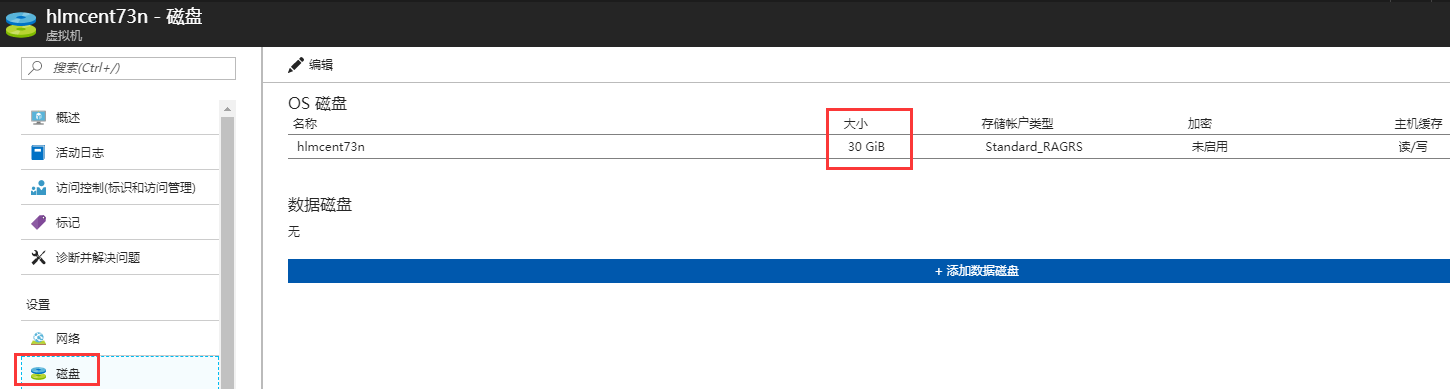
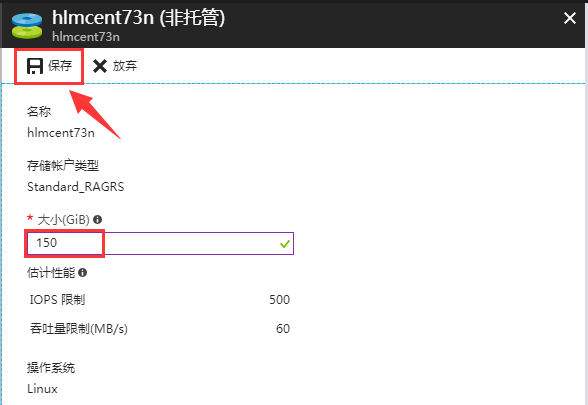
3.等待跟新完成,启动虚拟机,查看到整块磁盘已经变为150G,但/dev/sda2分区还是30G

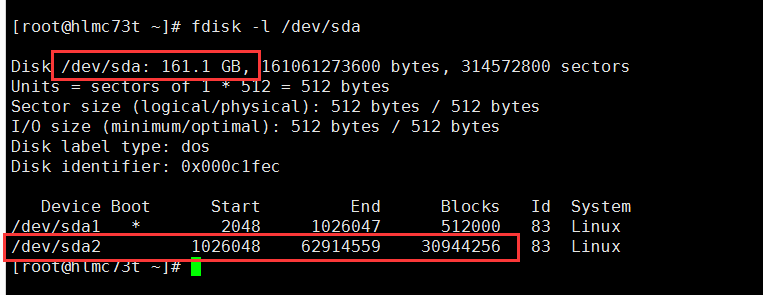
4.使用命令:fdisk /dev/sda,重新划分分区/dev/sda2
[root@hlmc73t ~]# fdisk -l /dev/sda

Disk /dev/sda: 161.1 GB,  bytes,  sectors

Units = sectors of  *  =  bytes

Sector size (logical/physical):  bytes /  bytes

I/O size (minimum/optimal):  bytes /  bytes

Disk label type: dos

Disk identifier: 0x000c1fec

   Device Boot      Start         End      Blocks   Id  System

/dev/sda1   *                        Linux

/dev/sda2                      Linux

[root@hlmc73t ~]# clear

[root@hlmc73t ~]# fdisk /dev/sda

Welcome to fdisk (util-linux 2.23.).

Changes will remain in memory only, until you decide to write them.

Be careful before using the write command.

Command (m for help): p      ##查看目前的分区信息

Disk /dev/sda: 161.1 GB,  bytes,  sectors

Units = sectors of  *  =  bytes

Sector size (logical/physical):  bytes /  bytes

I/O size (minimum/optimal):  bytes /  bytes

Disk label type: dos

Disk identifier: 0x000c1fec

   Device Boot      Start         End      Blocks   Id  System

/dev/sda1   *                        Linux

/dev/sda2         1026048             Linux

Command (m for help): d      ##将原来的/dev/sda2分区删除

Partition number (,, default ):

Partition  is deleted

Command (m for help): p

Disk /dev/sda: 161.1 GB,  bytes,  sectors

Units = sectors of  *  =  bytes

Sector size (logical/physical):  bytes /  bytes

I/O size (minimum/optimal):  bytes /  bytes

Disk label type: dos

Disk identifier: 0x000c1fec

   Device Boot      Start         End      Blocks   Id  System

/dev/sda1   *                        Linux

Command (m for help): n      ##重新创建分区

Partition type:

   p   primary ( primary,  extended,  free)

   e   extended

Select (default p): p

Partition number (-, default ):

First sector (-, default ):       ##该值需要与上述标黄的start值相同

Using default value

Last sector, +sectors or +size{K,M,G} (-, default ):

Using default value

Partition  of type Linux and of size 149.5 GiB is set

Command (m for help): p

Disk /dev/sda: 161.1 GB,  bytes,  sectors

Units = sectors of  *  =  bytes

Sector size (logical/physical):  bytes /  bytes

I/O size (minimum/optimal):  bytes /  bytes

Disk label type: dos

Disk identifier: 0x000c1fec

   Device Boot      Start         End      Blocks   Id  System

/dev/sda1   *                        Linux

/dev/sda2                    Linux

Command (m for help): w      ##如果确认信息无误,运行该参数,保存退出

The partition table has been altered!

Calling ioctl() to re-read partition table.

WARNING: Re-reading the partition table failed with error : Device or resource busy.

The kernel still uses the old table. The new table will be used at

the next reboot or after you run partprobe() or kpartx()

Syncing disks.
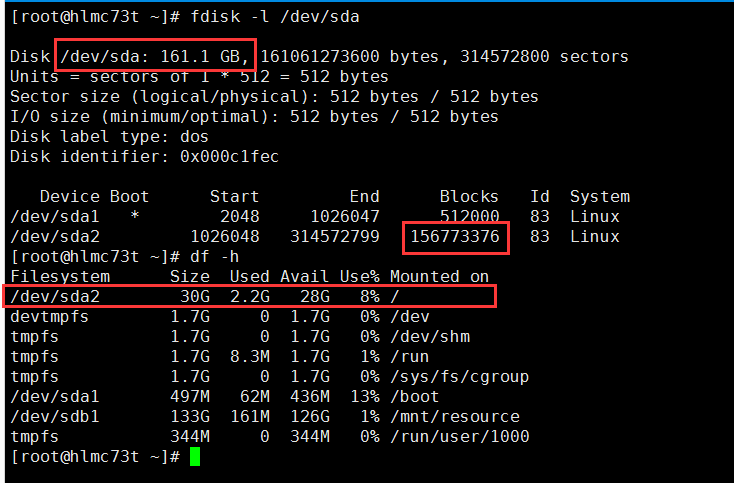
5.使用fdisk –l查看/dev/sda2已经变为了150G,但使用df –h查看/dev/sda2还是30G
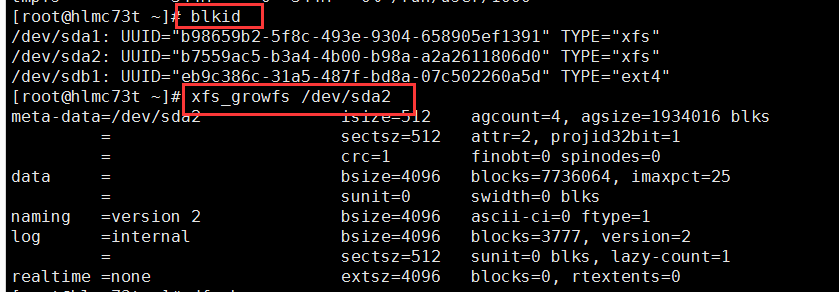
6.此时拉伸文件系统的话,输出信息类似如下,拉伸没有生效。需要重启电脑以便重读分区表后,才能成功拉伸文件系统。备注:可以使用“blkid”命令查看分区的文件系统
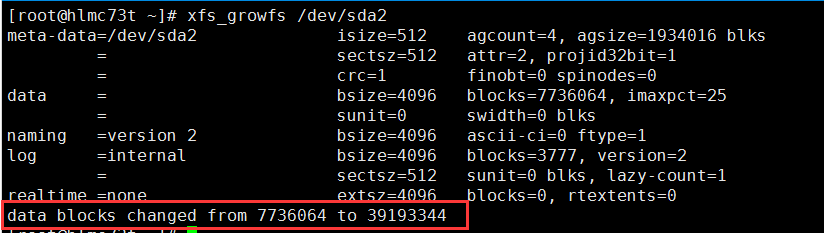
7.重启电脑后,重新使用命令:xfs_growfs,拉伸文件系统,可以看到成功拉伸文件系统
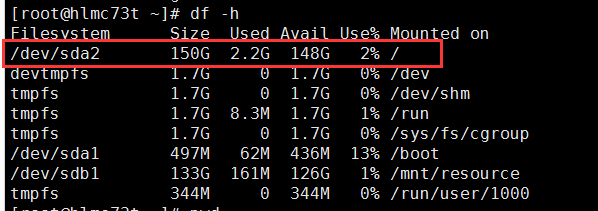
8.重新查看,发现/dev/sda2成功拉伸为了150G,并且之前的数据文件仍然存在并可正常使用。
CentOS7.3 ARM虚拟机扩容系统磁盘的更多相关文章
- CentOS6.9 ARM虚拟机扩容系统磁盘
由于扩容磁盘的操作非同小可,一旦哪一步出现问题,就会导致分区损坏,数据丢失等一系列严重的问题,因此建议:在进行虚拟机分区扩容之前,一定要备份重要数据文件,并且先在测试机上验证以下步骤,再应用于您的生产 ...
- AzureARM 使用 powershell 扩容系统磁盘大小
azure中的虚拟机,windows磁盘大小为127G,linux磁盘大小为30G,在很多时候部署应用程序时直接部署到系统磁盘内导致磁盘后期容量不够需要扩容,在执行分区扩容前我们需要先通过Potal或 ...
- CentOS7.3托管磁盘虚拟机扩容数据磁盘
随着托管磁盘的上线,虚拟机支持的单块磁盘容量从1TB到达了4TB,客户对单块磁盘容量的需求量也会变的很大. 操作之前需要重点查看: 由于扩容磁盘的操作非同小可,一旦哪一步出现问题,就会导致分区损坏,数 ...
- centos7下使用LVM给系统硬盘扩容超详细
简单介绍: LVM是逻辑盘卷管理(Logical Volume Manager)的简称,它是Linux环境下对磁盘分区进行管理的一种机制,LVM是建立在硬盘和分区之上的一个逻辑层,来提高磁盘分区管理的 ...
- 【转载】CentOS7下使用LVM给系统硬盘扩容
原文地址:https://www.cnblogs.com/ding2016/p/9680690.html 简单介绍: LVM是逻辑盘卷管理(Logical Volume Manager)的简称,它是L ...
- VMware下对虚拟机Ubuntu14系统所在分区sda1进行磁盘扩容
VMware下对虚拟机Ubuntu14系统所在分区sda1进行磁盘扩容 一般来说,在对虚拟机里的Ubuntu下的磁盘进行扩容时,都是添加新的分区,而并不是对其系统所在分区进行扩容,如在此链接中http ...
- VMware虚拟机扩展Ubuntu系统磁盘空间
1 首先给虚拟机扩容 虚拟机->设置->硬盘->实用程序->扩展磁盘容量 2 启动Ubuntu系统 2.1 打开终端安装gparted,sudo apt-get install ...
- Linux系统扩容根目录磁盘空间
作者:非法小恋 一.使用背景 Linux根目录磁盘空间不够用了,当修改了虚拟机模版增加磁盘大小或者插入了一块新硬盘,但是发现系统里的大小还是没改变. 产生的原因是没有给磁盘格式化,没有增加分区. 二. ...
- Java 创建 ARM 虚拟机磁盘类型选择的问题
问题描述 在Azure 门户创建 ARM 虚拟机时,我们直接可以选择虚拟机的磁盘类型,但是在 Azure Management Libraries for Java 的 API 中我们无法找到直接设置 ...
随机推荐
- label按钮和文字对齐
label按钮和文字对齐 做表单的时候,经常遇到:复选框和文字对不齐的情况 ========================== 下面方法可以对齐 <!--label [[--> < ...
- 第八章:Python基础の面向对象(二)
本課主題 面向对象的多态 面向对象的成员 成员修饰符 特殊成员 面向对象其他应用 异常处理 设计模式与单例模式 面向对象的多态 指定参数类型只是多态的一种表现 另外一种是允许自己类型和自己的子类型(典 ...
- Appium python
1.运行报错:FAILED_ALREADY_EXISTS: Attempt to re-install io.appium.android.ime without first uninstalling ...
- spark 1.6 完全分布式平台搭建
软件环境: scala-2.11.4.tgz spark-1.6.2-bin-hadoop2.6.tgz 操作步骤: 一. 安装scala 1. 解压scala (tar –zxvf filena ...
- [转载]MySQL5.6 PERFORMANCE_SCHEMA 说明
背景: MySQL 5.5开始新增一个数据库:PERFORMANCE_SCHEMA,主要用于收集数据库服务器性能参数.并且库里表的存储引擎均为PERFORMANCE_SCHEMA,而用户是不能创建存储 ...
- 【读书笔记】【深入理解ES6】#13-用模块封装代码
什么是模块 模块是自动运行在严格模式下并且没有办法退出运行的 JavaScript 代码. 在模块顶部创建的变量不会自动被添加到全局变量作用域,这个变量仅在模块的顶级作用域中存在,而且模块必须导出一些 ...
- js 实现复制剪切
原生js实现复制 <!DOCTYPE html> <html> <head> <meta charset="utf-8"> < ...
- C#学习笔记-策略模式
题目:做一个商场收银的小程序,可能会出现的情况包括:正常收费,九折优惠,七折优惠,满300减50等各种不同随时会变化的优惠活动. 界面如下: 分析: 首先我们对于收钱写一个父类CashSuper.这个 ...
- Jquery_基础(三) ajax与json
什么是ajax? AJAX = Asynchronous JavaScript and XML(异步的 JavaScript 和 XML). AJAX 不是新的编程语言,而是一种使用现有标准的新方法. ...
- POJ 1163 The Triangle【dp+杨辉三角加强版(递归)】
The Triangle Time Limit: 1000MS Memory Limit: 10000K Total Submissions: 49955 Accepted: 30177 De ...