
MiniProfiler使用点滴记录-2017年6月23日11:08:23
1.看似针对同样一段查询表ef达式,重复执行却没有被记录下来。其实这是正常情况,因为ef并没有重复去执行 相同sql查询。
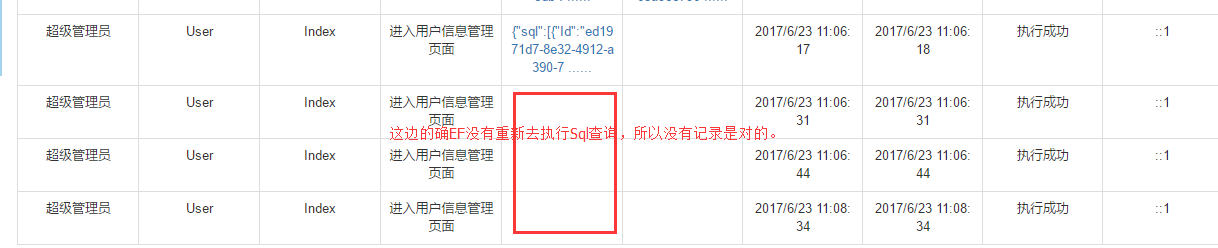
2.MiniProfiler结合MVC过滤器进行 拦截记录Sql,示例代码:
using Mobile360.Core;

using Mobile360.Core.Interfaces;

using Mobile360.Core.Models;

using Mobile360.Web.Common;

using Newtonsoft.Json.Linq;

using StackExchange.Profiling;

using StackExchange.Profiling.Storage;

using System;

using System.Collections.Generic;

using System.Collections.Specialized;

using System.Configuration;

using System.Linq;

using System.Text;

using System.Web;

using System.Web.Helpers;

using System.Web.Mvc;

namespace Mobile360.Web

{

    [AttributeUsage(AttributeTargets.Method, AllowMultiple = true, Inherited = false)]

    public class OperationHandlerAttribute : FilterAttribute,IActionFilter, IExceptionFilter

    {

        private IRepository repo;

        /// <summary>

        /// 模块描述

        /// </summary>

        public string ModuleName { get; set; }

        /// <summary>

        /// 方法名称

        /// </summary>

        public string ActionName { get; set; }

        /// <summary>

        /// 方法描述

        /// </summary>

        public string ActionDescription { get; set; }

        /// <summary>

        /// 控制器名称

        /// </summary>

        public string ControllerName { get; set; }

        /// <summary>

        /// 方法参数

        /// </summary>

        public string ActionParameters { get; set; }

        /// <summary>

        /// 访问时间

        /// </summary>

        public DateTime AccessDate { get; set; }

        /// <summary>

        /// 操作备注

        /// </summary>

        public string OperationRemark { get; set; }

        /// <summary>

        /// 是否记录入库

        /// </summary>

        public bool IsLog { get; set; }

        /// <summary>

        /// 操作人id

        /// </summary>

        public int OperatorId { get; set; }

        /// <summary>

        /// 操作人名

        /// </summary>

        public string OperatorName { get; set; }

        public OperationHandlerAttribute()

        {

            this.AccessDate = DateTime.Now;

            this.IsLog = true;

            this.repo = DependencyResolver.Current.GetService<IRepository>();

        }

        /// <summary>

        /// 操作日志记录

        /// </summary>

        /// <param name="option">操作动作描述</param>

        /// <param name="remark">其他备注</param>

        public OperationHandlerAttribute(string actionDescription , string remark = "")

        {

            this.AccessDate = DateTime.Now;

            this.IsLog = true;

            //this.ModuleName = moduleName;

            this.OperationRemark = remark;

            this.ActionDescription = actionDescription;

            this.repo = DependencyResolver.Current.GetService<IRepository>();

        }

        void IActionFilter.OnActionExecuting(ActionExecutingContext filterContext)

        {

            if (this.IsLog)

            {

                MiniProfiler.Start();

                this.OperatorName =  filterContext.HttpContext.User.Identity.Name;

                this.ActionName = filterContext.ActionDescriptor.ActionName;

                this.ControllerName = filterContext.ActionDescriptor.ControllerDescriptor.ControllerName;

                IDictionary<string, object> dic = filterContext.ActionParameters;

                var parameters = new System.Text.StringBuilder();

                foreach (var item in dic)

                {

                    parameters.Append(item.Key + "=" +  Json.Encode(item.Value) + "|");

                }

                this.ActionParameters = parameters.ToString();

            }

        }

        void IActionFilter.OnActionExecuted(ActionExecutedContext context)

        {

            if (this.IsLog)

            {

                MiniProfiler.Stop();

                string efSqlStr2Json = MiniProfiler.Current.Root.CustomTimingsJson;

                AuditLog log = new AuditLog();

                log.AuditAccount = string.IsNullOrEmpty(this.OperatorName)?"(未登录用户)": this.OperatorName;

                log.Action = this.ActionName;

                log.ActionDescription = this.ActionDescription;

                log.Controller = this.ControllerName;

                log.Parameters = this.ActionParameters;

                log.StartTime = this.AccessDate;

                log.SqlQuery = efSqlStr2Json;

                log.EndTime = DateTime.Now;

                log.Result = true;

                log.IP = IPHelper.GetRealIP();

                repo.Insert<AuditLog>(log);

                repo.SaveChanges();

            }

        }

        #region IExceptionFilter 成员

        void IExceptionFilter.OnException(ExceptionContext context)

        {

            if (ConfigurationManager.AppSettings["IsDev"] == "true")

            {

                throw new Exception(context.Exception.Message, context.Exception);

            }

            SystemLog slog = new SystemLog();

            slog.Action = this.ActionName;

            slog.Level = (int)SystemLogType.ERROR;

            slog.LoginAccount = this.OperatorName;

            slog.Message = BuildExceptionInfo(context);

            slog.OccurTime = DateTime.Now;

            repo.Insert<SystemLog>(slog);

            repo.SaveChanges();

            JObject jsonResult = new JObject(); //返回的json数据

            jsonResult.Add(new JProperty("Code", -));

            jsonResult.Add(new JProperty("Msg", "系统发生异常,请查看内部日志"));

            ContentResult cr = new ContentResult();

            cr.Content = jsonResult.ToString();

            cr.ContentType = "application/json";

            context.Result = cr;

            context.ExceptionHandled = true;

        }

        private string BuildExceptionInfo(ExceptionContext context)

        {

            var sb = new StringBuilder();

            var req = context.HttpContext.Request;

            sb.AppendLine(String.Format("处理对“{0}”的“{1}”请求时发生了异常", req.RawUrl, req.HttpMethod));

            sb.AppendLine("以下是参数的信息:");

            this.AppendRequestLine(sb, req.QueryString);

            this.AppendRequestLine(sb, req.Form);

            sb.AppendLine("以下是异常的信息:");

            sb.AppendLine(context.Exception.ToString());

            //sb.AppendLine(context.Exception.StackTrace.ToString());

            return sb.ToString();

        }

        private void AppendRequestLine(StringBuilder sb, NameValueCollection coll)

        {

            for (int i = ; i < coll.Count; i++)

            {

                sb.AppendFormat("{0}: {1}", coll.Keys[i], coll[i]);

                sb.AppendLine();

            }

        }

        #endregion

    }

}
3.以上的miniprofiler并不能 拦截到 sql语句查询,需要使用 minprofiler 封装的ado.net对象。
 /// <summary>

        /// 执行自定义SQL(创建、更新、删除操作)

        /// </summary>

        /// <typeparam name="TEntity"></typeparam>

        /// <param name="commandText"></param>

        /// <param name="parameters"></param>

        /// <returns></returns>

        public async Task<int> ExecuteSqlCommandAsync(string commandText, params object[] parameters)

        {

            var connection1 = this.Database.Connection;//使用EF的sql连接对象。统一管理。

            if (connection1 != null)

            {

                DbCommand command = new SqlCommand();

                ProfiledDbCommand prcommand = new ProfiledDbCommand(command, connection1, MiniProfiler.Current);

                prcommand.CommandType = CommandType.Text;

                prcommand.CommandText = commandText;

                prcommand.Parameters.AddRange(parameters);

                prcommand.Connection = connection1;

                if (connection1.State == ConnectionState.Closed)

                    connection1.Open();

                return await prcommand.ExecuteNonQueryAsync();

            }

            return ;

        }
ProfiledDbCommand,
ProfiledDbConnection等对象都是MiniProfiler的对象。这样才能抓到 Sql语句。

4.由于miniprofiler是用来性能调优的,用来做审计日志记录(包括哪个用户最终生成的sql查询)看似并不合适,非常耗性能。
所以,我们并没有准备去使用它来获取Sql语句。

运用在
Application_BeginRequest和
Application_EndRequest
期间用EF6.0版本以上才有的 拦截器接口
DbCommandInterceptor
拦截的所有sql语句作为一次请求的sql查询语句 来作为尝试,不知道这样有啥劣势不? 希望有尝试过的 前辈 指点。
MiniProfiler使用点滴记录-2017年6月23日11:08:23的更多相关文章
- 读C#开发实战1200例子记录-2017年8月14日11:20:38获取汉字编码值
try { char chr = textBox1.Text[0]; byte[] gb2312_bt = Encoding.GetEncoding("gb2312").GetBy ...
- 读C#开发实战1200例子记录-2017年8月14日10:03:55
C# 语言基础应用,注释 "///"标记不仅仅可以为代码段添加说明,它还有一项更重要的工作,就是用于生成自动文档.自动文档一般用于描述项目,是项目更加清晰直观.在VisualStu ...
- 猖獗的假新闻:2017年1月1日起iOS的APP必须使用HTTPS
一.假新闻如此猖獗 刚才一位老同事 打电话问:我们公司还是用的HTTP,马上就到2017年了,提交AppStore会被拒绝,怎么办? 公司里已经有很多人问过这个问题,回答一下: HTTP还是可以正常提 ...
- [转载]Ubuntu17.04(Zesty Zapus)路线图发布:2017年4月13日发布
Canonical今天公布了Ubuntu 17.04(Zesty Zapus)操作系统的发布路线图,该版本于今年10月24日上线启动,toolchain已经上传且首个daily ISO镜像已经生成.面 ...
- 2017年1月5日 星期四 --出埃及记 Exodus 21:31
2017年1月5日 星期四 --出埃及记 Exodus 21:31 This law also applies if the bull gores a son or daughter.牛无论触了人的儿 ...
- 2017年1月4日 星期三 --出埃及记 Exodus 21:30
2017年1月4日 星期三 --出埃及记 Exodus 21:30 However, if payment is demanded of him, he may redeem his life by ...
- 2017年1月3日 星期二 --出埃及记 Exodus 21:29
2017年1月3日 星期二 --出埃及记 Exodus 21:29 If, however, the bull has had the habit of goring and the owner ha ...
- 2017年1月2日 星期一 --出埃及记 Exodus 21:28
2017年1月2日 星期一 --出埃及记 Exodus 21:28 "If a bull gores a man or a woman to death, the bull must be ...
- 2017年1月1日 星期日 --出埃及记 Exodus 21:27
2017年1月1日 星期日 --出埃及记 Exodus 21:27 And if he knocks out the tooth of a manservant or maidservant, he ...
随机推荐
- 全球移动互联网大会gmic 2017为什么值得参加?
长城会CEO郝义认为,"科学产业化将会推动科学复兴,"而本次GMIC 北京 2017也将首次引入了高规格科学家闭门峰会,专门设置G-Summit全球科学创新峰会,以"科学 ...
- 【跑会指南】2017年3-5月IT技术会议大合集
2016年各类大会让人应接不暇,技术圈儿最不缺的就是各种大会小会,有的纯干货,有的纯广告.作为一名技术开发者,参加了几场大会,你是不是也开始思忖:究竟哪些会议才值得参加?下面活动家为你推荐几场2017 ...
- UI—视图的生命周期
- Python—课时ONE
说实话第一次接触Python还是在我刚上班的时候,听说很多人这个开发语言很吊,应用的领域很多.but这些东西还不能够吸引我,真正的原因是因为这个开发语言很是简单,比较适合我这种2B学的.但是越往后越觉 ...
- Another kind of Fibonacce(矩阵快速幂,HDU3306)
Another kind of Fibonacci Time Limit: 3000/1000 MS (Java/Others) Memory Limit: 65536/65536 K (Jav ...
- Day4-软件目录开发规范
层次清晰的目录结构:1. 可读性高: 不熟悉这个项目的代码的人,一眼就能看懂目录结构,知道程序启动脚本是哪个,测试目录在哪儿,配置文件在哪儿等等.从而非常快速的了解这个项目.2. 可维护性高: 定义好 ...
- 贴片晶振跟随WIFI渗透到我们的生活之中
在用WIFI上网的时候很多时候会遇到上网速度不是慢就是卡,甚至是连接不上更气人的就是有时候会识别不了.我最常遇到的就是连接不上去,玩着玩着就玩不了了.起初我不知道这是什么原因,但是从事晶振行业之后我慢 ...
- 简易数据加密传输电路(VHDL)(原创)
LIBRARY IEEE; USE IEEE.STD_LOGIC_1164.ALL; USE IEEE.std_logic_unsigned.ALL; ENTITY KEKE IS --定义实体wsj ...
- struts2.1.6教程五、拦截器
在前面我们已经初步使用过拦截器,下面继续细细探讨. 1.概述strust2中的拦截器 拦截器是Struts2框架的核心,它主要完成解析请求参数.将请求参数赋值给Action属性.执行数据校验.文件上传 ...
- 开涛spring3(6.1) - AOP 之 6.1 AOP基础
6.1.1 AOP是什么 考虑这样一个问题:需要对系统中的某些业务做日志记录,比如支付系统中的支付业务需要记录支付相关日志,对于支付系统可能相当复杂,比如可能有自己的支付系统,也可能引入第三方支付平 ...