
WebServices:WSDL的结构分析
WSDL(Web Services Description Language,Web服务描述语言)是为描述Web Services发布的XML格式。W3C组织没有批准1.1版的WSDL,但是2.0版本已经在製訂中,2.0版将被作为推荐标准(recommendation)(一种官方标准),并将被W3C组织批准为正式标准。WSDL描述Web服务的公共接口。这是一个基于XML的关于如何与Web服务通讯和使用的服务描述;也就是描述与目录中列出的Web服务进行交互时需要绑定的协议和信息格式。通常采用抽象语言描述该服务支持的操作和信息,使用的时候再将实际的网络协议和信息格式绑定给该服务。
WSDL 文档仅仅是一个简单的 XML 文档。它包含一系列描述某个 web service 的定义。
WebMthod的定义:
1: [WebService(Namespace = "http://tempuri.org/")]
2: [WebServiceBinding(ConformsTo = WsiProfiles.BasicProfile1_1)]
3: [System.ComponentModel.ToolboxItem(false)]
4: public class WebService2 : System.Web.Services.WebService
5: {
6: [WebMethod]
7: public bool Add(TestClass testClass,int id)
8: {
9: return true;
10: }
11: }
12:
13: public class TestClass
14: {
15: public int a;
16: public string b;
17: public DateTime c;
18: }
19:
WSDL的结构:
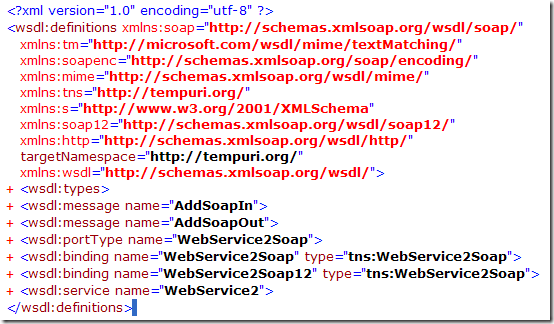
一个WSDL文档通常包含有以下元素,即types、message、portType、operation、binding、 service元素。这些元素嵌套在definitions元素中。
definitions是WSDL文档的根元素,definitions还声明各命名空间。
types,数据类型定义的容器,它使用某种类型系统(一般地使用XML Schema中的类型系统)。
1: <wsdl:types>
2: <s:schema elementFormDefault="qualified" targetNamespace="http://tempuri.org/">
3: <s:element name="Add">
4: <s:complexType>
5: <s:sequence>
6: <s:element minOccurs="0" maxOccurs="1" name="testClass" type="tns:TestClass" />
7: <s:element minOccurs="1" maxOccurs="1" name="id" type="s:int" />
8: </s:sequence>
9: </s:complexType>
10: </s:element>
11: <s:complexType name="TestClass">
12: <s:sequence>
13: <s:element minOccurs="1" maxOccurs="1" name="a" type="s:int" />
14: <s:element minOccurs="0" maxOccurs="1" name="b" type="s:string" />
15: <s:element minOccurs="1" maxOccurs="1" name="c" type="s:dateTime" />
16: </s:sequence>
17: </s:complexType>
18: <s:element name="AddResponse">
19: <s:complexType>
20: <s:sequence>
21: <s:element minOccurs="1" maxOccurs="1" name="AddResult" type="s:boolean" />
22: </s:sequence>
23: </s:complexType>
24: </s:element>
25: </s:schema>
26: </wsdl:types>
types描述WebMethod的名称(Add),传入参数(testClass——包括对TestClass的详细描述,id),响应信息(AddResponse)。
message描述通信消息的数据结构的抽象类型化定义,使用types的描述的类型来定义整个消息的数据结构。
1: <wsdl:message name="AddSoapIn">
2: <wsdl:part name="parameters" element="tns:Add" />
3: </wsdl:message>
4: <wsdl:message name="AddSoapOut">
5: <wsdl:part name="parameters" element="tns:AddResponse" />
6: </wsdl:message>
portType和operation描述服务和服务的方法。operation包括输入和输出(使用message的描述)。
1: <wsdl:portType name="WebService2Soap">
2: <wsdl:operation name="Add">
3: <wsdl:input message="tns:AddSoapIn" />
4: <wsdl:output message="tns:AddSoapOut" />
5: </wsdl:operation>
6: </wsdl:portType>
binding描述Web Services的通信协议。 <soap:binding/>描述使用SOAP协议,binding还描述Web Services的方法、输入、输出。
1: <wsdl:binding name="WebService2Soap" type="tns:WebService2Soap">
2: <soap:binding transport="http://schemas.xmlsoap.org/soap/http" />
3: <wsdl:operation name="Add">
4: <soap:operation soapAction="http://tempuri.org/Add" style="document" />
5: <wsdl:input>
6: <soap:body use="literal" />
7: </wsdl:input>
8: <wsdl:output>
9: <soap:body use="literal" />
10: </wsdl:output>
11: </wsdl:operation>
12: </wsdl:binding>
service描述Web Services访问点的集合。因为包括SOAP1.1和SOAP1.2的描述,所以一个方法有对应两描述。
1: <wsdl:service name="WebService2">
2: <wsdl:port name="WebService2Soap" binding="tns:WebService2Soap">
3: <soap:address location="http://localhost:1552/WebService2.asmx" />
4: </wsdl:port>
5: <wsdl:port name="WebService2Soap12" binding="tns:WebService2Soap12">
6: <soap12:address location="http://localhost:1552/WebService2.asmx" />
7: </wsdl:port>
8: </wsdl:service>
WebServices:WSDL的结构分析的更多相关文章
- wsdl文件结构分析
WSDL (Web Services Description Language,Web服务描述语言)是一种XML Application,他将Web服务描述定义为一组服务访问点,客户端可以通过这些服务 ...
- javaweb项目中嵌入webservice--axis2
由于最近项目中需要搭建webservice服务端,由于原项目是javaweb项目,所以需要整合.之前用cxf试了,启动老是报错,maven依赖冲突.后来索性换成axis2 百度了一圈,下面这个博客 h ...
- 利用SoapUI 测试web service的方法介绍
1. 简介 SoapUI是用java开发的测试web service的工具. 2. 安装 2.1. 下载地址 http://www.soapui.org/ 2.2. 安装 By downloading ...
- 用VisualC++建立SOAP客户端应用(一)
用VisualC++建立SOAP客户端应用(一) SoapSerializer对象用来构建一个向Web服务发送的SOAP消息.在与服务器连接前,SoapSerializer对象必须与SoapConne ...
- 【转】Delphi调用webservice总结
原文:http://www.cnblogs.com/zhangzhifeng/archive/2013/08/15/3259084.html Delphi调用C#写的webservice 用delph ...
- 用delphi的THTTPRIO控件调用了c#写的webservice。
用delphi的THTTPRIO控件调用了c#写的webservice. 下面是我调试时遇到的一些问题: 1,导入wsdl文件:file--new----other----wenservice---W ...
- Delphi调用webservice总结
Delphi调用webservice总结 Delphi调用C#写的webservice 用delphi的THTTPRIO控件调用了c#写的webservice. 下面是我调试时遇到的一些问题: ...
- WebService测试工具SoapUI
尊重原著作:本文转载自http://gqsunrise.iteye.com/blog/1958480 1. 简介 SoapUI是用java开发的测试web service的工具. 2. 安装 2.1. ...
- onvif实现
前言 负责开发了公司的onvif,一个人从0开始写的,花了两个月 !!!下面是我的总结. onvif介绍 ONVIF[Open Network Video Interface Forum](开放型网络 ...
随机推荐
- C#非常重要基础之多态
前几天看了一位同志的博客,写的是关于他自己去支付宝面试的经历.过程大体是这样的:问答的时候,前面部分,作者都应答如流,说起自己经验如何之丰富,最后面试官问了作者一个问题:请简述多态的概念和作用.结果这 ...
- FastCgi与PHP-fpm之间的关系
web server(比如说nginx)只是内容的分发者.比如,如果请求/index.html,那么web server会去文件系统中找到这个文件,发送给浏览器,这里分发的是静态数据.好了,如果现在请 ...
- 游戏编程系列[2]--游戏编程中RPC与OpLog协议的结合--序
在系列[1]中,我们展示了RPC调用协议的定义以及演示,通过方法定义以及协议约定,进行了协议约定以及调用过程的约定.然而,实际上在游戏中,调用过程之后,需要传输相对多的数据给服务端. 常用场景,客户端 ...
- Android之SQLite数据库篇
一.SQLite简介 Google为Andriod的较大的数据处理提供了SQLite,他在数据存储.管理.维护等各方面都相当出色,功能也非常的强大. 二.SQLite的特点 1.轻量级使用 SQLit ...
- 游戏服务器菜鸟之C#初探四游戏服务
经过多次折腾之后,在一次进行了一次重大的重构,去解决问题 主要重构如下 1.将原来的单一协议修改多协议进行,一些查询.认证的功能都采用HTTP进行,避免全部采用TCP链接资源的消耗: 2.原来单一的部 ...
- Java总结篇系列:Java泛型
一. 泛型概念的提出(为什么需要泛型)? 首先,我们看下下面这段简短的代码: 1 public class GenericTest { 2 3 public static void main(Stri ...
- 说说面向服务的体系架构SOA
序言 在.Net的世界中,一提及SOA,大家想到的应该是Web Service,WCF,还有人或许也会在.NET MVC中的Web API上做上标记,然后泛泛其谈! 的确,微软的这些技术也确实推动着面 ...
- 高仿QQ顶部控件之IOS SegmentView
经常会看到QQ上面有一个 消息和电话 的顶部面板,这个空间是IOS7的分段控制,android中没有这个控件,今天在威哥的微信公众号中成功gank到这个自定义控件的实现,下面跟着尝试一波. 首先是定义 ...
- 【分布式】Zookeeper使用--开源客户端
一.前言 上一篇博客已经介绍了如何使用Zookeeper提供的原生态Java API进行操作,本篇博文主要讲解如何通过开源客户端来进行操作. 二.ZkClient ZkClient是在Zookeepe ...
- 纯WebApi,不包含MVC Demo
1.创建项目 只是单纯的使用Web API的功能,而不需要使用的MVC,这个时候就该抛开MVC来新建项目了. 首先,新建一个Asp.Net空应用程序,在程序集中添加引用System.Web.Http和 ...