
移动端 微信 网易 触屏滑动回弹菜单(css版)
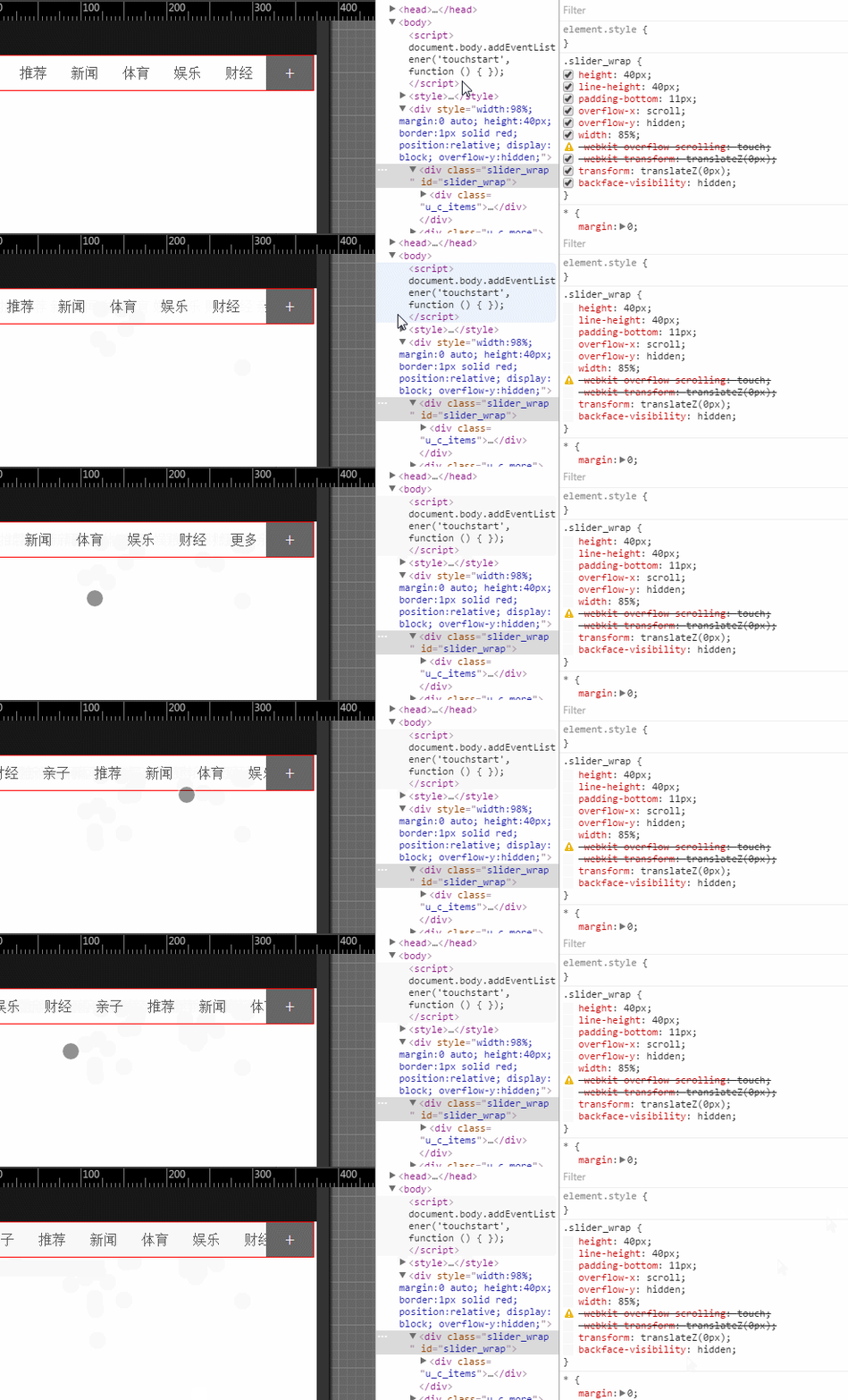
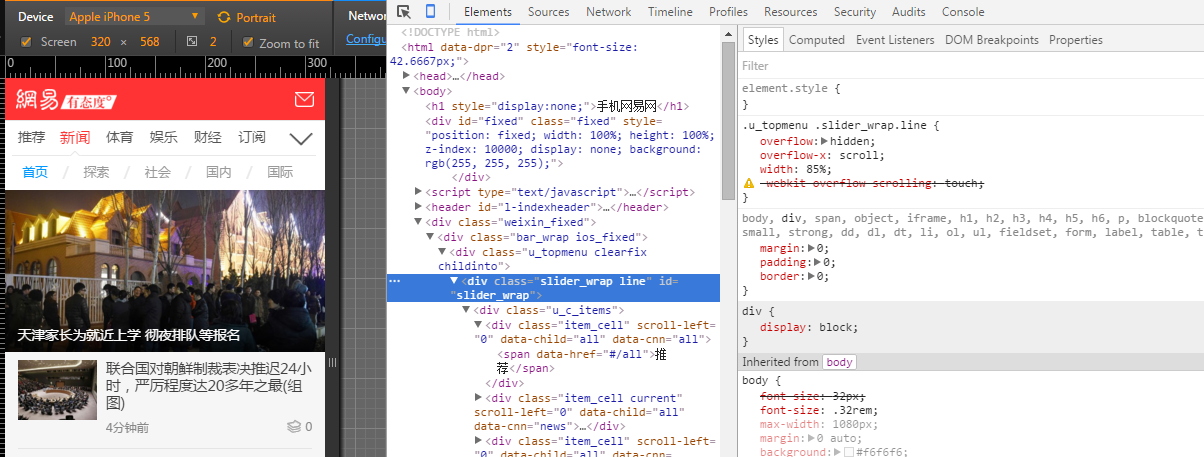
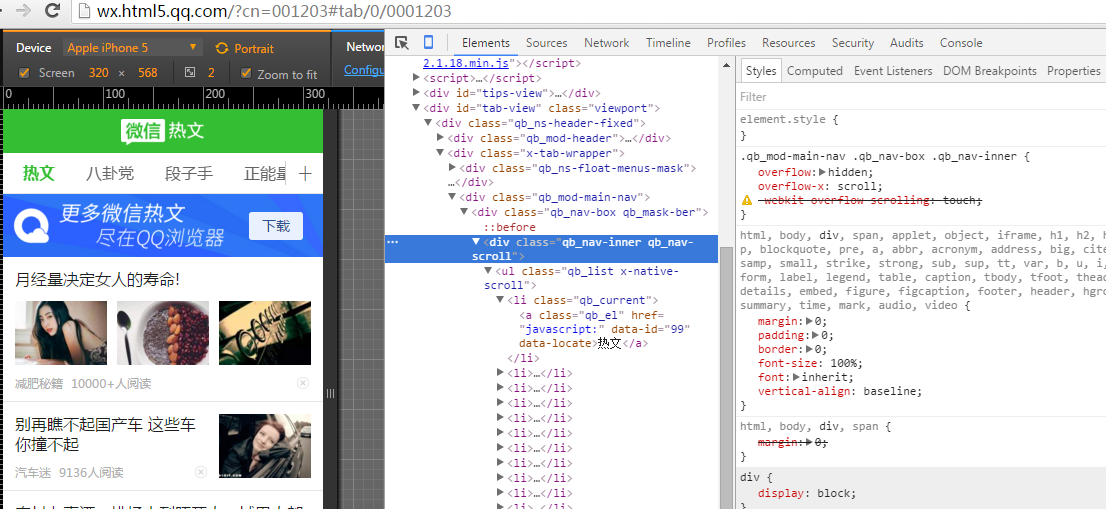
总结一下:
有点:网易新闻,微信 热文 都是 -webkit-overflow-scrolling: touch;实现,css实现,轻巧;
bug: 部分安卓浏览器(uc,自带) 只支持持续滑动,不支持回弹,
iphone垂直滑动 第一次不能完全持续滑动到底部;总体不影响使用;
偶尔低端的手机会卡,适当 GPU hack;
iphone safari浏览器会出现滚动条,::-webkit-scrollbar {display: none;width:0}无效;
.slider_wrap::-webkit-scrollbar,.slider_wrap::scrollbar{ /*iphone safari 无效*/
display:none !important;width:0px; height:0; line-height:0; -webkit-appearance: none; background:transparent;overflow:hidden;
}
解决办法
父类 overflow-y:hidden 子类 padding-bottom:11px; /*iphone safari 去掉滚动条*/
其他
如果需要js版本的持续滑动菜单 ,请点击 淘宝 xscroll.js 基于kissy框架,
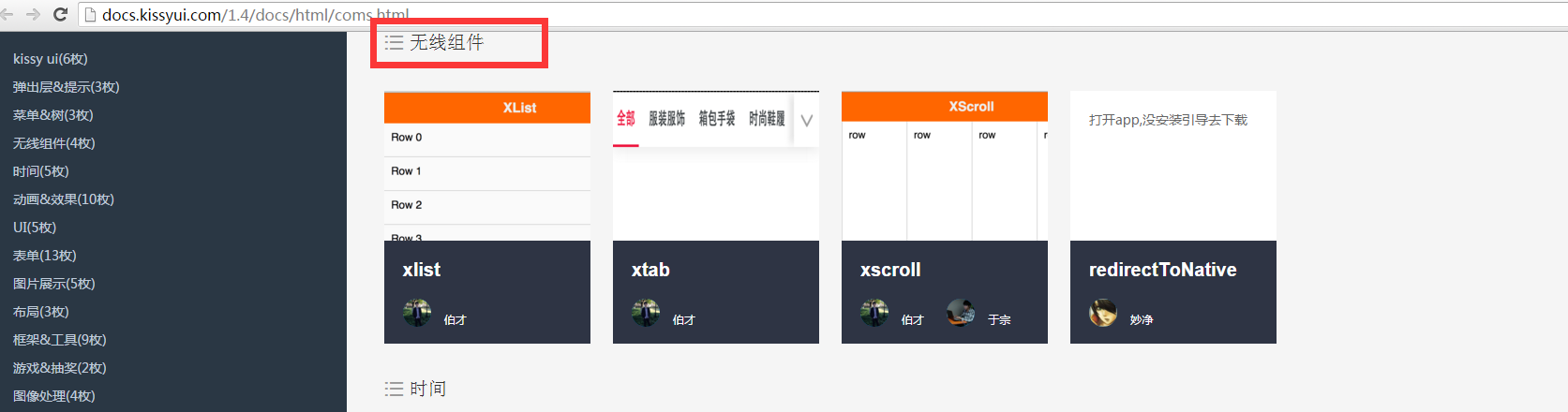
不懂kissy框架。如需独立的,里面找一下,有原生的js,不依赖库的 传送门 http://xscroll.github.io/ ,感觉功能却是完善,但这个组件的体积还是有点稍微大了;
原生独立的xscroll https://github.com/huxiaoqi567/xscroll/blob/master/build/standalone/xscroll.js

自己封装的移动端 触屏滑动条菜单(完善版) ,功能呵呵,能用,兼容没人淘宝的那么强大,也没那么多测试机器,win10触摸屏的不支持;
如果需要淘宝的 ,点击此处
附上css demo:
<!DOCTYPE html>

<html>

 <head>

  <title>surface</title>

  <meta charset="utf-8" />

<meta name="viewport"   content="initial-scale=1.0,user-scalable=no,maximum-scale=1,width=device-width"  />

 <meta http-equiv="pragma" content="no-cache">

 <meta http-equiv="cache-control" content="no-cache">

 <meta http-equiv="expires" content="0">

 <meta name="format-detection" content="telephone=no">

<meta name="format-detection" content="address=no">

<meta name="format-detection" content="email=no" >

<meta name="apple-mobile-web-app-title" content="">

<meta name="apple-mobile-web-app-capable" content="yes" />

<meta name="apple-mobile-web-app-status-bar-style" content="black-translucent" />

 </head>

 <body>

<script>  document.body.addEventListener('touchstart', function () { }); </script>

  <style>

  *{ margin:0; padding:0;}

  ul,li{ list-style:none;}

::-webkit-scrollbar-thumb, ::-webkit-scrollbar-thumb:horizontal {/*当焦点不在当前区域滑块的状态*/

background:#FF0;

}

.slider_wrap {

height:40px; line-height:40px;

padding-bottom:11px; /*iphone safari 去掉滚动条*/

overflow-x: scroll;

overflow-y:hidden;

width: 85%;

/* -webkit-overflow-scrolling: touch;  js 添加  */

-webkit-transform: translateZ(0px);transform: translateZ(0px); backface-visibility:hidden;}

#slider_wrap::-webkit-scrollbar{

display:none; width:0px; -webkit-appearance: none;

}

.u_c_items {

white-space: nowrap; height:40px;/*display: -webkit-box;*/

}

.item_cell {

display: inline-block;

height: 40px;

width: 16.6666%;

overflow: hidden;

position: relative;

}

.u_c_items span {

color: #555;

line-height: 40px;

white-space: nowrap;

display: block;

-webkit-tap-highlight-color: rgba(0,0,0,0);

text-align: center;

cursor: pointer;

}

.u_c_more {

width: 15%; background:#666; color:#fff; z-index:5; font-size:22px;

height: 40px;

line-height: 40px;

text-align: center;

position: absolute;

bottom: 0;

right: 0;

}

.qb_ns-float-menus-mask {

position: fixed;

z-index: 0;

top: 40px;

left: 0;

width: 100%;

height: 100%;

background: rgba(30,30,30,0.5);-webkit-transition: opacity .2s;

transition: opacity .2s;

opacity: 0;

pointer-events: none;

}

.qb_ns-float-menus-mask.qb_show {

opacity: 1;

pointer-events: auto;

z-index: 190;

}

  </style>

  <div style="width:98%; margin:0 auto; height:40px;border:1px solid red; position:relative; display:block; overflow-y:hidden;">

          <div class="slider_wrap " id="slider_wrap">

                <div class="u_c_items" id="j_u_c_items">

                <div class="item_cell current" scroll-left="0" data-child="all" data-cnn="all"><span data-href="#/all">推荐</span></div>

                <div class="item_cell" scroll-left="0" data-child="all" data-cnn="news"><span data-href="#/news">新闻</span></div>

                <div class="item_cell" scroll-left="0" data-child="all" data-cnn="sports"><span data-href="#/sports">体育</span></div>

                <div class="item_cell" scroll-left="45" data-child="all" data-cnn="ent"><span data-href="#/ent">娱乐</span></div>

                <div class="item_cell" scroll-left="91" data-child="all" data-cnn="money"><span data-href="#/money">财经</span></div>

                <div class="item_cell" scroll-left="777" data-child="all" data-cnn="baby"><span data-href="#/baby">亲子</span></div>

                <div class="item_cell current" scroll-left="0" data-child="all" data-cnn="all"><span data-href="#/all">推荐</span></div>

                <div class="item_cell" scroll-left="0" data-child="all" data-cnn="news"><span data-href="#/news">新闻</span></div>

                <div class="item_cell" scroll-left="0" data-child="all" data-cnn="sports"><span data-href="#/sports">体育</span></div>

                <div class="item_cell" scroll-left="45" data-child="all" data-cnn="ent"><span data-href="#/ent">娱乐</span></div>

                <div class="item_cell" scroll-left="91" data-child="all" data-cnn="money"><span data-href="#/money">财经</span></div>

               <div class="item_cell" scroll-left="777" data-child="all" data-cnn="navall"><span data-href="http://3g.163.com/touch/navigation/">更多</span></div>

              </div>

         </div>

          <div class="u_c_more">

                <span class="more_channel up ">+</span>

          </div>

    </div>

    <div class="qb_ns-float-menus-mask ">

    </div>

    <script>

	document.getElementById('slider_wrap').style.webkitOverflowScrolling = 'touch';  //js 添加  防止开始卡死

	document.getElementById("j_u_c_items").addEventListener('touchstart', function(event){});//ios7 促发

     var u_c_more=document.querySelector(".u_c_more").addEventListener("click",function(){

		 document.querySelector(".qb_ns-float-menus-mask").classList.toggle('qb_show');

	 });;

    </script>

 </body>

</html>
移动端 微信 网易 触屏滑动回弹菜单(css版)的更多相关文章
- JS案例之5——移动端触屏滑动
移动端触屏滑动的效果其实就是图片轮播,在PC的页面上很好实现,绑定click和mouseover等事件来完成.但是在移动设备上,要实现这种轮播的效果,就需要用到核心的touch事件.处理touch事件 ...
- 移动端触屏滑动,JS事件
先了解下 移动端的触屏滑动 毕竟这玩意其实和PC端还是有一定的区别的 hh 整理了下网上的资料放一放 移动端触屏滑动的效果其实就是图片轮播,在PC的页面上很好实现,绑定click和mouseover等 ...
- 自己用原生JS写的轮播图,支持移动端触屏滑动,面向对象思路。分页器圆点支持click和mouseover。
自己用原生javascript写的轮播图,面向对象思路,支持移动端手指触屏滑动.分页器圆点可以选择click点击或mouseover鼠标移入时触发.图片滚动用的setInterval,感觉setInt ...
- touch移动触屏滑动事件
移动端触屏滑动的效果其实就是图片轮播,在PC的页面上很好实现,绑定click和mouseover等事件来完成.但是在移动设备上,要实现这种轮播的效果,就需要用到核心的touch事件.处理touch事件 ...
- JS移动客户端--触屏滑动事件
移动端触屏滑动的效果其实就是图片轮播,在PC的页面上很好实现,绑定click和mouseover等事件来完成.但是在移动设备上,要实现这种轮播的效果,就需要用到核心的touch事件.处理touch事件 ...
- JS移动客户端--触屏滑动事件 banner图效果
JS移动客户端--触屏滑动事件 移动端触屏滑动的效果其实就是图片轮播,在PC的页面上很好实现,绑定click和mouseover等事件来完成.但是在移动设备上,要实现这种轮播的效果,就需要用到核心的t ...
- js实现touch移动触屏滑动事件
在开始描述touch事件之前,需要先描述一下多触式系统中特有的touch对象(android和iOS乃至nokia最新的meego系统都模拟了类 似的对象).这个对象封装一次屏幕触摸,一般来自于手指. ...
- JS移动客户端--触屏滑动事件及js手机拖拽效果
移动端触屏滑动的效果其实就是图片轮播,在PC的页面上很好实现,绑定click和mouseover等事件来完成.但是在移动设备上,要实现这种轮播的效果,就需要用到核心的touch事件.处理touch事件 ...
- 朋友圈常见单页面触屏滑动上下翻屏功能jQuery实现
翻页插件:实现原理,用margin-top来控制页面容器位置来实现上下翻页.margin这属性很好用,可以用来制作侧栏动画滑出菜单(左菜单,右内容,控制两者的margin实现):或者head下滑菜单 ...
随机推荐
- Java流读写
写: package com.wjy.write; import java.io.BufferedWriter; import java.io.FileOutputStream; import jav ...
- CentOS 6.4 文件夹打开方式
CentOS 6.4 文件夹打开方式 在CentOS 6.4中,双击文件夹,默认会在新窗口中打开文件夹,没有路径.前进.后退这样的按钮,如果一个文件夹的路径很深,则需要打开n多的窗口才能找到最终想要的 ...
- Android编程获取网络连接状态及调用网络配置界面
获取网络连接状态 随着3G和Wifi的推广,越来越多的Android应用程序需要调用网络资源,检测网络连接状态也就成为网络应用程序所必备的功能. Android平台提供了ConnectivityMan ...
- SpringMVC(转)
http://www.cnblogs.com/liukemng/p/3725582.html
- Mega的简单使用
Table of Contents 1 Mega画树的简单应用 2 fas格式文件的准备 3 用生成的.meg画树 4 生出树的处理 4.1 修改内容,添加标注 4.2 导出 4.3 后面随着学习的进 ...
- cocos2d-x: 33种切换场景
[1]:CCTransitionCrossFade::create(时间,目标场景); //慢慢淡化到还有一场景 [2]:CCTransitionFade::create(时间,目标场景); //本场 ...
- 面试题 收集请求k千里马
收集请求k最大值 个人信息:就读于燕大本科软件project专业 眼下大三; 本人博客:google搜索"cqs_2012"就可以; 个人爱好:酷爱数据结构和算法,希望将来从事算法 ...
- Android 随着输入框控件的清除功能ClearEditText,抄IOS输入框
今天给大家带来一个非常有用的小控件ClearEditText,就是在Android系统的输入框右边增加一个小图标,点击小图标能够清除输入框里面的内容,IOS上面直接设置某个属性就能够实现这一功能.可是 ...
- ZOJ Monthly, October 2010 ABEFI
ZOJ 3406 Another Very Easy Task #include <cstdio> #include <cstring> const int N = 10000 ...
- Android访问服务器(TOMCAT)乱码引发的问题
1.浏览器往服务器发送的请求主要可分为2种:get.post:delete.head等不赘述. GET方式: 从浏览器上直接敲地址,最大特点就是参数直接跟在地址后面. POST方式:表单提交等. 2. ...