
相机标定 matlab opencv ROS三种方法标定步骤(2)
二 ubuntu下Opencv的相机标定
一般直接用Opencv的源码就可以进行相机的标定,但是可能只是会实现结果,却不懂实现的过程,我也是模模糊糊的看了《计算机视觉中的多视图几何》以及实现一些经典的算法,对Opencv有一些了解才开始做相机的标定,可以先看看源码:
#include <iostream>

#include <sstream>

#include <time.h>

#include <stdio.h>

#include <opencv2/core/core.hpp>

#include <opencv2/imgproc/imgproc.hpp>

#include <opencv2/calib3d/calib3d.hpp>

#include <opencv2/highgui/highgui.hpp>

#ifndef _CRT_SECURE_NO_WARNINGS

# define _CRT_SECURE_NO_WARNINGS

#endif

using namespace cv;

using namespace std;

static void help()

{

    cout <<  "This is a camera calibration sample." << endl

         <<  "Usage: calibration configurationFile"  << endl

         <<  "Near the sample file you'll find the configuration file, which has detailed help of "

             "how to edit it.  It may be any OpenCV supported file format XML/YAML." << endl;

}

class Settings

{

public:

    Settings() : goodInput(false) {}

    enum Pattern { NOT_EXISTING, CHESSBOARD, CIRCLES_GRID, ASYMMETRIC_CIRCLES_GRID };

    enum InputType {INVALID, CAMERA, VIDEO_FILE, IMAGE_LIST};

    void write(FileStorage& fs) const                        //Write serialization for this class

    {

        fs << "{" << "BoardSize_Width"  << boardSize.width

                  << "BoardSize_Height" << boardSize.height

                  << "Square_Size"         << squareSize

                  << "Calibrate_Pattern" << patternToUse

                  << "Calibrate_NrOfFrameToUse" << nrFrames

                  << "Calibrate_FixAspectRatio" << aspectRatio

                  << "Calibrate_AssumeZeroTangentialDistortion" << calibZeroTangentDist

                  << "Calibrate_FixPrincipalPointAtTheCenter" << calibFixPrincipalPoint

                  << "Write_DetectedFeaturePoints" << bwritePoints

                  << "Write_extrinsicParameters"   << bwriteExtrinsics

                  << "Write_outputFileName"  << outputFileName

                  << "Show_UndistortedImage" << showUndistorsed

                  << "Input_FlipAroundHorizontalAxis" << flipVertical

                  << "Input_Delay" << delay

                  << "Input" << input

           << "}";

    }

    void read(const FileNode& node)                          //Read serialization for this class

    {

        node["BoardSize_Width" ] >> boardSize.width;

        node["BoardSize_Height"] >> boardSize.height;

        node["Calibrate_Pattern"] >> patternToUse;

        node["Square_Size"]  >> squareSize;

        node["Calibrate_NrOfFrameToUse"] >> nrFrames;

        node["Calibrate_FixAspectRatio"] >> aspectRatio;

        node["Write_DetectedFeaturePoints"] >> bwritePoints;

        node["Write_extrinsicParameters"] >> bwriteExtrinsics;

        node["Write_outputFileName"] >> outputFileName;

        node["Calibrate_AssumeZeroTangentialDistortion"] >> calibZeroTangentDist;

        node["Calibrate_FixPrincipalPointAtTheCenter"] >> calibFixPrincipalPoint;

        node["Input_FlipAroundHorizontalAxis"] >> flipVertical;

        node["Show_UndistortedImage"] >> showUndistorsed;

        node["Input"] >> input;

        node["Input_Delay"] >> delay;

        interprate();

    }

    void interprate()

    {

        goodInput = true;

        if (boardSize.width <=  || boardSize.height <= )

        {

            cerr << "Invalid Board size: " << boardSize.width << " " << boardSize.height << endl;

            goodInput = false;

        }

        if (squareSize <= 10e-)

        {

            cerr << "Invalid square size " << squareSize << endl;

            goodInput = false;

        }

        if (nrFrames <= )

        {

            cerr << "Invalid number of frames " << nrFrames << endl;

            goodInput = false;

        }

        if (input.empty())      // Check for valid input

                inputType = INVALID;

        else

        {

            if (input[] >= '' && input[] <= '')

            {

                stringstream ss(input);

                ss >> cameraID;

                inputType = CAMERA;

            }

            else

            {

                if (readStringList(input, imageList))

                    {

                        inputType = IMAGE_LIST;

                        nrFrames = (nrFrames < (int)imageList.size()) ? nrFrames : (int)imageList.size();

                    }

                else

                    inputType = VIDEO_FILE;

            }

            if (inputType == CAMERA)

                inputCapture.open(cameraID);

            if (inputType == VIDEO_FILE)

                inputCapture.open(input);

            if (inputType != IMAGE_LIST && !inputCapture.isOpened())

                    inputType = INVALID;

        }

        if (inputType == INVALID)

        {

            cerr << " Inexistent input: " << input;

            goodInput = false;

        }

        flag = ;

        if(calibFixPrincipalPoint) flag |= CV_CALIB_FIX_PRINCIPAL_POINT;

        if(calibZeroTangentDist)   flag |= CV_CALIB_ZERO_TANGENT_DIST;

        if(aspectRatio)            flag |= CV_CALIB_FIX_ASPECT_RATIO;

        calibrationPattern = NOT_EXISTING;

        if (!patternToUse.compare("CHESSBOARD")) calibrationPattern = CHESSBOARD;

        if (!patternToUse.compare("CIRCLES_GRID")) calibrationPattern = CIRCLES_GRID;

        if (!patternToUse.compare("ASYMMETRIC_CIRCLES_GRID")) calibrationPattern = ASYMMETRIC_CIRCLES_GRID;

        if (calibrationPattern == NOT_EXISTING)

            {

                cerr << " Inexistent camera calibration mode: " << patternToUse << endl;

                goodInput = false;

            }

        atImageList = ;

    }

    Mat nextImage()

    {

        Mat result;

        if( inputCapture.isOpened() )

        {

            Mat view0;

            inputCapture >> view0;

            view0.copyTo(result);

        }

        else if( atImageList < (int)imageList.size() )

            result = imread(imageList[atImageList++], CV_LOAD_IMAGE_COLOR);

        return result;

    }

    static bool readStringList( const string& filename, vector<string>& l )

    {

        l.clear();

        FileStorage fs(filename, FileStorage::READ);

        if( !fs.isOpened() )

            return false;

        FileNode n = fs.getFirstTopLevelNode();

        if( n.type() != FileNode::SEQ )

            return false;

        FileNodeIterator it = n.begin(), it_end = n.end();

        for( ; it != it_end; ++it )

            l.push_back((string)*it);

        return true;

    }

public:

    Size boardSize;            // The size of the board -> Number of items by width and height

    Pattern calibrationPattern;// One of the Chessboard, circles, or asymmetric circle pattern

    float squareSize;          // The size of a square in your defined unit (point, millimeter,etc).

    int nrFrames;              // The number of frames to use from the input for calibration

    float aspectRatio;         // The aspect ratio

    int delay;                 // In case of a video input

    bool bwritePoints;         //  Write detected feature points

    bool bwriteExtrinsics;     // Write extrinsic parameters

    bool calibZeroTangentDist; // Assume zero tangential distortion

    bool calibFixPrincipalPoint;// Fix the principal point at the center

    bool flipVertical;          // Flip the captured images around the horizontal axis

    string outputFileName;      // The name of the file where to write

    bool showUndistorsed;       // Show undistorted images after calibration

    string input;               // The input ->

    int cameraID;

    vector<string> imageList;

    int atImageList;

    VideoCapture inputCapture;

    InputType inputType;

    bool goodInput;

    int flag;

private:

    string patternToUse;

};

static void read(const FileNode& node, Settings& x, const Settings& default_value = Settings())

{

    if(node.empty())

        x = default_value;

    else

        x.read(node);

}

enum { DETECTION = , CAPTURING = , CALIBRATED =  };

bool runCalibrationAndSave(Settings& s, Size imageSize, Mat&  cameraMatrix, Mat& distCoeffs,

                           vector<vector<Point2f> > imagePoints );

int main(int argc, char* argv[])

{

    help();

    Settings s;

    const string inputSettingsFile = argc >  ? argv[] : "default.xml";

    FileStorage fs(inputSettingsFile, FileStorage::READ); // Read the settings

    if (!fs.isOpened())

    {

        cout << "Could not open the configuration file: \"" << inputSettingsFile << "\"" << endl;

        return -;

    }

    fs["Settings"] >> s;

    fs.release();                                         // close Settings file

    if (!s.goodInput)

    {

        cout << "Invalid input detected. Application stopping. " << endl;

        return -;

    }

    vector<vector<Point2f> > imagePoints;

    Mat cameraMatrix, distCoeffs;

    Size imageSize;

    int mode = s.inputType == Settings::IMAGE_LIST ? CAPTURING : DETECTION;

    clock_t prevTimestamp = ;

    const Scalar RED(,,), GREEN(,,);

    const char ESC_KEY = ;

    for(int i = ;;++i)

    {

      Mat view;

      bool blinkOutput = false;

      view = s.nextImage();

      //-----  If no more image, or got enough, then stop calibration and show result -------------

      if( mode == CAPTURING && imagePoints.size() >= (unsigned)s.nrFrames )

      {

          if( runCalibrationAndSave(s, imageSize,  cameraMatrix, distCoeffs, imagePoints))

              mode = CALIBRATED;

          else

              mode = DETECTION;

      }

      if(view.empty())          // If no more images then run calibration, save and stop loop.

      {

            if( imagePoints.size() >  )

                runCalibrationAndSave(s, imageSize,  cameraMatrix, distCoeffs, imagePoints);

            break;

      }

        imageSize = view.size();  // Format input image.

        if( s.flipVertical )    flip( view, view,  );

        vector<Point2f> pointBuf;

        bool found;

        switch( s.calibrationPattern ) // Find feature points on the input format

        {

        case Settings::CHESSBOARD:

            found = findChessboardCorners( view, s.boardSize, pointBuf,

                CV_CALIB_CB_ADAPTIVE_THRESH | CV_CALIB_CB_FAST_CHECK | CV_CALIB_CB_NORMALIZE_IMAGE);

            break;

        case Settings::CIRCLES_GRID:

            found = findCirclesGrid( view, s.boardSize, pointBuf );

            break;

        case Settings::ASYMMETRIC_CIRCLES_GRID:

            found = findCirclesGrid( view, s.boardSize, pointBuf, CALIB_CB_ASYMMETRIC_GRID );

            break;

        default:

            found = false;

            break;

        }

        if ( found)                // If done with success,

        {

              // improve the found corners' coordinate accuracy for chessboard

                if( s.calibrationPattern == Settings::CHESSBOARD)

                {

                    Mat viewGray;

                    cvtColor(view, viewGray, COLOR_BGR2GRAY);

                    cornerSubPix( viewGray, pointBuf, Size(,),

                        Size(-,-), TermCriteria( CV_TERMCRIT_EPS+CV_TERMCRIT_ITER, , 0.1 ));

                }

                if( mode == CAPTURING &&  // For camera only take new samples after delay time

                    (!s.inputCapture.isOpened() || clock() - prevTimestamp > s.delay*1e-*CLOCKS_PER_SEC) )

                {

                    imagePoints.push_back(pointBuf);

                    prevTimestamp = clock();

                    blinkOutput = s.inputCapture.isOpened();

                }

                // Draw the corners.

                drawChessboardCorners( view, s.boardSize, Mat(pointBuf), found );

        }

        //----------------------------- Output Text ------------------------------------------------

        string msg = (mode == CAPTURING) ? "100/100" :

                      mode == CALIBRATED ? "Calibrated" : "Press 'g' to start";

        int baseLine = ;

        Size textSize = getTextSize(msg, , , , &baseLine);

        Point textOrigin(view.cols - *textSize.width - , view.rows - *baseLine - );

        if( mode == CAPTURING )

        {

            if(s.showUndistorsed)

                msg = format( "%d/%d Undist", (int)imagePoints.size(), s.nrFrames );

            else

                msg = format( "%d/%d", (int)imagePoints.size(), s.nrFrames );

        }

        putText( view, msg, textOrigin, , , mode == CALIBRATED ?  GREEN : RED);

        if( blinkOutput )

            bitwise_not(view, view);

        //------------------------- Video capture  output  undistorted ------------------------------

        if( mode == CALIBRATED && s.showUndistorsed )

        {

            Mat temp = view.clone();

            undistort(temp, view, cameraMatrix, distCoeffs);

        }

        //------------------------------ Show image and check for input commands -------------------

        imshow("Image View", view);

        char key = (char)waitKey(s.inputCapture.isOpened() ?  : s.delay);

        if( key  == ESC_KEY )

            break;

        if( key == 'u' && mode == CALIBRATED )

           s.showUndistorsed = !s.showUndistorsed;

        if( s.inputCapture.isOpened() && key == 'g' )

        {

            mode = CAPTURING;

            imagePoints.clear();

        }

    }

    // -----------------------Show the undistorted image for the image list ------------------------

    if( s.inputType == Settings::IMAGE_LIST && s.showUndistorsed )

    {

        Mat view, rview, map1, map2;

        initUndistortRectifyMap(cameraMatrix, distCoeffs, Mat(),

            getOptimalNewCameraMatrix(cameraMatrix, distCoeffs, imageSize, , imageSize, ),

            imageSize, CV_16SC2, map1, map2);

        for(int i = ; i < (int)s.imageList.size(); i++ )

        {

            view = imread(s.imageList[i], );

            if(view.empty())

                continue;

            remap(view, rview, map1, map2, INTER_LINEAR);

            imshow("Image View", rview);

            char c = (char)waitKey();

            if( c  == ESC_KEY || c == 'q' || c == 'Q' )

                break;

        }

    }

    return ;

}

static double computeReprojectionErrors( const vector<vector<Point3f> >& objectPoints,

                                         const vector<vector<Point2f> >& imagePoints,

                                         const vector<Mat>& rvecs, const vector<Mat>& tvecs,

                                         const Mat& cameraMatrix , const Mat& distCoeffs,

                                         vector<float>& perViewErrors)

{

    vector<Point2f> imagePoints2;

    int i, totalPoints = ;

    double totalErr = , err;

    perViewErrors.resize(objectPoints.size());

    for( i = ; i < (int)objectPoints.size(); ++i )

    {

        projectPoints( Mat(objectPoints[i]), rvecs[i], tvecs[i], cameraMatrix,

                       distCoeffs, imagePoints2);

        err = norm(Mat(imagePoints[i]), Mat(imagePoints2), CV_L2);

        int n = (int)objectPoints[i].size();

        perViewErrors[i] = (float) std::sqrt(err*err/n);

        totalErr        += err*err;

        totalPoints     += n;

    }

    return std::sqrt(totalErr/totalPoints);

}

static void calcBoardCornerPositions(Size boardSize, float squareSize, vector<Point3f>& corners,

                                     Settings::Pattern patternType /*= Settings::CHESSBOARD*/)

{

    corners.clear();

    switch(patternType)

    {

    case Settings::CHESSBOARD:

    case Settings::CIRCLES_GRID:

        for( int i = ; i < boardSize.height; ++i )

            for( int j = ; j < boardSize.width; ++j )

                corners.push_back(Point3f(float( j*squareSize ), float( i*squareSize ), ));

        break;

    case Settings::ASYMMETRIC_CIRCLES_GRID:

        for( int i = ; i < boardSize.height; i++ )

            for( int j = ; j < boardSize.width; j++ )

                corners.push_back(Point3f(float((*j + i % )*squareSize), float(i*squareSize), ));

        break;

    default:

        break;

    }

}

static bool runCalibration( Settings& s, Size& imageSize, Mat& cameraMatrix, Mat& distCoeffs,

                            vector<vector<Point2f> > imagePoints, vector<Mat>& rvecs, vector<Mat>& tvecs,

                            vector<float>& reprojErrs,  double& totalAvgErr)

{

    cameraMatrix = Mat::eye(, , CV_64F);

    if( s.flag & CV_CALIB_FIX_ASPECT_RATIO )

        cameraMatrix.at<double>(,) = 1.0;

    distCoeffs = Mat::zeros(, , CV_64F);

    vector<vector<Point3f> > objectPoints();

    calcBoardCornerPositions(s.boardSize, s.squareSize, objectPoints[], s.calibrationPattern);

    objectPoints.resize(imagePoints.size(),objectPoints[]);

    //Find intrinsic and extrinsic camera parameters

    double rms = calibrateCamera(objectPoints, imagePoints, imageSize, cameraMatrix,

                                 distCoeffs, rvecs, tvecs, s.flag|CV_CALIB_FIX_K4|CV_CALIB_FIX_K5);

    cout << "Re-projection error reported by calibrateCamera: "<< rms << endl;

    bool ok = checkRange(cameraMatrix) && checkRange(distCoeffs);

    totalAvgErr = computeReprojectionErrors(objectPoints, imagePoints,

                                             rvecs, tvecs, cameraMatrix, distCoeffs, reprojErrs);

    return ok;

}

// Print camera parameters to the output file

static void saveCameraParams( Settings& s, Size& imageSize, Mat& cameraMatrix, Mat& distCoeffs,

                              const vector<Mat>& rvecs, const vector<Mat>& tvecs,

                              const vector<float>& reprojErrs, const vector<vector<Point2f> >& imagePoints,

                              double totalAvgErr )

{

    FileStorage fs( s.outputFileName, FileStorage::WRITE );

    time_t tm;

    time( &tm );

    struct tm *t2 = localtime( &tm );

    char buf[];

    strftime( buf, sizeof(buf)-, "%c", t2 );

    fs << "calibration_Time" << buf;

    if( !rvecs.empty() || !reprojErrs.empty() )

        fs << "nrOfFrames" << (int)std::max(rvecs.size(), reprojErrs.size());

    fs << "image_Width" << imageSize.width;

    fs << "image_Height" << imageSize.height;

    fs << "board_Width" << s.boardSize.width;

    fs << "board_Height" << s.boardSize.height;

    fs << "square_Size" << s.squareSize;

    if( s.flag & CV_CALIB_FIX_ASPECT_RATIO )

        fs << "FixAspectRatio" << s.aspectRatio;

    if( s.flag )

    {

        sprintf( buf, "flags: %s%s%s%s",

            s.flag & CV_CALIB_USE_INTRINSIC_GUESS ? " +use_intrinsic_guess" : "",

            s.flag & CV_CALIB_FIX_ASPECT_RATIO ? " +fix_aspectRatio" : "",

            s.flag & CV_CALIB_FIX_PRINCIPAL_POINT ? " +fix_principal_point" : "",

            s.flag & CV_CALIB_ZERO_TANGENT_DIST ? " +zero_tangent_dist" : "" );

        cvWriteComment( *fs, buf,  );

    }

    fs << "flagValue" << s.flag;

    fs << "Camera_Matrix" << cameraMatrix;

    fs << "Distortion_Coefficients" << distCoeffs;

    fs << "Avg_Reprojection_Error" << totalAvgErr;

    if( !reprojErrs.empty() )

        fs << "Per_View_Reprojection_Errors" << Mat(reprojErrs);

    if( !rvecs.empty() && !tvecs.empty() )

    {

        CV_Assert(rvecs[].type() == tvecs[].type());

        Mat bigmat((int)rvecs.size(), , rvecs[].type());

        for( int i = ; i < (int)rvecs.size(); i++ )

        {

            Mat r = bigmat(Range(i, i+), Range(,));

            Mat t = bigmat(Range(i, i+), Range(,));

            CV_Assert(rvecs[i].rows ==  && rvecs[i].cols == );

            CV_Assert(tvecs[i].rows ==  && tvecs[i].cols == );

            //*.t() is MatExpr (not Mat) so we can use assignment operator

            r = rvecs[i].t();

            t = tvecs[i].t();

        }

        cvWriteComment( *fs, "a set of 6-tuples (rotation vector + translation vector) for each view",  );

        fs << "Extrinsic_Parameters" << bigmat;

    }

    if( !imagePoints.empty() )

    {

        Mat imagePtMat((int)imagePoints.size(), (int)imagePoints[].size(), CV_32FC2);

        for( int i = ; i < (int)imagePoints.size(); i++ )

        {

            Mat r = imagePtMat.row(i).reshape(, imagePtMat.cols);

            Mat imgpti(imagePoints[i]);

            imgpti.copyTo(r);

        }

        fs << "Image_points" << imagePtMat;

    }

}

bool runCalibrationAndSave(Settings& s, Size imageSize, Mat&  cameraMatrix, Mat& distCoeffs,vector<vector<Point2f> > imagePoints )

{

    vector<Mat> rvecs, tvecs;

    vector<float> reprojErrs;

    double totalAvgErr = ;

    bool ok = runCalibration(s,imageSize, cameraMatrix, distCoeffs, imagePoints, rvecs, tvecs,

                             reprojErrs, totalAvgErr);

    cout << (ok ? "Calibration succeeded" : "Calibration failed")

        << ". avg re projection error = "  << totalAvgErr ;

    if( ok )

        saveCameraParams( s, imageSize, cameraMatrix, distCoeffs, rvecs ,tvecs, reprojErrs,

                            imagePoints, totalAvgErr);

    return ok;

}
网上有很多关于相机标定的代码,但都是没有官方网站的源文件更详细,给源文件同时写一个Makefile文件
#Makefile for camera_calibrateion

EXE =camera_calibration

OBJS += camera_calibration.o

CC = g++

CFLAGS += -g -O3 -Wall

INC += -I. `pkg-config --cflags opencv`

LIBS += `pkg-config --libs opencv`

all:$(EXE)

$(EXE):$(OBJS)

	$(CC) $(INC) $(CFLAGS) $(OBJS) -o $(EXE) $(LIBS)

$(OBJS):%.o:%.cpp

	$(CC) $(INC) $(CFLAGS) -c $< -o $@

.PHONY:clean

clean:

	rm -r *.o $(EXE)
然后make一下就会生成可执行文件,那么同时还要有一个配置文件 .xml 要在同一个目录文件下,原文件提供了三种方式进行标定,
(1) 直接输入摄像头信息
(2)采用已经采集好的多照不同位置的标定模板
(3 )使用采集下的视频流文件
那么我这里只做了(1) (2)并且标定不同的摄像头
(1)采用摄像头的输入方式的mycamera.xml 代码如下:(同时要在camera_calibration.cpp文件里更改读取的.xml文件)
(这里的标定模板我是用A3纸张打印出来,为8*6 35mm的标定棋盘)
<?xml version="1.0"?>

<opencv_storage>

           <!--设置标定参数-->

<Settings>

           <!-- Number of inner corners per a item row and column. 宽度和高度的设置(square, circle) -->

<BoardSize_Width> 8</BoardSize_Width>

<BoardSize_Height>6</BoardSize_Height>

           <!-- The size of a square in some user defined metric system 每个方格的边长的长度单位一般是mm(pixel, millimeter)-->

<Square_Size>35</Square_Size>

         <!-- The type of input used for camera calibration. 标定模板的样式(棋盘)

         这里一共有三种模板One of: CHESSBOARD CIRCLES_GRID ASYMMETRIC_CIRCLES_GRID -->

<Calibrate_Pattern>"CHESSBOARD"</Calibrate_Pattern>

                <!-- The input to use for calibration.

		To use an input camera -> give the ID of the camera, like "1"

		To use an input video  -> give the path of the input video, like "/tmp/x.avi"

		To use an image list   -> give the path to the XML or YAML file containing the list of the images,

                like "/tmp/circles_list.xml"

		输入标定模板的方式有三种方式:摄像头输入;视频输入;照片文件流输入-->

<Input>"1"</Input>

              <!--  If true (non-zero) we flip the input images around the horizontal axis.

                 如果为真(非零),安照垂直方向翻转输入图像,这里选择为零,即不翻转-->

<Input_FlipAroundHorizontalAxis>0</Input_FlipAroundHorizontalAxis>

                  <!-- Time delay between frames in case of camera.在使用相机的情况下的帧之间的时间延迟 -->

<Input_Delay>100</Input_Delay>

                  <!-- How many frames to use, for calibration.用多少帧照片去校准,可以自己设置,一般不能低于20个 -->

<Calibrate_NrOfFrameToUse>25</Calibrate_NrOfFrameToUse>

                 <!-- Consider only fy as a free parameter, the ratio fx/fy stays the same as in the input cameraMatrix.

	           Use or not setting. 0 - False Non-Zero - True

                    假设fy是一个自由参数,而fx/fy是一个固定的比例参数,使用或者不设置 0    假  非零  真-->

<Calibrate_FixAspectRatio> 1 </Calibrate_FixAspectRatio>

                <!-- If true (non-zero) tangential distortion coefficients  are set to zeros and stay zero.

                 如果设置为真,表示切向畸变系数被设置为0  保持为零-->

<Calibrate_AssumeZeroTangentialDistortion>1</Calibrate_AssumeZeroTangentialDistortion>

                 <!-- If true (non-zero) the principal point(摄像机坐标系下真实的坐标原点) is not changed during the global optimization.-->

<Calibrate_FixPrincipalPointAtTheCenter> 1 </Calibrate_FixPrincipalPointAtTheCenter>

                   <!-- The name of the output log file. 输出文件的名称-->

<Write_outputFileName>"out_camera_data.xml"</Write_outputFileName>

                  <!-- If true (non-zero) we write to the output file the feature points.(如果为真我们向输出文件写入特征点)-->

<Write_DetectedFeaturePoints>1</Write_DetectedFeaturePoints>

                  <!-- If true (non-zero) we write to the output file the extrinsic camera parameters.(写入相机的外部参数)-->

<Write_extrinsicParameters>1</Write_extrinsicParameters>

                         <!-- If true (non-zero) we show after calibration the undistorted images.展示校准后不失真的照片-->

 <Show_UndistortedImage>1</Show_UndistortedImage>

</Settings>

</opencv_storage>
里面的汉字是我写的标注,其中有几个地方需要修改的与我们的实际标定模板一致
<BoardSize_Width> 8</BoardSize_Width> :表示标定模板的宽度 实际一共有9个黑白方格
<BoardSize_Height>6</BoardSize_Height> :实际有7个黑白方格
<Calibrate_Pattern>"CHESSBOARD"</Calibrate_Pattern>
:选择棋盘形式,一共有 CHESSBOARD ,CIRCLES_GRID, ASYMMETRIC_CIRCLES_GRID三种
<Square_Size>35</Square_Size> :每个黑白方格的边长35mm(根据实际情况)
<Input>"1"</Input>                   :选择标定模板的输入种类  1. To use an input camera -> give the ID of the camera, like "1"
                                                           2. To use an input video  -> give the path of the input video, like "/tmp/x.avi"
                                                           3. To use an image list   -> give the path to the XML or YAML file containing the list of the images,      <Write_outputFileName>"out_camera_data.xml"</Write_outputFileName>
<Write_outputFileName>"out_camera_data.xml"</Write_outputFileName> :表示标定输出文件
运行文件夹下运行./camera_calibration 会启动摄像头,然后选择“g”开始标定 ,但是如果上面的这些参数没有设置的与实际相符合,是不会开始采集标定模板的,(我刚开始就出现了这个错误,所以一定亚设置与实际的标定模板一致)
就会开始采集25个不同角度和位置的标定模板,如下图:
注意(我这样直接拿着标定模板来标定是不正确的,应该用一个平面模板把标定模板固定住,这样的标定的结果才是更加准确的,因为这样只是做实验,)
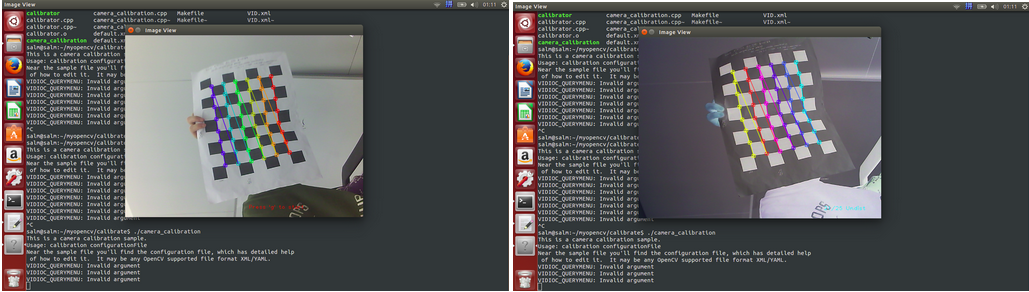
每采集成功一次就会变为二图,颜色略有变化,采集完成就会自动开始校准如下:
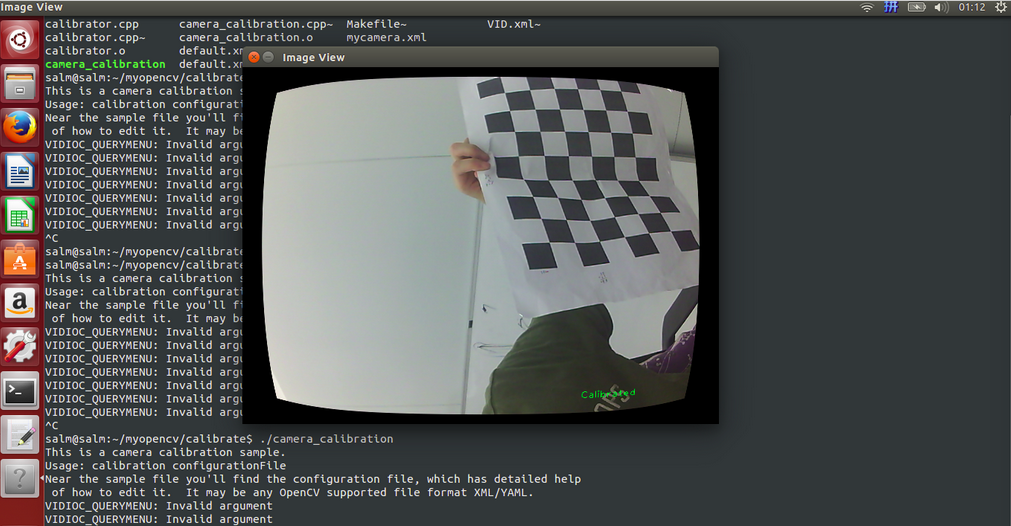
此时在工程文件夹下就会生成out_camera_data.xml,就是相机的标定结果报告
(2)使用Opencv 提供的标定模板进行标定
我们只需要更改
<BoardSize_Width> 8</BoardSize_Width>   改为   <BoardSize_Width> 6</BoardSize_Width>

<BoardSize_Height>6</BoardSize_Height>   改为  <BoardSize_Height>4</BoardSize_Height>
<Square_Size>35</Square_Size> 改为 <Square_Size108</Square_Size>
<Input>"1"</Input>      改为     <Input>"/home/salm/myopencv/calibrate/VID.xml"</Input>
这里就是指定了另一个.xml文件,就是标定模板的图片,其中VID.xml内容为:
<?xml version="1.0"?>

<opencv_storage>

<images>

/home/salm/myopencv/images/chessboards/chessboard01.jpg

/home/salm/myopencv/images/chessboards/chessboard02.jpg

/home/salm/myopencv/images/chessboards/chessboard03.jpg

/home/salm/myopencv/images/chessboards/chessboard04.jpg

/home/salm/myopencv/images/chessboards/chessboard05.jpg

/home/salm/myopencv/images/chessboards/chessboard06.jpg

/home/salm/myopencv/images/chessboards/chessboard07.jpg

/home/salm/myopencv/images/chessboards/chessboard08.jpg

/home/salm/myopencv/images/chessboards/chessboard09.jpg

/home/salm/myopencv/images/chessboards/chessboard10.jpg

/home/salm/myopencv/images/chessboards/chessboard11.jpg

/home/salm/myopencv/images/chessboards/chessboard12.jpg

/home/salm/myopencv/images/chessboards/chessboard13.jpg

/home/salm/myopencv/images/chessboards/chessboard14.jpg

/home/salm/myopencv/images/chessboards/chessboard15.jpg

/home/salm/myopencv/images/chessboards/chessboard16.jpg

/home/salm/myopencv/images/chessboards/chessboard17.jpg

/home/salm/myopencv/images/chessboards/chessboard18.jpg

/home/salm/myopencv/images/chessboards/chessboard19.jpg

/home/salm/myopencv/images/chessboards/chessboard20.jpg

/home/salm/myopencv/images/chessboards/chessboard21.jpg

/home/salm/myopencv/images/chessboards/chessboard22.jpg

/home/salm/myopencv/images/chessboards/chessboard23.jpg

/home/salm/myopencv/images/chessboards/chessboard24.jpg

/home/salm/myopencv/images/chessboards/chessboard25.jpg

</images>

</opencv_storage>
运行文件夹下运行./camera_calibration 会启动VID.xml文件下的图片,这是标定过程中的截图文件 如图
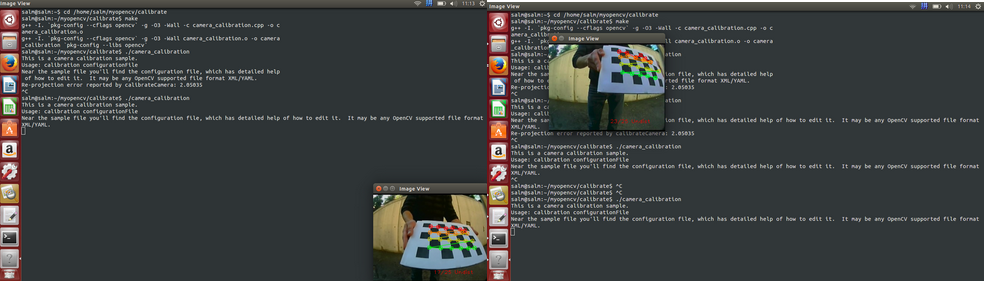
此时在工程文件夹下就会生成out_camera_data.xml
后续还有其他相关的只是待我学习完了再写出来,只是为了记录我的实验过程,如果能有人从中获取帮助,那就更好了
(如果很不幸,被大神们看见了,就直接嗤之以鼻吧,因为没有什么创新的东西,谢谢)
如果您觉得看完有所收获,可以资助一分,几分money,不在乎多少(我也是跟网上的大神们学的),不想挣钱娶媳妇的程序员不是好程序员(同时我也看看到底有没有人认可),谢谢

版权所有,转载请注明出处 http://www.cnblogs.com/li-yao7758258/p/5933653.html相机标定 matlab opencv ROS三种方法标定步骤(2)的更多相关文章
- 相机标定 matlab opencv ROS三种方法标定步骤(1)
一 . 理解摄像机模型,网上有很多讲解的十分详细,在这里我只是记录我的整合出来的资料和我的部分理解 计算机视觉领域中常见的三个坐标系:图像坐标系,相机坐标系,世界坐标系,实际上就是要用矩阵来表 示各个 ...
- 相机标定 matlab opencv ROS三种方法标定步骤(3)
三 , ROS 环境下 如何进行相机标定 刚开始做到的时候遇到一些问题没有记录下来,现在回头写的时候都是没有错误的结果了,首先使用ROS标定相机, 要知道如何查看节点之间的流程图 rosrun r ...
- matlab多行注释的三种方法
转自:http://icictech.blog.163.com/blog/static/2797425420084595725499/ 1)方法一 选中你要加注释的内容,然后选择工具菜单"t ...
- 用matlab脚本语言写M文件函数时用三种方法简单实现实现DFT(离散傅里叶变换)
%用二重循环实现DFT: function xk=dt_0(xn); %define a function N=length(xn); %caculate the length of the vari ...
- Matlab中数组元素引用——三种方法
Matlab中数组元素引用——三种方法 1.Matlab中数组元素引用有三种方法 1 2 3 1.下标法(subscripts) 2.索引法(index) 3.布尔法(Boolean) 注意:在使 ...
- MATLAB中多行注释的三种方法
MATLAB中多行注释的三种方法 A. %{ 若干语句 %} B. 多行注释: 选中要注释的若干语句, 编辑器菜单Text->Comment, 或者快捷键Ctrl+R 取消注释: 选中要取消注释 ...
- opencv 3.1.0 访问像素值的三种方法(C++)
三种方法分别问: 指针访问:void colorReduce_ptr(cv::Mat &inputImage, cv::Mat &outputImage, int div); 迭代器访 ...
- opencv图像阈值设置的三种方法
1.简单阈值设置 像素值高于阈值时,给这个像素赋予一个新值(可能是白色),否则我们给它赋予另外一种颜色(也许是黑色).这个函数就是 cv2.threshhold().这个函数的第一个参数就是原图像 ...
- 【Android】Eclipse自动编译NDK/JNI的三种方法
[Android]Eclipse自动编译NDK/JNI的三种方法 SkySeraph Sep. 18th 2014 Email:skyseraph00@163.com 更多精彩请直接访问SkySer ...
随机推荐
- LigerUI+MVC的应用1
[项目开发]LigerUI+MVC的应用(一) 近期因为稍微空闲有点时间,就晚上回家自己在随便写写代码,也就边写边记,中间主要采用了微软的MVC4.0框架.虽然目前公司也是使用的MVC的模式,但是因为 ...
- discuz 门户功能增加自定义keywords字段
discuz的门户的“发布文章”功能中,没有自动添加keywords字段,结果在文章页面中的meta的keywords中只显示标题,这样对于seo及其不利,今天整理了添加keywords字段方法. 一 ...
- [google面试CTCI] 1-5.替换字符串中特定字符
[字符串与数组] Q:Write a method to replace all spaces in a string with ‘%20’ 题目:写一个算法将一个字符串中的空格替换成%20 解答: ...
- IOS开发之路二十一(UIWebView加载本地html)
挺简单不多说的直接代码: // // ViewController.h // JSAndJson // // Created by WildCat on 13-9-8. // Copyright (c ...
- CKeditor 集成 CKFinder
之前照着网上的做,遇到了一些问题,经过多次实验修改最后算是成功了,下面进行详细讲解. 一.CKeditor的配置(附件中已有最新版CKeditor和CKFinder) 1.需要下载ckeditor, ...
- ios缩放图片
http://blog.csdn.net/yanfangjin/article/details/7456681
- eclipse配置自动提示EXTJS和jQurey
extjs-2.3.0下载地址1:http://dev.sencha.com/deploy/ext-2.3.0.zip 下载地址2:http://www.sencha.com/products/ext ...
- 关于socket通讯,如何才能高效?
关于socket通讯,如何才能高效? 网络通讯,一个不朽的话题,今天和一个做游戏的朋友(以前的同事聊天),他向我诉说了他的痛苦 他之前是做客户端的,无奈人力资源紧张,也开始搞服务器,他说自己的服务器总 ...
- 在WebStorm中集成Karma+jasmine进行前端单元测试
在WebStorm中集成Karma+jasmine进行前端单元测试 前言 好久没有写博了,主要还是太懒=.=,有点时间都去带娃.看书了,今天给大家分享一个原创的小东西,如果大家对TDD或者BDD有兴趣 ...
- C#中WindowsForm常见控件的运用
C#中WindowsForm常见控件的运用 -- 1.button(曹操,贡天子以令不臣): 属性;text:我们经常可以看见将按钮命名为“登入”,在其属性面板里面编辑text即可:如下图: ...