
30-seconds-of-css
你可以再30秒或者更短的时间内读懂的有用的CSS代码片段的精选.
github地址 不过代码不在github上面
官网地址 上面有详细的介绍和演示
下面是我读到的一些个人认为比较实用的片段
1. 等宽高比
给定一个可变宽度的元素, 它确保其高度以响应的方式与宽度保持成比例, 即宽度与高度的比例保持一致.
<div class="constant-width-to-height-ratio"></div>
CSS代码
.constant-width-to-height-ratio {

  background: #333;

  width: 50%;

}

.constant-width-to-height-ratio::before {

  content: '';

  padding-top: 100%;

  float: left;

}

.constant-width-to-height-ratio::after {

  content: '';

  display: block;

  clear: both;

}
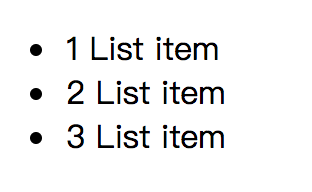
2. 计数器
计数器本质上是由CSS维护的变量, 其值可以通过CSS规则递增以跟踪它们的使用次数
<ul>

  <li>List item</li>

  <li>List item</li>

  <li>List item</li>

</ul>
CSS代码
ul {

  counter-reset: counter;

}

li::before {

  counter-increment: counter;

  content: counters(counter, '.') ' ';

}
效果
3. 自定义文本选择
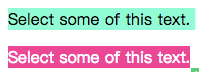
更改文本选择的样式
<p>Sleect some of this text</p>

<p class="custom-text-selection">Select some of this text.</p>
CSS代码
::selection {

  background: aquamarine;

  color: black;

}

.custom-text-selection::selection {

  background: deeppink;

  color: white;

}
效果
4. 自定义变量
CSS变量, 其中包含要在整个文档中重用的值.
<p class="custom-variables">CSS is awesome!</p>
CSS代码
:root {

  --some-color: #da7800;

  --some-keyword: italic;

  --some-size: 1.25em;

  --some-complex-value: 1px 1px 2px whitesmoke, 0 0 1em slategray, 0 0 0.2em slategray;

}

.custom-variables {

  color: var(--some-color);

  font-size: var(--some-size);

  font-style: var(--some-keyword);

  text-shadow: var(--some-complex-value);

}
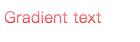
5. 渐变文本
为文本提供渐变(IE无效)
<p class="gradient-text">Gradient text</p>
CSS代码
.gradient-text {

  background: -webkit-linear-gradient(pink, red);

  -webkit-text-fill-color: transparent;

  -webkit-background-clip: text;

}
6. 溢出滚动渐变
向溢出元素添加渐变以更好的提示用户有更多内容需要滚动
<div class="overflow-scroll-gradient">

  <div class="overflow-scroll-gradient__scroller">

    Content to be scrolled

  </div>

</div>
CSS代码
.overflow-scroll-gradient {

  position: relative;

}

.overflow-scroll-gradient::after {

  content: '';

  position: absolute;

  bottom:;

  width: 240px;

  height: 25px;

  background: linear-gradient(

    rgba(255, 255, 255, 0.001),

    white

  ); /* transparent keyword is broken in Safari */

  pointer-events: none;

}

.overflow-scroll-gradient__scroller {

  overflow-y: scroll;

  background: white;

  width: 240px;

  height: 200px;

  padding: 15px 0;

  line-height: 1.2;

  text-align: center;

}
7. 环形旋转器
用CSS动画创建一个正在加载的动画
<div class="donut"></div>
CSS代码
@keyframes donut-spin {

  0% {

    transform: rotate(0deg);

  }

  100% {

    transform: rotate(360deg);

  }

}

.donut {

  display: inline-block;

  border: 4px solid rgba(0, 0, 0, 0.1);

  border-left-color: #7983ff;

  border-radius: 50%;

  width: 30px;

  height: 30px;

  animation: donut-spin 1.2s linear infinite;

}
其实有很多加载动画都可以用css3去书写, 如果不考虑IE9以下的流浪器
30-seconds-of-css的更多相关文章
- [PHP]Maximum execution time of 30 seconds exceeded
前言 在使用PHP渲染页面页面的时候,如果程序处理的时间特别久,超过配置文件(php.ini)设置的超时时间,就会出现如下提示: Maximum execution time of 30 second ...
- Drupal错误:drupal Maximum execution time of 30 seconds exceeded database in解决方法
Drupal开源内容管理框架 Drupal是使用PHP语言编写的开源内容管理框架(CMF),它由内容管理系统(CMS)和PHP开发框架(Framework)共同构成.连续多年荣获全球最佳CMS大奖,是 ...
- Maximum execution time of 30 seconds exceeded解决错误方法
Maximum execution time of 30 seconds exceeded解决错误方法Fatal error: Maximum execution time of 30 seconds ...
- PHP超过三十秒怎么办Maximum execution time of 30 seconds exceeded
1 如图所示, Maximum execution time of 30 seconds exceeded 2 在php.ini文件中查找"max_execution_time"把 ...
- Maximum execution time of 30 seconds exceeded解决办法
Maximum execution time of 30 seconds exceeded,今天把这个错误的解决方案总结一下: 简单总结一下解决办法: 报错一:内存超限,具体报错语句忘了,简单说一下解 ...
- Fatal error: Maximum execution time of 30 seconds exceeded in
Fatal error: Maximum execution time of 30 seconds exceeded in C:\Program Files\Apache Software Found ...
- 【PHP】Maximum execution time of 30 seconds exceeded解决办法
Maximum execution time of 30 seconds exceeded,今天把这个错误的解决方案总结一下: 简单总结一下解决办法: 报错一:内存超限,具体报错语句忘了,简单说一下解 ...
- 解决php网页运行超时问题:Maximum execution time of 30 seconds exceeded
Fatal error: Maximum execution time of 30 seconds exceeded in C:\Inetpub\wwwroot\ry.php on line 11 意 ...
- 项目读取数据,一直出现 Closing connections idle longer than 30 SECONDS,卡死现象
项目读取数据,一直出现 Closing connections idle longer than 30 SECONDS,卡死现象. 我的是在读取oracle数据的时候出现这种错误. 可以参考这篇文章 ...
- Mysql : Maximum execution time of 30 seconds exceeded
在向Mysql数据库中插入数据时,提示Maximum execution time of 30 seconds exceeded.......翻译:最大运行时间超过30秒. 最后在php.ini中找到 ...
随机推荐
- countdownlatch 和 CyclicBarrier 和 Semaphore
cdl用的是aqs,共享的是aqs那个volatile的state,阻塞线程列表用的也是aqs的 cb用的是reentrantlock+condition,当然rel用的也是aqs不过不同的是用的是互 ...
- leetcode31题:下一个排列
实现获取下一个排列的函数,算法需要将给定数字序列重新排列成字典序中下一个更大的排列. 如果不存在下一个更大的排列,则将数字重新排列成最小的排列(即升序排列). 必须原地修改,只允许使用额外常数空间. ...
- 使用libcurl下载https地址的文件
使用libcurl下载https地址的文件 void downLoadFile(std::string filename, std::string newFilename) { CURL *curl_ ...
- Beta阶段冲刺---Day1
一.Daily Scrum Meeting照片 二.讨论项目每个成员的昨天进展 由于今天是Beta阶段冲刺的第一天,因此每个成员没有昨日进展. 我们在昨天把未来五天的其他科目的作业都一起做完了(手动斜 ...
- drf 分页
分页: 1.简单的分页: 每页显示条数: page_size = api_settings.PAGE_SIZE 查询的页码数: page_query_param = "page" ...
- python 创建flask项目方法
Flask是一个基于Python的web框架,它的设计目的是提供Web开发所需的最小功能子集. Flask与别的框架(尤其是采用其他编程语言的框架)的不同之处在于:它没有绑定诸如数据库查询或者表单处理 ...
- angular5 自定义指令 输入输出 @Input @Output(右键点击事件传递)
指令写法,angular5官网文档给的很详细. 首先要创建一个文件,需注意命名规范(后缀名为xxx.directive.ts): 今天要记录的是在多个li中,右键点击之后显示出对应的菜单,直接上图吧! ...
- POJ 3461 Oulipo(KMP裸题)
Description The French author Georges Perec (1936–1982) once wrote a book, La disparition, without t ...
- python的time模块
#encoding=utf-8 import time # 返回时间戳 print time.time() # 延迟运行单位为s,如下为延迟3s time.sleep(3) # 转换时间戳为时间元组( ...
- ES6 对象的扩展 Object.is()
ES5 比较两个值是否相等,只有两个运算符:相等运算符(==)和严格相等运算符(===).它们都有缺点,前者会自动转换数据类型,后者的NaN不等于自身,以及+0等于-0. ES6 提出“Same-va ...