
WorkerScript QML Type
官方描述:在一个Qt Quick应用程序中可以使用线程了.
Import Statement: import QtQuick .
属性:
source : url
信号:
message(jsobject msg)
使用WorkerScript在一个新线程中执行操作.再后台执行操作是很有用的,主GUI线程也不会锁定.
Message可以在新线程和父线程之间通过sendMessage()和onMessage()进行传递消息.
方法:
sendMessage(jsobject message)
案例:
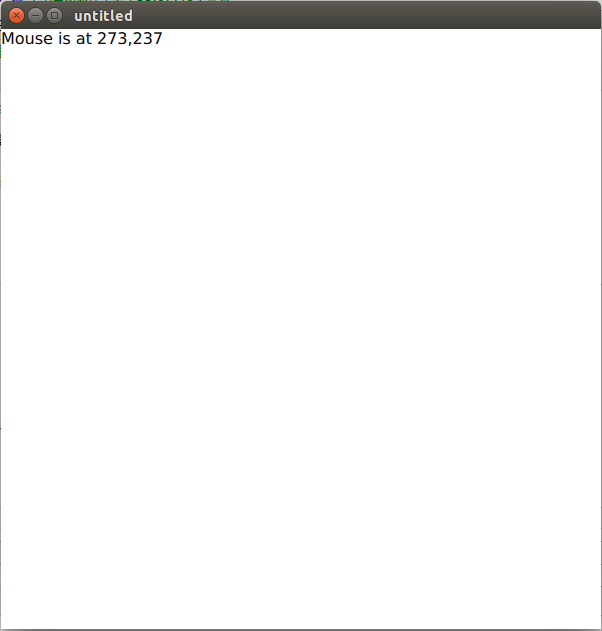
功能是:鼠标点击窗口中的某一个位置,程序中的那行文本便会更新当前鼠标的XY坐标.
运行效果如下图所示:
import QtQuick 2.0

Rectangle {

    width: 300; height: 300

    Text {

        id: myText

        text: 'Click anywhere'

    }

    WorkerScript {

        id: myWorker

        source: "script.js"

        onMessage: myText.text = messageObject.reply

    }

    MouseArea {

        anchors.fill: parent

        onClicked: myWorker.sendMessage({ 'x': mouse.x, 'y': mouse.y })

    }

}
The above worker script specifies a JavaScript file, "script.js", that handles the operations to be performed in the new thread. Here is script.js:
上面的worker script指定了一个javascript文件,"script.js",在这个新线程中处理将被执行的操作.下面就是这个script.js文件
WorkerScript.onMessage = function(message) {

    // ... long-running operations and calculations are done here

    WorkerScript.sendMessage({ 'reply': 'Mouse is at ' + message.x + ',' + message.y })

}
Worker script不能使用.导入语法:
见 Qt Quick Examples - Threading and Threaded ListModel Example.
属性文档:
source : url
这里保存着javascript文件的地址url,里面实现了WorkerScript.onMessage()处理线程操作.
信号文档:
message(jsobject msg)
This signal is emitted when a message msg is received from a worker script in another thread through a call to sendMessage().
通信句柄是onMessage.
方法文档:
sendMessage(jsobject message)
在其他线程中发送给定的消息到script 句柄.其他的worker script句柄可以接收消息,通过onMessage().
消息对象只可以包含一下的值类型:
boolean, number, string
JavaScript objects and arrays
ListModel objects (任何其他类型的 QObject* 是不被允许的.)
所有的对象和数组都被拷贝到message上.除了ListModel对象,在消息中任何被其他线程修改了的发送出来的信息 将不会再原始对象上反映出来.
WorkerScript QML Type的更多相关文章
- PinchArea QML Type
PinchArea类型是在QtQuick 1.1中添加进去的.PinchArea是一个不可见的对象,常用在与一个可见对象连接在一起,为对应的可见对象提供手势操作.enabled属性被用来去设置绑定对象 ...
- PinchEvent QML Type
PinchEvent类型在QtQuick 1.1中被添加进来.center, startCenter, previousCenter属性保存了两个触摸点之间的中心位置.scale and previo ...
- 初学QML之qmlRegisterType
qmlRegisterType 是一个可以将C++实现的类在QML中调用的,连接C++和QML的一个工具 首先来看QtAssistant的介绍 int qmlRegisterType(const ch ...
- QML Object Attributes QML对象属性
QML Object Attributes Every QML object type has a defined set of attributes. Each instance of an obj ...
- qml demo分析(threading-线程任务)
一.关键类说明 qml内置了WorkerScript组件,该组件有一个source属性,可以加载js文件,含有一个名为message的信号,意味着他有一个默认的onMessage槽函数,除此之外他还有 ...
- Qt QML referenceexamples attached Demo hacking
/********************************************************************************************* * Qt ...
- Qt qml的软件架构设计
google: qt qml application architecture 有很多资源. 1 https://www.ics.com/blog/multilayered-architecture- ...
- Import Statements 导入语句
Syntax of an Import Statement 导入语句的语法 An import statement allows clients to tell the engine which mo ...
- 创建一个QT for Android的传感器应用应用程序(摘自笔者2015年将出的《QT5权威指南》,本文为试读篇)
这个手册描述了使用Qt Quick面访的方式在Android和ios设备上开发QtQuick应用程序的方法.我们使用Qt Creator实现一个QtQuick应用程序,这个应用程序基于加速器的值 ...
随机推荐
- 微信开发第6章 通过accesstoken获取用户粉丝列表
上一章我们讲解到open_id获取用户基本信息,那么open_id哪儿来的呢?就是粉丝列表中可以看到的.本次讲解如何获取粉丝列表. 获取粉丝列表 可以查看文档 http://mp.weixin.qq. ...
- shell脚本采用crontab定时备份数据库日志
测试服务器上才用定时脚本备份一个数据库 并打包压缩成tar避免文件过大 脚本如下: 测试服务器的shell backup_mysql.sh #!/bin/bash BASE_PATH=/alidata ...
- 更改Sublimetext3的主题文件,改变某些不喜欢的颜色
使用的主题是Monokai(SL),主题很好看,但是注释和内容选中的颜色看起来跟没有一个样,看起来很淡,所以稍微改一下主题文件的颜色.
- asp.net中利用session对象传递、共享数据[session用法]
下面介绍Asp.net中利用session对象传递.共享数据用法: 1.传递值: 首先定义将一个文本值或单独一个值赋予session,如下: session[“name”]=textbox1.text ...
- 服务器后端开发系列——《实战FastDFS分布式文件系统》[转]
1.FastDFS的配置.部署与API使用解读(1)Get Started with FastDFS 内容:讲解FastDFS的背景.基本原理,并讲述基本的配置.部署和测试的内容. 2.FastDFS ...
- Upstart概述引导方法事件驱动的任务和服务
/********************************************************************* * Author : Samson * Date ...
- NSURLSessionDownloadTask 断点下载
#import "ViewController.h" #import "ASIHTTPRequest.h" #import <AFNetworking/A ...
- PreferenceActivity的使用
PreferenceActivity是一个非常有用的基类,当我们开发Android项目时避免不了选项设置,这些设置习惯用Preference来保存.Android专门为这种Activity提供了便捷的 ...
- yii2 验证码的使用
@see http://www.yiiframework.com/doc-2.0/yii-captcha-captcha.html 以下根据 MVC 模型的顺序来添加代码 1. model 层, 或 ...
- fsdfasfsa
http://www.cnblogs.com/daniel206/archive/2008/01/16/1041729.html using System.IO;using System.Net;us ...