
计算从哪天起应该购买预售火车票.cs
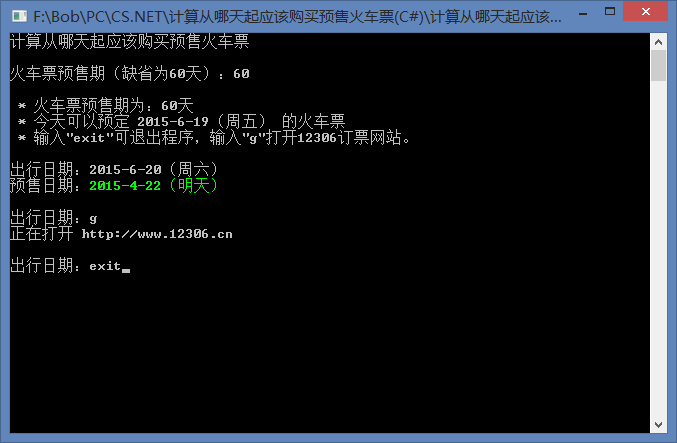
代码直接CSC编译即可。
计算从哪天起应该购买预售火车票.cs
 using System;

 using System.Diagnostics;

 using System.IO;

 class Program

 {

     static ConsoleColor DefaultForegroundColor = Console.ForegroundColor; //保留Console前景色

     static int Main(params string[] args)

     {

         int days = ; //预售天数

         if (args.Length>)

         {

             if(!int.TryParse(args[], out days))

             {

                 ShowHelpAndExit(); //第一个参数错误

             }

             else if(args.Length>)

             {

                 DateTime argsDate; //出行日期

                 if(args[].Trim().Equals("now",StringComparison.OrdinalIgnoreCase))

                 {

                     argsDate = DateTime.Now.AddDays(days - ); //出行日期为now的话,计算出今天可预订的出行日期

                 }

                 else if(!DateTime.TryParse(args[], out argsDate))

                 {

                     ShowHelpAndExit(); //第二个参数错误

                 }

                 Console.WriteLine("\r\n * 火车票预售期为:{0}天\r\n\r\n出行日期:{1}",days, FormatDate(argsDate));

                 OutputBookingDay(days, argsDate); //输出预售日期

                 var paused = true;

                 if(args.Length>)

                 {

                     if(args[].Trim().Equals("nopause",StringComparison.OrdinalIgnoreCase))

                     {

                         paused = false; //第三个参数为 nopause 则不暂停直接退出,用于配合命令提示符

                     }

                 }

                 if(paused)

                 {

                     Console.Write("\r\n按任意键退出...");

                     Console.ReadKey(true);

                 }

                 Environment.Exit(); //正常退出

             }

         }

         else

         {

             Console.WriteLine("计算从哪天起应该购买预售火车票"); //未带参数,输出标题

             Console.WriteLine();

         }

         if(days <= )

         {

             Console.Write("火车票预售期(缺省为60天):");

             var input=Console.ReadLine().Trim();  //手动输入预售期

             inputToExit(input);

             if (!int.TryParse(input, out days)||days<=)

             {

                 days = ; //输入错误,预售期设置为60天

                 ConsoleCursorRelativeLine(-); //光标移动到上一行行首。

                 var point = ConsoleCursorGetCurrentPosition();

                 if(point!=null)

                 {

                     ConsoleCursorFillLines(point.Value.Top,point.Value.Top, ' '); //清除光标所在行的显示字符(用空格填充)

                     Console.Write("火车票预售期(缺省为60天):{0}\r\n", days);

                 }

             }

         }

         Console.WriteLine("\r\n * 火车票预售期为:{0}天",days);

         Console.WriteLine(" * 今天可以预定 {0} 的火车票", FormatDate(DateTime.Now.AddDays(days - )));

         Console.WriteLine(" * 输入\"exit\"可退出程序,输入\"g\"打开12306订票网站。\r\n");

         while(true)

         {

             Console.Write("出行日期:");  //输入出行日期

             var input = Console.ReadLine().Trim();

             inputToExit(input);  //若输入exit则退出

             if(input.Equals("g",StringComparison.OrdinalIgnoreCase))

             {

                 const string web = "http://www.12306.cn";

                 Process.Start(web); //输入g打开12306网站

                 Console.WriteLine("正在打开 {0} ", web);

             }

             else

             {

                 DateTime dest;

                 if(DateTime.TryParse(input, out dest))

                 {

                     ConsoleCursorRelativeLine(-);

                     var point = ConsoleCursorGetCurrentPosition();

                     if(point!=null)

                     {

                         ConsoleCursorFillLines(point.Value.Top,point.Value.Top, ' '); //清除前一行显示字符

                         Console.WriteLine("出行日期:{0}",FormatDate(dest)); //更新输出日期

                     }

                     OutputBookingDay(days, dest);

                 }

                 else

                 {

                     Console.ForegroundColor = ConsoleColor.Red;

                     Console.WriteLine("输入错误"); //显示输出错误

                     Console.ForegroundColor = DefaultForegroundColor;

                     ConsoleCursorRelativeLine(-); //光标向上移动3行

                     var point = ConsoleCursorGetCurrentPosition();

                     if(point!=null)

                     {

                         ConsoleCursorFillLines(point.Value.Top,point.Value.Top+, ' ');

                     }

                 }

             }

             Console.WriteLine();

         }

     }

     static void inputToExit(string input)

     {

         if(input.Equals("exit", StringComparison.OrdinalIgnoreCase))

         {

              Environment.Exit(); //用户退出

         }

     }

     static void ShowHelp()

     {

         //帮助提示

         var appname = Path.GetFileName(Environment.GetCommandLineArgs()[]);

         Console.WriteLine(" * 参数格式:");

         Console.WriteLine("   {0} <火车票预售期>", appname);

         Console.WriteLine("   {0} <火车票预售期> <出行日期> [nopause]", appname);

         Console.WriteLine("   {0} <火车票预售期> now [nopause]", appname);

         Console.WriteLine("\r\n * 例子:预售期60天,查看今天可以预定哪天火车票");

         Console.WriteLine("   {0} 60 now", appname);

         Console.WriteLine("\r\n * 批处理:");

         Console.WriteLine("   {0} 60 now nopause|Find \"出行日期:\"", appname);

         Console.WriteLine();

     }

     static void ShowHelpAndExit(int exitcode)

     {

         ShowHelp(); //显示帮助提示然后按任意键退出

         Console.Write("按任意键退出...");

         Console.ReadKey(true);

         Environment.Exit(exitcode); //返回错误码(errorlevel)

     }

     static string FormatDate(DateTime date)

     {

         ConsoleColor? cc;

         return FormatDate(date, out cc); //格式化日期

     }

     static string[] dayOfWeek = new []{ "周日", "周一", "周二", "周三", "周四", "周五", "周六" };

     static string FormatDate(DateTime date, out ConsoleColor? consoleColor)

     {

         var d = (date.Date - DateTime.Now.Date).Days;

         string tip;

         switch (d)

         {

             case -:

                 tip = "(前天)";

                 break;

             case -:

                 tip = "(昨天)";

                 break;

             case :

                 tip = "(今天)";

                 break;

             case :

                 tip = "(明天)";

                 break;

             case :

                 tip = "(后天)";

                 break;

             default:

                 tip = string.Format("({0})",dayOfWeek[(int)date.DayOfWeek]);

                 break;

         }

         if (d>=)

         {

             consoleColor = ConsoleColor.Green;  //返回建议颜色,下同

         }

         else

         {

             consoleColor = ConsoleColor.Yellow;

         }

         return string.Format("{0:yyyy-M-d}{1}", date, tip);

     }

     static void OutputBookingDay(int days, DateTime destDate)

     {

         var date = destDate.AddDays(-days + );

         ConsoleColor? cc;

         var formattedDest = FormatDate(date, out cc);

         Console.ForegroundColor = DefaultForegroundColor;

         Console.Write("预售日期:"); //用缺省前景色显示“预售日期:”这几个字

         if(cc.HasValue)

         {

             Console.ForegroundColor = cc.Value; //更换前景色

         }

         Console.WriteLine(formattedDest); //按格式输出预售日期

         Console.ForegroundColor = DefaultForegroundColor; //还原缺省前景色

     }

     static bool ConsoleCursorRelativeLine(int rows)

     {

         //将ConsoleCursor操作封装成方法,加入try语句,防止在非控制台下输出造成异常,下同

         try

         {

             var t = Console.CursorTop + rows; //相对行号

             Console.SetCursorPosition(, t); //移动光标到相对行

             return true; //成功

         }

         catch

         {

         }

         return false; //失败

     }

     static bool ConsoleCursorFillLines(int startLine, int endLine, char @char)

     {

         var d = endLine - startLine + ;

         if (d>)

         {

             try

             {

                 var point = ConsoleCursorGetCurrentPosition().Value;

                 Console.SetCursorPosition(, startLine); //光标移动到起始行

                 Console.Write(new string(@char,Console.BufferWidth * d)); //用字符填满指定行数(d)

                 Console.SetCursorPosition(point.Left, point.Top); //返回光标原来的位置

                 return true; //成功

             }

             catch

             {

             }

         }

         return false; //失败

     }

     static Point? ConsoleCursorGetCurrentPosition()

     {

         try

         {

             return new Point(Console.CursorLeft, Console.CursorTop); //返回光标位置

         }

         catch

         {

         }

         return null; //失败

     }

     struct Point

     {

         public int Left;

         public int Top;

         public Point(int left, int top)

         {

             Left = left;

             Top = top;

         }

     }

 }
计算从哪天起应该购买预售火车票.cs的更多相关文章
- doeNET Framework 农历 ChineseLunisolarCalendar
C:\Program Files (x86)\MSBuild\14.0\Bin\csc.exe test.cs # test.cs using System; using System.Diagnos ...
- python爬虫(正则取数据)读取表格内的基金代码后爬取基金最新净值,同时写到对应的表格中,基于最近一次购买净值计算出涨跌幅(名字有点长)
最近基金跌的真够猛,虽说是定投,但大幅度下跌,有时候适当的增加定投数也是降低平均成本的一种方式 每天去看去算太费时间,写了个爬虫,让他自动抓数据后自动计算出来吧 实现逻辑: 1.创建了一个excel表 ...
- flink window的early计算
Tumbing Windows:滚动窗口,窗口之间时间点不重叠.它是按照固定的时间,或固定的事件个数划分的,分别可以叫做滚动时间窗口和滚动事件窗口.Sliding Windows:滑动窗口,窗口之间时 ...
- 数据可视化之分析篇(五)如何使用Power BI计算新客户数量?
https://zhuanlan.zhihu.com/p/65119988 每个企业的经营活动都是围绕着客户而开展的,在服务好老客户的同时,不断开拓新客户是每个企业的经营目标之一. 开拓新客户必然要付 ...
- 数据可视化之分析篇(二)Power BI 数据分析:客户购买频次分布
https://zhuanlan.zhihu.com/p/100070260 商业数据分析通常都可以简化为对数据进行筛选.分组.汇总的过程,本文通过一个实例来看看PowerBI是如何快速完成整个过程的 ...
- 数据可视化之PowerQuery篇(十二)客户购买频次分布
https://zhuanlan.zhihu.com/p/100070260 商业数据分析通常都可以简化为对数据进行筛选.分组.汇总的过程,本文通过一个实例来看看PowerBI是如何快速完成整个过程的 ...
- 数据可视化之PowerQuery篇(十五)如何使用Power BI计算新客户数量?
https://zhuanlan.zhihu.com/p/65119988 每个企业的经营活动都是围绕着客户而开展的,在服务好老客户的同时,不断开拓新客户是每个企业的经营目标之一. 开拓新客户必然要付 ...
- 大数据学习day23-----spark06--------1. Spark执行流程(知识补充:RDD的依赖关系)2. Repartition和coalesce算子的区别 3.触发多次actions时,速度不一样 4. RDD的深入理解(错误例子,RDD数据是如何获取的)5 购物的相关计算
1. Spark执行流程 知识补充:RDD的依赖关系 RDD的依赖关系分为两类:窄依赖(Narrow Dependency)和宽依赖(Shuffle Dependency) (1)窄依赖 窄依赖指的是 ...
- 如何一步一步用DDD设计一个电商网站(六)—— 给购物车加点料,集成售价上下文
阅读目录 前言 如何在一个项目中实现多个上下文的业务 售价上下文与购买上下文的集成 结语 一.前言 前几篇已经实现了一个最简单的购买过程,这次开始往这个过程中增加一些东西.比如促销.会员价等,在我们的 ...
随机推荐
- Struts2.0 封装请求数据和拦截器介绍
1. Struts2 框架中使用 Servlet 的 API 来操作数据 1.1 完全解耦合的方式 Struts2 框架中提供了一个 ActionContext 类,该类中提供了一些方法: stati ...
- 解决chrome在ubuntu+root模式下打不开的问题
chrome在ubuntu root模式下打不开 双击图标,chrome打不开了: 解决办法: 查看一下打开chrome浏览器的命令是什么,右键properties 发现是chromium-brows ...
- screenX clientX pageX区别
screenX:鼠标位置相对于用户屏幕水平偏移量,而screenY也就是垂直方向的,此时的参照点也就是原点是屏幕的左上角. clientX:跟screenX相比就是将参照点改成了浏览器内容区域的左上角 ...
- corethink功能模块探索开发(十六)后台搜索功能
效果图: 代码很简单,就是添加搜索框,搜索字段,在初始化页面查询的时候添加查询条件. 1.添加搜索框 添加到删除按钮后边. ->setSearch('请输入设备名称/MAC/宿舍号', U('i ...
- Digital Audio - Creating a WAV (RIFF) file
Abstract:This tutorial covers the creation of a WAV (RIFF) audio file. It covers bit size, sample ra ...
- 知乎Live总结-重复nature文章笔记Single-cell
来自知乎Live-孟浩巍 1.文章重要技术及图讲解 首先在转录组RNA-seq中,有基因表达差异.基因融合.可变剪切.RNA单点突变. 在基因组中,单点变异.结构变异,CNV变异(拷贝数变异) 三类基 ...
- java反射基础知识(四)反射应用实践
反射基础 p.s: 本文需要读者对反射机制的API有一定程度的了解,如果之前没有接触过的话,建议先看一下官方文档的Quick Start. 在应用反射机制之前,首先我们先来看一下如何获取一个对象对应的 ...
- Delphi 正则表达式之TPerlRegEx 类的属性与方法(1): 查找
Delphi 正则表达式之TPerlRegEx 类的属性与方法(1): 查找 //查找是否存在 var reg: TPerlRegEx; begin reg := TPerlRegEx.Cre ...
- cf100989b
http://codeforces.com/gym/100989/my B. LCS (B) time limit per test 0.25 seconds memory limit per tes ...
- linux centos7 安装zookeeper
linux 系统下 zookeeper 安装教程 1.下载安装包 1)进入安装目录 cd /home/install/ 2)下载 wget http://mirror.bit.edu.cn/apach ...