
srpingboot web - 启动(3) 监听器
接上一篇
一. getRunListeners()
在run() 方法中调用了 getRunListeners(args) 方法, 先看一下这个方法干了什么
private SpringApplicationRunListeners getRunListeners(String[] args) {

    Class<?>[] types = new Class<?>[] { SpringApplication.class, String[].class };

    return new SpringApplicationRunListeners(logger, getSpringFactoriesInstances(

            SpringApplicationRunListener.class, types, this, args));

}
加载配置 spring.factories 中的配置,
# Run Listeners

org.springframework.boot.SpringApplicationRunListener=\

org.springframework.boot.context.event.EventPublishingRunListener
然后创建配置中的 EventPublishingRunListener , 封装到 SpringApplicationRunListeners 类中的 this.listeners 属性中.
1. 创建 EventPublishingRunListener
public EventPublishingRunListener(SpringApplication application, String[] args) {

    this.application = application;

    this.args = args;

    this.initialMulticaster = new SimpleApplicationEventMulticaster();

    for (ApplicationListener<?> listener : application.getListeners()) {

        this.initialMulticaster.addApplicationListener(listener);

    }

}
1. 这里创建了一个多播器: SimpleApplicationEventMulticaster
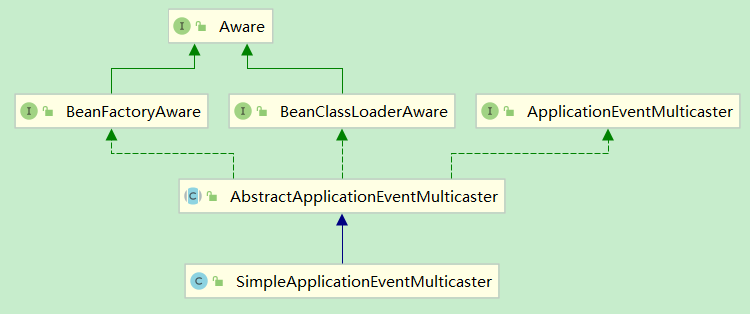
2. 将容器中10个监听器放入多播器中.
上一篇提到过, 容器中加载了10个监听器, 放在 this.listeners 属性中.
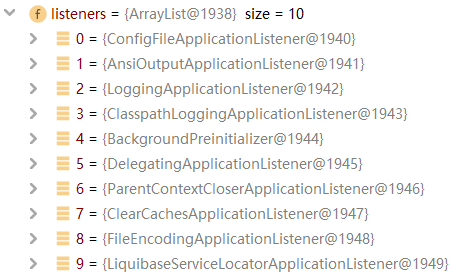
这里的顺序与配置的读取顺序不同, 是经过排序过的.
addApplicationListener()
@Override

public void addApplicationListener(ApplicationListener<?> listener) {

    synchronized (this.retrievalMutex) {

        // Explicitly remove target for a proxy, if registered already,

        // in order to avoid double invocations of the same listener.

        Object singletonTarget = AopProxyUtils.getSingletonTarget(listener);

        if (singletonTarget instanceof ApplicationListener) {

            this.defaultRetriever.applicationListeners.remove(singletonTarget);

        }

        this.defaultRetriever.applicationListeners.add(listener);

        this.retrieverCache.clear();

    }

}
ListenerRetriever 是 AbstractApplicationEventMulticaster 的一个内部类. 所以监听器是放在 一个内部类的 applicationListeners 属性中:
public final Set<ApplicationListener<?>> applicationListeners;
二. listeners.starting()
public void starting() {

    for (SpringApplicationRunListener listener : this.listeners) {

        listener.starting();

    }

}
此处的 this.listeners 中的 this -> SpringApplicationRunListeners .
所以调用的是 EventPublishingRunListener的starting() 方法.
//EventPublishingRunListener.java

@Override

public void starting() {
   //创建Application的启动事件, 并进行多波

    this.initialMulticaster.multicastEvent(

            new ApplicationStartingEvent(this.application, this.args));

}
看一下 multicastEvent 方法:
//SimpleApplicationEventMulticaster.java

@Override

public void multicastEvent(ApplicationEvent event) {

    multicastEvent(event, resolveDefaultEventType(event));

}

@Override

public void multicastEvent(final ApplicationEvent event, @Nullable ResolvableType eventType) {

    ResolvableType type = (eventType != null ? eventType : resolveDefaultEventType(event));
  // getApplicationListeners 会对监听器进行过滤

    for (final ApplicationListener<?> listener : getApplicationListeners(event, type)) {
     //获取线程池, 暂时为null

        Executor executor = getTaskExecutor();

        if (executor != null) {
        //异步发送事件

            executor.execute(() -> invokeListener(listener, event));

        }

        else {
       //同步发送事件

            invokeListener(listener, event);

        }

    }

}
getApplicationListeners()
protected boolean supportsEvent(

        ApplicationListener<?> listener, ResolvableType eventType, @Nullable Class<?> sourceType) {

    GenericApplicationListener smartListener = (listener instanceof GenericApplicationListener ?

            (GenericApplicationListener) listener : new GenericApplicationListenerAdapter(listener));

    return (smartListener.supportsEventType(eventType) && smartListener.supportsSourceType(sourceType));

}
1. 判断监听器是否为 GenericApplicationListener 类型
|-> 如果是, 则调用其 supportsEventType() 和 supportsSourceType() , 且同时满足, 才可以. 否则会被过滤掉
|-> 如果不是, 则 使用GenericApplicationListenerAdapter 进行适配转换, 然后 调用上面两个方法, 同时满足, 才可以. 否则会被过滤掉
满足条件的有4个监听器:
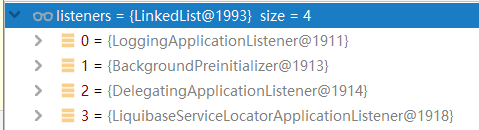
此处看一下 LoggingApplicationListener 的两个方法执行:
1. supportsEventType()
private static final Class<?>[] EVENT_TYPES = { ApplicationStartingEvent.class,

            ApplicationEnvironmentPreparedEvent.class, ApplicationPreparedEvent.class,

            ContextClosedEvent.class, ApplicationFailedEvent.class };

@Override

public boolean supportsEventType(ResolvableType resolvableType) {

    return isAssignableFrom(resolvableType.getRawClass(), EVENT_TYPES);

}

@Override

public boolean supportsSourceType(Class<?> sourceType) {

    return isAssignableFrom(sourceType, SOURCE_TYPES);

}

private boolean isAssignableFrom(Class<?> type, Class<?>... supportedTypes) {

    if (type != null) {

        for (Class<?> supportedType : supportedTypes) {

            if (supportedType.isAssignableFrom(type)) {

                return true;

            }

        }

    }

    return false;

}
可以看到, 这里他支持5中类型, 其中正好就有当前发布的 ApplicationStartingEvent 事件.
2. supportsSourceType()
private static final Class<?>[] SOURCE_TYPES = { SpringApplication.class,

            ApplicationContext.class };

@Override

public boolean supportsSourceType(Class<?> sourceType) {
  //这里调用的还是上面的那个方法, 只是传入参数不同

    return isAssignableFrom(sourceType, SOURCE_TYPES);

}
invokeListener()
protected void invokeListener(ApplicationListener<?> listener, ApplicationEvent event) {
  //不管 errorhandler 是否为null, 都会调用 doInvokeListener 方法

    ErrorHandler errorHandler = getErrorHandler();

    if (errorHandler != null) {

        try {

            doInvokeListener(listener, event);

        }

        catch (Throwable err) {

            errorHandler.handleError(err);

        }

    }

    else {

        doInvokeListener(listener, event);

    }

}

private void doInvokeListener(ApplicationListener listener, ApplicationEvent event) {

    try {

        listener.onApplicationEvent(event);

    }

    catch (ClassCastException ex) {

        String msg = ex.getMessage();

        if (msg == null || matchesClassCastMessage(msg, event.getClass().getName())) {

            // Possibly a lambda-defined listener which we could not resolve the generic event type for

            // -> let's suppress the exception and just log a debug message.

            Log logger = LogFactory.getLog(getClass());

            if (logger.isDebugEnabled()) {

                logger.debug("Non-matching event type for listener: " + listener, ex);

            }

        }

        else {

            throw ex;

        }

    }

}
这里就是调用 监听器的 onApplicationEvent 方法, 并传入要多波的事件.
这里仍然来看 LoggingApplicationListener 的 onApplicationEvent 方法:
@Override

public void onApplicationEvent(ApplicationEvent event) {
  //Application启动

    if (event instanceof ApplicationStartingEvent) {

        onApplicationStartingEvent((ApplicationStartingEvent) event);

    }
  //环境准备完成

    else if (event instanceof ApplicationEnvironmentPreparedEvent) {

        onApplicationEnvironmentPreparedEvent(

                (ApplicationEnvironmentPreparedEvent) event);

    }
  //Application 准备完

    else if (event instanceof ApplicationPreparedEvent) {

        onApplicationPreparedEvent((ApplicationPreparedEvent) event);

    }
  //容器关闭

    else if (event instanceof ContextClosedEvent && ((ContextClosedEvent) event)

            .getApplicationContext().getParent() == null) {

        onContextClosedEvent();

    }
  //Application启动失败

    else if (event instanceof ApplicationFailedEvent) {

        onApplicationFailedEvent();

    }

}
不同的事件进来, 执行不同的方法.
srpingboot web - 启动(3) 监听器的更多相关文章
- springboot web - 启动(2) run()
接上一篇 在创建 SpringApplication 之后, 调用了 run() 方法. public ConfigurableApplicationContext run(String... arg ...
- WEB启动时就加载servlet的dopost方法
web启动的时候可以加载servlet的init方法,无法加载dopost方法,如果你需要什么内容在启动的时候执行,可以将内容放到init方法里面,dopost方法,是在客户端使用post请求的时候才 ...
- 从web启动winform程序
最近有个客户提出想从网站上启动一个客户端的程序,研究了下,实现方法如下: 1. 注入注册表 try { string appPath ...
- Jenkins新建节点,启动方式没有“通过Java Web启动代理”选项怎么办?
在Jenkins中,打开“系统管理”→“管理节点”→“新建节点”页面时,“启动方式”选项没有“通过Java Web启动代理”,怎么办? 打开“系统管理”,进入“全局安全配置”页面. 1. “JNLP代 ...
- Jenkins新建节点找不到通过Java web启动代理?
参考博客:Jenkins新建节点,启动方式没有“通过Java Web启动代理”选项怎么办? 在Jenkins中,打开“系统管理”→“管理节点”→“新建节点”页面时,“启动方式”选项没有“通过Java ...
- 启动oracle11监听器错误
启动oracle11监听器错误:本地计算机上的OracleOraDb11g_home1TNSListener服务启动后又停止了解决方案 . 关键字:启动oracle10监听器错误:本地计算机上的Ora ...
- 启动web项目,监听器、过滤器、拦截器启动顺序
启动顺序:监听器 > 过滤器 > 拦截器 记忆技巧:接到命令,监听电报,过滤敌情,拦截行动.
- web.xml中监听器配置
<!-- 监听器的配置:监听器配置完以后,应用系统在启动的时候就会开启这些监听器. 监听器的理解:监听器好比一个卫兵,卫兵一直站在那里等待长官的命令,当卫兵收到长官的命令以后,立即执行 之前已经 ...
- Web中的监听器【Listener】
Servlet监听器:Servlet规范中定义的一种特殊类,它用于监听Web应用程序中的ServletContext.HttpSession和ServletRequest等域对象的创建与销毁事件,以及 ...
随机推荐
- python学习记录(四)
0828--https://www.cnblogs.com/fnng/archive/2013/04/18/3029807.html 0828--https://www.cnblogs.com/fnn ...
- Codeforces 1092 D2 Great Vova Wall (Version 2) (栈)
题意: 给一排砖,每列的高度$a_i$,问是否可以放1*2的砖,使得n列高度一样,砖只能横着放 思路: 每两个相邻的高度相同的砖可以变成大于等于它的高度的任意高度 所以像这样的 123321 是不满足 ...
- Go语言实现:【剑指offer】合并两个排序的链表
该题目来源于牛客网<剑指offer>专题. 输入两个单调递增的链表,输出两个链表合成后的链表,当然我们需要合成后的链表满足单调不减规则. Go语言实现: //递归 func merge(l ...
- 罗德里格斯旋转公式(Rodrigues' rotation formula)推导
本文综合了几个相关的维基百科,加了点自己的理解,从比较基础的向量投影和叉积讲起,推导出罗德里格斯旋转公式.公式比较繁杂,如有错误,欢迎评论区指出. 对于向量的三维旋转问题,给定旋转轴和旋转角度,用罗德 ...
- (转载)Linux平台下安装 python 模块包
https://blog.csdn.net/aiwangtingyun/article/details/79121145 一.安装Python Windows平台下: 进入Python官网下载页面下载 ...
- 《自拍教程19》ffmpeg_音视频图像转码工具
ffmpeg命令介绍 ffmpeg.exe(linux/imac一般不带后缀,ffmpeg), 是一款音视频编解码的命令行工具软件, 常用于多媒体测试的文件制作与转码. 我们常用的:格式工厂,Medi ...
- Ts环境搭建
一.ts环境搭建 安装node.js,用dos命令npm全局安装typescripe包环境 进入vscode官网下载zip文件解压后使用code.exe
- webpack nodejs npm关系
nodejs是js后端运行平台,可以把它看成java体系中对应的jdk,是三个里面最基础的.npm是nodejs的包管理工具,可以把它看成maven中包依赖管理那部分.webpack是前端工程化打包工 ...
- WinFrom 在Devexpress里用GridControl和DataNavigtor进行分页
1,分页嘛先要有个SQL 程序才能写下去 先提供下SQL的思路,对于分页的SQL我之前帖子有介绍,就不一一介绍了 select top pageSize * --显示数量 from (select r ...
- css3新增边框、阴影、边框、背景、文本、字体
css3和css有什么区别?简单来讲css3是css(层叠样式表)技术的升级版本,css3新特征有很多,例如圆角效果.图形化边界.块阴影与文字阴影.使用RGBA实现透明效果.渐变效果.使用@Font- ...