
[TensorFlow] Introduction to TensorFlow Datasets and Estimators
Datasets and Estimators are two key TensorFlow features you should use:
- Datasets: The best practice way of creating input pipelines (that is, reading data into your program).
- Estimators: A high-level way to create TensorFlow models. Estimators include pre-made models for common machine learning tasks, but you can also use them to create your own custom models.
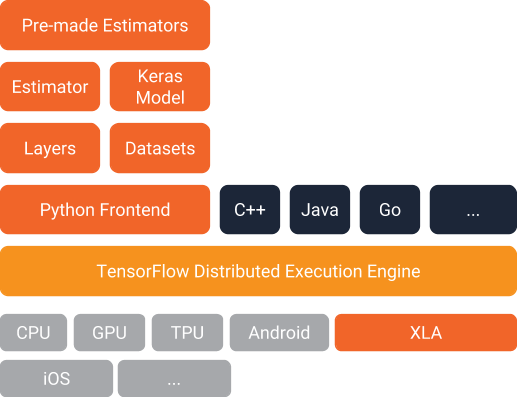
Below you can see how they fit in the TensorFlow architecture. Combined, they offer an easy way to create TensorFlow models and to feed data to them:
Our Example Model
To explore these features we're going to build a model and show you relevant code snippets. The complete code is available here, including instructions for getting the training and test files. Note that the code was written to demonstrate how Datasets and Estimators work functionally, and was not optimized for maximum performance.
The trained model categorizes Iris flowers based on four botanical features (sepallength, sepal width, petal length, and petal width). So, during inference, you can provide values for those four features and the model will predict that the flower is one of the following three beautiful variants:

We're going to train a Deep Neural Network Classifier with the below structure. All input and output values will be float32, and the sum of the output values will be 1 (as we are predicting the probability for each individual Iris type):
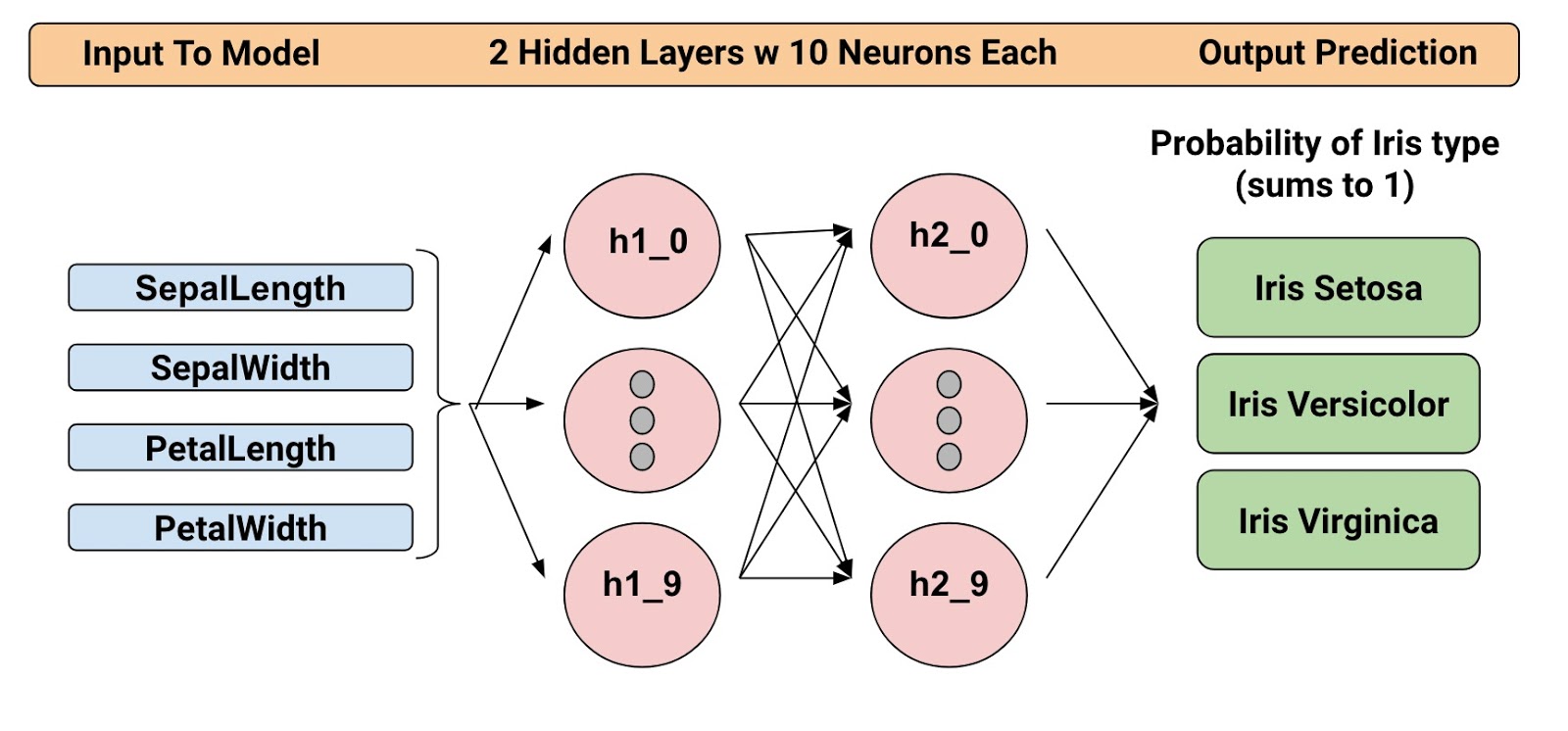
For example, an output result might be 0.05 for Iris Setosa, 0.9 for Iris Versicolor, and 0.05 for Iris Virginica, which indicates a 90% probability that this is an Iris Versicolor.
Alright! Now that we have defined the model, let's look at how we can use Datasets and Estimators to train it and make predictions.
Introducing The Datasets
Since release 1.4, Datasets is a new way to create input pipelines to TensorFlow models. This API is much more performant than using feed_dict or the queue-based pipelines, and it's cleaner and easier to use.
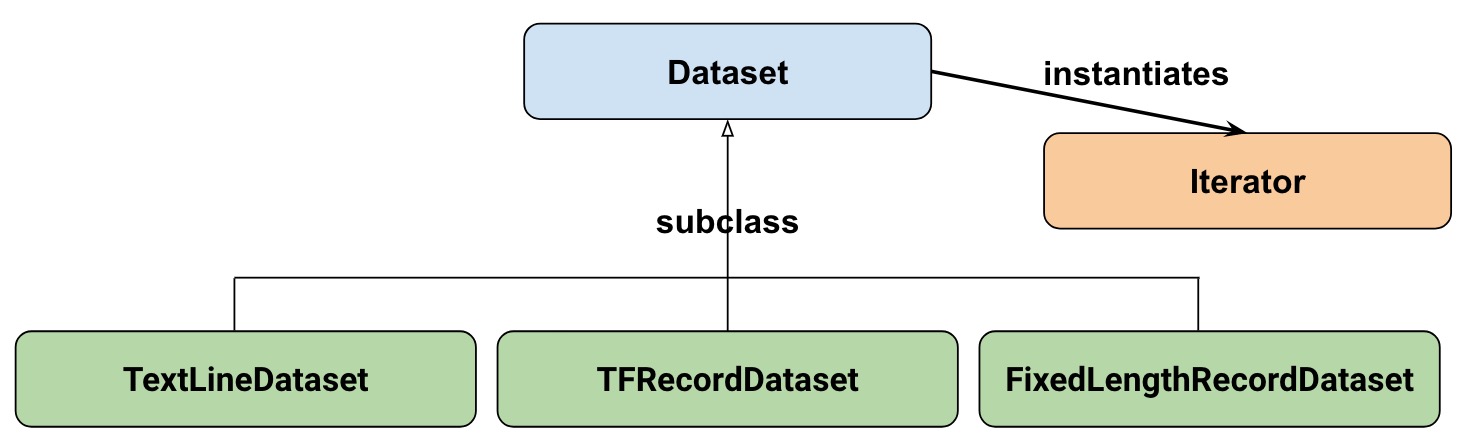
At a high-level, the Datasets consists of the following classes:
Where:
- Dataset: Base class containing methods to create and transform datasets. Also allows you initialize a dataset from data in memory, or from a Python generator.
- TextLineDataset: Reads lines from text files.
- TFRecordDataset: Reads records from TFRecord files.
- FixedLengthRecordDataset: Reads fixed size records from binary files.
- Iterator: Provides a way to access one dataset element at a time.
Our dataset
To get started, let's first look at the dataset we will use to feed our model. We'll read data from a CSV file, where each row will contain five values-the four input values, plus the label:

The label will be:
- 0 for Iris Setosa
- 1 for Versicolor
- 2 for Virginica.
Representing our dataset
To describe our dataset, we first create a list of our features:
feature_names = [

    'SepalLength',

    'SepalWidth',

    'PetalLength',

    'PetalWidth']
When we train our model, we'll need a function that reads the input file and returns the feature and label data. Estimators requires that you create a function of the following format:
def input_fn():

    ...<code>...

    return ({ 'SepalLength':[values], ..<etc>.., 'PetalWidth':[values] },

            [IrisFlowerType])
The return value must be a two-element tuple organized as follows: :
- The first element must be a dict in which each input feature is a key, and then a list of values for the training batch.
- The second element is a list of labels for the training batch.
Since we are returning a batch of input features and training labels, it means that all lists in the return statement will have equal lengths. Technically speaking, whenever we referred to "list" here, we actually mean a 1-d TensorFlow tensor.
To allow simple reuse of the input_fn we're going to add some arguments to it. This allows us to build input functions with different settings. The arguments are pretty straightforward:
file_path: The data file to read.perform_shuffle: Whether the record order should be randomized.repeat_count: The number of times to iterate over the records in the dataset. For example, if we specify 1, then each record is read once. If we specify None, iteration will continue forever.
Here's how we can implement this function using the Dataset API. We will wrap this in an "input function" that is suitable when feeding our Estimator model later on:
def my_input_fn(file_path, perform_shuffle=False, repeat_count=1):

   def decode_csv(line):

       parsed_line = tf.decode_csv(line, [[0.], [0.], [0.], [0.], [0]])

       label = parsed_line[-1:] # Last element is the label

       del parsed_line[-1] # Delete last element

       features = parsed_line # Everything (but last element) are the features

       d = dict(zip(feature_names, features)), label

       return d

   dataset = (tf.data.TextLineDataset(file_path) # Read text file

       .skip(1) # Skip header row

       .map(decode_csv)) # Transform each elem by applying decode_csv fn

   if perform_shuffle:

       # Randomizes input using a window of 256 elements (read into memory)

       dataset = dataset.shuffle(buffer_size=256)

   dataset = dataset.repeat(repeat_count) # Repeats dataset this # times

   dataset = dataset.batch(32)  # Batch size to use

   iterator = dataset.make_one_shot_iterator()

   batch_features, batch_labels = iterator.get_next()

   return batch_features, batch_labels
Note the following: :
TextLineDataset: The Dataset API will do a lot of memory management for you when you're using its file-based datasets. You can, for example, read in dataset files much larger than memory or read in multiple files by specifying a list as argument.shuffle: Reads buffer_size records, then shuffles (randomizes) their order.map: Calls thedecode_csvfunction with each element in the dataset as an argument (since we are using TextLineDataset, each element will be a line of CSV text). Then we applydecode_csvto each of the lines.decode_csv: Splits each line into fields, providing the default values if necessary. Then returns a dict with the field keys and field values. The map function updates each elem (line) in the dataset with the dict.
That's an introduction to Datasets! Just for fun, we can now use this function to print the first batch:
next_batch = my_input_fn(FILE, True) # Will return 32 random elements

# Now let's try it out, retrieving and printing one batch of data.

# Although this code looks strange, you don't need to understand

# the details.

with tf.Session() as sess:

    first_batch = sess.run(next_batch)

print(first_batch)

# Output

({'SepalLength': array([ 5.4000001, ...<repeat to 32 elems>], dtype=float32),

  'PetalWidth': array([ 0.40000001, ...<repeat to 32 elems>], dtype=float32),

  ...

 },

 [array([[2], ...<repeat to 32 elems>], dtype=int32) # Labels

)
That's actually all we need from the Dataset API to implement our model. Datasets have a lot more capabilities though; please see the end of this post where we have collected more resources.
Introducing Estimators
Estimators is a high-level API that reduces much of the boilerplate code you previously needed to write when training a TensorFlow model. Estimators are also very flexible, allowing you to override the default behavior if you have specific requirements for your model.
There are two possible ways you can build your model using Estimators:
- Pre-made Estimator - These are predefined estimators, created to generate a specific type of model. In this blog post, we will use the DNNClassifier pre-made estimator.
- Estimator (base class) - Gives you complete control of how your model should be created by using a model_fn function. We will cover how to do this in a separate blog post.
Here is the class diagram for Estimators:

We hope to add more pre-made Estimators in future releases.
As you can see, all estimators make use of input_fn that provides the estimator with input data. In our case, we will reuse my_input_fn, which we defined for this purpose.
The following code instantiates the estimator that predicts the Iris flower type:
# Create the feature_columns, which specifies the input to our model.

# All our input features are numeric, so use numeric_column for each one.

feature_columns = [tf.feature_column.numeric_column(k) for k in feature_names]

# Create a deep neural network regression classifier.

# Use the DNNClassifier pre-made estimator

classifier = tf.estimator.DNNClassifier(

   feature_columns=feature_columns, # The input features to our model

   hidden_units=[10, 10], # Two layers, each with 10 neurons

   n_classes=3,

   model_dir=PATH) # Path to where checkpoints etc are stored
We now have a estimator that we can start to train.
Training the model
Training is performed using a single line of TensorFlow code:
# Train our model, use the previously function my_input_fn

# Input to training is a file with training example

# Stop training after 8 iterations of train data (epochs)

classifier.train(

   input_fn=lambda: my_input_fn(FILE_TRAIN, True, 8))
But wait a minute... what is this "lambda: my_input_fn(FILE_TRAIN, True, 8)" stuff? That is where we hook up Datasets with the Estimators! Estimators needs data to perform training, evaluation, and prediction, and it uses the input_fn to fetch the data. Estimators require an input_fn with no arguments, so we create a function with no arguments using lambda, which calls our input_fn with the desired arguments: the file_path, shuffle setting, and repeat_count. In our case, we use our my_input_fn,passing it:
FILE_TRAIN, which is the training data file.True, which tells the Estimator to shuffle the data.8, which tells the Estimator to and repeat the dataset 8 times.
Evaluating Our Trained Model
Ok, so now we have a trained model. How can we evaluate how well it's performing? Fortunately, every Estimator contains an evaluate method:
# Evaluate our model using the examples contained in FILE_TEST

# Return value will contain evaluation_metrics such as: loss & average_loss

evaluate_result = estimator.evaluate(

   input_fn=lambda: my_input_fn(FILE_TEST, False, 4)

print("Evaluation results")

for key in evaluate_result:

   print("   {}, was: {}".format(key, evaluate_result[key]))
In our case, we reach an accuracy of about ~93%. There are various ways of improving this accuracy, of course. One way is to simply run the program over and over. Since the state of the model is persisted (in model_dir=PATH above), the model will improve the more iterations you train it, until it settles. Another way would be to adjust the number of hidden layers or the number of nodes in each hidden layer. Feel free to experiment with this; please note, however, that when you make a change, you need to remove the directory specified in model_dir=PATH, since you are changing the structure of the DNNClassifier.
Making Predictions Using Our Trained Model
And that's it! We now have a trained model, and if we are happy with the evaluation results, we can use it to predict an Iris flower based on some input. As with training, and evaluation, we make predictions using a single function call:
# Predict the type of some Iris flowers.

# Let's predict the examples in FILE_TEST, repeat only once.

predict_results = classifier.predict(

    input_fn=lambda: my_input_fn(FILE_TEST, False, 1))

print("Predictions on test file")

for prediction in predict_results:

   # Will print the predicted class, i.e: 0, 1, or 2 if the prediction

   # is Iris Sentosa, Vericolor, Virginica, respectively.

   print prediction["class_ids"][0]
Making Predictions on Data in Memory
The preceding code specified FILE_TEST to make predictions on data stored in a file, but how could we make predictions on data residing in other sources, for example, in memory? As you may guess, this does not actually require a change to our predict call. Instead, we configure the Dataset API to use a memory structure as follows:
# Let create a memory dataset for prediction.

# We've taken the first 3 examples in FILE_TEST.

prediction_input = [[5.9, 3.0, 4.2, 1.5],  # -> 1, Iris Versicolor

                    [6.9, 3.1, 5.4, 2.1],  # -> 2, Iris Virginica

                    [5.1, 3.3, 1.7, 0.5]]  # -> 0, Iris Sentosa

def new_input_fn():

   def decode(x):

       x = tf.split(x, 4) # Need to split into our 4 features

       # When predicting, we don't need (or have) any labels

       return dict(zip(feature_names, x)) # Then build a dict from them

   # The from_tensor_slices function will use a memory structure as input

   dataset = tf.data.Dataset.from_tensor_slices(prediction_input)

   dataset = dataset.map(decode)

   iterator = dataset.make_one_shot_iterator()

   next_feature_batch = iterator.get_next()

   return next_feature_batch, None # In prediction, we have no labels

# Predict all our prediction_input

predict_results = classifier.predict(input_fn=new_input_fn)

# Print results

print("Predictions on memory data")

for idx, prediction in enumerate(predict_results):

   type = prediction["class_ids"][0] # Get the predicted class (index)

   if type == 0:

       print("I think: {}, is Iris Sentosa".format(prediction_input[idx]))

   elif type == 1:

       print("I think: {}, is Iris Versicolor".format(prediction_input[idx]))

   else:

       print("I think: {}, is Iris Virginica".format(prediction_input[idx])
Dataset.from_tensor_slides() is designed for small datasets that fit in memory. When using TextLineDataset as we did for training and evaluation, you can have arbitrarily large files, as long as your memory can manage the shuffle buffer and batch sizes.
Freebies
Using a pre-made Estimator like DNNClassifier provides a lot of value. In addition to being easy to use, pre-made Estimators also provide built-in evaluation metrics, and create summaries you can see in TensorBoard. To see this reporting, start TensorBoard from your command-line as follows:
# Replace PATH with the actual path passed as model_dir argument when the

# DNNRegressor estimator was created.

tensorboard --logdir=PATH
The following diagrams show some of the data that TensorBoard will provide:

Summary
In this this blogpost, we explored Datasets and Estimators. These are important APIs for defining input data streams and creating models, so investing time to learn them is definitely worthwhile!
For more details, be sure to check out
- The complete source code used in this blogpost is available here.
- Josh Gordon's excellent Jupyter notebook on the matter. Using that notebook, you will learn how to run a more extensive example that has many different types of features (inputs). As you recall from our model, we just used numeric features.
- For Datasets, see a new chapter in the Programmer's guide and reference documentation.
- For Estimators, see a new chapter in the Programmer's guide and reference documentation.
But it doesn't stop here. We will shortly publish more posts that describe how these APIs work, so stay tuned for that!
Until then, Happy TensorFlow coding!
转: https://developers.googleblog.com/2017/09/introducing-tensorflow-datasets.html
[TensorFlow] Introduction to TensorFlow Datasets and Estimators的更多相关文章
- 吴恩达课后习题第二课第三周:TensorFlow Introduction
目录 第二课第三周:TensorFlow Introduction Introduction to TensorFlow 1 - Packages 1.1 - Checking TensorFlow ...
- Introduction to TensorFlow
Lecture note 1: Introduction to TensorFlow Why TensorFlow TensorFlow was originally created by resea ...
- 移动端目标识别(3)——使用TensorFlow Lite将tensorflow模型部署到移动端(ssd)之Running on mobile with TensorFlow Lite (写的很乱,回头更新一个简洁的版本)
承接移动端目标识别(2) 使用TensorFlow Lite在移动设备上运行 在本节中,我们将向您展示如何使用TensorFlow Lite获得更小的模型,并允许您利用针对移动设备优化 ...
- 移动端目标识别(1)——使用TensorFlow Lite将tensorflow模型部署到移动端(ssd)之TensorFlow Lite简介
平时工作就是做深度学习,但是深度学习没有落地就是比较虚,目前在移动端或嵌入式端应用的比较实际,也了解到目前主要有 caffe2,腾讯ncnn,tensorflow,因为工作用tensorflow比较多 ...
- 移动端目标识别(2)——使用TENSORFLOW LITE将TENSORFLOW模型部署到移动端(SSD)之TF Lite Developer Guide
TF Lite开发人员指南 目录: 1 选择一个模型 使用一个预训练模型 使用自己的数据集重新训练inception-V3,MovileNet 训练自己的模型 2 转换模型格式 转换tf.GraphD ...
- TensorFlow+Keras 03 TensorFlow 与 Keras 介绍
1 TensorFlow 架构图 1.1 处理器 TensorFlow 可以在CPU.GPU.TPU中执行 1.2 平台 TensorFlow 具备跨平台能力,Windows .Linux.Andro ...
- [Tensorflow] **Android Meets TensorFlow
TensorFlow Dev Summit 2017 From: Android Meets TensorFlow: How to Accelerate Your App with AI (Googl ...
- [Tensorflow] Practice - The Tensorflow Way
该系列主要是<Tensorflow 实战Google深度学习框架 >阅读笔记:有了Cookbook的热身后,以这本书作为基础形成个人知识体系. Ref: [Tensorflow] Cook ...
- 使用TensorFlow Serving优化TensorFlow模型
使用TensorFlow Serving优化TensorFlow模型 https://www.tensorflowers.cn/t/7464 https://mp.weixin.qq.com/s/qO ...
随机推荐
- linux学习第九天 (Linux就该这么学)
今天讲了raid0 至少两块盘串联在一起,读写性能提升,但不具备数据备份和错误修复能力,RAID1把两块盘绑定,在写入数据时,同时写入到多块硬盘设备,raid5推荐使用,10推荐使用 LVM,今天是 ...
- cpp 区块链模拟示例(三)新基本原形工程的建立
/* 作 者: itdef 欢迎转帖 请保持文本完整并注明出处 技术博客 http://www.cnblogs.com/itdef/ 技术交流群 群号码:432336863欢迎c c++ window ...
- 转载-js如何设置网页横屏和竖屏切换
<!DOCTYPE html> <html> <head> <meta http-equiv="Content-Type" content ...
- mysql---select的五种子句学习(where、group by、having、order by、limit)
mysql---select的五种子句学习(where.group by.having.order by.limit) 分类: Mysql学习2012-09-27 16:14 1533人阅读 评论 ...
- [GO]简单的http服务器和客户端的实现
package main import ( "net/http" "fmt" ) func Hello(w http.ResponseWriter, r *ht ...
- 【部署问题】解决Nginx: [error] open() "/usr/local/Nginx/logs/Nginx.pid" failed(2:No such file or directory)
问题:环境问题 解决方法: /usr/local/nginx/sbin/nginx -c /usr/local/nginx/conf/nginx.conf 使用nginx -c的参数指定nginx.c ...
- 32 bit 与 64 bit 程序(1)如何识别?
一, 怎样判断一个exe可执行程序是32位的还是64位的? 简单的方法: 一般来说在64位的windows7下,打开任务管理器可以知道哪些程序是32位的哪些是64位的,但是因为自己的电脑是64位的wi ...
- Navicat for MYSQL 断网时本地连接无法打开,2005错误
Navicat for MYSQL 断网时本地连接无法打开,2005错误 NO1 提示下图: NO2 解决方法: (1)选中本地连接,右键 连接属性 (2) 将 主机名或IP地址 这一栏改为 127. ...
- js的微观性能
概述 js的微观性能是指js的某一个表达式或者某一行或者某一块代码的性能.几天前和同事讨论过这方面的内容,今天深入研究了一下,记录下来,供以后开发时参考,相信对其他人也有用. 从一段代码说起 记得以前 ...
- 生成多个git ssh密钥
如果你已经有了一套名为 id_rsa 的公秘钥,将要生成另外一个公钥,比如 aysee ,你也可以使用任何你喜欢的名字. 步骤如下: 1.生成一个新的自定义名称的公钥: ssh-keygen -t r ...