
web框架的前生今世--从servlet到spring mvc到spring boot
背景
上世纪90年代,随着Internet和浏览器的飞速发展,基于浏览器的B/S模式随之火爆发展起来。最初,用户使用浏览器向WEB服务器发送的请求都是请求静态的资源,比如html、css等。 但是可以想象:根据用户请求的不同动态的处理并返回资源是理所当然必须的要求。
servlet的定义
- Servlet is a technology which is used to create a web application. servlet是一项用来创建web application的技术。
- Servlet is an API that provides many interfaces and classes including documentation. servlet是一个提供很多接口和类api及其相关文档。
- Servlet is an interface that must be implemented for creating any Servlet.servlet是一个接口,创建任何servlet都要实现的接口。
- Servlet is a class that extends the capabilities of the servers and responds to the incoming requests. It can respond to any requests. servlet是一个实现了服务器各种能力的类,对请求做出响应。它可以对任何请求做出响应。
- Servlet is a web component that is deployed on the server to create a dynamic web page.servlet是一个web组件,部署到一个web server上(如tomcat,jetty),用来产生一个动态web页面。
servlet的历史
| 版本 | 日期 | JAVA EE/JDK版本 | 特性 |
| Servlet 4.0 | 2017年10月 | JavaEE 8 | HTTP2 [1] |
| Servlet 3.1 | 2013年5月 | JavaEE 7 | Non-blocking I/O, HTTP protocol upgrade mechanism |
| Servlet 3.0 | 2009年12月 | JavaEE 6, JavaSE 6 | Pluggability, Ease of development, Async Servlet, Security, File Uploading |
| Servlet 2.5 | 2005年10月 | JavaEE 5, JavaSE 5 | Requires JavaSE 5, supports annotation |
| Servlet 2.4 | 2003年11月 | J2EE 1.4, J2SE 1.3 | web.xml uses XML Schema |
| Servlet 2.3 | 2001年8月 | J2EE 1.3, J2SE 1.2 | Addition of Filter |
| Servlet 2.2 | 1999年8月 | J2EE 1.2, J2SE 1.2 | Becomes part of J2EE, introduced independent web applications in .war files |
| Servlet 2.1 | 1998年11月 | 未指定 | First official specification, added RequestDispatcher, ServletContext |
| Servlet 2.0 | JDK 1.1 | Part of Java Servlet Development Kit 2.0 | |
| Servlet 1.0 | 1997年6月 |
web Container
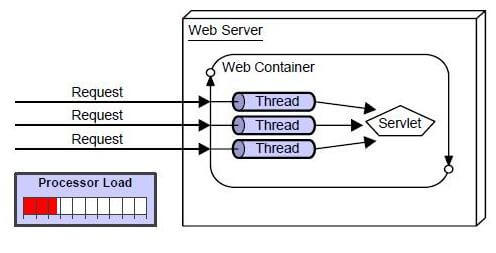
web容器也叫servlet容器,负责servlet的生命周期,映射url请求到相应的servlet。
A web container (also known as a servlet container;[1] and compare "webcontainer"[2]) is the component of a web server that interacts with Java servlets. A web container is responsible for managing the lifecycle of servlets, mapping a URL to a particular servlet and ensuring that the URL requester has the correct access-rights.

A web container handles requests to servlets, JavaServer Pages (JSP) files, and other types of files that include server-side code. The Web container creates servlet instances, loads and unloads servlets, creates and manages request and response objects, and performs other servlet-management tasks.

A web container implements the web component contract of the Java EE architecture. This architecture specifies a runtime environment for additional web components, including security, concurrency, lifecycle management, transaction, deployment, and other services.
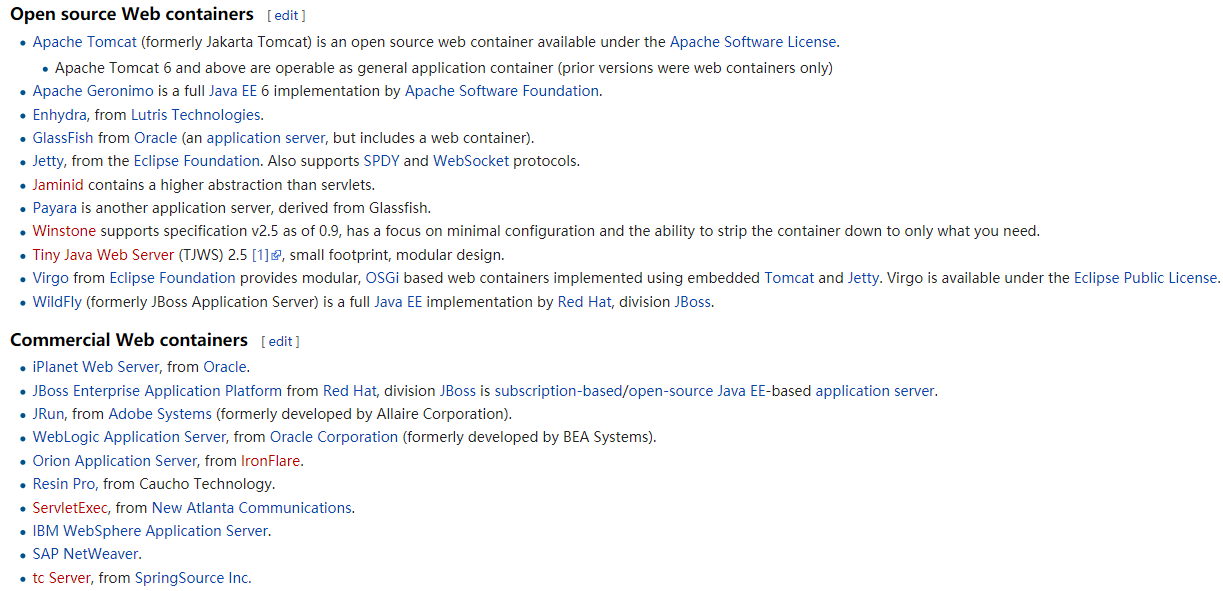
常见的web容器如下:
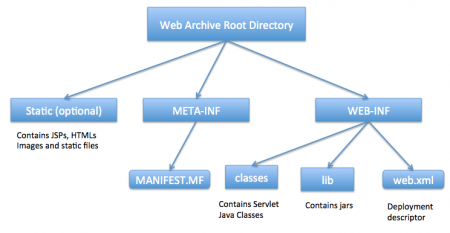
在web容器中,web应用服务器的结构如下:
1.普通servlet实现页面访问
1.1 实例1:使用web.xml实现一个http服务
实现一个简单的servlet
package com.howtodoinjava.servlets;

import java.io.IOException;

import java.io.PrintWriter;

import javax.servlet.ServletException;

import javax.servlet.http.HttpServlet;

import javax.servlet.http.HttpServletRequest;

import javax.servlet.http.HttpServletResponse;

public class MyFirstServlet extends HttpServlet {

    private static final long serialVersionUID = -1915463532411657451L;

    @Override

    protected void doGet(HttpServletRequest request,

            HttpServletResponse response) throws ServletException, IOException

    {

        response.setContentType("text/html;charset=UTF-8");

        PrintWriter out = response.getWriter();

        try {

            // Write some content

            out.println("<html>");

            out.println("<head>");

            out.println("<title>MyFirstServlet</title>");

            out.println("</head>");

            out.println("<body>");

            out.println("<h2>Servlet MyFirstServlet at " + request.getContextPath() + "</h2>");

            out.println("</body>");

            out.println("</html>");

        } finally {

            out.close();

        }

    }

    @Override

    protected void doPost(HttpServletRequest request,

            HttpServletResponse response) throws ServletException, IOException {

        //Do some other work

    }

    @Override

    public String getServletInfo() {

        return "MyFirstServlet";

    }

}
web.xml配置servlet
<?xml version="1.0"?>

<web-app     xmlns="http://xmlns.jcp.org/xml/ns/javaee"

            xmlns:xsi="http://www.w3.org/2001/XMLSchema-instance"

            xsi:schemaLocation="http://xmlns.jcp.org/xml/ns/javaee

            http://xmlns.jcp.org/xml/ns/javaee/web-app_3_0.xsd"

            version="3.0">

    <welcome-file-list>

        <welcome-file>/MyFirstServlet</welcome-file>

    </welcome-file-list>

    <servlet>

        <servlet-name>MyFirstServlet</servlet-name>

        <servlet-class>com.howtodoinjava.servlets.MyFirstServlet</servlet-class>

    </servlet>

    <servlet-mapping>

        <servlet-name>MyFirstServlet</servlet-name>

        <url-pattern>/MyFirstServlet</url-pattern>

    </servlet-mapping>

</web-app>
1.2 编程方式实现一个http服务请求
不需要xml
package com.journaldev.first;

import java.io.IOException;

import java.io.PrintWriter;

import java.util.Date;

import javax.servlet.ServletException;

import javax.servlet.annotation.WebInitParam;

import javax.servlet.annotation.WebServlet;

import javax.servlet.http.HttpServlet;

import javax.servlet.http.HttpServletRequest;

import javax.servlet.http.HttpServletResponse;

/**

 * Servlet implementation class FirstServlet

 */

@WebServlet(description = "My First Servlet", urlPatterns = { "/FirstServlet" , "/FirstServlet.do"}, initParams = {@WebInitParam(name="id",value="1"),@WebInitParam(name="name",value="pankaj")})

public class FirstServlet extends HttpServlet {

    private static final long serialVersionUID = 1L;

    public static final String HTML_START="<html><body>";

    public static final String HTML_END="</body></html>";

    /**

     * @see HttpServlet#HttpServlet()

     */

    public FirstServlet() {

        super();

        // TODO Auto-generated constructor stub

    }

    /**

     * @see HttpServlet#doGet(HttpServletRequest request, HttpServletResponse response)

     */

    protected void doGet(HttpServletRequest request, HttpServletResponse response) throws ServletException, IOException {

        PrintWriter out = response.getWriter();

        Date date = new Date();

        out.println(HTML_START + "<h2>Hi There!</h2><br/><h3>Date="+date +"</h3>"+HTML_END);

    }

    /**

     * @see HttpServlet#doPost(HttpServletRequest request, HttpServletResponse response)

     */

    protected void doPost(HttpServletRequest request, HttpServletResponse response) throws ServletException, IOException {

        // TODO Auto-generated method stub

    }

}
2.spring mvc实现页面访问
2.1 web.xml方式
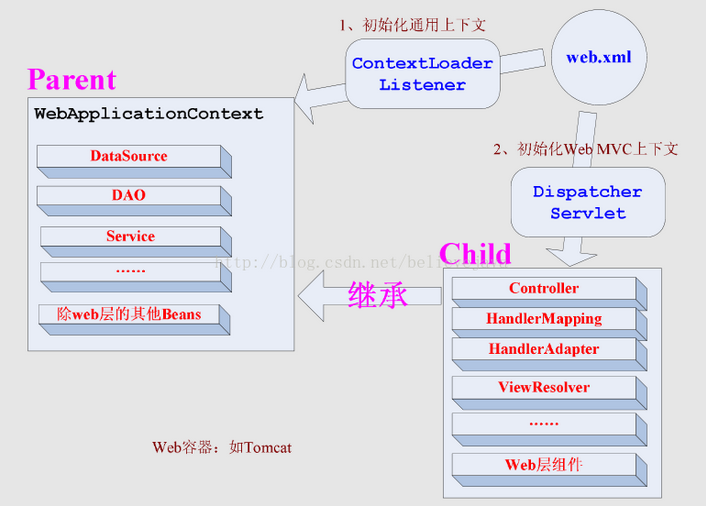
示例:
<web-app xmlns="http://java.sun.com/xml/ns/javaee" xmlns:xsi="http://www.w3.org/2001/XMLSchema-instance"

    xsi:schemaLocation="http://java.sun.com/xml/ns/javaee

    http://java.sun.com/xml/ns/javaee/web-app_2_5.xsd"

    version="2.5">

    <display-name>Gradle + Spring MVC Hello World + XML</display-name>

    <description>Spring MVC web application</description>

    <!-- For web context -->

    <servlet>

        <servlet-name>hello-dispatcher</servlet-name>

        <servlet-class>org.springframework.web.servlet.DispatcherServlet</servlet-class>

        <init-param>

            <param-name>contextConfigLocation</param-name>

            <param-value>/WEB-INF/spring-mvc-config.xml</param-value>

        </init-param>

        <load-on-startup>1</load-on-startup>

    </servlet>

    <servlet-mapping>

        <servlet-name>hello-dispatcher</servlet-name>

        <url-pattern>/</url-pattern>

    </servlet-mapping>

    <!-- For root context -->

    <listener>

        <listener-class>org.springframework.web.context.ContextLoaderListener</listener-class>

    </listener>

    <context-param>

        <param-name>contextConfigLocation</param-name>

        <param-value>/WEB-INF/spring-core-config.xml</param-value>

    </context-param>

</web-app>
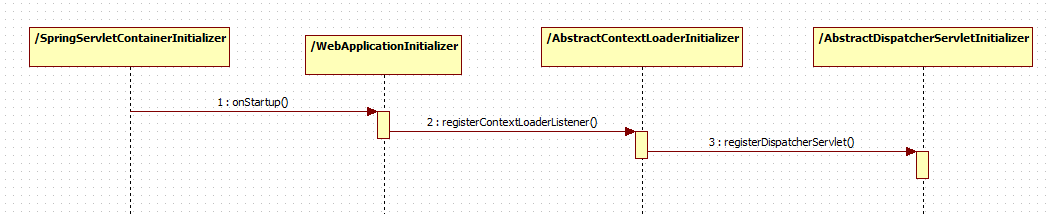
2.2 编码方式
public class MyWebAppInitializer implements WebApplicationInitializer {

     @Override

     public void onStartup(ServletContext container) {

       // Create the 'root' Spring application context

       AnnotationConfigWebApplicationContext rootContext =

         new AnnotationConfigWebApplicationContext();

       rootContext.register(AppConfig.class);

       // Manage the lifecycle of the root application context

       container.addListener(new ContextLoaderListener(rootContext));

       // Create the dispatcher servlet's Spring application context

       AnnotationConfigWebApplicationContext dispatcherContext =

         new AnnotationConfigWebApplicationContext();

       dispatcherContext.register(DispatcherConfig.class);

       // Register and map the dispatcher servlet

       ServletRegistration.Dynamic dispatcher =

         container.addServlet("dispatcher", new DispatcherServlet(dispatcherContext));

       dispatcher.setLoadOnStartup(1);

       dispatcher.addMapping("/");

     }

  }
内部实现
3.spring boot
继承了spring mvc的框架,实现SpringBootServletInitializer
package com.mkyong;

import org.springframework.boot.SpringApplication;

import org.springframework.boot.autoconfigure.SpringBootApplication;

import org.springframework.boot.builder.SpringApplicationBuilder;

import org.springframework.boot.web.support.SpringBootServletInitializer;

@SpringBootApplication

public class SpringBootWebApplication extends SpringBootServletInitializer {

    @Override

    protected SpringApplicationBuilder configure(SpringApplicationBuilder application) {

        return application.sources(SpringBootWebApplication.class);

    }

    public static void main(String[] args) throws Exception {

        SpringApplication.run(SpringBootWebApplication.class, args);

    }

}
然后controller
package com.mkyong;

import java.util.Map;

import org.springframework.beans.factory.annotation.Value;

import org.springframework.stereotype.Controller;

import org.springframework.web.bind.annotation.RequestMapping;

@Controller

public class WelcomeController {

    // inject via application.properties

    @Value("${welcome.message:test}")

    private String message = "Hello World";

    @RequestMapping("/")

    public String welcome(Map<String, Object> model) {

        model.put("message", this.message);

        return "welcome";

    }

}
总结:
1.servlet的本质没有变化,从web框架的发展来看,web框架只是简化了开发servlet的工作,但还是遵循servlet规范的发展而发展的。
2.servlet的历史发展,从配置方式向编程方式到自动配置方式发展
3.spring mvc框架的分组:root和child(可以有多个dispatcherservlet),多个child可以共享root,child直接不共享
参考文献:
【1】https://en.wikipedia.org/wiki/Web_container
【2】https://baike.baidu.com/item/servlet/477555?fr=aladdin
【3】https://www.javatpoint.com/servlet-tutorial
【4】https://www.journaldev.com/1854/java-web-application-tutorial-for-beginners#deployment-descriptor
【5】https://blog.csdn.net/qq_22075041/article/details/78692780
【6】http://www.mkyong.com/spring-mvc/gradle-spring-mvc-web-project-example/
【7】http://www.mkyong.com/spring-boot/spring-boot-hello-world-example-jsp/
web框架的前生今世--从servlet到spring mvc到spring boot的更多相关文章
- Java NIO 的前生今世 之四 NIO Selector 详解
Selector Selector 允许一个单一的线程来操作多个 Channel. 如果我们的应用程序中使用了多个 Channel, 那么使用 Selector 很方便的实现这样的目的, 但是因为在一 ...
- 揭秘 BPF map 前生今世
揭秘 BPF map 前生今世 本文地址:https://www.ebpf.top/post/map_internal 1. 前言 众所周知,map 可用于内核 BPF 程序和用户应用程序之间实现双向 ...
- java(样品集成框架spring、spring mvc、spring data jpa、hibernate)
这是你自己的参考springside集成框架的开源项目.主要的整合spring.spring mvc.spring data jpa.hibernate几个框架,对于这些框架中仍然感觉更舒适sprin ...
- Owin学习笔记(一) Owin的前生今世
ASP.NET框架至今为止已经存在了数十年了,大量的网站使用ASP.NET框架进行开发.随着网站应用开发技术的进步, 许多网站应用开发框架有了新的流行趋势 轻量化 模块化 可移植 ASP.NET框架 ...
- 月光宝盒之时间魔法--java时间的前生今世
月光宝盒花絮 “曾经有一份真诚的爱情摆在我的面前,但是我没有珍惜,等到了失去的时候才后悔莫及,尘世间最痛苦的事莫过于此.如果可以给我一个机会再来一次的话,我会跟那个女孩子说我爱她,如果非要把这份爱加上 ...
- maven配置spring mvc+hibernate+spring框架
作为一名刚出茅草屋的新手小白写的框架,仅适合新手小白借鉴,大神勿喷,谢谢...... 前天刚知道spring mvc这个框架现在也很流行,决定用它代替struts2来写我的毕业设计. ...作为一名新 ...
- spring mvc 和spring security配置 web.xml设置
<?xml version="1.0" encoding="UTF-8"?> <web-app xmlns="http://xmln ...
- Java的前生今世
Java作为一门编程语言,自诞生以来已经流行了20多年,在学习它之前,我们有必要先了解一下它的历史,了解它是如何一步步发展到今天这个样子. 孕育 上世纪90年代,硬件领域出现了单片式计算机系统,比如电 ...
- RPC 原理的前生今世
(如果感觉有帮助,请帮忙点推荐,添加关注,谢谢!你的支持是我不断更新文章的动力.本博客会逐步推出一系列的关于大型网站架构.分布式应用.设计模式.架构模式等方面的系列文章) 在校期间大家都写过不少程序, ...
随机推荐
- 探索未知种族之osg类生物---呼吸分解之更新循环一
上节总结 前几天我们大体上介绍完成了osg的事件循环的介绍,总结一下osg的时间循环主要就是得到平台(windows)的所有消息,并遍历所有的node的eventCallback,并对他们进行处理.接 ...
- HDU 5521.Meeting 最短路模板题
Meeting Time Limit: 12000/6000 MS (Java/Others) Memory Limit: 262144/262144 K (Java/Others)Total ...
- playframework 一步一步来 之 日志 (二)
带着之前的疑问,我们先回顾一下日志相关的知识: 首先是SL4J,SL4J是个什么东西来着?官方解释为:“The Simple Logging Facade for Java (SLF4J) serve ...
- [Machine Learning][The Analytics Edge][Predicting Earnings from Census Data]
census = read.csv("census.csv")library(caTools)set.seed(2000)spl = sample.split(census$ove ...
- SQL笔试基础
SQLSERVER服务器中,给定表table1 中有两个字段 ID.LastUpdateDate,ID表示更新的事务号,LastUpdateDate表示更新时的服务器时间,请使用一句SQL语句获得最后 ...
- JNI 记
Java Native Interface(JNI)从零开始详细教程 ================================================================ ...
- Ubuntu 14.04 LTS 下使用源码编译安装 Sagemath 6.7 x64 (小结)
原先博客放弃使用,几篇文章搬运过来 下载源码包 系统的最低要求: 6GB 硬盘 : 2GB RAM. 命令行工具: A C/C++ compiler: Since Sage builds its ow ...
- Html5与Css3知识点拾遗(五)
css3更新的颜色 RGBA:红.绿.蓝.不透明度 rgba(89,0,127,0.4); HSL和HSLA:色相.饱和度.亮度.不透明度 hsl(282,100%,25%); hsl(282,100 ...
- 深入理解SpringCloud与微服务构建学习总结
说明:用时 from 2018-11-16 to 2018-11-23 七天 0 放在前面 什么是微服务? 微服务是一个分布式系统.微服务架构的风格,就是将单一程序开发成一个微服务,每个微服务 ...
- 将json对象转化成jsonp对象
这个Demo用来检查是否具有唯一性 //检查 /user/check/{param}/{type} @RequestMapping("/check/{param}/{type}") ...