
UI框架搭建DAY1
分析:UI框架主要是为了用户(使用框架的程序猿)更快捷、方便地开发UI,UI框架的好处还在于解耦,使得程序更具有灵活性。
UI框架的核心是窗口的管理,窗口管理的主要任务就是显示窗口和关闭窗口。
因为窗口的类型多样,比如弹出式窗口,固定位置窗口,隐藏其他窗口(打开这个窗口会覆盖整个屏幕),模态窗口等等。
这里我目前把窗口分为三大类型:普通窗口、弹出式窗口、隐藏其他窗口,而位置固定、是否模态作为窗口的属性。
1.为了更易于复用和拓展,我设计了一个基类BasePanel, NormalPanel, PopupPanel, HiderOtherPanel都由此基类派生。
BasePanel封装了3个重要方法:Open(), Close(), Freeze()。
2.巧妇难为无米之炊,要显示这些窗体首先要制作这些窗体的预制体,然后加载。为此,我又设计了一个核心类PanelManager。
PanelManager主要负责窗体的创建和销毁(隐藏),核心方法CreatePanel()。另外使用了对象池技术,缓存窗体。
3.要动态加载窗体,必须获得窗体资源的路径,为此我设计了一个SysDefine类,此文件用于定义一些预制体路径常量,节点(Inspector面板中的物体位置)常量。(后期重构时打算用Json文件配置)。加载资源的类ResourceManager。
4.此外,我还设计了一个帮助类Helper,目前实现的功能仅仅是自动化设置窗体节点的父节点。
下面,展示我今天下午的成果。
 using UnityEngine;

 public class BasePanel : MonoBehaviour

 {

     //窗体类型

    public EPanelType panelType;

     //是否是模态窗口

     public bool isModal;

     //是否是固定位置窗口

     public bool isFixed;

     //透明度

     ETransparencyLevel transLevel;

     //初始化

     private void Awake()

     {

         panelType = EPanelType.Normal;

         isModal = true;

         isFixed = false;

         transLevel = ETransparencyLevel.Opaque;

     }

     private void Start()

     {

         //自动设置物体的父节点

         Helper.GetInstance().SetParent(gameObject);

     }

     //打开窗口

     public void Open()

     {

         gameObject.SetActive(true);

     }

     //关闭窗口

     public void Close()

     {

         gameObject.SetActive(false);

     }

     //冻结窗口

    public void Freeze()

     {

         //TO DO

     }

 }
 using System.Collections.Generic;

 using UnityEngine;

 public class PanelManager

 {

     //本类实例

     private static PanelManager _instance;

     //存储面板名字和对应的路径字典

     public static Dictionary<string, string> dictPanelPath;

     //存储已显示的面板字典

     public static Dictionary<string, BasePanel> dictCurPanel;

     //存储已隐藏的面板字典

     public static Dictionary<string, BasePanel> dictHidePanel;

     //存储Popup类型面板的字典

     public static Dictionary<string, Stack<BasePanel>> dictPopupPanel;

     //单例模式

     private PanelManager() { }

     public static PanelManager GetInstance()

     {

         if(_instance == null)

         {

             _instance = new PanelManager();

             InitProperties();

         }

         return _instance;

     }

     //初始化字段

     private static void InitProperties()

     {

         dictPanelPath = new Dictionary<string, string>();

         dictCurPanel = new Dictionary<string, BasePanel>();

         dictHidePanel = new Dictionary<string, BasePanel>();

         dictPopupPanel = new Dictionary<string, Stack<BasePanel>>();

     }

     /// <summary>

     /// 创建一个面板

     /// 先检查dictHidePanel集合里是否存在此面板,有则取出显示并加入dictCurPanel集合

     /// 没有,则创建一个,然后加如dictCurPanel集合。

     /// </summary>

     /// <param name="panelName">要创建的面板的名字</param>

     /// <returns></returns>

     public BasePanel CreatePanel(string panelName)

     {

         BasePanel basePanel = null;

         dictHidePanel.TryGetValue(panelName, out basePanel);

         if(basePanel != null)

         {

             return basePanel;

         }

         else

         {

             //创建面板

             GameObject go = ResourceManager.GetInstance().LoadAsset<GameObject>(panelName);

             if(go != null)

             {

                 basePanel = go.GetComponent<BasePanel>();

                 if(basePanel != null)

                 {

                     //添加到正在显示的面板集合

                     dictCurPanel.Add(panelName, basePanel);

                 }

                 else

                 {

                     Debug.LogError(GetType()+"你可能忘记挂在了BasePanel类型的脚本");

                 }

                 return basePanel;

             }

             else

             {

                 Debug.Log(GetType()+"panelName可能不存在");

             }

         }

         return null;

     }

 }
 using UnityEngine;

 public class ResourceManager

 {

     private static ResourceManager _instance;

     public static ResourceManager GetInstance()

     {

         if (_instance == null)

         {

             _instance = new ResourceManager();

         }

         return _instance;

     }

     private ResourceManager() { }

     public T LoadAsset<T>(string path)where T:Object

     {

         Object o = Resources.Load(path);

         //实例化

         GameObject go = GameObject.Instantiate(o) as GameObject;

         return go as T;

     }

 }
 public enum ETransparencyLevel

 {

     Opaque,                                 //不透明

     Translucence,                           //半透明的

     Transparent,                            //透明的

 }

 public enum EPanelType

 {

     Normal,

     Popup,

     HideOther

 }

 public  class PrefabPathStr

 {

     public const string uiRootPath = @"Prefabs/UIRoot";

     public const string logOnPanelPath = @"Prefabs/LogOnPanel";

 }

 public class NodePathStr

 {

     public const string normalPath = @"UIRoot/Normal";

     public const string popupPath = @"UIRoot/Popup";

     public const string hiderOtherPath = @"UIRoot/HideOther";

 }

 public class SysDefine

 {

 }
 using UnityEngine;

 public class Helper

 {

     private static Helper _instance = null;                                    //本类实;

     private static Transform normal;                                   //normal 节点

     private static Transform popup;                                    //popup 节点

     private static Transform hiderOther;                               //hiderOther 节点

     //单利模式

     public static Helper GetInstance()

     {

         if(_instance == null)

         {                                                               //本类实例化时,初始化节点字段

             normal = GameObject.Find(NodePathStr.normalPath).transform;

             popup = GameObject.Find(NodePathStr.popupPath).transform;

             hiderOther = GameObject.Find(NodePathStr.hiderOtherPath).transform;

             _instance = new Helper();

         }

         return _instance;

     }

     private Helper() { }

     /// <summary>

     /// 若用户自定义了parent则使用,若没有则根据panelType自动设定。

     /// </summary>

     /// <param name="child">子物体</param>

     /// <param name="parent">父物体</param>

     public  void SetParent(GameObject child, Transform parent = null)

     {

         if(parent != null)

         {

             child.transform.SetParent(parent, true);

             child.transform.localScale = new Vector3(, , );

             child.transform.localPosition = Vector3.zero;

         }

         else

         {

             if(child.GetComponent<BasePanel>()!= null)

             {

                 EPanelType panelType = child.GetComponent<BasePanel>().panelType;

                 switch (panelType)

                 {

                     case EPanelType.Normal:

                         child.transform.SetParent(normal);

                         break;

                     case EPanelType.Popup:

                         child.transform.SetParent(popup);

                         break;

                     case EPanelType.HideOther:

                         child.transform.SetParent(hiderOther);

                         break;

                     default:

                         Debug.LogError("错误,未知的窗体类型");

                         break;

                 }

                 child.transform.localScale = new Vector3(, , );

                 child.transform.localPosition = Vector3.zero;

             }

             else

             {

                 Debug.LogError(GetType()+ "请检查此物体是否挂载了BasePanel类型脚本!");

             }

         }

     }

 }
启动框架类StartGame.cs
 using UnityEngine;

 public class StartGame : MonoBehaviour

 {

     private GameObject uiRoot = null;

     void Start()

     {

         uiRoot = GameObject.FindGameObjectWithTag("UIRoot");

         if (uiRoot != null)          //已生成UIRoot

         {

             Destroy(uiRoot);

         }

         //获取UIRoot对象

         uiRoot = ResourceManager.GetInstance().LoadAsset<GameObject>(PrefabPathStr.uiRootPath);

         //修改克隆体的名字

         uiRoot.name = "UIRoot";

         //加载场景时不销毁UIRoot

         DontDestroyOnLoad(uiRoot);

         //加载登陆面板

         PanelManager.GetInstance().CreatePanel(PrefabPathStr.logOnPanelPath);

     }

 }
测试代码LogOnPanel.cs
 using System.Collections;

 using System.Collections.Generic;

 using UnityEngine;

 public class LogOnPanel : BasePanel

 {

     private void Awake()

     {

         this.panelType = EPanelType.Normal;

     }

 }
UIRoot预制体效果图
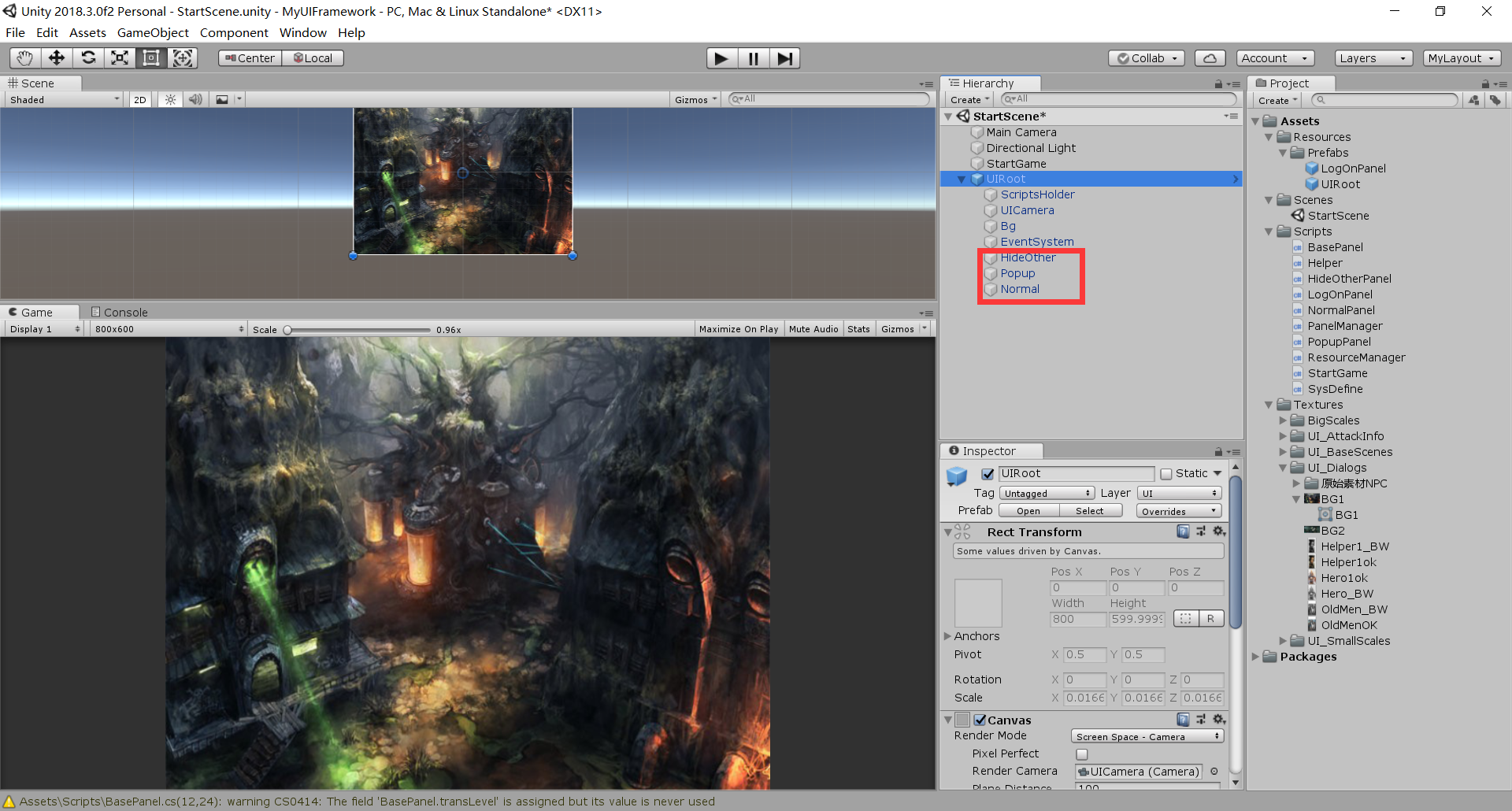
LogOnPanel预制体效果图:
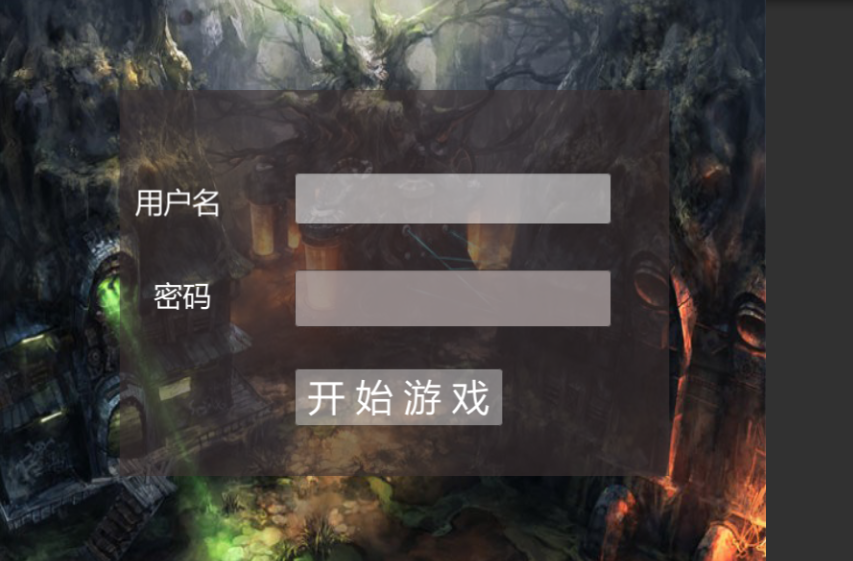
运行效果图:

UI框架搭建DAY1的更多相关文章
- Element UI 框架搭建
Element UI 框架搭建 1.webpack 全局安装 npm install -g webpack 2.淘宝镜像cnpm安装 npm install -g cnpm --registry=ht ...
- UI框架搭建DAY2
今天的主要任务是完善NormalPanel, 搭建PopupPanel. 在编写PanelManager的过程中,发现了一个bug.昨天把panelPath直接传给了ResourceManager.G ...
- ASP.NET MVC搭建项目后台UI框架—1、后台主框架
目录 ASP.NET MVC搭建项目后台UI框架—1.后台主框架 ASP.NET MVC搭建项目后台UI框架—2.菜单特效 ASP.NET MVC搭建项目后台UI框架—3.面板折叠和展开 ASP.NE ...
- ASP.NET MVC搭建项目后台UI框架—11、自动加载下拉框查询
ASP.NET MVC搭建项目后台UI框架—1.后台主框架 需求:在查询记录的时候,输入第一个字,就自动把以这个字开头的相关记录查找出来,输入2个字就过滤以这两个子开头的记录,依次类推. 突然要用到这 ...
- 从零开始,搭建博客系统MVC5+EF6搭建框架(4)上,前后台页面布局页面实现,介绍使用的UI框架以及JS组件
一.博客系统进度回顾以及页面设计 1.1页面设计说明 紧接前面基础基本完成了框架搭建,现在开始设计页面,前台页面设计我是模仿我博客园的风格来设计的,后台是常规的左右布局风格. 1.2前台页面风格 主页 ...
- ASP.NET MVC搭建项目后台UI框架—2、菜单特效
目录 ASP.NET MVC搭建项目后台UI框架—1.后台主框架 ASP.NET MVC搭建项目后台UI框架—2.菜单特效 ASP.NET MVC搭建项目后台UI框架—3.面板折叠和展开 ASP.NE ...
- ASP.NET MVC搭建项目后台UI框架—3、面板折叠和展开
目录 ASP.NET MVC搭建项目后台UI框架—1.后台主框架 ASP.NET MVC搭建项目后台UI框架—2.菜单特效 ASP.NET MVC搭建项目后台UI框架—3.面板折叠和展开 ASP.NE ...
- ASP.NET MVC搭建项目后台UI框架—4、tab多页签支持
目录 ASP.NET MVC搭建项目后台UI框架—1.后台主框架 ASP.NET MVC搭建项目后台UI框架—2.菜单特效 ASP.NET MVC搭建项目后台UI框架—3.面板折叠和展开 ASP.NE ...
- ASP.NET MVC搭建项目后台UI框架—5、Demo演示Controller和View的交互
目录 ASP.NET MVC搭建项目后台UI框架—1.后台主框架 ASP.NET MVC搭建项目后台UI框架—2.菜单特效 ASP.NET MVC搭建项目后台UI框架—3.面板折叠和展开 ASP.NE ...
随机推荐
- Centos&Redhat下bcm43142博通无线网卡linux驱动之二
上次通过更换内核实现成功编译驱动无线网卡,但是启动到系统原内核下依然没有bcm43142的驱动,遂准备在原内核下编译驱动,记录一下 ps:更推荐这种方法,避免因更换内核出现其他兼容性问题 1.准备驱动 ...
- python中通过字符串名来调用函数
强调:eval()函数功能虽然强大,但是也很危险,这个方法需要慎重使用. 利用python中的内置函数 eval() ,函数说明: def eval(*args, **kwargs): # real ...
- 用 wait-notify 写一段代码来解决生产者-消费者问题
在同步块中调用 wait() 和 notify()方法,如果阻塞,通过循环来测试等待条件.请参考答案中的示例代码. [生产者] import java.util.Vector; import java ...
- ubuntu16.04英文版搜狗输入法安装报错
1.因为是英文版的,所以需要更新中文字体 Systems Settings>Language Support ,会提示自动更新,这个时候KeyBorad input method 选择不了fci ...
- UIWebView使用app内自定义字体
最近,做了个小需求.因为app是使用的自定义字体,所以产品想让h5的字体跟app的字体一致,减少脱离感.而一般来说,app内的h5页面,都是显示系统的默认字体.要想使用自定义字体,一般的做法是在h5里 ...
- c++ __declspec
dllimport 和dllexport 用__declspec(dllexport),__declspec(dllimport)显式的定义dll接口给调用它的exe或dll文件,用 dllexpor ...
- VS2013 Ctrl+Shift+F 没反应
快捷键设定与搜狗输入法中文繁体切换冲突,搜狗输入法管理设置中关掉就好.
- java学习(三)--- 修饰符
访问修饰符: default.public.private.protected 非访问修饰符 static: 静态方法,静态变量 final: final变量: final变量能够显示的初始化并且只能 ...
- PHP(层叠样式表,写法分类),选择器的种类)
表单元素的取值怎么取 对应的属性值都有哪些? <span> 标签被用来组合文档中的行内元素. 注释:span 没有固定的格式表现.当对它应用样式时,它才会产生视觉上的变化. style ...
- Redis集合 安装 哨兵集群 配置
redis相关 redis基础 redis发布订阅 redis持久化RDB与AOF redis不重启,切换RDB备份到AOF备份 redis安全配置 redis主从同步 redis哨兵集群 redis ...