
Spring配置JDBCTemplate
案例:单测查询全部学生
项目结构:
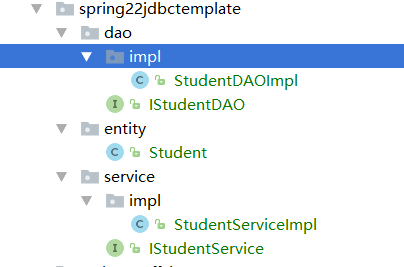
1.导入部署jar包:spring-jdbc
<!--spring-jdbc-->

        <dependency>

            <groupId>org.springframework</groupId>

            <artifactId>spring-jdbc</artifactId>

            <version>4.2.0.RELEASE</version>

        </dependency>
2.创建实体类:Student
public class Student {

    private Integer id;  //编号

    private String name;  //姓名

    private Integer age;  //年龄

    private Date birthday;  //出生日期

}
3.创建dao层的接口和实现类:
IStudentDAO:
public interface IStudentDAO {

    //查询全部

    public List<Student> findAll();

}
StudentDAOImpl:继承JdbcDaoSupport 实现IStudentDAO
public class StudentDAOImpl extends JdbcDaoSupport implements IStudentDAO{

    public List<Student> findAll() {

        String sql="select * from student";

        List<Student> list=this.getJdbcTemplate().query(sql, new RowMapper<Student>() {

            /**

             *

             * @param rs

             * @param i

             * @return

             * @throws SQLException

             */

            public Student mapRow(ResultSet rs, int i) throws SQLException {

                Student student=new Student();

                student.setId(rs.getInt("id"));

                student.setName(rs.getString("name"));

                student.setAge(rs.getInt("age"));

                student.setBirthday(rs.getDate("birthday"));

                return student;

            }

        });

        return list;

    }

}
4.创建service层的接口和实现类:
IStudentService:
public interface IStudentService {

    //查询全部

    public List<Student> findAll();

}
StudentServiceImpl:
public class StudentServiceImpl implements IStudentService {

    private IStudentDAO dao;

    public List<Student> findAll() {

        return dao.findAll();

    }

    public IStudentDAO getDao() {

        return dao;

    }

    public void setDao(IStudentDAO dao) {

        this.dao = dao;

    }

}
在applicationContextSpring15jdbctemplate.xml中配置:
<?xml version="1.0" encoding="UTF-8"?>

<beans xmlns="http://www.springframework.org/schema/beans"

       xmlns:aop="http://www.springframework.org/schema/aop"

       xmlns:context="http://www.springframework.org/schema/context"

       xmlns:xsi="http://www.w3.org/2001/XMLSchema-instance"

       xsi:schemaLocation="

       http://www.springframework.org/schema/beans http://www.springframework.org/schema/beans/spring-beans.xsd

       http://www.springframework.org/schema/aop http://www.springframework.org/schema/aop/spring-aop.xsd

       http://www.springframework.org/schema/context http://www.springframework.org/schema/context/spring-context.xsd

">

   <!--00.识别jdbc.properties-->

    <!--方式一-->

   <!-- <context:property-placeholder location="jdbc.properties"></context:property-placeholder>-->

    <!--方式二-->

    <bean class="org.springframework.beans.factory.config.PropertyPlaceholderConfigurer">

        <property name="location" value="jdbc.properties"></property>

    </bean>

    <!--01.建立数据源-->

    <bean id="dataSource" class="org.springframework.jdbc.datasource.DriverManagerDataSource">

        <property name="driverClassName" value="${jdbc.driver}"></property>

        <property name="url" value="${jdbc.url}"></property>

        <property name="username" value="${jdbc.uname}"></property>

        <property name="password" value="${jdbc.password}"></property>

    </bean>

    <!--03.dao的配置-->

    <bean id="studentDao" class="cn.happy.spring22jdbctemplate.dao.impl.StudentDAOImpl">

        <property name="dataSource" ref="dataSource"></property>

    </bean>

    <!--04.service的配置-->

    <bean id="studentService" class="cn.happy.spring22jdbctemplate.service.impl.StudentServiceImpl">

        <property name="dao" ref="studentDao"></property>

    </bean>

</beans>
其他三种数据源的方案:
 <!--02建立数据源 dbcp-->

     <bean id="dataSource" class="org.apache.commons.dbcp.BasicDataSource">

         <property name="driverClassName" value="${jdbc.driver}"></property>

         <property name="url" value="${jdbc.url}"></property>

         <property name="username" value="${jdbc.uname}"></property>

         <property name="password" value="${jdbc.password}"></property>

     </bean>

     <!--03建立数据源 c3p0-->

     <bean id="dataSource" class="com.mchange.v2.c3p0.ComboPooledDataSource">

         <property name="driverClass" value="${jdbc.driver}"></property>

         <property name="jdbcUrl" value="${jdbc.url}"></property>

         <property name="user" value="${jdbc.uname}"></property>

         <property name="password" value="${jdbc.password}"></property>

     </bean>

     <!--03建立数据源 alibaba-->

     <bean id="dataSource" class="com.alibaba.druid.pool.DruidDataSource">

         <property name="driverClassName" value="${jdbc.driver}"></property>

         <property name="url" value="${jdbc.url}"></property>

         <property name="username" value="${jdbc.uname}"></property>

         <property name="password" value="${jdbc.password}"></property>

     </bean>
单元测试:
  //jdbcTemplate

    @Test

    public void test01(){

        ApplicationContext context=new ClassPathXmlApplicationContext("applicationContextSpring15jdbctemplate.xml");

        IStudentService dao=(IStudentService) context.getBean("studentService");

        List<Student> list = dao.findAll();

        for (Student item:list){

            System.out.println(item.getName());

        }

    }
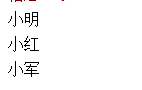
执行结果:
Spring配置JDBCTemplate的更多相关文章
- Spring:JdbcTemplate使用指南
Spring:JdbcTemplate使用指南 Spring:JdbcTemplate使用指南 前言: 本文指在介绍Spring框架中的JdbcTemplate类的使用方法,涉及基本的Spring反转 ...
- spring配置连接池和dao使用jdbcTemplate
1 spring配置c3p0连接池 第一步 导入jar包 第二步 创建spring配置文件,配置连接池 (1)把代码中的实现在配置文件中实现 2 dao使用jdbcTemplate (1) 创建ser ...
- Spring配置连接池和 Dao 层使用 jdbcTemplate
1.Spring 配置 c3p0 连接池 (1)导入jar包(Maven项目) <dependency> <groupId>com.mchange</groupId> ...
- spring配置属性的两种方式
spring配置属性有两种方式,第一种方式通过context命名空间中的property-placeholder标签 <context:property-placeholder location ...
- spring配置详解
1.前言 公司老项目的后台,均是基于spring框架搭建,其中还用到了log4j.jar等开源架包.在新项目中,则是spring和hibernate框架均有使用,利用了hibernate框架,来实现持 ...
- spring配置事务
一.配置JDBC事务处理机制 <!-- 配置Hibernate事务处理 --> <bean id="transactionManager" class=" ...
- spring使用jdbcTemplate和jdbcdaosupport和namedparameter
jdbcTemplate: 首先连接数据库 <!-- 导入外部文件 --> <context:property-placeholder location="classpat ...
- Spring之JDBCTemplate学习
一.Spring对不同的持久化支持: Spring为各种支持的持久化技术,都提供了简单操作的模板和回调 ORM持久化技术 模板类 JDBC org.springframework.jdbc.core. ...
- spring使用JdbcTemplate和jdbcDaosupport及具名参数使用
关于jdbctemplate: 个人感觉比Java链接mysql那一套方便好维护多了,只需在配置文件维护即可 需要的包: com.springsource.net.sf.cglib-2.2.0.jar ...
随机推荐
- 升级centos6.8内核
1.查看默认版本:uname -r 2.更新nss 3.安装elrepo的yum源,升级内核需要使用elrepo的yum源,在安装yum源之前还需要我们导入elrepo的key rpm --impor ...
- add web server(nginx)
#!/bin/bash # # Web Server Install Script # Last Updated 2012.09.24 # ##### modify by WanJie 2012.09 ...
- String 类的实现(2)引用计数与写时拷贝
1.引用计数 我们知道在C++中动态开辟空间时是用字符new和delete的.其中使用new test[N]方式开辟空间时实际上是开辟了(N*sizeof(test)+4)字节的空间.如图示其中保存N ...
- Python函数之匿名函数
一:概述 匿名函数主要用来处理比较简单的逻辑,用一行显示,并将运算结果作为返回值返回 二:书写规则 函数名 = lambda 参数:返回值 参数可以有多个,多个参数使用逗号分隔 三 :例子 将func ...
- 步步为营102-Css样式加个版本
背景:当系统发布后修改了css样式,由于浏览器有缓存,所以会造成css样式无效.可通过在css中添加版本号来解决 1 修改css引用 <link rel="stylesheet&quo ...
- Java接口自动化测试之HTTPClient学习(四)
pom.xml 文件中dependency <dependencies> <dependency> <groupId>org.testng</groupId ...
- python 装饰器--对有无参数的函数进行装饰
# 使用装饰器无参数的函数进行装饰# def func(funcionName): # print('-----1------') # def func_in(): # print('--func_i ...
- 据说是Flord算法
贵有恒,何必三更起五更眠:最无益,莫过一日曝十日寒. 问题 C: Restoring Road Network 问题 C: Restoring Road Network 时间限制: 1 Sec 内存 ...
- Ubuntu16.04安装vim8
Ubuntu16.04安装vim8 在Ubuntu16.04下编译安装vim8,并配置vim-plug插件管理器,以及安装YouCompleteMe等插件. 安装依赖 sudo apt-get ins ...
- 【C++ Primer | 15】继承的构造函数
继承的构造函数 子类为完成基类初始化,在C++11之前,需要在初始化列表调用基类的构造函数,从而完成构造函数的传递.如果基类拥有多个构造函数,那么子类也需要实现多个与基类构造函数对应的构造函数. cl ...