
JS设计模式——4.继承(示例)
目的
我们的目的就是编写一个用于创建和管理就地编辑域的可重用的模块化API。它是指网页上的一段普通文本被点击后就变成一个配有一些按钮的表单域,以便用户就地对这段文本进行编辑。
思路
当用户点击时
1.将普通文本域隐藏
2.添加表单元素
3.设置表单元素的value
当用户保存时
ajax通信保存内容
当用户取消时
1.隐藏表单域
2.显示文本域
3.设置文本域的value
类式继承实现就地编辑
superClass的实现(input)
function EditInPlaceField(id, parent, value){

    this.id = id;

    this.value = value || 'default value';

    this.parentElement = parent;

    this.createElements(this.id);

    this.attachEvents();

}

EditInPlaceField.prototype = {

    createElements: function(){

        this.containerElement = document.createElement('div');

        this.parentElement.appendChild(this.containerElement);

        this.staticElement = document.createElement('span');

        this.containerElement.appendChild(this.staticElement);

        this.staticElement.innerHTML = this.value;

        this.fieldElement = document.createElement('input');

        this.fieldElement.type = 'text';

        this.fieldElement.value = this.value;

        this.containerElement.appendChild(this.fieldElement);

        this.saveButton = document.createElement('input');

        this.saveButton.type='button';

        this.saveButton.value="Save";

        this.containerElement.appendChild(this.saveButton);

        this.cancelBtton = document.createElement('input');

        this.cancelBtton.type = 'button';

        this.cancelBtton.value = 'Cancel';

        this.containerElement.appendChild(this.cancelBtton);

        this.convertToText();

    },

    attachEvents: function(){

        var that = this;

        addEvent(this.staticElement, 'click', function(){that.convertToEditable();});

        addEvent(this.saveButton, 'click', function(){ that.save();});

        addEvent(this.cancelBtton, 'click', function(){that.cancel()});

    },

    convertToEditable: function(){

        this.staticElement.style.display = 'none';

        this.fieldElement.style.display = 'inline';

        this.saveButton.style.display = 'inline';

        this.cancelBtton.style.display = 'inline';

        this.setValue(this.value);

    },

    save: function(){

        this.value = this.getValue();

        var that = this;

        var callback = {

            success: function(){that.convertToText();},

            failure: function(){alert('Error saving value.');}

        };

        ajaxRequest('GET', 'save.php?id'+this.id+'&value='+this.value, callback);

    },

    cancel: function(){

        this.convertToText();

    },

    convertToText: function(){

        this.fieldElement.style.display = 'none';

        this.saveButton.style.display = 'none';

        this.cancelBtton.style.display = 'none';

        this.staticElement.style.display = 'inline';

        this.setValue(this.value);

    },

    setValue: function(value){

        this.fieldElement.value = value;

        this.staticElement.innerHTML = value;

    },

    getValue: function(){

        return this.fieldElement.value;

    }

};
subClass的实现(textarea)
function EditInPlaceArea(id, parent, value){

    EditInPlaceArea.superclass.constructor.call(this, id, parent, value);

}

extend(EditInPlaceArea, EditInPlaceField);

EditInPlaceArea.prototype.createElements = function(id){

    this.containerElement = document.createElement('div');

    this.parentElement.appendChild(this.containerElement);

    this.staticElement = document.createElement('p');

    this.containerElement.appendChild(this.staticElement);

    this.staticElement.innerHTML = this.value;

    this.fieldElement = document.createElement('textarea');

    this.fieldElement.type = 'text';

    this.fieldElement.value = this.value;

    this.containerElement.appendChild(this.fieldElement);

    this.saveButton = document.createElement('input');

    this.saveButton.type='button';

    this.saveButton.value="Save";

    this.containerElement.appendChild(this.saveButton);

    this.cancelBtton = document.createElement('input');

    this.cancelBtton.type = 'button';

    this.cancelBtton.value = 'Cancel';

    this.containerElement.appendChild(this.cancelBtton);

    this.convertToText();

};

EditInPlaceArea.prototype.convertToEditable = function(){

    this.staticElement.style.display = 'none';

    this.fieldElement.style.display = 'block';

    this.saveButton.style.display = 'inline';

    this.cancelBtton.style.display = 'inline';

    this.setValue(this.value);

};

EditInPlaceArea.prototype.convertToText = function(){

    this.fieldElement.style.display = 'none';

    this.saveButton.style.display = 'none';

    this.cancelBtton.style.display = 'none';

    this.staticElement.style.display = 'block';

    this.setValue(this.value);

};
API的依赖与调用
addEvent依赖
function addEvent(el, ty, fn){

    if(el.addEvetListener){

        el.addEvetListener(ty, fn, false);

    }else if(el.attachEvent){

        el.attachEvent('on'+ty, fn);

    }else{

        el['on'+ty] = fn;

    }

}
extend依赖
function extend(subClass, superClass){

    var F = function(){};

    F.prototype = superClass.prototype;

    subClass.prototype = new F();

    subClass.prototype.constructor = subClass;

    subClass.superclass = superClass.prototype;

    if(superClass.prototype.constructor == Object.prototype.constructor){

        superClass.prototype.constructor = superClass;

    }

}
API的调用
var titleClassical = new EditInPlaceField('titleClassical', document.getElementById('titleClassical').parentNode, 'Title here');

var bodyClassical =new EditInPlaceArea('bodyClassical', document.getElementById('bodyClassical').parentNode, 'Body here');
效果展示
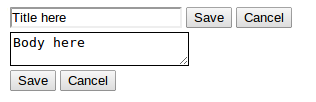
最开始时

点击后
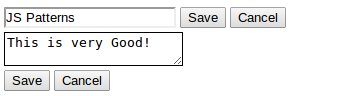
保存后
取消后

原型式继承和掺元类
基本代码就那些,原型式继承和掺元类的实现只是模式的不同,所以就不再给出具体代码了。
JS设计模式——4.继承(示例)的更多相关文章
- JS设计模式——4.继承(概念)
类式继承 0.构造函数 一个简单的Person类 function Person(name){ this.name = name; } Person.prototype.getName = funct ...
- JS设计模式(一)
刚入职时,看过一段时间的设计模式,似懂非懂.不知不觉过去七个月了,对JS的理解更深刻了,数据结构与算法的基础也基本上算是过了一遍了,接下来要把设计模式搞定,然后不再深层次研究JS了,而是学习前端自动化 ...
- JS如何实现继承?
JS的继承是基于JS类的基础上的一种代码复用机制.换言之,有了代码,我们就不需要复制之前写好的方法,只要通过简捷的方式 复用之前自己写的或同事写的代码.比如一个弹出层,我们需要在上面做一些修改.同事写 ...
- js设计模式——5.状态模式
js设计模式——5.状态模式 代码演示 /*js设计模式——状态模式*/ // 状态(红灯,黄灯,绿灯) class State { constructor(color) { this.color = ...
- js设计模式——1.代理模式
js设计模式——1.代理模式 以下是代码示例 /*js设计模式——代理模式*/ class ReadImg { constructor(fileName) { this.fileName = file ...
- 浅谈JS中的继承
前言 JS 是没有继承的,不过可以曲线救国,利用构造函数.原型等方法实现继承的功能. var o=new Object(); 其实用构造函数实例化一个对象,就是继承,这里可以使用Object中的所有属 ...
- JS创建对象、继承原型、ES6中class继承
面向对象编程:java中对象的两个基本概念:1.类:类是对象的模板,比如说Leader 这个是泛称领导,并不特指谁.2:实例:实例是根据类创建的对象,根据类Leader可以创建出很多实例:liyi,y ...
- js最好的继承机制:用对象冒充继承构造函数的属性,用原型prototype继承对象的方法。
js最好的继承机制:用对象冒充继承构造函数的属性,用原型prototype继承对象的方法. function ClassA(sColor) { this.color = sColor; } Class ...
- js设计模式(12)---职责链模式
0.前言 老实讲,看设计模式真得很痛苦,一则阅读过的代码太少:二则从来或者从没意识到使用过这些东西.所以我采用了看书(<js设计模式>)和阅读博客(大叔.alloyteam.聂微东)相结合 ...
随机推荐
- python3判断字典、列表、元组为空以及字典是否存在某个key的方法
#!/usr/bin/python3 #False,0,'',[],{},()都可以视为假 m1=[] m2={} m3=() m4={"name":1,"age&quo ...
- python的N个小功能(文本字段对应数值,经纬度计算距离,两个时间点计算时间间隔)
案例1 >>> import pandas as pd >>> df=pd.DataFrame({'A':[1,2,3],'B':[1,2,3],'C':[1,2, ...
- compareTo 返回为整数 调用者比参数大;返回负数 调用者比参数小
compareTo 返回为整数 调用者比参数大;返回负数 调用者比参数小
- Hadoop RPC protocol description--转
原文地址:https://spotify.github.io/snakebite/hadoop_rpc.html Snakebite currently implements the followin ...
- BZOJ 1212 L语言(DP+字典树)
求能被理解的最长前缀. 很显然的dp.令dp[i]=true,表示前缀i能理解.否则不能理解.那么dp[i+len]=dp[i]=true,当s[len]能匹配str[i,i+len]. 由于模式串长 ...
- AtCoder Regular Contest 076E Coneected?
题意 给出一个矩形区域和上面的m对整点,要求在矩形区域内画m条互不相交的线(可以是曲线)分别把m对点连接起来.只需要输出能不能做到. 分析 假设我们已经画了一条线.因为在这个题中有用的是平面区域之间的 ...
- hive 连接(join)查询
1.内连接 hive> select b.*,a.name from userinfo2 b,userinfo a where a.userid=b.userid; hive> selec ...
- 【BZOJ1014】火星人(Splay,哈希)
[BZOJ1014]火星人(Splay,哈希) 题面 BZOJ 题解 要动态维护这个串,一脸的平衡树. 那么用\(Splay\)维护这个哈希值就好了. 每次计算答案的时候二分+Splay计算区间哈希值 ...
- Insert Node in Sorted Linked List
Insert a node in a sorted linked list. Have you met this question in a real interview? Yes Example ...
- 洛谷P4608 [FJOI2016]所有公共子序列问题 【序列自动机 + dp + 高精】
题目链接 洛谷P4608 题解 建个序列自动机后 第一问暴搜 第二问dp + 高精 设\(f[i][j]\)为两个序列自动机分别走到\(i\)和\(j\)节点的方案数,答案就是\(f[0][0]\) ...