
office 文档转pdf
本地先安装 金山wps,并确保可用
工程目录
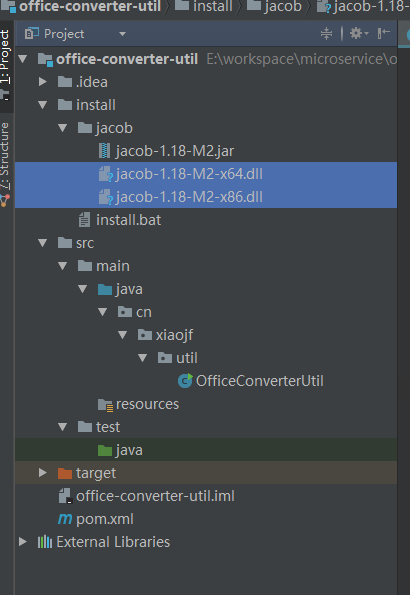
1、使用前,先执行install.bat 安装jacob 到maven本地仓库
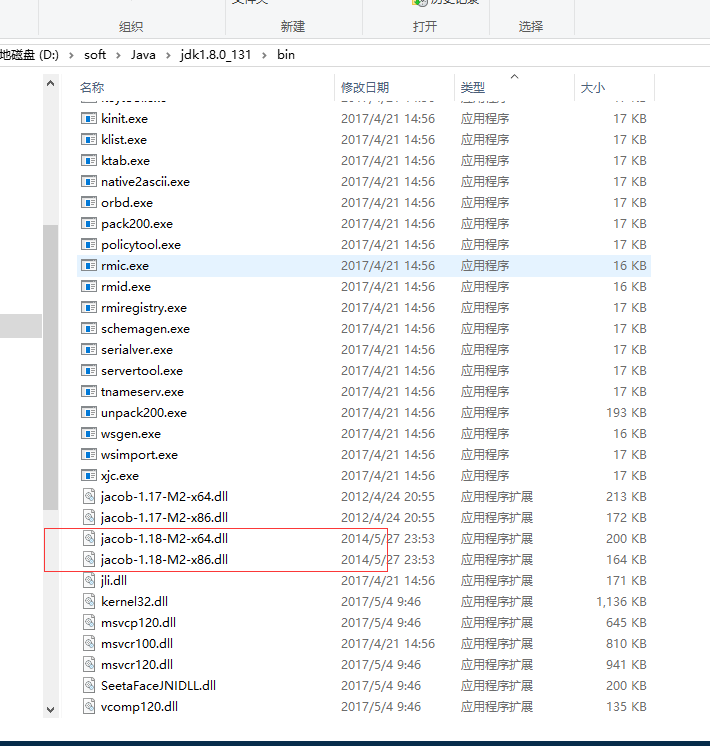
2、复制
jacob-1.18-M2-x64.dll
jacob-1.18-M2-x86.dll
到jdk的bin目录
maven的pom.xml
<?xml version="1.0" encoding="UTF-8"?>

<project xmlns="http://maven.apache.org/POM/4.0.0"

         xmlns:xsi="http://www.w3.org/2001/XMLSchema-instance"

         xsi:schemaLocation="http://maven.apache.org/POM/4.0.0 http://maven.apache.org/xsd/maven-4.0.0.xsd">

    <modelVersion>4.0.0</modelVersion>

    <groupId>cn.xiaojf.util</groupId>

    <artifactId>office-converter-util</artifactId>

    <version>1.0-SNAPSHOT</version>

    <dependencies>

        <dependency>

            <groupId>jacob</groupId>

            <artifactId>jacob</artifactId>

            <version>1.18-M2</version>

        </dependency>

        <dependency>

            <groupId>commons-io</groupId>

            <artifactId>commons-io</artifactId>

            <version>2.5</version>

        </dependency>

        <dependency>

            <groupId>org.apache.commons</groupId>

            <artifactId>commons-lang3</artifactId>

            <version>3.5</version>

        </dependency>

    </dependencies>

</project>
工具类
package cn.xiaojf.util;

import java.io.File;

import java.util.UUID;

import com.jacob.activeX.ActiveXComponent;

import com.jacob.com.Dispatch;

import com.jacob.com.Variant;

import org.apache.commons.lang3.StringUtils;

/**

 * office 文档转换成pdf工具类,通过jacob调用wps转换文档

 * @author xiaojf 2017/12/2 8:29

 */

public class OfficeConverterUtil {

    private static final int WDFO_RMATPDF = 17;

    private static final int XLTYPE_PDF = 0;

    private static final int PPT_SAVEAS_PDF = 32;

    public static final int WORD_HTML = 8;

    public static final int WORD_TXT = 7;

    public static final int EXCEL_HTML = 44;

    public static final int PPT_SAVEAS_JPG = 17;

    // private static final int msoTrue = -1;

    // private static final int msofalse = 0;

    private static ActiveXComponent wordApp = null;

    private static ActiveXComponent excelApp = null;

    private static ActiveXComponent pptApp = null;

    private static ActiveXComponent ppApp = null;

    static {

        wordApp = new ActiveXComponent("Word.Application");

        wordApp.setProperty("Visible", new Variant(false));

        excelApp = new ActiveXComponent("Excel.Application");

        excelApp.setProperty("Visible", false);

        pptApp = new ActiveXComponent("KWPP.Application");

        ppApp = new ActiveXComponent("PowerPoint.Application");

    }

    /**

     * office文件转换成pdf,根据后缀名识别转换类型

     * @param inputFilePath 输入文件绝对路径

     * @param pdfPath 输出文件绝对路径

     * @return 转换是否成功,true 成功,false 不成功

     * @author xiaojf 2017/12/2 8:30

     */

    public static boolean officeFileConverterToPdf(String inputFilePath, String pdfPath) {

        if (StringUtils.isBlank(inputFilePath) || StringUtils.isBlank(pdfPath) || StringUtils.isBlank(getFileSufix(inputFilePath))) {

            return false;

        }

        String suffix = getFileSufix(inputFilePath);

        File file = new File(inputFilePath);

        if (!file.exists()) {

            return false;

        }

        // PDF如果不存在则创建文件夹

        file = new File(getFilePath(pdfPath));

        if (!file.exists()) {

            file.mkdir();

        }

        // 如果输入的路径为PDF 则生成失败

        if (suffix.equals("pdf")) {

            System.out.println("PDF not need to convert!");

            return false;

        }

        if (suffix.equals("doc") || suffix.equals("docx") || suffix.equals("txt")) {

            return wordToPDF(inputFilePath, pdfPath);

        } else if (suffix.equals("xls") || suffix.equals("xlsx")) {

            return excelToPdf(inputFilePath, pdfPath);

        } else if (suffix.equals("ppt") || suffix.equals("pptx")) {

            return pptToPdf(inputFilePath, pdfPath);

            // return ppt2PDF(argInputFilePath, argPdfPath);

        }

        return false;

    }

    /**

     * word 转 pdf

     * @param wordPath 输入文件绝对路径

     * @param pdfPath 输出文件绝对路径

     * @return 转换是否成功,true 成功,false 不成功

     * @author xiaojf 2017/12/2 8:30

     */

    public static boolean wordToPDF(String wordPath, String pdfPath) {

        try {

            Dispatch docs = Dispatch.get(wordApp, "Documents").toDispatch();

            // long pdfStart = System.currentTimeMillis();

            Dispatch doc = Dispatch.invoke(docs, "Open", Dispatch.Method,

                    new Object[]{wordPath, new Variant(false), new Variant(true)}, new int[1]).toDispatch();

            deletePdf(pdfPath);

            Dispatch.invoke(doc, "SaveAs", Dispatch.Method, new Object[]{pdfPath, new Variant(WDFO_RMATPDF)},

                    new int[1]);

            // long pdfEnd = System.currentTimeMillis();

            if (null != doc) {

                Dispatch.call(doc, "Close", false);

            }

        } catch (Exception e) {

            e.printStackTrace();

        } /*

             * finally { wordApp.invoke("Quit"); }

             */

        return true;

    }

    /**

     * excel 转 pdf

     * @param inputFile 输入文件绝对路径

     * @param pdfFile 输出文件绝对路径

     * @return 转换是否成功,true 成功,false 不成功

     * @author xiaojf 2017/12/2 8:30

     */

    public static boolean excelToPdf(String inputFile, String pdfFile) {

        try {

            deletePdf(pdfFile);

            Dispatch excels = excelApp.getProperty("Workbooks").toDispatch();

            Dispatch excel = Dispatch.call(excels, "Open", inputFile, false, true).toDispatch();

            Dispatch.call(excel, "ExportAsFixedFormat", XLTYPE_PDF, pdfFile);

            Dispatch.call(excel, "Close", false);

        } catch (Exception e) {

            e.printStackTrace();

        } /*

             * finally { excelApp.invoke("Quit"); }

             */

        return true;

    }

    /**

     * ppt 转 pdf

     * @param inputFile 输入文件绝对路径

     * @param pdfFile 输出文件绝对路径

     * @return 转换是否成功,true 成功,false 不成功

     * @author xiaojf 2017/12/2 8:30

     */

    public static boolean pptToPdf(String inputFile, String pdfFile) {

        // ComThread.InitSTA(true);

        try {

            // app.setProperty("Visible", false);

            Dispatch ppts = pptApp.getProperty("Presentations").toDispatch();

            Dispatch ppt = Dispatch.call(ppts, "Open", inputFile, true, // ReadOnly

                    // false, // Untitled指定文件是否有标题

                    false// WithWindow指定文件是否可见

            ).toDispatch();

            Dispatch.invoke(ppt, "SaveAs", Dispatch.Method, new Object[]{pdfFile, new Variant(PPT_SAVEAS_PDF)},

                    new int[1]);

            Dispatch.call(ppt, "Close");

        } catch (Exception e) {

            e.printStackTrace();

        } /*

             * finally { pptApp.invoke("Quit"); }

             */

        return true;

    }

    /**

     * ppt 转 图片

     * @param inputFile 输入文件绝对路径

     * @param imgFile 输出文件绝对路径

     * @return 转换是否成功,true 成功,false 不成功

     * @author xiaojf 2017/12/2 8:30

     */

    public static boolean pptToImg(String inputFile, String imgFile) {

        // 打开word应用程序

        try {

            // 设置word不可见,office可能有限制

            // app.setProperty("Visible", false);

            // 获取word中国所打开的文档,返回Documents对象

            Dispatch files = ppApp.getProperty("Presentations").toDispatch();

            // 调用Documents对象中Open方法打开文档,并返回打开的文档对象Document

            Dispatch file = Dispatch.call(files, "open", inputFile, true, true, false).toDispatch();

            // 调用Document对象的SaveAs方法,将文档保存为pdf格式

            // Dispatch.call(doc, "ExportAsFixedFormat", outputFile,

            // PPT_TO_PDF);

            Dispatch.call(file, "SaveAs", imgFile, PPT_SAVEAS_JPG);

            // 关闭文档

            // Dispatch.call(file, "Close", false);

            Dispatch.call(file, "Close");

            // 关闭word应用程序

            // app.invoke("Quit", 0);

        } catch (Exception e) {

            e.printStackTrace();

        } /*

             * finally { ppApp.invoke("Quit"); }

             */

        return true;

    }

    /**

     * 获取文件扩展名

     * @param filePath

     * @author xiaojf 2017/12/2 8:35

     */

    public static String getFileSufix(String filePath) {

        int splitIndex = filePath.lastIndexOf(".");

        return filePath.substring(splitIndex + 1);

    }

    /**

     * 获取文件路径

     * @param filePath

     * @author xiaojf 2017/12/2 8:37

     */

    public static String getFilePath(String filePath) {

        int pathIndex = filePath.lastIndexOf("/");

        return filePath.substring(0, pathIndex);

    }

    /**

     *  如果目标文件存在,则删除

     *  @param pdfPath

     * @author xiaojf 2017/12/2 8:34

     */

    private static void deletePdf(String pdfPath) {

        File pdfFile = new File(pdfPath);

        if (pdfFile.exists()) {

            pdfFile.delete();

        }

    }

    public static void main(String[] args) {

        OfficeConverterUtil.wordToPDF("D:\\word2pdf\\1.doc",

                "D:\\word2pdf\\pdf\\" + UUID.randomUUID().toString() + ".doc.pdf");

        OfficeConverterUtil.wordToPDF("D:\\word2pdf\\1.docx",

                "D:\\word2pdf\\pdf\\" + UUID.randomUUID().toString() + ".docx.pdf");

        OfficeConverterUtil.pptToPdf("D:\\word2pdf\\1.ppt",

                "D:\\word2pdf\\pdf\\" + UUID.randomUUID().toString() + ".ppt.pdf");

        OfficeConverterUtil.pptToPdf("D:\\word2pdf\\1.pptx",

                "D:\\word2pdf\\pdf\\" + UUID.randomUUID().toString() + ".pptx.pdf");

        OfficeConverterUtil.wordToPDF("D:\\word2pdf\\1.rtf",

                "D:\\word2pdf\\pdf\\" + UUID.randomUUID().toString() + ".rtf.pdf");

        OfficeConverterUtil.wordToPDF("D:\\word2pdf\\1.txt",

                "D:\\word2pdf\\pdf\\" + UUID.randomUUID().toString() + ".txt.pdf");

        OfficeConverterUtil.excelToPdf("D:\\word2pdf\\1.xls",

                "D:\\word2pdf\\pdf\\" + UUID.randomUUID().toString() + ".xls.pdf");

        OfficeConverterUtil.excelToPdf("D:\\word2pdf\\1.xlsx",

                "D:\\word2pdf\\pdf\\" + UUID.randomUUID().toString() + ".xlsx.pdf");

        OfficeConverterUtil.pptToImg("D:\\word2pdf\\1.ppt",

                "D:\\word2pdf\\pdf\\" + UUID.randomUUID().toString() + ".ppt.jpg");

        wordApp.invoke("Quit");

        wordApp.safeRelease();

        excelApp.invoke("Quit");

        excelApp.safeRelease();

        pptApp.invoke("Quit");

        pptApp.safeRelease();

        ppApp.invoke("Quit");

        ppApp.safeRelease();

    }

}
转前

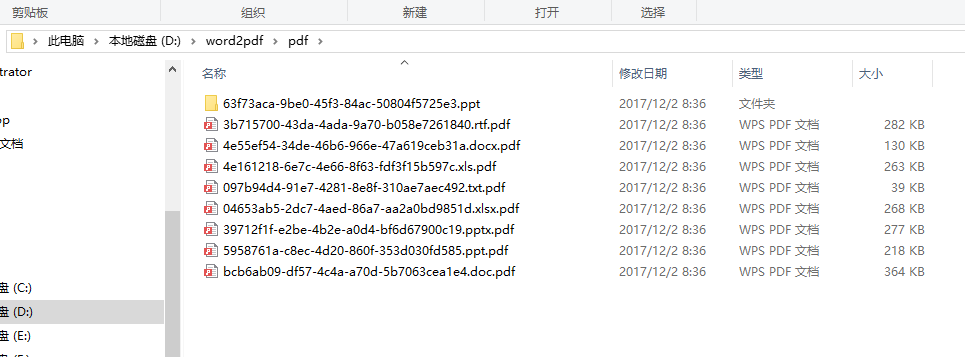
转后
源码下载
https://gitee.com/xiaojf/office-converter-util.git
office 文档转pdf的更多相关文章
- Java实现office文档与pdf文档的在线预览功能
最近项目有个需求要java实现office文档与pdf文档的在线预览功能,刚刚接到的时候就觉得有点难,以自己的水平难以在三四天做完.压力略大.后面查找百度资料.以及在同事与网友的帮助下,四天多把它做完 ...
- office文档转pdf
这里贴下代码吧,没啥好说的. using System; using System.Collections.Generic; using System.Linq; using System.Text; ...
- 转:C#实现office文档转换为PDF或xps的一些方法
代码支持任意office格式 需要安装office 2007 还有一个office2007的插件OfficeSaveAsPDFandXPS 下载地址 [url]http://www.microsoft ...
- Java实现web在线预览office文档与pdf文档实例
https://yq.aliyun.com/ziliao/1768?spm=5176.8246799.blogcont.24.1PxYoX 摘要: 本文讲的是Java实现web在线预览office文档 ...
- Java中几种office文档转pdf的方式
最近公司要做office的文档,搜集了几种office文档转pdf的方式,简单的做下总结 我主要尝试了三种方式:openoffice,aspose,jacob 对他们进行了大文件,小文件,在linux ...
- 在禅道中实现WORD等OFFICE文档转换为PDF进行在线浏览
条件: 安装好禅道的服务器 能直接浏览PDF的浏览器(或通过 安装插件实现 ) 文档转换服务程序(建议部署在另一台服务器上) 实现 原理: 修改禅道的文件预览功能(OFFICE文档其使用的是下 ...
- C#实现office文档转换为PDF或xps的一些方法( 转)
源博客http://blog.csdn.net/kable999/article/details/4786654 代码支持任意office格式 需要安装office 2007 还有一个office20 ...
- C#实现office文档转换为PDF格式
1.安装组件OfficeSaveAsPDFandXPS 需要安装office 2007 还有一个office2007的插件OfficeSaveAsPDFandXPS 下载地址 OfficeSave ...
- linux平台的office文档转pdf(程序员的菜)
需要材料: 1. Openoffice3.4(我是32位的centos,可以根据自己的系统下载指定的openoffice软件包) 下载地址:http://sourceforge.net/projec ...
随机推荐
- 【agc004F】Namori
Portal -->agc004F Solution 好神仙的转化qwq 首先我们可以先考虑\(m=n-1\)的情况下,也就是树的情况下要怎么做 我们可以将这个问题转化一下:我们对这颗 ...
- ios 逆向
Theos https://www.jianshu.com/p/307243ea40e4 Dumpsdecrypted https://www.cnblogs.com/wangyaoguo/p/908 ...
- 设置texture
//获取内部资源贴图 public void setInsideTexture() { Texture2D texture = Resources.Load(texture_url) as Textu ...
- Vue.js随笔一(Webpack + Vue.js开发准备,含VNM、NPM、Node、Webpack等相关工具)
想入门工具是必须的,这一章将向大家带来vue.js相关的程序安装步骤. ①首先你需要有一个NVM(一个非常好用的Node版本管理器): 1.NVM下载地址:https://github.com/cor ...
- JS中的匿名函数自执行、函数声明与函数表达式
先看一段jQuery源码中匿名函数自执行的例子: (function( window, undefined ) { // jquery code })(window); 另外一种常见的写法: +fun ...
- net-speeder
有的同学反映自己的搬瓦工速度慢,丢包率高.这其实和你的网络服务提供商有关.据我所知一部分上海电信的同学就有这种问题.那么碰到了坑爹的网络服务商,我们应该怎么办呢? duangduang~~~~~~有请 ...
- JS常用面试题
一.闭包: 1.函数嵌套函数.内部函数可以引用外部函数的参数和变量. 参数和变量不会被垃圾回收机制所收回 function aaa(a){ var b = 5; function bbb(){ ...
- oracle分析函数 (转)
一.总体介绍 12.1 分析函数如何工作 语法 FUNCTION_NAME(<参数>,…) OVER (<PARTITION BY 表达式,…> <ORDER BY 表达 ...
- HTML 5 Web 存储:localStorage和sessionStorage
本文内容摘自http://www.w3school.com.cn/ 在客户端存储数据 HTML5 提供了两种在客户端存储数据的新方法: localStorage - 没有时间限制的数据存储 sessi ...
- 在Unity中实现屏幕空间反射Screen Space Reflection(2)
traceRay函数 在上一篇中,我们有如下签名的traceRay函数 bool traceRay(float3 start, float3 direction, out float2 hitPixe ...