
STL——容器(Map & multimap)的删除
Map & multimap 的删除
- map.clear(); //删除所有元素
- map.erase(pos); //删除pos迭代器所指的元素,返回下一个元素的迭代器。
- map.erase(beg,end);//删除区间[beg,end)的所有元素 ,返回下一个元素的迭代器。
- map.erase(key); //删除容器中key为key的对组,返回删除的对组个数
1. clear() 删除所有元素示例:
 1 #include <iostream>

 2 #include <map>

 3

 4 using namespace std;

 5

 6 int main()

 7 {

 8     map<int, string> mapStu1;

 9     mapStu1.insert(pair<int, string>(1, "内容A"));

10     mapStu1.insert(pair<int, string>(2, "内容B"));

11     mapStu1.insert(pair<int, string>(3, "内容C"));

12

13     if (!mapStu1.empty())

14     {

15         cout << "容器 mapStu1 中共有" << mapStu1.size() << "个元素" << endl;

16     }

17     else

18     {

19         cout << "容器 mapStu1 中共有" << mapStu1.size() << "个元素, " << "容器为空" << endl;

20     }

21

22     cout << "删除所有元素" << endl;

23     mapStu1.clear();

24     if (!mapStu1.empty())

25     {

26         cout << "容器 mapStu1 中共有" << mapStu1.size() << "个元素" << endl;

27     }

28     else

29     {

30         cout << "容器 mapStu1 中共有" << mapStu1.size() << "个元素, " << "容器为空" << endl;

31     }

32

33     return 0;

34 }
打印结果:

2. erase(pos); //删除pos迭代器所指的元素示例:
 1 #include <iostream>

 2 #include <map>

 3

 4 using namespace std;

 5

 6 int main()

 7 {

 8     map<int, string> mapStu1;

 9

10     mapStu1.insert(pair<int, string>(1, "内容A"));

11     mapStu1.insert(pair<int, string>(2, "内容B"));

12     mapStu1.insert(pair<int, string>(3, "内容C"));

13     mapStu1.insert(pair<int, string>(4, "内容D"));

14

15     map<int, string>::iterator it1 = mapStu1.begin();

16     cout << "删除首元素前, 首元素为:" << it1->first << "首元素内容为: " << it1->second << endl;

17     cout << endl;

18     map<int, string>::iterator it2 = mapStu1.erase(mapStu1.begin());

19     cout << "删除首元素后, 新的首元素为:" << it2->first << "首元素内容为: " << it2->second << endl;

20

21     return 0;

22 }
打印结果:

3. erase(beg,end); //删除区间[beg,end)的所有元素示例
 1 #include <iostream>

 2 #include <map>

 3

 4 using namespace std;

 5

 6 int main()

 7 {

 8     map<int, string> mapStu1;

 9

10     mapStu1.insert(pair<int, string>(1, "内容A"));

11     mapStu1.insert(pair<int, string>(2, "内容B"));

12     mapStu1.insert(pair<int, string>(3, "内容C"));

13     mapStu1.insert(pair<int, string>(4, "内容D"));

14     mapStu1.insert(pair<int, string>(5, "内容E"));

15

16     cout << "遍历mapStu1: " << endl;

17     for (map<int, string>::iterator it = mapStu1.begin(); it != mapStu1.end(); it++)

18     {

19         cout << "容器 mapStu1 的第" << it->first << "个元素为: " << it->second << endl;

20     }

21

22     cout << endl << "删除除首元素与尾部元素之间的所有元素" << endl;

23

24     map<int, string>::iterator it = mapStu1.erase(++mapStu1.begin(), --mapStu1.end());

25     cout << endl << "删除完后返回的迭代器所指向的 key 为: " << it->first << "内容为: " << it->second << endl;

26

27     cout << endl << "删除后遍历mapStu1: " << endl;

28     for (map<int, string>::iterator it = mapStu1.begin(); it != mapStu1.end(); it++)

29     {

30         cout << "容器 mapStu1 的第" << it->first << "个元素为: " << it->second << endl;

31     }

32

33     return 0;

34 }
打印结果:
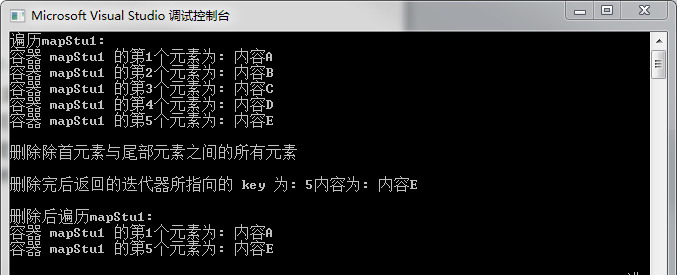
4. erase(key); //删除容器中key为key的对组示例
 1 #include <iostream>

 2 #include <map>

 3

 4 using namespace std;

 5

 6 int main()

 7 {

 8     multimap<int, string> multimapStu1;

 9

10     multimapStu1.insert(pair<int, string>(1, "内容A"));

11     multimapStu1.insert(pair<int, string>(1, "内容AA"));

12     multimapStu1.insert(pair<int, string>(1, "内容AAA"));

13     multimapStu1.insert(pair<int, string>(2, "内容B"));

14     multimapStu1.insert(pair<int, string>(3, "内容C"));

15

16     cout << "遍历mapStu1: " << endl;

17     for (map<int, string>::iterator it = multimapStu1.begin(); it != multimapStu1.end(); it++)

18     {

19         cout << "容器 mapStu1 key 为" << it->first << "的个元素为: " << it->second << endl;

20     }

21     cout << endl << "删除所有 key 为 1 的组" << endl;

22

23     cout << endl << "共删除了" << multimapStu1.erase(1) << "个 key 为1的组" << endl;            //会返回删除的个数

24     cout << "遍历mapStu1: " << endl;

25     for (map<int, string>::iterator it = multimapStu1.begin(); it != multimapStu1.end(); it++)

26     {

27         cout << "容器 mapStu1 key 为" << it->first << "的个元素为: " << it->second << endl;

28     }

29

30     return 0;

31 }
打印结果:
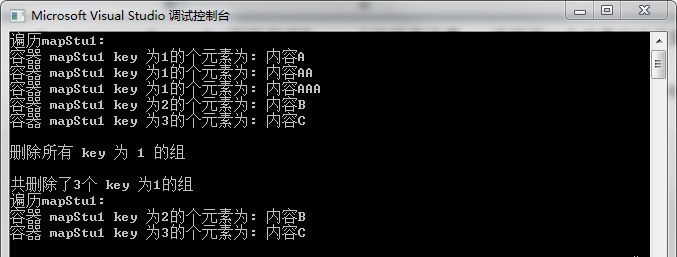
=====================================================================================================================
STL——容器(Map & multimap)的删除的更多相关文章
- STL:map/multimap用法详解
map/multimap 使用map/multimap之前要加入头文件#include<map>,map和multimap将key/value当作元素,进行管理.它们可根据key的排序准则 ...
- STL之map&multimap使用简介
map 1.insert 第一种:用insert函数插入pair数据 #include <map> #include <string> #include <iostrea ...
- STL容器 -- Map
核心描述: map 就是从键(key) 到 值(value) 的一个映射.且键值不可重复,内部按照键值排序. 头文件: #include <map> 拓展: multimap 是一个多重映 ...
- STL容器Map
Map的常见函数 Map的实现机制 STL中的Map底层实现机制是RB树(红-黑树)
- 【STL】-Map/Multimap的用法
初始化: map<string,double> salaries; 算法: 1. 赋值.salaries[ "Pat" ] = 75000.00; 2. 无效的索引将自 ...
- STL - 容器 - Map(二)
把Map用作关联式数组 MapAdvanceTest.cpp #include <map> #include <string> #include <iostream> ...
- STL - 容器 - Map(一)
MapTest.cpp #include <map> #include <string> #include <iostream> #include <algo ...
- iBinary C++STL模板库关联容器之map/multimap
目录 一丶关联容器map/multimap 容器 二丶代码例子 1.map的三种插入数据的方法 3.map集合的遍历 4.验证map集合数据是否插入成功 5.map数据的查找 6.Map集合删除元素以 ...
- STL 笔记(二) 关联容器 map、set、multimap 和 multimap
STL 关联容器简单介绍 关联容器即 key-value 键值对容器,依靠 key 来存储和读取元素. 在 STL 中,有四种关联容器,各自是: map 键值对 key-value 存储,key 不可 ...
随机推荐
- rbd的增量备份和恢复
前言 快照的功能一般是基于时间点做一个标记,然后在某些需要的时候,将状态恢复到标记的那个点,这个有一个前提是底层的东西没用破坏,举个简单的例子,Vmware 里面对虚拟机做了一个快照,然后做了一些系统 ...
- 测试_QTP简介
一:什么是QTP? QTP(QuickTest Professional)是一款自动化测试工具,自动化测试就是利用计算机模拟人进行测试,也就是开发一套代码测试另一套代码. QTP主要用它来执行重复的手 ...
- “三剑客”之sed手中有剑
一.sed介绍 sed是Stream Editor(字符流编辑器)的缩写,简称流编辑器.sed是操作.过滤和转换文本内容的强大工具.常用功能包括对文件实现快速增删改查(增加.删除.修改.查询),其中查 ...
- 协程实现爬虫的例子主要优势在于充分利用IO时间去请求其他的url
# 分别使用urlopen和requests两个模块进行演示 # import requests # 需要安装的 # from urllib.request import urlopen # # ur ...
- 多线程实现socketserver练习
1.server import socket from threading import Thread def my_socketserver(conn, addr): conn.send(b'hel ...
- 本地Git仓库的使用方法
一.如何将自己的项目上传到本地git仓库以及上传到GitHub上面 上传到本地git仓库步骤: 1.先配置好git:工具-->扩展和更新-->安装GitHbu Extension for ...
- [代码审计Day2] filter_var函数缺陷代码审计
简介 // composer require "twig/twig" require 'vendor/autoload.php'; class Template { private ...
- Android系统添加key和keypad
平台:MTK 一.添加一个按键 1.在DCT tool keypad list 文件增加新按键的选项alps\mediatek\source\dct\Keypad_YuSu.cmp中添加新键,如SMS ...
- 如何用CDR做出毛笔字效果
不仅仅是水墨字,毛笔字在CDR中的制作也是很简单的.一般来讲,水墨字其实跟毛笔字有相通之处,也可以说毛笔字是水墨字的一种,在CDR中的实现也是既简单又实用的. 方法一:艺术笔工具 艺术笔工具是比较便捷 ...
- css3系列之box-sizing
box-sizing box-sizing: 俗称ie6 的混杂模式的盒子模型. 首先来了解一下 ie6 的混杂模式,和我们常用的 盒子模型有什么不一样 正常模式下: 我们设置的 width 和 ...