
python自动化之使用allure生成测试报告
- 安装allure
- Windows用户:
- scoop install allure (需要先下载并安装Scoop,该方法无需配置环境变量)
- MAC用户:
- 通过Homebrew进行自动安装
- brew install allure (如果Homebrew版本比较旧,需要先升级Homebrew,否则安装的allure版本也很老,可能会与Python插件不兼容)
- 手动安装:
- 可以从官网 https://repo.maven.apache.org/maven2/io/qameta/allure/allure-commandline/ 手动下载
- 目前最新版本为2.13.6
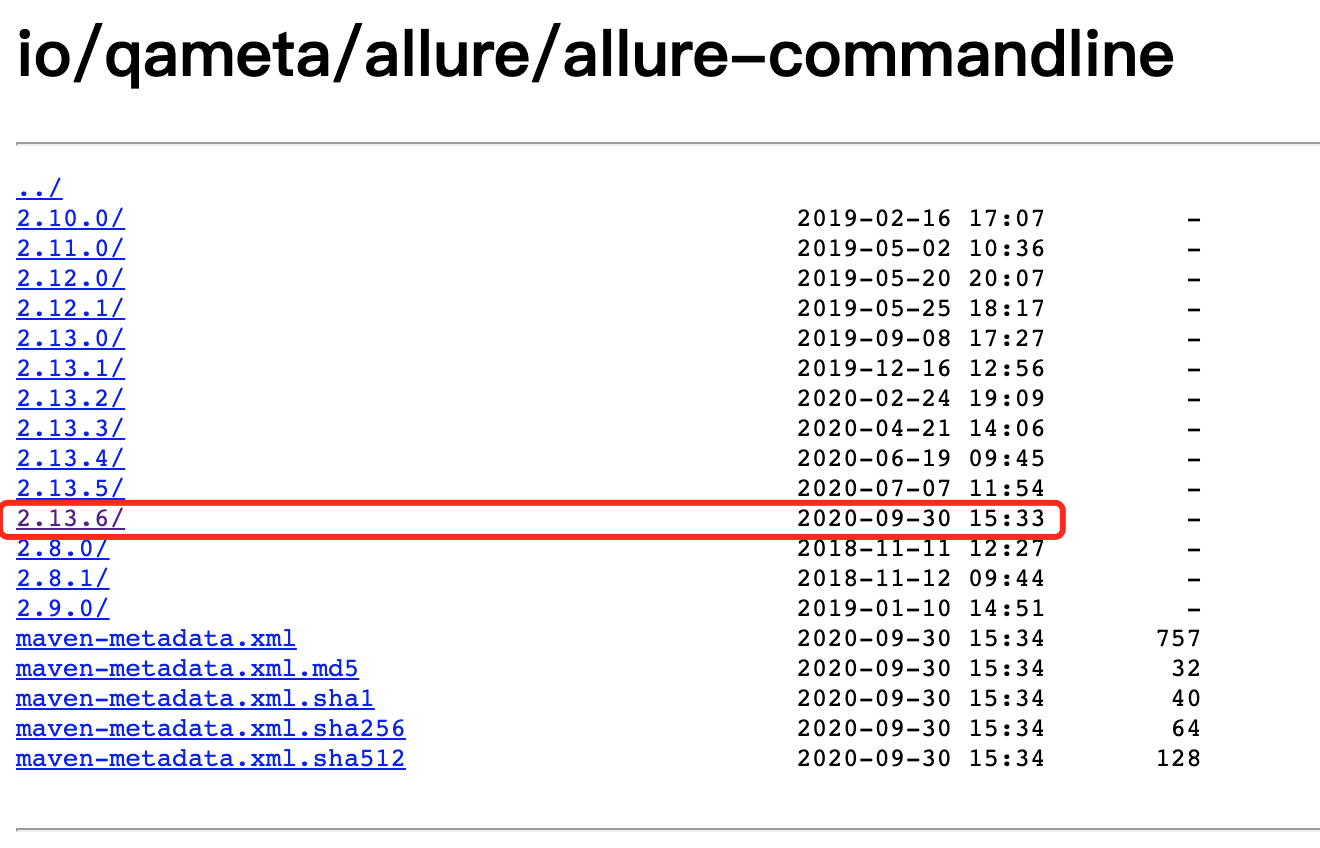
下载后解压并配置环境变量
- 安装allure-pytest插件
- pip install allure-pytest
allure常用特性
希望在报告中看到测试功能,子功能或场景,测试步骤,包括测试附加信息可以使用@feature,@story,@step,@attach
步骤:
- import allure
- 功能上加@allure.feature("功能名称")
- 子功能上加@allure.story("子功能名称")
- 步骤上加@allure.step("步骤细节")
- @allure.attach("具体文本信息"),需要附加的信息,可以是数据,文本,图片,视频,网页
- 如果只测试部分功能运行的时候可以加限制过滤:
- pytest 文件名 --allure-features "需要运行的功能名称"
allure特性—feature/story
@allure.feature与@allure.store的关系
- feature相当于一个功能,一个大的模块,将case分类到某个feature中,报告中在behaviore中显示,相当于testsuite
- story相当于对应这个功能或者模块下的不同场景,分支功能,属于feature之下的结构,报告在features中显示,相当于testcase
- feature与story类似于父与子关系
step特性
- 测试过程中每个步骤,一般放在具体逻辑方法中
- 可以放在关键步骤中,在报告中显示
- 在app,web自动化测试中,建议每切换到一个新的页面当做一个step
- 用法:
- @allure.step() 只能以装饰器的形式放在类或方法上面
- with allure.step(): 可以放在测试用例方法里面,但测试步骤的代码需要被该语句包含
运行:
在测试执行期间收集结果
pytest [测试文件] -s -q --alluredir=./result --clean-alluredir
- --alluredir这个选项,用于指定存储测试结果的路径
- --clean-alluredir 这个选项用来清除之前生成的结果
查看测试报告:
方法一:测试完成后查看实际报告,在线看报告,会直接打开默认浏览器展示当前报告
allure serve ./result
方法二:从结果生成报告,这是一个启动tomcat的服务,需要两个步骤
生成报告:
allure generate ./result -o ./report --clean (注意:--clean用来清除之前已生成的报告)
打开报告:
allure open -h 127.0.0.1 -p 8883 ./report (该方法直接生成一个tomcat服务,可远程访问)
举个例子:
有如下代码文件


#!/usr/bin/python

# -*- coding: UTF-8 -*-

"""

@author:chenshifeng

@file:test_allure.py

@time:2020/10/10

"""

import allure

import pytest

@allure.feature('登录模块')

class TestLogin():

    @allure.story('登录成功')

    @allure.title('登录成功标题')

    def test_login_sucess(self):

        with allure.step('步骤1:打开应用'):

            print('应用已打开')

        with allure.step('步骤2:进入登录页面'):

            print('登录页面已打开')

        with allure.step('步骤3:输入用户名和密码'):

            print('用户名和密码输入成功')

        print('登录测试用例:登录成功')

    @allure.story('登录成功')

    def test_login_sucess2(self):

        assert '1' == 1

        print('登录测试用例:登录成功')

    @allure.story('登录失败')

    def test_login_failure_a(self):

        print('登录测试用例:登录失败,用户名缺失')

    @allure.story('登录失败')

    def test_login_failure_b(self):

        print('登录测试用例:登录失败,密码缺失')

    @allure.story('登录失败')

    def test_login_failure_c(self):

        with allure.step('输入用户名'):

            print('已输入用户名')

        with allure.step('输入密码'):

            print('已输入密码')

        with allure.step('点击登录'):

            print('已点击登录')

        print('登录测试用例:登录失败,密码错误')

@allure.feature('搜索模块')

class TestSearch():

    def test_search1(self):

        print('搜索用例1')

    TEST_CASE_LINK = 'https://mirrors.huaweicloud.com/'

    @allure.testcase(TEST_CASE_LINK,'测试用例连接')

    def test_search2(self):

        print('搜索用例2')

    @allure.step('搜索步骤')

    def test_search3(self):

        print('搜索用例3')
依次执行命令:
pytest test_allure.py --alluredir=./result --clean-alluredir
allure serve ./result
chenshifengdeMacBook-Pro:testcode chenshifeng$ pytest test_allure.py --alluredir=./result --clean-alluredir

============================================================================= test session starts =============================================================================

platform darwin -- Python 3.9.0, pytest-6.1.1, py-1.9.0, pluggy-0.13.1

rootdir: /Users/chenshifeng/MyCode/PythonCode/SFDSZL/test_pytest, configfile: pytest.ini

plugins: allure-pytest-2.8.18

collected 8 items

test_allure.py .F......                                                                                                                                                 [100%]

================================================================================== FAILURES ===================================================================================

________________________________________________________________________ TestLogin.test_login_sucess2 _________________________________________________________________________

self = <test_allure.TestLogin object at 0x7fef3d5cba90>

    @allure.story('登录成功')

    def test_login_sucess2(self):

>       assert '1' == 1

E       AssertionError: assert '1' == 1

test_allure.py:27: AssertionError

=========================================================================== short test summary info ===========================================================================

FAILED test_allure.py::TestLogin::test_login_sucess2 - AssertionError: assert '1' == 1

========================================================================= 1 failed, 7 passed in 0.07s =========================================================================

chenshifengdeMacBook-Pro:testcode chenshifeng$ allure serve ./result

Generating report to temp directory...

Report successfully generated to /var/folders/p0/3_7fwrvx6n3ftpfd4wjb01300000gn/T/7024790777193223986/allure-report

Starting web server...

2020-10-13 21:39:56.174:INFO::main: Logging initialized @6818ms to org.eclipse.jetty.util.log.StdErrLog

Server started at <http://192.168.12.100:58977/>. Press <Ctrl+C> to exit
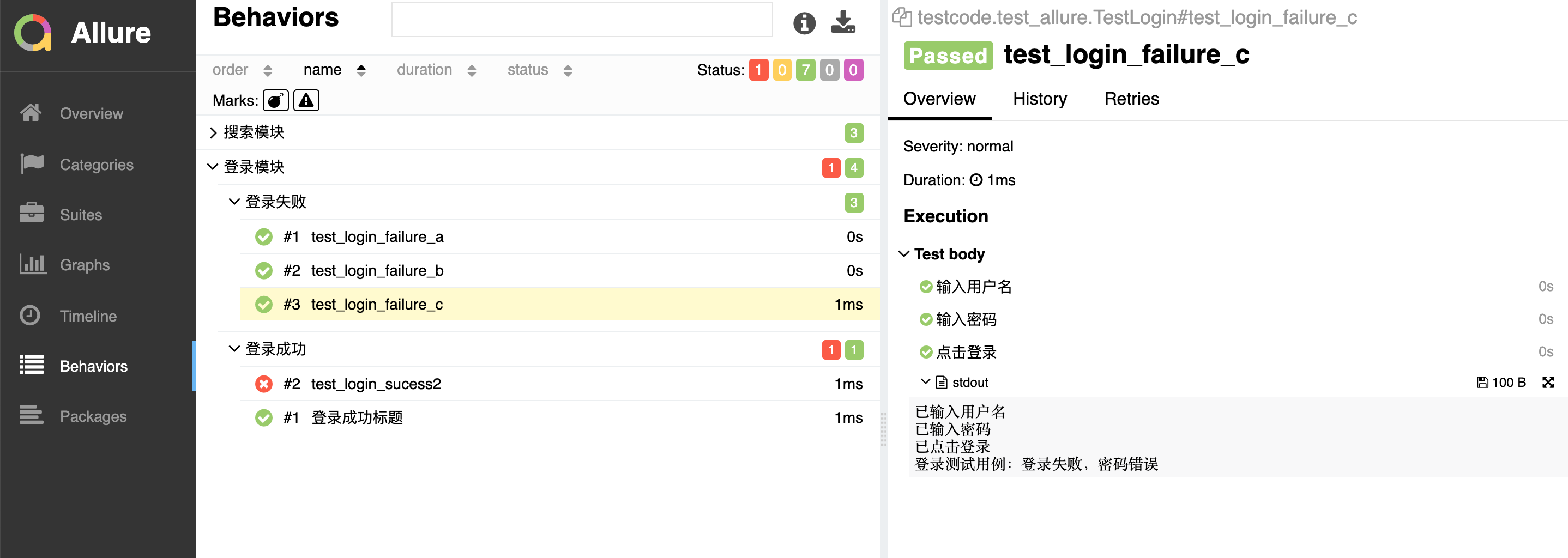
生成的报告:
allure特性-testcase
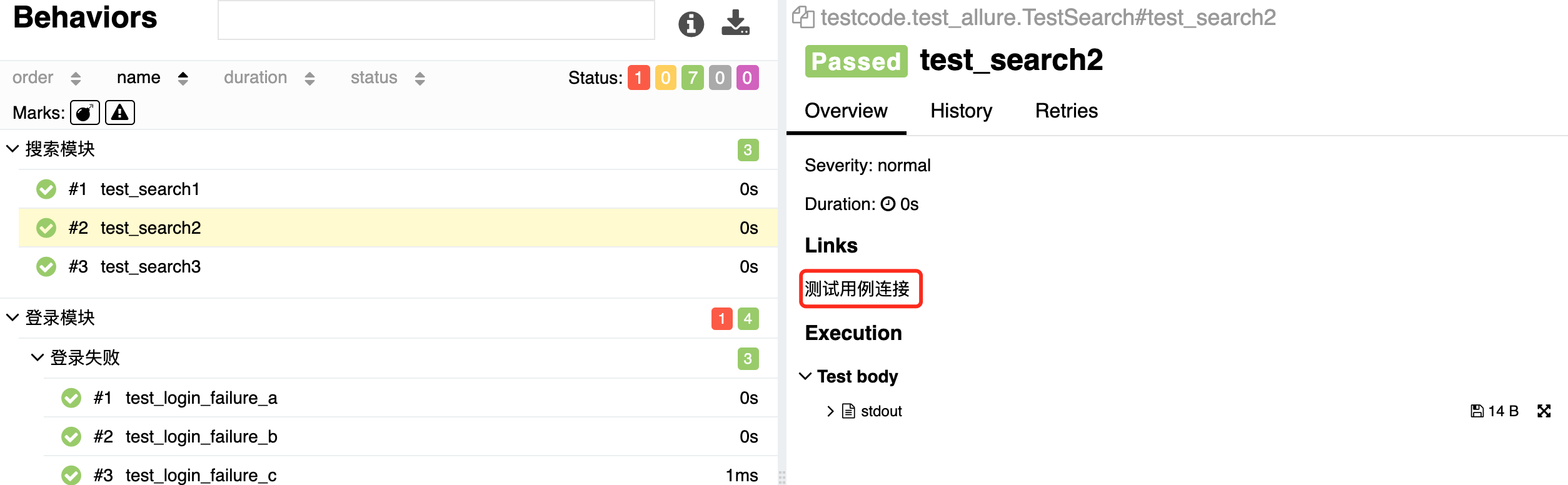
关联测试用例(可以直接给测试用例的地址链接)
例子:
TEST_CASE_LINK = 'https://mirrors.huaweicloud.com/'

@allure.testcase(TEST_CASE_LINK,'测试用例连接')

def test_search(self):

    print('搜索用例')
按重要性级别进行一定范围测试
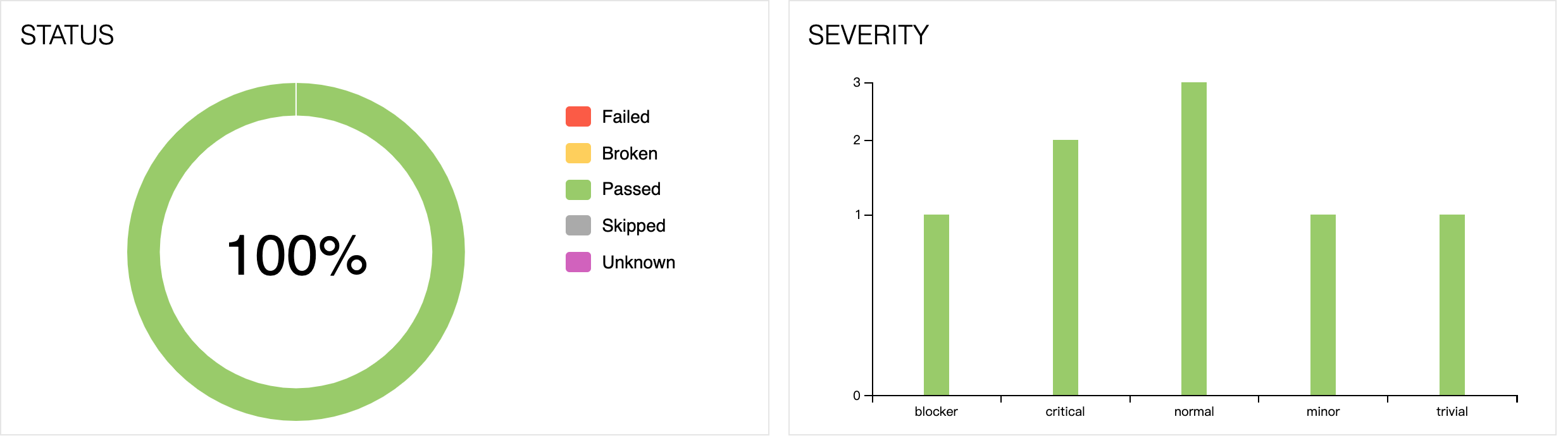
通常测试有P0、冒烟测试、验证上线测试。按重要性级别来执行的,比如上线要把主流程和重要模块都跑一遍,可通过以下方法解决
- 通过附加@pytest.mark标记
- 通过allure.feature,allure.story
- 也可以通过allure.severity来附加标记
- 级别:
- trivial:不重要,轻微缺陷(必输项无提示,或者提示不规范)
- minor 不太重要,次要缺陷(界面错误与UI需求不符)
- normal:正常问题,普通缺陷(数值计算错误)
- critical:严重,临界缺陷(功能点缺失)
- blocker:阻塞,中断缺陷(客户端程序无响应,无法执行下一步操作)
使用方法:
在方法、函数和类上面加 @allure.severity(allure.severity_level.TRIVIAL)
执行:
pytest -s -v 文件名 --allure-severities normal,critical
举例说明:
#!/usr/bin/python

# -*- coding: UTF-8 -*-

"""

@author:chenshifeng

@file:test_severity.py

@time:2020/10/11

"""

import allure

import pytest

# 不加任何标记,默认normal

def test_with_no_severity():

    pass

# trivial:不重要,轻微缺陷(必输项无提示,或者提示不规范)

@allure.severity(allure.severity_level.TRIVIAL)

def test_with_trivial_severity():

    pass

# minor 级别 不太重要,次要缺陷(界面错误与UI需求不符)

@allure.severity(allure.severity_level.MINOR)

def test_with_minor_severity():

    pass

# normal:正常问题,普通缺陷(数值计算错误)

@allure.severity(allure.severity_level.NORMAL)

def test_with_normal_severity():

    pass

# critical:严重,临界缺陷(功能点缺失)

@allure.severity(allure.severity_level.CRITICAL)

def test_with_ritical_severity():

    pass

# blocker:阻塞,中断缺陷(客户端程序无响应,无法执行下一步操作)

@allure.severity(allure.severity_level.BLOCKER)

def test_with_blocker_severity():

    pass

@allure.severity(allure.severity_level.NORMAL)

class TestClassWithNormalSeverity(object):

    # 不加任何标记,默认为同class级别

    def test_inside_with_normal_severity(self):

        pass

    # 重新设置了critical级别

    @allure.severity(allure.severity_level.CRITICAL)

    def test_inside_with_critical_severity(self):

        pass
执行:
chenshifengdeMacBook-Pro:testcode chenshifeng$ pytest test_severity.py --alluredir=./result --clean-alluredir -vs

============================================================================= test session starts =============================================================================

platform darwin -- Python 3.9.0, pytest-6.1.1, py-1.9.0, pluggy-0.13.1 -- /usr/local/bin/python3.9

cachedir: .pytest_cache

rootdir: /Users/chenshifeng/MyCode/PythonCode/SFDSZL/test_pytest, configfile: pytest.ini

plugins: allure-pytest-2.8.18

collected 8 items

test_severity.py::test_with_no_severity PASSED

test_severity.py::test_with_trivial_severity PASSED

test_severity.py::test_with_minor_severity PASSED

test_severity.py::test_with_normal_severity PASSED

test_severity.py::test_with_ritical_severity PASSED

test_severity.py::test_with_blocker_severity PASSED

test_severity.py::TestClassWithNormalSeverity::test_inside_with_normal_severity PASSED

test_severity.py::TestClassWithNormalSeverity::test_inside_with_critical_severity PASSED

============================================================================== 8 passed in 0.03s ==============================================================================

chenshifengdeMacBook-Pro:testcode chenshifeng$ allure serve ./result

Generating report to temp directory...

Report successfully generated to /var/folders/p0/3_7fwrvx6n3ftpfd4wjb01300000gn/T/17788207943997663035/allure-report

Starting web server...

2020-10-13 22:27:49.842:INFO::main: Logging initialized @6620ms to org.eclipse.jetty.util.log.StdErrLog

Server started at <http://192.168.12.100:59696/>. Press <Ctrl+C> to exit
终极用例:
百度搜索:
#!/usr/bin/python

# -*- coding: UTF-8 -*-

"""

@author:chenshifeng

@file:test_baidudemo.py

@time:2020/10/13

"""

import pytest

import allure

from selenium import webdriver

import time

@allure.testcase('https://www.github.com')

@allure.feature("百度搜索")

@pytest.mark.parametrize('test_data1',['allure','pytest','unittest'])

def test_steps_demo(test_data1):

    with allure.step('打开百度网页'):

        driver=webdriver.Chrome()

        driver.get('http://www.baidu.com')

        driver.maximize_window()

    with allure.step(f'输入搜索词:{test_data1}'):

        driver.find_element_by_id('kw').send_keys(test_data1)

        time.sleep(2)

        driver.find_element_by_id('su').click()

        time.sleep(2)

    with allure.step('保存图片'):

        driver.save_screenshot('./screenshot/baidu.png')

        allure.attach.file('./screenshot/baidu.png',attachment_type=allure.attachment_type.PNG)

    with allure.step('关闭浏览器'):

        driver.quit()
执行:
chenshifengdeMacBook-Pro:testcode chenshifeng$ pytest test_baidudemo.py --alluredir=./result --clean-alluredir -vs

============================================================================= test session starts =============================================================================

platform darwin -- Python 3.9.0, pytest-6.1.1, py-1.9.0, pluggy-0.13.1 -- /usr/local/bin/python3.9

cachedir: .pytest_cache

rootdir: /Users/chenshifeng/MyCode/PythonCode/SFDSZL/test_pytest, configfile: pytest.ini

plugins: allure-pytest-2.8.18

collected 3 items

test_baidudemo.py::test_steps_demo[allure] PASSED

test_baidudemo.py::test_steps_demo[pytest] PASSED

test_baidudemo.py::test_steps_demo[unittest] PASSED

============================================================================= 3 passed in 24.65s ==============================================================================

chenshifengdeMacBook-Pro:testcode chenshifeng$ allure serve ./result

Generating report to temp directory...

Report successfully generated to /var/folders/p0/3_7fwrvx6n3ftpfd4wjb01300000gn/T/18005664130273264423/allure-report

Starting web server...

2020-10-13 23:03:39.221:INFO::main: Logging initialized @7360ms to org.eclipse.jetty.util.log.StdErrLog

Server started at <http://192.168.12.100:60775/>. Press <Ctrl+C> to exit
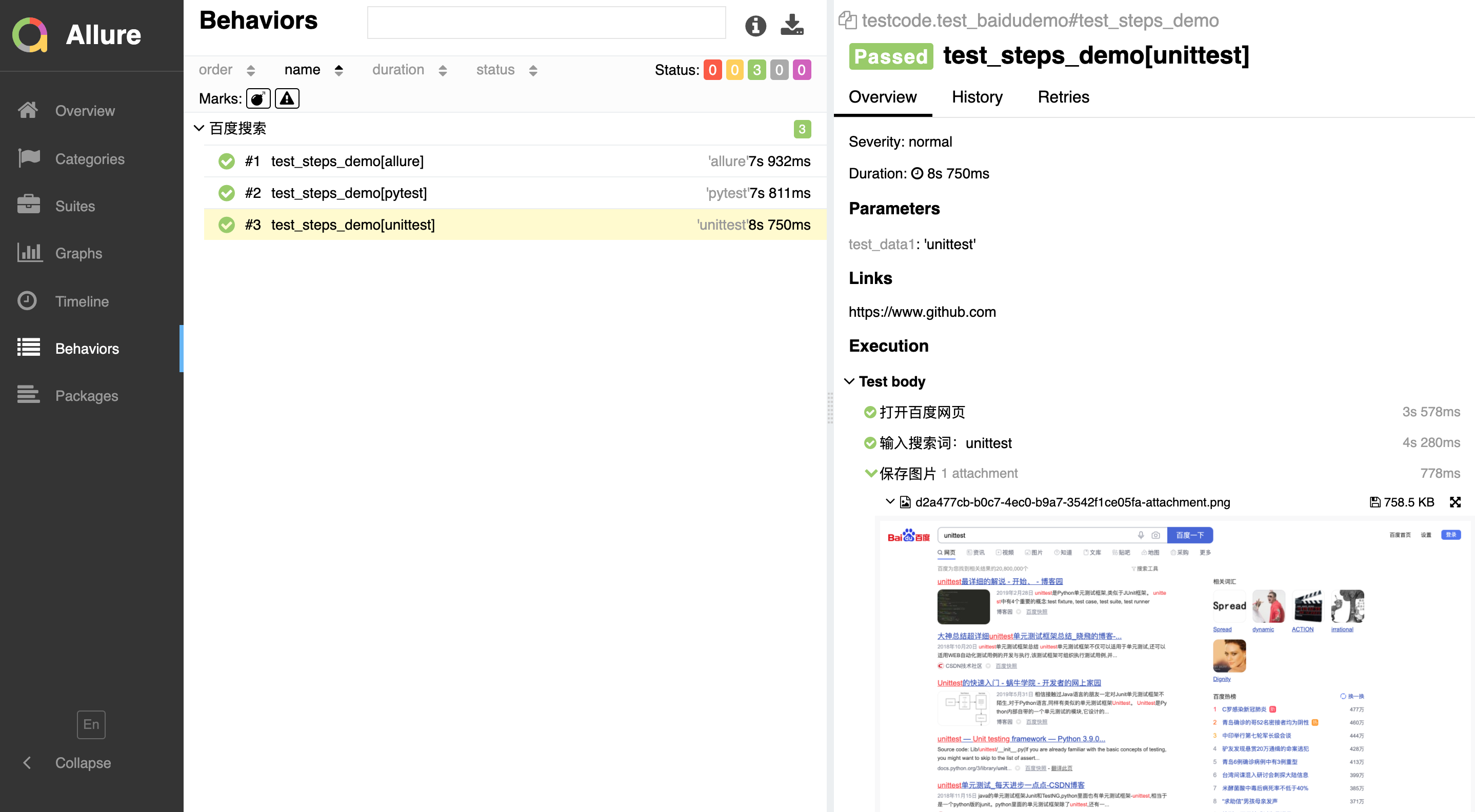
报告:
python自动化之使用allure生成测试报告的更多相关文章
- python + pytest + allure生成测试报告
pytest结合allure生成测试报告 环境搭建 要安装java环境,版本要是jdk1.8的,配置好java环境变量,不然输入allure命令会报错,JAVA_HOME环境,自行配置 安装allur ...
- Pytest测试框架(五):pytest + allure生成测试报告
Allure 是一款轻量级.支持多语言的开源自动化测试报告生成框架,由Java语言开发,可以集成到 Jenkins. pytest 测试框架支持Allure 报告生成. pytest也可以生成juni ...
- pytest(11)-Allure生成测试报告(一)
Allure是一个开源的测试报告生成框架,提供了测试报告定制化功能,相较于我们之前使用过pytest-html插件生成的html格式的测试报告,通过Allure生成的报告更加规范.清晰.美观. pyt ...
- Python&Selenium&pytest借助allure生成自动化测试报告
一.摘要 本篇博文将介绍Python和Selenium进行自动化测试时,如何借助allure生成自动化测试报告 二.环境配置 首先python环境中安装pytest和pytest_allure_ada ...
- pytest+jenkins+allure 生成测试报告发送邮件
前言第一部分:Pycharm for Gitee1. pycharm安装gitee插件2. gitee关联本地Git快速设置- 如果你知道该怎么操作,直接使用下面的地址简易的命令行入门教程:3. Gi ...
- Python单元测试框架unittest之生成测试报告(HTMLTestRunner)
前言 批量执行完用例后,生成的测试报告是文本形式的,不够直观,为了更好的展示测试报告,最好是生成HTML格式的. unittest里面是不能生成html格式报告的,需要导入一个第三方的模块:HTMLT ...
- Python单元测试框架之pytest -- 生成测试报告
继续pytest单元测试框架的学习,pytest可以生成多种类型的测试报告.这一节就来学习pytest如何生成测试报告. 创建test_calss.py 测试用例文件,这里以测试该文件为例. #cod ...
- Python 中 使用 HTMLTestRunner 模块生成测试报告
使用 HTMLTestRunner 模块可以生成测试报告,但是系统自带的报告不详细,不好看,所以找了一份详细的报告 HTMLTestRunner 模板,直接导入就能使用 两种方法生成HTML报告,都 ...
- python+selenium简易自动化框架,包含生成测试报告以及发送结果至Email
Selenium+python环境搭建见虫师的pdf文档,非常详尽 简易框架: 1.文件目录:
随机推荐
- redhat_快捷键和shell命令操作.md
tab键 命令自动补全 history !n 执行历史记录第n条 !! 执行上一条命令 !l 最后一条以l开头的命令 alias 创建命令的别名 alias 命令别名 = "命令行" ...
- 初识 D3.js :打造专属可视化
一.前言 随着现在自定义可视化的需求日益增长,Highcharts.echarts等高度封装的可视化框架已经无法满足用户各种强定制性的可视化需求了,这个时候D3的无限定制的能力就脱颖而出. 如果想要通 ...
- PHP 获取天气
/** * 获取天气 */ function get_tq () { //获取用户ip地址 $ip = get_real_ip(); // $ip = '123.125.71.38'; //根据ip地 ...
- sql查询速度慢分析及如何优化查询
原因分析后台数据库中数据过多,未做数据优化数据请求-解析-展示处理不当 网络问题提高数据库查询的速度方案SQL 查询速度慢的原因有很多,常见的有以下几种:1.没有索引或者没有用到索引(查询慢最常见的问 ...
- 对Java集合的概述
前言 大部分编程语言都提供了数组来保存对象,数组是非常重要的数据结构之一.但是数组在初始化时就已经定义了数组长度,不可变,使用起来颇为麻烦.因此,Java 在 JDK 1.2 版本中添加了集合框架,用 ...
- 【对线面试官】Java 反射&&动态代理
// 抽象类,定义泛型<T> public abstract class BaseDao<T> { public BaseDao(){ Class clazz = this.g ...
- Scrapy使用RabbitMQ做任务队列
前言 一个月没更博客了,这个月也搞了不少东西,但是公司对保密性要求挺高,很多东西都没有办法写出来 想来想去,还是写一篇最近写Scrapy中遇到的跳转问题 如果你的业务需求是遇到301/302/303跳 ...
- Java虚拟机常用的性能监控工具
基础故障处理工具 jps: 虚拟机进程状况工具 功能:来处正在运行的虚拟机进程,并显示虚拟机执行主类名称,以及本地虚拟机唯一ID. 它是使用频率最高的命令行工具,因为其他JDK工具大多需要输入他查询到 ...
- CentOS | python3.7安装指南
前言: centos系统本身默认安装有python2.x,版本x根据不同版本系统有所不同 可通过 python --V 或 python --version 查看系统自带的python版本 有一些系统 ...
- awk中的if ,else
local pct="$(awk -v one="$1" -v two="$2" 'BEGIN{ if (two > 0) { printf & ...