
Kubernetes实战指南(三十三):都0202了,你还在手写k8s的yaml文件?
1. k8s的yaml文件到底有多复杂
Kubernetes创建、更新、删除资源等操作时均可以使用json或yaml文件进行操作,更新和删除可以依赖之前的文件进行更改,但是创建具有多变形,往往编辑起来比较复杂,容器出错,而且k8s的配置项实在太多,稍微不注意就会犯错。要写好一个yaml文件,你需要了解yaml的语法,需要掌握k8s的各种配置,对于一个k8s的初学者而言,这将是一件很难的事情。
比如我们看一个同时创建一个Deployment、Service、Ingress的yaml文件内容:
---

apiVersion: v1

kind: Service

metadata:

  labels:

    app: test-yaml

  name: test-yaml

  namespace: freeswitch

spec:

  ports:

  - name: container-1-web-1

    port: 8080

    protocol: TCP

    targetPort: 8080

  selector:

    app: test-yaml

  sessionAffinity: None

  type: ClusterIP

---

apiVersion: networking.k8s.io/v1beta1

kind: Ingress

metadata:

  creationTimestamp: null

  name: test-yaml

spec:

  rules:

  - host: test.com

    http:

      paths:

      - backend:

          serviceName: test-yaml

          servicePort: 8080

        path: /

---

apiVersion: apps/v1

kind: Deployment

metadata:

  labels:

    app: test-yaml

  name: test-yaml

  namespace: freeswitch

spec:

  replicas: 3

  selector:

    matchLabels:

      app: test-yaml

  strategy:

    rollingUpdate:

      maxSurge: 1

      maxUnavailable: 0

    type: RollingUpdate

  template:

    metadata:

      annotations:

        info: test for yaml

      labels:

        app: test-yaml

    spec:

      affinity:

        podAntiAffinity:

          preferredDuringSchedulingIgnoredDuringExecution:

          - podAffinityTerm:

              labelSelector:

                matchExpressions:

                - key: app

                  operator: In

                  values:

                  - test-yaml

              topologyKey: kubernetes.io/hostname

            weight: 100

      containers:

      - env:

        - name: TZ

          value: Asia/Shanghai

        - name: LANG

          value: C.UTF-8

        image: nginx

        imagePullPolicy: Always

        lifecycle: {}

        livenessProbe:

          failureThreshold: 2

          initialDelaySeconds: 30

          periodSeconds: 10

          successThreshold: 1

          tcpSocket:

            port: 8080

          timeoutSeconds: 2

        name: test-yaml

        ports:

        - containerPort: 8080

          name: web

          protocol: TCP

        readinessProbe:

          failureThreshold: 2

          initialDelaySeconds: 30

          periodSeconds: 10

          successThreshold: 1

          tcpSocket:

            port: 8080

          timeoutSeconds: 2

        resources:

          limits:

            cpu: 195m

            memory: 375Mi

          requests:

            cpu: 10m

            memory: 10Mi

        securityContext:

          allowPrivilegeEscalation: false

          capabilities: {}

          privileged: false

          procMount: Default

          readOnlyRootFilesystem: false

          runAsNonRoot: false

        volumeMounts:

        - mountPath: /usr/share/zoneinfo/Asia/Shanghai

          name: tz-config

        - mountPath: /etc/localtime

          name: tz-config

        - mountPath: /etc/timezone

          name: timezone

      dnsPolicy: ClusterFirst

      hostAliases:

      - hostnames:

        - www.baidu.com

        ip: 114.114.114.114

      imagePullSecrets:

      - name: myregistrykey

      - name: myregistrykey2

      restartPolicy: Always

      securityContext: {}

      volumes:

      - hostPath:

          path: /usr/share/zoneinfo/Asia/Shanghai

          type: ""

        name: tz-config

      - hostPath:

          path: /etc/timezone

          type: ""

        name: timezone
这是一个包含了Service、Ingress、Deployment比较常用并且没有用到高级功能的yaml配置,就已经有上百行,如果是在添加了一些高级配置或者是Deployment中的容器不止一个,这个yaml会更大,就会造成一种视觉上疲劳,更改起来也比较麻烦而且非常容易出错。
2. 基于图形化的方式自动生成yaml
2.1 k8s图形化管理工具Ratel安装
本次采用Ratel自动生成yaml文件,Ratel安装文档:https://github.com/dotbalo/ratel-doc/blob/master/cluster/Install.md请添加链接描述
2.2 使用Ratel创建生成yaml文件
2.2.1 基本配置
安装完成后,可以生成、创建管理常用的k8s核心资源,比如创建一个Deployment:
点击Deployment -- 创建如图所示:
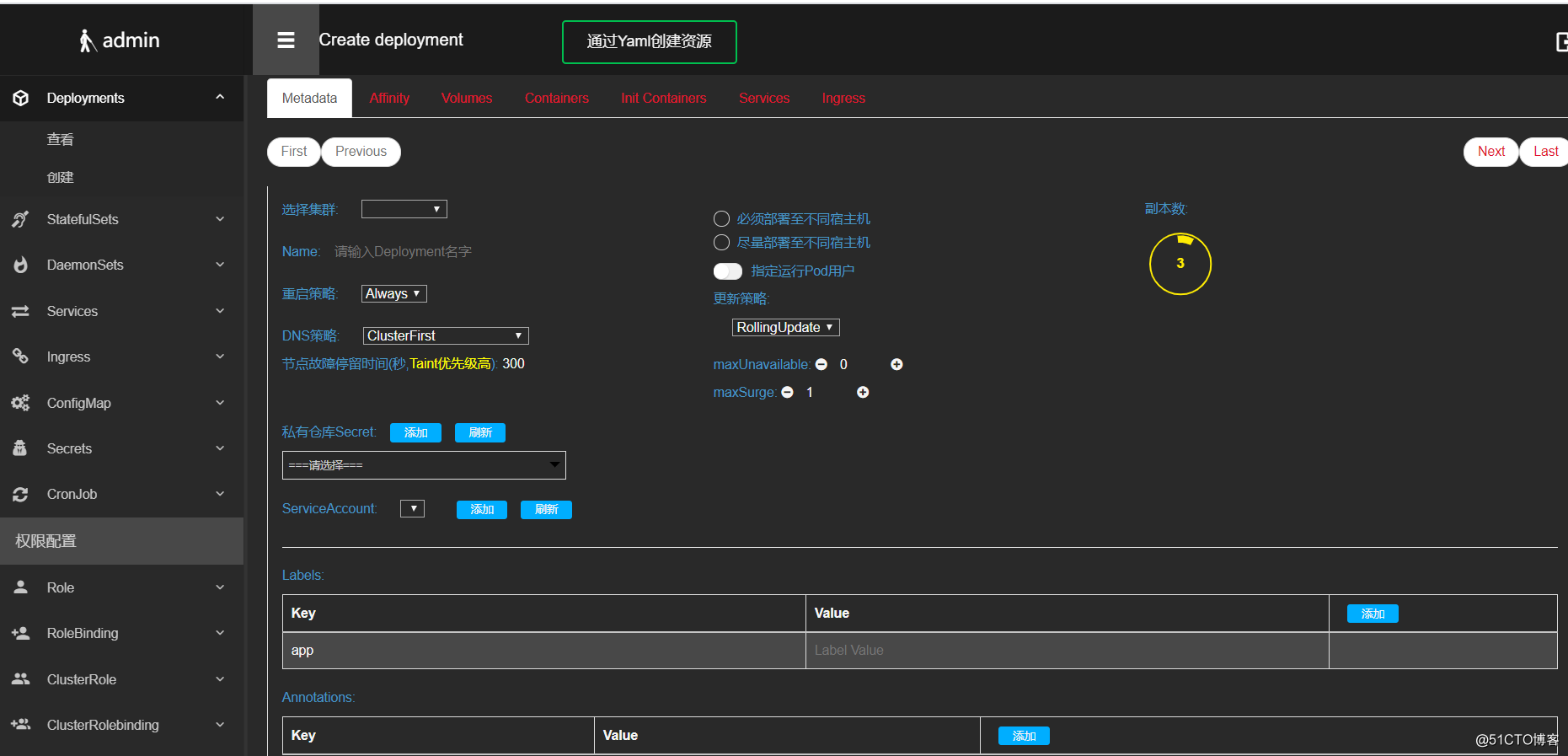
之后可以填写一些基本的配置信息,比如Deployment名称、副本数、标签信息等,当然也可以点击必须/尽量部署至不同宿主机进行Pod亲和力的配置
同时也可添加一些复杂的配置,比如内核配置、容忍配置、节点亲和力快捷配置:
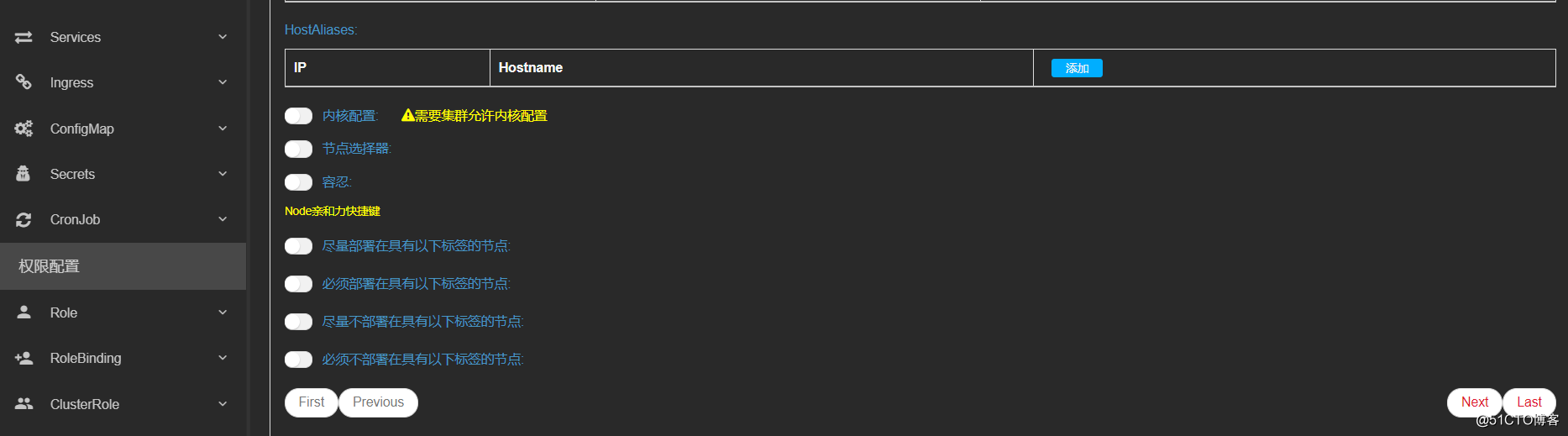
2.2.2 亲和力配置
基本配置编译完成以后,点击NEXT,下一个配置亲和力配置,如果上一页使用了亲和力快捷键,这边会自动生成亲和力配置,你可以再次编辑或者添加、删除:
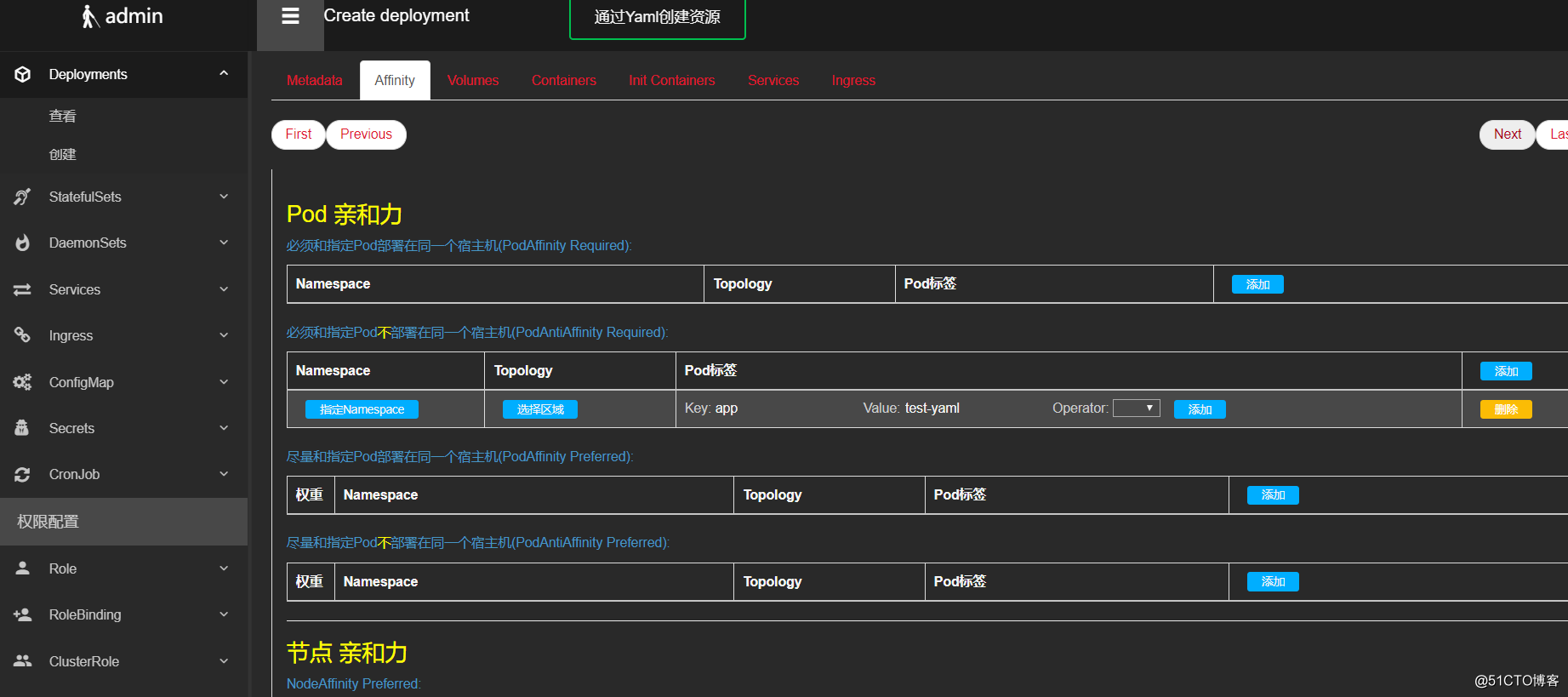
2.2.3 存储配置
亲和力配置完成以后,可以点击NEXT进行存储配置,目前支持volume和projectedVolume配置,volume支持configMap、Secret、HostPath、PVC、NFS、Empty等常用类型的配置:
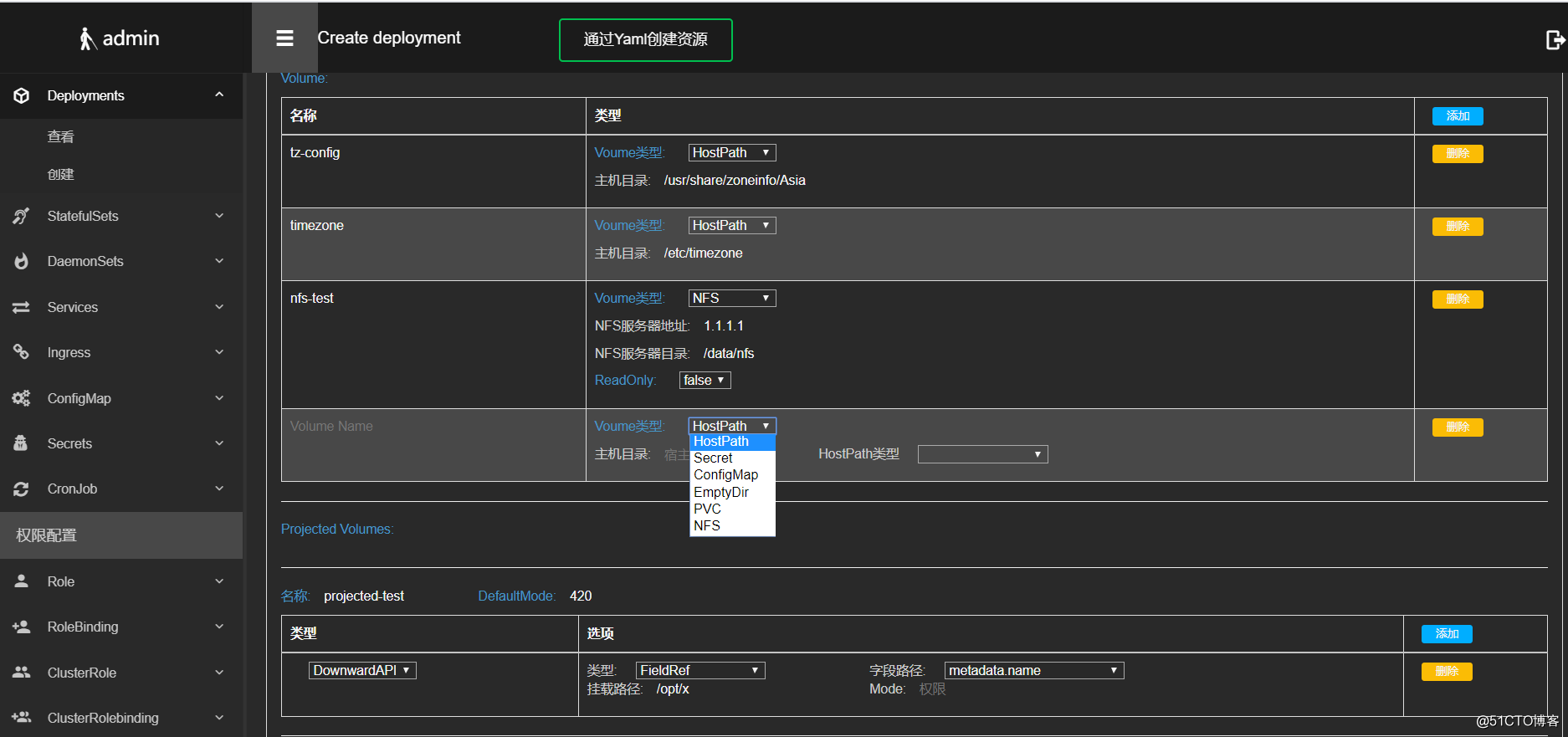
2.2.4 容器配置
接下来是容器配置,支持常用的容器配置,当然也可以添加多个容器:
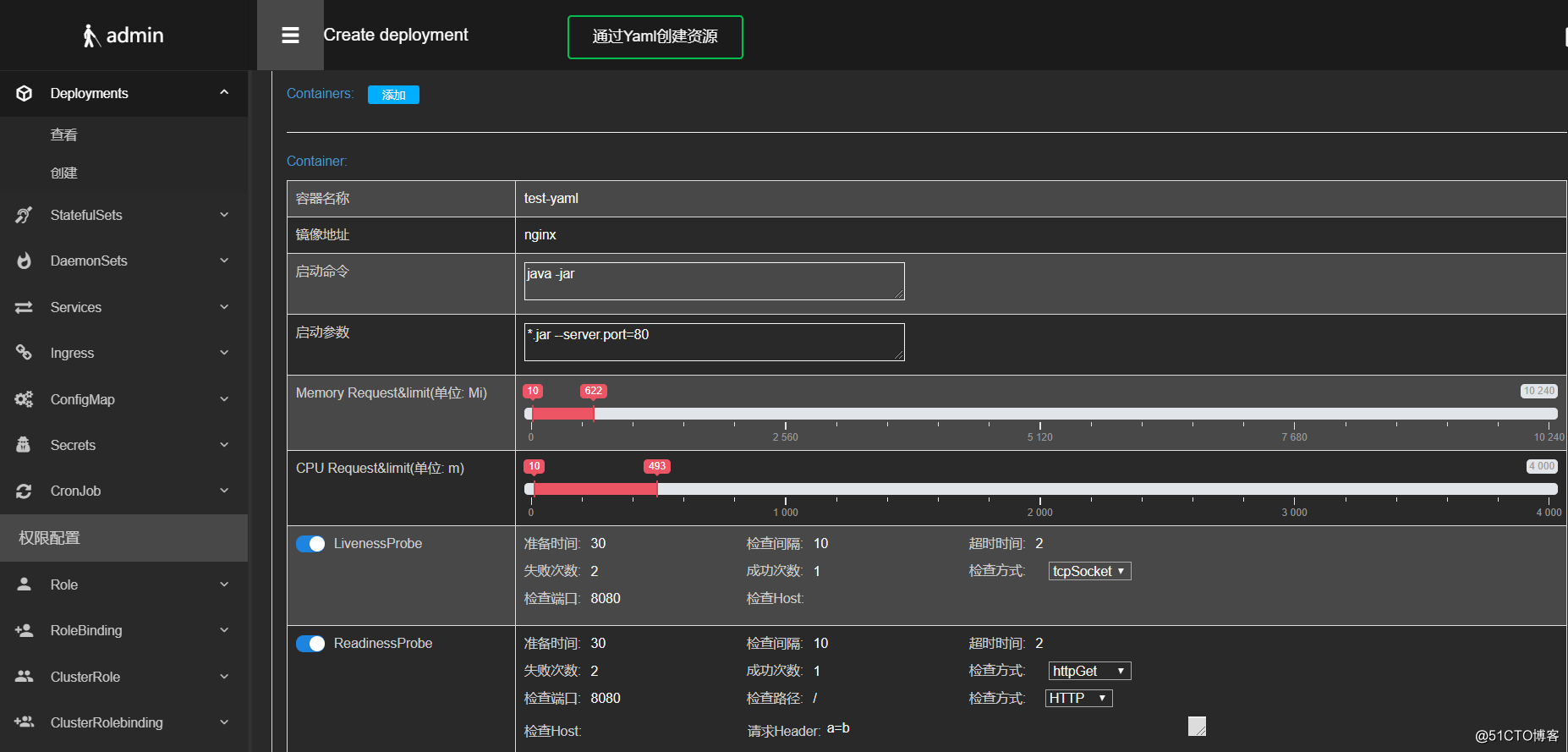
稍微复制一点的配置:
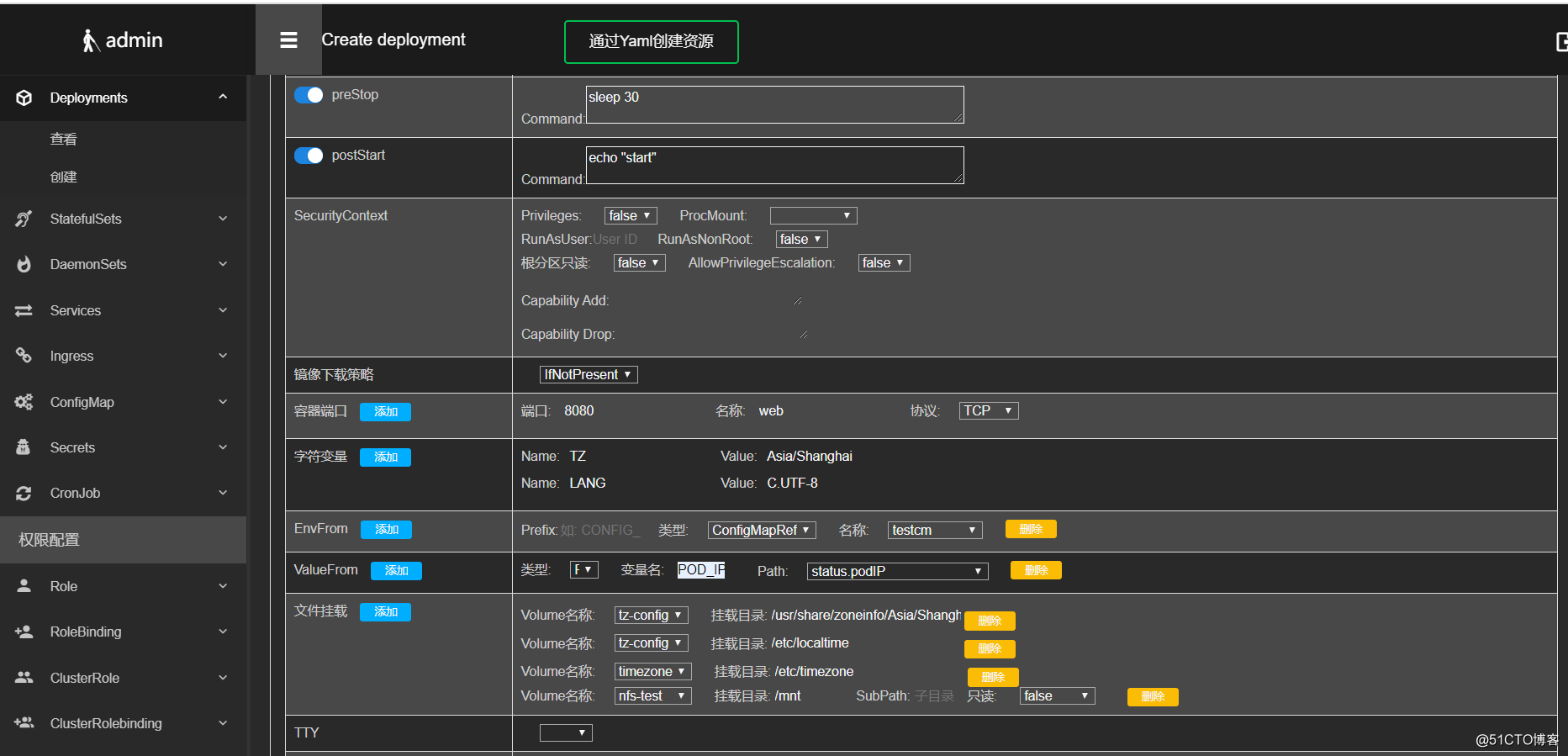
2.2.4 初始化容器配置
初始化容器和容器配置类似
2.2.5 Service和Ingress配置
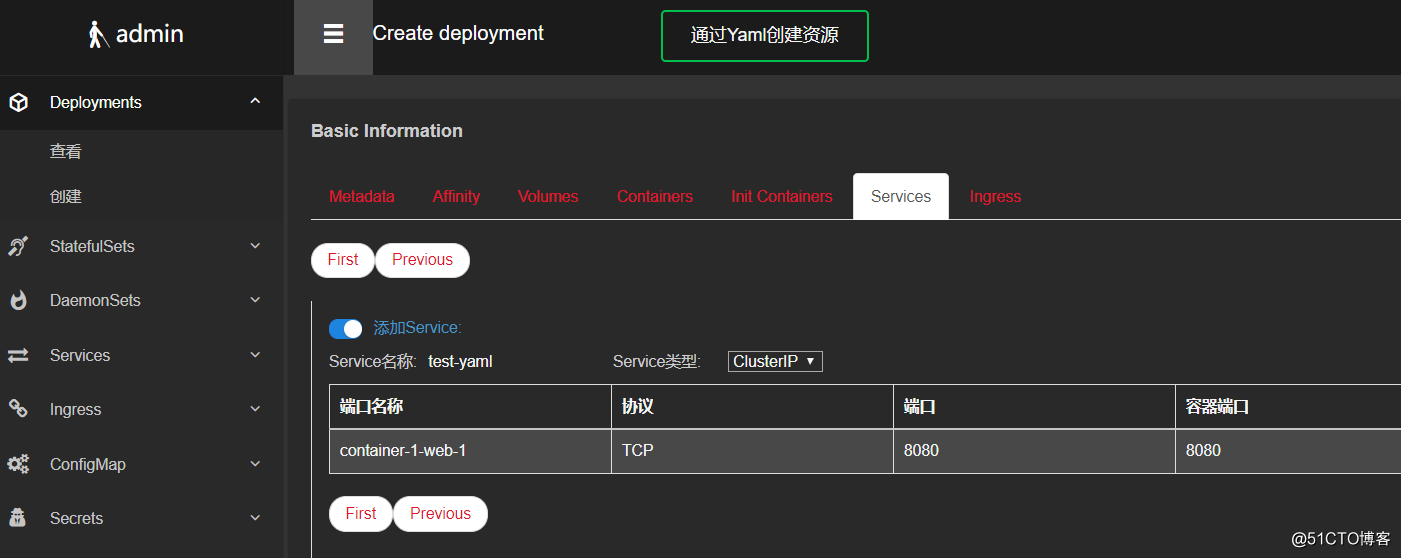
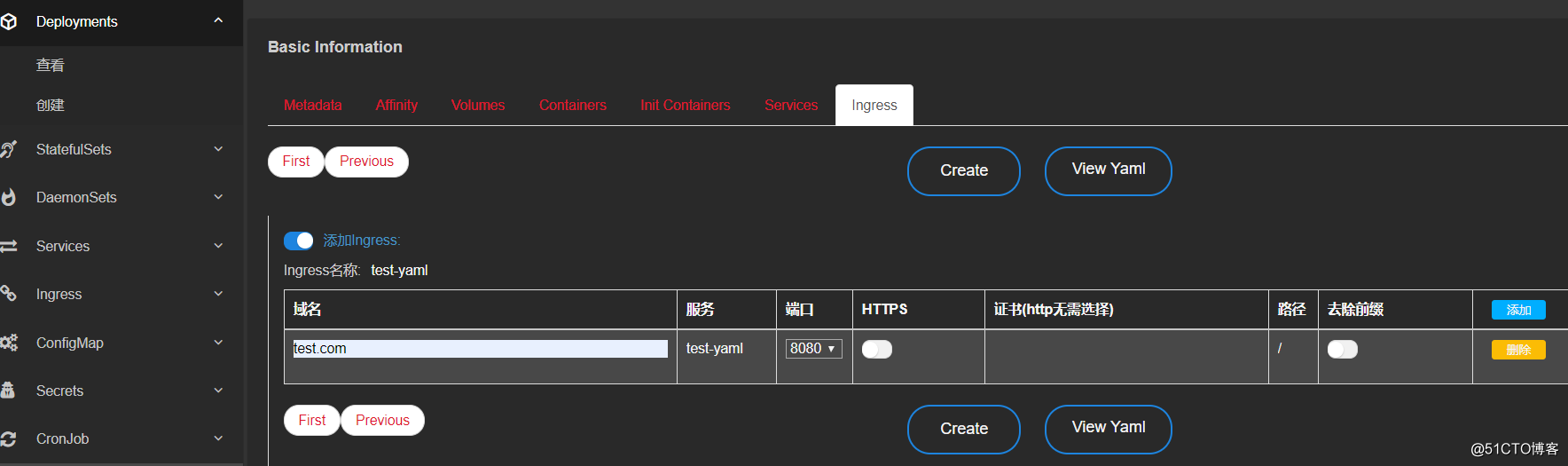
创建Deployment时可以一键添加Service和Ingress,添加Service时会自动读取容器的端口配置,添加Ingress时会自动读取Service配置
2.2.6 创建资源或生成yaml文件
上述配置完成以后,可以选择创建资源或生成yaml文件,假如点击生成yaml文件,会自动生成Service、Ingress、Deployment的yaml文件,可以直接拿着使用:
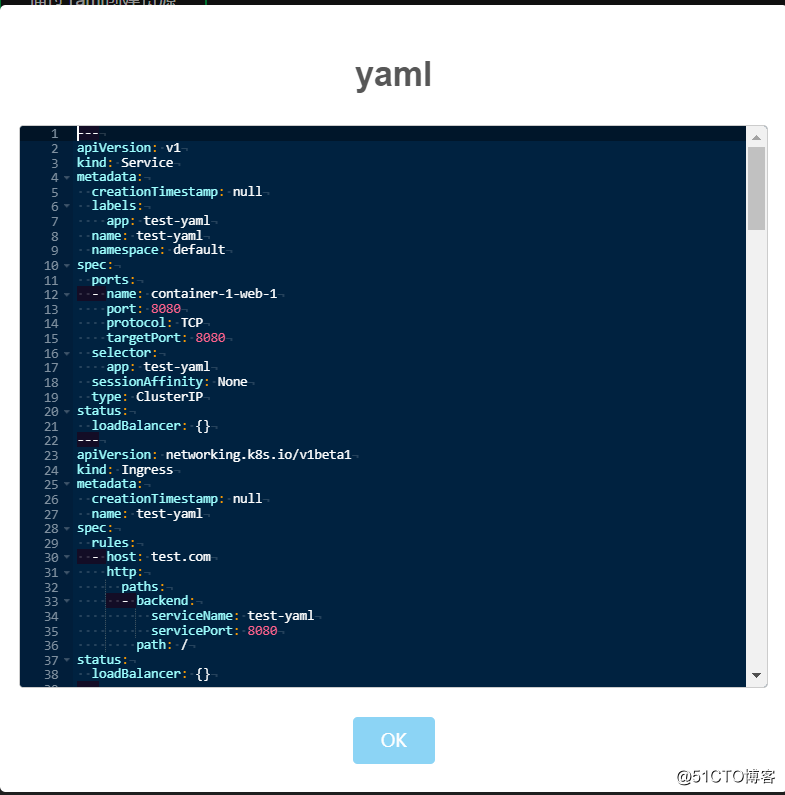
生成的内容如下:
---

apiVersion: v1

kind: Service

metadata:

  creationTimestamp: null

  labels:

    app: test-yaml

  name: test-yaml

  namespace: default

spec:

  ports:

  - name: container-1-web-1

    port: 8080

    protocol: TCP

    targetPort: 8080

  selector:

    app: test-yaml

  sessionAffinity: None

  type: ClusterIP

status:

  loadBalancer: {}

---

apiVersion: networking.k8s.io/v1beta1

kind: Ingress

metadata:

  creationTimestamp: null

  name: test-yaml

spec:

  rules:

  - host: test.com

    http:

      paths:

      - backend:

          serviceName: test-yaml

          servicePort: 8080

        path: /

status:

  loadBalancer: {}

---

apiVersion: apps/v1

kind: Deployment

metadata:

  creationTimestamp: null

  labels:

    app: test-yaml

  name: test-yaml

  namespace: default

spec:

  replicas: 3

  selector:

    matchLabels:

      app: test-yaml

  strategy:

    rollingUpdate:

      maxSurge: 1

      maxUnavailable: 0

    type: RollingUpdate

  template:

    metadata:

      creationTimestamp: null

      labels:

        app: test-yaml

    spec:

      affinity:

        nodeAffinity:

          preferredDuringSchedulingIgnoredDuringExecution:

          - preference:

              matchExpressions:

              - key: loki

                operator: In

                values:

                - "true"

            weight: 100

          requiredDuringSchedulingIgnoredDuringExecution:

            nodeSelectorTerms:

            - matchExpressions:

              - key: master

                operator: NotIn

                values:

                - "true"

        podAntiAffinity:

          requiredDuringSchedulingIgnoredDuringExecution:

          - labelSelector:

              matchExpressions:

              - key: app

                operator: In

                values:

                - test-yaml

            topologyKey: kubernetes.io/hostname

      containers:

      - args:

        - '*.jar --server.port=80'

        command:

        - java -jar

        env:

        - name: TZ

          value: Asia/Shanghai

        - name: LANG

          value: C.UTF-8

        - name: POD_IP

          valueFrom:

            fieldRef:

              fieldPath: status.podIP

        envFrom:

        - configMapRef:

            name: testcm

        image: nginx

        imagePullPolicy: IfNotPresent

        lifecycle:

          postStart:

            exec:

              command:

              - echo "start"

          preStop:

            exec:

              command:

              - sleep 30

        livenessProbe:

          failureThreshold: 2

          initialDelaySeconds: 30

          periodSeconds: 10

          successThreshold: 1

          tcpSocket:

            port: 8080

          timeoutSeconds: 2

        name: test-yaml

        ports:

        - containerPort: 8080

          name: web

          protocol: TCP

        readinessProbe:

          failureThreshold: 2

          httpGet:

            httpHeaders:

            - name: a

              value: b

            path: /

            port: 8080

            scheme: HTTP

          initialDelaySeconds: 30

          periodSeconds: 10

          successThreshold: 1

          timeoutSeconds: 2

        resources:

          limits:

            cpu: 493m

            memory: 622Mi

          requests:

            cpu: 10m

            memory: 10Mi

        securityContext:

          allowPrivilegeEscalation: false

          capabilities: {}

          privileged: false

          procMount: Default

          readOnlyRootFilesystem: false

          runAsNonRoot: false

        volumeMounts:

        - mountPath: /usr/share/zoneinfo/Asia/Shanghai

          name: tz-config

        - mountPath: /etc/localtime

          name: tz-config

        - mountPath: /etc/timezone

          name: timezone

        - mountPath: /mnt

          name: nfs-test

      dnsPolicy: ClusterFirst

      initContainers:

      - args:

        - init

        command:

        - echo

        env:

        - name: TZ

          value: Asia/Shanghai

        - name: LANG

          value: C.UTF-8

        image: nignx-init

        imagePullPolicy: Always

        name: init

        resources:

          limits:

            cpu: 351m

            memory: 258Mi

          requests:

            cpu: 10m

            memory: 10Mi

        securityContext:

          allowPrivilegeEscalation: false

          capabilities: {}

          privileged: false

          procMount: Default

          readOnlyRootFilesystem: false

          runAsNonRoot: false

        volumeMounts:

        - mountPath: /usr/share/zoneinfo/Asia/Shanghai

          name: tz-config

        - mountPath: /etc/localtime

          name: tz-config

        - mountPath: /etc/timezone

          name: timezone

      nodeSelector:

        ratel: "true"

      restartPolicy: Always

      securityContext:

        sysctls:

        - name: net.core.somaxconn

          value: "16384"

        - name: net.ipv4.tcp_max_syn_backlog

          value: "16384"

      tolerations:

      - effect: NoSchedule

        key: node-role.kubernetes.io/master

        operator: Exists

      volumes:

      - name: projected-test

        projected:

          defaultMode: 420

          sources:

          - downwardAPI:

              items:

              - fieldRef:

                  fieldPath: metadata.name

                path: /opt/x

      - hostPath:

          path: /usr/share/zoneinfo/Asia/Shanghai

          type: ""

        name: tz-config

      - hostPath:

          path: /etc/timezone

          type: ""

        name: timezone

      - name: nfs-test

        nfs:

          path: /data/nfs

          server: 1.1.1.1

status: {}
这个yaml比之前的稍复杂,并且添加了一些高级配置,手动编写的还是比较麻烦的,所以用Ratel自动生成还是比较方便的,并且不会出错。
3. 其他资源文件自动生成
目前支持了很多资源文件的自动生成,比如:Deployment、StatefulSet、DaemonSet、Service、Ingress、CronJob、Secret、ConfigMap、PV、PVC等,可以大大减少我们的工作量和k8s的复杂度。
如果想要系统的学习k8s,可以专注下k8s的课程:
Kubernetes实战指南(三十三):都0202了,你还在手写k8s的yaml文件?的更多相关文章
- Android项目实战(三十三):AS下获取获取依赖三方的jar文件、aar 转 jar
使用 Android studio 开发项目中,有几种引用三方代码的方式:jar 包 ,类库 ,gradle.build 的compile依赖. 大家会发现github上不少的项目只提供compile ...
- 2020 最新 Kubernetes实战指南
1.Kubernetes带来的变革 对于开发人员 由于公司业务多,开发环境.测试环境.预生产环境和生产环境都是隔离的,而且除了生产环境,为了节省成本,其他环境可能是没有日志收集的,在没有用k8s的 ...
- 新书推荐《再也不踩坑的Kubernetes实战指南》
<再也不踩坑的Kubernetes实战指南>终于出版啦.目前可以在京东.天猫购买,京东自营和当当网预计一个星期左右上架. 本书贴合生产环境经验,解决在初次使用或者是构建集群中的痛点,帮 ...
- Kubernetes实战指南(三十一):零宕机无缝迁移Spring Cloud至k8s
1. 项目迁移背景 1.1 为什么要在"太岁"上动土? 目前公司的测试环境.UAT环境.生产环境均已经使用k8s进行维护管理,大部分项目均已完成容器化,并且已经在线上平稳运行许久. ...
- Kubernetes实战指南(三十四): 高可用安装K8s集群1.20.x
@ 目录 1. 安装说明 2. 节点规划 3. 基本配置 4. 内核配置 5. 基本组件安装 6. 高可用组件安装 7. 集群初始化 8. 高可用Master 9. 添加Node节点 10. Cali ...
- MongoDB实战指南(三):MongoDB的锁机制
与关系数据库一样,MongoDB也是通过锁机制来保证数据的完整性和一致性,MongoDB利用读写锁来支持并发操作,读锁可以共享写锁具有排他性.当一个读锁存在时,其他读操作也可以用这个读锁:但当一个写锁 ...
- kubernetes实战-配置中心(二)交付apollo配置中心到k8s
apollo官网:官方地址 apollo架构图: apollo需要使用数据库,这里使用mysql,注意版本需要在5.6以上: 本次环境mysql部署在10.4.7.11上,使用mariadb:10.1 ...
- 都0202了,还在问Vegas和Pr哪个好?
自媒体时代,蕴藏着很多机会.许多平凡的人,通过制作视频,收获了掌声.赢得了粉丝,甚至改变了自己的命运. 图1:B站百大UP主颁奖现场 但这条路真的一路畅通吗?其实不然,他们成功的背后,必定有多方面 ...
- kubernetes实战(三十):CentOS 8 二进制 高可用 安装 k8s 1.17.x
1. 基本说明 本文章将演示CentOS 8二进制方式安装高可用k8s 1.17.x,相对于其他版本,二进制安装方式并无太大区别. 2. 基本环境配置 主机信息 192.168.1.19 k8s-ma ...
随机推荐
- 篮球30S定时器设计
一.设计介绍 本设计采用74LS192作为计数器,74LS192具有同步加减计数功能,可以通过引脚电平对它设置达到清零重置的目的,可以达到对计数器清零的功能,使用两片级联74LS192分别显示十位和个 ...
- sqlite 显示表内容时乱码,无法正常显示汉字,
把txt文件另存为时,选择编码为utf-8即可
- Linux阶段总结
Linux总结 一.学习心得: 在学习本阶段关于Linux阶段的课程时,让我对Linux有了一个大概的了解. 我了解到Linux操作系统是基于最初的Unix系统而开发出来的: 在学习Linux的时候, ...
- 项目总结,彻底掌握NodeJS中如何使用Sequelize
前言 sequelize是什么? sequelize是基于NodeJs的ORM框架,它适用于不同的数据库,如:Postgres.MySQL.SQLite.MariaDB,我们可以通过sequelize ...
- Python 字典(Dictionary) copy()方法
描述 Python 字典(Dictionary) copy() 函数返回一个字典的浅复制.高佣联盟 www.cgewang.com 语法 copy()方法语法: dict.copy() 参数 NA. ...
- 字典内置函数&方法
字典内置函数&方法 Python字典包含了以下内置函数:高佣联盟 www.cgewang.com 序号 函数及描述 1 cmp(dict1, dict2)比较两个字典元素. 2 len(dic ...
- HTML 统一资源定位器(Uniform Resource Locators)
HTML 统一资源定位器(Uniform Resource Locators) URL 是一个网页地址.高佣联盟 www.cgewang.com URL可以由字母组成,如"runoob.co ...
- 网络滴神,TCP!
TCP在网络协议(网络协议见这篇文章)中的重要性就相当于女朋友对于程序员的重要一样,这么说你应该知道有多重要了吧. 1. 三次握手 TCP在进行数据的传输之前必须先建立连接,建立之后才能进行数据的传 ...
- Python的基本运用(一)
1.a**b 表示a的b次方. 2.def something(a,b): 定义函数,注意 python的缩进 . 3.print (a)与print a 的区别,python3中不支持print ...
- 测试驱动开发学习笔记(UTDD)
title: 测试驱动开发学习笔记(UTDD) date: 2020-08-01 23:59:17 tags: [2020, 学习一门技能, TDD, DevOps] What TDD(Test-Dr ...